What is an 802.1X Supplicant? Client Types and Device Configuration

This guide explains the role of the 802.1X supplicant in enterprise WiFi authentication. It covers the technical architecture, compares native OS supplicants with third-party clients, and provides practical configuration guidance for IT teams deploying EAP-TLS and PEAP.

📖 5 min read📝 1,091 words🔧 2 worked examples3 practice questions📚 8 key definitions

Listen to this guide

View podcast transcript
Speak in British English with a confident, authoritative, conversational tone - like a senior network security consultant briefing a client. Measured pace, clear diction, professional but not stiff. Occasional natural pauses for emphasis: Welcome to the Purple technical briefing series. Today we are covering something that sits right at the heart of enterprise WiFi security - the 802.1X supplicant. If you have ever wondered why some devices connect to your corporate network without a password prompt, while others throw up certificate errors and helpdesk tickets, this is the episode for you. [medium pause] Let us start with the basics. The 802.1X supplicant is the software component on a client device - a laptop, a smartphone, a tablet - that handles the authentication handshake when that device tries to join a network protected by IEEE 802.1X. Think of it as the device's ID card presenter. The network does not just let anyone in. It asks for credentials. The supplicant is what steps forward and says: here is who I am, here is my certificate, let me in. The standard itself - IEEE 802.1X - defines port-based network access control. Before authentication succeeds, the access point or switch only allows a very narrow type of traffic through: EAPOL frames, which stands for Extensible Authentication Protocol over LAN. Everything else is blocked. Once the supplicant proves its identity to the RADIUS server via the authenticator, the port opens and normal traffic flows. [medium pause] Now, there are three actors in this play. First, the supplicant - the client device. Second, the authenticator - your access point or switch, hardware like Cisco Meraki, HPE Aruba, Ruckus, or Juniper Mist. Third, the authentication server - almost always a RADIUS server, which validates credentials against a directory like Microsoft Entra ID or Okta. The supplicant initiates the process by sending an EAPOL-Start message. The authenticator responds with an EAP-Request for identity. The supplicant replies with its identity. That identity gets forwarded to the RADIUS server, which then challenges the supplicant with the agreed EAP method. If everything checks out, the RADIUS server sends an Access-Accept, the port opens, and the device gets placed on the correct VLAN. [medium pause] Let us talk about EAP methods, because this is where most deployment decisions get made. EAP-TLS - that is Extensible Authentication Protocol with Transport Layer Security - is the gold standard. It requires both the client and the server to present certificates. Mutual authentication. No passwords. The client certificate proves the device's identity; the server certificate proves the network is legitimate, which protects against evil twin attacks where a rogue access point tries to harvest credentials. EAP-TLS completes in twelve steps and uses public-private key cryptography throughout. It is the method required for WPA3-Enterprise in its highest security mode, and it aligns with NIST SP 800-171 requirements for device identity verification. PEAP - Protected EAP - is the more common starting point for organisations that do not yet have a full PKI in place. PEAP wraps a password-based inner method, typically MSCHAPv2, inside a TLS tunnel. The server presents a certificate; the client does not. This means deployment is simpler - you do not need to provision client certificates - but it is less secure. MSCHAPv2 uses MD4 hashing, which has been considered compromised since 1995. If a user connects to a rogue access point that presents a trusted-looking certificate, their credentials can be captured. Server certificate validation on the client side is therefore non-negotiable when running PEAP. [medium pause] Now let us get into the supplicant itself - specifically the choice between native OS supplicants and third-party client software. Every major operating system ships with a built-in 802.1X supplicant. Windows has supported it natively since XP, via the Wireless AutoConfig and Wired AutoConfig services. macOS and iOS handle 802.1X through their network configuration profiles. Android supports it through the WiFi settings panel. These native supplicants cover EAP-TLS and PEAP-MSCHAPv2 on all current platforms. The advantage of native supplicants is obvious: no additional software to deploy, no licensing cost, automatic OS security updates, and tight integration with the operating system's certificate store. For managed device fleets - Windows machines enrolled in Microsoft Intune, Macs managed through Jamf - you can push 802.1X configuration profiles silently via MDM, and users never see a prompt. The device authenticates automatically every time it comes into range. Third-party supplicants come into play in specific scenarios. If you are running Cisco infrastructure and want to use EAP-FAST - Cisco's proprietary EAP method - you need Cisco's client software, historically the Secure Services Client or AnyConnect Network Access Manager. If you need consistent configuration management across a mixed-OS estate and want to lock down supplicant settings so users cannot accidentally misconfigure them, a third-party client gives you that control. Tools like SecureW2's JoinNow suite also act as onboarding agents - they configure the native supplicant rather than replacing it, walking users through certificate enrolment and profile installation. [medium pause] Let me walk you through two real-world scenarios to make this concrete. First, a 400-room hotel. The property runs a staff network on WPA2-Enterprise with PEAP-MSCHAPv2 today. The IT team wants to migrate to EAP-TLS to eliminate password-based authentication and reduce the risk of credential theft. The challenge: staff devices are a mix of Windows laptops managed via Intune, personal Android phones used for property management software, and a handful of legacy Windows 7 machines in back-of-house. The approach here is phased. Start with the managed Windows fleet. Push an Intune configuration profile that installs the RADIUS server's root CA certificate, configures the WiFi profile for EAP-TLS, and triggers SCEP-based certificate enrolment from the internal PKI. Those devices authenticate automatically from day one. For Android BYOD devices, deploy a self-service onboarding portal - users visit a URL, download a configuration profile, and the supplicant is configured for them. The legacy Windows 7 machines stay on PEAP with strict server certificate validation enforced, isolated to a separate VLAN with limited access, until they are decommissioned. [medium pause] Second scenario: a large retail chain with 200 stores. Each store has a mix of point-of-sale terminals, staff tablets, and a guest WiFi network. PCI DSS requires that cardholder data environments are isolated from other network segments. The retailer uses 802.1X on the staff and POS networks, with VLAN assignment driven by certificate attributes. A POS terminal presents a device certificate with an organisational unit of "POS" - the RADIUS policy assigns it to the PCI VLAN. A staff tablet presents a certificate with "Staff" - it lands on the staff VLAN. Guest devices connect to a separate SSID entirely, handled by a captive portal solution. The supplicant configuration on POS terminals is locked down via MDM. No user interaction required. The terminals authenticate silently on boot. Certificate renewal is automated through SCEP, so there is no manual intervention when certificates expire. [medium pause] Now, implementation pitfalls. Let me give you the four most common ones. Number one: missing server certificate validation on PEAP deployments. If you do not configure the supplicant to validate the RADIUS server's certificate and check the server name, users are vulnerable to connecting to a rogue access point. Always specify the trusted root CA and the server name in the supplicant profile. Number two: certificate expiry causing mass authentication failures. Client certificates have a validity period. If you do not have automated renewal in place via SCEP or NDES, you will face a cliff-edge event where hundreds of devices stop authenticating simultaneously. Build renewal automation before you go live. Number three: BYOD devices with inconsistent supplicant behaviour. Android in particular has fragmented 802.1X support across manufacturers. Some versions require the user to manually install the CA certificate before the WiFi profile will accept it. An onboarding portal that handles this step reduces helpdesk volume significantly. Number four: Windows 11 feature updates breaking supplicant configuration. Microsoft has changed 802.1X behaviour in several Windows 11 updates. Specifically, the 24H2 update introduced changes to how the native supplicant handles EAP-TLS fallback. Test your supplicant profiles against new OS versions before rolling them out to production. [medium pause] Quick-fire questions now. Can IoT devices support 802.1X? Most cannot. IoT devices typically lack a supplicant entirely. The fallback is MAC Authentication Bypass - MAB - where the RADIUS server authenticates the device based on its MAC address. MAC addresses can be spoofed, so MAB devices should always land on an isolated IoT VLAN with strict firewall rules. Do I need a PKI to run 802.1X? For PEAP, no - you only need a server certificate on the RADIUS server. For EAP-TLS, yes - you need a PKI to issue client certificates. Cloud-based PKI services reduce the infrastructure overhead considerably. How does 802.1X interact with Purple's network access platform? Purple operates as a cloud overlay on top of your existing hardware - Cisco Meraki, HPE Aruba, Ruckus, Juniper Mist, and others. On Staff WiFi networks, Purple's SecurePass add-on integrates with your identity provider - Microsoft Entra ID, Okta, or Google Workspace - to enforce 802.1X authentication and apply per-user VLAN policies without requiring on-premises RADIUS infrastructure. [medium pause] To wrap up: the 802.1X supplicant is the device-side agent that makes port-based network access control work. Your choice of EAP method - EAP-TLS for maximum security, PEAP as a transitional option - drives your PKI requirements and your supplicant configuration approach. Native OS supplicants cover the majority of managed device scenarios when deployed via MDM. Third-party clients add value in specific cases: proprietary EAP methods, mixed-OS estates requiring consistent configuration, or self-service BYOD onboarding. The three things to take away: validate your RADIUS server certificate on every supplicant profile, automate certificate renewal before you deploy EAP-TLS at scale, and isolate devices that cannot support 802.1X - IoT, legacy hardware - onto dedicated VLANs with MAC Authentication Bypass as the fallback. For more on how Purple integrates with your network access architecture, visit purple dot ai. Thanks for listening.

header_image.png

执行摘要

当设备连接到企业网络时,802.1X 客户端 (Supplicant) 是负责证明其身份的软件组件。对于大型场馆的 IT 经理和网络架构师而言,了解客户端的工作原理对于在不产生服务台工单的情况下确保网络访问安全至关重要。本指南将揭秘 IEEE 802.1X 认证中的设备端代理,对比原生操作系统功能与第三方客户端软件。我们将研究如何为 EAP-TLS 和 PEAP-MSCHAPv2 配置客户端,探讨酒店和零售行业的实际部署场景,并详细介绍正确的客户端配置如何与基于身份的网络(Identity-Based Networks)集成以优化访问。无论您是管理 200 间客房的酒店,还是管理拥有 80,000 多个座位的活动场馆,正确配置客户端都是构建安全、可靠 WiFi 的基石。

技术深挖

IEEE 802.1X 标准定义了基于端口的网络访问控制。它基于一个简单的原则:在设备证明其身份之前,阻断网络边缘的所有流量。客户端是此过程中的客户端参与者。

802.1X 的三个组成部分

认证需要三个不同的实体:

  1. 客户端 (Supplicant):请求网络访问的客户端设备(笔记本电脑、智能手机或平板电脑)。
  2. 认证器 (Authenticator):网络访问设备,例如 Cisco Meraki、HPE Aruba、Ruckus 或 Juniper Mist 接入点。
  3. 认证服务器 (Authentication Server):根据 Microsoft Entra ID 或 Okta 等身份提供商验证凭据的 RADIUS 服务器。

在认证之前,认证器的端口处于未授权状态,仅允许局域网上的可扩展身份验证协议 (EAPOL) 流量。客户端通过 EAPOL-Start 帧发起该过程。认证器请求身份,客户端进行响应。该身份将被转发到 RADIUS 服务器,由其决定要使用的 EAP 方法。验证成功后,RADIUS 服务器会发送 Access-Accept 消息,端口转换为授权状态,设备通常会被分配到特定的 VLAN。
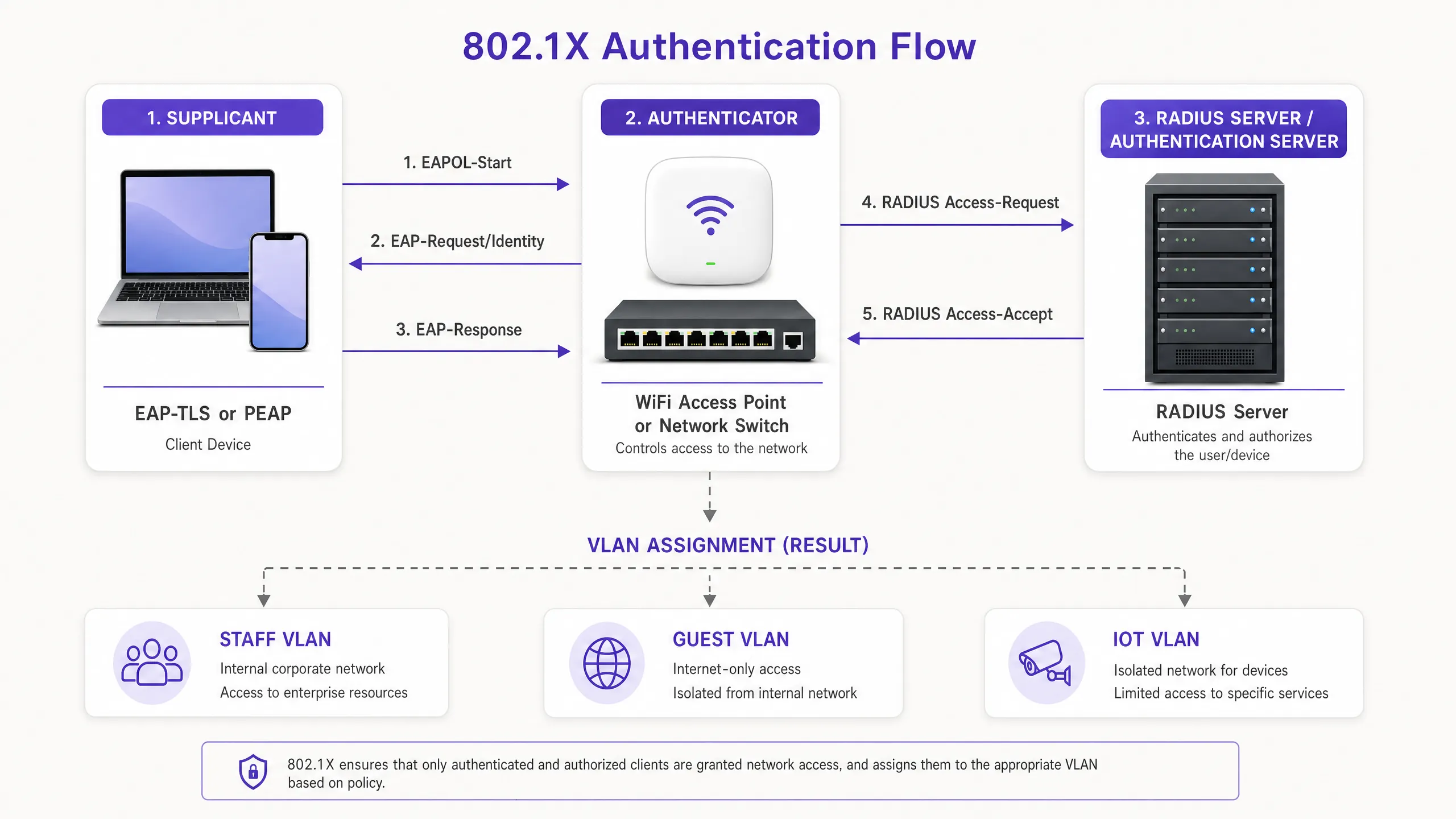
architecture_overview.png

EAP 方法:客户端的语言

客户端和 RADIUS 服务器必须就可扩展身份验证协议 (EAP) 方法达成一致。EAP 方法的选择决定了安全状况以及客户端的配置负担。

EAP-TLS(传输层安全协议) EAP-TLS 需要使用数字证书进行双向身份验证。客户端(Supplicant)提供客户端证书以证明其身份,RADIUS 服务器提供服务器证书以证明网络的合法性。这种无密码方法消除了凭据窃取,并且是 NIST SP 800-171 等严格安全框架所要求的。客户端必须配置为信任颁发证书颁发机构 (CA) 并拥有有效的客户端证书。

PEAP (Protected EAP) 在无法使用完整公钥基础设施 (PKI) 的情况下,PEAP 被广泛使用。它在 TLS 隧道内封装了一个内部身份验证方法(通常是 MSCHAPv2)。RADIUS 服务器提供证书,但客户端只需提供用户名和密码。虽然 PEAP 更易于部署,但如果未严格配置客户端来验证服务器证书,它很容易受到凭据收集攻击。

实施指南

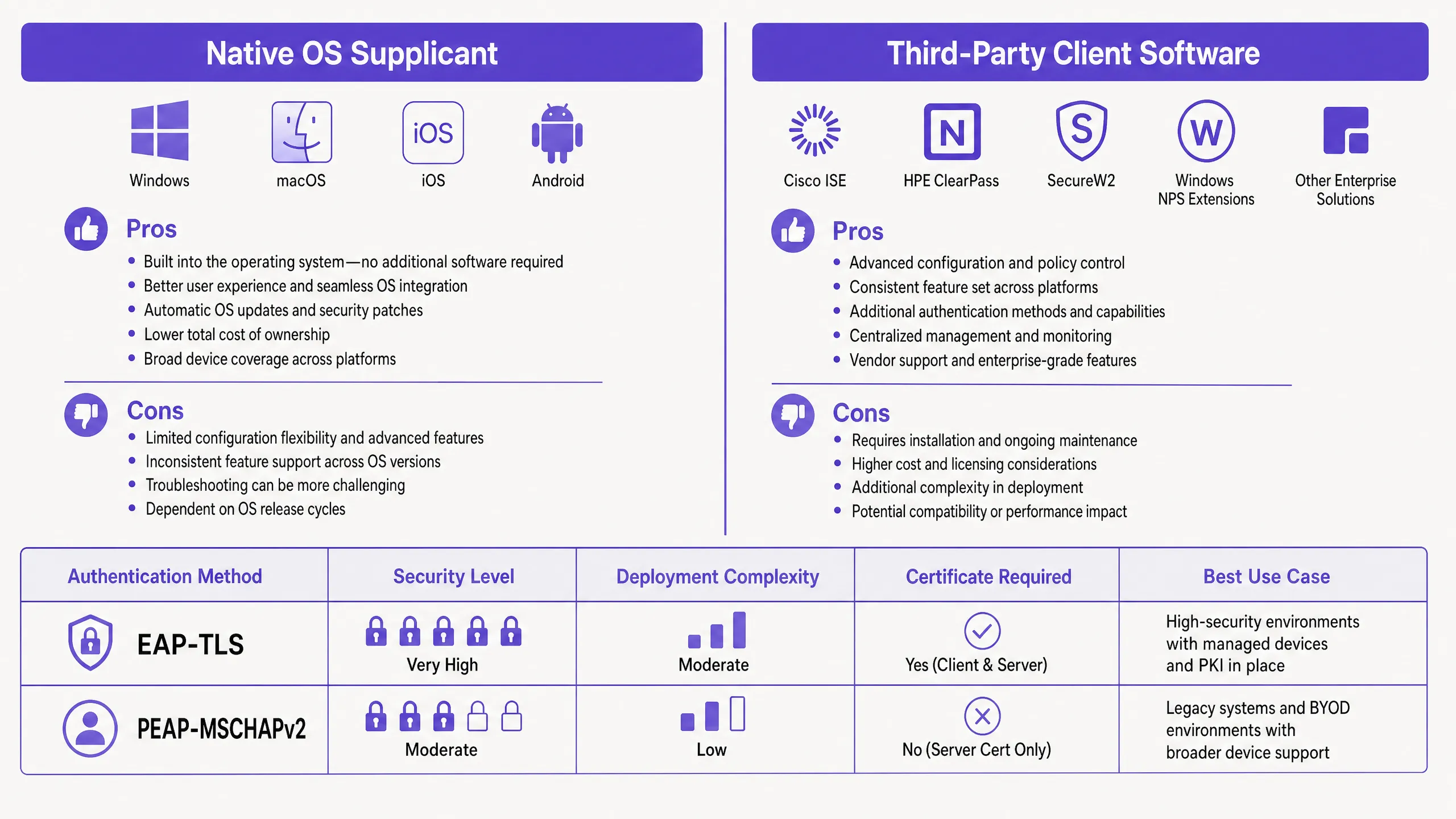
在部署 802.1X 时,IT 团队必须在选择使用操作系统内置的原生客户端,还是部署第三方客户端软件之间做出决定。

原生系统客户端

每个现代操作系统都包含一个原生的 802.1X 客户端。Windows 使用有线自动配置 (Wired AutoConfig) 和无线自动配置 (WLAN AutoConfig) 服务。Apple 设备使用网络配置文件。Android 将其集成在 WiFi 设置中。

原生客户端是托管设备群的理想选择。使用 Microsoft Intune 或 Jamf 等移动设备管理 (MDM) 平台,IT 管理员可以静默推送配置文件,这些文件通过 SCEP 定义了 SSID、EAP 方法、受信任的根 CA 以及证书注册过程。用户体验是无缝的;设备在后台进行身份验证。

第三方客户端软件

在特定场景下,需要使用第三方客户端,例如 Cisco AnyConnect 网络访问管理器或 SecureW2 JoinNow:

  • 专有协议:使用 Cisco EAP-FAST 需要 Cisco 客户端。
  • BYOD 准入:第三方工具通常充当准入助手,引导用户在原生配置较为复杂的非托管设备上安装证书(特别是在碎片化的 Android 环境中)。
  • 严格的配置控制:第三方客户端可以锁定设置,防止用户禁用服务器证书验证。

native_vs_thirdparty_comparison.png

配置服务器证书验证

无论选择哪种客户端,配置服务器证书验证都至关重要,特别是对于 PEAP。如果客户端不验证 RADIUS 服务器的证书,它会毫无防备地将凭据发送给模仿您 SSID 的恶意接入点。

在 Windows 中,这意味着勾选 PEAP 属性中的“验证服务器证书”、选择受信任的根证书颁发机构(Root CA),并指定客户端应期望的确切服务器名称。在 Apple 设备上,配置文件必须明确列出受信任的证书。

最佳实践

  1. 强制服务器验证:部署 PEAP 时,切勿在未配置客户端验证 RADIUS 服务器证书的情况下进行。这是防御“邪恶双胞胎”(evil twin)攻击的首要防线。
  2. 自动化证书生命周期:使用 EAP-TLS 时,应通过 MDM 使用 SCEP 或 NDES 自动执行客户端证书的注册和更新。手动证书管理难以扩展,且会导致突发性的身份验证失败。
  3. 按身份进行隔离:使用 RADIUS 属性根据验证的身份分配 VLAN。员工设备和 POS 终端应验证到同一个 SSID,但最终落在不同的 VLAN 上。
  4. 为物联网(IoT)做好规划:大多数 IoT 设备缺乏 802.1X 客户端。对于这些设备,请使用 MAC 地址绕过认证(MAB),但必须将其严格隔离在专用的 IoT VLAN 上。

故障排查与风险缓解

当设备无法连接时,问题几乎总是出在客户端配置或证书链上。

  • “已连接,无互联网”:这通常表明 VLAN 分配失败或身份验证后出现 DHCP 问题。请检查 RADIUS 日志以确认 Access-Accept 消息中是否包含了正确的 Tunnel-Private-Group-Id。
  • Windows 11 上的静默失败:最近的 Windows 11 功能更新(如 24H2)改变了原生客户端处理 EAP-TLS 回退的方式。在广泛部署之前,请务必针对新的操作系统版本测试配置文件。
  • 证书过期:如果一批设备突然掉网,请检查客户端证书的有效期。确保您的 MDM 在证书过期之前成功对其进行了更新。

投资回报率(ROI)与业务影响

迁移到配置了正确客户端的 802.1X 可以带来可衡量的业务价值。通过消除共享密码(预共享密钥/PSK),您可以彻底免除在员工离职时轮换密码的操作开销。转向 EAP-TLS 可以完全消除密码重置工单,从而为服务台释放大量的生产力时间。

此外,802.1X 允许在单个 SSID 上实现基于身份的网络隔离。无需为 Guest WiFi 、员工和运营广播独立的网络,单个 SSID 即可根据客户端的凭据安全地路由流量。这减少了信道干扰并提高了整体网络性能,直接支持了 Purple 的云端覆盖方法来进行与硬件无关的网络管理。如需更深入地了解分析,请探索我们的 WiFi Analytics 功能。

Key Definitions

802.1X Supplicant

The software component on a client device that handles the authentication process required to join an IEEE 802.1X protected network.

IT teams configure the supplicant to define how a device proves its identity to the network.

Authenticator

The network device (switch or access point) that blocks traffic until the supplicant successfully authenticates.

Hardware from vendors like Cisco Meraki or HPE Aruba acts as the authenticator, relaying messages between the device and the server.

RADIUS

Remote Authentication Dial-In User Service. The server that verifies the credentials provided by the supplicant.

The RADIUS server checks the identity against directories like Okta or Microsoft Entra ID before granting access.

EAP-TLS

Extensible Authentication Protocol with Transport Layer Security. An authentication method requiring both client and server digital certificates.

Considered the most secure method for enterprise networks, eliminating the need for passwords.

PEAP

Protected Extensible Authentication Protocol. An authentication method that creates a secure TLS tunnel to protect password-based authentication.

Commonly used in BYOD environments where deploying client certificates to unmanaged devices is too complex.

EAPOL

Extensible Authentication Protocol over LAN. The protocol used to encapsulate EAP messages between the supplicant and the authenticator.

Before authentication, EAPOL is the only type of traffic the authenticator allows through the port.

MAC Authentication Bypass (MAB)

A fallback authentication method where the network uses the device's MAC address as its identity.

Used for printers, cameras, and IoT devices that lack an 802.1X supplicant.

VLAN Assignment

The process of dynamically placing an authenticated device onto a specific virtual network segment.

The RADIUS server tells the authenticator which VLAN to assign based on the supplicant's identity.

Worked Examples

A 200-room hotel needs to secure its staff network. Currently using WPA2-Personal with a shared password, they want to move to 802.1X. The staff use a mix of corporate-owned Windows laptops and personal Android phones for scheduling. How should they configure the supplicants?

The hotel should deploy a hybrid approach. For the corporate Windows laptops, they should use the native Windows supplicant configured via Microsoft Intune. The MDM profile should push EAP-TLS settings, install the Root CA, and automate client certificate enrolment via SCEP. For the personal Android phones, they should deploy a third-party onboarding agent (like SecureW2) via a self-service portal. The staff member logs into the portal using their Microsoft Entra ID credentials, and the agent automatically configures the native Android supplicant for PEAP-MSCHAPv2, ensuring the server certificate validation is locked in.

Examiner's Commentary: This approach balances security with operational reality. EAP-TLS is enforced where MDM control exists, providing maximum security. PEAP is used for BYOD where client certificate distribution is complex, but the onboarding agent ensures the supplicant is configured securely, mitigating the risk of rogue access points.

A large retail chain with 50 stores is rolling out new mobile point-of-sale (POS) tablets. PCI DSS requires strict network isolation. How should the supplicant configuration ensure compliance?

The tablets should be managed via MDM. The MDM pushes a native supplicant configuration profile enforcing EAP-TLS. Each tablet receives a unique client certificate containing an attribute identifying it as a POS device. When the tablet's supplicant authenticates, the RADIUS server reads this attribute and returns a VLAN assignment specifically for the PCI-compliant network segment. The supplicant configuration must be locked down so store staff cannot modify the network settings.

Examiner's Commentary: Using EAP-TLS with certificate-based VLAN assignment is the textbook method for achieving PCI compliance on wireless networks. It removes human error from network segmentation and ensures the device cannot be accidentally connected to the less secure staff or [Retail](/industries/retail) guest networks.

Practice Questions

Q1. Your organisation is deploying PEAP-MSCHAPv2 for a new staff BYOD network. During testing, you notice that devices can connect to a test access point broadcasting the same SSID, even though it is not connected to your RADIUS server. What supplicant configuration step was missed?

Hint: Consider how the supplicant verifies the identity of the network before sending the MSCHAPv2 credentials.

View model answer

The supplicant was not configured to validate the server certificate. In PEAP, the supplicant must be explicitly configured to trust the specific Root CA that issued the RADIUS server's certificate, and to verify the server's domain name. Without this, the supplicant will establish a TLS tunnel with any server presenting a certificate, exposing the user's credentials to a rogue access point.

Q2. A university is migrating its managed Windows laptop fleet from PEAP to EAP-TLS. They push the new configuration profile via MDM, but all devices fail to authenticate. The RADIUS logs show 'EAP-TLS failed SSL/TLS handshake'. What is the most likely cause?

Hint: EAP-TLS requires mutual authentication. What does the client need that it didn't need for PEAP?

View model answer

The client devices lack a valid client certificate. EAP-TLS requires the supplicant to present a certificate to the RADIUS server. The MDM profile must be configured not just to set the EAP method to TLS, but also to trigger a protocol like SCEP to request and install a client certificate from the organisation's PKI before attempting to authenticate.

Q3. You need to connect 50 smart TVs to the network in a [Healthcare](/industries/healthcare) environment. The TVs only support WPA2-Personal (Pre-Shared Key) and do not have an 802.1X supplicant. How do you secure their access while maintaining 802.1X for staff devices?

Hint: If the device cannot speak EAP, the authenticator must identify it another way.

View model answer

You should use MAC Authentication Bypass (MAB). The authenticator will use the smart TV's MAC address as the username and password sent to the RADIUS server. Because MAC addresses can be spoofed, the RADIUS server must be configured to assign these devices to a highly restricted, isolated IoT VLAN that only allows necessary traffic.

Continue reading in this series

Server RADIUS: a comprehensive guide for businesses

This guide provides IT managers, network architects, and CTOs with a definitive technical reference on server RADIUS authentication for enterprise WiFi. It covers the AAA framework, 802.1X architecture, EAP method selection, cloud versus on-premises deployment trade-offs, and dynamic VLAN assignment. Venue operators across hospitality, retail, events, and the public sector will find actionable implementation guidance, real-world case studies, and the decision frameworks needed to migrate from insecure pre-shared keys to a secure, identity-driven network access control architecture.

Read the guide →

Server RADIUS: a comprehensive guide for businesses

This guide provides IT managers, network architects, and CTOs with a definitive technical reference on server RADIUS authentication for enterprise WiFi. It covers the AAA framework, 802.1X architecture, EAP method selection, cloud versus on-premises deployment trade-offs, and dynamic VLAN assignment. Venue operators across hospitality, retail, events, and the public sector will find actionable implementation guidance, real-world case studies, and the decision frameworks needed to migrate from insecure pre-shared keys to a secure, identity-driven network access control architecture.

Read the guide →

Aruba ClearPass vs. Purple WiFi: Comparing Features and Co-deployment

A comprehensive technical guide detailing the co-deployment architecture of Aruba ClearPass and Purple WiFi. It covers RADIUS proxy configuration, dynamic VLAN assignment, and best practices for delivering secure, analytics-driven guest networks alongside enterprise NAC.

Read the guide →