
Ruu PPSK: comparing features and deployment models
This technical reference guide compares Ruu PPSK (Private Pre-Shared Key) architecture against standard PSK and 802.1X for multi-tenant environments. It provides network architects with vendor-neutral deployment models, implementation strategies, and risk mitigation for Build to Rent and student accommodation networks.
Listen to this guide
View podcast transcript
Listen to this guide
Executive summary
Traditional WPA2 Personal networks share a single password across all devices. In a 200-unit Build to Rent (BTR) development, that means one password for every resident, every smart TV, every thermostat, and every games console in the building. When a resident moves out, you either rotate the password for everyone, breaking connectivity for the other 199 flats, or you leave the former resident with access. Neither is acceptable.
Ruu PPSK (Private Pre-Shared Key) solves this. It issues a unique WiFi password to each resident or unit, tying that key to a specific Virtual Local Area Network (VLAN). Devices connect to the same Service Set Identifier (SSID), but the network isolates them into private segments. Each resident's devices discover each other. No resident can see another's devices. When a tenancy ends, you revoke one key without touching anyone else's connection.
This guide compares Ruu PPSK deployment against standard PSK and IEEE 802.1X, details the three primary deployment architectures, and provides actionable implementation guidance for property developers, BTR operators, and the IT teams who support them. Purple operates across 80,000+ live venues and integrates as a cloud overlay across Cisco Meraki, HPE Aruba, Ruckus, Juniper Mist, Ubiquiti UniFi, Cambium, Extreme, and Fortinet.
Technical deep-dive: Ruu PPSK vs 802.1X vs standard PSK
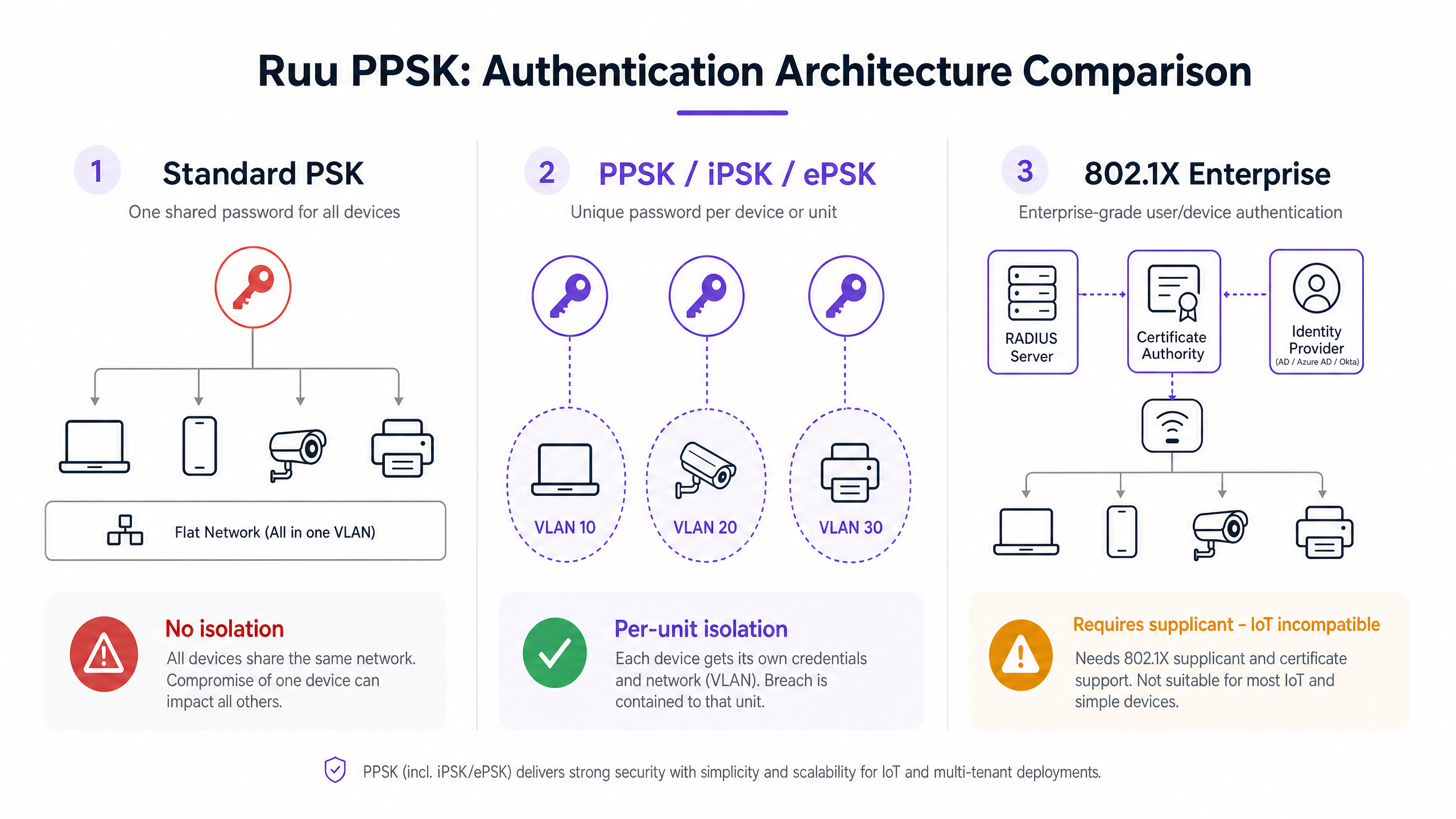
To understand why Ruu PPSK dominates multi-tenant deployments, you must compare it to the alternatives at the association layer.
Standard PSK: the home network model
In a standard WPA2 Personal setup, the access point broadcasts an SSID and requires a single pre-shared key. Every device uses this key. The access point places all devices onto the same VLAN. Devices can discover each other. This is ideal for a single household, but unacceptable for a 200-unit BTR development. Standard PSK lacks any per-user revocation mechanism. Revoking access for one user requires rotating the key for everyone.
802.1X: the enterprise standard
IEEE 802.1X (WPA Enterprise) requires a RADIUS server, an identity provider such as Microsoft Entra ID, Okta, or Google Workspace, and a supplicant on every device. The supplicant handles the Extensible Authentication Protocol (EAP) exchange. This provides robust, identity-backed security with per-user accountability. However, 802.1X fails in residential environments because IoT devices lack 802.1X supplicants. Smart TVs, game consoles, wireless speakers, and smart home sensors cannot authenticate. Deploying 802.1X in a BTR building means leaving every IoT device either unauthenticated or on a separate unmanaged network.
Ruu PPSK: the multi-tenant solution
Ruu PPSK bridges this gap. The access point broadcasts a single SSID. When a device connects, it presents its pre-shared key during the WPA2 four-way handshake. The access point or cloud controller queries the PPSK directory to validate the key and retrieve the assigned VLAN. The device perceives a standard home network. It has no idea it has been placed in an isolated segment. Everything behaves exactly as it would on a home broadband connection.
Implementation guide: three deployment models
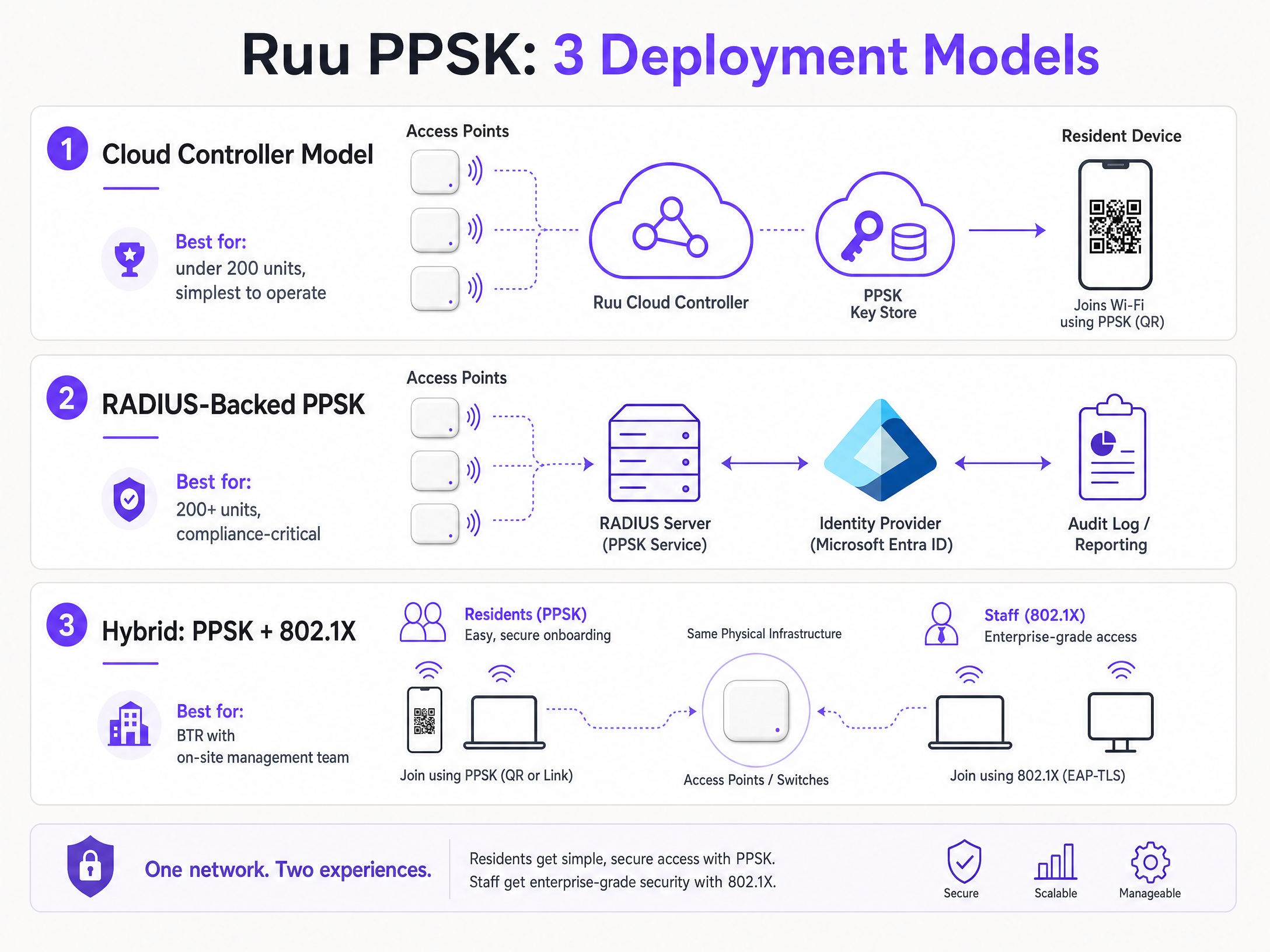
Ruu PPSK can be deployed in three distinct ways. The right choice depends on your building size, your IT resource, and your compliance requirements.
Model 1: Cloud controller model
This is the most common pattern for new deployments under 200 units. Your access points connect to a cloud management platform. The PPSK key store lives in the cloud controller. When you provision a new resident, you create a key in the portal, assign it to a VLAN, and the controller pushes the policy to every access point in the building. The resident gets their key via email, SMS, or a QR code in their welcome pack. They scan it, all their devices connect, and their Chromecast, smart speaker, and console all work immediately. When they move out, you delete the key. Their devices stop connecting. Nobody else is affected. It is the simplest to operate and requires no additional infrastructure.
Model 2: RADIUS-backed PPSK
Some enterprise deployments use a RADIUS server to store and validate PPSK credentials. This gives you centralised logging, audit trails, and integration with your identity management platform. It adds infrastructure overhead but gives you the accountability of 802.1X with the device compatibility of PPSK. It is the right model for mixed environments, say a coworking space where you have both managed corporate devices and member-owned IoT equipment, or a BTR development where the operator has compliance obligations that require per-resident audit trails.
Model 3: Hybrid architecture
Residents use PPSK for their laptops and IoT devices. Building staff use 802.1X for corporate devices. Both groups connect to the same physical infrastructure but map to different logical segments. Purple recommends this architecture for comprehensive Build to Rent and multi-dwelling unit deployments. Three distinct authentication models, three distinct VLANs, one physical infrastructure. It is the architecture that gives you consumer simplicity for residents and enterprise accountability for staff, without running two separate networks.
Best practices for deployment
If you are deploying Ruu PPSK for a BTR development or an MDU property, follow this sequence.
Start with your logical design before you touch hardware. Map out your resident count, your IoT device categories, and any staff or management systems. Assign VLANs. A typical BTR deployment looks like this: VLANs 10 through to your unit count for residents, one VLAN per flat or one VLAN per floor depending on density. VLAN 99 for IoT. VLAN 100 for building management. VLAN 200 for Guest WiFi in common areas.
Document your IP addressing scheme. In a 200-unit building, you are looking at 3,000 to 5,000 devices on the network at any given time. Your DHCP scopes need to accommodate that. Use RFC 1918 private addressing with sufficient subnet sizes per VLAN. A slash 24 gives you 254 usable addresses. A slash 23 gives you 510. Size accordingly.
On hardware selection, PPSK is supported across all major enterprise access point platforms. Cisco Meraki calls it iPSK and manages it through the Meraki dashboard. HPE Aruba implements it natively in ArubaOS and Aruba Central. Ruckus supports it through SmartZone and the Ruckus Cloud platform. Juniper Mist uses ePSK with AI-driven RF management. Ubiquiti UniFi has had PPSK since 2023, though note it is currently WPA2 only and will not work on the 6 GHz band. Cambium and Extreme both support it through their respective cloud platforms.
Troubleshooting and risk mitigation
These are the failure modes that repeatedly impact production deployments.
SSID proliferation. Every SSID you broadcast consumes airtime for beacon frames. In a dense residential building, if you are broadcasting six or eight SSIDs per access point, you are degrading performance for everyone. Keep it to a maximum of four SSIDs per radio. Use PPSK to serve multiple resident segments from a single SSID rather than creating a separate SSID per flat or per floor.
Insufficient trunk port configuration. You design a clean VLAN scheme, you deploy the access points, and then traffic silently drops because someone forgot to permit the relevant VLANs on a trunk link between the distribution switch and the access layer. Validate every trunk port during commissioning. Document it. Test it with a device on each VLAN before residents move in.
Key distribution. Generating keys is easy. Getting them to residents in a way that is secure and operationally manageable is harder. A QR code in the welcome pack works well for move-in day. A resident portal where they can retrieve their key and add new devices is better for ongoing operations. Build the key distribution workflow before you deploy, not after.
MAC address randomisation. Since iOS 14, Android 10, and Windows 11, devices use randomised MAC addresses by default for privacy reasons. If your RADIUS server is doing a MAC lookup and the device presents a randomised address, the lookup fails and the device cannot connect. Configure your SSID to request that clients use their permanent hardware MAC address, or implement a pre-registration workflow. Purple's platform handles this automatically as part of the resident onboarding flow.
ROI and business impact
Ruu PPSK delivers measurable operational efficiency. By automating the key lifecycle through property management system integrations, operators eliminate manual password rotation and reduce WiFi-related support tickets by 30% to 70%. The architecture also enables operators to offer secure, home-like WiFi as a premium amenity, often supporting a £15-30 monthly rent premium per unit. Furthermore, the complete audit trail provided by per-resident keys ensures GDPR compliance, allowing operators to respond accurately to subject access requests.
For more information on deploying multi-tenant networks, explore our related guides: PPSK directory: comparing features and deployment models and Three SSIDs to rule them all: guest, Passpoint, and IoT WiFi .
Key Definitions
PPSK
Private Pre-Shared Key. An authentication method that issues unique WiFi passwords to individual users or devices on a single SSID, tying each key to a specific VLAN.
Used to provide per-unit isolation and IoT compatibility in multi-tenant environments.
SSID
Service Set Identifier. The technical term for a WiFi network name.
PPSK allows you to broadcast a single SSID while securely segmenting users underneath it.
VLAN
Virtual Local Area Network. A logical subnetwork that groups a collection of devices from different physical LAN segments.
PPSK maps each unique key to a specific VLAN, ensuring residents cannot see each other's devices.
802.1X
An IEEE standard for port-based network access control that provides an authentication mechanism to devices wishing to attach to a LAN or WLAN.
The enterprise standard for staff networks, but unsuitable for residential IoT devices that lack supplicants.
RADIUS
Remote Authentication Dial-In User Service. A networking protocol that provides centralized authentication, authorization, and accounting management.
Used in RADIUS-backed PPSK models to store credentials and provide audit trails.
Supplicant
A software client on an end-user device that communicates with an authenticator to gain access to a network.
Required for 802.1X authentication, but missing from most IoT devices like smart TVs and speakers.
MAC Randomisation
A privacy feature where a device uses a randomly generated MAC address instead of its permanent hardware address when connecting to a network.
Can break RADIUS MAC lookups if not accounted for via pre-registration workflows.
WPA3-SAE
Wi-Fi Protected Access 3 Simultaneous Authentication of Equals. A secure key establishment protocol that protects against offline dictionary attacks.
Required for PPSK deployments on the 6 GHz band. Not all vendors support PPSK with WPA3 yet.
Worked Examples
A 180-unit Build to Rent development in a city centre needs to provide WiFi included in rent as an amenity, with move-in-day activation and full smart home support.
Deploy HPE Aruba access points managed through Aruba Central using a cloud controller PPSK model. Generate a unique PPSK key for each flat at tenancy sign-up. Email the key to the resident with a QR code. When they scan it, all their devices connect, and their Chromecast, smart speaker, and console work immediately. When a resident moves out, delete the key in the portal. Generate a fresh key for the new resident at move-in.
A 400-bed purpose-built student accommodation block needs to handle cohort move-in week, with hundreds of students arriving simultaneously and connecting dozens of devices at once.
Use Ruckus access points with SmartZone, deploying a RADIUS-backed PPSK model with one key per room. Pre-generate keys and include them in the welcome pack sent before arrival. Students scan the QR code on arrival and connect within seconds.
Practice Questions
Q1. A property developer is building a 50-unit luxury apartment block. They want to provide managed WiFi but have no on-site IT staff. Which deployment model should they choose?
Hint: Consider the unit count and the lack of IT resources for managing complex infrastructure.
View model answer
The cloud controller model. It is the simplest to operate, requires no RADIUS backend, and easily scales to support 50 units.
Q2. A university is upgrading the WiFi in a 1,000-bed student accommodation facility. They need to ensure students can connect their gaming consoles and smart speakers, but they also require strict audit trails for compliance. What architecture is required?
Hint: Consider the need for both IoT compatibility and compliance auditing.
View model answer
A RADIUS-backed PPSK deployment. PPSK ensures compatibility with gaming consoles and smart speakers, while the RADIUS backend provides the necessary centralized logging and audit trails for compliance.
Q3. An IT manager plans to deploy WiFi 6E access points in a new BTR development and wants to use the 6 GHz band for resident devices. They are considering Ubiquiti UniFi hardware. What is the risk?
Hint: Consider the security protocol requirements for the 6 GHz band and UniFi's current PPSK capabilities.
View model answer
The 6 GHz band requires WPA3. Ubiquiti UniFi currently only supports PPSK on WPA2. The IT manager must either restrict PPSK clients to the 2.4 and 5 GHz bands or choose a vendor that supports WPA3-SAE with PPSK, such as Aruba or Meraki.
Continue reading in this series
Uu PPSK pdf: comparing features and deployment models
This technical reference guide compares Private Pre-Shared Key (PPSK) WiFi architecture against traditional 802.1X and standard PSK deployments. It provides network architects and IT managers with vendor-neutral implementation strategies for multi-tenant residential, IoT, and BTR environments.
Uu PPSK pdf: comparing features and deployment models
This technical reference guide compares Private Pre-Shared Key (PPSK) WiFi architecture against traditional 802.1X and standard PSK deployments. It provides network architects and IT managers with vendor-neutral implementation strategies for multi-tenant residential, IoT, and BTR environments.
Uu PPSK 2023: comparing features and deployment models
This technical reference guide compares Unique per-User Private Pre-Shared Key (UU PPSK) WiFi architecture against traditional shared PSK and 802.1X deployments, with a specific focus on the 2023 landscape of vendor implementations and platform capabilities. It provides property developers, BTR operators, and MDU landlords with actionable deployment strategies, VLAN architecture guidance, and automated lifecycle management workflows. The guide covers three deployment models, real-world case studies, and the compliance implications of each authentication approach.