
Server RADIUS: a comprehensive guide for businesses
This guide provides IT managers, network architects, and CTOs with a definitive technical reference on server RADIUS authentication for enterprise WiFi. It covers the AAA framework, 802.1X architecture, EAP method selection, cloud versus on-premises deployment trade-offs, and dynamic VLAN assignment. Venue operators across hospitality, retail, events, and the public sector will find actionable implementation guidance, real-world case studies, and the decision frameworks needed to migrate from insecure pre-shared keys to a secure, identity-driven network access control architecture.
Listen to this guide
View podcast transcript
📚 Part of our core series: Enterprise WiFi Security Guide →

Executive summary
For IT managers, network architects, and CTOs operating across hospitality , retail , transport , and large public venues, securing wireless access is a core operational requirement - not an optional upgrade. Relying on a pre-shared key (PSK) for WiFi access is a significant security liability. A single compromised credential exposes the entire network, and revoking access requires changing the password for every device on the estate. Implementing 802.1X authentication via a server RADIUS (Remote Authentication Dial-In User Service) architecture eliminates this problem. Each user authenticates individually, access can be revoked instantly, and network segmentation is enforced dynamically.
Server RADIUS implements the AAA framework: Authentication, Authorisation, and Accounting. It validates identities against directories such as Microsoft Entra ID, Okta, or Google Workspace, assigns users to the correct network segment via dynamic VLAN assignment, and maintains a detailed audit trail for every session. For organisations subject to PCI DSS, GDPR, or Cyber Essentials, this audit trail is not optional. It is a hard compliance requirement. Purple's Cloud RADIUS server secures staff and corporate devices via certificate-based 802.1X authentication, integrating with Cisco Meraki, HPE Aruba, Ruckus, Juniper Mist, Ubiquiti UniFi, Cambium, Extreme, and Fortinet across 80,000+ live venues.
Technical deep-dive: server RADIUS architecture
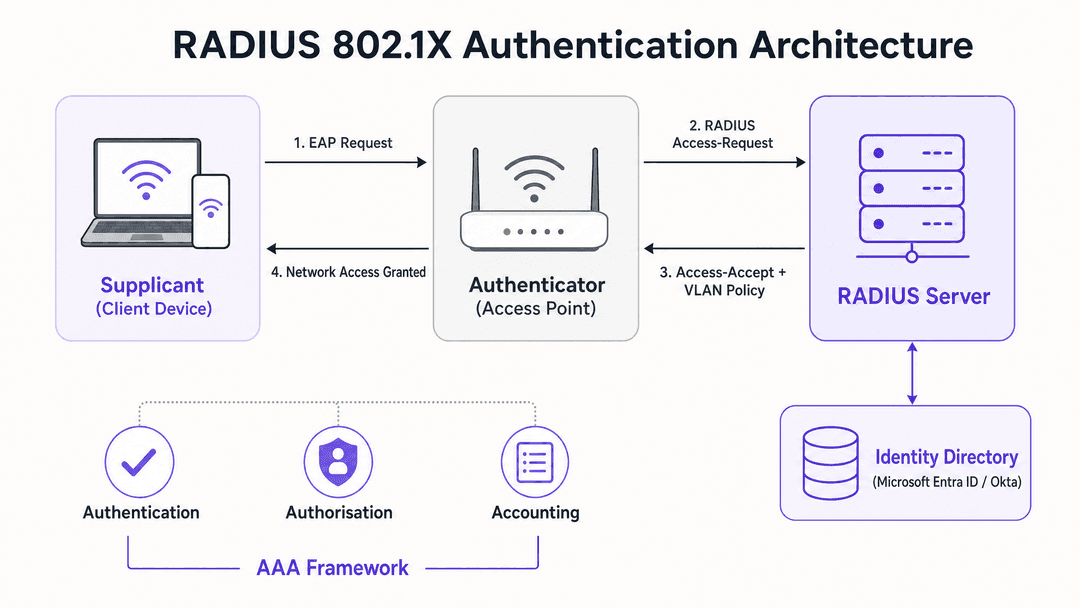
The IEEE 802.1X standard defines port-based network access control (PNAC). In a wireless context, it involves three primary roles working in concert to secure the network edge.
| Role | Component | Responsibility |
|---|---|---|
| Supplicant | Client device (laptop, smartphone) | Presents credentials to request network access |
| Authenticator | WiFi access point or controller | Enforces access control; relays EAP messages |
| Authentication server | Server RADIUS | Validates credentials; returns accept or reject and policy attributes |
When a supplicant associates with an access point, the AP blocks all data traffic except Extensible Authentication Protocol (EAP) messages. The AP encapsulates these EAP messages in RADIUS packets and forwards them to the server RADIUS over UDP port 1812. The server verifies the credentials against a backend directory and returns an Access-Accept or Access-Reject message. If accepted, the AP unblocks the port and client traffic flows freely.
The AAA framework in practice
Authentication is the first pillar: verifying who someone is. When a device connects to a WPA3-Enterprise SSID, the server RADIUS checks the presented credentials or certificate against the configured identity source. Microsoft Entra ID, Okta, and Google Workspace are the canonical cloud identity providers that integrate directly with modern Cloud RADIUS platforms.
Authorisation is the second pillar: determining what the authenticated user can do. The server RADIUS returns RADIUS attributes to the access point, most critically the VLAN ID. A staff member in the finance team lands on VLAN 10 with access to internal systems. A contractor lands on VLAN 20 with internet-only access. A guest lands on VLAN 30, isolated from all corporate resources. This dynamic VLAN assignment is the mechanism that enables proper network segmentation - a mandatory control for PCI DSS compliance in retail environments.
Accounting is the third pillar: recording what actually happened. The server RADIUS logs session start and stop times, session duration, data transferred, and the MAC address of each device. Under PCI DSS v4.0, this logging is a hard requirement. In the event of a security incident, these logs are the foundation of any forensic investigation.
EAP method selection
The security of your server RADIUS deployment depends heavily on the EAP method selected. The three most common methods in enterprise WiFi are PEAP, EAP-TTLS, and EAP-TLS.
PEAP-MSCHAPv2 is the most widely deployed method. It creates an encrypted TLS tunnel using a server-side certificate, inside which the user authenticates with a username and password. It is relatively straightforward to deploy because you only need to manage one certificate - the server's. However, if client devices are not explicitly configured to validate the server certificate, they are vulnerable to rogue access point attacks. An attacker can present a fraudulent certificate and capture credentials. This is a documented real-world threat, not a theoretical one. Enforce strict certificate validation via Group Policy Objects or MDM profiles without exception.
EAP-TLS is the gold standard. It requires digital certificates on both the server RADIUS and every client device, eliminating passwords entirely. Even if an attacker captures the full authentication exchange, there are no credentials to extract. The trade-off is administrative overhead: deploying and managing client certificates requires a Public Key Infrastructure (PKI) and an MDM platform such as Microsoft Intune or Jamf. For corporate devices, EAP-TLS is the authentication method you should be working towards. Purple's Cloud RADIUS supports EAP-TLS natively, with automated certificate lifecycle management.
Implementation guide: cloud vs on-premises
When deploying a server RADIUS architecture, IT teams must choose between cloud-hosted and on-premises deployment. This is the most consequential architectural decision in the project.
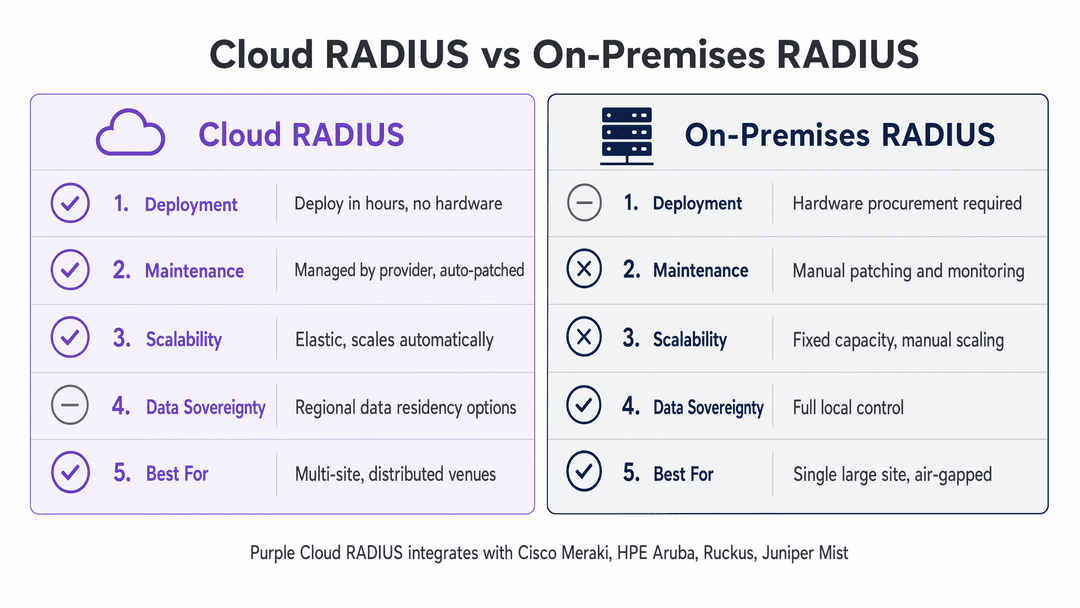
On-premises RADIUS, using platforms like FreeRADIUS or Microsoft Network Policy Server (NPS), gives you complete control over the infrastructure. For a single large venue - a stadium, a hospital, or a government facility - this can be the right call. Authentication requests travel over the local LAN, delivering sub-millisecond response times. If your identity directory is an on-premises Active Directory that cannot be exposed to the internet for data sovereignty reasons, an on-premises server RADIUS is often your only viable option.
However, for multi-site organisations, on-premises RADIUS introduces significant operational overhead. You are managing separate server instances at each location, handling certificate renewals manually, and responding to outages at two in the morning when a certificate expires. For a retail chain with 50 locations, that means 50 separate RADIUS instances to patch, monitor, and maintain.
Cloud RADIUS changes this entirely. The infrastructure is hosted globally across multiple availability zones. When a user connects at a branch location, the request routes to the nearest cloud edge node. High availability is built in by default. Certificate rotation is automated, eliminating the single most common cause of authentication outages in on-premises deployments. For multi-site organisations with cloud-native identity providers like Microsoft Entra ID, Okta, or Google Workspace, Cloud RADIUS is almost always the operationally superior choice.
Purple's Cloud RADIUS integrates directly with Cisco Meraki, HPE Aruba, Ruckus, Juniper Mist, Ubiquiti UniFi, Cambium, Extreme, and Fortinet. You deploy across your entire hardware estate without replacing a single access point.
Step-by-step deployment
Step 1: Choose your deployment model. Audit three factors: your current identity provider and whether it is cloud-native; your WAN resilience at each site; and your team's capacity to manage ongoing maintenance. These three factors determine whether cloud or on-premises is the right path.
Step 2: Integrate your identity source. Connect your server RADIUS to your organisation's identity directory. Most Cloud RADIUS platforms support direct integration with Microsoft Entra ID, Okta, and Google Workspace via LDAP or SAML. For on-premises Active Directory, use LDAP over a secure connector.
Step 3: Configure your network hardware. Create a new SSID configured for WPA2-Enterprise or WPA3-Enterprise and point it at your server RADIUS. Configure the shared secret - the password that encrypts communication between the access point and the server RADIUS. This shared secret must match exactly on both sides. A mismatch is one of the most common causes of authentication failures during initial deployment.
Step 4: Define authorisation policies. Map user groups from your identity directory to network policies. Staff get full access on VLAN 10. Guests get internet-only access on VLAN 20. IoT devices get a restricted VLAN with firewall rules blocking lateral movement.
Step 5: Onboard your users. For corporate staff, deploy WiFi profiles via your MDM platform. For guests, use a captive portal. Purple's Guest WiFi platform automates the guest onboarding flow, supporting social login, registration forms, and voucher codes. Staff and corporate devices authenticate silently via 802.1X while guests are directed to a branded portal - a tiered access model that delivers both security and WiFi Analytics .
For a deeper look at SSID architecture across guest, staff, and IoT networks, see Three SSIDs to rule them all: guest, Passpoint, and IoT WiFi .
Best practices
Enforce strict certificate validation on every client device. Use Group Policy Objects for Windows devices and MDM profiles for macOS and mobile devices. The profile must specify exactly which Certificate Authority to trust and what the expected server name is. Do not leave this to the user to configure manually. Failure to enforce this is the primary attack vector for credential theft on PEAP deployments.
Deploy at least two server RADIUS instances. Configure all access points to fail over to the secondary if the primary becomes unreachable. For Cloud RADIUS, this redundancy is built in and managed by the provider. For on-premises, deploy an active-active cluster across two geographically separated locations.
Use MAC Authentication Bypass (MAB) for headless IoT devices. Printers, sensors, and digital signage cannot present 802.1X credentials. MAB allows authentication based on MAC address. Because MAC addresses are easily spoofed, always pair MAB-authenticated devices with a restrictive VLAN and firewall rules blocking access to corporate resources.
Rotate shared secrets regularly. The shared secret between your access points and your server RADIUS must be long, random, and rotated periodically. A weak or default shared secret undermines the entire authentication chain.
Validate segmentation with penetration testing. Configuration alone is not evidence. Commission a penetration test that explicitly includes the wireless environment and validation of VLAN segmentation. A tester should actively attempt to access corporate resources from the guest VLAN and document that every attempt is blocked. This is the evidence your PCI DSS Qualified Security Assessor needs.
Troubleshooting and risk mitigation
The most common failure modes in server RADIUS deployments fall into four categories.
Shared secret mismatch. If the shared secret configured on the access point does not match the secret on the server RADIUS, every authentication attempt will fail silently. Always copy-paste shared secrets rather than typing them manually. Verify the configuration on both sides before testing.
Certificate expiry. On on-premises deployments, if the server certificate expires, every client device will reject the connection. This causes a complete authentication outage with no graceful degradation. Cloud RADIUS providers automate certificate rotation, eliminating this risk. For on-premises deployments, configure monitoring alerts at 60 days, 30 days, and seven days before expiry.
Client certificate validation not enforced. If PEAP clients are not configured to validate the server certificate, they will connect to any RADIUS server that responds - including rogue access points. Enforce certificate validation via GPO or MDM profiles on every managed device.
WAN dependency for Cloud RADIUS. Cloud RADIUS relies entirely on the WAN link at each venue. If the internet connection drops, authentication fails. Implement a local survivability strategy: configure access points to cache credentials for critical staff, or use SD-WAN to ensure high availability of the internet link. Always configure a fallback policy - either open access to a restricted VLAN, or locally cached credentials.
ROI and business impact
Deploying a server RADIUS architecture transforms the wireless network from a vulnerability into a managed, secure asset with measurable operational benefits.
For a European hotel group with 45 properties, migrating from 45 on-premises FreeRADIUS instances to Cloud RADIUS reclaimed roughly 40% of the central IT team's maintenance time (Purple internal data). That is engineering capacity redirected from keeping the lights on to strategic initiatives.
For a retail chain preparing for a PCI DSS audit, proper network segmentation via dynamic VLAN assignment removes the guest WiFi network from the Cardholder Data Environment scope entirely. Platforms like Purple's Guest WiFi operate on the guest-facing VLAN, completely isolated from payment traffic. The analytics platform is out of PCI scope, and the business retains the freedom to deploy revenue-generating tools - guest analytics, loyalty programmes, customer engagement - safely and confidently.
For organisations with more than 10 sites and fewer than five network engineers, the predictable operational expenditure of Cloud RADIUS typically delivers a positive return on investment within 18 months compared to maintaining on-premises infrastructure (Purple internal data). Hardware procurement, power, cooling, and engineering time for on-premises deployments at scale consistently exceed the subscription cost of a managed Cloud RADIUS service.
Purple operates across 80,000+ live venues with 99.999% uptime, ISO 27001 certification, GDPR and CCPA compliance, and Cyber Essentials certification. For IT teams that need to demonstrate due diligence to their board or auditors, these certifications provide the third-party validation that a self-managed on-premises deployment cannot.
For a detailed comparison of Purple's Cloud RADIUS against alternative platforms, see the Aruba ClearPass vs. Purple WiFi feature and co-deployment comparison .
Key Definitions
Server RADIUS
Remote Authentication Dial-In User Service. A networking protocol server that provides centralised Authentication, Authorisation, and Accounting (AAA) management for network access. Defined in RFC 2865 and extended by subsequent RFCs.
The core engine that validates user credentials against a directory and dictates network access policies. Every enterprise WiFi deployment using 802.1X requires a server RADIUS.
802.1X
An IEEE standard for port-based network access control that provides an authentication mechanism for devices wishing to attach to a LAN or WLAN. It defines the roles of Supplicant, Authenticator, and Authentication Server.
The standard that access points use to communicate with the server RADIUS. Without 802.1X, there is no mechanism to block unauthenticated devices at the network edge.
EAP-TLS
Extensible Authentication Protocol - Transport Layer Security. An authentication method requiring digital certificates on both the client device and the server RADIUS. Provides mutual authentication with no password involved.
The gold standard for authenticating corporate devices. Eliminates credential theft and phishing attacks. Requires a PKI and MDM platform to deploy client certificates at scale.
PEAP-MSCHAPv2
Protected Extensible Authentication Protocol with Microsoft Challenge Handshake Authentication Protocol version 2. Uses a server-side TLS certificate to create an encrypted tunnel, inside which the user authenticates with a username and password.
The most common enterprise WiFi authentication method. Secure only when clients are explicitly configured to validate the server certificate via GPO or MDM profiles.
Dynamic VLAN assignment
The process by which a server RADIUS instructs an access point to place an authenticated user onto a specific Virtual Local Area Network (VLAN) based on their identity and group membership in the directory.
The mechanism that enforces network segmentation. Essential for PCI DSS compliance in retail and hospitality. Allows a single SSID to serve staff, contractors, guests, and IoT devices on separate network segments.
AAA framework
Authentication, Authorisation, and Accounting. The three-pillar framework implemented by server RADIUS for managing network access. Authentication verifies identity, Authorisation determines access level, Accounting logs session activity.
The conceptual foundation of all server RADIUS deployments. PCI DSS v4.0 requires all three pillars to be implemented for networks handling payment data.
Supplicant
The client device (laptop, smartphone, IoT sensor) that requests access to the network by presenting credentials or a certificate to the Authenticator.
The endpoint that must satisfy the server RADIUS authentication challenge. Understanding which component is failing is the foundation of effective troubleshooting.
Captive portal
A web page that users must interact with before being granted access to a public WiFi network. Handles the user-facing onboarding experience while the server RADIUS manages back-end authentication and session policy enforcement.
Used for guest onboarding in hospitality, retail, and venue environments. Works in conjunction with the server RADIUS - the portal is the user interface, the server RADIUS is the back-end engine.
MAC Authentication Bypass (MAB)
A mechanism that allows devices without 802.1X capabilities (printers, IoT sensors, digital signage) to be authenticated based on their MAC address rather than credentials or certificates.
Required for headless devices that cannot run an 802.1X supplicant. Because MAC addresses are easily spoofed, MAB-authenticated devices must always be placed on a highly restricted VLAN.
Shared secret
A password that encrypts the communication between an access point (RADIUS client) and the server RADIUS. Must be configured identically on both sides and rotated periodically.
A shared secret mismatch is one of the most common causes of authentication failures during initial deployment. Always copy-paste rather than type manually.
Worked Examples
A 200-room hotel needs to secure staff devices via 802.1X while providing isolated guest WiFi access. The property management system runs on staff devices and must not be accessible from the guest network. The hotel is part of a 45-property group managed by a three-person central IT team.
Deploy Purple's Cloud RADIUS integrated with Microsoft Entra ID. Configure a staff SSID using WPA3-Enterprise with EAP-TLS, deploying client certificates to all staff devices via Microsoft Intune. Configure the server RADIUS to dynamically assign staff devices to VLAN 10, which has access to the property management system and internal printers. Deploy a separate guest SSID using WPA2-Personal with a captive portal for onboarding, assigned to VLAN 20 with internet-only access and strict firewall rules blocking all traffic to VLAN 10. The Cloud RADIUS handles all 45 properties from a single management dashboard, with automated certificate rotation eliminating the per-site maintenance overhead that previously consumed 40% of the team's time.
A retail chain with 50 stores is experiencing frequent authentication outages caused by expired certificates on their local FreeRADIUS servers. POS tablets authenticate via 802.1X, and each outage prevents staff from processing payments until the certificate is manually renewed. The IT director wants to eliminate this failure mode before the next peak trading period.
Migrate from the 50 on-premises FreeRADIUS instances to a centralised Cloud RADIUS platform. Integrate the Cloud RADIUS with the corporate Okta directory. Update the access point configurations at all 50 locations to point to the new Cloud RADIUS endpoints. Configure dynamic VLAN assignment to place POS tablets on VLAN 10 (payment network) and staff devices on VLAN 20 (corporate network). The cloud provider handles all server certificate rotation automatically. Validate VLAN segmentation between the payment network and the guest WiFi network with a penetration test before the next audit cycle.
Practice Questions
Q1. A retail venue is preparing for a PCI DSS v4.0 audit. They currently run a single SSID with a pre-shared key for both staff POS tablets and guest access. The Qualified Security Assessor has flagged this as a critical finding. What is the immediate architectural change required, and which server RADIUS feature is central to the remediation?
Hint: Focus on network segmentation and the specific RADIUS feature that enforces it dynamically.
View model answer
The venue must deploy a server RADIUS to implement 802.1X authentication and replace the shared PSK. The central feature is dynamic VLAN assignment: the server RADIUS must be configured to place POS tablets on a payment VLAN and guests on an isolated internet-only VLAN, with strict firewall rules preventing any traffic crossing between them. The guest SSID should use a captive portal for onboarding. The segmentation must be validated with a penetration test, not just configuration review, to satisfy PCI DSS Requirement 11.
Q2. An enterprise with 30 branch offices is deciding between Cloud RADIUS and on-premises server RADIUS. They have a small central IT team of four engineers, use Okta for identity management, and have no data sovereignty requirements. Which deployment model is recommended, and what is the primary operational justification?
Hint: Evaluate the maintenance overhead of managing 30 separate instances versus a centralised cloud service.
View model answer
Cloud RADIUS is strongly recommended. With 30 sites and four engineers, deploying and maintaining 30 on-premises server RADIUS instances would consume a disproportionate share of the team's capacity. Cloud RADIUS integrates natively with Okta, automates certificate rotation, and provides built-in high availability without requiring the team to manage the underlying infrastructure. The absence of data sovereignty requirements removes the primary justification for on-premises. The team should configure access points with a fallback policy to handle the WAN dependency gracefully.
Q3. During a PEAP-MSCHAPv2 deployment, users report security certificate warnings on their devices when connecting to the corporate WiFi SSID. Some users are dismissing the warnings and connecting anyway. What is the security risk, and what configuration step was missed?
Hint: Consider what happens when a client does not validate the server certificate, and how an attacker could exploit this.
View model answer
The security risk is a rogue access point attack. Without enforced certificate validation, a client device will connect to any server RADIUS that responds - including one operated by an attacker. The attacker presents a fraudulent certificate, the user dismisses the warning, and the attacker captures the username and password inside the PEAP tunnel. The missed configuration step is deploying MDM profiles (for macOS and mobile) and Group Policy Objects (for Windows) that explicitly specify the trusted Certificate Authority and expected server name. Users must never be left to make certificate trust decisions manually.
Q4. A stadium with 68,000 seats needs to authenticate staff devices during a major event where 40,000 devices may attempt to connect within a 30-minute window. The IT team has strict data sovereignty requirements: all authentication logs must remain on UK soil. Which deployment model is recommended, and what specific architecture addresses the burst traffic requirement?
Hint: Consider the latency and throughput advantages of local authentication versus cloud-routed requests under burst conditions.
View model answer
On-premises server RADIUS is recommended due to the data sovereignty requirement and the extreme burst authentication load. The recommended architecture is a dual on-premises RADIUS cluster in active-active configuration, with a secondary cluster in a co-location facility within the UK. Local authentication delivers sub-millisecond response times and removes the WAN dependency that would create a bottleneck during burst events. The active-active cluster provides redundancy without relying on internet connectivity. Authentication logs remain on UK soil, satisfying the data sovereignty requirement.
Continue reading in this series
Configuring RADIUS Authentication for Guest and Staff WiFi Networks
This technical reference guide outlines the architecture, configuration, and deployment of RADIUS authentication for enterprise guest and staff WiFi networks. It provides network architects and IT managers with the exact protocols, security standards, and troubleshooting methodologies required to build secure, scalable wireless access control systems.
Passpoint and OpenRoaming: Complete Guide
This technical reference guide provides a comprehensive analysis of Passpoint (Hotspot 2.0) and WBA OpenRoaming frameworks within enterprise WiFi networks. It details the underlying authentication protocols, architectural components, and deployment strategies required to establish secure, frictionless guest connectivity. Network architects and IT leaders will learn how to design, implement, and troubleshoot these standards to eliminate manual login barriers while maintaining enterprise-grade security.
How to Implement SCEP for Secure BYOD and Network Enrollment in Higher Education
This technical guide provides network architects and IT managers with a vendor-neutral blueprint for deploying SCEP-based certificate enrollment to secure higher education campus networks. It details how to migrate from password-based PEAP to 802.1X EAP-TLS, automate BYOD onboarding, and enforce robust VLAN segmentation.