
iPSK artinya: a comprehensive guide for businesses
This technical reference guide defines iPSK (Identity Pre-Shared Key) architecture and explains how it enables secure, isolated WiFi access for multi-tenant properties. It details implementation steps, vendor compatibility, and the business case for replacing legacy shared passwords with a managed identity-based network.
Listen to this guide
View podcast transcript

Executive Summary
When property operators and IT architects search for "iPSK artinya", they are looking for the technical definition and business application of Identity Pre-Shared Key technology. iPSK replaces the inherent security flaws of a single shared WiFi password with an enterprise-grade architecture that assigns a unique credential to every resident or unit.
This model creates a Private Area Network (PAN) for each household, delivering Layer 2 device isolation on shared infrastructure. Residents experience the simplicity of a home router, where their smartphones seamlessly discover their own smart TVs and IoT devices, while remaining completely invisible to their neighbours. For property developers, Build-to-Rent (BTR) operators, and landlords, deploying iPSK on platforms like Cisco Meraki, HPE Aruba, or Ruckus eliminates support friction, automates lifecycle management via Property Management System (PMS) integration, and turns WiFi from a cost centre into a revenue-generating amenity.
Technical Deep-Dive: Architecture and Standards
The traditional shared Pre-Shared Key (PSK) model provides zero segmentation. If one user shares the password, the entire network perimeter is compromised. Conversely, the WPA3-Enterprise standard using IEEE 802.1X authentication provides excellent security but requires a supplicant on the client device. This breaks connectivity for "headless" consumer devices like games consoles, smart speakers, and casting hardware.
iPSK bridges this gap by combining the universal compatibility of WPA2-Personal with the centralised control of RADIUS authentication.
How iPSK Authentication Works
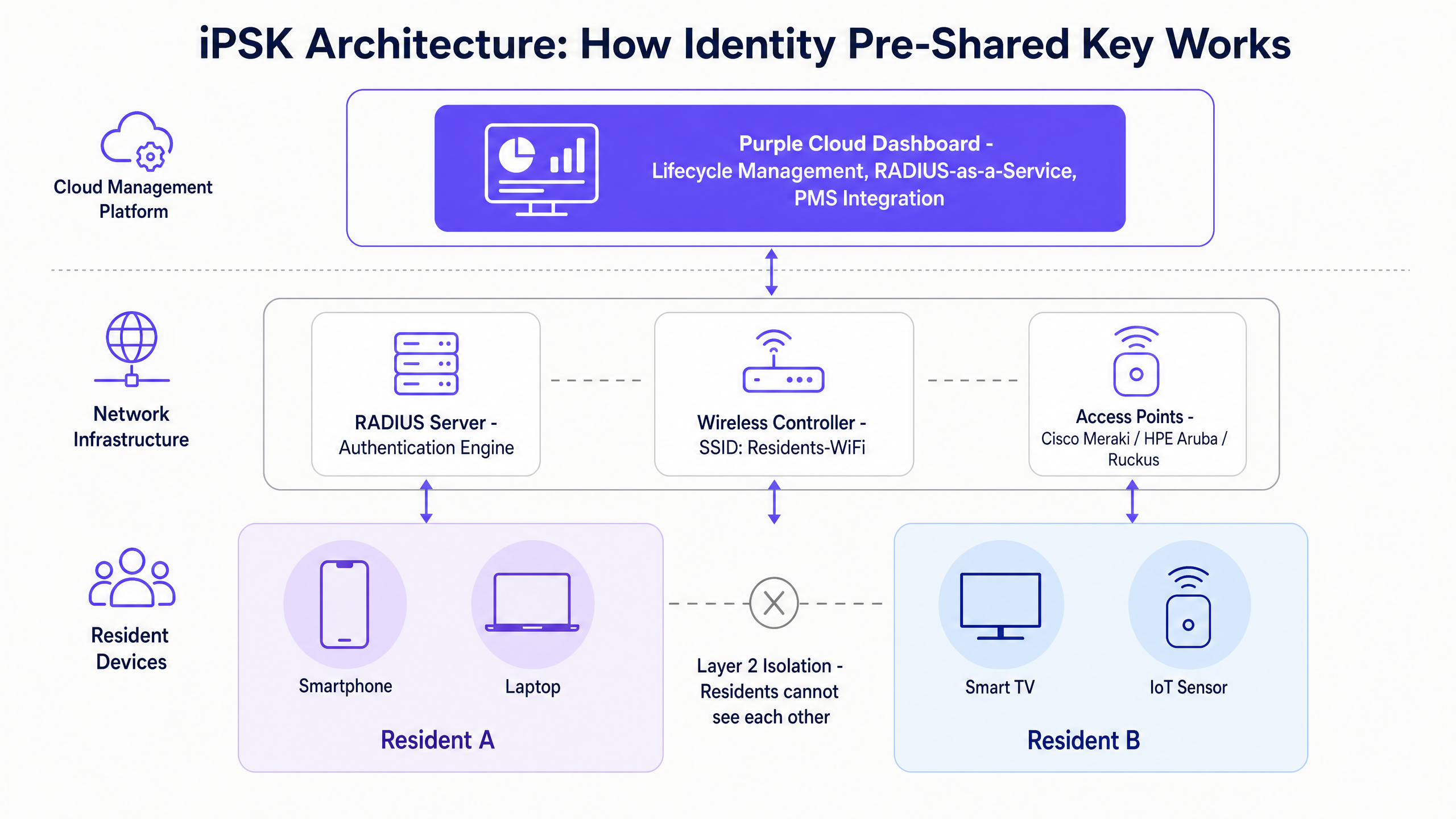
When a device attempts to associate with the SSID, the wireless controller captures the device's MAC address and forwards it to the RADIUS server. The RADIUS server authenticates the MAC address against its database, retrieves the specific passphrase assigned to that resident, and returns it to the controller (often as a Cisco AV-pair attribute). The controller then uses this specific passphrase to complete the standard four-way handshake. The resident simply enters their unique password; the backend infrastructure handles the complex identity mapping.
Layer 2 Isolation and Private Area Networks
The most critical function of iPSK in a multi-tenant environment is the creation of Private Area Networks. By using the RADIUS response to assign specific VLAN tags and policy profiles, the network logically isolates each resident's traffic.
Resident A and Resident B connect to the exact same access point. However, because they authenticated with different keys, the network places them in separate virtual segments. Resident A can cast Netflix to their own television, but they cannot scan the network and discover Resident B's devices. This Layer 2 isolation is fundamental for compliance with privacy regulations like GDPR and security standards like PCI DSS.
Vendor Implementations and Compatibility
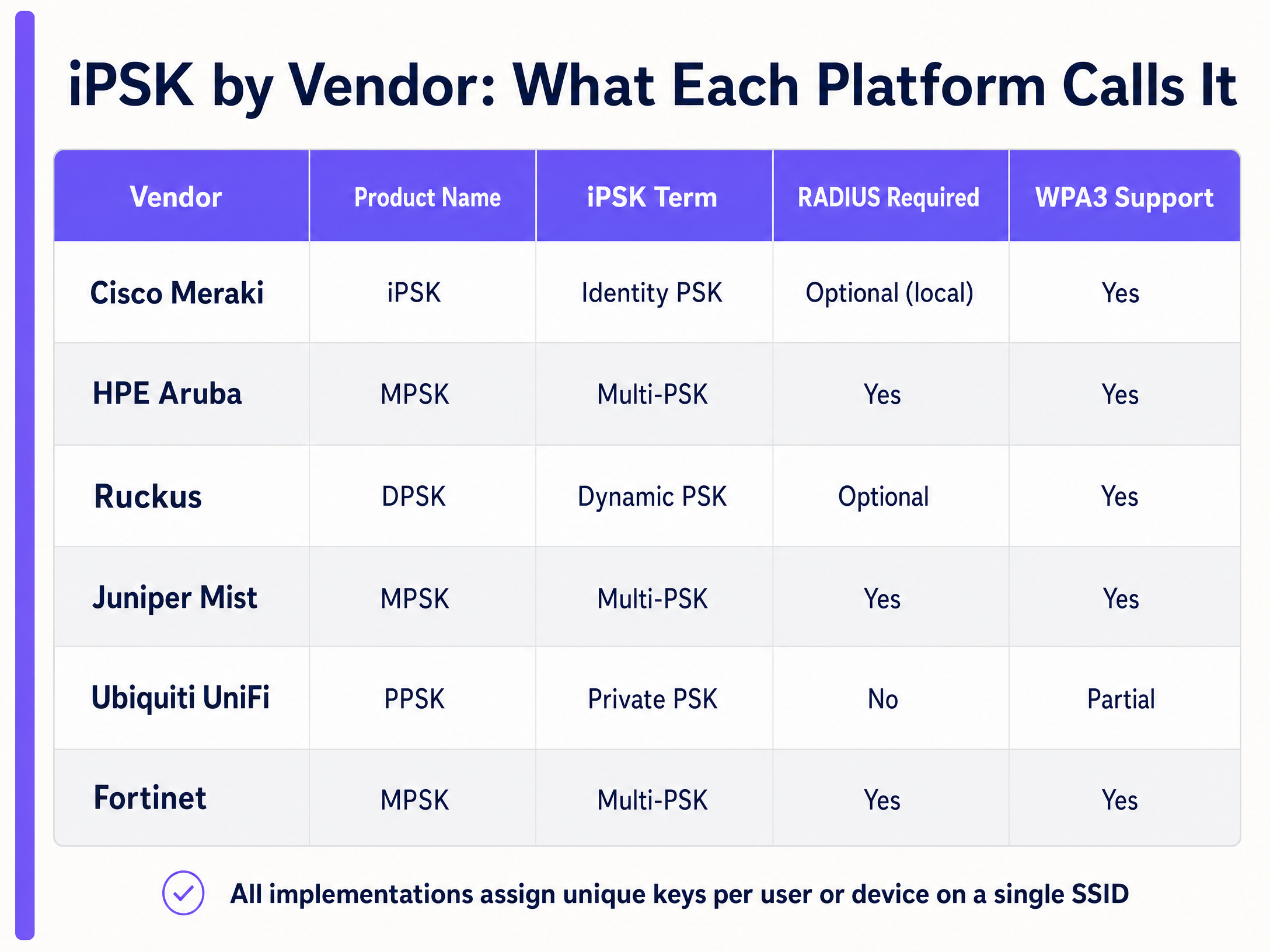
While the underlying mechanics rely on standard RADIUS protocols, different hardware vendors use proprietary terminology for their implementations. Purple's cloud overlay integrates across all of them, providing a unified management interface.
Implementation Guide: Deploying iPSK at Scale
Deploying a multi-tenant network requires rigorous planning. Follow these vendor-neutral steps to ensure a stable deployment.
1. Conduct a Predictive and Physical RF Site Survey
Do not guess access point placement. You must model RF propagation to account for attenuation from concrete floors, steel framing, and fire doors. The goal is continuous coverage with minimal co-channel interference. In high-density environments like student accommodation, deploy enterprise-grade access points in corridors or directly within units, depending on the attenuation model.
2. Define VLAN and Subnet Architecture
Map each resident segment to a dedicated VLAN. You must size your DHCP scopes accurately. The current average is 15 to 25 connected devices per household. A 200-unit building requires a DHCP scope capable of supporting at least 4,000 concurrent leases.
3. Enable mDNS Reflection
This is a critical configuration step. Multicast DNS (mDNS) is the protocol that allows Apple AirPlay, Google Chromecast, and smart home hubs to discover each other. You must configure your wireless controller to reflect mDNS traffic within a resident's PAN, but strictly block it from crossing into other PANs. If you skip this step, IoT devices will fail to pair, generating significant support volume.
4. Integrate with Identity Providers
Manual key management fails at scale. Integrate your WiFi management platform with your PMS or an identity provider like Microsoft Entra ID or Okta. This enables automated provisioning when a lease begins and immediate revocation when a tenancy ends, enforcing a Zero Trust access model.
Best Practices and Industry Standards
Security Configurations
For new deployments, configure the network to use WPA3 Transition Mode. This allows newer devices to negotiate the stronger WPA3-SAE handshake while permitting legacy devices to fall back to WPA2-PSK. Verify that your specific hardware vendor supports dynamic key assignment under WPA3 Transition Mode, as the SAE handshake alters how the controller processes the RADIUS override.
Hardware Selection
Standardise on canonical enterprise hardware. Purple supports Cisco Meraki, HPE Aruba, Ruckus, Juniper Mist, Ubiquiti UniFi, Cambium, Extreme, and Fortinet. Do not deploy consumer-grade mesh routers in a multi-tenant environment; they lack the processing power for dense concurrent connections and cannot enforce VLAN segmentation.
Data Privacy
Implement strict data retention policies. While aggregate analytics (like total bandwidth utilisation) are useful for capacity planning, individual session logs should be retained only as long as required for security auditing. Purple provides selectable data residency to comply with regional privacy laws.
Troubleshooting & Risk Mitigation
The "Flat Network" Pitfall
Some simplified PSK implementations assign different passwords but drop all users onto a single flat subnet. This provides the illusion of security without actual isolation. You must verify that your RADIUS server is actively assigning distinct VLANs or applying micro-segmentation policies per user.
Device MAC Randomisation
Modern operating systems (iOS 14+, Android 10+) use MAC address randomisation by default to prevent tracking. Because iPSK relies on MAC authentication at the RADIUS layer, residents must be instructed to disable "Private Wi-Fi Address" for the building's SSID. The Purple app automates this onboarding flow, guiding residents to register their true hardware MAC address.
ROI & Business Impact
Deploying managed multi-tenant WiFi transforms connectivity from an operational headache into a measurable asset.
- Rent Premium: Data from the British Property Federation indicates that BTR operators can command a rent premium of £15 to £30 per unit per month when high-performance, managed WiFi is included as an amenity.
- Void Reduction: Providing an "instant-on" connection on move-in day eliminates the two-week wait for broadband installation. This amenity consistently shortens void periods by 5 to 10 days.
- Operational Efficiency: Eliminating per-unit consumer routers removes thousands of potential hardware failure points. Automated PMS integration drops password-related support tickets to near zero.
For a 200-unit building, a £25 monthly premium generates £60,000 in additional annual revenue, while simultaneously reducing the IT support burden.
Listen to the Purple Technical Briefing
For a deeper dive into MDU deployment strategies, listen to our technical podcast below:
Internal Resources
- Core Products: Guest WiFi , WiFi Analytics
- Core Industries: Retail , Healthcare , Hospitality , Transport
- Related Blogs: How to make a great first impression with your guest WiFi (and keep your brand consistent) , Três SSIDs para a todos governar: o design de WiFi para convidados, funcionários e IoT , Three SSIDs to rule them all: guest, Passpoint, and IoT WiFi
- Related Guides: Cisco iPSK: a comprehensive guide for businesses , Cisco iPSK: um guia completo para empresas
Key Definitions
iPSK (Identity Pre-Shared Key)
An authentication method that assigns unique WiFi passphrases to individual users or devices on a single shared SSID.
Used to provide enterprise-grade security and segmentation without the complexity of 802.1X certificates.
Private Area Network (PAN)
A logically isolated network segment created for a single user or household on shared physical infrastructure.
Essential for delivering privacy and enabling smart home device discovery in multi-tenant buildings.
mDNS (Multicast DNS)
A protocol used by devices to discover services on a local network without a central DNS server.
Must be carefully managed (reflected within PANs, blocked between them) to allow casting and smart home pairing in MDUs.
RADIUS (Remote Authentication Dial-In User Service)
A networking protocol that provides centralised authentication, authorisation, and accounting management.
The backend engine that maps a device's MAC address to its specific iPSK passphrase and VLAN assignment.
Layer 2 Isolation
Network segmentation enforced at the data link layer, preventing devices from communicating directly with each other via MAC addresses.
The mechanism that ensures Resident A cannot see or access Resident B's devices on the same access point.
MAC Randomisation
A privacy feature in modern operating systems that generates a fake MAC address for different WiFi networks.
Can disrupt iPSK authentication, requiring residents to disable the feature for their home network to ensure stable connectivity.
Co-Channel Interference (CCI)
Performance degradation caused when multiple access points transmit on the same frequency channel.
The primary reason why deploying individual consumer routers in every apartment fails at scale.
WPA3 Transition Mode
A security configuration that allows WPA3-capable devices to use stronger encryption while permitting legacy devices to connect via WPA2.
The recommended setting for modern iPSK deployments to balance security with maximum device compatibility.
Worked Examples
A 250-unit Build-to-Rent operator is experiencing severe WiFi performance issues. Residents complain of slow speeds and dropped connections. The current setup uses 250 individual consumer-grade routers provided by a local ISP, all broadcasting on the 2.4 GHz and 5 GHz bands.
The operator must replace the 250 consumer routers with a centrally managed enterprise WiFi architecture using iPSK. Step 1: Conduct an RF survey to design a high-density access point layout (e.g., using Cisco Meraki or HPE Aruba hardware) in the corridors. Step 2: Configure a single building-wide SSID. Step 3: Deploy Purple's cloud RADIUS to assign a unique iPSK to each apartment. Step 4: Configure VLANs and mDNS reflection to create isolated Private Area Networks for each unit.
A university IT team needs to onboard 3,000 students in a single weekend. The legacy 802.1X network generates hundreds of helpdesk tickets because students cannot connect their PlayStation consoles or smart speakers.
The IT team integrates their student directory with Purple's management platform. As students enrol, the system automatically generates a unique iPSK for each student and emails it to them before arrival. Students use this single key to connect their laptops, phones, and headless IoT devices. When the academic year ends, the keys are automatically revoked via the directory integration.
Practice Questions
Q1. You are designing the network for a new 150-unit co-living space. The client wants to use standard WPA2-Personal with a single password to save money on licensing. What are the primary technical risks of this approach?
Hint: Consider what happens when a resident moves out, and what residents can see on their network segment.
View model answer
The primary risks are zero security segmentation and operational failure. With a shared password, residents can see and potentially access each other's devices, violating privacy requirements. When a resident moves out, the password must be changed to revoke their access, which instantly disconnects the remaining 149 units and generates massive support volume.
Q2. A resident complains that they cannot cast Netflix from their iPhone to their new smart TV. Both devices are connected to the iPSK network using the resident's unique key. What is the most likely configuration error?
Hint: Think about the protocol required for device discovery and how it interacts with VLAN isolation.
View model answer
The network is likely missing mDNS (Multicast DNS) reflection configuration. While both devices are correctly assigned to the resident's VLAN, the wireless controller must be explicitly configured to allow multicast discovery traffic to reflect within that specific PAN. Without it, the devices cannot 'see' each other to initiate casting.
Q3. Your deployment uses hardware that enforces WPA3-only mode. Why might this cause an issue for a traditional iPSK rollout?
Hint: Consider the difference in the handshake mechanism between WPA2 and WPA3-SAE.
View model answer
Traditional iPSK relies on the RADIUS server returning a specific passphrase override during the WPA2 4-way handshake. WPA3 uses the Simultaneous Authentication of Equals (SAE) handshake, which changes how keys are negotiated and can break the standard RADIUS override mechanism. You must verify explicit vendor support for iPSK under WPA3, or use WPA3 Transition Mode to maintain compatibility.
Continue reading in this series
Uu PPSK pdf: comparing features and deployment models
This technical reference guide compares Private Pre-Shared Key (PPSK) WiFi architecture against traditional 802.1X and standard PSK deployments. It provides network architects and IT managers with vendor-neutral implementation strategies for multi-tenant residential, IoT, and BTR environments.
Uu PPSK pdf: comparing features and deployment models
This technical reference guide compares Private Pre-Shared Key (PPSK) WiFi architecture against traditional 802.1X and standard PSK deployments. It provides network architects and IT managers with vendor-neutral implementation strategies for multi-tenant residential, IoT, and BTR environments.
Uu PPSK 2023: comparing features and deployment models
This technical reference guide compares Unique per-User Private Pre-Shared Key (UU PPSK) WiFi architecture against traditional shared PSK and 802.1X deployments, with a specific focus on the 2023 landscape of vendor implementations and platform capabilities. It provides property developers, BTR operators, and MDU landlords with actionable deployment strategies, VLAN architecture guidance, and automated lifecycle management workflows. The guide covers three deployment models, real-world case studies, and the compliance implications of each authentication approach.