
Managed WiFi solutions: a comprehensive guide for businesses
This guide details how to design, deploy, and manage enterprise WiFi networks across multi-site estates. It covers VLAN segmentation, identity-based authentication, and cloud-managed architecture to ensure security and operational efficiency.
Video overview
Listen to this guide
View podcast transcript

Executive Summary
Managing WiFi across a distributed estate is a significant operational challenge. You likely have a mix of hardware - Cisco Meraki in one location, HPE Aruba in another - running different firmware versions with inconsistent security policies. This fragmentation creates vulnerabilities and drives up support costs.
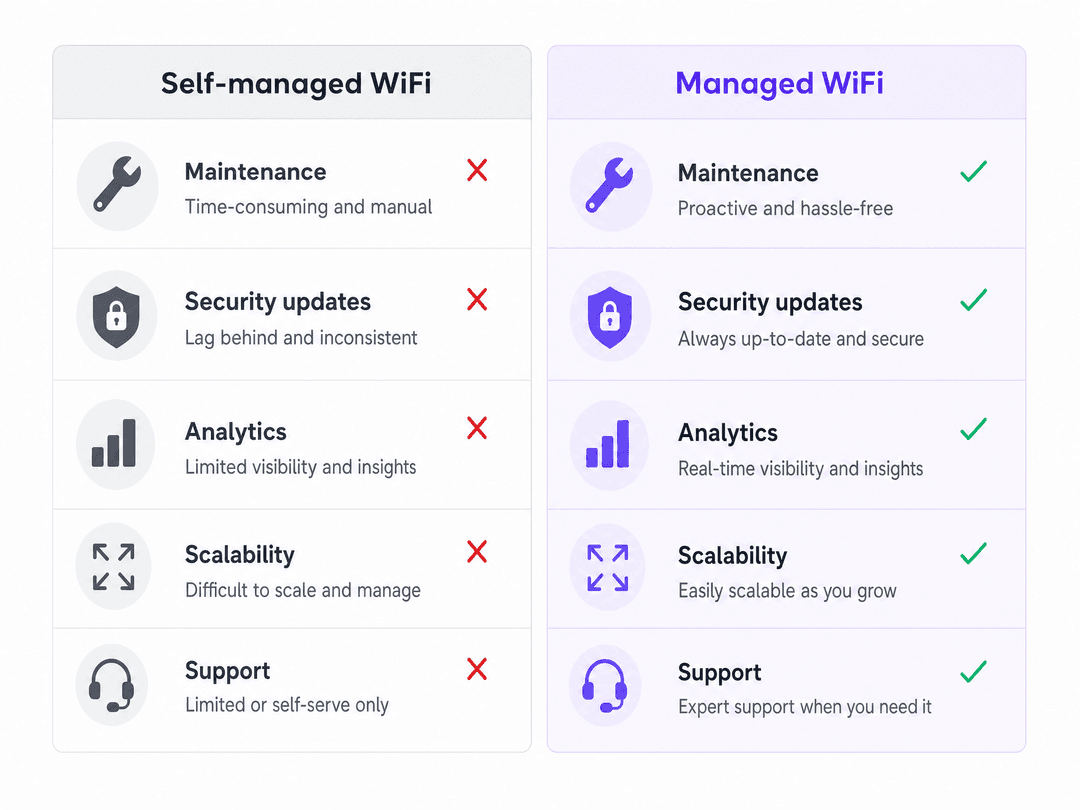
Managed WiFi solutions resolve this by abstracting the management layer. You apply a single cloud overlay across your entire infrastructure. This approach centralises policy enforcement, automates firmware updates, and provides real-time visibility into network health. By implementing strict VLAN segmentation and identity-based authentication, you protect your core systems while delivering reliable access to guests, staff, and IoT devices.
Technical Deep-Dive
Network Segmentation
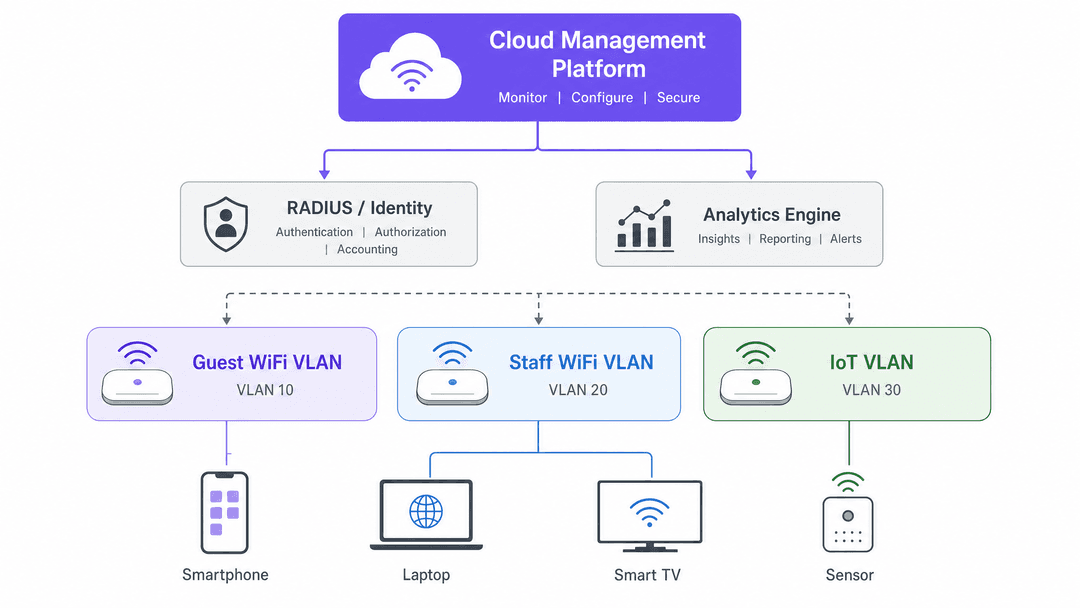
A defensible network architecture requires strict isolation. You must separate traffic into at least three distinct VLANs.
- Guest WiFi VLAN: The public-facing network. Devices on this VLAN must only be able to reach the internet. They must not be able to communicate with each other (client isolation) or access internal subnets.
- Staff WiFi VLAN: An authenticated network for employees. Access is granted via IEEE 802.1X, using an identity provider to verify credentials.
- IoT VLAN: A restricted network for building management systems, CCTV, and sensors. These devices often run outdated firmware and pose a significant security risk. They must be isolated from both guest and staff traffic.
Authentication Protocols
For guest access, the traditional approach is a captive portal. A user connects to the SSID, opens a browser, and completes a login process. This method, used by Guest WiFi , allows you to capture first-party data and secure GDPR-compliant opt-ins.
The modern alternative is Passpoint (Hotspot 2.0), which uses 802.11u and WPA3 to authenticate devices automatically. Purple acts as a free identity provider for OpenRoaming under the Connect plan, enabling seamless, secure connections without a splash page.
For staff, you must implement IEEE 802.1X with EAP-TLS. Devices authenticate using certificates rather than passwords, eliminating the risk of credential stuffing. You integrate this with Microsoft Entra ID, Okta, or Google Workspace via SCIM and SAML. When an employee leaves, their access is revoked automatically.
In multi-tenant environments like build-to-rent (BTR) developments, you deploy iPSK (Identity Pre-Shared Key) or PPSK (Private Pre-Shared Key). Each resident receives a unique key. The network isolates traffic per unit at the VLAN level, ensuring a resident's smart TV or thermostat is only accessible to their devices.
Implementation Guide
Deploying a managed WiFi solution follows a structured five-phase process.
Phase 1: Site Survey
You must conduct a radio frequency (RF) survey to map coverage and identify interference. Use predictive software or perform an active survey with a spectrum analyser. A standard hotel room requires one access point per two to four rooms. Concrete and steel construction will necessitate higher AP density.
Phase 2: Network Design
Document your VLAN structure, DHCP scopes, and QoS policies. Define your channel plans: 2.4 GHz for range and IoT compatibility, 5 GHz for throughput, and 6 GHz (Wi-Fi 6E) for high-density areas. If you are deploying 802.1X, configure your RADIUS server and certificate authority.
Phase 3: Hardware Installation
Run Cat 6A cabling to every access point. Install PoE+ switches with sufficient power budgets. Underspecifying the switching layer is a common cause of performance degradation.
Phase 4: Cloud Onboarding
Connect your hardware to the management platform. Push your configuration templates and conduct testing. Purple operates as a cloud overlay, integrating with Cisco Meraki, HPE Aruba, Ruckus, Juniper Mist, Ubiquiti UniFi, Cambium, Extreme, and Fortinet.
Phase 5: Ongoing Management
Use the cloud platform to monitor bandwidth, detect rogue APs, and automate firmware updates. Set up alerts for offline hardware to enable proactive maintenance.
Best Practices
- Segment Everything: Guest, staff, and IoT traffic must never share a VLAN. Misconfigured VLANs are a primary cause of security incidents.
- Design for Peak Load: Calculate AP density and channel plans based on maximum concurrent connections, not average usage.
- Mandate WPA3: Enable WPA3 for all new deployments to protect against KRACK vulnerabilities. Use transition mode to support legacy devices.
Troubleshooting & Risk Mitigation
- Co-Channel Interference: If APs are transmitting on overlapping channels, performance will degrade. Implement automated channel management or manually assign non-overlapping channels (1, 6, 11 on 2.4 GHz).
- DHCP Exhaustion: In high-footfall venues, short lease times are essential. If lease times are too long, the DHCP pool will exhaust, preventing new devices from connecting.
- Captive Portal Failures: Ensure your walled garden configuration allows access to the necessary authentication servers and identity providers before the user logs in.
ROI & Business Impact
Managed WiFi reduces IT support time by an average of 40% compared to self-managed infrastructure. It provides 99.999% uptime, equating to less than six minutes of downtime per year.
Furthermore, it transforms a cost centre into a revenue generator. By integrating WiFi Analytics , you collect first-party data. In the Hospitality sector, this data drives targeted marketing campaigns, increasing direct bookings and food and beverage spend.
Listen to our technical briefing for more details:
Key Definitions
VLAN (Virtual Local Area Network)
A logical subnetwork that groups a collection of devices, isolating their traffic from other networks.
Used to separate guest, staff, and IoT traffic to prevent unauthorised access to internal systems.
IEEE 802.1X
A network authentication protocol that requires devices to present credentials (like a certificate) before granting access to the LAN or WLAN.
The standard for securing Staff WiFi, preventing unauthorised devices from connecting to the corporate network.
iPSK (Identity Pre-Shared Key)
A security method where multiple unique pre-shared keys are created for a single SSID, with each key assigned to a specific user or device group.
Essential for multi-tenant environments (like BTR or student accommodation) to isolate traffic per unit while allowing residents to connect smart devices easily.
Passpoint (Hotspot 2.0)
A standard that enables mobile devices to automatically discover and connect to Wi-Fi networks securely, without requiring a captive portal.
Provides a seamless, cellular-like connection experience for users in public venues.
Captive Portal
A web page that users must view and interact with before accessing a public Wi-Fi network.
Used to capture first-party data, present terms and conditions, and secure GDPR-compliant opt-ins.
RADIUS (Remote Authentication Dial-In User Service)
A networking protocol that provides centralised authentication, authorisation, and accounting management for users who connect and use a network service.
The backend server that verifies credentials when a device attempts to connect using 802.1X.
EAP-TLS (Extensible Authentication Protocol - Transport Layer Security)
An authentication framework that uses digital certificates on both the client and the server to establish a secure connection.
The most secure method for 802.1X authentication, eliminating the reliance on passwords.
WPA3 (Wi-Fi Protected Access 3)
The latest Wi-Fi security certification, offering improved encryption and protection against brute-force attacks.
Mandatory for new deployments to ensure the highest level of wireless security.
Worked Examples
A 200-room hotel requires reliable WiFi for guests, secure access for staff, and connectivity for building management systems. The IT team consists of two people who cannot be on-site constantly.
Deploy 85 access points on HPE Aruba hardware, managed via Purple's cloud overlay. Configure three VLANs: VLAN 10 for Guest WiFi with a branded splash page, VLAN 20 for Staff WiFi using 802.1X authentication tied to Microsoft Entra ID, and VLAN 30 for IoT devices. The IT team manages the network remotely, and firmware updates are automated.
A build-to-rent (BTR) operator needs to provide WiFi across 300 apartments. Residents must be able to connect smart home devices securely, and traffic between apartments must be isolated.
Implement Purple's Multi-Tenant WiFi using iPSK on Cisco Meraki hardware. Automatically provision a unique pre-shared key for each unit when a tenancy begins. Configure the network to isolate traffic per VLAN, ensuring devices in one apartment cannot communicate with devices in another.
Practice Questions
Q1. A retail chain with 50 stores wants to implement a loyalty program that requires shoppers to connect to the WiFi. They currently use a single WPA2 password across all stores.
Hint: Consider how to capture data securely and manage access across multiple locations.
View model answer
Replace the shared WPA2 password with a captive portal managed via a cloud overlay. Configure the portal to capture email addresses and secure GDPR consent before granting access. Ensure the guest network is on a separate VLAN from the point-of-sale systems to maintain PCI DSS compliance.
Q2. A university needs to provide secure WiFi for 10,000 students across multiple campus buildings. Students need to connect laptops, phones, and gaming consoles.
Hint: Think about how to handle devices that do not support enterprise authentication protocols.
View model answer
Deploy 802.1X with EAP-TLS for laptops and phones, integrating with the university's identity provider. For headless devices like gaming consoles, implement a PPSK solution where students can generate unique keys for their devices via a self-service portal. Isolate traffic to prevent peer-to-peer attacks.
Q3. A hospital IT director is concerned about the security of their network after discovering several unpatched smart TVs in patient rooms connected to the main staff network.
Hint: Focus on network segmentation and device isolation.
View model answer
Immediately move all smart TVs and other IoT devices to a dedicated IoT VLAN. Configure firewall rules to block all traffic from the IoT VLAN to the staff and patient networks. Implement MAC address profiling to ensure only authorised devices can connect to the IoT network.
Continue reading in this series
Staff WiFi vs. Guest WiFi: Best Practices for Corporate Network Segmentation
A comprehensive technical guide for IT leaders on segmenting staff and guest WiFi networks. It covers VLAN architecture, 802.1X authentication, firewall policies, and the business impact of secure network design.
Apartment WiFi solutions: a comprehensive guide for businesses
This guide covers the architecture, deployment, and business case for apartment WiFi solutions in Build to Rent and multi-dwelling unit properties. It explains how Identity Pre-Shared Key (iPSK) technology creates secure, isolated network bubbles for each resident while supporting smart devices and IoT. Property developers, landlords, and BTR operators will find actionable deployment guidance, ROI data, and worked implementation scenarios.
Cox business managed WiFi: a comprehensive guide for businesses
This guide details how property developers and BTR operators can deploy scalable, secure networks using Cox Business managed WiFi. It covers network architecture, vendor-neutral hardware deployment, and the business impact of transitioning connectivity from an operational headache to reliable infrastructure.