
Staff WiFi vs. Guest WiFi: Best Practices for Corporate Network Segmentation
A comprehensive technical guide for IT leaders on segmenting staff and guest WiFi networks. It covers VLAN architecture, 802.1X authentication, firewall policies, and the business impact of secure network design.
Video overview
Listen to this guide
View podcast transcript
📚 Part of our core series: Guest WiFi Guide →

Executive Summary
Providing internet access to the public while maintaining secure corporate operations requires strict architectural separation. Running staff and guest traffic on a flat network is a critical vulnerability that enables lateral movement from unmanaged devices directly to your point-of-sale terminals, property management systems, and back-office servers. This guide details the technical requirements for implementing staff and guest WiFi segmentation using VLANs, 802.1X authentication, and zero-trust firewall policies. By isolating untrusted traffic, you mitigate breach risk, satisfy compliance mandates like PCI DSS, and create a secure foundation for deploying Guest WiFi as a first-party data asset.
Listen to the technical briefing podcast:
Technical Deep-Dive
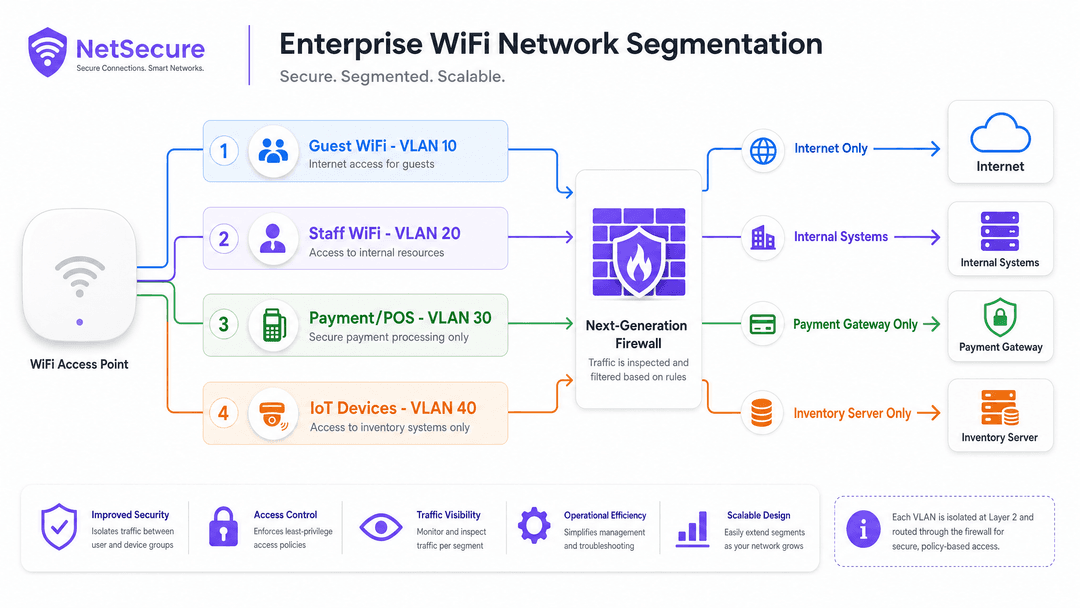
The fundamental mechanism for network segmentation is the Virtual Local Area Network (VLAN). Rather than deploying separate physical infrastructure for every user group, enterprise access points from vendors like Cisco Meraki, HPE Aruba, and Juniper Mist broadcast multiple SSIDs from a single radio. Each SSID is mapped to a distinct 802.1Q VLAN tag.
When a device connects to the Guest WiFi SSID, the access point tags its traffic (e.g., VLAN 10). When an employee connects to the Staff WiFi SSID, their traffic receives a different tag (e.g., VLAN 20). These tags persist across the switching infrastructure to the core firewall. The firewall acts as the absolute enforcement point, dropping any packets attempting to cross VLAN boundaries without an explicit permit rule.
Authentication Architecture
Network segmentation requires robust identity verification. A hidden SSID provides zero security against passive scanning.
For Staff WiFi, WPA3-Enterprise with IEEE 802.1X is the mandatory standard. This architecture replaces shared passwords with individual, revocable credentials verified against an identity provider like Microsoft Entra ID or Okta via a RADIUS server. If an employee departs, revoking their central identity instantly terminates their network access. For high-security environments, EAP-TLS replaces passwords with client certificates, eliminating the risk of credential phishing.
For Guest WiFi, authentication relies on a captive portal. This provides a legal demarcation point for terms and conditions and serves as the data ingestion layer for a WiFi Analytics platform.
Implementation Guide
Deploying a segmented network requires disciplined configuration across the wireless controller, switching fabric, and firewall.
- Define the VLAN Schema: Assign non-overlapping subnets to each VLAN. For example, 10.10.0.0/22 for guests and 10.20.0.0/24 for staff.
- Configure the Access Points: Map the Guest SSID to the guest VLAN and the Staff SSID to the corporate VLAN. Enable Client Isolation on the Guest SSID to block peer-to-peer communication between untrusted devices.
- Configure the Switching Fabric: Ensure all switch ports connecting to access points are configured as 802.1Q trunk ports that permit the required VLAN tags. Avoid using the native VLAN for management traffic.
- Deploy Firewall Policies: Implement a default-deny stance. The guest VLAN requires an explicit permit rule for HTTP/HTTPS traffic bound for the WAN interface, and a deny rule for all RFC 1918 internal IP ranges. The staff VLAN requires granular permit rules based on specific application requirements.
Best Practices
To maintain the integrity of your network segmentation, adhere to these operational standards.
- Enforce Client Isolation: Always enable client isolation on public SSIDs. This prevents a compromised device in a hotel lobby from scanning or attacking other devices connected to the same access point.
- Implement Bandwidth Throttling: Apply Quality of Service (QoS) policies to prioritise staff traffic. Enforce per-user bandwidth limits (e.g., 5 Mbps) on the guest network to prevent a single user from saturating the WAN uplink and degrading critical business applications.
- Limit SSID Sprawl: Broadcasting excessive SSIDs degrades radio performance due to management frame overhead. Restrict deployments to three or four SSIDs per access point. Use dynamic VLAN assignment via RADIUS if you require more granular logical separation.
- Standardise Configurations: Use cloud-managed templates to deploy consistent configurations across multi-site estates. A single misconfigured switch port set to access mode instead of trunk mode can silently bridge VLANs and expose the corporate network.
Troubleshooting & Risk Mitigation
The most severe risk in a segmented architecture is VLAN hopping caused by misconfiguration. If a trunk port is incorrectly provisioned, untagged guest traffic may default onto the corporate management VLAN.
Mitigate this risk through automated configuration auditing. Run regular penetration tests that attempt to route traffic from the guest network to internal IP addresses. If a ping reaches a corporate server from a guest IP, the segmentation has failed. Ensure all management interfaces (SSH, HTTPS) for network hardware reside on a dedicated, isolated management VLAN that is inaccessible from both guest and staff segments.
ROI & Business Impact
Network segmentation is a prerequisite for operating securely in modern Retail , Hospitality , and Transport environments. It satisfies PCI DSS Requirement 1.2, which mandates the isolation of cardholder data environments from untrusted networks, significantly reducing the scope and cost of compliance audits.
Beyond risk reduction, a segmented architecture transforms Guest WiFi from a pure operational cost into a secure data collection asset. By safely isolating public traffic, venues can deploy advanced captive portals to capture first-party data, drive loyalty program sign-ups, and generate measurable marketing ROI without compromising the security of their internal systems.
Key Definitions
VLAN (Virtual Local Area Network)
A logical subnetwork that groups a collection of devices on the same physical infrastructure as if they were on separate, isolated LANs.
VLANs are the foundational technology for separating guest traffic from staff traffic without requiring duplicate switches and access points.
802.1X Authentication
An IEEE standard for port-based network access control that provides an authentication mechanism to devices wishing to attach to a LAN or WLAN.
Replaces shared WiFi passwords with individual credentials, ensuring that only authorised staff devices can access the corporate VLAN.
Client Isolation
A wireless security feature that prevents devices connected to the same access point from communicating directly with one another.
Mandatory on Guest WiFi networks to prevent a malicious actor from launching attacks against other visitors' laptops or phones.
Captive Portal
A web page that a user of a public-access network is obliged to view and interact with before access is granted.
Used on the Guest VLAN to present terms of service and capture first-party marketing data before routing traffic to the internet.
RADIUS (Remote Authentication Dial-In User Service)
A networking protocol that provides centralised Authentication, Authorization, and Accounting (AAA) management for users who connect and use a network service.
The broker that validates a staff member's WiFi credentials against the corporate directory (like Microsoft Entra ID) before granting network access.
Zero-Touch Provisioning
A deployment method where network devices automatically download their configuration from a central management platform upon connecting to the internet.
Essential for large retail or hospitality chains to ensure consistent, error-free VLAN configurations across hundreds of sites.
PCI DSS Requirement 1.2
A compliance standard mandating the restriction of connections between untrusted networks and any system components in the cardholder data environment.
Proper network segmentation using VLANs is required to pass this audit and process credit card payments securely.
Quality of Service (QoS)
The use of mechanisms or technologies that work on a network to control traffic and ensure the performance of critical applications.
Used to prioritise Staff WiFi traffic (like POS transactions) over Guest WiFi traffic (like video streaming) during periods of high network congestion.
Worked Examples
A 200-room luxury hotel needs to provide WiFi for guests, corporate staff, and a new deployment of IoT-enabled door locks, while maintaining PCI DSS compliance for its property management system.
Deploy a four-VLAN architecture. Assign VLAN 10 for guests, VLAN 20 for corporate staff, VLAN 30 for the payment card environment (CDE), and VLAN 40 for IoT devices. The firewall must enforce strict access control lists (ACLs). Guest traffic is routed exclusively to the WAN. Staff traffic is permitted to the property management system. The CDE VLAN is isolated from all other VLANs, satisfying PCI DSS Requirement 1.2. The IoT VLAN is restricted to communicating only with the vendor's specific cloud server.
A retail chain with 500 locations needs to roll out secure staff and guest WiFi consistently, minimising the risk of local misconfigurations that could expose the corporate network.
Implement a template-based deployment using cloud-managed hardware like Cisco Meraki or HPE Aruba. Define a master configuration profile specifying the SSIDs, VLAN tags, and firewall rules. Use Zero-Touch Provisioning so that when a new access point is plugged in at a store, it automatically downloads the validated configuration. Manage the guest captive portal centrally via Purple to ensure a consistent brand experience and unified data collection.
Practice Questions
Q1. A stadium IT director proposes broadcasting eight different SSIDs to separate traffic for fans, ticketing, media, operations, VIPs, teams, vendors, and security. What is the architectural flaw in this approach?
Hint: Consider the impact of management frames on the radio frequency spectrum.
View model answer
Broadcasting eight SSIDs will cause severe co-channel interference and management frame overhead, drastically reducing the available airtime for actual data transmission. The correct approach is to broadcast a maximum of three to four SSIDs (e.g., Fan, Staff, Operations) and use 802.1X dynamic VLAN assignment via RADIUS to place different user groups (like media or VIPs) into their respective isolated VLANs upon authentication.
Q2. During a network audit at a hospital, you discover that a guest laptop was able to ping the IP address of an internal radiology server. The access points are configured with separate SSIDs for guests and staff. What is the most likely configuration error?
Hint: Think about how the traffic travels from the access point to the firewall.
View model answer
The most likely error is a VLAN hopping vulnerability caused by a misconfigured switch port. If the switch port connecting the access point is configured as an 'access' port on the native VLAN rather than an 802.1Q 'trunk' port, the VLAN tags applied by the access point may be stripped or ignored, dumping the guest traffic directly onto the untagged corporate network.
Q3. A retail chain wants to deploy Guest WiFi but is concerned that shoppers downloading large files will prevent the point-of-sale (POS) terminals from processing transactions quickly. How should the network be configured to prevent this?
Hint: Consider both bandwidth limits and traffic prioritisation.
View model answer
The network must implement two controls. First, apply per-user bandwidth throttling on the Guest VLAN (e.g., capping each device at 5 Mbps) to prevent any single user from saturating the link. Second, configure Quality of Service (QoS) policies on the router/firewall to prioritise traffic originating from the Staff/POS VLAN over traffic from the Guest VLAN, ensuring business-critical data is processed first during congestion.
Continue reading in this series
Hotel Guest WiFi Management: Integrating PMS, Portals, and Brand Standards
This technical guide details how to architect enterprise-grade hotel WiFi networks, focusing on VLAN segmentation, PMS integration for automated session management, and captive portal optimisation for GDPR-compliant data capture.
How to Set Up Guest WiFi: A Secure Enterprise Configuration Guide
This authoritative guide provides IT leaders and network architects with a definitive blueprint for deploying secure enterprise guest WiFi. It covers essential architecture, WPA3 migration, VLAN segmentation, and captive portal integration to protect internal systems while capturing compliant first-party data.
Museum and Gallery WiFi: Creating a Connected Visitor Experience
This guide provides a comprehensive technical blueprint for deploying high-density WiFi in museums and galleries. It covers network architecture, visitor engagement strategies, and how to leverage WiFi analytics to drive ROI and operational efficiency.
Got questions about your specific setup?
Our team works with venue operators, IT managers, and network engineers across 80,000 venues. Book a 20-minute call and we will show you how others like you solved it.