

Aumentar la productividad del personal filtrando anuncios y rastreadores intrusivos
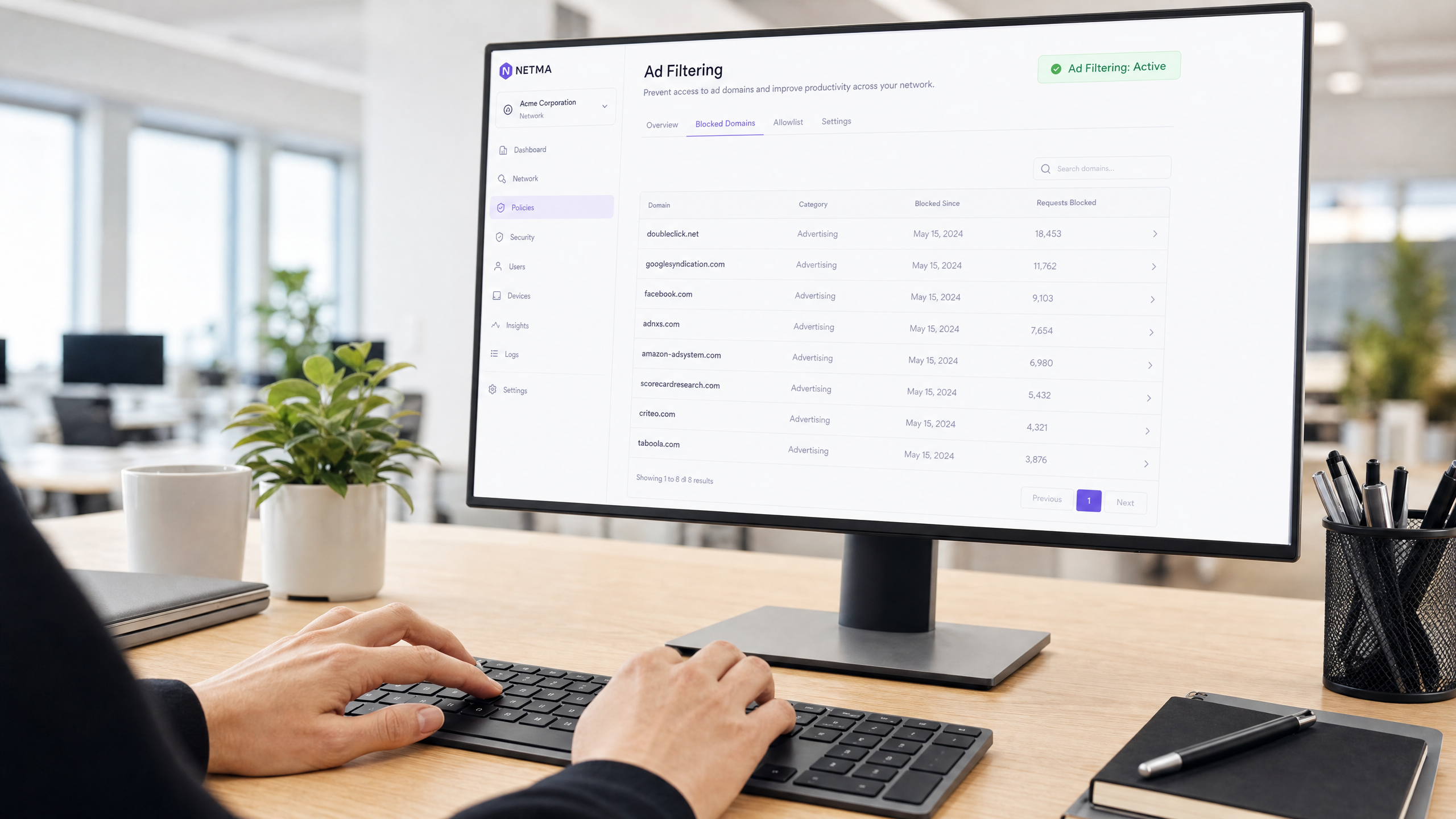
Esta guía de referencia técnica proporciona estrategias prácticas para que los gerentes de TI y los arquitectos de red implementen el filtrado a nivel de DNS en las redes corporativas. Explora cómo el bloqueo de anuncios y rastreadores intrusivos mitiga los riesgos de seguridad como el malvertising, al tiempo que recupera significativamente el ancho de banda y aumenta la productividad del personal.
Escuchar esta guía
Ver transcripción del podcast
Resumen Ejecutivo
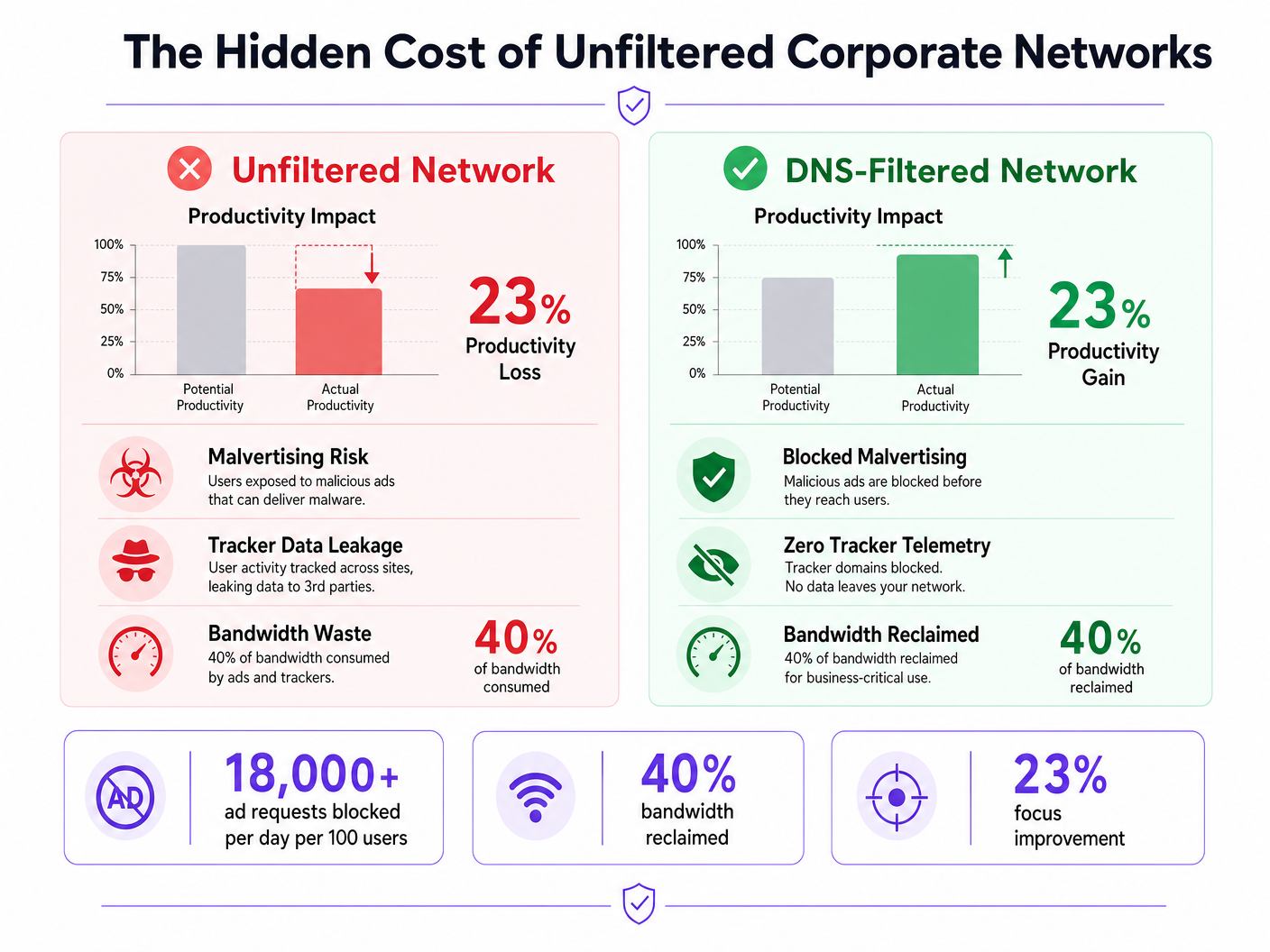
Las redes corporativas sin filtrar exponen a las organizaciones a vulnerabilidades de seguridad significativas y a pérdidas de productividad ocultas. Cuando los dispositivos del personal se conectan a internet, hasta el 40% de las consultas DNS pueden originarse en redes publicitarias, rastreadores de terceros y puntos finales de telemetría. Este tráfico de fondo no solo consume un ancho de banda valioso, sino que también introduce vectores de malvertising directamente en el entorno empresarial.
Para los gerentes de TI y arquitectos de red que operan en Hostelería , Comercio Minorista , Sanidad y Transporte , implementar el filtrado de anuncios y rastreadores a nivel de red es una intervención de alto ROI. Al interceptar las solicitudes en la capa DNS, las organizaciones pueden evitar la ejecución de cargas maliciosas, garantizar el cumplimiento de las regulaciones de privacidad de datos como GDPR y recuperar la productividad perdida. Esta guía detalla la arquitectura técnica del filtrado DNS, las estrategias de implementación neutrales respecto al proveedor y los impactos comerciales medibles para las redes empresariales modernas.
Análisis Técnico Detallado
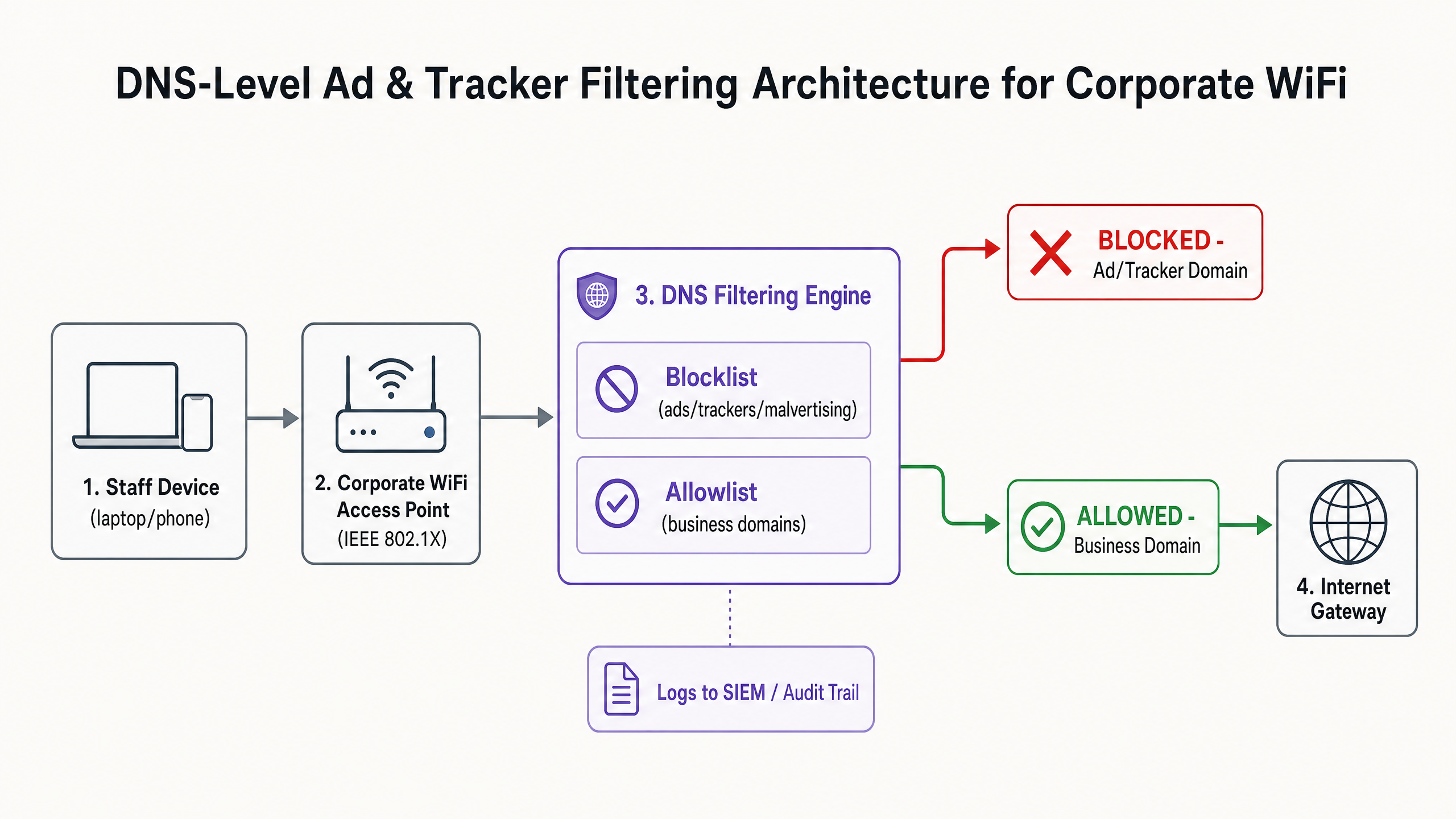
La base de una mitigación efectiva de anuncios y rastreadores es el filtrado a nivel de DNS. A diferencia de las extensiones basadas en navegador que operan en la capa de aplicación y requieren una gestión individual de los puntos finales, el filtrado DNS proporciona una aplicación a nivel de toda la infraestructura. Cuando un dispositivo —ya sea gestionado por la empresa o Bring Your Own Device (BYOD)— intenta resolver un dominio, el resolvedor DNS verifica la consulta con listas de bloqueo de inteligencia de amenazas seleccionadas.
Arquitectura y Flujo
El motor de filtrado se sitúa entre el punto de acceso y la puerta de enlace a internet. Si un dominio solicitado coincide con una red publicitaria conocida (por ejemplo, doubleclick.net) o un rastreador, el resolvedor devuelve una respuesta nula (0.0.0.0) o un error NXDOMAIN. El contenido malicioso o que distrae nunca llega al punto final.
Inteligencia de Amenazas y Listas de Bloqueo
Una arquitectura de filtrado robusta se basa en inteligencia de amenazas dinámica. Las listas de bloqueo estáticas son insuficientes contra dominios de malvertising que rotan rápidamente. Las implementaciones empresariales suelen agregar múltiples fuentes, incluidas listas de código abierto (como EasyList y EasyPrivacy) y fuentes de amenazas comerciales. Estas listas deben categorizar los dominios con precisión para evitar falsos positivos que podrían interrumpir aplicaciones críticas para el negocio.
Gestión de DNS Cifrado (DoH/DoT)
Los sistemas operativos y navegadores modernos recurren cada vez más a DNS sobre HTTPS (DoH) o DNS sobre TLS (DoT) por defecto, cifrando las consultas a resolvedores externos como Cloudflare (1.1.1.1) o Google (8.8.8.8). Esto elude el filtrado DNS local. Para mantener el control, los arquitectos de red deben configurar los firewalls perimetrales para bloquear el puerto TCP/UDP saliente 853 (DoT) e interceptar o bloquear las direcciones IP conocidas de proveedores de DoH, obligando a los clientes a recurrir al resolvedor local proporcionado.
Guía de Implementación
La implementación del filtrado DNS requiere un enfoque por fases para evitar interrupciones en las operaciones. Una implementación repentina y agresiva de una lista de bloqueo inevitablemente romperá aplicaciones SaaS legítimas y generará tickets de soporte.
Fase 1: Segmentación de Red y Autenticación
Antes de alterar la resolución DNS, asegúrese de que la red del personal esté lógicamente separada de los entornos de WiFi de Invitados e IoT utilizando VLANs. Implemente WPA3-Enterprise con autenticación IEEE 802.1X. Esto asegura que solo los usuarios autenticados accedan al SSID corporativo y permite la aplicación de políticas por usuario. Si todavía depende de claves precompartidas (PSK), la actualización de su modelo de autenticación es el paso previo. Para obtener más información sobre la modernización de su infraestructura, revise nuestra guía sobre Wi-Fi de Oficina: Optimice su Red Wi-Fi de Oficina Moderna .
Fase 2: Implementación del Resolvedor
Seleccione una arquitectura de filtrado DNS que se alinee con sus capacidades operativas:
- Dispositivo Local: Ofrece la latencia más baja y asegura que todos los registros de consultas permanezcan dentro de su infraestructura, crucial para requisitos estrictos de soberanía de datos.
- Servicio Basado en la Nube: Transfiere el mantenimiento de la inteligencia de amenazas al proveedor, ideal para entornos de comercio minorista u hostelería distribuidos.
- Modelo Híbrido: Utiliza un reenviador local para la resolución DNS interna mientras enruta las consultas externas a un servicio en la nube filtrado.
Fase 3: Modo Solo Monitorización
Implemente el motor de filtrado en modo solo monitorización durante 14 a 28 días. No bloquee ningún tráfico. En su lugar, ingiera los registros de consultas en su SIEM para establecer una línea de base. Analice los dominios más bloqueados en relación con sus aplicaciones comerciales.
Fase 4: Configuración y Aplicación de la Lista Blanca
Basándose en la fase de monitorización, construya una lista blanca explícita para los dominios de terceros necesarios utilizados por su CRM, ERP o pasarelas de pago. Una vez verificada la lista blanca, cambie el motor al modo de aplicación. Asegúrese de mantener un registro de auditoría claro de todos los cambios de configuración y eventos bloqueados.
Mejores Prácticas
Para garantizar una implementación exitosa y mantener la integridad de la red, siga las siguientes mejores prácticas neutrales respecto al proveedor:
- Comunique Antes de Aplicar: Notifique al personal antes de activar el filtrado. Enfóquelo como una mejora de seguridad y rendimiento en lugar de una medida de vigilancia de RRHH. Proporcione un proceso claro, respaldado por SLA, para que los usuarios soliciten el desbloqueo de dominios.
- Imponer Asignación DNS por DHCP: Evite que los usuarios configuren manualmente servidores DNS alternativos imponiendo el uso del resolvedor proporcionado por DHCP.
- Revise Regularmente la Lista Blanca: Las aplicaciones comerciales evolucionan. Realice revisiones trimestrales de su lista blanca para eliminar dominios obsoletos y evalúenuevos requisitos.
- Integración con la protección de endpoints: El filtrado DNS es una defensa perimetral. Debe combinarse con soluciones robustas de Detección y Respuesta de Endpoints (EDR) para proteger contra amenazas introducidas a través de USB o archivos adjuntos de correo electrónico.
Resolución de problemas y mitigación de riesgos
El riesgo más significativo durante la implementación es el bloqueo excesivo, que impacta directamente en las operaciones comerciales.
Falsos positivos
Cuando un servicio legítimo no se carga, a menudo depende de un dominio de seguimiento en segundo plano para la autenticación o el análisis.
- Mitigación: Capacite al servicio de asistencia técnica con capacidades de omisión temporal o un flujo de trabajo de lista de permitidos optimizado. Utilice los registros de consulta para identificar el dominio bloqueado específico que causa el fallo.
Omisión de DNS cifrado
Los usuarios técnicamente competentes o el malware sofisticado pueden intentar omitir el resolvedor local utilizando DoH/DoT.
- Mitigación: Implemente reglas estrictas de firewall que bloqueen el tráfico saliente a resolvedores DoH conocidos. Supervise los registros del firewall en busca de intentos de conexión repetidos al puerto 853.
Interferencia en la red de invitados
La aplicación de políticas agresivas de filtrado para el personal a la red de invitados puede degradar la experiencia del visitante.
- Mitigación: Mantenga un estricto aislamiento de VLAN. Aplique un perfil de filtrado más ligero y centrado en la seguridad (bloqueando malware y contenido para adultos) a la red de invitados, gestionado a través de una plataforma dedicada de WiFi Analytics .
ROI e impacto empresarial
El impacto empresarial del filtrado a nivel de red va más allá de la seguridad; es un impulsor medible de la productividad.
Recuperación de ancho de banda
Al eliminar hasta el 40% de las solicitudes innecesarias en segundo plano, las organizaciones recuperan un ancho de banda significativo. Esto reduce la necesidad de costosas actualizaciones de circuitos WAN y mejora el rendimiento de las aplicaciones críticas en la nube.
Aumento de la productividad
Reducir la exposición a anuncios intrusivos y malvertising minimiza las interrupciones cognitivas. Aunque las cifras exactas varían, mitigar estas distracciones recupera cientos de horas de tiempo de trabajo concentrado anualmente en toda la empresa. Para estrategias similares aplicadas a entornos educativos, consulte nuestra guía sobre Minimising Student Distractions with Network-Level Ad Blocking y la versión en español Minimizar las distracciones de los estudiantes con el bloqueo de anuncios a nivel de red .
Cumplimiento y reducción de riesgos
El filtrado de rastreadores a nivel de red demuestra un cumplimiento proactivo con marcos de protección de datos como GDPR y PCI DSS. Al prevenir la exfiltración de datos y bloquear las cargas útiles de malvertising antes de que lleguen al endpoint, las organizaciones reducen significativamente su exposición al riesgo y los posibles costes de respuesta a incidentes.
Escuche el informe
Para una inmersión más profunda en las estrategias de implementación, escuche nuestro informe de audio:
Definiciones clave
DNS-Level Filtering
The process of blocking access to specific domains by intercepting DNS queries and returning a null response or redirect, preventing the device from connecting to the target server.
Used by IT teams to enforce security and productivity policies across an entire network without requiring endpoint software.
Malvertising
The use of online advertising to distribute malware. Malicious code is injected into legitimate advertising networks and displayed on trusted websites.
A primary vector for ransomware and spyware, making ad blocking a critical cybersecurity control, not just a productivity tool.
DNS over HTTPS (DoH)
A protocol for performing remote Domain Name System resolution via the HTTPS protocol, encrypting the data between the DoH client and the DoH-based DNS resolver.
While improving user privacy, DoH can bypass corporate DNS filtering policies if not actively managed and blocked at the firewall.
IEEE 802.1X
An IEEE Standard for port-based Network Access Control (PNAC), providing an authentication mechanism to devices wishing to attach to a LAN or WLAN.
Essential for enterprise WiFi security, replacing shared passwords (PSKs) with individual user credentials or certificates.
Telemetry
The automatic recording and transmission of data from remote or inaccessible sources to an IT system in a different location for monitoring and analysis.
Often generated by software and devices tracking user behaviour; blocking unnecessary telemetry reclaims bandwidth and protects privacy.
False Positive
An error in data reporting in which a test result improperly indicates presence of a condition, such as when a legitimate business domain is incorrectly categorised as malware or advertising.
The main cause of operational disruption during DNS filtering rollouts, mitigated by proper allowlisting.
SIEM (Security Information and Event Management)
A solution that provides real-time analysis of security alerts generated by applications and network hardware.
DNS query logs should be exported to the SIEM to identify compromised devices attempting to contact command-and-control servers.
Allowlist
A mechanism that explicitly allows access to specific entities (domains, IP addresses) while denying access to all others by default, or overriding a broader blocklist.
Critical for ensuring third-party integrations (like payment gateways or CRMs) function correctly behind a strict DNS filter.
Ejemplos prácticos
A 200-room hotel needs to secure its staff network (used by reception, housekeeping, and management) against malvertising, while ensuring the property management system (PMS) remains fully operational. The current network uses a single WPA2-PSK SSID for all staff.
- Upgrade the staff network to WPA3-Enterprise using IEEE 802.1X authentication to ensure individual accountability and encryption.
- Segment the staff network onto a dedicated VLAN, isolated from the guest WiFi.
- Deploy a cloud-based DNS filtering service with a local forwarder.
- Run the filter in monitor-only mode for 14 days.
- Analyze logs to identify all domains accessed by the PMS (e.g., third-party booking engine APIs, payment gateways) and add them to the allowlist.
- Enforce blocking for 'Advertising', 'Trackers', and 'Malware' categories.
- Block outbound TCP/UDP port 853 at the firewall to prevent DoT bypass.
A retail chain is experiencing high latency on its point-of-sale (POS) terminals during peak hours. Packet analysis reveals 35% of DNS traffic consists of tracking and telemetry requests from staff BYOD devices connected to the corporate network.
- Implement DNS-level filtering targeting 'Trackers' and 'Advertising' categories.
- Ensure POS terminals are on a strictly isolated VLAN with restricted outbound internet access (PCI DSS Requirement 1.3).
- Route the BYOD staff VLAN through the DNS filtering engine.
- Communicate the change to staff, emphasising the performance benefits for the POS systems.
- Monitor bandwidth utilisation post-enforcement to quantify the reclaimed capacity.
Preguntas de práctica
Q1. Your organisation is implementing DNS filtering. During the monitor-only phase, you notice that a high volume of requests to 'api.segment.io' are being flagged under the 'Trackers' category. This domain is used by your marketing team's analytics dashboard. How should you proceed?
Sugerencia: Consider the impact of blocking versus the business requirement for the tool.
Ver respuesta modelo
Add 'api.segment.io' to the explicit allowlist before moving to enforcement mode. While it is technically a tracker, it is a sanctioned business application. Failing to allowlist it will break the marketing dashboard and generate support tickets.
Q2. After deploying DNS filtering, you observe that devices using the latest version of a popular web browser are still loading ads and resolving domains that should be blocked. Older devices are filtered correctly. What is the most likely cause?
Sugerencia: Modern browsers often try to encrypt their DNS queries.
Ver respuesta modelo
The modern browser has likely enabled DNS over HTTPS (DoH) by default, bypassing the local DNS resolver and communicating directly with an external provider (like Cloudflare). You must configure the firewall to block or intercept known DoH IP addresses to force the browser to fall back to the local filtered DNS.
Q3. A venue operations director asks if they can use the same aggressive ad-blocking DNS policy on the public Guest WiFi as they do on the corporate Staff WiFi to save bandwidth. What is the architectural recommendation?
Sugerencia: Consider the user experience and the different risk profiles of staff versus guests.
Ver respuesta modelo
No. The Staff and Guest networks must remain on isolated VLANs with separate DNS policies. Applying aggressive corporate filtering to the Guest WiFi will likely break captive portals, cause false positives on diverse guest devices, and lead to a poor user experience. Guest networks should use a lighter filtering profile focused strictly on malware and legal compliance.