

Minimizar las distracciones de los estudiantes con el bloqueo de anuncios a nivel de red
Esta guía de referencia técnica autorizada detalla la arquitectura, la implementación y el impacto empresarial del bloqueo de anuncios a nivel de red en entornos educativos. Proporciona a los gerentes de TI y a los arquitectos de red estrategias prácticas para recuperar ancho de banda, reforzar el cumplimiento y eliminar los riesgos de publicidad maliciosa.
Escuchar esta guía
Ver transcripción del podcast
Resumen Ejecutivo
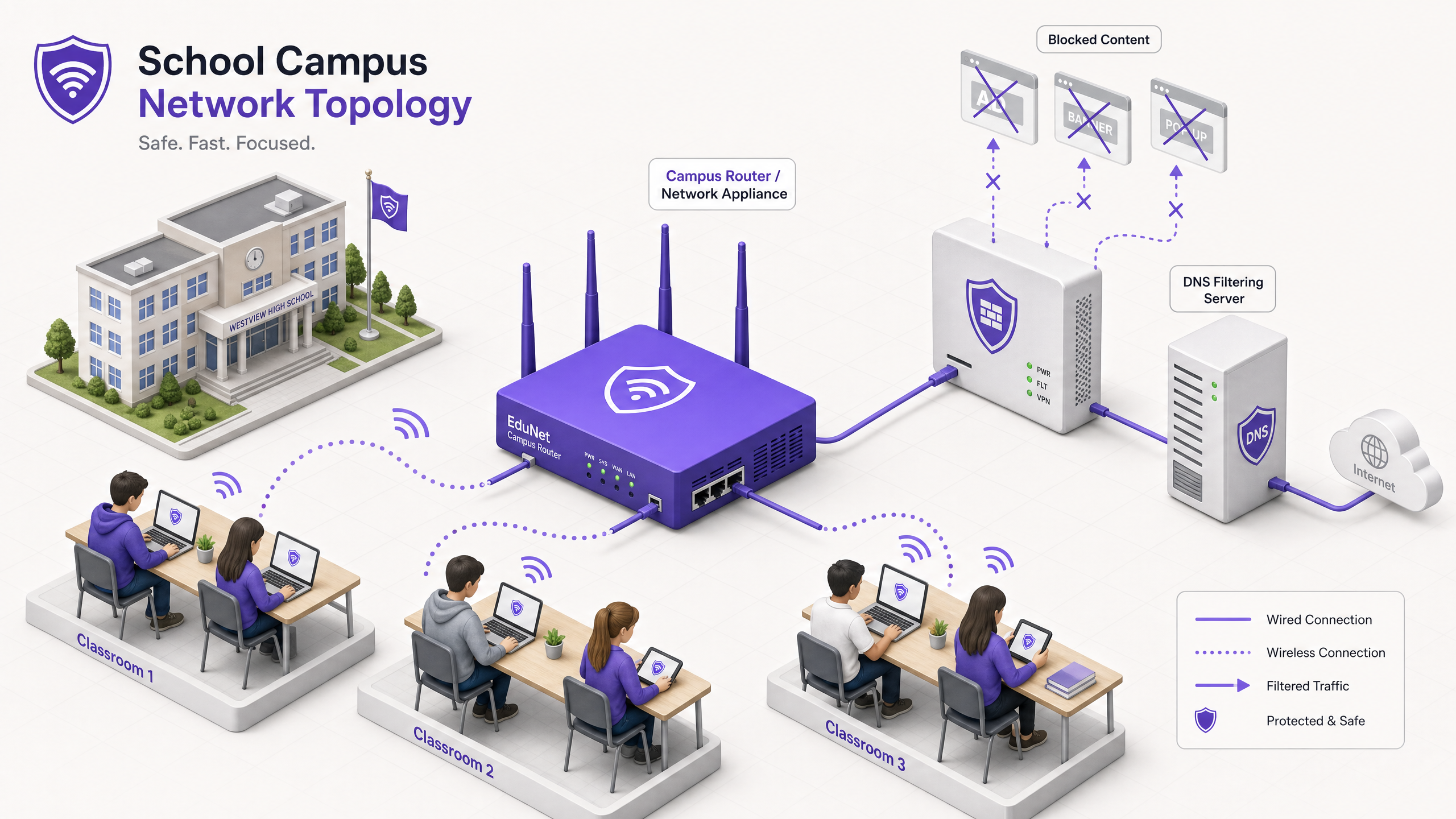
Para los directores de TI y arquitectos de red que gestionan entornos educativos, la proliferación de dispositivos ha creado una tormenta perfecta de consumo de ancho de banda, riesgos de seguridad y lagunas en el cumplimiento. Con los estudiantes trayendo un promedio de 2,5 dispositivos al campus, la gestión del filtrado basado en puntos finales ya no es una estrategia operativa viable.
El bloqueo de anuncios a nivel de red representa un cambio fundamental de la gestión de puntos finales al control de la capa de infraestructura. Al interceptar el tráfico a nivel de DNS o proxy antes de que llegue al dispositivo cliente, los equipos de TI pueden eliminar unilateralmente hasta el 30% del consumo de ancho de banda no educativo, mitigar los riesgos de publicidad maliciosa y hacer cumplir la normativa de protección de datos como GDPR y COPPA.
Esta guía de referencia técnica describe la arquitectura, la metodología de implementación y la medición del ROI para la implementación del bloqueo de anuncios a nivel de red en campus de K-12 y universitarios, basándose en implementaciones reales en entornos de alta densidad.
Escuche nuestro podcast complementario para una visión estratégica:
Análisis Técnico Detallado
La implementación del bloqueo de anuncios en la capa de red requiere un enfoque arquitectónico por capas para manejar la diversidad del tráfico web moderno, particularmente la ubicuidad de HTTPS y los protocolos DNS cifrados emergentes.
Arquitectura de Filtrado a Nivel de DNS
La capa fundamental del bloqueo de anuncios en red es el filtrado DNS. Cuando un dispositivo cliente intenta resolver un dominio asociado con redes publicitarias, telemetría o seguimiento, el resolvedor DNS de la red intercepta la consulta y la compara con una lista de bloqueo dinámica.
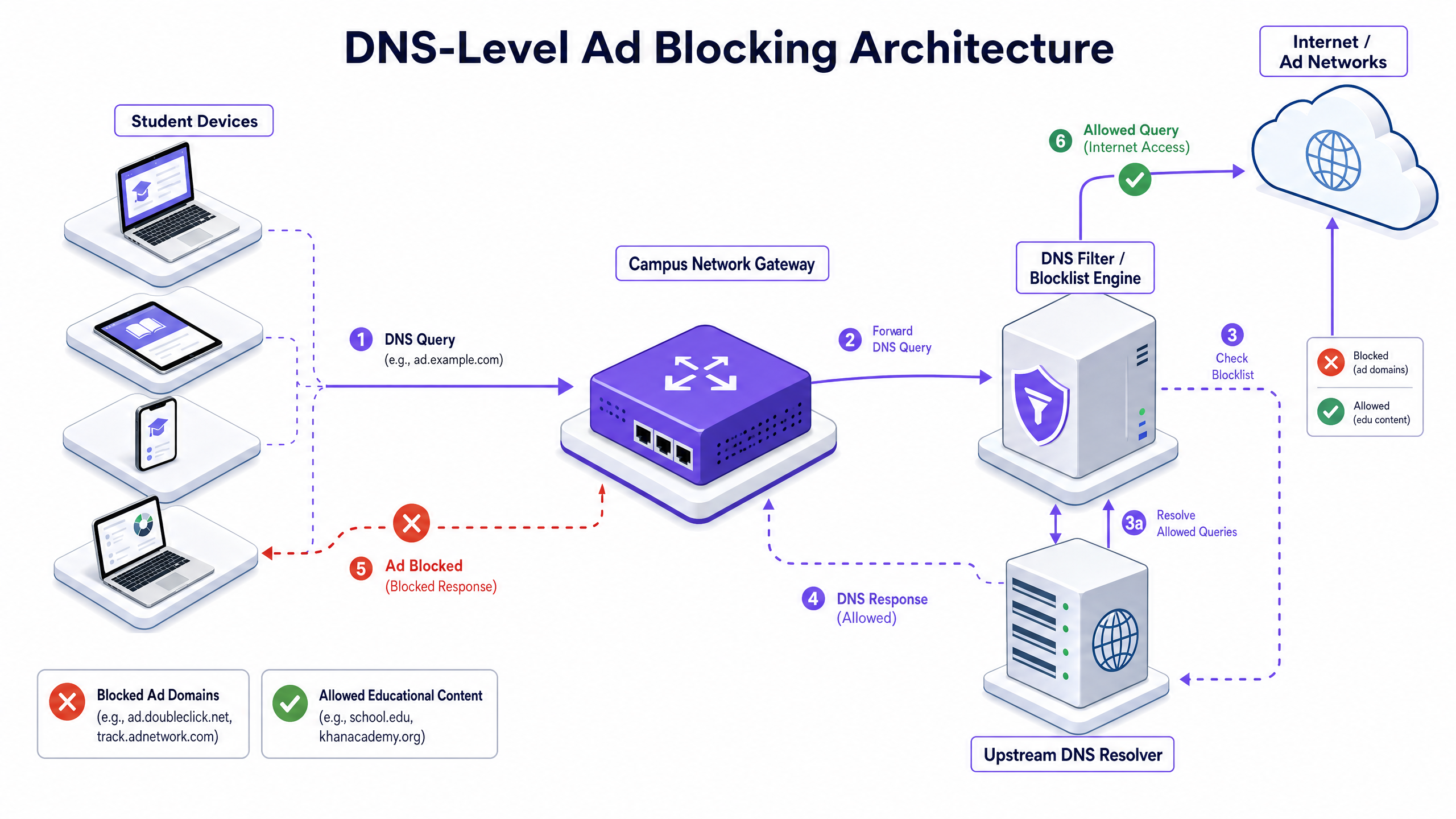
Este enfoque es altamente eficiente porque evita que la conexión se establezca. La carga útil del anuncio nunca se descarga y el script de seguimiento nunca se ejecuta. Sin embargo, las implementaciones modernas deben tener en cuenta DNS-over-HTTPS (DoH) y DNS-over-TLS (DoT). Si los dispositivos cliente omiten el resolvedor local utilizando DNS cifrado, la capa de filtrado se elude. Los arquitectos de red deben configurar los firewalls perimetrales para bloquear los puntos finales DoH/DoT conocidos (como 8.8.8.8 sobre el puerto 443) para forzar la vuelta al DNS estándar (puerto 53), o implementar una solución de puerta de enlace que inspeccione de forma nativa el tráfico DoH.
Inspección de Proxy y SSL
Si bien el filtrado DNS maneja la mayor parte del tráfico de anuncios, el proxy HTTP/HTTPS transparente proporciona un control granular sobre URL específicas en lugar de dominios completos. Dado que la gran mayoría del tráfico web está cifrado, la implementación de la inspección SSL (descifrado Man-in-the-Middle) es necesaria para la inspección profunda de paquetes.
Esto requiere implementar un certificado raíz de confianza en todos los dispositivos gestionados. Si bien es una práctica estándar en entornos empresariales, la inspección SSL en entornos educativos requiere una definición cuidadosa para evitar descifrar tráfico sensible (por ejemplo, portales bancarios o de atención médica) y debe alinearse con la política de uso aceptable de la organización.
Integración con Control de Acceso a la Red (NAC)
El filtrado efectivo requiere políticas conscientes de la identidad. La integración con IEEE 802.1X permite a la red aplicar políticas de filtrado diferenciadas basadas en el usuario autenticado o el perfil del dispositivo. Un estudiante que inicia sesión en la red a través de WPA3-Enterprise recibe una política restrictiva, mientras que un miembro del personal recibe una política diferente, y un visitante en la red Guest WiFi recibe una política de cumplimiento básica.
Guía de Implementación
La implementación del bloqueo de anuncios a nivel de red requiere un enfoque por fases para evitar interrumpir las actividades educativas legítimas.
Fase 1: Auditoría de Tráfico y Establecimiento de Línea Base
Antes de implementar cualquier regla de bloqueo, despliegue la solución de filtrado en modo de monitoreo pasivo (solo registro) durante 14-21 días. Esto establece una línea base de los volúmenes y la categorización de las consultas DNS actuales. Utilice estos datos para identificar las principales redes de anuncios y dominios de seguimiento que actualmente consumen ancho de banda. Esta línea base es fundamental para el cálculo posterior del ROI y la elaboración de informes de WiFi Analytics .
Fase 2: Implementación Piloto
Seleccione un segmento de red representativo —como una única VLAN de estudiantes o un edificio específico— para la fase piloto. Aplique las políticas iniciales de la lista de bloqueo dirigidas a redes de anuncios y rastreadores conocidos.
Paso Crucial: Establezca un proceso de solicitud de lista blanca de respuesta rápida. Los profesores inevitablemente encontrarán falsos positivos donde el contenido educativo legítimo está alojado en dominios categorizados como publicidad o seguimiento. El servicio de asistencia de TI debe estar preparado para evaluar y añadir dominios a la lista blanca rápidamente para mantener la confianza de las partes interesadas.
Fase 3: Despliegue Completo y Ajuste de Políticas
Expanda el despliegue a todos los segmentos de red relevantes, aplicando políticas diferenciadas mediante la integración 802.1X. Monitoree los registros continuamente durante las primeras 48 horas para identificar cualquier problema sistémico.
Asegúrese de que el despliegue se alinee con políticas de seguridad más amplias, como mantener un Explain what is audit trail for IT Security in 2026 para demostrar el cumplimiento de los requisitos de seguridad.
Mejores Prácticas
- Defensa por Capas: No confíe únicamente en el filtrado DNS. Combínelo con la gestión de puntos finales para dispositivos propiedad de la escuela y reglas de firewall robustas para bloquear intentos de elusión (por ejemplo, protocolos VPN, DoH).
- Seguridad Estandarizada: Asegúrese de que todas las nuevas implementaciones inalámbricas utilicen WPA3 para proteger contra el robo de credenciales, que es una vector para estudiantes que intentan acceder a redes del personal para eludir el filtrado.
- Alineación con la Conformidad: En el Reino Unido, asegúrese de que sus políticas de filtrado cumplan con los requisitos básicos descritos en la Conformidad IWF para Redes WiFi Públicas en el Reino Unido (o Cumplimiento IWF para redes WiFi públicas en el Reino Unido para operaciones de habla hispana).
- Revisión Regular: Las redes publicitarias cambian constantemente de dominio para evadir las listas de bloqueo. Asegúrese de que su solución de filtrado utilice fuentes de inteligencia de amenazas actualizadas dinámicamente en lugar de listas estáticas.
Solución de Problemas y Mitigación de Riesgos
| Modo de Fallo | Causa Raíz | Estrategia de Mitigación |
|---|---|---|
| Bypass a través de DNS Cifrado | Estudiantes configurando navegadores para usar DoH/DoT (p. ej., Cloudflare, Google DNS). | Bloquee las direcciones IP de proveedores DoH conocidos en el firewall; imponga la resolución DNS local a través de DHCP. |
| Bypass a través de VPN | Uso de clientes VPN comerciales o extensiones de navegador. | Bloquee los protocolos VPN comunes (IPsec, OpenVPN, WireGuard) y los dominios de proveedores VPN conocidos en las VLAN de estudiantes. |
| Bloqueo Excesivo (Falsos Positivos) | Filtrado heurístico agresivo que bloquea contenido educativo. | Implemente un proceso de solicitud de lista blanca optimizado y respaldado por SLA para el personal docente; pruebe las políticas a fondo antes del despliegue completo. |
| Fuga de IPv6 | Filtrado aplicado solo a IPv4, permitiendo el bypass a través de la resolución DNS de IPv6. | Asegúrese de que la solución de filtrado y la infraestructura de red soporten y apliquen completamente las políticas en toda la pila IPv6. |
ROI e Impacto Empresarial
El caso de negocio para el bloqueo de anuncios a nivel de red va más allá de la protección; ofrece eficiencias operativas medibles.
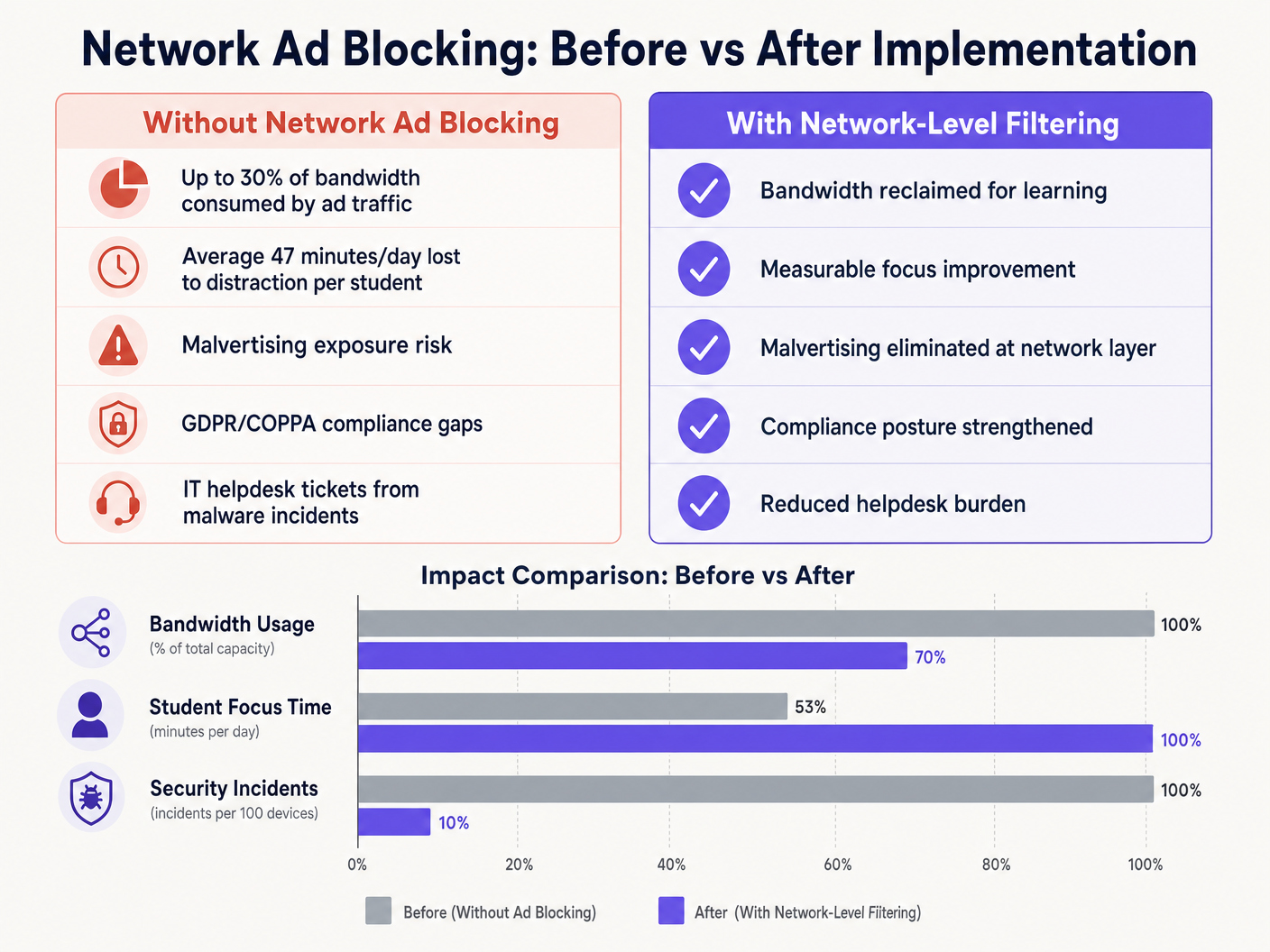
Al eliminar las cargas útiles de anuncios y los scripts de seguimiento en el borde de la red, los lugares suelen recuperar entre el 15% y el 30% de su ancho de banda total. Esta capacidad recuperada aplaza la necesidad de costosas actualizaciones de circuitos y mejora el rendimiento de las aplicaciones críticas en la nube. Además, el bloqueo de dominios de publicidad maliciosa en la capa DNS reduce significativamente el volumen de incidentes de malware, disminuyendo directamente el volumen de tickets de soporte de TI y los costes de remediación.
Ya sea implementando en una escuela, optimizando Wi Fi de Oficina: Optimice su Red Wi-Fi Moderna de Oficina , o gestionando entornos de alta densidad en Retail , Healthcare , Hospitality , o Transport , comprender la capa física, como Frecuencias Wi Fi: Una Guía de Frecuencias Wi-Fi en 2026 , y asegurar la capa lógica a través del filtrado DNS son componentes esenciales de la arquitectura de red moderna.
Definiciones clave
DNS Filtering
The process of using the Domain Name System to block malicious websites and filter out harmful or unwanted content by returning a null IP address for blocked domains.
The primary mechanism for network-level ad blocking, operating upstream of client devices.
DNS-over-HTTPS (DoH)
A protocol for performing remote Domain Name System resolution via the HTTPS protocol, encrypting the data between the DoH client and the DoH-based DNS resolver.
A common method used to bypass local network DNS filtering policies.
Malvertising
The use of online advertising to spread malware, often through legitimate advertising networks without the publisher's knowledge.
A key security risk mitigated by network-level ad blocking.
SSL Inspection
The process of intercepting, decrypting, and inspecting HTTPS traffic for malicious content or policy violations before re-encrypting and forwarding it.
Required for deep packet inspection of encrypted web traffic, though complex to deploy in BYOD environments.
IEEE 802.1X
An IEEE Standard for port-based Network Access Control (PNAC), providing an authentication mechanism to devices wishing to attach to a LAN or WLAN.
Used to identify users and devices to apply differentiated filtering policies.
WPA3-Enterprise
The latest generation of Wi-Fi security, providing enhanced cryptographic strength and protecting against dictionary attacks.
Essential for securing campus networks and ensuring users cannot easily spoof identities to bypass filtering.
VLAN (Virtual Local Area Network)
A logical subnetwork that groups a collection of devices from different physical LANs.
Used to segment student, staff, and guest traffic to apply different security and filtering policies.
Transparent Proxy
An intermediary system that sits between a user and a content provider, intercepting requests without requiring client-side configuration.
Used to enforce URL-level filtering policies without deploying endpoint agents.
Ejemplos prácticos
A large multi-academy trust with 15,000 students across 12 campuses needs to implement ad blocking. They currently use a mix of school-issued Chromebooks and a BYOD policy for sixth-form students. The network is struggling with bandwidth congestion during peak hours.
- Deploy a cloud-managed DNS filtering solution across all 12 campuses, pointing all DHCP-assigned DNS settings to the cloud resolvers.
- Configure the firewall to block outbound port 53 traffic to any external IP other than the approved cloud resolvers to prevent manual DNS overrides.
- Block known DoH provider IPs at the firewall.
- Integrate the DNS filtering solution with the trust's Active Directory via 802.1X to apply different filtering policies: a strict policy for the Chromebook VLAN and a slightly more permissive policy for the BYOD VLAN, while maintaining core ad and malvertising blocking across both.
A university campus IT team receives complaints from the Computer Science faculty that the new network ad blocking solution is preventing access to legitimate development tools and APIs used in coursework.
- Review the DNS query logs for the Computer Science VLAN to identify the specific domains being blocked.
- Create a dedicated policy group for the Computer Science faculty and student VLANs.
- Implement a scoped whitelist for the required development domains, applying it only to the Computer Science policy group to maintain security across the rest of the campus.
- Establish a fast-track IT ticketing category specifically for 'Educational Content Blocking' to handle future requests with a 2-hour SLA.
Preguntas de práctica
Q1. You have deployed DNS filtering across the campus network, but monitoring shows that a significant number of student BYOD devices are still loading ads and accessing restricted content. What is the most likely cause, and how should you address it?
Sugerencia: Consider how modern browsers handle DNS queries independently of the operating system's network settings.
Ver respuesta modelo
The most likely cause is that modern browsers on the BYOD devices are using DNS-over-HTTPS (DoH) to bypass the local network's DNS resolver. To address this, configure the perimeter firewall to block known DoH provider IP addresses and drop outbound traffic on port 53 that does not originate from the approved campus DNS resolvers. This forces the devices to fall back to the local, filtered DNS infrastructure.
Q2. The school's leadership team wants to block all social media and advertising networks globally across the entire campus to ensure maximum compliance. As the IT Director, why might you advise against a single global policy, and what architecture would you propose instead?
Sugerencia: Consider the different user groups on campus and their specific needs.
Ver respuesta modelo
A single global policy will inevitably cause operational friction. Staff may need access to social media for communications or marketing, and certain ad networks may be required for legitimate educational tools. Instead, propose a segmented architecture using 802.1X integration to apply identity-aware policies. Create distinct VLANs and policy groups for Students, Staff, and Guests, applying strict blocking to students while allowing necessary access for staff.
Q3. Before switching the new DNS filtering solution into active enforcement mode, what critical operational process must be established with the IT helpdesk?
Sugerencia: Think about the impact of false positives on teaching staff.
Ver respuesta modelo
A rapid-response whitelist request process must be established. Heuristic filtering will inevitably block some legitimate educational resources (false positives). Without a fast, SLA-backed process for teachers to request domains be unblocked, the deployment will disrupt learning and cause stakeholder resistance.