
Autenticación de certificados WiFi: Cómo los certificados digitales aseguran las redes inalámbricas
Esta guía autorizada detalla cómo los certificados digitales X.509 y EAP-TLS reemplazan las contraseñas vulnerables en las redes WiFi empresariales. Proporciona a los arquitectos de red y a los gerentes de TI pasos prácticos de implementación, diseño de arquitectura PKI y análisis de ROI empresarial.
Escuchar esta guía
Ver transcripción del podcast
Resumen Ejecutivo
La era de la clave precompartida (PSK) en las redes inalámbricas empresariales ha terminado funcionalmente. Para los gerentes de TI, arquitectos de red y CTOs que supervisan entornos corporativos, establecimientos de hostelería y cadenas minoristas, confiar en contraseñas compartidas introduce un riesgo inaceptable, una sobrecarga operativa y fallos de cumplimiento. La autenticación de certificados WiFi —específicamente a través de IEEE 802.1X y EAP-TLS— reemplaza las contraseñas predecibles con certificados digitales X.509 criptográficamente seguros.
Al vincular matemáticamente una identidad a un dispositivo específico, la autenticación de certificados permite la autenticación mutua, el acceso a la red de confianza cero (ZTNA) y la revocación instantánea. Esta guía proporciona una referencia técnica definitiva sobre cómo los certificados digitales aseguran las redes inalámbricas, detallando la infraestructura de clave pública (PKI) subyacente, la arquitectura de implementación y el impacto empresarial concreto de la transición a un modelo basado en certificados. Para las organizaciones que utilizan Guest WiFi junto con redes corporativas, segmentar adecuadamente estos entornos manteniendo una gestión de identidad robusta es un mandato de cumplimiento crítico.
Análisis Técnico Detallado: La Arquitectura de la Confianza
Certificados X.509 y Jerarquía PKI
En el núcleo de la autenticación de certificados WiFi se encuentra el certificado digital X.509. A diferencia de una contraseña, un certificado no es un secreto compartido. Se basa en criptografía asimétrica: una clave pública incrustada en el certificado y una clave privada almacenada de forma segura en el hardware del dispositivo (como un TPM o Secure Enclave).
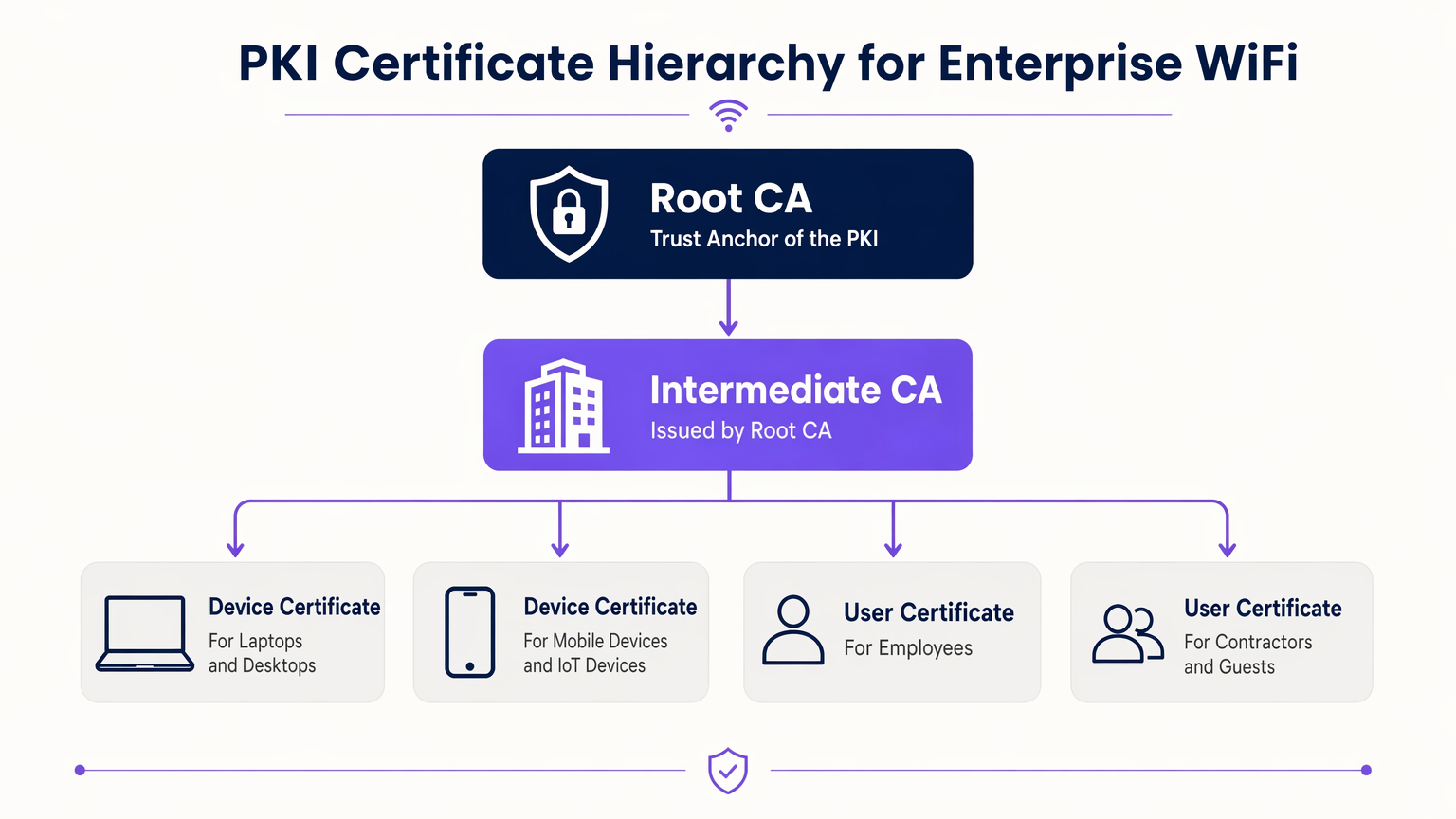
El modelo de confianza que rige estos certificados es la Infraestructura de Clave Pública (PKI). En un entorno empresarial, una jerarquía PKI de múltiples niveles es la mejor práctica:
- Autoridad de Certificación Raíz (CA): El ancla de confianza definitiva, mantenida fuera de línea para evitar compromisos.
- CA Intermedia: Emitida por la CA Raíz, este servidor permanece en línea para emitir y revocar activamente certificados para las entidades finales.
- Certificados de Entidad Final: Desplegados en dispositivos cliente (portátiles, teléfonos, sensores IoT) e infraestructura (servidores RADIUS, Access Points).
Flujo de Autenticación 802.1X y EAP-TLS
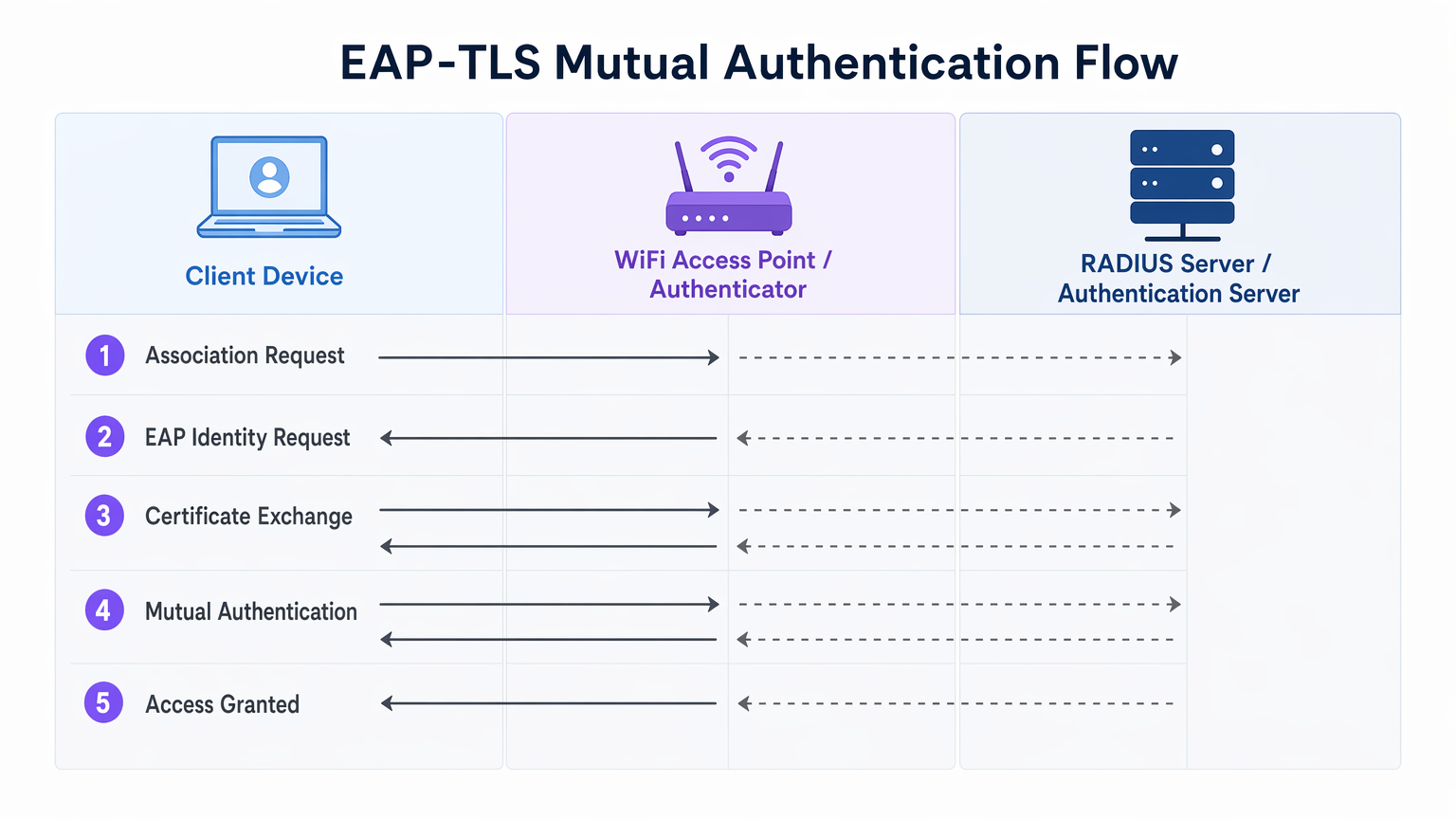
La seguridad WiFi empresarial se basa en el estándar IEEE 802.1X para el control de acceso a la red basado en puertos. Cuando se combina con EAP-TLS (Extensible Authentication Protocol - Transport Layer Security), ofrece autenticación mutua.
- Asociación: El dispositivo cliente se conecta al Access Point (Autenticador). El acceso a la red se bloquea a nivel de puerto.
- Solicitud de Identidad: El AP solicita la identidad del cliente y actúa como proxy del tráfico EAP hacia el servidor RADIUS (Servidor de Autenticación).
- Autenticación del Servidor: El servidor RADIUS presenta su certificado al cliente. El cliente verifica el certificado del servidor contra sus CA Raíz de confianza, previniendo ataques de AP maliciosos (Evil Twin).
- Autenticación del Cliente: El cliente presenta su certificado al servidor RADIUS. El servidor valida la firma del certificado, el período de validez y el estado de revocación.
- Acceso Concedido: Tras una autenticación mutua exitosa, el servidor RADIUS envía un mensaje
Access-Accept, a menudo incluyendo atributos específicos del proveedor (VSAs) para asignar dinámicamente el cliente a una VLAN específica.
El Papel de Purple en el Ecosistema de Identidad
Mientras que los dispositivos corporativos utilizan PKI empresarial y EAP-TLS, los usuarios invitados y BYOD (Bring Your Own Device) requieren un enfoque diferente. Aquí es donde las plataformas de Guest WiFi como Purple se integran en la arquitectura. Purple actúa como un proveedor de identidad robusto para SSIDs de cara al público, capturando datos de primera parte y habilitando servicios como OpenRoaming bajo la licencia Connect. Esto asegura una incorporación fluida y segura para los invitados sin comprometer el SSID corporativo asegurado por certificados.
Guía de Implementación
La implementación de la autenticación de certificados requiere una orquestación cuidadosa en sus silos de red, identidad y gestión de dispositivos.
1. Diseñar la infraestructura PKI y RADIUS
- Implementar una PKI de dos niveles: Nunca utilice una PKI plana. Mantenga la CA Raíz fuera de línea.
- Implementar RADIUS redundante: Despliegue al menos dos servidores RADIUS (por ejemplo, FreeRADIUS, Cisco ISE, Aruba ISE) en un clúster activo-activo o activo-pasivo.
- Configurar la comprobación de revocación: Decida entre CRL (Certificate Revocation List) y OCSP (Online Certificate Status Protocol). Para requisitos de alta seguridad y baja latencia, OCSP es obligatorio.
2. Automatizar la inscripción de certificados
El aprovisionamiento manual de certificados no es escalable. Integre su PKI con su solución de Mobile Device Management (MDM) o Unified Endpoint Management (UEM) (por ejemplo, Microsoft Intune, Jamf).
- Utilice SCEP (Simple Certificate Enrolment Protocol) o el moderno EST (Enrolment over Secure Transport) para enviar certificados a dispositivos unidos a un dominio y gestionados automáticamente.
- Asegúrese de que la carga útil del MDM incluya tanto el certificado del cliente como el certificado de la CA Raíz de confianza para el servidor RADIUS.
3. Configuración y segmentación de red
- Configure sus controladores WLAN y Access Points para usar WPA3-Enterprise (o WPA2-Enterprise como alternativa).
- Asigne las respuestas de RADIUS a asignaciones dinámicas de VLAN para aplicar la microsegmentación.
- Asegure una estricta separación de firewall entre el SSID corporativo 802.1X y el Captive Portal SSID gestionado por su plataforma de WiFi Analytics .
Mejores prácticas
- Alinear los períodos de validez: Establezca la vida útil de los certificados de cliente (por ejemplo, 1 aaño) para alinearse con los ciclos de registro de MDM y actualización de dispositivos.
- Almacenar en caché las respuestas OCSP: Configure su servidor RADIUS para almacenar en caché las respuestas OCSP (OCSP Stapling) y evitar tiempos de espera de autenticación si el respondedor OCSP externo no está disponible.
- Monitorizar el perímetro: Utilice su sistema de gestión de red para monitorizar los tiempos de espera y las tasas de rechazo de 802.1X. Un pico repentino a menudo indica una CA intermedia caducada o una carga útil de MDM mal configurada.
- Adoptar OpenRoaming: Para redes de invitados, aproveche las tecnologías Passpoint/OpenRoaming donde Purple actúa como proveedor de identidad, extendiendo el roaming sin interrupciones similar a un certificado a los usuarios públicos.
Resolución de problemas y mitigación de riesgos
| Modo de fallo | Causa raíz | Estrategia de mitigación |
|---|---|---|
| El cliente rechaza el certificado del servidor | La CA raíz del servidor RADIUS no está en el almacén de confianza del cliente. | Envíe la CA raíz a través de la carga útil de MDM antes de aplicar 802.1X. |
| La autenticación agota el tiempo de espera | El servidor RADIUS no puede alcanzar el respondedor OCSP o la CRL es demasiado grande. | Implemente el almacenamiento en caché de OCSP en el servidor RADIUS; asegúrese de que el respondedor OCSP tenga alta disponibilidad. |
| Ataques de AP no autorizados | Los clientes están configurados para omitir la validación del certificado del servidor. | Aplique una validación estricta del servidor en el perfil de suplicante de MDM. Nunca permita que los usuarios hagan clic en "Confiar" en certificados desconocidos. |
| La asignación de VLAN falla | Los VSA de RADIUS no coinciden con la configuración del switch/AP. | Estandarice las convenciones de nomenclatura de VSA en todos sus proveedores de hardware de red. |
ROI e impacto empresarial
La transición a la autenticación por certificado WiFi ofrece resultados empresariales medibles para los operadores empresariales:
- Reducción de la sobrecarga del servicio de asistencia: Los restablecimientos de contraseña representan hasta el 30% de los tickets del servicio de asistencia de TI. La inscripción automática de certificados elimina las llamadas de soporte relacionadas con contraseñas WiFi.
- Aceleración del cumplimiento: El requisito 8 de PCI DSS exige identificaciones únicas para todos los usuarios. EAP-TLS proporciona una pista de auditoría criptográfica de exactamente qué dispositivo accedió a la red, simplificando las auditorías de cumplimiento en entornos de Retail y Hospitality .
- Contención de brechas: En caso de pérdida o robo de un dispositivo, la revocación de un único certificado termina instantáneamente el acceso a la red, mientras que una PSK comprometida requiere una rotación global de contraseñas.
Definiciones clave
EAP-TLS
Extensible Authentication Protocol with Transport Layer Security. The most secure WiFi authentication method, requiring digital certificates on both the client and the server.
Used when an organisation mandates zero-trust network access and wants to eliminate password-based vulnerabilities.
PKI (Public Key Infrastructure)
The framework of hardware, software, policies, and procedures needed to create, manage, distribute, and revoke digital certificates.
The foundational architecture IT teams must build or procure before deploying certificate-based WiFi.
RADIUS
Remote Authentication Dial-In User Service. A networking protocol that provides centralized Authentication, Authorization, and Accounting (AAA) management.
The server that sits between your WiFi Access Points and your Active Directory/PKI to make the actual 'allow or deny' decision.
802.1X
An IEEE standard for port-based Network Access Control (PNAC). It provides an authentication mechanism to devices wishing to attach to a LAN or WLAN.
The protocol configured on the Access Point that blocks network traffic until the RADIUS server confirms the device is authenticated.
OCSP (Online Certificate Status Protocol)
An internet protocol used for obtaining the revocation status of an X.509 digital certificate in real-time.
Preferred over CRLs in enterprise environments to ensure a stolen device's certificate is rejected instantly.
MDM / UEM
Mobile Device Management / Unified Endpoint Management. Software used to manage, secure, and deploy policies to corporate devices.
The delivery mechanism used to push digital certificates to laptops and phones without manual IT intervention.
Supplicant
The software client on the end-user device that handles the 802.1X authentication process.
Configured via MDM to ensure the device knows which certificates to present and which RADIUS servers to trust.
VSA (Vendor-Specific Attribute)
Custom attributes passed in RADIUS messages to provide specific instructions to network hardware, such as assigning a specific VLAN.
Used to dynamically segment users (e.g., putting an IoT sensor on a restricted VLAN and a CEO's laptop on the corporate VLAN) based on their certificate.
Ejemplos prácticos
A 400-room luxury hotel needs to secure its back-of-house corporate WiFi for staff tablets and POS terminals, while maintaining a separate guest network. They currently use a single WPA2-PSK for staff.
- Deploy a two-tier PKI and redundant RADIUS servers.\n2. Use the hotel's MDM to push device certificates via SCEP to all staff tablets and POS terminals.\n3. Configure the corporate SSID for WPA3-Enterprise with EAP-TLS.\n4. Segment the network: Corporate traffic routes internally; guest traffic routes to a separate VLAN managed by Purple's captive portal for analytics.
A large public-sector organisation is experiencing high helpdesk volume due to 90-day WiFi password rotation policies on their corporate network.
Transition from PEAP-MSCHAPv2 (username/password) to EAP-TLS (certificates). Issue 1-year device certificates via Active Directory Certificate Services (AD CS) and Group Policy to all Windows laptops. Configure RADIUS to validate the certificates against AD.
Preguntas de práctica
Q1. Your network monitoring tool alerts you to a sudden 100% failure rate for all 802.1X authentications across your [Retail](/industries/retail) stores. The RADIUS server logs show 'Unknown CA'. What is the most likely cause?
Sugerencia: Consider the lifecycle of the certificates in your PKI hierarchy.
Ver respuesta modelo
The Intermediate CA certificate installed on the RADIUS server has expired. When the Intermediate CA expires, the RADIUS server can no longer validate the chain of trust for the client certificates, causing all authentications to fail. The mitigation is to renew the Intermediate CA and update the RADIUS server.
Q2. You are designing the WiFi architecture for a new corporate headquarters. You need to support corporate laptops, BYOD smartphones, and guest users. How should you structure the SSIDs and authentication?
Sugerencia: Remember the rule: Segment the Guests from the Certs.
Ver respuesta modelo
Deploy two distinct SSIDs. 1) 'Corp-WiFi': Uses WPA3-Enterprise with EAP-TLS for corporate laptops, authenticated via certificates pushed by MDM. 2) 'Guest-WiFi': Uses an open network with a captive portal managed by Purple for BYOD and guests, providing client isolation and routing directly to the internet.
Q3. During an audit of your [Healthcare](/industries/healthcare) network, the auditor notes that users are occasionally prompted to 'Accept' a new certificate when connecting to the corporate WiFi. Why is this a security risk?
Sugerencia: Think about what mutual authentication is designed to prevent.
Ver respuesta modelo
This indicates that the client supplicant is not configured to strictly validate the server certificate. If users can manually accept unknown certificates, an attacker can set up a rogue Access Point (Evil Twin) and trick devices into connecting, potentially intercepting traffic or harvesting credentials. The fix is to push a strict MDM profile that hardcodes the trusted Root CA and prevents user overrides.
Continúe leyendo esta serie
PSK por dispositivo por fabricante: comparación de iPSK, DPSK, MPSK y PPSK (y compatibilidad con WPA3)
Una comparación exhaustiva de las implementaciones de PSK por dispositivo en Cisco Meraki, HPE Aruba, Ruckus, Juniper Mist, Extreme, Fortinet y Ubiquiti UniFi. Descubra cómo afecta WPA3-SAE a las estrategias de claves por dispositivo y cuándo implementar modos de transición en lugar de migrar a 802.1X.
¿Qué es la autenticación de dirección MAC? Cuándo usarla y cuándo evitarla
Esta guía de referencia técnica autorizada cubre la autenticación de dirección MAC en entornos empresariales de WiFi: cómo funciona la autenticación MAC basada en RADIUS en la Capa 2, sus vulnerabilidades de seguridad inherentes (incluyendo la suplantación de MAC y el impacto de la aleatorización de MAC a nivel de SO), y los contextos operativos precisos donde sigue siendo una herramienta válida para gestionar dispositivos IoT y sin interfaz. Proporciona una guía de implementación práctica para gerentes de TI y arquitectos de red en hostelería, comercio minorista, atención médica y recintos del sector público, con ejemplos prácticos del mundo real, marcos de decisión y contexto de integración para la plataforma de WiFi para invitados y análisis de Purple.
Cómo configurar WiFi empresarial en iOS y macOS con 802.1X
Esta guía autorizada proporciona a los líderes de TI sénior pasos prácticos para implementar WiFi empresarial 802.1X en dispositivos iOS y macOS. Cubre la autenticación basada en certificados (EAP-TLS), los perfiles de configuración de MDM y la integración de la arquitectura para proteger las redes corporativas al tiempo que apoya las iniciativas BYOD.