
Café WiFi: Cómo configurar, proteger y monetizar tu red de invitados
Una referencia técnica completa para gestores de TI y operadores de locales sobre el diseño, la seguridad y la monetización de redes WiFi para cafeterías. Cubre la segmentación esencial de la red, el despliegue de hardware Wi-Fi 6, los Captive Portals compatibles con GDPR y la automatización de marketing para impulsar un ROI medible.
Escuchar esta guía
Ver transcripción del podcast
Resumen Ejecutivo
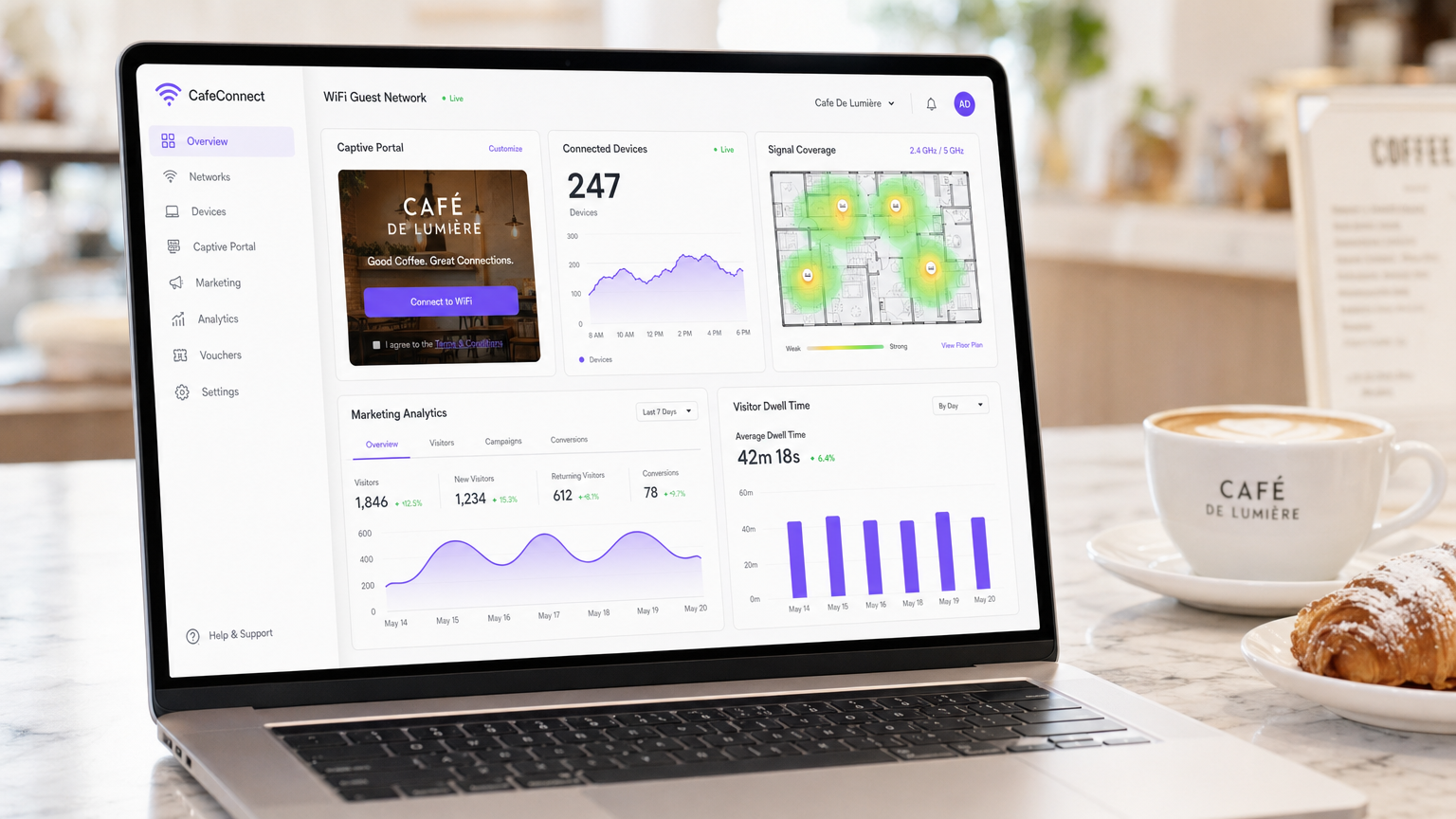
Para los locales de hostelería modernos, el café WiFi ya no es una mera utilidad operativa, es un activo de datos de primera parte crítico, un canal de automatización de marketing y una estricta obligación de cumplimiento. Esta guía de referencia técnica proporciona a los gestores de TI, arquitectos de red y directores de operaciones de locales un marco completo para diseñar, implementar y monetizar redes de invitados.
Desde cafeterías independientes hasta cadenas empresariales con múltiples ubicaciones, los principios arquitectónicos se mantienen constantes. Debe aplicar una estricta segmentación de red para mantener el cumplimiento de PCI DSS, desplegar hardware 802.11ax (Wi-Fi 6) de nivel empresarial para entornos con alta densidad de clientes e implementar un Captive Portal robusto para capturar el consentimiento de marketing explícito y compatible con GDPR.
Al pasar de routers de consumo no gestionados a una plataforma empresarial de Guest WiFi , los locales pueden transformar un centro de costes en un motor de ingresos medible. Esta guía describe las especificaciones exactas de hardware, los estándares de seguridad, los cálculos de ancho de banda y los flujos de trabajo de automatización de marketing necesarios para construir una red de invitados resiliente y rentable.
Análisis Técnico Detallado
Arquitectura y Segmentación de Red
El principio fundamental de cualquier red de cara al público es la separación lógica absoluta de la infraestructura operativa. Desplegar una única red plana que aloje tanto sus sistemas de punto de venta (POS) como su tráfico de invitados es un fallo crítico tanto en seguridad como en cumplimiento.
Implementación de VLAN: Su infraestructura de enrutamiento y conmutación debe ser compatible con el etiquetado VLAN IEEE 802.1Q. Un despliegue estándar requiere un mínimo de dos Redes de Área Local Virtuales:
- VLAN 10 (Operacional): Dedicada a terminales POS, PCs de back-office y dispositivos IoT.
- VLAN 20 (Invitados): Dedicada exclusivamente a la red WiFi de invitados de la cafetería.
El tráfico entre estas VLAN debe bloquearse a nivel de firewall. Los puntos de acceso (APs) emitirán Service Set Identifiers (SSIDs) distintos mapeados directamente a sus respectivas VLAN. Este aislamiento es un requisito no negociable para el cumplimiento de PCI DSS, asegurando que el entorno de datos del titular de la tarjeta (CDE) no pueda ser comprometido por actores maliciosos conectados a la red de invitados.
Estándares Inalámbricos y Selección de Hardware
Para entornos con alta densidad de dispositivos, como una cafetería concurrida donde 40-80 clientes pueden estar transmitiendo, navegando y sincronizando simultáneamente, el hardware de consumo se degradará rápidamente.
Requisitos de 802.11ax (Wi-Fi 6): Los despliegues modernos deben utilizar exclusivamente puntos de acceso Wi-Fi 6. La ventaja crítica de Wi-Fi 6 en entornos de hostelería es el Acceso Múltiple por División de Frecuencia Ortogonal (OFDMA). A diferencia de los estándares más antiguos que atienden a los clientes secuencialmente, OFDMA permite que un solo AP se comunique con múltiples dispositivos simultáneamente dividiendo los canales en subportadoras más pequeñas. Esto reduce drásticamente la latencia y mejora el rendimiento en entornos congestionados.
Dimensionamiento del Hardware:
- Sitio Único (50-150 m²): 1-2 APs Wi-Fi 6 montados en el techo, un switch gestionado PoE+ y un firewall/router de nivel empresarial.
- Despliegues Multi-Sitio: La infraestructura gestionada en la nube es obligatoria para una visibilidad centralizada, gestión de firmware y resolución de problemas remota en huellas minoristas distribuidas.
Protocolos de Seguridad
La era del WiFi público abierto y sin cifrar está terminando. Aunque WPA2-Personal sigue siendo común, los nuevos despliegues deberían aprovechar WPA3.
Para las redes de invitados que utilizan un Captive Portal, la transmisión inalámbrica subyacente debe seguir cifrada. WPA3-SAE (Simultaneous Authentication of Equals) proporciona secreto directo, mitigando ataques de diccionario offline. Si se despliega una red abierta con un Captive Portal (a menudo para máxima compatibilidad), asegúrese de que el aislamiento de clientes esté habilitado a nivel de AP para que los dispositivos no puedan comunicarse entre sí a través de la subred local.
Guía de Implementación
Desplegar una red WiFi segura y monetizada para cafeterías requiere un enfoque estructurado. Siga esta secuencia de despliegue neutral respecto al proveedor:
Paso 1: Estudio del Sitio y Planificación del Ancho de Banda
Antes de adquirir hardware, realice un estudio físico del sitio para identificar interferencias de RF (por ejemplo, microondas, acero estructural) y determinar la ubicación óptima de los AP.
Calcule sus requisitos de ancho de banda. Una regla general estándar es provisionar 2 Mbps por usuario concurrente para navegación general, y 5 Mbps si la transmisión de vídeo es común. Para una cafetería que espera 50 usuarios concurrentes, se recomienda una conexión simétrica mínima de 100 Mbps. Si su local alberga eventos de negocios o requiere un tiempo de actividad garantizado, consulte nuestra guía sobre ¿Qué es una Línea Dedicada? Internet Empresarial Dedicado para opciones de conectividad empresarial. Para cálculos detallados de ancho de banda, consulte nuestra guía Velocidad WiFi en Hoteles: Qué Esperan los Huéspedes y Cómo Ofrecerla .
Paso 2: Configuración de la Infraestructura
Instale su router, switch gestionado y puntos de acceso. Configure sus VLAN y reglas de firewall antes de conectar los AP. Asegúrese de que los pools DHCP para la VLAN de invitados estén dimensionados adecuadamente (por ejemplo, una subred /23 que proporcione 510 direcciones IP) con tiempos de concesión cortos (por ejemplo, 2 horas) para evitar el agotamiento de IP durante períodos de alta afluencia.
Paso 3: Despliegue del Captive Portal
El Captive Portal es la interfaz crítica entre su red y su base de datos de marketing.
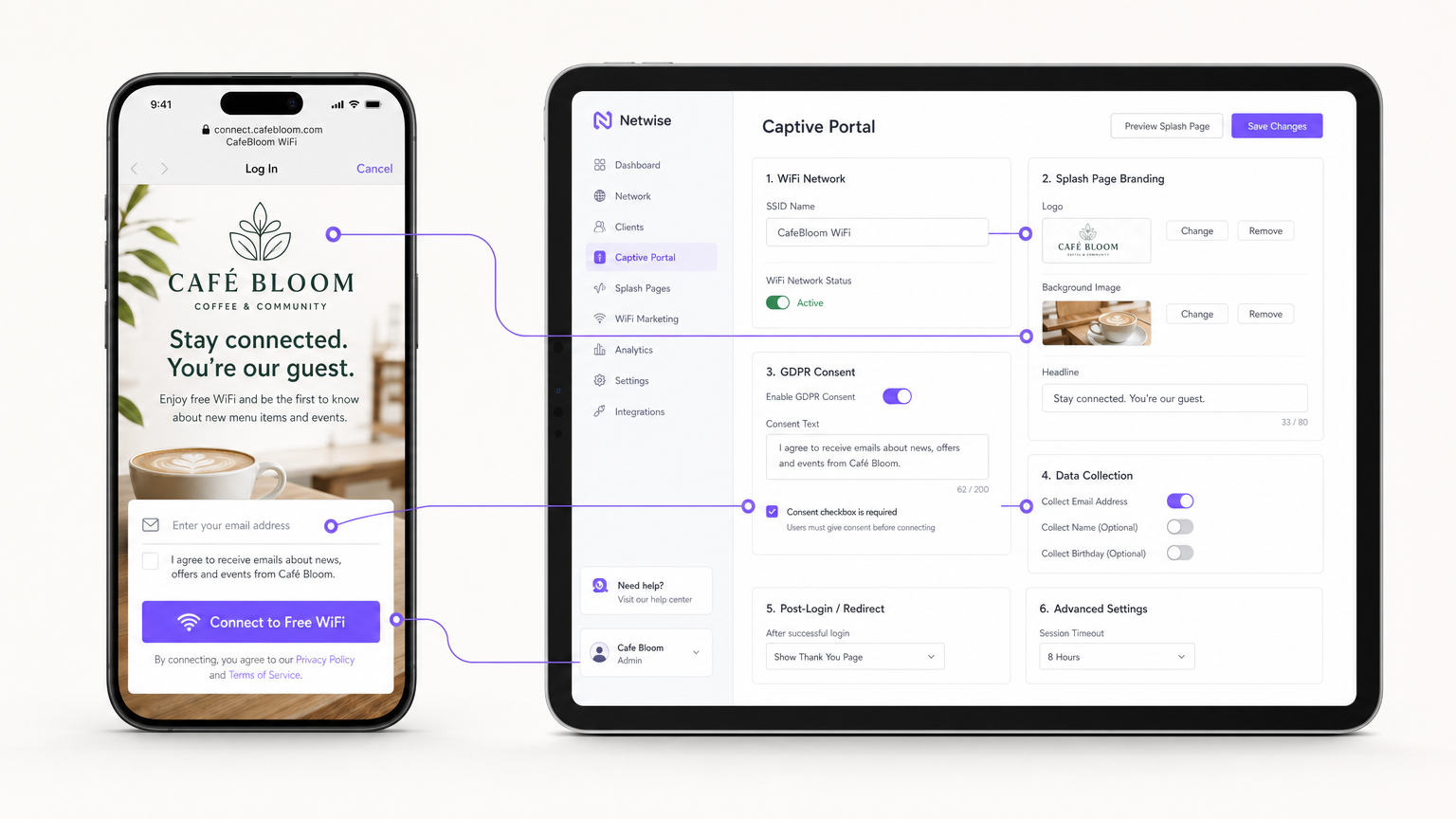
En lugar de alojar servidores de portal en sus instalaciones, integre su APs (a través de RADIUS o API) con una plataforma Guest WiFi basada en la nube como Purple. Configure la página de bienvenida con la marca de su local y establezca los métodos de autenticación (por ejemplo, correo electrónico, inicio de sesión social o autenticación basada en perfiles sin interrupciones como OpenRoaming).
Paso 4: Cumplimiento y Gestión del Consentimiento
Configure los campos de recopilación de datos. Según el GDPR, el consentimiento de marketing debe ser explícito, informado e inequívoco. Asegúrese de que su Captive Portal incluya una casilla de verificación sin marcar para las suscripciones de marketing. La plataforma debe registrar la marca de tiempo, la dirección IP, la dirección MAC y el lenguaje de consentimiento exacto mostrado al usuario para proporcionar un rastro de auditoría verificable.
Paso 5: Integración de Automatización de Marketing
Conecte la plataforma WiFi a su CRM o utilice las herramientas nativas de WiFi Analytics de la plataforma para crear campañas automatizadas. Configure activadores para:
- Visitantes por primera vez: Correo electrónico de bienvenida con un descuento de fidelidad.
- Visitantes inactivos: Oferta de reactivación después de 30 días de ausencia.
- Visitantes frecuentes: Invitación a un programa VIP.
Mejores Prácticas
- Habilitar el aislamiento de clientes: Habilite siempre el aislamiento de clientes de Capa 2 en el SSID de invitados. Esto evita que los dispositivos conectados se vean o se comuniquen entre sí, mitigando el riesgo de movimiento lateral de malware o de rastreo de paquetes.
- Implementar Calidad de Servicio (QoS): Configure reglas de QoS en su router para priorizar el tráfico operativo (POS, VoIP) sobre el tráfico de invitados. Implemente límites de ancho de banda por cliente (por ejemplo, limitando a los invitados a 5 Mbps de bajada/subida) para evitar que un solo usuario sature el enlace WAN.
- Acortar los tiempos de concesión de DHCP: En entornos de alta rotación como cafeterías, establezca los tiempos de concesión de DHCP en 1-2 horas en lugar de las 24 horas estándar para evitar el agotamiento del pool de IP.
- Aprovechar la autenticación basada en perfiles: Para cadenas de múltiples sitios o entornos de Retail , implemente protocolos de autenticación sin interrupciones (como Passpoint/OpenRoaming) para permitir que los usuarios recurrentes se conecten automáticamente sin volver a autenticarse en el portal, mejorando significativamente la experiencia del usuario mientras se mantiene el seguimiento de datos.
Resolución de Problemas y Mitigación de Riesgos
| Modo de Fallo | Causa Raíz | Estrategia de Mitigación |
|---|---|---|
| Agotamiento de IP | Los invitados no pueden conectarse porque el servidor DHCP se ha quedado sin direcciones IP disponibles. | Amplíe la máscara de subred (por ejemplo, de /24 a /23) y reduzca los tiempos de concesión de DHCP a 1-2 horas. |
| Interferencia de Co-Canal | Múltiples APs transmitiendo en el mismo canal, causando alta latencia y pérdida de paquetes. | Implemente la asignación dinámica de canales en el controlador inalámbrico; evite los canales de 2.4GHz que no sean el 1, 6 y 11. |
| Bypass del Captive Portal | Los dispositivos se conectan pero no activan la redirección de la página de bienvenida, dejando a los usuarios sin conexión. | Asegúrese de que el firewall permita el tráfico DNS y HTTP/HTTPS a las direcciones IP del 'walled garden' del portal antes de la autenticación. |
| Incumplimiento de la Normativa | Recopilación de correos electrónicos a través de un formulario abierto sin registro explícito del consentimiento. | Utilice una plataforma de Captive Portal certificada que gestione de forma nativa el registro de consentimiento GDPR y las políticas de retención de datos. |
ROI e Impacto Empresarial
La transición de un WiFi no gestionado a una red de invitados empresarial transforma la infraestructura de TI de un coste irrecuperable en un activo de marketing medible.
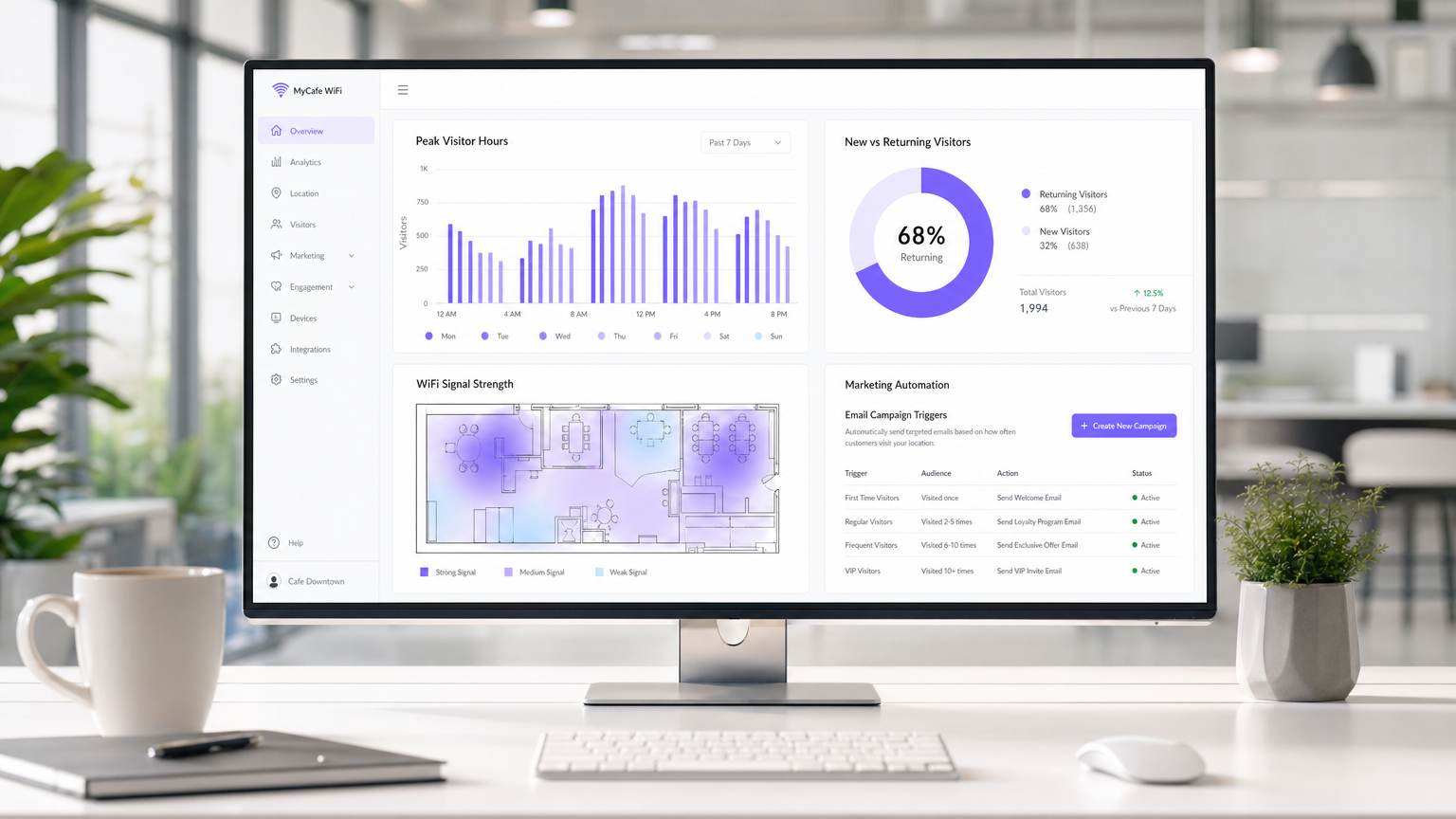
Medición del Éxito: El ROI de una implementación de WiFi en una cafetería se calcula a través de tres métricas principales:
- Tasa de Captura de Datos: El porcentaje de usuarios conectados que optan por recibir comunicaciones de marketing. Un portal bien optimizado debería lograr una tasa de captura del 30-40%.
- Conversión de Campañas: El tráfico generado por campañas automatizadas de correo electrónico/SMS activadas por la plataforma WiFi. Por ejemplo, el seguimiento de cuántos usuarios regresan dentro de los 7 días de recibir una oferta de "te echamos de menos".
- Optimización del Tiempo de Permanencia: Utilización de análisis para correlacionar el tiempo de permanencia del visitante con el valor promedio de la transacción, permitiendo a los equipos de operaciones optimizar la disposición de los asientos y la velocidad del servicio.
Al capturar datos de primera mano e impulsar visitas repetidas a través de marketing dirigido, una solución de WiFi para invitados gestionada suele lograr un ROI en 3-6 meses desde su implementación, particularmente en entornos competitivos de Hospitality .
Definiciones clave
VLAN (Virtual Local Area Network)
A logical subnetwork that groups a collection of devices from different physical LANs. Used to securely separate guest traffic from operational traffic.
Essential for maintaining PCI DSS compliance and preventing guests from accessing back-office systems.
Captive Portal
A web page that the user of a public-access network is obliged to view and interact with before access is granted.
The primary mechanism for capturing user data, presenting terms of service, and securing GDPR marketing consent.
Client Isolation
A wireless security feature that prevents devices connected to the same AP from communicating with each other.
Crucial for public networks to prevent malicious users from scanning or attacking other guests' devices.
OFDMA (Orthogonal Frequency-Division Multiple Access)
A feature of Wi-Fi 6 that allows an AP to subdivide a channel to communicate with multiple devices simultaneously.
Solves the 'latency' problem in dense café environments where dozens of devices are competing for airtime.
PCI DSS
Payment Card Industry Data Security Standard. A set of security standards designed to ensure that all companies that accept, process, store or transmit credit card information maintain a secure environment.
The regulatory reason why network segmentation between POS and guest WiFi is legally required.
First-Party Data
Information a company collects directly from its customers and owns entirely.
The core asset generated by a guest WiFi platform, insulating venues from the deprecation of third-party cookies.
QoS (Quality of Service)
Technologies that manage data traffic to reduce packet loss, latency and jitter on the network.
Used to prioritize critical business traffic (like payment processing) over guest Netflix streaming.
Walled Garden
A restricted environment that controls user access to web content and services.
Required configuration on the firewall to allow unauthenticated users to access the captive portal and its associated resources (like social login APIs) before granting full internet access.
Ejemplos prácticos
A growing independent café chain with 3 locations is experiencing network dropouts during peak hours. Their POS terminals frequently disconnect, and guests complain about slow speeds. They are currently using consumer-grade routers provided by their ISP, broadcasting a single SSID for both staff and guests.
- Replace consumer routers with a cloud-managed business gateway and Wi-Fi 6 access points at each location.
- Implement VLAN tagging: VLAN 10 for POS/Staff, VLAN 20 for Guests.
- Configure firewall rules to block inter-VLAN routing, securing the POS network.
- Set up QoS to prioritize VLAN 10 traffic over VLAN 20, and implement a 5 Mbps per-client bandwidth cap on the guest network.
- Deploy a centralized captive portal to manage guest access and collect GDPR-compliant marketing data.
A large conference centre café needs to provide seamless WiFi for returning delegates without forcing them to log in via the captive portal every day, while still tracking their presence for analytics.
Deploy a profile-based authentication system utilizing Passpoint (Hotspot 2.0) or OpenRoaming. Guests authenticate via the captive portal on their first visit, downloading a secure profile to their device. On subsequent visits, their device authenticates automatically via WPA2/3-Enterprise using EAP-TTLS, bypassing the splash page while still registering their MAC address and presence in the analytics dashboard.
Preguntas de práctica
Q1. A retail café chain wants to implement a guest WiFi network. The marketing director insists on making email collection mandatory for access to maximize database growth. The IT director is concerned about compliance. What is the correct architectural approach?
Sugerencia: Consider the specific requirements of GDPR regarding 'freely given' consent.
Ver respuesta modelo
Under GDPR, consent for marketing cannot be a precondition for service. The captive portal must allow users to access the WiFi without opting into marketing emails. The correct approach is to offer a clear, unticked checkbox for marketing consent, while allowing users to connect simply by accepting the terms and conditions. The marketing team should instead incentivize opt-ins by offering a clear value exchange (e.g., 'Sign up for 10% off your next coffee').
Q2. During peak hours (12:00 PM - 2:00 PM), guests at a busy city-centre café report that they can see the WiFi network with strong signal, but cannot connect or obtain an IP address. The network works perfectly in the morning and evening. What is the most likely cause and solution?
Sugerencia: Think about the lifecycle of a connection in a high-turnover environment.
Ver respuesta modelo
The most likely cause is DHCP IP pool exhaustion. Because the café has high footfall but short dwell times, the default 24-hour DHCP leases are tying up IP addresses long after the guests have left. The solution is to reduce the DHCP lease time for the guest VLAN to 1 or 2 hours, and potentially expand the subnet from a /24 (254 addresses) to a /23 (510 addresses).
Q3. A venue operator wants to deploy a single unified network for both their EPOS systems and guest WiFi to save on hardware costs, using a standard consumer broadband router. What are the specific technical and business risks of this approach?
Sugerencia: Evaluate the scenario against PCI DSS requirements and wireless performance standards.
Ver respuesta modelo
- Compliance Failure: A flat network violates PCI DSS requirements for isolating the Cardholder Data Environment, risking heavy fines and loss of card processing abilities. 2. Security Risk: Without client isolation and VLANs, guests can potentially access or attack the EPOS systems. 3. Performance Degradation: Consumer routers lack QoS to prioritize EPOS traffic, meaning guest streaming could cause payment processing to time out. 4. Device Limitations: Consumer routers cannot handle the concurrent connections typical in a café, leading to network crashes.
Continúe leyendo esta serie
Gestión del ancho de banda para WiFi de empleados: modelado, QoS y reducción de tráfico
Esta guía detalla métodos prácticos para gestionar el ancho de banda para el WiFi de empleados en entornos empresariales. Cubre el modelado de tráfico, la implementación de QoS y cómo el despliegue de Purple Shield reduce la carga de la red sin necesidad de actualizar la infraestructura.
¿Qué es una solicitud de sondeo (Probe Request)? Entendiendo cómo los dispositivos descubren redes
Esta guía de referencia técnica ofrece un análisis en profundidad de las solicitudes de sondeo IEEE 802.11, el escaneo activo frente al pasivo y el impacto de la aleatorización de MAC en el análisis de ubicaciones. Proporciona estrategias de implementación prácticas para que los arquitectos de red optimicen las implementaciones de alta densidad, mitiguen las 'tormentas de sondeo' y garanticen una recopilación de datos precisa y compatible con GDPR utilizando capas de identidad autenticadas.
Cómo solucionar el WiFi lento sin actualizar tu plan de internet
Una guía de referencia técnica completa para gerentes de TI y arquitectos de red sobre cómo optimizar el rendimiento del WiFi empresarial sin aumentar el ancho de banda del ISP. Cubre la sintonización de RF, la gestión de la densidad de clientes, la implementación de QoS y cómo aprovechar el análisis de WiFi para diagnosticar y resolver cuellos de botella.