

Captive Portal basado en la nube vs. local: ¿Cuál es el adecuado para su negocio?
Una comparación técnica exhaustiva de las arquitecturas de Captive Portal basado en la nube frente a las locales. Esta guía evalúa la velocidad de implementación, las estructuras de costes, la escalabilidad y las implicaciones de cumplimiento para ayudar a los líderes de TI a tomar decisiones de infraestructura informadas.
🎧 Escuchar esta guía
Ver transcripción
Resumen Ejecutivo
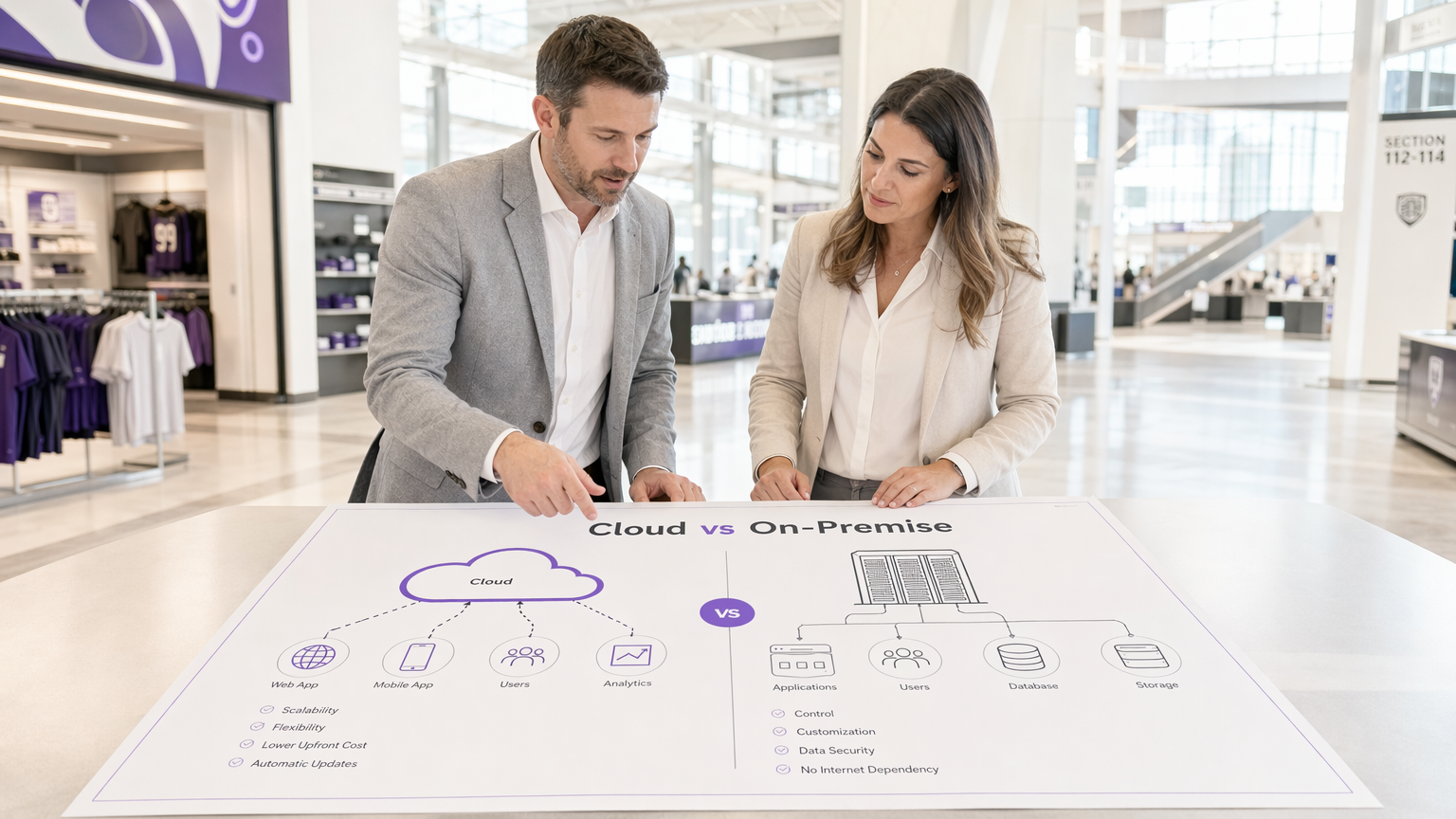
Al diseñar una arquitectura de WiFi para invitados, la elección entre un Captive Portal basado en la nube y un servidor de Captive Portal local determina sus costes de infraestructura, la sobrecarga operativa y la postura de cumplimiento durante el ciclo de vida de la implementación. Para los gerentes de TI, arquitectos de red y CTOs, esto no es simplemente una preferencia de software; es una decisión arquitectónica fundamental.
Un Captive Portal basado en la nube traslada las cargas de trabajo de autenticación y renderizado del portal a un entorno gestionado por el proveedor, ofreciendo escalabilidad elástica y un mantenimiento significativamente reducido. Por el contrario, un sistema de Captive Portal local retiene todos los datos y la lógica de autenticación dentro del perímetro de su red local, proporcionando un control absoluto a expensas de una mayor inversión de capital y carga operativa.
Esta guía proporciona una rigurosa comparación técnica de ambos modelos de implementación. Examinaremos la arquitectura, evaluaremos el coste total de propiedad y describiremos escenarios de implementación específicos para ayudarle a determinar qué software de Captive Portal se alinea con sus objetivos comerciales y requisitos reglamentarios.
Análisis Técnico Detallado: Arquitectura y Flujos de Autenticación
Comprender la distinción entre un Captive Portal alojado y una solución local requiere examinar el flujo de autenticación y dónde se ejecutan los procesos subyacentes.
La Arquitectura del Captive Portal Basado en la Nube
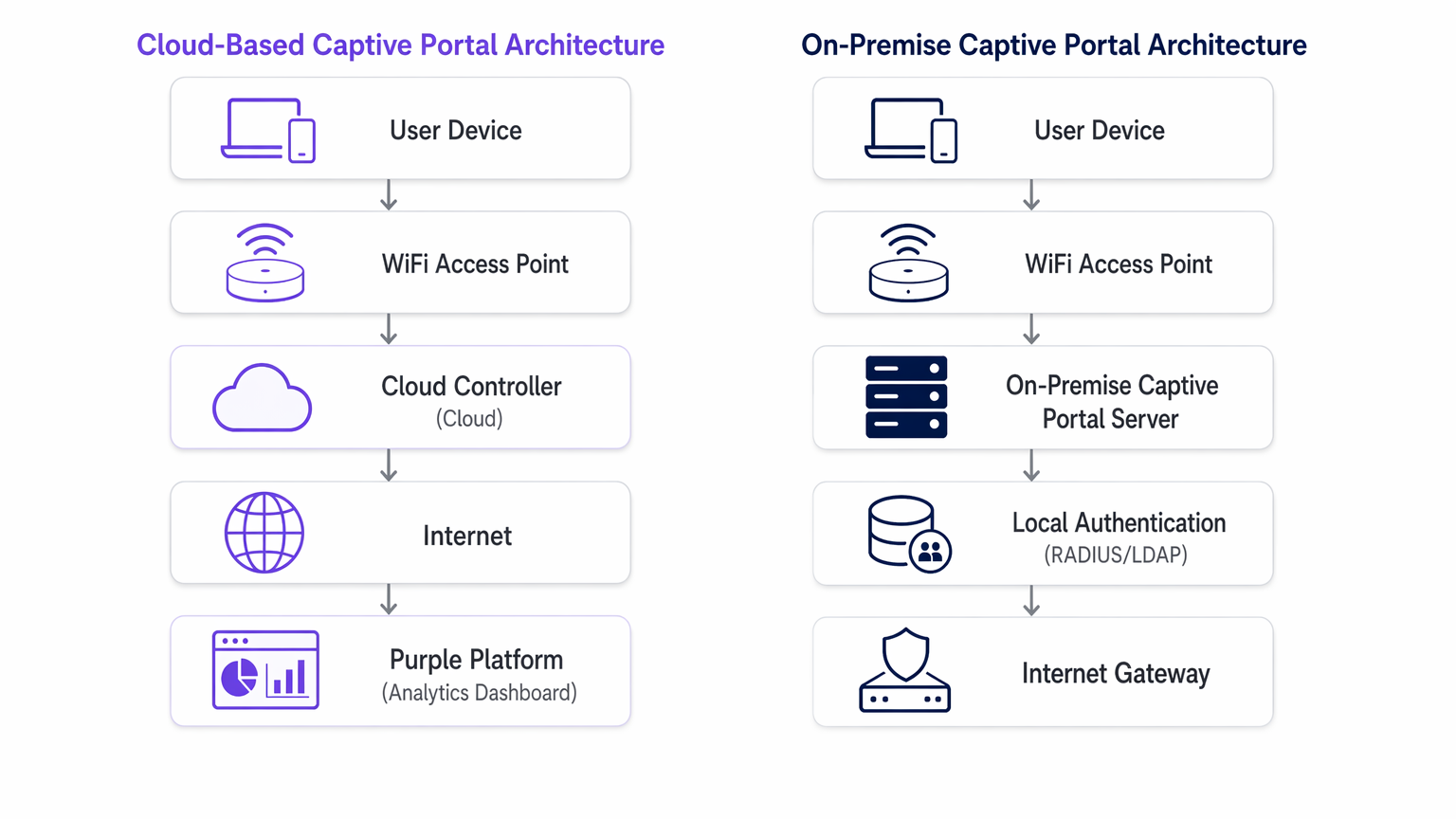
En un modelo basado en la nube, la lógica del Captive Portal, la autenticación RADIUS y las bases de datos de captura de datos residen en una infraestructura de terceros (por ejemplo, AWS, Azure, GCP) gestionada por un proveedor como Purple.
Cuando un dispositivo cliente se asocia con el SSID de invitados, el punto de acceso local (AP) o el controlador de LAN inalámbrica (WLC) intercepta la solicitud HTTP/HTTPS inicial. Dado que el dispositivo no está autenticado, el controlador redirige el navegador a una URL alojada en la nube. El usuario interactúa con el portal, aceptando términos, autenticándose a través de un inicio de sesión social o completando un formulario. Tras una autenticación exitosa, la plataforma en la nube se comunica con el controlador local (a menudo a través de RADIUS o una API específica del proveedor) para autorizar la dirección MAC del cliente, otorgando acceso a internet.
Esta arquitectura es altamente elástica. Durante los picos de carga —como el descanso en un estadio o una gran venta en Retail — la infraestructura en la nube se escala automáticamente para manejar miles de solicitudes de autenticación concurrentes sin requerir actualizaciones de hardware local. Además, plataformas como Purple proporcionan analíticas de Guest WiFi y actúan como un proveedor de identidad gratuito para servicios como OpenRoaming bajo la licencia Connect, añadiendo un valor significativo más allá del control de acceso básico.
La Arquitectura del Servidor de Captive Portal Local
Un servidor de Captive Portal local requiere la implementación de hardware dedicado o máquinas virtuales (VMs) dentro de su infraestructura de red local. El servidor web del portal, el servidor RADIUS (por ejemplo, FreeRADIUS, Microsoft NPS) y la base de datos de usuarios son mantenidos localmente por su equipo de TI.
El proceso de redirección es similar, pero el cliente es dirigido a una dirección IP interna en lugar de una URL pública. La transacción de autenticación ocurre completamente dentro de la red de área local (LAN). Este modelo asegura que ningún dato de invitado atraviese internet público durante la fase de autenticación, lo cual es a menudo un requisito estricto para Healthcare o instalaciones gubernamentales regidas por políticas estrictas de soberanía de datos.
Sin embargo, el rendimiento de un sistema local está estrictamente limitado por el hardware aprovisionado. La planificación de la capacidad debe tener en cuenta las sesiones concurrentes máximas, lo que a menudo resulta en un aprovisionamiento excesivo significativo. Además, el equipo de TI asume la plena responsabilidad del parcheo del OS, la renovación de certificados SSL, el mantenimiento de la base de datos y la configuración de pares de conmutación por error de alta disponibilidad.
Guía de Implementación: Recomendaciones Neutras del Proveedor
La selección de la arquitectura adecuada depende de sus limitaciones operativas específicas.
Cuándo Elegir un Captive Portal Basado en la Nube
- Implementaciones Multi-Sitio: Si gestiona una cartera distribuida, como una cadena de Hospitality o una red de centros de Transport , un Captive Portal basado en la nube proporciona una gestión centralizada. Puede enviar actualizaciones del portal, cambios de marca y modificaciones de políticas a cientos de sitios simultáneamente.
- Operaciones de TI Ligeras: Cuando su equipo de red se centra en la infraestructura principal en lugar del mantenimiento de aplicaciones, delegar el sistema de Captive Portal a un proveedor SaaS reduce la sobrecarga operativa.
- Integración de Marketing y Analíticas: Las plataformas en la nube facilitan inherentemente la agregación de datos. Si su objetivo es aprovechar las WiFi Analytics para impulsar la participación del cliente, un Captive Portal alojado proporciona las integraciones necesarias de forma predeterminada.
Cuándo Elegir un Captive Portal Local
- Soberanía de Datos Estricta: Si los marcos regulatorios prohíben que los datos de los invitados salgan de sus instalaciones físicas o fronteras nacionales, una implementación local es obligatoria.
- Entornos Aislados o de Alta Latencia: Los lugares con enlaces de internet poco fiables no pueden depender de una pasarela de autenticación en la nube. Si el enlace WAN falla, un portal en la nube falla; un portal local aún puede autenticar a los usuarios para el acceso a la red local.
- Profup Integración personalizada: Cuando el portal debe interactuar directamente con sistemas de gestión de propiedades (PMS) heredados y alojados localmente a través de APIs propietarias que no pueden exponerse a internet.
Mejores prácticas para la implementación de Captive Portal
Independientemente del modelo de implementación, la adhesión a los estándares de la industria es fundamental para la seguridad y la experiencia del usuario.
- Segmentación de VLAN: Aísle siempre la red WiFi de invitados en una VLAN dedicada, completamente separada de los recursos corporativos.
- Gestión de certificados SSL/TLS: Un Captive Portal debe servir sus páginas a través de HTTPS. Los certificados caducados activarán advertencias graves en el navegador, deteniendo el flujo de autenticación. Para implementaciones on-premise, automatice la renovación de certificados utilizando protocolos como ACME (por ejemplo, Let's Encrypt). Los proveedores de la nube gestionan esto automáticamente.
- Consideraciones sobre WPA3 y 802.1X: Aunque WPA3-Enterprise con 802.1X es el estándar de oro para dispositivos corporativos, es poco práctico para redes de invitados donde no se pueden distribuir certificados a dispositivos no gestionados. Por lo tanto, una red abierta con un Captive Portal, o WPA3-Personal (Opportunistic Wireless Encryption - OWE), sigue siendo el estándar para el acceso público.
- Acuerdos de procesamiento de datos (DPA): Al utilizar un Captive Portal alojado, revise rigurosamente el DPA del proveedor. Asegúrese de que cumplen con GDPR, PCI DSS y definen claramente sus subprocesadores y ubicaciones de residencia de datos.
Resolución de problemas y mitigación de riesgos
Los modos de fallo comunes difieren significativamente entre las dos arquitecturas.
Riesgos basados en la nube
- Interrupciones de WAN: El riesgo principal es la pérdida de conectividad a internet. Sin un enlace ascendente, el controlador en la nube no puede ser alcanzado y la autenticación falla. Mitigue esto con enlaces WAN redundantes (por ejemplo, fibra primaria, 5G/LTE secundario) o considere Los beneficios clave de SD WAN para empresas modernas para garantizar una alta disponibilidad.
- Fallos de resolución de DNS: Si el DNS local no logra resolver la URL del portal en la nube, la redirección se interrumpe. Asegure una infraestructura DNS local robusta.
Riesgos on-premise
- Fallo de hardware: Un único servidor de Captive Portal es un único punto de fallo. Debe implementarse en un clúster activo-pasivo o activo-activo para garantizar una alta disponibilidad.
- Agotamiento de capacidad: Picos inesperados en la densidad de usuarios pueden sobrecargar el servidor RADIUS local o el servidor web, causando tiempos de espera. Supervise rigurosamente las métricas de CPU, memoria y sesiones concurrentes.
- Gestión de parches: Los servidores de portal sin parches son objetivos principales para la explotación. Implemente una gestión estricta de vulnerabilidades y programas de despliegue de parches.
Para escenarios en los que el portal está causando más fricción que valor, consulte Cómo eliminar un inicio de sesión de Captive Portal (y cuándo debería hacerlo) .
ROI e impacto empresarial
Los modelos financieros para estas arquitecturas son fundamentalmente diferentes.
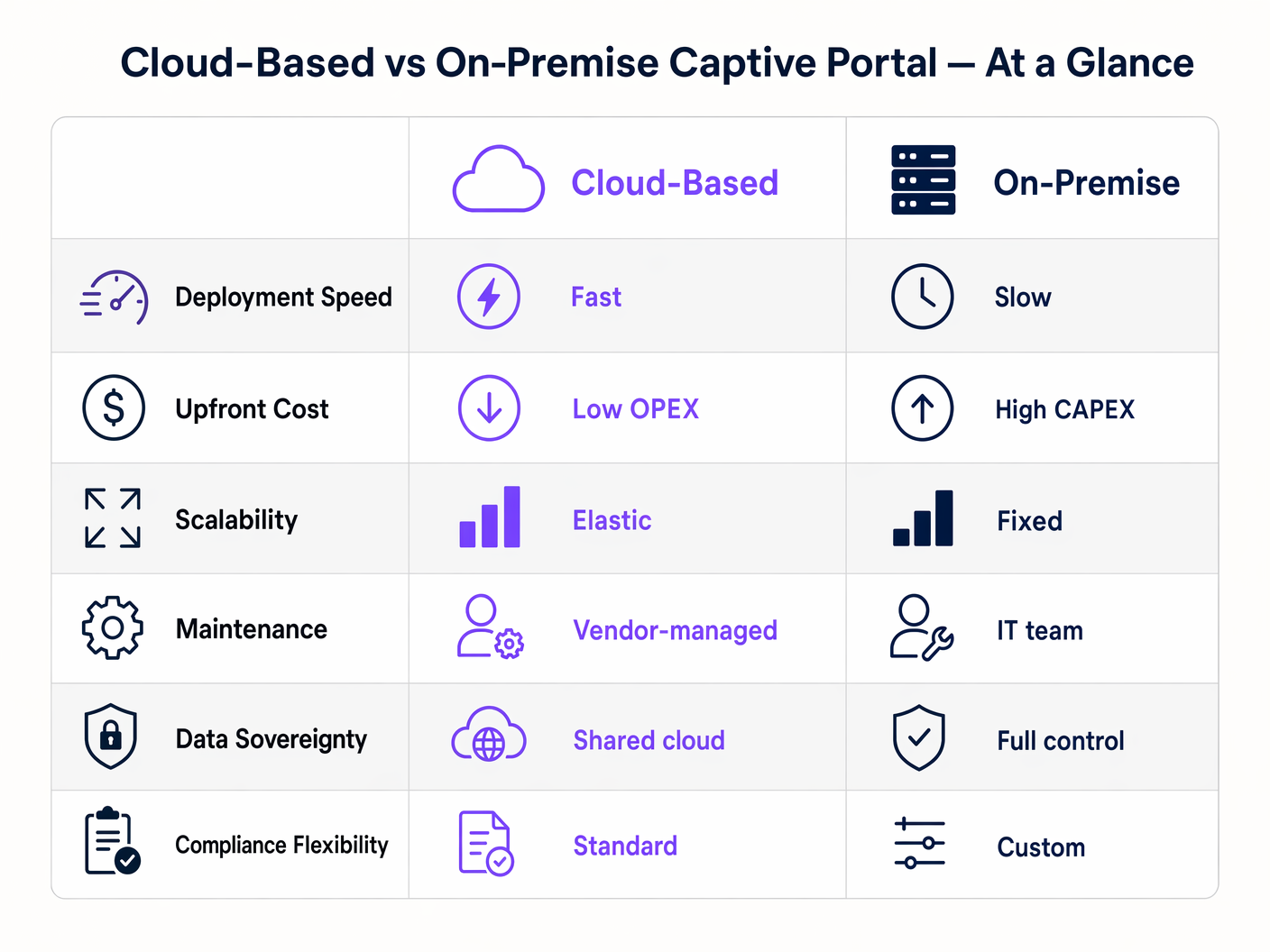
Una implementación de software de Captive Portal on-premise es un modelo de Gasto de Capital (CAPEX). Usted incurre en costes iniciales significativos para hardware, licencias de hipervisor e infraestructura redundante. Los costes continuos están ocultos en el gasto operativo (OPEX) del tiempo de su equipo de TI dedicado al mantenimiento y la resolución de problemas.
Un Captive Portal basado en la nube opera con un modelo OPEX. Los costes iniciales son mínimos, limitados a los puntos de acceso y la configuración inicial. Usted paga una tarifa de suscripción predecible y recurrente. El ROI de una plataforma en la nube a menudo se materializa a través de la reducción de la carga de trabajo de TI y la monetización de los datos capturados mediante análisis avanzados e integraciones de marketing, transformando el WiFi de invitados de un centro de costes en un activo generador de ingresos.
Términos clave y definiciones
Captive Portal
A web page that a user of a public access network is obliged to view and interact with before access is granted.
The primary mechanism for authenticating guests and capturing marketing consent on public WiFi networks.
RADIUS (Remote Authentication Dial-In User Service)
A networking protocol that provides centralized Authentication, Authorization, and Accounting (AAA) management for users who connect and use a network service.
The backend protocol used by both cloud and on-premise portals to signal the access point that a user is authorized.
Data Sovereignty
The concept that data is subject to the laws and governance structures within the nation it is collected.
A critical deciding factor for government and healthcare venues evaluating cloud vs. on-premise architectures.
MAC Address Authorization
The process of using a device's Media Access Control address to identify it and grant network access after initial authentication.
How the network controller remembers a device so the user doesn't have to log in every time they roam between access points.
WPA3-Enterprise
The latest Wi-Fi security standard requiring 802.1X authentication and a RADIUS server, providing individualized encryption.
The standard for corporate networks, which operates separately from the open/OWE guest network where the captive portal resides.
VLAN Segmentation
The practice of dividing a physical network into multiple logical networks.
Essential for security, ensuring guest WiFi traffic (and the captive portal) is isolated from internal corporate data.
Data Processing Agreement (DPA)
A legally binding contract that states the rights and obligations of each party concerning the protection of personal data.
Mandatory documentation when utilizing a hosted captive portal to ensure GDPR compliance.
OpenRoaming
A federation of Wi-Fi networks that allows users to automatically and securely connect to participating networks without manual login.
An advanced authentication method supported by platforms like Purple, offering a frictionless alternative to traditional captive portals.
Casos de éxito
A national retail chain with 400 locations needs to deploy a standardized guest WiFi experience. Their IT team consists of 5 network engineers based at headquarters. They require detailed analytics on customer dwell time and visit frequency to integrate with their CRM.
Deploy a cloud-based captive portal system. The lean IT team cannot manage 400 on-premise portal servers or complex VPN routing back to a centralized on-premise data center. A hosted captive portal allows centralized policy management, immediate scalability, and native API integration for CRM data syncing.
A large NHS hospital trust requires guest WiFi across its campus. Strict patient data confidentiality policies dictate that no MAC addresses, device identifiers, or user information can be stored on servers outside the UK, and all authentication traffic must remain within the hospital's private network.
Deploy an on-premise captive portal server. The hospital must provision a high-availability cluster of portal servers within their local data center, integrated with their local Active Directory or a dedicated FreeRADIUS instance for guest accounts.
Análisis de escenarios
Q1. A hotel chain is experiencing frequent authentication timeouts during large conferences because their local captive portal server reaches maximum CPU utilization. What is the most operationally efficient architectural solution?
💡 Sugerencia:Consider which deployment model handles elastic scaling automatically.
Mostrar enfoque recomendado
Migrate to a cloud-based captive portal system. Cloud architectures provide elastic scalability, automatically absorbing authentication spikes without requiring the local IT team to provision, configure, or maintain additional hardware.
Q2. A government facility must deploy guest WiFi but has a strict policy that no external DNS resolution or outbound internet traffic is permitted from the management VLAN. Which captive portal architecture must be deployed?
💡 Sugerencia:Evaluate how a cloud portal redirects clients.
Mostrar enfoque recomendado
An on-premise captive portal server must be deployed. A cloud-based portal requires the client to resolve and reach an external URL for authentication. Without outbound internet access from the management/guest VLAN, the redirection will fail. The authentication process must be handled entirely locally.
Q3. You are calculating the total cost of ownership (TCO) for an on-premise captive portal deployment. Beyond the initial server hardware and software licensing, what critical infrastructure component must be included to ensure network resilience?
💡 Sugerencia:Consider the impact of a single server failure.
Mostrar enfoque recomendado
You must include the cost of a secondary server configured for high availability (active-passive or active-active failover). Relying on a single on-premise server creates a single point of failure; if it goes offline, the entire guest network becomes inaccessible.




