
Cómo configurar un servidor RADIUS para la autenticación WiFi
Esta guía autorizada ofrece a los líderes de TI y arquitectos de red una estrategia integral para implementar un servidor RADIUS para la autenticación WiFi empresarial. Cubre las ventajas y desventajas de diseño entre las implementaciones locales y en la nube, la selección del método EAP, la integración con Active Directory y la asignación dinámica de VLAN. Los operadores de establecimientos y los equipos de TI encontrarán pasos de implementación prácticos, casos de estudio reales y estrategias de mitigación de riesgos para pasar de un entorno de PSK inseguro a una infraestructura robusta de 802.1X este trimestre.
Video overview
Escuchar esta guía
Ver transcripción del podcast
Parte de nuestra serie principal: Guía de seguridad WiFi empresarial →
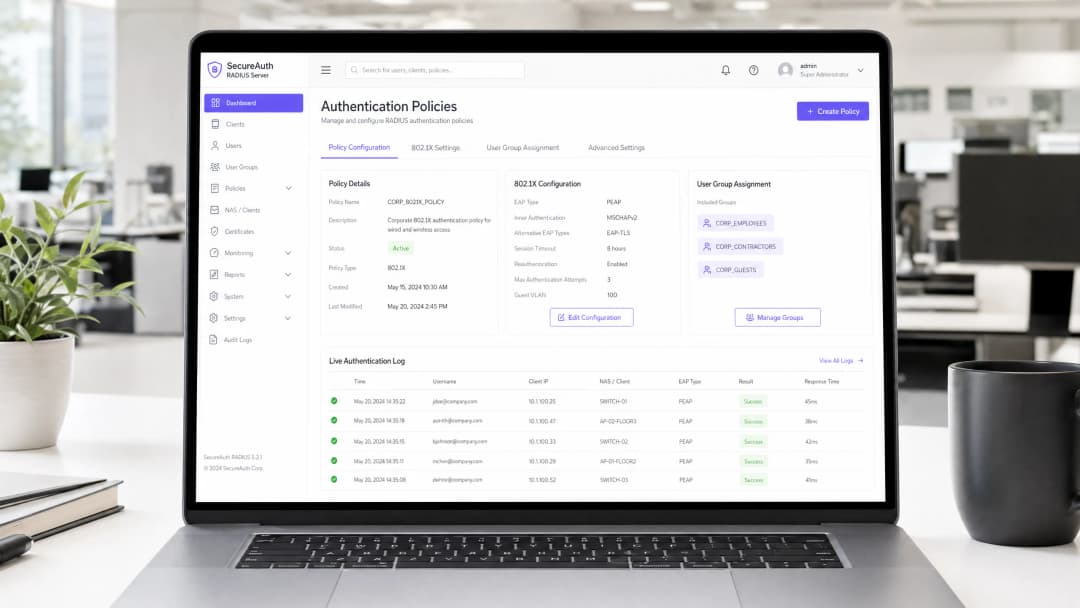
Resumen ejecutivo
Para los entornos empresariales - ya sea un campus universitario en expansión, un estadio de alta densidad o una cadena de tiendas distribuidas - depender de una clave precompartida (PSK) para el acceso a la WiFi representa un riesgo de seguridad significativo. Una sola credencial comprometida expone a toda la red, y revocar el acceso requiere cambiar la contraseña en todos los dispositivos de la propiedad. La implementación de la autenticación 802.1X a través de un servidor RADIUS (Remote Authentication Dial-In User Service) elimina este problema por completo: cada usuario se autentica de forma individual, el acceso se puede revocar de forma instantánea y la segmentación de la red se aplica dinámicamente.
Esta guía proporciona una hoja de ruta definitiva para que los responsables de TI y los arquitectos de red desplieguen la autenticación RADIUS. Analizamos las ventajas y desventajas arquitectónicas entre los despliegues locales y en la nube, la configuración de los métodos del protocolo de autenticación extensible (EAP) y la integración con servicios de directorio como Active Directory. También mostramos cómo se integra una capa de autenticación robusta con las soluciones de WiFi para invitados (Guest WiFi) para proporcionar un acceso sin fricciones a los visitantes, al tiempo que se capturan las analíticas de WiFi (WiFi Analytics) que transforman su red en un activo de inteligencia empresarial.
Análisis técnico detallado
La arquitectura 802.1X
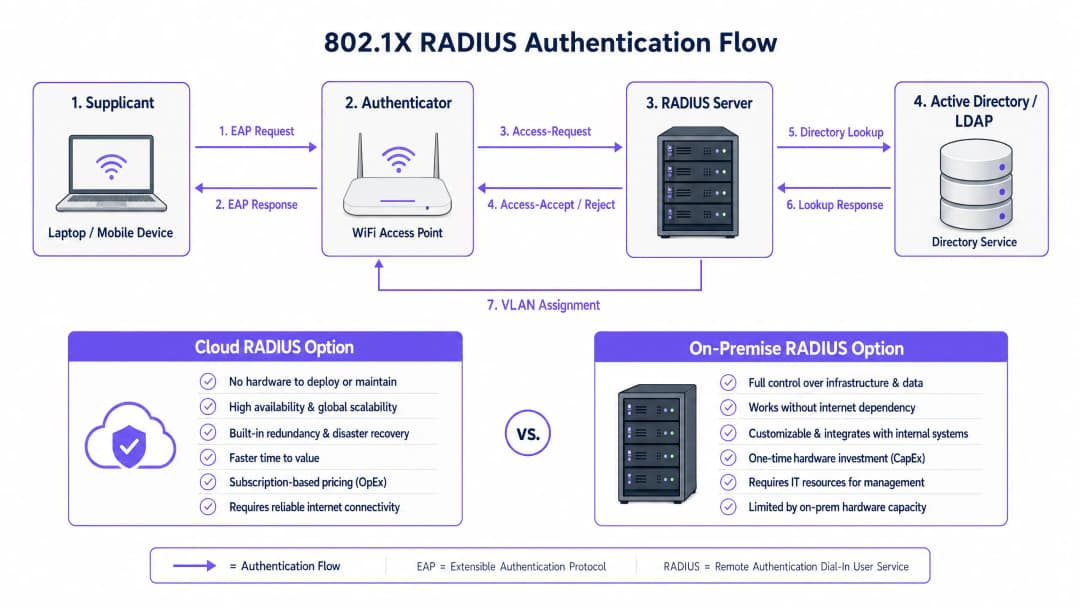
El estándar IEEE 802.1X define el control de acceso a la red basado en puertos (PNAC). En un contexto inalámbrico, implica tres roles principales que funcionan de manera conjunta:
| Rol | Componente | Responsabilidad |
|---|---|---|
| Suplicante (Supplicant) | Dispositivo cliente (portátil, smartphone) | Presenta las credenciales para solicitar acceso a la red |
| Autenticador (Authenticator) | Punto de acceso o controlador de WiFi | Aplica el control de acceso; retransmite mensajes EAP |
| Servidor de autenticación | Servidor RADIUS | Valida las credenciales; devuelve atributos de aceptación/rechazo y políticas |
Cuando un suplicante se asocia con un punto de acceso, el AP bloquea todo el tráfico de datos excepto los mensajes EAP (Extensible Authentication Protocol). El AP encapsula estos mensajes EAP en paquetes RADIUS y los reenvía al servidor RADIUS. El servidor verifica las credenciales en una base de datos back-end (normalmente LDAP o Active Directory) y devuelve un mensaje Access-Accept o Access-Reject. Si se acepta, el AP desbloquea el puerto y el tráfico del cliente fluye libremente.
Elección de un método EAP
La seguridad de su despliegue de RADIUS depende en gran medida del método EAP seleccionado. Los dos más comunes en despliegues empresariales son:
EAP-TLS (Transport Layer Security) es el estándar de oro. Requiere certificados digitales tanto en el servidor RADIUS como en cada dispositivo cliente, eliminando las contraseñas por completo. Incluso si un atacante captura todo el intercambio de autenticación, no hay credenciales que extraer. La contrapartida es la carga administrativa: la implementación y gestión de certificados de cliente requiere una Infraestructura de Clave Pública (PKI) en funcionamiento y una solución MDM (por ejemplo, Microsoft Intune, Jamf) para distribuir los certificados a los endpoints.
PEAP-MSCHAPv2 (Protected EAP) es el método más implementado en la práctica. Utiliza un certificado en el lado del servidor para establecer un túnel TLS cifrado, dentro del cual el cliente se autentica con un nombre de usuario y contraseña. Esto es significativamente más fácil de implementar que EAP-TLS porque solo se necesita gestionar un certificado: el del servidor. Sin embargo, conlleva una advertencia crítica: si los dispositivos cliente no están configurados explícitamente para validar el certificado del servidor RADIUS, son vulnerables a ataques Man-in-the-Middle (MitM) a través de puntos de acceso no autorizados.
Nota de seguridad crítica: No aplicar una validación estricta de certificados en los dispositivos cliente anula de forma efectiva los beneficios de seguridad de PEAP-MSCHAPv2. Un atacante puede desplegar un punto de acceso no autorizado, presentar un certificado fraudulento y capturar las credenciales de los usuarios en texto plano. Este no es un riesgo teórico: es un vector de ataque bien documentado que se ha explotado en entornos reales.
-
Guía de implementación
Paso 1: Decisión arquitectónica - RADIUS On-Premise frente a Cloud
La primera decisión es dónde alojar la infraestructura RADIUS. Esta es principalmente una cuestión operativa y de costes, no de seguridad: ambos modelos se pueden implementar de forma segura.
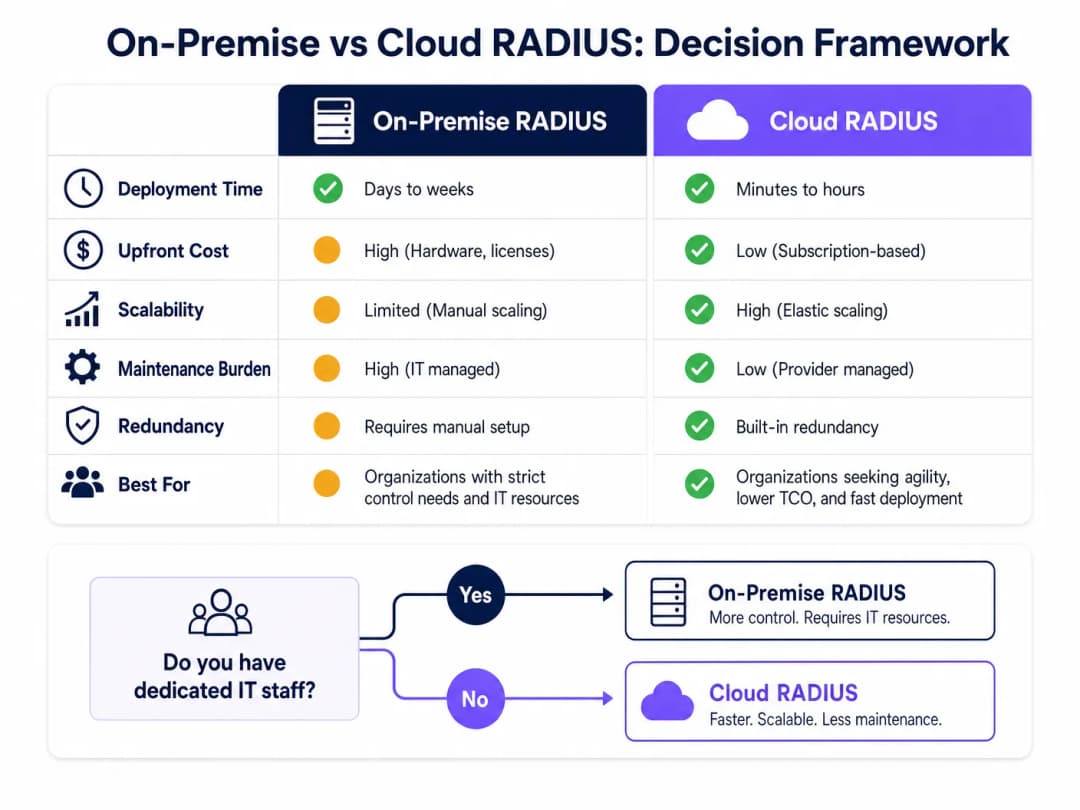
RADIUS On-Premise (por ejemplo, Microsoft NPS, FreeRADIUS, Cisco ISE) es adecuado para organizaciones con personal de TI dedicado, infraestructura de directorio local existente y requisitos estrictos de soberanía de datos o cumplimiento normativo. No depende de la conectividad a Internet para la autenticación, lo que supone una ventaja significativa para entornos donde no se puede garantizar el tiempo de actividad de Internet.
Cloud RADIUS es cada vez más el modelo preferido para entornos distribuidos: cadenas de Retail, grupos de Hospitality y centros de Transport donde implementar servidores en cada ubicación resulta operativamente inviable. Cloud RADIUS se integra de forma nativa con proveedores de identidad en la nube (Azure AD, Google Workspace, Okta) y proporciona alta disponibilidad integrada y escalabilidad global.
Paso 2: Instalar y configurar el servidor RADIUS
Para una implementación local utilizando Microsoft NPS (la opción más común en entornos basados en Windows):
- Instale el rol de Servidor de directivas de redes a través de Administrador del servidor.
- Registre el servidor NPS en Active Directory para permitirle leer las propiedades de marcación del usuario.
- Cree una entrada de RADIUS Client para cada punto de acceso o controlador inalámbrico, especificando la dirección IP del AP y un Shared Secret seguro y único.
- Configure una Network Policy que defina las condiciones (por ejemplo, la pertenencia a un grupo de usuarios) y las restricciones (por ejemplo, el método EAP, el tiempo de espera de la sesión) para el acceso.
- Configure la Connection Request Policy para procesar las solicitudes localmente.
Para FreeRADIUS en Linux:
- Instálelo mediante el gestor de paquetes:
sudo apt-get install freeradius freeradius-ldap. - Configure
/etc/freeradius/3.0/clients.confpara definir los RADIUS clients (APs) y sus shared secrets. - Configure el módulo LDAP en
/etc/freeradius/3.0/mods-available/ldappara que apunte a su Active Directory o servidor LDAP. - Habilite el módulo LDAP:
sudo ln -s /etc/freeradius/3.0/mods-available/ldap /etc/freeradius/3.0/mods-enabled/. - Defina los métodos EAP en
/etc/freeradius/3.0/mods-available/eap.
Paso 3: Configurar los puntos de acceso
En su controlador inalámbrico o en los puntos de acceso individuales:
- Defina las direcciones IP del servidor RADIUS y el puerto de autenticación (por defecto: UDP 1812).
- Configure el Shared Secret: utilice un mínimo de 22 caracteres, mezclando caracteres alfanuméricos y especiales. Utilice un secreto único por ubicación o grupo de AP.
- Configure el SSID para utilizar el modo de seguridad WPA2-Enterprise o WPA3-Enterprise con gestión de claves 802.1X.
- Configure un servidor RADIUS secundario para la tolerancia a fallos.
Paso 4: Integración del directorio
Para la integración con AD local, el servidor RADIUS debe estar unido al dominio o tener acceso de lectura LDAP. Asegúrese de que las cuentas de servicio utilizadas para el enlace LDAP tengan los permisos mínimos necesarios. Para RADIUS en la nube, configure la sincronización basada en API o la integración SAML/OIDC con su IdP.
Defina grupos de usuarios claros en su directorio, ya que estos impulsarán las políticas de autorización. Estructura de grupos recomendada:
| Grupo | VLAN | Nivel de acceso |
|---|---|---|
Corp_Staff |
VLAN 10 | Red interna completa |
Corp_Contractors |
VLAN 20 | Internet + recursos internos específicos |
Corp_IoT |
VLAN 30 | Solo puertos aislados específicos del dispositivo |
Corp_Guests |
VLAN 100 | Solo Internet mediante captive portal |
Paso 5: Configuración del cliente y validación del certificado
Este es el paso más crítico a nivel operativo. Utilice directivas de grupo (GPO) para Windows y perfiles de MDM para macOS/iOS/Android para enviar las configuraciones de WiFi de forma silenciosa a los dispositivos gestionados. El perfil debe especificar:
- La CA raíz que emitió el certificado del servidor RADIUS.
- El nombre de servidor esperado (CN o SAN del certificado del servidor).
- El método EAP y el protocolo de autenticación interno.
Para los dispositivos BYOD no gestionados, proporcione instrucciones claras de autogestión para la incorporación, idealmente a través de un portal de control de acceso a la red (NAC).
Paso 6: Implementar la asignación dinámica de VLAN
Configure el servidor RADIUS para devolver los atributos de asignación de VLAN en la respuesta Access-Accept:
Tunnel-Type=VLAN(13)Tunnel-Medium-Type=IEEE-802(6)Tunnel-Private-Group-Id=<VLAN ID>
El punto de acceso lee estos atributos y ubica al cliente autenticado en la VLAN especificada; no se requiere reconfiguración manual a medida que los usuarios cambian de rol o de ubicación.
¿Tiene preguntas sobre su configuración específica?
Nuestro equipo trabaja con operadores de recintos, responsables de TI e ingenieros de redes en 80 000 espacios. Reserve una llamada de 20 minutos y le mostraremos cómo lo han solucionado otros profesionales como usted.
Prácticas recomendadas
La redundancia no es negociable. Implemente un mínimo de dos servidores RADIUS (principal y secundario) y configure todos los puntos de acceso para que realicen una conmutación por error de forma automática. Para implementaciones locales, considere ubicar el servidor secundario en una ubicación física o zona de disponibilidad diferente. Una interrupción de RADIUS significa que nadie puede autenticarse, lo que se traduce en una interrupción total de la red para los SSIDs protegidos por 802.1X.
Supervise la expiración de los certificados de forma proactiva. La expiración del certificado del servidor RADIUS es una de las causas más comunes de fallos de autenticación repentinos y generalizados. Implemente una supervisión para alertar a los administradores al menos 30 días antes de la expiración. Esto se aplica tanto al certificado del servidor como a cualquier certificado de CA intermedia de la cadena.
Trate el Secreto Compartido como una credencial crítica. El secreto compartido entre el AP y el servidor RADIUS cifra los paquetes RADIUS. Utilice secretos únicos por ubicación o grupo de AP, almacénelos en un gestor de secretos y rótelos periódicamente. Consulte nuestra guía sobre Proteja su red con DNS sólido y seguridad para obtener recomendaciones más amplias sobre higiene de seguridad de la red.
Alineación con los marcos de cumplimiento. Para entornos sujetos a PCI-DSS (por ejemplo, redes de pago minoristas), la autenticación 802.1X respalda directamente los requisitos de control de acceso a la red y registro de auditoría. Para el cumplimiento de GDPR, los registros de contabilidad de RADIUS (puerto 1813) proporcionan un registro de auditoría detallado de quién accedió a la red, desde dónde y cuándo, lo cual es muy valioso para la respuesta ante incidentes. Para entornos de Sanidad, la segmentación de red mediante la asignación dinámica de VLAN respalda los requisitos de HIPAA para proteger la información de salud electrónica protegida (ePHI).
Resolución de problemas y mitigación de riesgos
| Modo de fallo | Síntoma | Resolución |
|---|---|---|
| Expiración de certificado | Fallos de autenticación masivos y repentinos | Supervisar la expiración; renovar e implementar el certificado |
| Desincronización de NTP | Fallos intermitentes de EAP-TLS | Asegurarse de que el servidor RADIUS y los controladores de dominio se sincronicen con la misma fuente NTP |
| Pérdida de conectividad LDAP | La autenticación falla cuando no se puede acceder a AD | Implementar controladores de dominio redundantes; configurar RADIUS para almacenar en caché las autenticaciones recientes |
| Secreto compartido incorrecto | Los registros del AP muestran RADIUS timeout o Bad authenticator |
Verificar que el secreto coincida tanto en el AP como en el servidor RADIUS |
| Discrepancia en el certificado del cliente | Fallos de EAP-TLS para dispositivos específicos | Verificar que el certificado del cliente esté emitido por una CA de confianza; comprobar el periodo de validez del certificado |
| VLAN no asignada | Usuario autenticado pero en el segmento de red incorrecto | Verificar que los atributos RADIUS se devuelvan correctamente; comprobar la configuración de la VLAN del AP |
Para profundizar en el proceso de configuración de 802.1X en sí, la Guía paso a paso sobre cómo configurar la autenticación WiFi 802.1X ofrece guías de configuración detalladas y específicas para cada fabricante.
Retorno de la inversión (ROI) e impacto empresarial
La transición de PSK a 802.1X respaldado por RADIUS requiere una inversión inicial en configuración y, potencialmente, licencias para soluciones en la nube o hardware para despliegues locales. El caso de ROI es muy claro:
Mitigación de riesgos: El coste medio de una filtración de datos en el Reino Unido supera los 3 millones de libras esterlinas (según el informe Cost of a Data Breach Report de IBM). Una contraseña PSK comprometida puede exponer toda la red. 802.1X limita el radio de impacto a una única cuenta de usuario comprometida, que puede desactivarse en cuestión de segundos a través del directorio.
Eficiencia operativa: La asignación dinámica de VLAN elimina la reconfiguración manual de la red cuando el personal cambia de función. La incorporación de un nuevo empleado consiste simplemente en añadirlo al grupo de AD correcto; el acceso a la red se aplica automáticamente.
Postura de conformidad: Para las organizaciones sujetas a PCI-DSS, ISO 27001 o Cyber Essentials, 802.1X es un control directo que los auditores esperan ver. Su despliegue refuerza su postura de conformidad y reduce los costes de solución de auditorías.
Experiencia de invitados y analítica: Para los operadores de recintos, integrar RADIUS para la autenticación del personal con la plataforma de Guest WiFi de Purple para el acceso de visitantes crea un modelo de acceso unificado y estructurado por niveles. El personal se autentica de forma silenciosa mediante 802.1X; los invitados se conectan a través de un Captive Portal personalizado con la marca. La plataforma WiFi Analytics de Purple ofrece entonces visibilidad en tiempo real de los tiempos de permanencia de los visitantes, las tasas de visitas repetidas y las métricas de interacción, datos que fundamentan directamente el gasto en marketing y las decisiones operativas del recinto.
Para más información, consulte la Guía paso a paso sobre cómo configurar la autenticación WiFi 802.1X para obtener orientación sobre la implementación en portugués, y ¿Qué es una línea dedicada? Internet dedicado para empresas para obtener pautas sobre cómo garantizar que la conectividad subyacente cumpla con los requisitos empresariales.
Definiciones clave
RADIUS (Remote Authentication Dial-In User Service)
Un protocolo de red que proporciona una gestión centralizada de Autenticación, Autorización y Contabilidad (AAA) para los usuarios que se conectan a un servicio de red. Definido en RFC 2865.
El componente de servidor principal que valida las credenciales de los usuarios en un directorio antes de conceder acceso WiFi. Toda implementación de WiFi empresarial que utilice 802.1X requiere un servidor RADIUS.
802.1X
Un estándar de la IEEE para el Control de Acceso a Redes Basado en Puertos (PNAC). Proporciona un mecanismo de autenticación para los dispositivos que desean conectarse a una LAN o WLAN, bloqueando todo el tráfico que no sea EAP hasta que la autenticación se complete con éxito.
El estándar de marco global que define cómo se comunican el suplicante, el autenticador y el servidor de autenticación. Cuando los equipos de TI se refieren a la "seguridad WiFi empresarial", normalmente se refieren a WPA2/WPA3-Enterprise con 802.1X.
Suplicante
El dispositivo cliente - o más precisamente, la pila de software 802.1X en ese dispositivo - que inicia el proceso de autenticación presentando las credenciales a la red.
En Windows, el suplicante integrado es el servicio de configuración automática inalámbrica (Wireless AutoConfig). En macOS e iOS, es nativo del sistema operativo. Asegurarse de que el suplicante esté configurado correctamente (especialmente para la validación de certificados) es la fuente más común de problemas de implementación.
Autenticador
El dispositivo de red - típicamente un punto de acceso WiFi o un controlador inalámbrico - que actúa como intermediario entre el suplicante y el servidor RADIUS, aplicando el control de acceso según el resultado de la autenticación.
El punto de acceso bloquea todo el tráfico de datos en el puerto hasta que recibe un Access-Accept del servidor RADIUS. También lee los atributos de RADIUS (por ejemplo, la asignación de VLAN) de la respuesta Access-Accept y los aplica a la sesión.
EAP (Protocolo de Autenticación Extensible)
Un marco de autenticación definido en el RFC 3748 que proporciona un mecanismo de transporte estandarizado para varios métodos de autenticación (TLS, PEAP, TTLS, etc.) entre el suplicante y el servidor de autenticación.
EAP es el "idioma" que se habla entre el cliente y el servidor RADIUS. La elección del método EAP (EAP-TLS frente a PEAP) determina la solidez de la seguridad y la complejidad de la implementación del sistema de autenticación.
PEAP (EAP Protegido)
Un método EAP que primero establece un túnel TLS utilizando el certificado del servidor y, a continuación, realiza una autenticación secundaria (normalmente MSCHAPv2 con nombre de usuario y contraseña) dentro de ese túnel cifrado.
El método de autenticación WiFi empresarial más común debido a su equilibrio entre seguridad y sencillez de implementación. Solo requiere un certificado en el lado del servidor, lo que hace que su despliegue sea mucho más fácil que el de EAP-TLS.
Asignación dinámica de VLAN
Una función de RADIUS en la que el servidor incluye atributos específicos de VLAN (Tunnel-Type, Tunnel-Medium-Type, Tunnel-Private-Group-Id) en la respuesta Access-Accept, indicando al punto de acceso que coloque al cliente autenticado en una VLAN específica.
Permite que un único SSID preste servicio a múltiples grupos de usuarios con diferentes requisitos de seguridad. Elimina la necesidad de transmitir múltiples SSIDs para diferentes grupos de usuarios, lo que reduce la sobrecarga de RF y simplifica la experiencia del usuario.
Secreto compartido
Una cadena de texto preconfigurada conocida únicamente por el autenticador (punto de acceso) y el servidor RADIUS, utilizada para firmar y cifrar paquetes RADIUS, garantizando la integridad y autenticidad de la comunicación.
Un elemento de configuración de seguridad crítico. Si el secreto compartido es débil o se ve comprometido, un atacante podría falsificar respuestas Access-Accept de RADIUS, otorgando acceso no autorizado a la red. Utilice secretos únicos por ubicación y almacénelos en un gestor de secretos.
Bypass de autenticación MAC (MAB)
Un mecanismo de autenticación alternativo en el que la dirección MAC de un dispositivo se utiliza como credencial de identidad, lo que permite el acceso a la red para dispositivos que no son compatibles con suplicantes 802.1X.
Se utiliza para dispositivos sin interfaz de usuario (impresoras, sensores IoT, cámaras IP). Debido a que las direcciones MAC son visibles públicamente y se pueden suplantar fácilmente, MAB proporciona identificación de dispositivos en lugar de una autenticación sólida. Vincúlelo siempre con una asignación de VLAN restrictiva.
Ejemplos prácticos
Una cadena nacional de tiendas de venta al por menor con 500 ubicaciones necesita implementar un WiFi seguro para las tabletas de los gerentes de tienda y las terminales de punto de venta (TPV). Actualmente utilizan una única PSK en todas las tiendas, que se comparte con frecuencia con personal y contratistas no autorizados. Utilizan Azure AD para la gestión de identidades y no tienen personal de TI dedicado en las sucursales.
Implementar una solución de Cloud RADIUS integrada directamente con Azure AD (ahora Microsoft Entra ID). Esto elimina la necesidad de implementar y gestionar servidores RADIUS locales en 500 ubicaciones. El equipo de TI utiliza Microsoft Intune para distribuir un perfil de WiFi a todas las tabletas de los gerentes de tienda y terminales de TPV configuradas para PEAP-MSCHAPv2, exigiendo estrictamente la validación del certificado del servidor Cloud RADIUS. La política de Cloud RADIUS verifica la pertenencia al grupo de Azure AD del usuario antes de conceder el acceso: el grupo "Store_Managers" recibe la VLAN 10 (acceso total a TPV y oficina de soporte), el grupo "Contractors" recibe la VLAN 20 (solo acceso a internet). Cuando finaliza el contrato de un colaborador externo, su eliminación del grupo de Azure AD revoca inmediatamente su acceso WiFi en las 500 ubicaciones de forma simultánea, sin necesidad de cambiar la PSK.
Un hotel de 400 habitaciones en el centro de la ciudad necesita proporcionar WiFi seguro tanto para el personal (recepción, limpieza, dirección) como para los huéspedes. El personal requiere acceso al sistema de gestión hotelera (PMS) y a los servidores internos. Los huéspedes solo necesitan acceso a internet. El hotel dispone de un único entorno local de Windows Server.
Implementar Microsoft NPS en una máquina virtual dedicada de Windows Server. Configurar dos SSIDs en la infraestructura inalámbrica: "Hotel_Staff" (WPA2-Enterprise, 802.1X) y "Hotel_Guest" (abierto o WPA2-Personal, que redirige a un Captive Portal). Para el SSID del personal, NPS valida las credenciales en Active Directory y devuelve asignaciones dinámicas de VLAN: grupo de AD "Management" → VLAN 10 (acceso total), "FrontDesk" → VLAN 20 (acceso al PMS), "Housekeeping" → VLAN 30 (solo internet + aplicación de planificación). Para los huéspedes, integrar el Captive Portal con la plataforma Guest WiFi de Purple para ofrecer una experiencia de inicio de sesión de marca, recopilar datos propios (correo electrónico, consentimiento de marketing) y obtener análisis sobre el tiempo de permanencia y las visitas recurrentes. El modelo de dos SSIDs mantiene el tráfico del personal y de los huéspedes completamente separado en la capa de red.
Preguntas de práctica
Q1. Su organización va a migrar 2000 portátiles Windows de una PSK compartida a 802.1X con PEAP-MSCHAPv2. El equipo de seguridad advierte de que PEAP es vulnerable a la obtención de credenciales mediante puntos de acceso fraudulentos. ¿Cuál es el paso de configuración más importante para mitigar este riesgo y cómo se implementa a escala?
Sugerencia: Piense en qué impide que un cliente confíe en un servidor RADIUS fraudulento que presenta un certificado autofirmado.
Ver respuesta modelo
El paso crítico es aplicar una validación estricta del certificado del servidor en cada dispositivo cliente. Mediante Objetos de Directiva de Grupo (GPO), envíe un perfil de WiFi a los 2000 portátiles que especifique: (1) el certificado de la CA raíz exacto que emitió el certificado del servidor RADIUS, (2) el nombre de servidor esperado (CN/SAN) y (3) que el cliente no debe solicitar al usuario que confíe en nuevos certificados. Esto garantiza que incluso si un atacante despliega un AP fraudulento con un certificado falso, el cliente rechazará el saludo TLS y se negará a enviar credenciales. Sin esta configuración, PEAP no proporciona ninguna protección significativa contra ataques de AP fraudulentos.
Q2. Un director de TI de un hospital necesita proporcionar acceso a la red a 300 dispositivos IoT médicos (bombas de infusión, equipos de monitorización) que no son compatibles con 802.1X. Estos dispositivos comparten la misma infraestructura inalámbrica con las estaciones de trabajo del personal. ¿Cómo debe gestionar la infraestructura RADIUS estos dispositivos y qué controles de red deben aplicarse?
Sugerencia: Piense en el método de autenticación disponible para dispositivos sin interfaz de usuario y cómo compensar su debilidad inherente.
Ver respuesta modelo
Configure MAC Authentication Bypass (MAB) en el servidor RADIUS para estos dispositivos específicos. Registre la dirección MAC de cada dispositivo en un grupo dedicado de Active Directory o en la base de datos RADIUS. Dado que las direcciones MAC son fáciles de suplantar, el servidor RADIUS debe utilizar la asignación dinámica de VLAN para situar todos los dispositivos autenticados por MAB en una VLAN dedicada y muy restringida (por ejemplo, VLAN 30 - IoT). Esta VLAN debe estar protegida por un cortafuegos para permitir la comunicación únicamente con direcciones IP de servidores médicos específicos y bloquear el resto del tráfico, incluido el acceso a Internet y el movimiento lateral hacia las VLAN del personal. Las estaciones de trabajo del personal se autentican mediante 802.1X y se ubican en una VLAN independiente. Esta arquitectura cumple los requisitos de segmentación de red de HIPAA para dispositivos adyacentes a ePHI.
Q3. Usted es el arquitecto de red de una cadena de restaurantes con 50 establecimientos. La autenticación funciona correctamente en 49 de ellos utilizando Cloud RADIUS, pero un establecimiento específico informa de que ningún dispositivo consigue autenticarse. El portal de gestión de Cloud RADIUS muestra que no llega ninguna solicitud de autenticación desde ese establecimiento. ¿Cuál es su enfoque de diagnóstico?
Sugerencia: Si el servidor RADIUS no recibe ninguna solicitud, el problema está en la ruta de comunicación entre el autenticador y el servidor, no en la lógica de autenticación en sí.
Ver respuesta modelo
Dado que el servidor RADIUS no recibe ninguna solicitud de este establecimiento, el fallo se encuentra entre los puntos de acceso y el servidor Cloud RADIUS. Pasos de diagnóstico en orden: (1) Verifique la dirección IP y el puerto del servidor RADIUS (UDP 1812) configurados en los AP o en el controlador inalámbrico del establecimiento (un error tipográfico aquí es la causa más común). (2) Compruebe las reglas del cortafuegos o router local en ese establecimiento para confirmar que se permite el tráfico saliente UDP 1812 hacia el rango de IP de Cloud RADIUS. (3) Verifique que el secreto compartido configurado en los AP coincide con el secreto configurado para ese establecimiento en el portal de Cloud RADIUS (una discrepancia hace que el servidor RADIUS descarte los paquetes de forma silenciosa). (4) Compruebe si la conexión a Internet del establecimiento funciona (Cloud RADIUS requiere una conectividad a Internet fiable). Realizar una captura de paquetes en el AP o en el router ascendente confirmará si se están enviando paquetes RADIUS y si se están recibiendo respuestas.
Continúe leyendo esta serie
Guía de administración de redes para configurar la autenticación RADIUS en WiFi de invitados
Una referencia técnica completa para administradores de redes sobre el despliegue de la autenticación RADIUS para WiFi de invitados. Cubre la arquitectura, los pasos de configuración independientes del fabricante, las mejores prácticas de seguridad y la resolución de problemas comunes en el despliegue.
Implementación de SCEP para WiFi 802.1X y BYOD seguro en educación superior
Esta guía técnica detalla cómo los equipos de TI de educación superior pueden automatizar el registro de certificados 802.1X para miles de dispositivos BYOD utilizando SCEP. Cubre la arquitectura, las ventajas de seguridad y los pasos prácticos de despliegue para sustituir el registro manual por un modelo de acceso a la red seguro y sin intervención.
Configuring RADIUS Authentication for Guest and Staff WiFi Networks
Esta guía de referencia técnica describe la arquitectura, configuración y despliegue de la autenticación RADIUS para redes WiFi empresariales de invitados y de personal. Proporciona a los arquitectos de redes y responsables de TI los protocolos exactos, los estándares de seguridad y las metodologías de resolución de problemas necesarios para crear sistemas de control de acceso inalámbrico seguros y escalables.
¿Tiene preguntas sobre su configuración específica?
Nuestro equipo trabaja con operadores de recintos, responsables de TI e ingenieros de redes en 80 000 espacios. Reserve una llamada de 20 minutos y le mostraremos cómo lo han solucionado otros profesionales como usted.