
How to Configure Guest WiFi and Captive Portals on Ruijie Networks
This technical guide details the configuration of guest WiFi and captive portals on Ruijie Networks hardware, covering both native cloud portals and external RADIUS integrations. It provides IT managers and network architects with actionable steps for VLAN isolation, walled garden setup, and third-party platform integration to drive analytics and revenue.
Listen to this guide
View podcast transcript
Executive Summary
Configuring guest WiFi and captive portals on Ruijie Networks hardware requires a clear understanding of the platform's architecture, specifically the choice between native cloud portals and external RADIUS integrations. This technical reference guide provides IT managers, network architects, and venue operations directors with the definitive steps to deploy secure, isolated, and scalable guest networks using Ruijie RG-WS controllers and Reyee EG gateways. We cover the transition from basic NAT forwarding to robust VLAN isolation, the configuration of external captive portals via WISPr, and the integration of third-party platforms like Purple to capture first-party data and drive revenue. Whether you are managing a single hotel or a multi-site retail estate, this guide delivers the practical, vendor-neutral configuration steps required to build a compliant and high-performing wireless network.
Technical Deep-Dive
Ruijie Networks provides a robust, enterprise-grade wireless architecture that supports multiple deployment models for guest access. The core decision for any network architect is selecting the appropriate authentication flow and isolation strategy.
Captive Portal Deployment Models
Ruijie supports three distinct captive portal deployment models, each suited to different operational requirements:
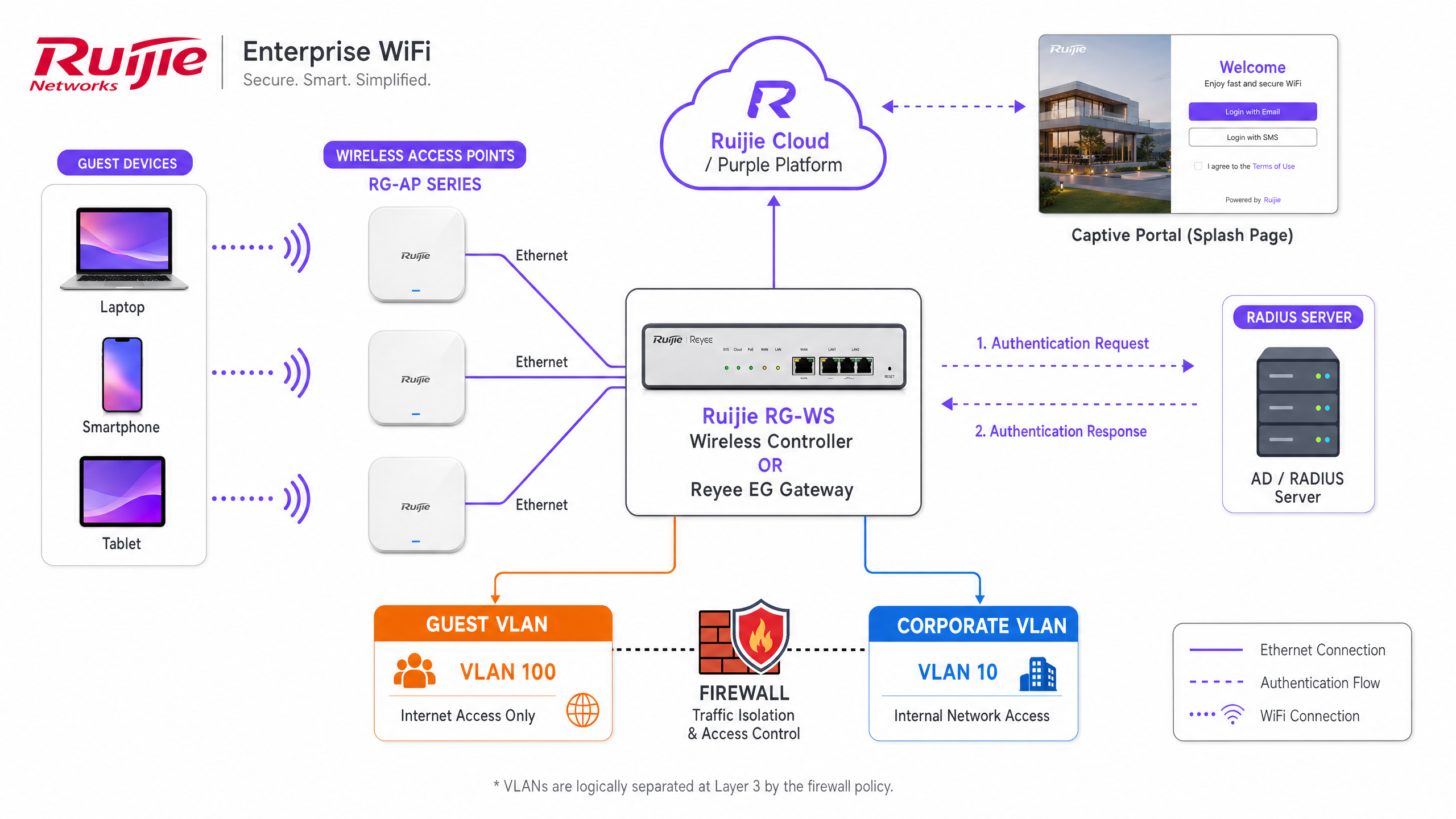
- Native Cloud Portal (Ruijie JaCS): The built-in Ruijie Cloud platform, specifically the JaCS interface for hospitality, provides a drag-and-drop portal builder. This model is configured under Device Config, where the SSID authentication is set to Captive Portal. It supports basic login options including one-click access and voucher codes. This is suitable for single-site venues that do not require deep analytics or external CRM integration.
- External Captive Portal (WISPr/RADIUS): For enterprise deployments, multi-site retail, and large public venues, the external portal model is mandatory. This approach uses the WISPr protocol to redirect guest traffic to a third-party platform like Purple. Authentication is handled via an external RADIUS server group using PAP encryption. This model enables advanced data capture, GDPR compliance management, and seamless integration with existing marketing stacks.
- Standalone AP Portal: Ruijie Reyee access points running ReyeeOS 1.219 or later support a localised captive portal without requiring an EG gateway. This is a fallback option for temporary deployments but lacks the robust QoS and isolation features of a controller-based architecture.
Network Isolation: NAT versus VLAN
The most critical architectural decision is how to isolate guest traffic from the corporate network. Ruijie offers two forwarding modes for guest SSIDs:
- NAT Mode: The gateway assigns IP addresses from a dedicated pool (defaulting to 192.168.23.0/24) and performs Network Address Translation before routing traffic to the internet. While simple to deploy, this method provides limited visibility and control over guest traffic at Layer 3.
- VLAN Mode: The recommended enterprise standard. The guest SSID is mapped to a dedicated VLAN (e.g., VLAN 100). The Reyee EG gateway or RG-WS controller uses Access Control Lists (ACLs) to enforce strict isolation. An extended ACL must be configured to deny IP traffic from the guest subnet to the corporate subnet, while permitting outbound internet access. This approach aligns with Enterprise WiFi Security: A Complete Guide for 2026 principles.
Walled Garden Configuration
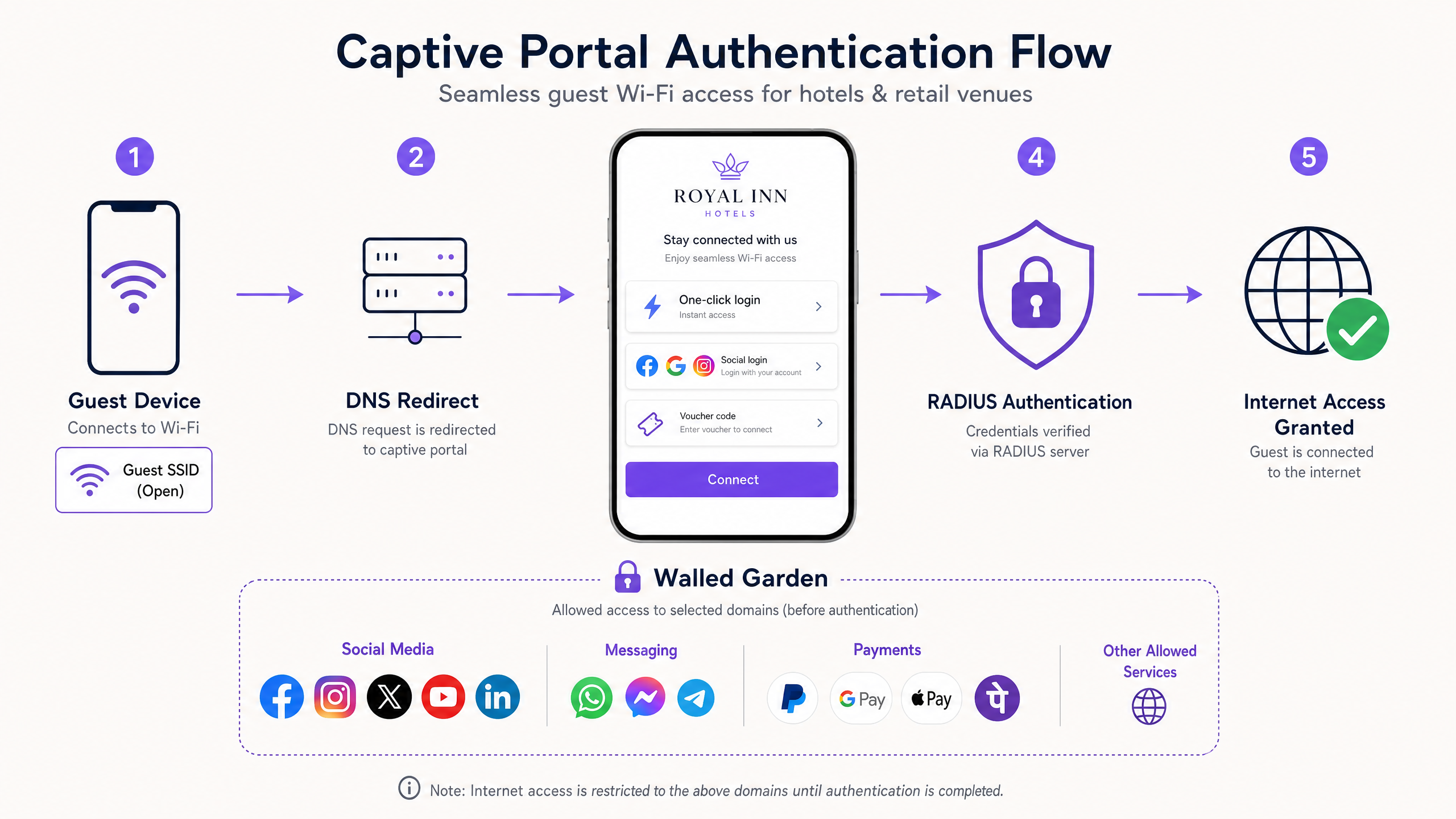
Before a guest completes the captive portal authentication, their device operates in a restricted state. A walled garden, or allowlist, must be configured to permit access to essential services. If you use an external platform, you must add the platform's domain, IP addresses, and the authentication endpoints for any social login providers (such as Facebook or Google). Crucially, you must include captive.apple.com to ensure iOS devices correctly trigger the captive portal mini-browser.
Implementation Guide
Deploying an external captive portal on Ruijie hardware requires precise configuration across the SSID, authentication policies, and network isolation layers. Follow these steps to integrate Ruijie with an external platform like Purple.
Step 1: Configure the Guest SSID and VLAN
- Log in to the Ruijie Cloud or the local eWeb interface of your controller.
- Navigate to Wireless Settings and create a new SSID named appropriately for your venue.
- Set the Security Mode to Open. The captive portal will serve as the authentication mechanism.
- Assign the SSID to your designated guest VLAN. Ensure the corresponding VLAN interface is configured on your EG gateway with a DHCP scope.
Step 2: Configure the External Captive Portal Policy
- Navigate to the Auth & Account section.
- Select Captive Portal under the Authentication menu.
- Create a new policy and set the Policy Mode to External.
- Select the Guest SSID you created in Step 1.
- Input the Portal Server URL provided by your external platform (e.g., Purple's portal endpoint).
- Configure the RADIUS server group using the IP addresses, ports (typically 1812 for authentication and 1813 for accounting), and shared secrets provided by your platform.
Step 3: Implement the Walled Garden
- In the Auth & Account section, locate the Allowlist configuration.
- Add the required domains and IP addresses for your external platform.
- Add the domains for any social identity providers you plan to use.
- Ensure standard captive portal detection domains are permitted.
Step 4: Enforce ACL Isolation
Connect to the command line interface of your Ruijie gateway or controller to configure the isolation ACL. This step ensures guests cannot reach internal resources.
Ruijie(config)# access-list extended 107
Ruijie(config-ext-nacl)# deny ip 192.168.100.0 0.0.0.255 192.168.10.0 0.0.0.255
Ruijie(config-ext-nacl)# permit ip any any
Ruijie(config-ext-nacl)# exit
Ruijie(config)# interface BVI 100
Ruijie(config-if-BVI 100)# access-group 107 in
Best Practices
To ensure a reliable and secure guest WiFi experience, adhere to these industry-standard best practices:
- Use External Authentication for Scale: If you manage multiple venues or require detailed Guest WiFi analytics, bypass the native portal and use an external RADIUS integration. Platforms like Purple provide hardware-agnostic management, allowing you to standardise the guest experience across Ruijie, Cisco Meraki, HPE Aruba, and Ruckus hardware.
- Implement Tiered Bandwidth: Use the QoS features on the Ruijie EG gateway to enforce per-user bandwidth limits. Offer a free baseline tier (e.g., 5 Mbps) and integrate with a payment gateway via your external portal to offer a premium, high-speed tier. This creates a direct revenue stream from your infrastructure.
- Synchronise Configurations: When using the Ruijie JaCS platform, you must explicitly click the Synchronise button after modifying a captive portal policy. Failing to do so means the EG gateway will not receive the updated configuration, leading to inconsistent portal behaviour.
- Comply with Data Privacy Regulations: Ensure your captive portal includes explicit, conscious-choice opt-ins for marketing communications. When using Purple, the platform automatically handles GDPR and CCPA compliance, providing a secure data privacy layer. Refer to The Network Administrator’s Guide to GDPR and Guest Data Privacy Compliance for detailed requirements.
Troubleshooting & Risk Mitigation
Even with careful configuration, captive portal deployments can encounter issues. Here are the common failure modes and how to resolve them:
- iOS Devices Fail to Show Portal: This is almost always a walled garden issue. Apple devices check
captive.apple.comto determine if they are behind a portal. If this domain is blocked, the device assumes it has full internet access and fails to launch the captive network assistant. Verify your allowlist configuration. - Guests Cannot Authenticate via RADIUS: Check the RADIUS shared secret and port configurations on the Ruijie gateway. Ensure the gateway's public IP address is correctly registered with your external platform. Use the Ruijie diagnostic tools to verify RADIUS reachability.
- Bandwidth Limits Are Ignored: If you are using an external platform to enforce bandwidth tiers, you must disable the Client Escape feature on the Ruijie gateway. If Client Escape is active, the gateway may bypass the external platform's QoS instructions.
- Guest Traffic Reaches Corporate Network: Review your ACL configuration. Ensure the extended access list is applied inbound on the correct VLAN or BVI interface. Test isolation by connecting a device to the guest SSID and attempting to ping a known internal IP address.
ROI & Business Impact
Deploying a robust captive portal on Ruijie hardware transforms guest WiFi from a sunk cost into a measurable business asset. By integrating an external WiFi Analytics platform like Purple, venues can achieve significant returns.
- First-Party Data Acquisition: The captive portal acts as a primary data capture point. By offering free WiFi in exchange for an email address or social login, venues build a rich database of customer profiles. This data fuels targeted marketing campaigns, increasing customer lifetime value.
- Operational Efficiency: Centralised cloud management via Ruijie Cloud and Purple reduces the time IT teams spend troubleshooting local network issues. The hardware-agnostic nature of the overlay means you can upgrade or replace access points without rebuilding your entire analytics stack.
- Direct Revenue Generation: Implementing tiered bandwidth models allows venues to monetise the network directly. For example, AGS Airports implemented a tiered WiFi strategy and saw an 842% return on investment.
- Enhanced Visitor Experience: A seamless, branded login experience improves customer satisfaction. In sectors like Hospitality and Retail , reliable connectivity is a baseline expectation; delivering it securely builds brand trust.
Key Definitions
Captive Portal
A web page that a user of a public access network is obliged to view and interact with before access is granted.
The primary mechanism for authenticating guests and capturing first-party data on a Ruijie wireless network.
RADIUS
Remote Authentication Dial-In User Service. A networking protocol that provides centralized Authentication, Authorization, and Accounting management.
Used to securely connect Ruijie gateways to external platforms like Purple for guest authentication.
Walled Garden
An allowlist of domains and IP addresses that a guest device can access before completing the captive portal authentication.
Essential for allowing social login providers and captive portal detection mechanisms (like Apple's CNA) to function.
VLAN Isolation
The practice of assigning guest traffic to a separate Virtual Local Area Network and using Access Control Lists to prevent communication with internal corporate networks.
The standard security posture for enterprise guest WiFi deployments on Ruijie hardware.
WISPr
Wireless Internet Service Provider roaming. A protocol that allows users to roam between different wireless providers, often used to handle the redirect to external captive portals.
The underlying mechanism Ruijie uses when the captive portal policy is set to External mode.
Ruijie JaCS
Ruijie's cloud management platform specifically tailored for hospitality and hotel scenarios, offering native captive portal building tools.
Used for managing single-site deployments that do not require external data capture platforms.
Reyee EG Gateway
Ruijie's line of enterprise security routers that handle routing, firewall policies, and captive portal redirection for the wireless network.
The central hardware component where ACLs and RADIUS configurations are applied in a Ruijie deployment.
Client Escape
A feature on Ruijie gateways that, if enabled, can allow clients to bypass certain QoS or portal restrictions.
Must be disabled when using an external platform to enforce tiered bandwidth limits.
Worked Examples
A 200-room hotel deploying Ruijie RG-AP access points and an EG gateway needs to provide free guest WiFi while capturing email addresses for their marketing database. They also require strict isolation from their property management system (PMS) network.
The IT team configures a new Open SSID assigned to VLAN 100. On the EG gateway, they configure an extended ACL to deny traffic from VLAN 100 to the PMS VLAN, applying it inbound on the guest interface. They set the captive portal policy to External mode, pointing the Portal Server URL to Purple's platform. They configure the RADIUS server group with Purple's credentials and add Purple's domains to the allowlist. The Purple platform handles the branded splash page and email capture workflow.
A retail chain with 50 locations is rolling out Ruijie hardware. Customers report that when they connect to the guest WiFi on their iPhones, the login screen does not appear automatically, forcing them to open a browser manually.
The network administrator logs into Ruijie Cloud, navigates to Auth & Account, and opens the Allowlist configuration. They add 'captive.apple.com' to the walled garden list and synchronise the configuration to all EG gateways across the estate.
Practice Questions
Q1. You are deploying Ruijie WiFi across a stadium. You need to capture fan data for marketing and enforce a 5 Mbps bandwidth limit per user. Should you use the native Ruijie portal or an external platform, and how do you enforce the bandwidth?
Hint: Consider the scale of the deployment and the data capture requirements.
View model answer
You must use an external platform like Purple for the data capture and marketing integration. To enforce the bandwidth, configure the QoS settings on the Ruijie EG gateway for the guest SSID, and ensure the Client Escape feature is disabled so the external platform's policies are respected.
Q2. A client complains that their guest network is insecure because the SSID is set to 'Open'. They ask you to implement a pre-shared key (WPA2-Personal) alongside the captive portal. How do you advise them?
Hint: Consider the user experience and the purpose of the captive portal.
View model answer
Advise the client that for public guest networks, adding a pre-shared key introduces unnecessary friction without significantly improving security, as the key must be shared publicly anyway. The captive portal itself serves as the authentication and authorization layer. For true security, WPA3-Enterprise with 802.1X should be used, but this is rarely suitable for public guest access.
Q3. After configuring a new external captive portal policy on Ruijie Cloud and pointing it to Purple, guests are still seeing the default Ruijie login page. What is the most likely cause?
Hint: Think about the configuration deployment process in the Ruijie interface.
View model answer
The administrator likely saved the configuration in Ruijie Cloud but failed to click the Synchronise button. The configuration has not been pushed down to the local EG gateway, so it is still serving the default local portal.
Continue reading in this series
Measuring the Business ROI of Guest WiFi and Location Analytics
This guide provides a technical and operational framework for measuring the business ROI of guest WiFi and location analytics. It details how to calculate value from hardware investments through dwell time uplift, operational efficiency, and first-party data capture across retail, hospitality, and public venues. IT managers, network architects, CTOs, and venue operations directors will find concrete measurement frameworks, real-world case studies, and compliance guidance to justify and maximise their WiFi investment.
Integrating WeChat WiFi Login: Capturing Engagement via Social Captive Portals
This guide details how to integrate WeChat WiFi authentication into enterprise captive portals, covering the OAuth 2.0 architecture, RADIUS integration, and step-by-step deployment across Cisco Meraki, HPE Aruba, and Juniper Mist hardware. It gives IT managers and network architects a practical framework for capturing first-party data from WeChat's 1.3 billion users while driving engagement via Official Account follows and post-login redirects.
WiFi GDPR Compliance: How to Securely Collect Guest Data via Captive Portals
This technical guide gives IT managers, network architects, and venue operations directors a practical framework for achieving GDPR compliance across guest WiFi deployments. It covers how captive portals collect personal data, how to secure explicit consent, and how to implement automated data retention policies that protect your organisation from regulatory fines of up to 4% of global turnover. Purple's guest WiFi platform maps directly to each compliance requirement, from consent logging to one-click data erasure.