
Cómo configurar WiFi empresarial en dispositivos Android con EAP-TLS
Esta guía de referencia técnica proporciona a los líderes de TI sénior un plan integral para implementar la autenticación 802.1X EAP-TLS en dispositivos Android. Cubre la mecánica arquitectónica, las estrategias de implementación manuales y basadas en MDM, y las metodologías de resolución de problemas necesarias para proteger las redes inalámbricas empresariales.
Escuchar esta guía
Ver transcripción del podcast

Resumen Ejecutivo
Proteger las redes inalámbricas empresariales contra el robo de credenciales y el acceso no autorizado requiere ir más allá de las contraseñas compartidas. Para flotas de dispositivos Android en entornos corporativos, 802.1X EAP-TLS (Extensible Authentication Protocol with Transport Layer Security) representa el estándar de seguridad definitivo. Al aprovechar la autenticación mutua basada en certificados, EAP-TLS elimina los riesgos asociados con la fatiga de contraseñas, el phishing y las credenciales débiles.
Esta guía de referencia técnica proporciona a arquitectos de red, gerentes de TI y CTOs estrategias accionables para implementar EAP-TLS en dispositivos Android. Ya sea gestionando terminales de punto de venta en Retail , dispositivos clínicos en Healthcare o operaciones internas en Hospitality , dominar esta implementación garantiza un sólido cumplimiento de seguridad (PCI DSS, GDPR, ISO 27001) al tiempo que ofrece una experiencia de conexión fluida para los usuarios finales. Cubrimos tanto la configuración manual para entornos BYOD como el aprovisionamiento MDM sin contacto para flotas propiedad de la empresa.
Escuche el Informe
Análisis Técnico Detallado
La Arquitectura 802.1X y la Mecánica de EAP-TLS
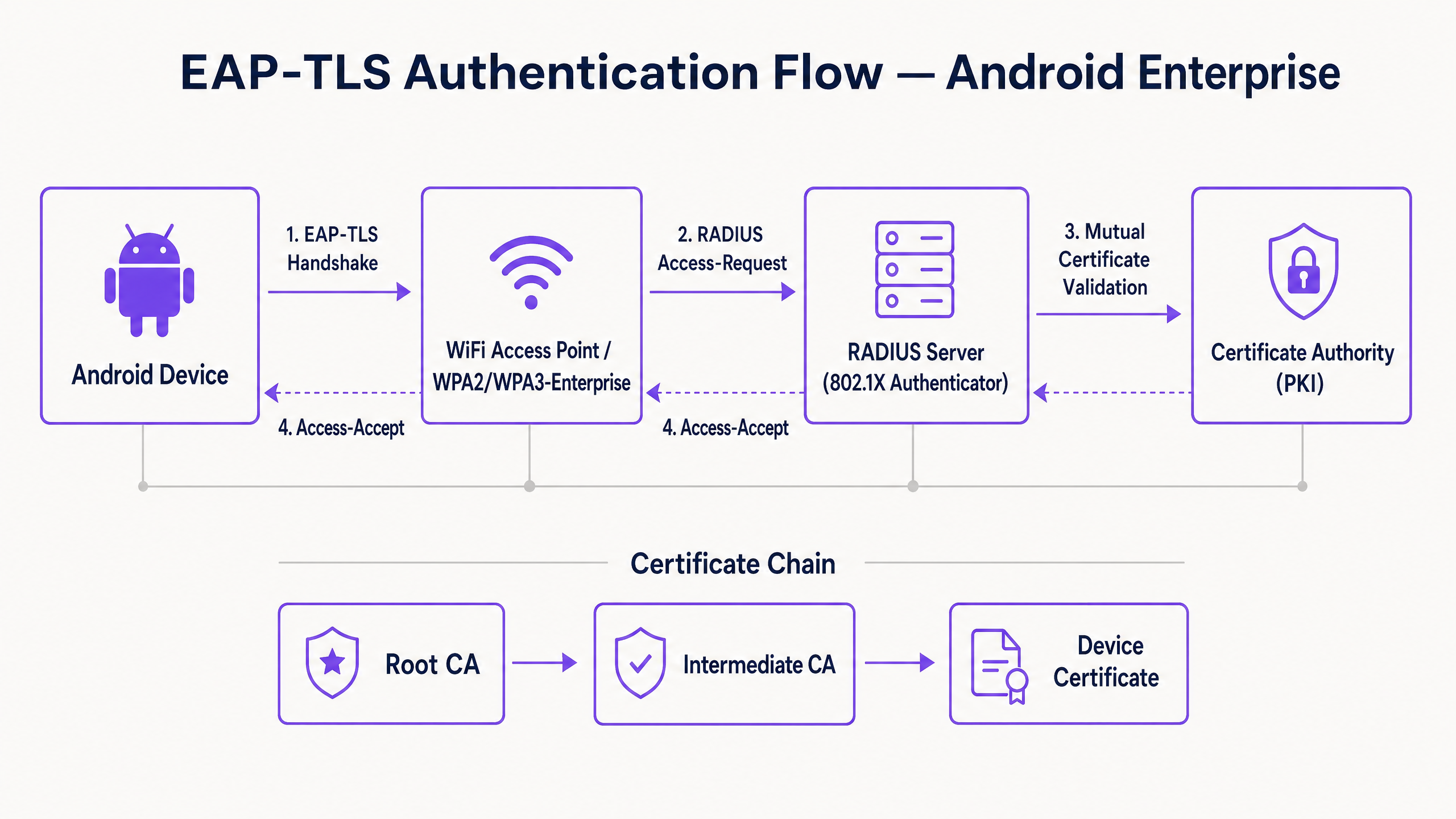
En su esencia, 802.1X es un estándar IEEE para el control de acceso a la red basado en puertos. En un contexto inalámbrico, el punto de acceso actúa como Autenticador, facilitando la comunicación entre el dispositivo Android (el Solicitante) y el servidor RADIUS (el Servidor de Autenticación).
A diferencia de PEAP o TTLS, que encapsulan la autenticación de contraseña heredada dentro de TLS, EAP-TLS se basa completamente en certificados X.509. Esto crea un paradigma de autenticación mutua:
- El servidor RADIUS presenta su certificado al dispositivo Android para demostrar que la red es legítima.
- El dispositivo Android presenta su certificado de cliente único al servidor RADIUS para demostrar que es un punto final autorizado.
Requisitos de Certificado Específicos de Android
La implementación en Android introduce restricciones específicas, particularmente a partir de Android 11. Google desaprobó la opción "No validar" para los certificados de servidor para mitigar los ataques de intermediario (MitM). En consecuencia, el dispositivo Android debe poseer el certificado de CA raíz que firmó el certificado del servidor RADIUS.
Además, el certificado del servidor RADIUS debe contener los atributos correctos de Uso Extendido de Clave (EKU), específicamente Server Authentication (OID 1.3.6.1.5.5.7.3.1). Sin esto, el solicitante Android descartará silenciosamente el handshake TLS.
Para el lado del cliente, Android requiere que la clave privada y el certificado estén empaquetados, típicamente en formato PKCS#12 (.p12 o .pfx).
Integración con el Ecosistema de Purple
Si bien EAP-TLS protege sus dispositivos corporativos y la infraestructura operativa, los operadores de recintos también deben gestionar el acceso de los visitantes. Aquí es donde una estrategia de doble SSID se vuelve crítica. Su SSID corporativo utiliza 802.1X EAP-TLS, mientras que su SSID público aprovecha la plataforma Guest WiFi de Purple. Esta separación garantiza la seguridad operativa al tiempo que permite al equipo de marketing aprovechar WiFi Analytics en la red de invitados. Para una visión más amplia sobre la seguridad de la infraestructura física, consulte Seguridad del Punto de Acceso: Su Guía Empresarial 2026 .
Guía de Implementación
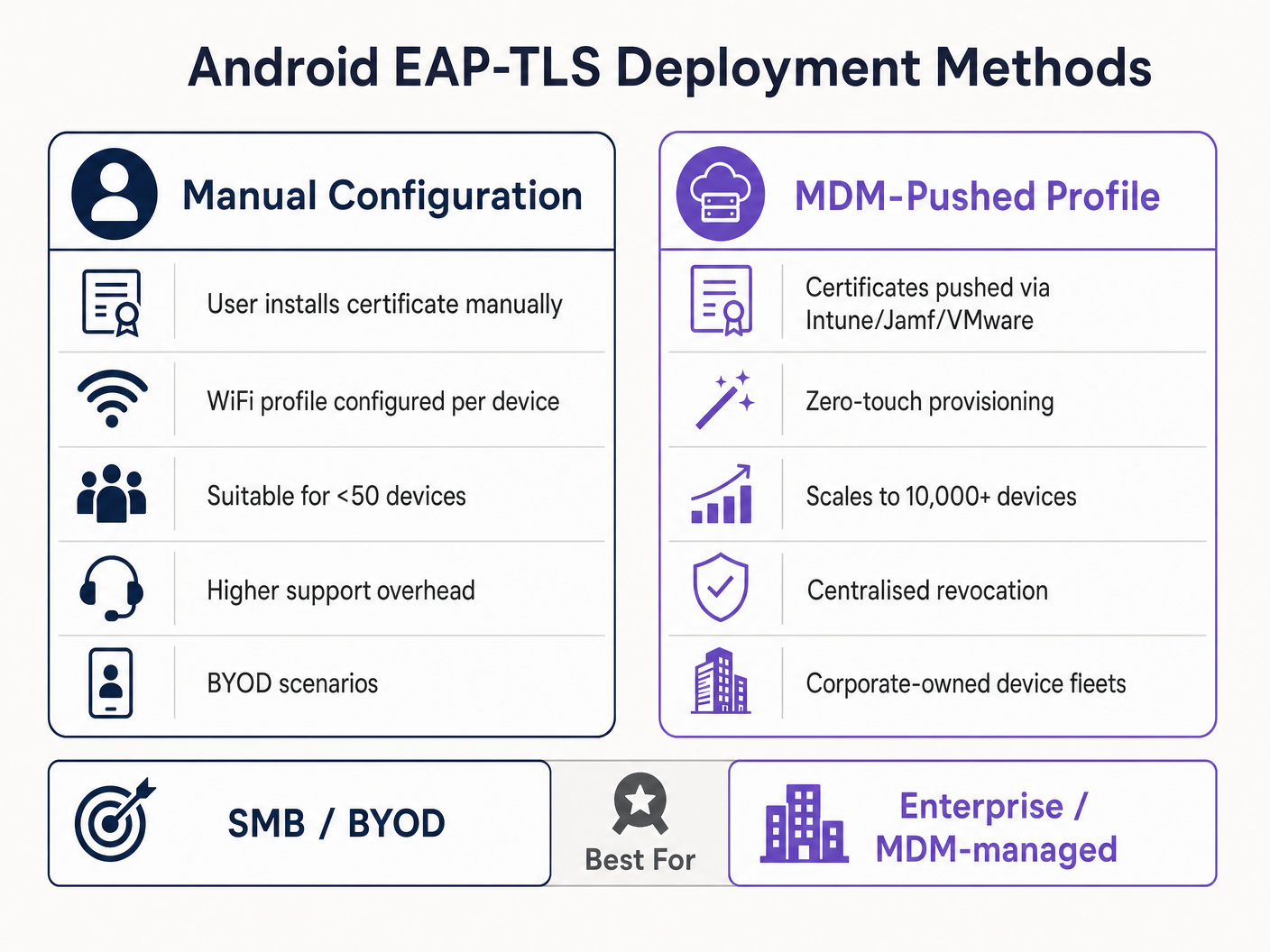
La implementación de EAP-TLS en Android se puede abordar manualmente para pequeñas implementaciones BYOD o mediante Mobile Device Management (MDM) para escala empresarial.
Método 1: Configuración Manual (BYOD / Pequeña Escala)
Este método requiere mucho soporte y solo se recomienda para implementaciones limitadas o pruebas.
- Entrega de Certificados: Entregue de forma segura el certificado de cliente
.p12y el archivo.cerde la CA raíz al dispositivo Android (por ejemplo, a través de un portal seguro o correo electrónico cifrado). - Instalación:
- Navegue a Ajustes > Seguridad > Cifrado y credenciales > Instalar un certificado.
- Instale la CA raíz como un "certificado Wi-Fi".
- Instale el archivo
.p12, proporcionando la contraseña de extracción cuando se le solicite.
- Configuración de Red:
- Vaya a Ajustes > Red e internet > Wi-Fi y seleccione "Añadir red".
- Introduzca el SSID.
- Establezca la Seguridad en WPA/WPA2/WPA3-Enterprise.
- Establezca el método EAP en TLS.
- Establezca el certificado de CA en la CA raíz instalada.
- Establezca el Estado del Certificado en Línea en Solicitar estado del certificado.
- Establezca el Dominio para que coincida con el Nombre Alternativo del Sujeto (SAN) del certificado del servidor RADIUS.
- Seleccione el certificado de Cliente instalado.
- Introduzca la Identidad (normalmente el UPN del usuario o la MAC del dispositivo).
Método 2: Perfil Distribuido por MDM (Escala Empresarial)
Para grandes propiedades, como un campus universitario o un centro logístico en Transport , MDM es obligatorio. Esto proporciona aprovisionamiento sin contacto y gestión del ciclo de vida.
- Integración PKI: Conecte su MDM (Intune, Workspace ONE, Jamf) a su Autoridad de Certificación utilizando SCEP o NDES.
- Perfil de Certificado: Cree un perfil de configuración para enviar la CA raíz al almacén de confianza del dispositivo. Cree un segundo perfil (SCEP) para solicitar e instalar automáticamente el certificado de cliente único.
- Perfil de WiFi: Cree un perfil de configuración de Wi-Fi que vincule el certificates.
- Tipo de seguridad: WPA2/WPA3 Enterprise
- Tipo de EAP: EAP-TLS
- Método de autenticación: Certificado
- Confianza del servidor: Especifique la CA raíz y el nombre de dominio exacto del servidor.
Para obtener instrucciones detalladas específicas de Microsoft, consulte nuestra guía: Cómo usar Microsoft Intune para enviar certificados WiFi a dispositivos .
Mejores prácticas
- Imponer WPA3-Enterprise: Cuando el hardware lo admita, exija WPA3-Enterprise. El conjunto de seguridad de 192 bits requiere explícitamente EAP-TLS, lo que garantiza los más altos estándares criptográficos.
- Automatizar el ciclo de vida de los certificados: Los certificados de cliente caducan. Si depende de renovaciones manuales, se enfrentará a interrupciones masivas. Implemente SCEP/NDES para renovar automáticamente los certificados 30 días antes de su caducidad.
- Implementar un DNS robusto: Las comprobaciones de la lista de revocación de certificados (CRL) y OCSP requieren una resolución DNS fiable desde el perímetro. Obtenga más información en Proteja su red con un DNS y una seguridad sólidos .
- Segmentación de VLAN: Asigne las sesiones autenticadas con EAP-TLS a VLAN específicas basándose en los atributos del certificado (por ejemplo, separando los terminales POS de las tabletas de los gerentes) utilizando atributos RADIUS como
Tunnel-Private-Group-Id.
Solución de problemas y mitigación de riesgos
Cuando los dispositivos Android no se conectan a través de EAP-TLS, el problema casi siempre reside en la cadena de certificados o en la configuración de RADIUS.
- Síntoma: Los dispositivos Android 11+ se desconectan inmediatamente o muestran "Error de autenticación" sin avisar al usuario.
- Causa raíz: El dispositivo no confía en el certificado del servidor RADIUS. El campo "Dominio" en el perfil WiFi debe coincidir exactamente con el SAN del certificado del servidor, y la CA raíz debe estar instalada.
- Síntoma: La conexión agota el tiempo de espera durante el handshake TLS.
- Causa raíz: El servidor RADIUS no puede alcanzar el punto de distribución de CRL para verificar el estado de revocación del certificado del cliente. Asegúrese de que su servidor RADIUS tenga acceso HTTP saliente a los puntos finales de CRL de su PKI.
- Síntoma: Los dispositivos Windows se conectan, pero los dispositivos Android fallan.
- Causa raíz: Falta el EKU de
Server Authenticationen el certificado RADIUS, o el suplicante Android está intentando usar un conjunto de cifrado no compatible. Revise los registros de RADIUS para ver si hay fallos en la negociación TLS.
- Causa raíz: Falta el EKU de
ROI e impacto empresarial
La transición a EAP-TLS requiere una inversión inicial en infraestructura PKI y MDM, pero el retorno de la inversión es sustancial para los líderes de TI sénior.
- Reducción de costes de Helpdesk: Los restablecimientos de contraseña representan el 20-30% de los tickets de soporte de TI. La autenticación basada en certificados elimina las políticas de rotación de contraseñas para el acceso a la red, reduciendo drásticamente los gastos generales de soporte.
- Mitigación de riesgos: EAP-TLS proporciona inmunidad contra la recolección de credenciales y los ataques de diccionario sin conexión. El coste de una sola brecha en una industria regulada como Sanidad supera con creces el coste de implementación de una PKI.
- Continuidad operativa: El aprovisionamiento automatizado de certificados garantiza que los dispositivos operativos críticos, desde escáneres de almacén hasta sistemas POS minoristas, nunca se desconecten de la red debido a credenciales caducadas. A medida que Purple continúa expandiendo su alcance, destacado por movimientos estratégicos recientes como Purple señala ambiciones en educación superior con el nombramiento del vicepresidente de educación Tim Peers , una conectividad fundacional robusta se convierte en el habilitador para análisis avanzados y engagement.
Definiciones clave
802.1X
An IEEE standard for port-based Network Access Control (PNAC) that provides an authentication mechanism to devices wishing to attach to a LAN or WLAN.
The foundational framework that prevents unauthorised devices from accessing the corporate network at the edge.
EAP-TLS
Extensible Authentication Protocol with Transport Layer Security. An authentication framework that uses X.509 certificates for mutual authentication between the client and the server.
Considered the most secure EAP type, it eliminates password reliance, making it essential for high-security environments.
RADIUS
Remote Authentication Dial-In User Service. A networking protocol that provides centralised Authentication, Authorization, and Accounting (AAA) management.
The server component (e.g., Cisco ISE, Microsoft NPS) that validates the Android device's certificate against the PKI.
Supplicant
The client device (in this case, the Android smartphone or tablet) that is requesting access to the network.
Understanding the supplicant's specific OS constraints (like Android 11's strict validation) is key to a successful deployment.
Authenticator
The network device (the WiFi Access Point) that facilitates the authentication process between the Supplicant and the RADIUS server.
The AP does not make the decision; it merely enforces the port control based on the RADIUS server's response.
PKI
Public Key Infrastructure. A set of roles, policies, hardware, software, and procedures needed to create, manage, distribute, use, store, and revoke digital certificates.
The backbone of EAP-TLS. Without a robust PKI, certificate-based authentication is impossible.
SCEP
Simple Certificate Enrollment Protocol. A protocol designed to make the issuing and revocation of digital certificates as scalable as possible.
Used by MDM platforms to automatically provision client certificates to Android devices without user intervention.
SAN
Subject Alternative Name. An extension to X.509 that allows various values to be associated with a security certificate.
Android 11+ requires the 'Domain' field in the WiFi profile to match the SAN of the RADIUS server's certificate.
Ejemplos prácticos
A national retail chain needs to deploy 5,000 Android-based point-of-sale (POS) tablets. The security team mandates that these devices must not use shared passwords and must be immune to credential phishing. How should the infrastructure team approach this deployment?
The team must deploy a Mobile Device Management (MDM) solution integrated with their internal Public Key Infrastructure (PKI) via SCEP. The MDM will push a configuration profile containing the Root CA certificate, automatically request a unique client certificate for each POS tablet, and configure the WPA3-Enterprise WiFi profile to use EAP-TLS. The RADIUS server will be configured to assign these devices to an isolated POS VLAN based on successful certificate validation.
A hospital IT manager is upgrading the wireless network. Following the upgrade, older Android 9 devices connect successfully to the EAP-TLS network, but newly procured Android 12 devices fail to authenticate, citing a trust error.
The IT manager must update the WiFi configuration profile pushed to the devices. Android 11+ enforces strict server certificate validation. The profile must be updated to explicitly define the Root CA certificate to trust and specify the exact 'Domain' (matching the RADIUS server's SAN) to prevent MitM attacks.
Preguntas de práctica
Q1. Your organisation is migrating from PEAP-MSCHAPv2 to EAP-TLS. During the pilot phase, several Android 13 devices fail to connect. The RADIUS logs show that the TLS handshake is initiated but dropped by the client before the client certificate is sent. What is the most likely configuration error?
Sugerencia: Consider the strict validation requirements introduced in recent Android versions regarding the server's identity.
Ver respuesta modelo
The most likely error is that the WiFi profile pushed to the Android 13 devices does not correctly specify the 'Domain' suffix match, or the Root CA is not properly linked in the profile. Android drops the connection to prevent a Man-in-the-Middle attack because it cannot validate the RADIUS server's certificate.
Q2. You are designing the architecture for a large stadium deployment. The client wants to use EAP-TLS for all staff devices. What specific infrastructure component must be scaled up compared to a standard WPA2-PSK network, and why?
Sugerencia: EAP-TLS involves complex cryptographic operations during the connection phase.
Ver respuesta modelo
The RADIUS server infrastructure must be significantly scaled up. EAP-TLS requires full mutual certificate validation (asymmetric cryptography), which is computationally expensive. In a stadium environment with thousands of devices potentially roaming or authenticating simultaneously, an undersized RADIUS deployment will cause authentication timeouts and connection failures.
Q3. A client certificate is compromised on a lost Android tablet. What is the exact mechanism by which the network prevents this device from connecting via EAP-TLS?
Sugerencia: How does the RADIUS server know the certificate is no longer valid before its expiration date?
Ver respuesta modelo
The IT administrator revokes the client certificate in the PKI. The PKI updates its Certificate Revocation List (CRL) or OCSP responder. When the lost tablet attempts to connect, the RADIUS server checks the client certificate against the CRL/OCSP. Seeing it is revoked, the RADIUS server rejects the authentication request.
Continúe leyendo esta serie
PSK por dispositivo por fabricante: comparación de iPSK, DPSK, MPSK y PPSK (y compatibilidad con WPA3)
Una comparación exhaustiva de las implementaciones de PSK por dispositivo en Cisco Meraki, HPE Aruba, Ruckus, Juniper Mist, Extreme, Fortinet y Ubiquiti UniFi. Descubra cómo afecta WPA3-SAE a las estrategias de claves por dispositivo y cuándo implementar modos de transición en lugar de migrar a 802.1X.
¿Qué es la autenticación de dirección MAC? Cuándo usarla y cuándo evitarla
Esta guía de referencia técnica autorizada cubre la autenticación de dirección MAC en entornos empresariales de WiFi: cómo funciona la autenticación MAC basada en RADIUS en la Capa 2, sus vulnerabilidades de seguridad inherentes (incluyendo la suplantación de MAC y el impacto de la aleatorización de MAC a nivel de SO), y los contextos operativos precisos donde sigue siendo una herramienta válida para gestionar dispositivos IoT y sin interfaz. Proporciona una guía de implementación práctica para gerentes de TI y arquitectos de red en hostelería, comercio minorista, atención médica y recintos del sector público, con ejemplos prácticos del mundo real, marcos de decisión y contexto de integración para la plataforma de WiFi para invitados y análisis de Purple.
Cómo configurar WiFi empresarial en iOS y macOS con 802.1X
Esta guía autorizada proporciona a los líderes de TI sénior pasos prácticos para implementar WiFi empresarial 802.1X en dispositivos iOS y macOS. Cubre la autenticación basada en certificados (EAP-TLS), los perfiles de configuración de MDM y la integración de la arquitectura para proteger las redes corporativas al tiempo que apoya las iniciativas BYOD.