
Cómo implementar SCEP para el registro automatizado de certificados WiFi
Esta guía explica cómo implementar SCEP (Simple Certificate Enrollment Protocol) para el registro automatizado de certificados WiFi en entornos empresariales. Cubre el diseño arquitectónico completo, desde el diseño de PKI y la integración de MDM hasta la secuencia de despliegue obligatoria de tres pasos, y muestra a los responsables de TI y arquitectos de red cómo eliminar las credenciales compartidas, automatizar la gestión del ciclo de vida de los certificados y cumplir con los requisitos de PCI DSS y GDPR a escala.
Escuchar esta guía
Ver transcripción del podcast
Resumen ejecutivo
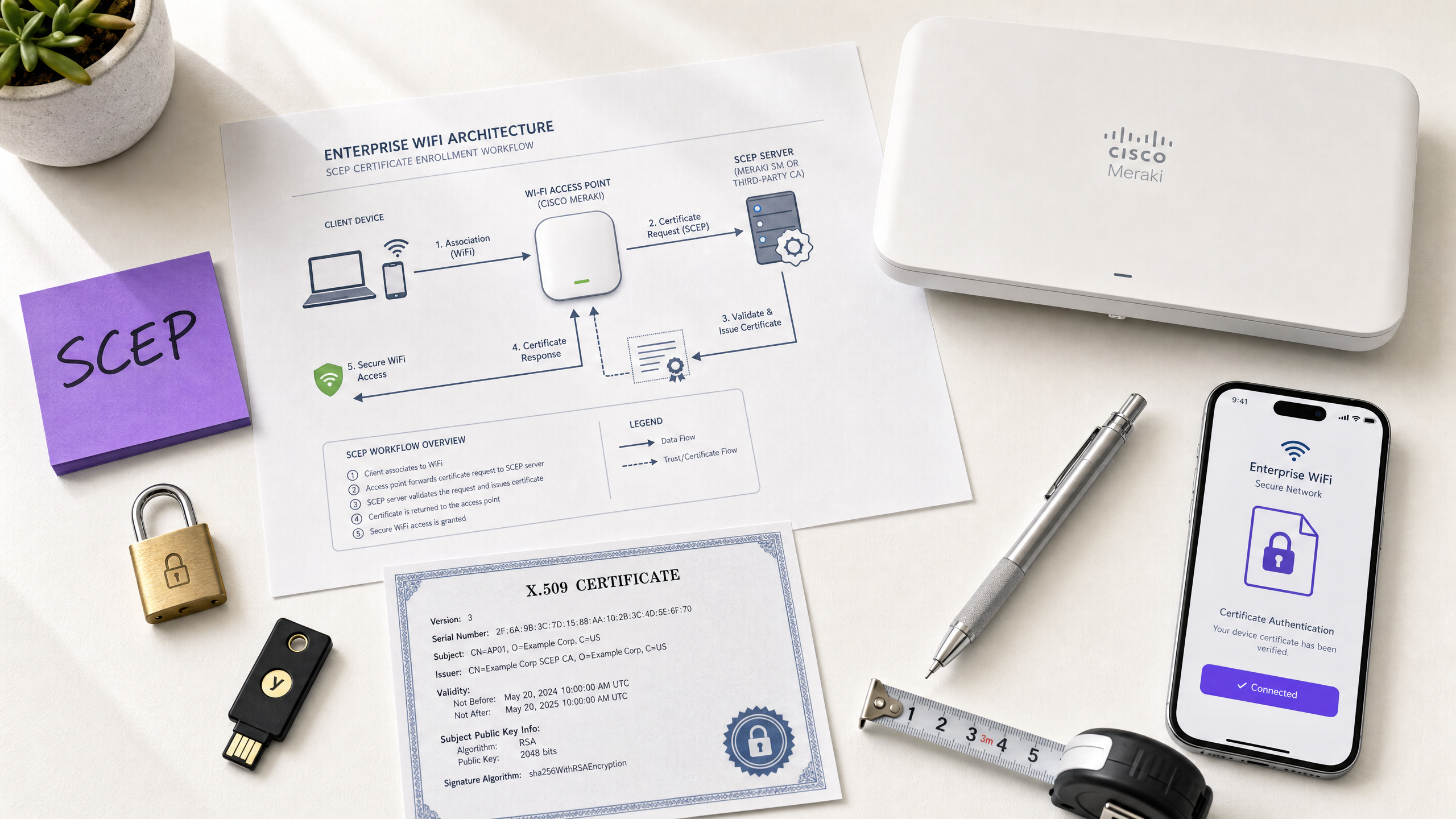
Para los operadores de recintos que ofrecen Guest WiFi en hoteles, establecimientos comerciales, estadios y centros de conferencias, depender de claves precompartidas o de Captive Portal básicos para el acceso a la red del personal es un riesgo de seguridad. La arquitectura de red moderna exige autenticación 802.1X mediante EAP-TLS (Protocolo de autenticación extensible - Seguridad de la capa de transporte), lo que garantiza que cada dispositivo se verifique criptográficamente antes de acceder a la red. El desafío es la distribución: ¿cómo desplegar certificados de cliente únicos en miles de dispositivos Windows, iOS y Android sin saturar al servicio de soporte técnico?
La respuesta es SCEP: el Protocolo simple de registro de certificados. Formalizado por el IETF como RFC 8894 en 2020, SCEP automatiza el registro de certificados en flotas de dispositivos gestionados. Cuando se integra con una plataforma MDM como Microsoft Intune o Jamf, SCEP ofrece un aprovisionamiento de certificados sin intervención: los dispositivos solicitan, reciben y renuevan sus propios certificados sin ninguna intervención de TI. La clave privada se genera localmente en el dispositivo y nunca se transmite a través de la red, una ventaja de seguridad fundamental sobre la distribución basada en PKCS.
Esta guía detalla el flujo de trabajo completo de la implementación de SCEP: la arquitectura PKI, la configuración de la pasarela NDES, la secuencia obligatoria de despliegue de MDM en tres pasos y los controles operativos (en particular, la comprobación de CRL y la segmentación de grupos) que determinan si un despliegue tiene éxito o se estanca. Dos escenarios del mundo real ilustran este enfoque en entornos de hostelería y comercio minorista. Purple opera en más de 80 000 recintos activos y cuenta con 350 millones de usuarios únicos; los patrones descritos aquí reflejan lo que funciona a esa escala.
Análisis técnico detallado
Qué hace realmente SCEP
SCEP se sitúa entre su plataforma MDM y su Autoridad de Certificación (CA). Proporciona un mecanismo estandarizado basado en HTTP para que los dispositivos soliciten, reciban y renueven certificados X.509 sin necesidad de una credencial unida al dominio ni de la intervención manual de un administrador. El protocolo se desarrolló originalmente a principios de la década de 2000 y logró una adopción generalizada en entornos MDM empresariales antes de que el IETF lo publicara formalmente como RFC 8894.
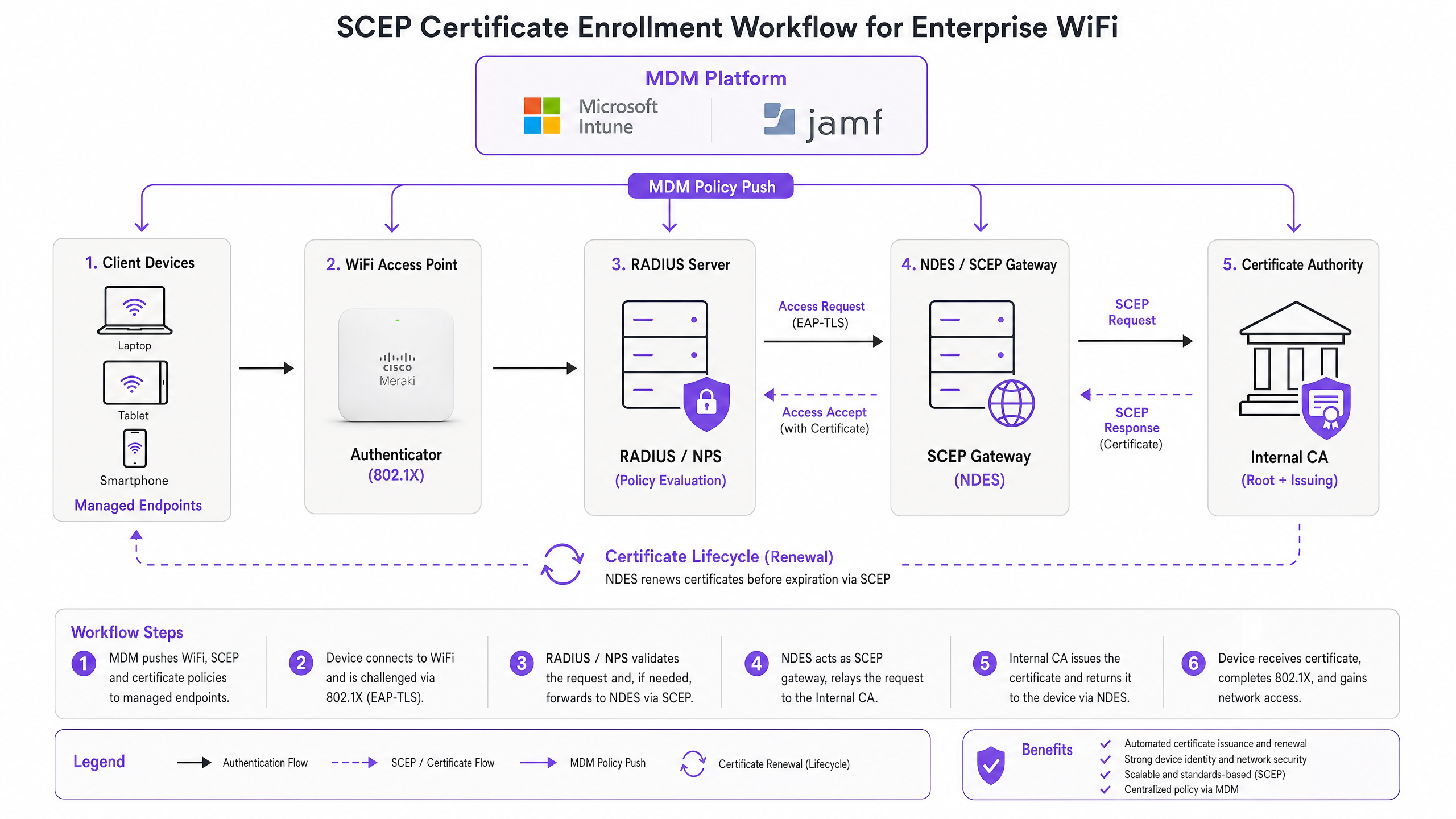
El flujo de registro de seis pasos funciona de la siguiente manera. Primero, el dispositivo gestionado se conecta a la URL de la pasarela SCEP preconfigurada en su perfil de MDM. Segundo, el dispositivo genera localmente un par de claves pública/privada y crea una Solicitud de Firma de Certificado (CSR). Tercero, la pasarela SCEP valida la autorización del dispositivo mediante una contraseña de desafío o un código OTP integrado en la política de MDM. Cuarto, la pasarela reenvía la CSR validada a la CA. Quinto, la CA firma el certificado y lo devuelve a la pasarela. Sexto, la pasarela entrega el certificado firmado al dispositivo. Las renovaciones futuras siguen la misma ruta automatizada: el dispositivo se vuelve a registrar antes de que expire el certificado sin ninguna acción por parte del usuario o del administrador.
SCEP frente a PKCS: la decisión clave
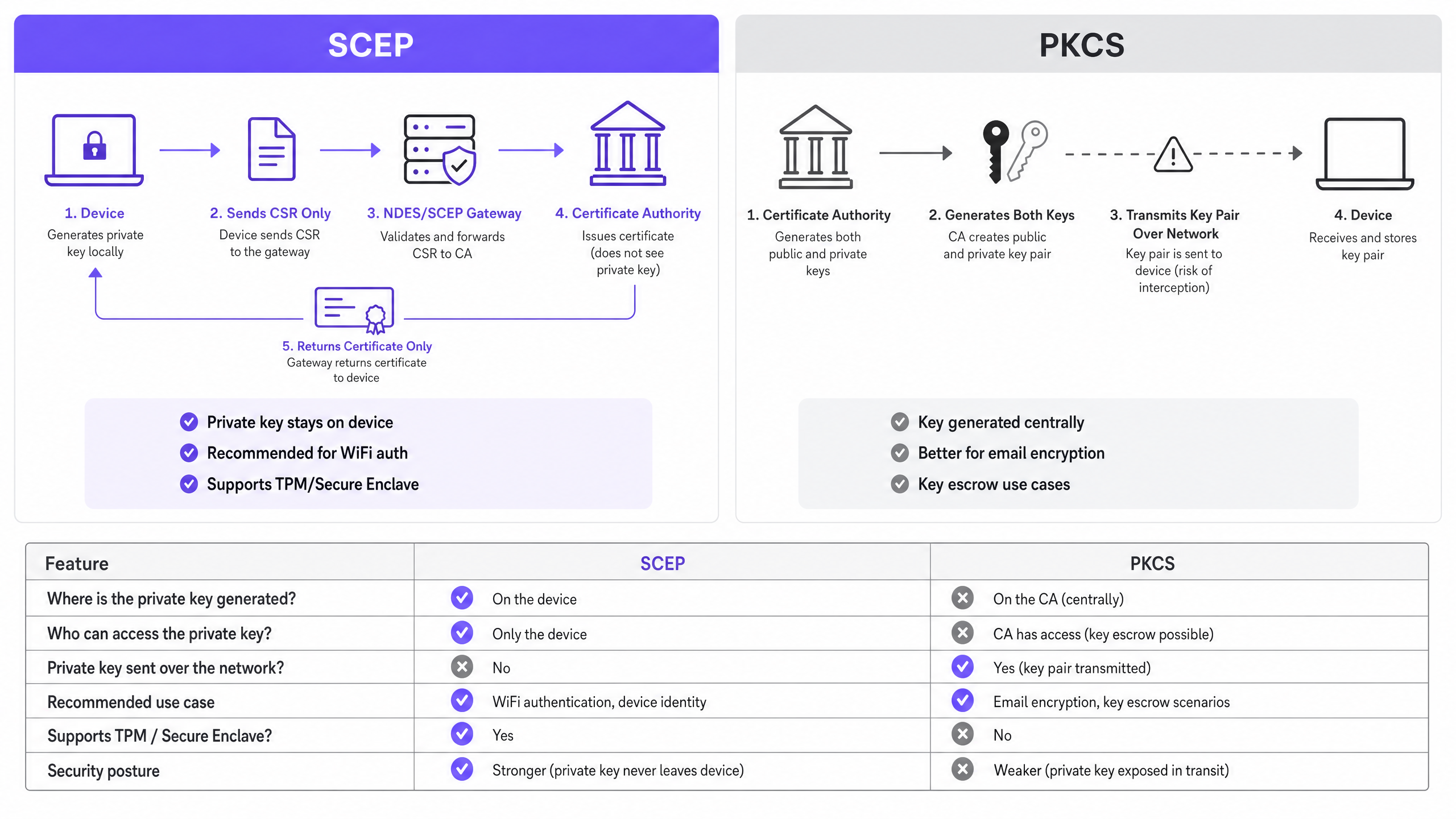
Microsoft Intune y la mayoría de las plataformas MDM admiten dos mecanismos de distribución de certificados: SCEP y PKCS. La distinción es arquitectónica, no estética.
Con SCEP, la clave privada se genera en el dispositivo y permanece allí. La CA nunca la ve. El TPM del dispositivo (en Windows) o el Secure Enclave (en iOS/macOS) protegen la clave a nivel de hardware. Con PKCS, la CA genera el par de claves de forma centralizada y lo transmite al dispositivo a través de la red. La CA conserva una copia, lo que permite el depósito de claves (key escrow), algo útil para el cifrado de correo electrónico S/MIME pero que introduce un riesgo innecesario para la autenticación de red.
Para la autenticación WiFi 802.1X, utilice SCEP. La clave privada nunca sale del dispositivo. Esa es la regla.
| Criterio | SCEP | PKCS |
|---|---|---|
| Clave privada generada en | Dispositivo | CA (centralizada) |
| Clave privada transmitida por red | Nunca | Sí |
| Compatible con TPM / Secure Enclave | Sí | No |
| Recomendado para autenticación WiFi | Sí | No |
| Recomendado para cifrado de correo (S/MIME) | No | Sí |
| Depósito de claves posible | No | Sí |
802.1X y EAP-TLS: el marco de autenticación
IEEE 802.1X es el estándar de control de acceso a la red basado en puertos que sustenta la seguridad WiFi empresarial. Define tres roles: el suplicante (el dispositivo cliente), el autenticador (el punto de acceso: Cisco Meraki, HPE Aruba, Ruckus, Juniper Mist, Ubiquiti UniFi, Cambium, Extreme o Fortinet) y el servidor de autenticación (un servidor RADIUS como Microsoft NPS, FreeRADIUS o Cisco ISE).
EAP-TLS es el método EAP más seguro para 802.1X. Ambas partes presentan certificados: el servidor RADIUS presenta su certificado al cliente, y el cliente presenta su certificado provisto por SCEP al servidor RADIUS. Ninguna de las partes puede suplantar a la otra sin un certificado válido y no revocado de la jerarquía de CA de confianza. Este modelo de autenticación mutua elimina el robo de credenciales, los ataques de tipo Evil Twin y los riesgos de puntos de acceso no autorizados en una sola decisión arquitectónica.
EAP-TLS cumple con el requisito 8.6 de PCI DSS 4.0 para la autenticación multifactor en la capa de red. Es obligatorio para despliegues de WPA3 Enterprise de 192 bits (Suite B). Para cualquier red inalámbrica dentro del alcance del procesamiento de datos de titulares de tarjetas (comercio minorista punto de venta, recepción de hotel, venta de entradas en estadios: EAP-TLS es la opción correcta.
Para analizar en profundidad la arquitectura de WiFi seguro y cómo la autenticación basada en certificados se integra en un marco de seguridad más amplio, consulte nuestra guía esencial.
Guía de implementación
La secuencia de despliegue no es negociable. Intune y Jamf resuelven las dependencias de los perfiles en orden: el perfil de WiFi depende del perfil SCEP, que a su vez depende del perfil de raíz de confianza (Trusted Root). Si los despliega fuera de orden, el perfil de WiFi no se aplicará.
Paso 1: Diseñe su PKI
Antes de tocar una consola MDM, diseñe su jerarquía de certificados. Lo estándar es una PKI de dos niveles: una CA raíz fuera de línea (offline) y una CA emisora en línea (online). La clave privada de la CA raíz es el ancla de confianza maestra para toda su infraestructura de certificados; manténgala aislada de la red (air-gapped). La CA emisora se encarga de la emisión diaria de certificados y publica la lista de revocación de certificados (CRL) y el respondedor OCSP.
Para la mayoría de los despliegues en recintos empresariales, Microsoft Active Directory Certificate Services (AD CS) ejecutado en Windows Server proporciona la CA emisora. Los servicios de PKI alojados en la nube de proveedores como SCEPman o SecureW2 eliminan por completo el requisito de infraestructura local y vale la pena evaluarlos para despliegues distribuidos en grupos hoteleros, cadenas de retail u organizaciones del sector público con múltiples sedes.
Paso 2: Despliegue el servidor NDES (o la pasarela SCEP en la nube)
NDES (Network Device Enrollment Service) es el rol de Microsoft Windows Server que actúa como pasarela SCEP entre su MDM y su CA. Requisitos clave de configuración:
- Publique la URL de NDES externamente a través de Azure AD Application Proxy (o un proxy inverso equivalente). Esto permite que los dispositivos remotos se registren antes de llegar a las instalaciones, sin abrir puertos de entrada en el cortafuegos.
- La cuenta de servicio de NDES requiere permisos de lectura y registro (Read y Enroll) en la plantilla de certificado de la CA.
- Configure la plantilla de certificado con el uso de clave (Key Usage) establecido en firma digital (Digital Signature) y cifrado de clave (Key Encipherment), y el uso de clave extendido (Extended Key Usage) establecido en autenticación de cliente (Client Authentication) (OID: 1.3.6.1.5.5.7.3.2).
- Establezca un período de validez de certificado adecuado. Un año es lo estándar para certificados de cliente; dos años es aceptable para certificados de dispositivo en flotas estables.
Si prefiere evitar la infraestructura NDES local, las pasarelas SCEP en la nube se integran directamente con Intune y su CA a través de una API, eliminando por completo la dependencia de IIS.
Paso 3: Despliegue el perfil de certificado de raíz de confianza (Trusted Root)
En su plataforma MDM, cree un perfil de certificado de confianza (Trusted Certificate) y cargue su certificado de CA raíz (y cualquier certificado de CA intermedia) como archivos .cer. Despliegue este perfil en sus grupos de dispositivos de destino antes de cualquier otro perfil de certificado o de WiFi. Sin este paso, los dispositivos no podrán validar el certificado del servidor RADIUS durante el saludo (handshake) EAP-TLS, y no podrán confiar en la CA emisora al solicitar su propio certificado SCEP.
Regla de oro: Diríjase siempre al mismo grupo de Azure AD (ya sea de usuarios o de dispositivos) en los tres perfiles relacionados. Una discrepancia aquí es la causa más común de fallos en el despliegue de perfiles de WiFi.
Paso 4: Configure el perfil de certificado SCEP
Cree un perfil de configuración de certificado SCEP en su MDM:
- Formato del nombre del sujeto (Subject name format): Para la autenticación basada en el usuario, use "CN={{UserPrincipalName}}". Para la autenticación de dispositivos (recomendado para dispositivos compartidos e IoT), use "CN={{AAD_Device_ID}}".
- Uso de clave (Key usage): Digital Signature, Key Encipherment.
- Uso de clave extendido (Extended key usage): Client Authentication (OID: 1.3.6.1.5.5.7.3.2).
- URL del servidor SCEP: La URL de NDES publicada externamente.
- Certificado raíz: Enlace al perfil de raíz de confianza (Trusted Root) del Paso 3.
- Período de validez del certificado: Debe coincidir con la plantilla configurada en la CA.
Paso 5: Despliegue el perfil de WiFi 802.1X
Cree un perfil de configuración de WiFi:
- SSID: Introduzca el nombre de la red exactamente como lo transmiten sus puntos de acceso.
- Tipo de seguridad: WPA2-Enterprise o WPA3-Enterprise.
- Tipo de EAP: EAP-TLS.
- Certificado de autenticación de cliente: Seleccione el perfil de certificado SCEP del Paso 4.
- Validación del servidor: Especifique el certificado de raíz de confianza (Trusted Root) del Paso 3 e introduzca el nombre del servidor RADIUS esperado. Esto evita que los dispositivos se conecten a puntos de acceso no autorizados que presenten certificados fraudulentos.
Buenas prácticas
Aplique una comprobación estricta de la CRL en su servidor RADIUS
La revocación de certificados es el control operativo que cierra la brecha entre la desactivación de una cuenta y el bloqueo del acceso a la red. Cuando un dispositivo se pierde, se roba o un empleado se marcha, desactive la cuenta de AD y revoque el certificado en la CA. Su servidor RADIUS debe estar configurado para comprobar la CRL en cada intento de autenticación. Si la CRL no está disponible (porque el CDP [punto de distribución de CRL] es inaccesible), la mayoría de los servidores RADIUS fallan en modo abierto (fail open) de forma predeterminada, lo que representa un riesgo de seguridad. Asegúrese de que sus CDP tengan una alta disponibilidad y de que su servidor RADIUS esté configurado para fallar en modo cerrado (fail closed) si no se puede obtener la CRL.
Para la revocación en tiempo real, configure OCSP (Online Certificate Status Protocol) además de la CRL. OCSP proporciona respuestas de estado por certificado sin necesidad de que el servidor RADIUS descargue y analice toda la CRL.
Utilice certificados de dispositivo para dispositivos compartidos e IoT
Para dispositivos compartidos (tabletas del servicio de limpieza de hoteles, terminales de punto de venta [POS] de retail, lectores de control de acceso a estadios), utilice certificados de dispositivo en lugar de certificados de usuario. Los certificados de dispositivo están vinculados a la identidad de la máquina, no a una cuenta de usuario. Esto significa que el dispositivo se autentica independientemente de qué usuario haya iniciado sesión, y la revocación está vinculada al registro del dispositivo en lugar de a la salida de un empleado.
Para despliegues de retail , los certificados de dispositivo en el hardware de POS también cumplen con el requisito de PCI DSS para la identidad del dispositivo a nivel de red sin introducir la complejidad de las credenciales de usuario en el punto de venta.
Automatice la renovación de certificados
SCEP admite la renovación automática: el MDM indica al dispositivo que vuelva a registrarse antes de que el certificate expires. Configure your SCEP profile to trigger renewal at 20% of the certificate's remaining validity period. For a one-year certificate, renewal begins approximately 73 days before expiry. This window provides enough time to resolve any renewal failures before the certificate expires and devices lose network access.
Expired certificates causing mass authentication failures are the most common operational incident in 802.1X deployments. Automated renewal via SCEP eliminates this risk entirely.
Segment networks by certificate attribute
RADIUS servers can read certificate attributes - Subject, SAN, or custom OIDs - and use them to assign devices to VLANs dynamically. A housekeeping tablet with a certificate issued from the HousekeepingDevices template lands on the housekeeping VLAN. A POS terminal with a certificate from the RetailPOS template lands on the PCI-scoped VLAN. This is cryptographically enforced network segmentation - far more reliable than SSID-based or MAC-based approaches.
For hospitality operators running Guest WiFi alongside Staff WiFi on the same physical infrastructure, VLAN assignment via certificate attributes ensures guests and staff are always on separate network segments, regardless of which SSID a device connects to.
Troubleshooting & risk mitigation
WiFi profile shows 'Error' or 'Not Applicable' in Intune
Root cause: Group targeting mismatch. The SCEP profile is assigned to a different group than the WiFi profile. Intune cannot resolve the certificate dependency.
Fix: Audit all three profiles (Trusted Root, SCEP, WiFi). Ensure they are all assigned to the exact same Azure AD group. If you are deploying to Users, all three profiles must target a Users group. If deploying to Devices, all three must target a Devices group.
NDES returns HTTP 403 errors
Root cause: The Intune Certificate Connector service account lacks Read or Enroll permissions on the CA certificate template, or firewall URL filtering is blocking SCEP query strings.
Fix: Verify the connector account has Read and Enroll permissions on the template in the CA console. Check firewall logs for blocked requests containing ?operation=GetCACaps or ?operation=PKIOperation. These query strings must pass through without modification.
Devices fail to renew certificates before expiry
Root cause: The SCEP renewal window is too short, or the NDES server is unreachable at the time of renewal.
Fix: Set the renewal threshold to 20% of certificate validity. Ensure the NDES URL is published via a highly available reverse proxy. Monitor NDES IIS logs for renewal request failures and alert on them proactively.
RADIUS rejects valid certificates
Root cause: The RADIUS server's trusted CA store does not include the issuing CA certificate, or the CRL is stale.
Fix: Import the full CA chain (Root CA + Issuing CA) into the RADIUS server's trusted store. Verify the CRL is being fetched successfully and that the CDP URL is reachable from the RADIUS server. Check the CRL's next-update timestamp - if it has passed, the CA needs to publish a new CRL.
For broader network performance considerations alongside security, see our bandwidth management guide .
ROI & business impact
The business case for SCEP-based certificate enrollment is straightforward. Password-based WiFi generates a predictable volume of helpdesk tickets: password expirations, lockouts, staff sharing credentials with guests, and onboarding friction for new starters. Certificate-based authentication is invisible to the end user. Devices connect automatically. There are no passwords to expire, share, or forget.
Organisations that migrate from password-based WiFi to EAP-TLS with SCEP typically report a 70-80% reduction in WiFi-related helpdesk tickets (Purple internal data, 2024, based on deployments across hospitality and retail estates). The helpdesk saving alone often justifies the implementation cost within the first year.
The compliance impact is equally concrete. EAP-TLS satisfies PCI DSS 4.0 Requirement 8.6 for multi-factor authentication at the network layer. For healthcare environments, it aligns with HIPAA technical safeguard requirements for wireless network access. For public-sector organisations, it supports NCSC Cyber Essentials Plus certification requirements for network access control.
For transport operators - rail franchises, airport operators, bus networks - certificate-based authentication on staff devices ensures that operational networks carrying safety-critical data are isolated from passenger WiFi and protected against credential-based attacks.
Purple's WiFi Analytics platform integrates with 802.1X-secured networks to deliver first-party data insights without compromising the security posture of the underlying infrastructure. The 29 billion data points collected across Purple's network demonstrate that security and analytics are complementary, not competing, objectives.
For feedback and experience management alongside your secure network deployment, see our venue feedback playbook .
Definiciones clave
SCEP (Simple Certificate Enrollment Protocol)
An IETF-standardised protocol (RFC 8894) that automates X.509 certificate enrollment for managed devices. The device generates its own private key locally and sends only a Certificate Signing Request to the CA via a gateway. The private key never leaves the device.
IT teams encounter SCEP when configuring MDM platforms (Intune, Jamf) to deploy WiFi authentication certificates at scale. It is the recommended mechanism for 802.1X EAP-TLS deployments because the private key is hardware-protected on the endpoint.
EAP-TLS (Extensible Authentication Protocol - Transport Layer Security)
The most secure 802.1X authentication method. Both the client device and the RADIUS server present X.509 certificates. Neither side can authenticate without a valid, non-revoked certificate from the trusted CA hierarchy.
EAP-TLS is the target authentication protocol that SCEP certificate deployment enables. It satisfies PCI DSS 4.0 Requirement 8.6 and is required for WPA3 Enterprise 192-bit (Suite B) deployments.
PKCS (Public Key Cryptography Standards)
A certificate delivery mechanism where the CA generates both the public and private key pair centrally and transmits them to the endpoint. The CA retains a copy of the private key, enabling key escrow.
IT teams choose between SCEP and PKCS when configuring certificate profiles in Intune. PKCS is appropriate for S/MIME email encryption where key escrow is required. It is not recommended for WiFi authentication because the private key is transmitted over the network.
NDES (Network Device Enrollment Service)
A Microsoft Windows Server role that acts as the SCEP gateway between an MDM platform and a Certificate Authority. It validates device enrollment requests and forwards CSRs to the CA.
NDES is a required infrastructure component for on-premises SCEP deployments with Microsoft Intune. It must be published externally via an application proxy to allow remote devices to enroll. Cloud SCEP gateways are an alternative that eliminates the on-premises NDES dependency.
CRL (Certificate Revocation List)
A list published by the CA containing the serial numbers of certificates that have been revoked before their expiry date. RADIUS servers check the CRL to ensure devices with revoked certificates cannot authenticate.
CRL checking is the operational control that enforces certificate revocation. IT teams must configure their RADIUS server to check the CRL on every authentication attempt and ensure the CRL Distribution Point (CDP) is highly available.
802.1X
An IEEE standard for port-based network access control. It defines the three-party authentication framework (supplicant, authenticator, authentication server) used in enterprise WiFi and wired networks.
802.1X is the framework within which EAP-TLS and SCEP operate. IT teams encounter it when configuring WPA2-Enterprise or WPA3-Enterprise SSIDs and when setting up RADIUS server policies.
RADIUS (Remote Authentication Dial-In User Service)
A networking protocol that provides centralised authentication, authorisation, and accounting (AAA) for network access. In 802.1X deployments, the RADIUS server validates client certificates and enforces VLAN assignment policies.
The RADIUS server is the authentication decision point in every 802.1X deployment. Common implementations include Microsoft NPS, FreeRADIUS, and Cisco ISE. It must be configured with the trusted CA chain and strict CRL or OCSP checking.
CSR (Certificate Signing Request)
A block of encoded text generated by a device that contains the device's public key and identity information. The device sends the CSR to the CA (via the SCEP gateway) to request a signed certificate. The corresponding private key is generated and retained on the device.
The CSR is the core artifact in the SCEP enrollment flow. IT teams configure the CSR format (subject name, key usage, EKU) in the SCEP certificate profile within their MDM platform.
PKI (Public Key Infrastructure)
The combination of hardware, software, policies, and procedures required to create, manage, distribute, and revoke digital certificates. A standard enterprise PKI consists of an offline root CA and an online issuing CA.
PKI is the prerequisite for any EAP-TLS deployment. IT teams must design and deploy a two-tier CA hierarchy before configuring SCEP. Cloud-hosted PKI services reduce the infrastructure burden for distributed estate deployments.
VLAN (Virtual Local Area Network)
A logical network segment that isolates traffic at Layer 2. In 802.1X deployments, RADIUS servers assign devices to VLANs dynamically based on certificate attributes, user identity, or policy.
VLAN assignment via RADIUS is the mechanism that enforces network segmentation in enterprise WiFi. IT teams use it to separate POS devices onto PCI-scoped VLANs, guest devices onto internet-only VLANs, and staff devices onto corporate VLANs - all from a single physical infrastructure.
Ejemplos prácticos
A 200-room Premier Inn property needs to deploy secure WiFi for 150 iOS housekeeping devices. Staff are currently sharing a WPA2-Personal password with guests, creating a compliance and operational risk. The IT Director needs to eliminate the shared password without disrupting daily operations.
The IT Director implements a Jamf-driven SCEP deployment in three phases. Phase one: the Root CA certificate is pushed to all 150 iOS devices via a Jamf Trusted Certificate profile, targeting the 'Housekeeping Devices' smart group. Phase two: a SCEP certificate profile is deployed, directing devices to an Azure AD App Proxy-published NDES server. The subject name uses CN={{SERIALNUMBER}} to tie the certificate to the device hardware. Phase three: a WPA2-Enterprise WiFi profile is pushed, specifying EAP-TLS and linking to the SCEP certificate. Devices authenticate silently. The shared password SSID is decommissioned. The RADIUS server is configured with strict CRL checking and VLAN assignment: housekeeping devices land on VLAN 20 (operations), guest devices on VLAN 10 (internet-only).
A retail chain with 500 locations needs to secure corporate WiFi for Windows POS tablets running payment processing software. PCI DSS 4.0 compliance requires multi-factor authentication at the network layer. The current WPA2-Personal setup fails the PCI DSS Requirement 8.6 assessment.
The network architect deploys EAP-TLS via Microsoft Intune and SCEP across all 500 locations. The deployment uses device certificates with CN={{AAD_Device_ID}} as the subject name, tying each certificate to the Intune device record. The three-profile sequence (Trusted Root, SCEP, WiFi) is deployed to the 'POS Devices' Azure AD group - the same group across all three profiles. The RADIUS server assigns POS devices to a dedicated PCI-scoped VLAN (VLAN 100) based on the certificate's issuing template. The CRL is published to a highly available CDN-hosted endpoint with a four-hour validity window. OCSP is enabled for real-time revocation checking. The deployment is validated against PCI DSS 4.0 Requirement 8.6 by the QSA.
Preguntas de práctica
Q1. You have deployed Trusted Root and SCEP certificate profiles to the 'All Staff' user group in Intune. You then deploy the WiFi profile to the 'Corporate Devices' device group. Devices receive the certificates but the WiFi profile shows 'Error' in the Intune console. What is the most likely cause, and how do you fix it?
Sugerencia: Consider how Intune resolves dependencies between profiles and what happens when profiles target different group types.
Ver respuesta modelo
The root cause is a group targeting mismatch. The WiFi profile depends on the SCEP profile, which depends on the Trusted Root profile. Intune cannot resolve these dependencies when the profiles target different group types (Users vs Devices). Fix: redeploy all three profiles to the same group. If the WiFi profile targets 'Corporate Devices' (a device group), the SCEP and Trusted Root profiles must also target 'Corporate Devices'. Alternatively, move all three to a user group if user-based authentication is required.
Q2. A hotel housekeeper's iPad is reported stolen. You immediately disable the housekeeper's Active Directory account. The next morning, the stolen iPad is still connecting to the hotel's WPA2-Enterprise network. Why, and what two actions do you take to prevent this?
Sugerencia: Think about what the RADIUS server actually validates during EAP-TLS authentication, and what controls govern certificate validity.
Ver respuesta modelo
Disabling the AD account does not revoke the client certificate stored on the iPad. The RADIUS server validates the certificate, not the AD account status, during EAP-TLS authentication. The two required actions are: (1) revoke the device certificate at the CA - this adds the certificate serial number to the CRL; (2) ensure the RADIUS server is configured with strict CRL checking so it fetches the updated CRL and rejects the revoked certificate on the next authentication attempt. For faster revocation, configure OCSP on the RADIUS server for real-time certificate status checks.
Q3. A retail chain is deploying 802.1X WiFi to 500 POS locations. The security architect proposes using PKCS certificate delivery instead of SCEP to avoid deploying an NDES server. The QSA reviewing the PCI DSS 4.0 assessment raises a concern. What is the concern, and what is the correct recommendation?
Sugerencia: Consider what PCI DSS says about private key handling and what PKCS does with the private key during delivery.
Ver respuesta modelo
The QSA's concern is that PKCS transmits the private key over the network from the CA to the device. PCI DSS 4.0 Requirement 3.5 requires that private keys used for authentication are protected against disclosure. Transmitting the private key over the network - even encrypted - introduces a risk that SCEP eliminates entirely. The correct recommendation is to use SCEP, where the private key is generated on the POS device and never leaves it. To avoid on-premises NDES infrastructure, the architect should evaluate a cloud SCEP gateway service that integrates directly with Intune and the CA via API.
Q4. You are designing a WiFi network for a large conference centre that hosts 50+ events per year. Staff devices need to be on a secure 802.1X network. You want to ensure that if a contractor's device is compromised, it can be isolated from the network within 15 minutes. What certificate revocation mechanism do you configure, and why?
Sugerencia: Compare CRL and OCSP in terms of revocation latency and what determines how quickly a RADIUS server acts on a revocation.
Ver respuesta modelo
Configure OCSP (Online Certificate Status Protocol) on the RADIUS server. CRL-based revocation has a latency determined by the CRL's validity period - typically one to 24 hours - meaning a revoked certificate may still authenticate until the RADIUS server fetches the next CRL. OCSP provides real-time per-certificate status responses: when a certificate is revoked at the CA, the OCSP responder immediately returns a 'revoked' status on the next query. With OCSP configured on the RADIUS server, a revoked contractor certificate is blocked on the next authentication attempt, typically within seconds. Ensure the OCSP responder is highly available - if it is unreachable and the RADIUS server is configured to fail closed, all authentications will fail.
Continúe leyendo esta serie
La guía empresarial de SCEP: Implementación de Simple Certificate Enrollment Protocol para la seguridad automatizada de WiFi en campus
Esta guía de referencia técnica proporciona un diseño arquitectónico definitivo y una estrategia de implementación paso a paso para el despliegue de certificados WiFi empresariales mediante SCEP. Cubre las diferencias críticas entre SCEP y PKCS, la secuencia exacta de despliegue necesaria para el éxito y estrategias reales de mitigación de riesgos para líderes de TI.
¿Por qué no se conecta mi WiFi de invitados? Resolución de problemas de Captive Portal
Esta guía de referencia técnica autorizada explica los mecanismos subyacentes de la detección de Captive Portal y detalla los seis modos de fallo principales que impiden que el WiFi de invitados se conecte. Proporciona a los responsables de TI y arquitectos de red un marco práctico de resolución de problemas para resolver incidencias de redirección HTTP, conflictos de DNS y desafíos de aleatorización de direcciones MAC.
GDPR y Guest WiFi: Guía de cumplimiento para marketing de espacios e IT
Esta guía proporciona a los responsables de IT y operadores de espacios un marco práctico para garantizar que los servicios de Guest WiFi cumplan plenamente con el GDPR. Cubre la arquitectura técnica, los mecanismos de consentimiento, la retención de datos y cómo transformar el cumplimiento en un activo seguro de datos de origen (first-party data).