
¿Por qué no se conecta mi WiFi de invitados? Resolución de problemas con el Captive Portal
Esta guía de referencia técnica autorizada explica los mecanismos subyacentes de la detección de Captive Portal y detalla los seis modos principales de fallo que impiden que el WiFi de invitados se conecte. Proporciona a los responsables de TI y arquitectos de redes un marco de resolución de problemas práctico para resolver incidencias de redirección HTTP, conflictos de DNS y desafíos de aleatorización de direcciones MAC.
Escuchar esta guía
Ver transcripción del podcast
Parte de nuestra serie principal: Guía de Captive Portal →
Resumen ejecutivo
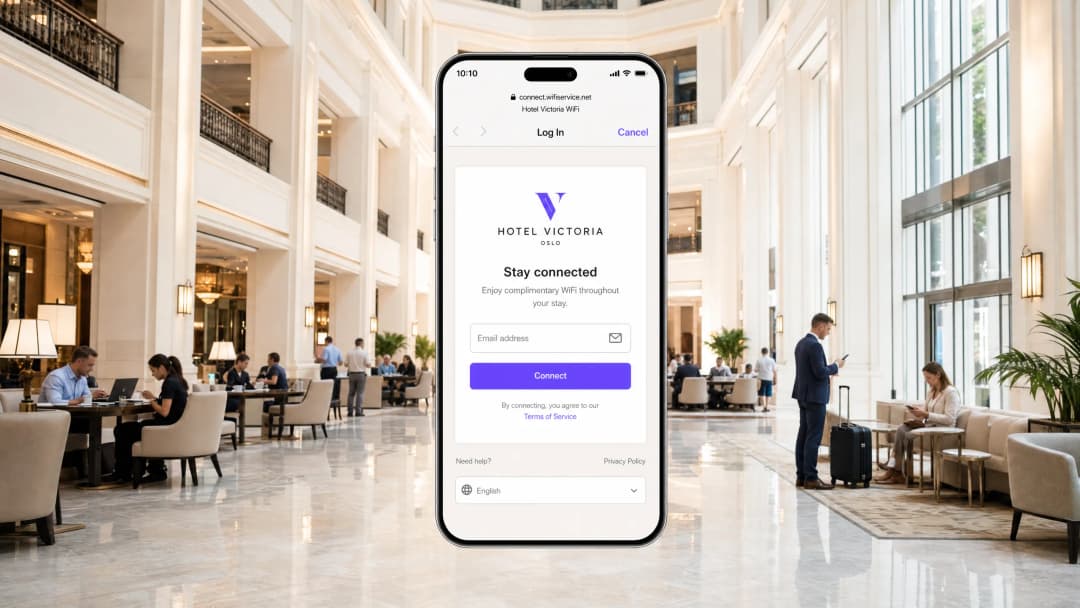
Para los espacios empresariales modernos, las redes WiFi de invitados ya no son un simple servicio de cortesía; representan un punto de contacto crítico para la interacción con el cliente, la inteligencia operativa y el posicionamiento de marca. Sin embargo, el valor comercial de estas redes depende enteramente de la fiabilidad de la experiencia de conexión inicial. Cuando un invitado se conecta a una red y la página de inicio de sesión del Captive Portal no aparece, el espacio sufre de inmediato un aumento de las fricciones en el servicio, un pico en los tickets de soporte y la pérdida de oportunidades de captura de datos.
En el centro de estos fallos se encuentra una tensión fundamental entre los estándares web seguros y las técnicas de interceptación a nivel de red utilizadas históricamente por los portales cautivos. Los navegadores web y sistemas operativos modernos están diseñados para detectar y bloquear la redirección de tráfico no autorizada con el fin de proteger a los usuarios de ataques de tipo man-in-the-middle. Al comprender las secuencias precisas de redirección HTTP y DNS, el impacto de los protocolos seguros como HSTS y las funciones de privacidad de los dispositivos móviles modernos, los equipos de TI pueden diseñar soluciones de acceso inalámbrico robustas. Esta guía proporciona el marco definitivo para diagnosticar y resolver las causas principales que provocan el estado de fallo "guest wifi not connecting captive portal".
Escuche la sesión técnica completa:
Análisis técnico detallado: cómo funciona realmente la detección de un Captive Portal
Para solucionar un problema con un Captive Portal, primero debe comprender qué hace realmente a nivel de red. La mayoría de la gente piensa que es simplemente una página de inicio de sesión. En realidad, se trata de un mecanismo de interceptación de tráfico a nivel de red.
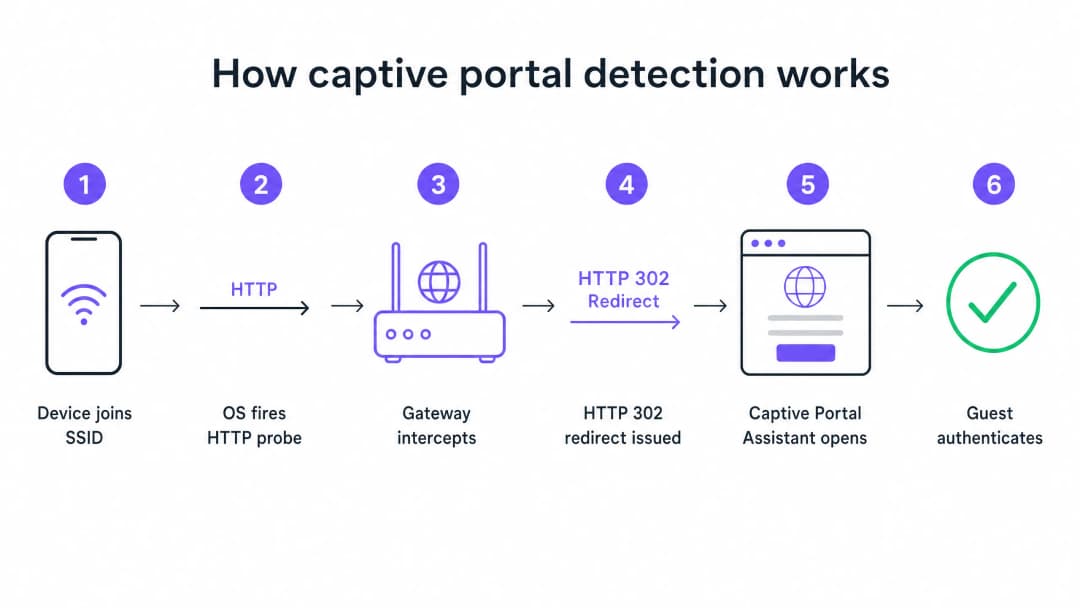
Cuando un dispositivo se conecta a su SSID de invitados y recibe una dirección IP a través de DHCP, el sistema operativo no espera a que el usuario abra un navegador. En segundo plano, un servicio del sistema activa inmediatamente una solicitud HTTP GET no cifrada a una URL de prueba controlada por el fabricante. Los dispositivos Apple consultan captive.apple.com. Los dispositivos Android consultan connectivitycheck.gstatic.com. Los dispositivos Windows consultan msftconnecttest.com.
Si la red tiene acceso abierto a Internet, estas sondas devuelven las respuestas esperadas y el sistema operativo concluye que todo está en orden. Pero en una red de invitados, su pasarela o controlador inalámbrico intercepta esta sonda HTTP antes de que llegue a Internet. En lugar de la respuesta esperada, la pasarela devuelve una redirección HTTP 302 que apunta a la página del Captive Portal. El sistema operativo detecta la redirección inesperada, se da cuenta de que está detrás de un Captive Portal y abre una ventana de navegador aislada (sandbox) para mostrar la página de inicio de sesión.
Los seis principales modos de fallo
Cuando un invitado informa de que el WiFi no se conecta, el fallo casi siempre se debe a una de las seis causas raíz que interrumpen esta secuencia.
1. Agotamiento del grupo DHCP Este es el asesino silencioso en eventos de alta densidad. Si organiza una conferencia con 2000 asistentes en una subred /24 estándar, dispondrá de 254 direcciones IP utilizables. Si el tiempo de concesión de DHCP está configurado en el valor predeterminado de 24 horas, agotará este grupo a los pocos minutos de abrir las puertas. Cada intento de conexión posterior fallará antes de que comience la secuencia del Captive Portal.
2. Fallo de interceptación de DNS La redirección del Captive Portal depende de que la pasarela intercepte la sonda HTTP. Pero la sonda requiere primero una consulta DNS. Si su configuración de DNS no permite a los clientes preautenticados resolver nombres de dominio externos, la sonda nunca se activará.
3. Jardín vallado (walled garden) incompleto El jardín vallado define a qué dominios externos pueden acceder los invitados no autenticados. Si su página del portal carga recursos de una CDN que no está en el jardín vallado, la página se mostrará como una pantalla en blanco. Si ofrece inicio de sesión social a través de Google, Apple o Facebook, todos los dominios OAuth utilizados por estos proveedores deben estar en la lista de permitidos. Los proveedores de identidad social actualizan sus rangos de IP de CDN con regularidad. Un jardín vallado que funcionaba perfectamente hace seis meses podría estar fallando silenciosamente hoy.
4. HSTS bloqueando la redirección HTTP Strict Transport Security (HSTS) es una política de seguridad del navegador que obliga a realizar conexiones a dominios específicos únicamente a través de HTTPS. Si un invitado intenta ponerse en contacto con un dominio preconfigurado con HSTS y su puerta de enlace intenta interceptar esa solicitud HTTPS para redirigirla al portal, el navegador detectará una discordancia en el certificado. Presentará un aviso de seguridad que no se puede omitir y bloqueará la redirección por completo. La solución correcta es no intentar nunca la interceptación HTTPS. Su puerta de enlace sólo debe redirigir los sondeos canarios HTTP no cifrados.
5. VPN activa en el dispositivo del invitado Una VPN cifra todo el tráfico del dispositivo y lo encauza a través de un túnel externo antes de que llegue a su puerta de enlace. Su puerta de enlace nunca ve el sondeo HTTP. La secuencia de detección del Captive Portal nunca se activa.
6. Aleatorización de direcciones MAC Los dispositivos iOS y Android modernos utilizan de forma predeterminada direcciones MAC aleatorias como función de privacidad. Dado que el estado de la sesión del Captive Portal se rastrea mediante la dirección MAC, un visitante que se haya autenticado hace una hora podría encontrarse de nuevo con la página de inicio de sesión después de que la MAC de su dispositivo rote.
¿Tiene preguntas sobre su configuración específica?
Nuestro equipo trabaja con operadores de recintos, responsables de TI e ingenieros de redes en 80 000 espacios. Reserve una llamada de 20 minutos y le mostraremos cómo lo han solucionado otros profesionales como usted.
Guía de implementación: Diseño para la fiabilidad
Un despliegue de Captive Portal bien configurado requiere una coordinación cuidadosa en toda su infraestructura de Guest WiFi.
Paso 1: Optimizar la arquitectura DHCP
Para cualquier recinto que prevea más de 200 dispositivos simultáneos, evite utilizar una única subred /24. Utilice una subred /22 o superior y configure los tiempos de concesión para que coincidan con el perfil de permanencia de su recinto. Un hotel establece las concesiones para 8 horas. Un estadio establece las concesiones para 3 horas. Un centro comercial establece las concesiones para 90 minutos. Un centro de convenciones establece las concesiones para 30 minutos.
Paso 2: Automatizar la gestión del Walled Garden
Valide su walled garden antes de cada evento importante. En la plataforma de Purple, mantenemos y actualizamos estas entradas de walled garden automáticamente como parte de nuestro servicio gestionado en la nube, lo que elimina la carga de mantenimiento manual para su equipo. Admitimos integraciones con Cisco Meraki, HPE Aruba, Ruckus, Juniper Mist, Ubiquiti UniFi, Cambium, Extreme y Fortinet.
Paso 3: Implementar RFC 8910 (Opción DHCP 114)
La solución estándar a largo plazo para los conflictos de HSTS es la RFC 8910, que define la Opción DHCP 114. Esta opción permite a su servidor DHCP anunciar la URL del Captive Portal directamente al dispositivo del cliente, evitando por completo la necesidad de redirección HTTP. iOS 14 y Android 11 o superior son compatibles con esto de forma nativa.
Buenas prácticas
Desplegar autenticación basada en perfiles para visitantes recurrentes Los Captive Portals son una tecnología madura, pero conllevan una fricción inherente. OpenRoaming, basado en Passpoint y 802.1X, permite a los visitantes recurrentes conectarse de forma automática y segura sin ver nunca una página de inicio de sesión. Purple actúa como un proveedor de identidad gratuito para OpenRoaming en nuestro plan Connect. Espacios como Premier Inn y Manchester Airports Group ya están desplegando esto para eliminar la fricción de la autenticación repetida para los visitantes frecuentes, manteniendo al mismo tiempo el pleno cumplimiento de la GDPR y la captura de datos de origen.
No realice nunca las pruebas desde un dispositivo autenticado Un error común que afecta a muchos equipos de TI: probar el portal desde un dispositivo que ya ha sido autenticado previamente. La sesión de su dispositivo sigue activa, por lo que se salta el portal por completo y concluye que todo funciona. Realice siempre las pruebas desde un dispositivo en un estado limpio y no autenticado.
Lea la guía relacionada Para leer más sobre cómo proteger sus redes, consulte nuestra guía ¿Qué es WiFi seguro? Guía esencial para empresas 2026 y nuestra Gestión del ancho de banda: Una guía práctica para 2026.
Resolución de problemas y mitigación de riesgos
Cuando un visitante informa de un problema de conexión, su equipo de atención al público necesita un marco de diagnóstico rápido.

Indique a su equipo que ejecute primero las soluciones del lado del cliente:
- Pida al visitante que desactive cualquier VPN activa.
- Indique al visitante que desactive la aleatorización de direcciones MAC (Dirección privada) para su SSID específico.
- Pida al visitante que abra un navegador predeterminado y navegue a
http://neverssl.com. Como este sitio está diseñado para no utilizar nunca SSL, la puerta de enlace puede interceptar fácilmente la solicitud y activar el redireccionamiento. - Si todo lo demás falla, pida al visitante que olvide la red y se conecte de nuevo.
Si el problema persiste en varios visitantes, pase a las comprobaciones del lado del operador. Revise inmediatamente la utilización del grupo DHCP, compruebe los registros de RADIUS para ver si hay mensajes de rechazo de acceso (Access-Reject) y pruebe la interceptación de DNS.
ROI e impacto empresarial
El impacto empresarial de un Captive Portal fiable va mucho más allá de las métricas de TI. Al eliminar los fallos de conexión, los establecimientos aumentan directamente la tasa de crecimiento de su base de datos de marketing.
Considere el caso de Harrods, que logró un ROI de marketing de 57 veces optimizando su flujo de WiFi Analytics y Captive Portal. O AGS Airports, que obtuvo un ROI del 842% gracias a una gestión fluida del ancho de banda por niveles. Una experiencia de conexión fiable es el requisito fundamental para recopilar los datos modernos de recopilación de opiniones que se detallan en nuestra guía, Recopilación moderna de opiniones: Un manual para establecimientos 2026.
Cada fallo de carga del Captive Portal representa un perfil de cliente perdido. Al implementar los estándares de arquitectura descritos en esta guía, los líderes de TI transforman su infraestructura inalámbrica de un centro de costes a un generador de ingresos fiable y conforme con la normativa.
Definiciones clave
Captive Portal
Un mecanismo de interceptación a nivel de red que obliga a un usuario no autenticado a ver e interactuar con una página web específica antes de que se le conceda acceso a la red pública de internet.
Cuando los equipos de TI desplieguen redes de invitados, el Captive Portal es la herramienta principal para aplicar las condiciones del servicio y capturar datos de marketing de origen.
Walled Garden
Una lista de control de acceso (ACL) previa a la autenticación que define a qué direcciones IP externas o nombres de dominio puede acceder un dispositivo no autenticado.
Crucial para permitir que los dispositivos carguen los elementos de la página de bienvenida del Captive Portal y se comuniquen con los proveedores de identidad social antes de que el usuario se haya autenticado por completo.
HSTS (HTTP Strict Transport Security)
Un mecanismo de política de seguridad web que ayuda a proteger los sitios web contra ataques de intermediario (man-in-the-middle), como los ataques de degradación de protocolo y el secuestro de cookies.
HSTS es la razón principal por la que interceptar el tráfico HTTPS para mostrar un Captive Portal provoca graves advertencias de seguridad en el navegador en lugar de una redirección correcta.
RFC 8910 (Opción DHCP 114)
Un estándar IETF que permite a un servidor DHCP anunciar directamente la URL del Captive Portal al dispositivo cliente durante la asignación inicial de la dirección IP.
Este estándar elimina por completo la necesidad de redirección HTTP, solucionando el conflicto de HSTS y proporcionando una experiencia de conexión más limpia.
Asignación aleatoria de direcciones MAC
Una función de privacidad en los sistemas operativos móviles modernos que genera una dirección MAC nueva y aleatoria para cada red WiFi a la que se une el dispositivo, o que rota la dirección periódicamente.
Esta función rompe la persistencia tradicional de las sesiones del Captive Portal, lo que obliga a los invitados que regresan a iniciar sesión repetidamente a menos que el establecimiento actualice a una autenticación basada en perfiles como OpenRoaming.
OpenRoaming
Una federación de roaming global basada en Passpoint y 802.1X que permite a los usuarios conectarse a redes WiFi públicas de forma automática y segura sin tener que interactuar con un Captive Portal.
Purple actúa como un proveedor de identidad gratuito para OpenRoaming bajo el plan Connect, lo que permite a los establecimientos eliminar la fricción de la autenticación repetida.
Redirección HTTP 302
Un código de estado de respuesta HTTP que indica que el recurso solicitado reside temporalmente bajo una URI diferente.
Este es el mecanismo específico que utiliza la pasarela inalámbrica para redirigir la sonda canario HTTP del dispositivo a la página de bienvenida del Captive Portal.
Sonda canario
Una solicitud HTTP automatizada y no cifrada enviada por un sistema operativo inmediatamente después de conectarse a una red para comprobar la conectividad a Internet.
Apple utiliza captive.apple.com; Android utiliza connectivitycheck.gstatic.com. La interceptación de estas sondas es la base de la detección del Captive Portal.
Ejemplos prácticos
Un centro de conferencias en Londres con capacidad para 2500 personas acoge una importante cumbre tecnológica. A los 45 minutos de comenzar la presentación principal, los asistentes informan de que el problema de "el WiFi de invitados no se conecta al captive portal" se ha generalizado. El SSID es visible, pero los dispositivos no obtienen una dirección IP o reciben una IP pero no ven la pantalla de inicio de sesión. La red está configurada con una única subred /23 y asignaciones DHCP de 12 horas.
- Identificar el agotamiento de DHCP: una subred /23 proporciona 1022 direcciones IP utilizables. Con 2500 asistentes, el grupo es insuficiente. La asignación de 12 horas significa que las direcciones no se devuelven al grupo cuando los asistentes abandonan el edificio para comer.
- Ampliar la subred: reconfigurar la VLAN de invitados para usar una subred /21, lo que proporciona 4094 direcciones IP utilizables, superando con creces la capacidad del recinto.
- Reducir el tiempo de asignación: cambiar el tiempo de asignación de DHCP de 12 horas a 30 minutos. Esto garantiza que las direcciones IP de los dispositivos que se desconectan (por ejemplo, cuando un asistente se va) se recuperen rápidamente.
- Borrar asignaciones: borrar las asignaciones de DHCP existentes para obligar a los dispositivos activos a renovarse bajo los nuevos parámetros.
Una cadena de tiendas estrena un nuevo Captive Portal que incluye inicio de sesión social a través de Google y Facebook. Durante las pruebas, el equipo de TI descubre que la página de bienvenida del portal se carga correctamente, pero cuando un usuario toca en "Iniciar sesión con Google", la página agota el tiempo de espera y no se conecta. El registro de correo electrónico estándar funciona perfectamente.
- Diagnosticar el fallo de Walled Garden: el tiempo de espera agotado indica que el dispositivo cliente no autenticado no puede comunicarse con los servidores de OAuth de Google para completar el intercambio de autenticación.
- Auditar las entradas de Walled Garden: revisar la lista de control de acceso previa a la autenticación en el controlador inalámbrico (por ejemplo, Cisco Meraki o HPE Aruba).
- Añadir los dominios requeridos: añadir los dominios de autenticación específicos de Google y Facebook (por ejemplo, accounts.google.com) al walled garden. Es fundamental añadir entradas de comodín para las CDN que sirven los recursos de la página de inicio de sesión (por ejemplo, *.gstatic.com).
- Implementar actualizaciones automatizadas: dado que estos proveedores cambian sus rangos de IP con frecuencia, configure el controlador para utilizar la inspección de dominios con comodines en lugar de una lista blanca de IP estáticas.
Preguntas de práctica
Q1. Un establecimiento comercial informa que su Captive Portal funciona perfectamente para los invitados que utilizan el registro de correo electrónico estándar, pero los invitados que intentan utilizar la opción "Iniciar sesión con Facebook" ven una pantalla blanca en blanco después de pulsar el botón. ¿Cuál es la causa arquitectónica más probable?
Sugerencia: Piense en a qué recursos de red necesita acceder el dispositivo no autenticado para cargar la pantalla de inicio de sesión de Facebook.
Ver respuesta modelo
El establecimiento tiene un jardín vallado (walled garden) incompleto. La pasarela inalámbrica está bloqueando el acceso del dispositivo no autenticado a los dominios de OAuth de Facebook o a la infraestructura de la CDN. El equipo de TI debe actualizar la lista de control de acceso previa a la autenticación para incluir todos los dominios comodín requeridos para la autenticación de Facebook.
Q2. Está diseñando la arquitectura de WiFi para invitados de un gran estadio de fútbol. El recinto tiene capacidad para 60.000 aficionados y los partidos duran aproximadamente 3 horas. La configuración actual utiliza una subred /16 y tiempos de concesión DHCP (lease times) de 24 horas. Durante el primer partido, miles de aficionados informan que no pueden conectarse. ¿Qué cambios debería implementar?
Sugerencia: Calcule el total de direcciones IP disponibles en la subred en comparación con la capacidad del establecimiento y evalúe el ciclo de vida de esas direcciones.
Ver respuesta modelo
La red está experimentando un agotamiento del grupo de direcciones DHCP (DHCP pool). Una subred /16 proporciona 65.534 direcciones IP utilizables, lo que teóricamente es suficiente para 60.000 aficionados. Sin embargo, con un tiempo de concesión de 24 horas, cualquier dispositivo que se conecte brevemente (por ejemplo, personal, proveedores o aficionados que pasan caminando) consume una dirección IP que no se liberará hasta el día siguiente. La solución es reducir el tiempo de concesión DHCP a 3 horas para que coincida con el perfil de permanencia del establecimiento, garantizando que las direcciones IP se reciclen de manera eficiente durante el evento.
Q3. Un huésped de un hotel se queja de que la página de inicio de sesión del Captive Portal no aparece automáticamente en su ordenador portátil. Cuando el personal de recepción revisa el dispositivo del huésped, nota que se está ejecutando un cliente VPN corporativo. ¿Por qué la VPN impide que se cargue el portal?
Sugerencia: Considere cómo enruta el tráfico una VPN y cómo la pasarela intercepta la sonda del Captive Portal.
Ver respuesta modelo
La VPN cifra todo el tráfico del portátil e intenta enrutarlo a través de un túnel seguro hacia el servidor corporativo. Dado que el tráfico está cifrado, la pasarela inalámbrica local no puede inspeccionarlo, no puede identificar la sonda de prueba HTTP no cifrada y, por lo tanto, no puede emitir la redirección HTTP 302 necesaria para activar el Captive Portal. El invitado debe desactivar la VPN, autenticarse a través del portal y luego volver a activar la VPN.
Continúe leyendo esta serie
El portal de invitados Ubiquiti UniFi no redirige: causas y soluciones
Esta guía aísla los fallos de redirección del portal de invitados de UniFi analizando en secuencia el estado del invitado, la redirección, la ruta de preautorización y la autorización del controlador. Ofrece a los equipos de TI de los establecimientos un método estructurado para resolver la confusión entre red de invitados y Hotspot, integraciones con portales externos, los requisitos actuales de las cuentas de UniFi OS y pruebas de aislamiento de DNS.
La página de splash de Cisco Meraki no funciona: diagrama de flujo para la resolución de problemas
Esta guía práctica de mantenimiento aísla el punto exacto donde ha fallado un flujo de splash de Cisco Meraki: autorización del cliente, inicio de redirección HTTP, accesibilidad del walled garden o inicio de sesión RADIUS. Proporciona a los equipos de TI de los establecimientos una ruta de pruebas controlada para restablecer el WiFi de invitados sin realizar cambios drásticos en una red en producción.
Guía de configuración de WiFi para invitados empresariales: segmentación por VLAN, seguridad y Captive Portals
Esta guía técnica muestra a los equipos de TI cómo configurar el WiFi de invitados como un servicio controlado de acceso a internet, mediante segmentación por VLAN, políticas de firewall y un Captive Portal. También explica cómo los formularios de registro y los controles de incorporación de Purple admiten una experiencia de visitante proporcionada sin debilitar el límite en torno a los sistemas de personal, pago y operativos.
¿Tiene preguntas sobre su configuración específica?
Nuestro equipo trabaja con operadores de recintos, responsables de TI e ingenieros de redes en 80 000 espacios. Reserve una llamada de 20 minutos y le mostraremos cómo lo han solucionado otros profesionales como usted.