
Cómo Ofrecer a los Clientes Minoristas una Experiencia Personalizada Usando WiFi
Esta guía de referencia técnica describe cómo los equipos de TI y operaciones minoristas pueden aprovechar la infraestructura WiFi de invitados existente para ofrecer experiencias de cliente personalizadas y basadas en la ubicación. Cubre la arquitectura, la captura de datos, la integración con CRM y el cumplimiento normativo, demostrando cómo transformar el tráfico peatonal anónimo en datos propios accionables.
Escuchar esta guía
Ver transcripción del podcast
Resumen Ejecutivo
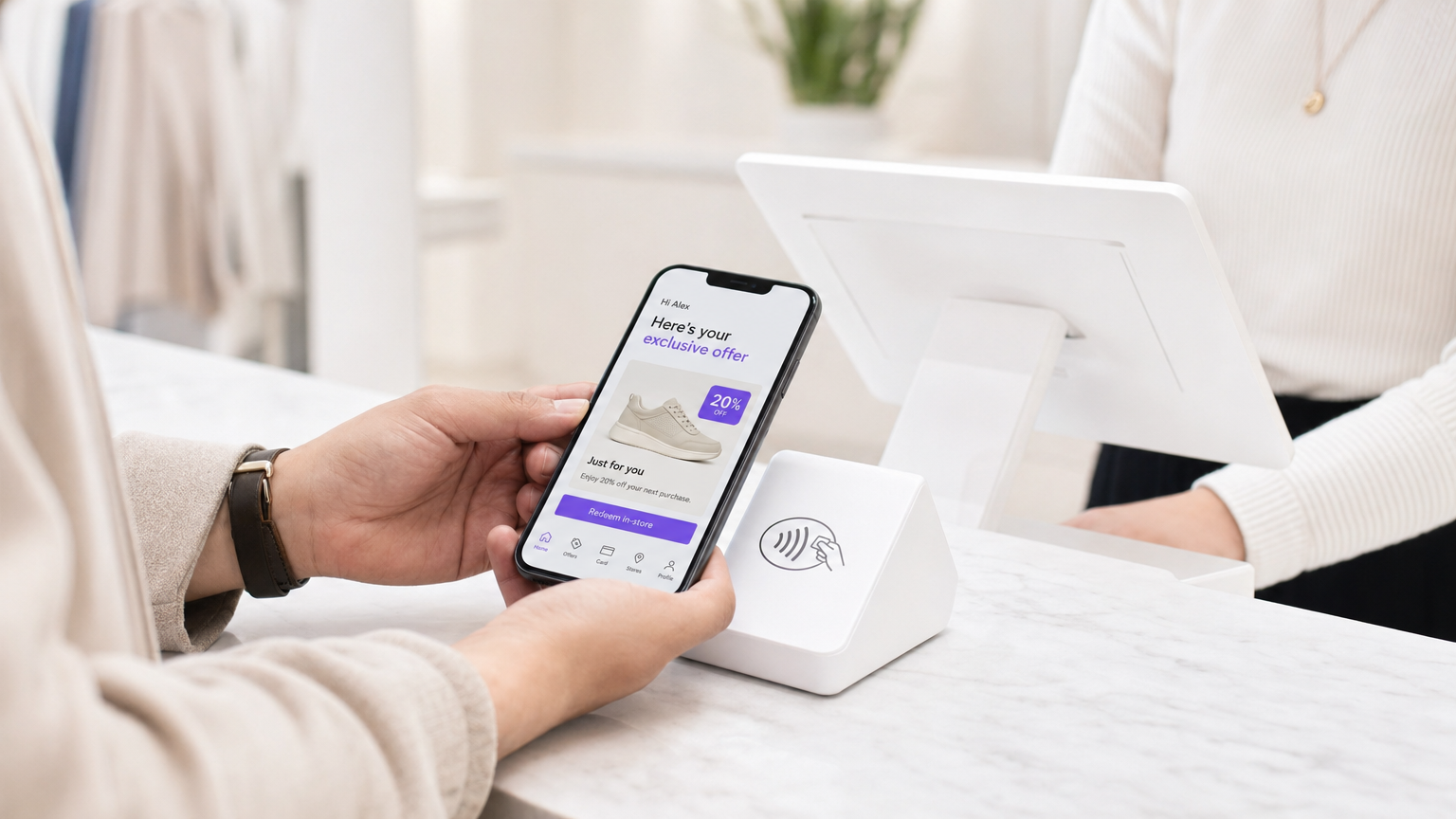
Para los gerentes de TI y directores de operaciones de locales, el mandato de ofrecer experiencias de cliente personalizadas a menudo se traduce en proyectos de integración complejos con múltiples proveedores. Sin embargo, la base más efectiva para la personalización en tienda probablemente ya esté desplegada en sus techos: su red WiFi de invitados empresarial.
Al superponer una sofisticada plataforma de análisis y autenticación sobre el hardware existente (como Cisco Meraki, Aruba o Ruckus), los minoristas pueden transformar una amenidad de conectividad básica en un potente motor para la captura de datos propios. Esta guía detalla cómo diseñar, implementar y escalar una estrategia de personalización impulsada por WiFi. Exploramos la mecánica de la resolución de identidad a través de Captive Portals, la integración del tiempo de permanencia y el análisis espacial en los sistemas CRM, y el desencadenamiento automatizado de ofertas contextualmente relevantes, todo ello manteniendo una estricta adhesión a los estándares GDPR y PCI DSS.
Ya sea que gestione una única tienda insignia o una extensa propiedad minorista, el objetivo sigue siendo el mismo: convertir el tráfico peatonal anónimo en clientes conocidos y direccionables, permitiendo a los equipos de marketing entregar el mensaje correcto en el momento preciso de mayor intención.
Análisis Técnico Detallado
Arquitectura y Flujo de Datos
La base de WiFi Analytics se apoya en una arquitectura robusta que captura y procesa de forma segura los datos del cliente. El modelo de despliegue típico implica puntos de acceso (APs) ligeros que informan a un controlador en la nube o local. La plataforma de análisis ingiere datos de este controlador a través de API o feeds de Syslog.
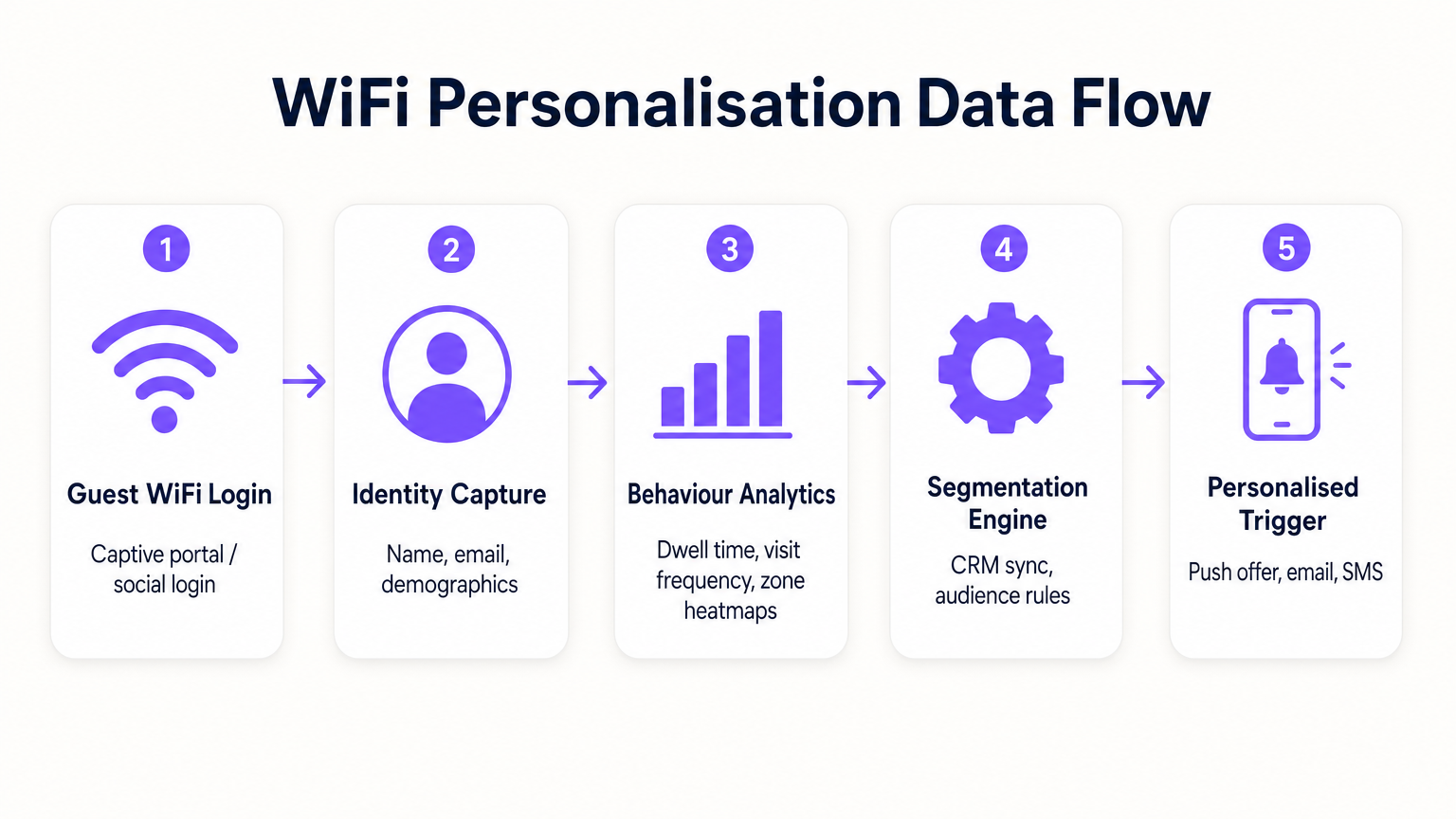
- Solicitudes de Sondeo y Asociación: Incluso antes de la autenticación, los APs detectan solicitudes de sondeo de dispositivos móviles, capturando direcciones MAC y la intensidad de la señal (RSSI). Esto proporciona datos básicos de tráfico peatonal y de zona.
- Autenticación (El Captive Portal): Cuando un usuario se asocia con el SSID Guest WiFi , es redirigido a un Captive Portal. Este es el punto crítico de captura de identidad. Al ofrecer autenticación a través de correo electrónico, redes sociales o SMS, el sistema vincula la dirección MAC previamente anónima a una identidad verificada.
- Motor de Análisis: La plataforma correlaciona los datos de ubicación en tiempo real (calculados mediante trilateración o mapas de calor RSSI) con la identidad autenticada, construyendo un perfil completo de tiempo de permanencia, frecuencia de visitas y preferencias de zona.
- Capa de Integración: Los Webhooks o REST APIs envían estos datos de perfil enriquecidos a sistemas externos (CRM, automatización de marketing, plataformas de fidelización).
Resolución de Identidad y Aleatorización de MAC
Los sistemas operativos móviles modernos (iOS 14+, Android 10+) implementan la aleatorización de direcciones MAC para evitar el seguimiento persistente. Esto hace que depender únicamente de las direcciones MAC para el análisis a largo plazo sea obsoleto. La solución es la autenticación basada en perfiles. Una vez que un usuario se autentica a través del Captive Portal, su correo electrónico o número de teléfono se convierte en el identificador persistente. Las visitas posteriores, incluso con una nueva dirección MAC aleatorizada, pueden vincularse al perfil principal tras la reautenticación, asegurando la continuidad en el registro del cliente.
Segmentación de Red y Seguridad
La seguridad es primordial. El tráfico de invitados debe segregarse estrictamente de la red corporativa, típicamente a través de VLANs dedicadas. Esto asegura el cumplimiento con PCI DSS al evitar cualquier superposición entre el acceso público a internet y los entornos de datos de punto de venta (POS). El SSID de invitados debería idealmente utilizar WPA3-Personal o WPA3-Enterprise (donde sea compatible) para cifrar el tráfico inalámbrico, protegiendo los datos del usuario de la interceptación.
Guía de Implementación
Desplegar una estrategia de personalización requiere un esfuerzo coordinado entre TI y marketing.
Fase 1: Evaluación de la Infraestructura
Antes de desplegar análisis avanzados, asegúrese de que el entorno RF subyacente sea sólido. Realice un estudio de sitio para verificar la densidad de cobertura, particularmente en zonas de alto valor. El análisis del tiempo de permanencia depende de una recepción de señal consistente; las zonas muertas distorsionarán los datos.
Fase 2: Configuración del Captive Portal
Diseñe el Captive Portal para maximizar las tasas de aceptación (opt-in) mientras asegura el cumplimiento del GDPR. El intercambio de valor debe ser claro. En lugar de un inicio de sesión genérico, ofrezca un incentivo: "Conéctese para ofertas exclusivas en tienda." Fundamentalmente, el consentimiento para el acceso a la red debe desvincularse del consentimiento para las comunicaciones de marketing. El portal debe presentar claramente los términos y condiciones y las políticas de privacidad.
Fase 3: Integración y Segmentación
Conecte la plataforma WiFi a su pila de marketing existente. Esto le permite combinar datos de comportamiento en tienda (por ejemplo, "visitó la sección de calzado durante 20 minutos") con datos transaccionales (por ejemplo, "compró zapatillas el mes pasado"). Cree segmentos accionables, como "Riesgo de Abandono de Alto Valor" (visitantes frecuentes que no se han conectado en 60 días).
Fase 4: Activadores Automatizados
Configure flujos de trabajo automatizados. Cuando un cliente perteneciente a un segmento específico se autentica, active una acción a través de API. Esto podría ser una oferta por SMS, una notificación push a través de la aplicación del minorista o un correo electrónico. La latencia entre la autenticación y la ejecución del activador debe ser mínima (menos de 30 segundos) para asegurar que el mensaje se reciba mientras el cliente aún está interactuando.
Para estrategias más detalladas sobre la construcción de estos perfiles, consulte nuestra guía sobre WiFi in Retail Stores: Building Customer Profiles From Footfall Data o su equivalente en francés, Le WiFi dans les magasins de détail : Créer des profils clients à partir des données de fréquentation .
Mejores prácticas
- Priorice el intercambio de valor: Los clientes solo compartirán sus datos si perciben un beneficio. Asegúrese de que el WiFi sea rápido y fiable, y de que cualquier oferta activada sea realmente valiosa.
- Respete los límites de frecuencia: No bombardee a los clientes con notificaciones cada vez que se conecten. Implemente límites de frecuencia (por ejemplo, un mensaje máximo por semana) para evitar la fatiga y las bajas.
- Aproveche las inversiones existentes: Evite los escenarios de sustitución total. Las plataformas de análisis modernas se integran a la perfección con los principales proveedores de hardware, lo que le permite extraer más valor de su infraestructura actual.
- Interconecte datos: Los datos de WiFi son más potentes cuando se combinan con otras fuentes. Intégrelos con su programa de fidelización para comprender cómo el comportamiento en la tienda se correlaciona con el valor de vida útil general del cliente. Este enfoque es muy relevante en varios sectores, incluidos Retail , Hospitality e incluso Healthcare .
Resolución de problemas y mitigación de riesgos
- Bajas tasas de aceptación: Si menos del 20% de los visitantes se autentican, revise el diseño del Captive Portal. Simplifique el proceso de inicio de sesión, aclare la propuesta de valor y asegúrese de que el portal sea adaptable a dispositivos móviles.
- Datos de ubicación inexactos: Si los análisis de zona parecen sesgados, verifique la ubicación de los AP y realice un nuevo estudio de RF. Las interferencias de obstáculos físicos o redes vecinas pueden afectar los cálculos de RSSI.
- Fallos de integración: Asegure un manejo de errores robusto para las conexiones API a los CRM. Supervise las tasas de éxito de entrega de webhooks e implemente mecanismos de reintento para cargas útiles fallidas.
- Riesgos de cumplimiento: Audite regularmente sus flujos de consentimiento y políticas de retención de datos. Asegúrese de tener un proceso optimizado para gestionar las solicitudes de acceso de los interesados (DSARs) bajo GDPR.
ROI e impacto empresarial
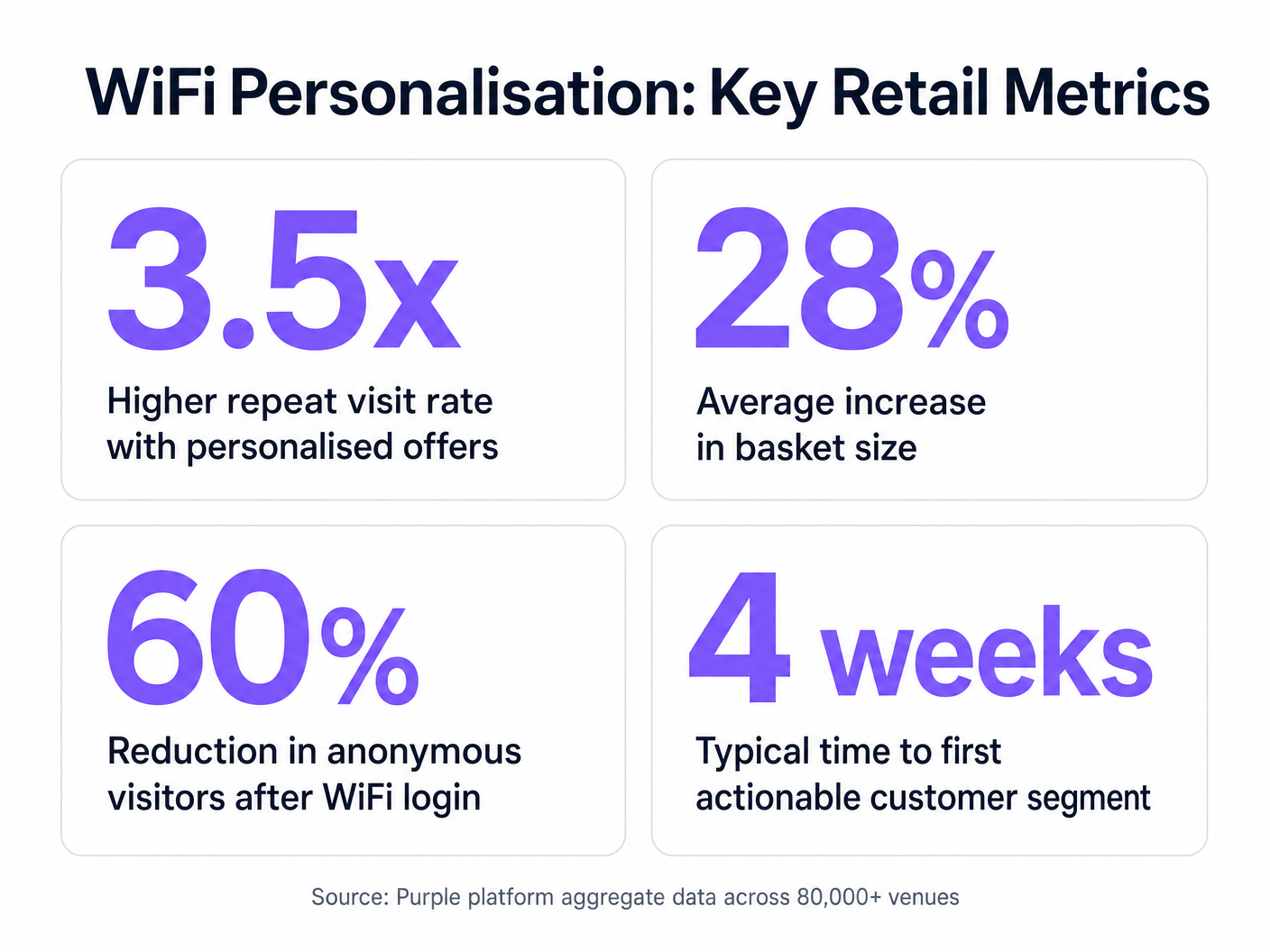
El caso de negocio para la personalización impulsada por WiFi es convincente. Al identificar a los visitantes anónimos, los minoristas pueden expandir significativamente su base de datos comercializable. Las métricas clave a seguir incluyen:
- Tasa de crecimiento de la base de datos: El volumen de nuevas identidades verificadas capturadas por mes.
- Tasa de conversión de ofertas activadas: El porcentaje de clientes que canjean una oferta que se les envía mientras están en la tienda.
- Aumento del tiempo de permanencia: Medir si el compromiso personalizado conduce a visitas más largas a la tienda.
- Frecuencia de visitas repetidas: Seguimiento del impacto de las campañas de reenganche dirigidas en la fidelidad del cliente.
Al ir más allá de la conectividad básica, los equipos de TI pueden posicionarse como facilitadores de ingresos, proporcionando la infraestructura esencial para operaciones minoristas modernas y basadas en datos.
Definiciones clave
Captive Portal
A web page that a user is forced to view and interact with before access is granted to a public network.
The primary interface for capturing user identity and establishing consent for data processing.
MAC Address Randomisation
A privacy feature where mobile devices use a temporary, randomly generated hardware address when scanning for or connecting to networks.
Forces IT teams to rely on authenticated profiles rather than hardware identifiers for long-term customer tracking.
Dwell Time
The duration a connected or probing device remains within the coverage area of a specific access point or defined zone.
A critical metric for understanding customer engagement with specific displays, departments, or the store as a whole.
Trilateration
A method of determining the location of a device by measuring its signal strength (RSSI) relative to three or more access points.
Used by spatial analytics platforms to generate accurate heatmaps and track customer movement patterns.
Probe Request
A frame sent by a client device to discover available wireless networks in its vicinity.
Allows analytics platforms to estimate footfall and capture anonymous presence data even if the user does not authenticate.
VLAN (Virtual Local Area Network)
A logical subnetwork that groups a collection of devices, isolating their traffic from other devices on the same physical network.
Essential for security and PCI DSS compliance, ensuring guest WiFi traffic is completely segregated from corporate systems.
Webhook
A method for one application to provide real-time information to another application, typically triggered by a specific event.
Used to instantly push authentication events from the WiFi platform to a CRM, enabling real-time triggered marketing.
RSSI (Received Signal Strength Indicator)
A measurement of the power present in a received radio signal.
The fundamental metric used by access points to estimate the distance of a client device, enabling location analytics.
Ejemplos prácticos
A mid-sized high street fashion retailer with 50 locations wants to reduce customer churn. They have Cisco Meraki APs deployed but are only offering a simple 'click-to-accept' splash page. How should the IT team approach upgrading this to a personalisation engine?
- Platform Integration: Integrate a dedicated WiFi analytics platform with the existing Meraki dashboard via API. No new hardware is required.
- Portal Upgrade: Replace the 'click-to-accept' page with a branded captive portal offering Social Login (Facebook/Google) or email authentication, coupled with an explicit marketing opt-in checkbox.
- CRM Sync: Configure a webhook to push newly authenticated identities and their visit data into the retailer's CRM (e.g., Salesforce).
- Campaign Execution: The marketing team creates a segment in the CRM for 'Customers who haven't visited in 90 days'. When a customer in this segment connects to the WiFi, an automated email offering a 15% discount is triggered immediately.
A large shopping centre operator needs to understand the flow of visitors between different anchor stores to optimize tenant placement and rent models. They currently rely on manual footfall counting at entrances.
- Network Tuning: The IT team optimizes the AP density to ensure consistent coverage across all concourses and store entrances, focusing on overlapping coverage for accurate trilateration.
- Analytics Deployment: Deploy a spatial analytics platform that ingests probe request data from the APs.
- Zone Mapping: Define specific zones within the analytics dashboard corresponding to key areas (e.g., 'Food Court', 'Anchor Store A', 'North Entrance').
- Data Analysis: Utilize the platform to generate heatmaps and flow diagrams, analyzing the typical paths taken by visitors and the dwell time in specific zones.
Preguntas de práctica
Q1. A retail client wants to trigger an immediate SMS discount to any customer who spends more than 15 minutes in the high-margin electronics section. They currently have a single access point covering the entire store. What is the primary technical constraint?
Sugerencia: Consider how the system determines location and dwell time.
Ver respuesta modelo
The primary constraint is a lack of spatial resolution. With only a single access point, the system can determine that the customer is in the store (associated with the AP), but it cannot use trilateration to pinpoint their location to a specific zone like the electronics section. The retailer must deploy additional access points to provide overlapping coverage, enabling accurate location analytics.
Q2. The marketing director is concerned that MAC address randomisation in iOS will prevent them from tracking repeat visitors. How should the IT architect respond?
Sugerencia: Focus on the transition from hardware-based tracking to identity-based tracking.
Ver respuesta modelo
The architect should explain that while MAC randomisation disrupts passive tracking of anonymous devices, it does not impact authenticated users. By implementing a captive portal that requires email or social login, the system creates a persistent profile based on the user's identity. When the user returns and reconnects (even with a new MAC address), they re-authenticate, and the new session is linked to their existing persistent profile.
Q3. A stadium operator wants to deploy guest WiFi but is concerned about PCI DSS compliance, as POS terminals for concessions share the same physical network switches. What network design principle must be enforced?
Sugerencia: Think about logical separation of network traffic.
Ver respuesta modelo
The IT team must enforce strict network segmentation using Virtual Local Area Networks (VLANs). The guest WiFi traffic must be placed on a dedicated VLAN that is completely isolated from the VLAN used by the POS terminals. Firewall rules must ensure that no traffic can route between the guest VLAN and the Cardholder Data Environment (CDE), thereby maintaining PCI DSS compliance.
Continúe leyendo esta serie
Privacidad desde el Diseño: Anonimización de datos WiFi para el cumplimiento del GDPR
Esta guía autorizada detalla la arquitectura técnica y las estrategias de implementación para anonimizar los datos WiFi y garantizar el cumplimiento del GDPR. Proporciona a los líderes de TI y a los arquitectos de red marcos de acción para equilibrar un análisis sólido de los espacios con estrictos requisitos de privacidad de datos.
Heatmapping vs. Análisis de Presencia: Diferencias Técnicas
Esta guía técnica autorizada detalla las diferencias arquitectónicas y operativas críticas entre el heatmapping WiFi y el análisis de presencia para operadores de recintos empresariales. Proporciona a los líderes de TI, arquitectos de red y directores de operaciones marcos de implementación accionables, escenarios de implementación reales y mejores prácticas neutrales respecto al proveedor para extraer el máximo ROI de su infraestructura inalámbrica existente.
Cómo calcular el tiempo de permanencia utilizando análisis de ubicación WiFi
Esta guía proporciona una referencia técnica exhaustiva para calcular el tiempo de permanencia wifi utilizando análisis de ubicación WiFi, cubriendo la arquitectura completa desde la captura de solicitudes de sondeo 802.11, pasando por la trilateración basada en RSSI, hasta el análisis de zonas geocercadas. Está diseñada para gerentes de TI, arquitectos de red y directores de operaciones de recintos que necesitan implementar inteligencia de ubicación precisa y escalable en entornos minoristas, hoteleros, sanitarios y del sector público. Los lectores obtendrán orientación de implementación práctica, estudios de casos reales y un marco claro para traducir datos espaciales brutos en resultados de negocio medibles.