
Designing Secure Staff WiFi Networks Separated from Guest Traffic
An authoritative technical reference guide for network architects and IT leaders on designing secure, high-performance staff WiFi networks. It details the logical and physical segmentation of operational traffic from public guest networks using VLANs, 802.1X authentication, and WPA3-Enterprise to satisfy compliance mandates (PCI DSS, GDPR) and eliminate lateral movement security risks.
Listen to this guide
View podcast transcript
Executive Summary
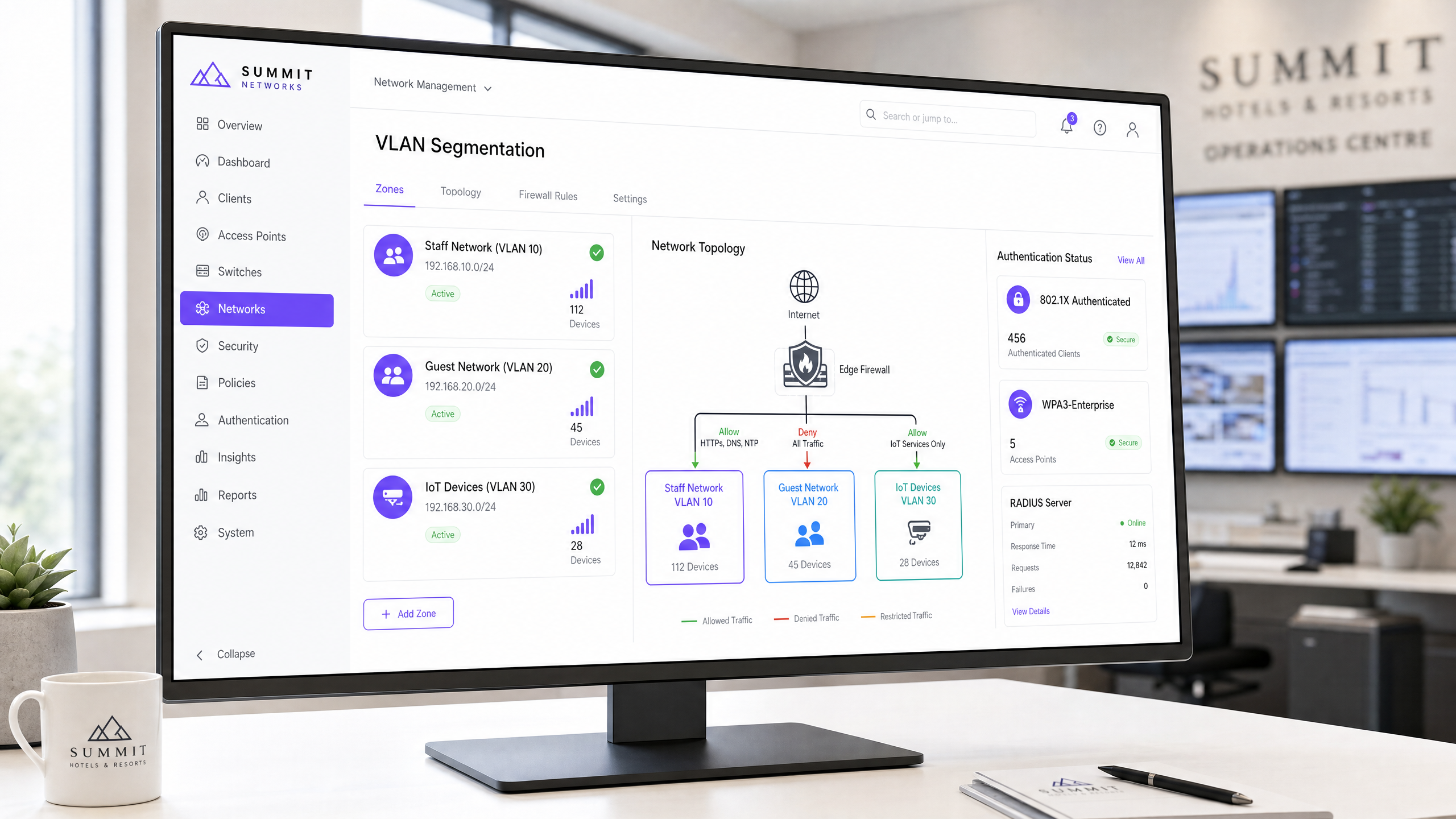
For enterprise venue operators, IT managers, and network architects across hospitality, retail, healthcare, and public sectors, wireless connectivity is a mission-critical utility. However, a common and dangerous architectural flaw is the conflation of public Guest WiFi and private staff networks. A flat, unsegmented network architecture allows lateral movement, exposing critical back-office systems—such as Property Management Systems (PMS), Point of Sale (POS) terminals, and Electronic Health Records (EHR)—to untrusted guest devices.
This technical reference guide outlines a vendor-neutral, enterprise-grade framework for designing and deploying secure staff WiFi networks that are strictly segmented from public guest traffic. By implementing Virtual Local Area Networks (VLANs), IEEE 802.1X authentication, and WPA3-Enterprise, organisations can eliminate lateral movement risks, ensure regulatory compliance (PCI DSS, GDPR), and guarantee operational throughput. This guide provides actionable deployment sequences, troubleshooting steps, and real-world case studies to help IT teams secure their wireless estate this quarter.
Listen to our companion technical briefing on designing secure staff networks:
Technical Deep-Dive
Logical and Physical Network Segmentation
The foundational security control for separating staff and guest traffic is network segmentation. In an enterprise wireless environment, logical segmentation is achieved by mapping distinct Service Set Identifiers (SSIDs) to isolated Virtual Local Area Networks (VLANs) at the Access Point (AP) layer [1]. This ensures that guest devices and staff hardware reside in completely separate broadcast domains, preventing any direct packet transmission between them.
+---------------------------------------------------------------------------------+
|                                    Internet                                     |
+---------------------------------------------------------------------------------+
                                         |
                                         v
+---------------------------------------------------------------------------------+
|                        Edge Firewall / Next-Gen Firewall                        |
+---------------------------------------------------------------------------------+
          |                              |                              |
          | (VLAN 10: Allow PMS/ERP)     | (VLAN 20: Deny Internal)     | (VLAN 30: Restricted)
          v                              v                              v
+--------------------+         +--------------------+         +--------------------+
|   Staff Network    |         |   Guest Network    |         | IoT/Building Sys.  |
|      VLAN 10       |         |      VLAN 20       |         |      VLAN 30       |
+--------------------+         +--------------------+         +--------------------+
          |                              |                              |
          +------------------------------+------------------------------+
                                         |
                                         v
+---------------------------------------------------------------------------------+
|                  Wireless Controller / Cloud Management Platform                 |
+---------------------------------------------------------------------------------+
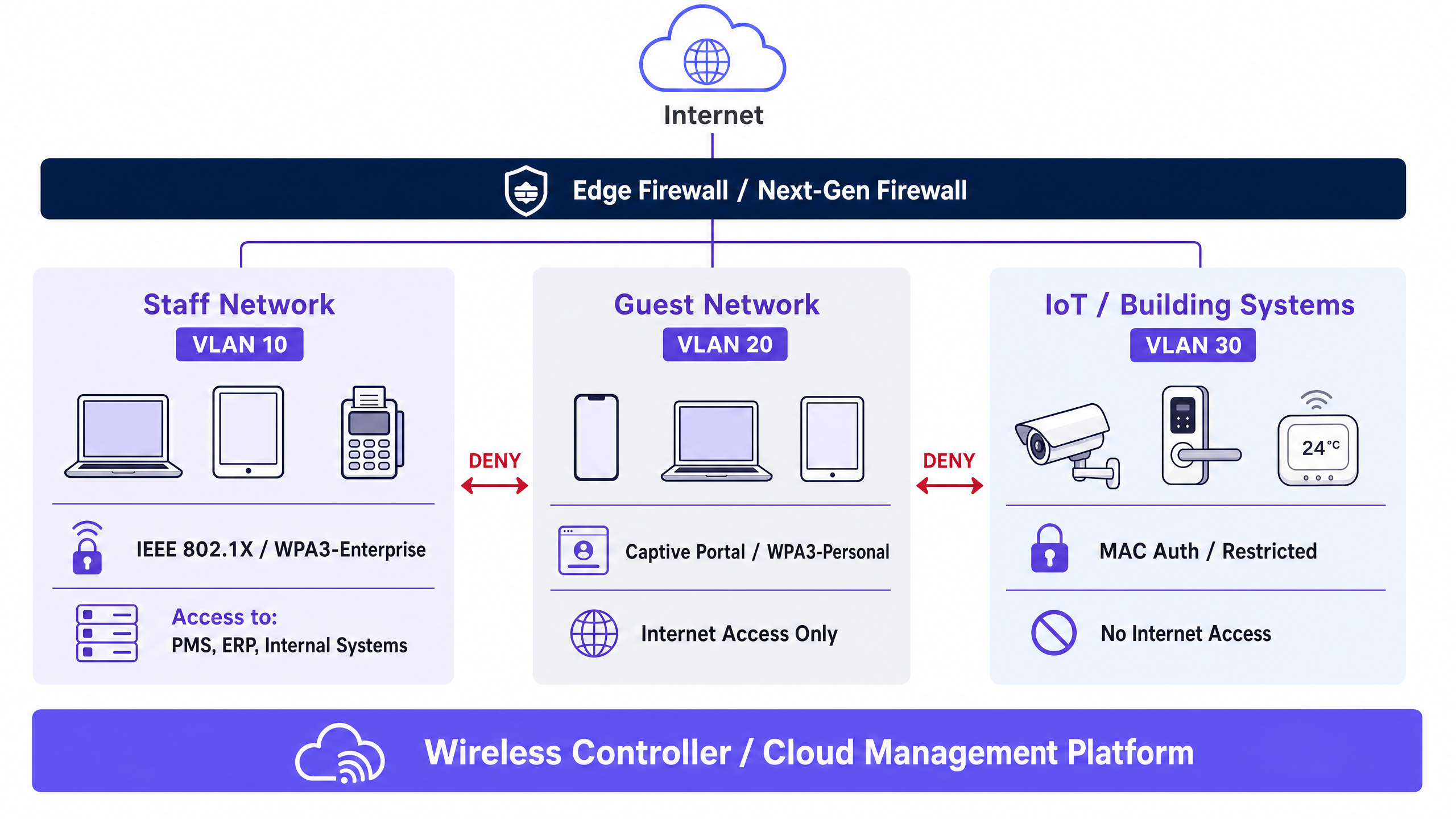
To enforce absolute isolation, a Layer 3 stateful firewall or Next-Generation Firewall (NGFW) must sit at the boundary of these VLANs [2]. The firewall enforces a Zero-Trust posture, treating the guest VLAN as a hostile, untrusted zone. The table below outlines the mandatory firewall Access Control List (ACL) policies:
| Source VLAN | Destination VLAN | Protocol / Ports | Action | Architectural Justification |
|---|---|---|---|---|
| VLAN 10 (Staff) | VLAN 20 (Guest) | Any | DENY | Prevents staff devices from interacting with unmanaged, potentially compromised guest hardware. |
| VLAN 20 (Guest) | VLAN 10 (Staff) | Any | DENY | Prevents guest devices from scanning or initiating connections to staff systems. |
| VLAN 20 (Guest) | WAN (Internet) | HTTP/S, DNS, NTP | ALLOW | Restricts guest traffic strictly to outbound internet access. |
| VLAN 30 (IoT) | VLAN 10 & 20 | Any | DENY | Prevents insecure IoT hardware (e.g., smart thermostats, CCTV) from being used as pivot points [3]. |
| VLAN 10 (Staff) | Internal Servers | HTTPS, SSH, SQL | ALLOW | Restricts staff access strictly to authorized operational applications (e.g., PMS, ERP). |
Enterprise Authentication and Encryption Standards
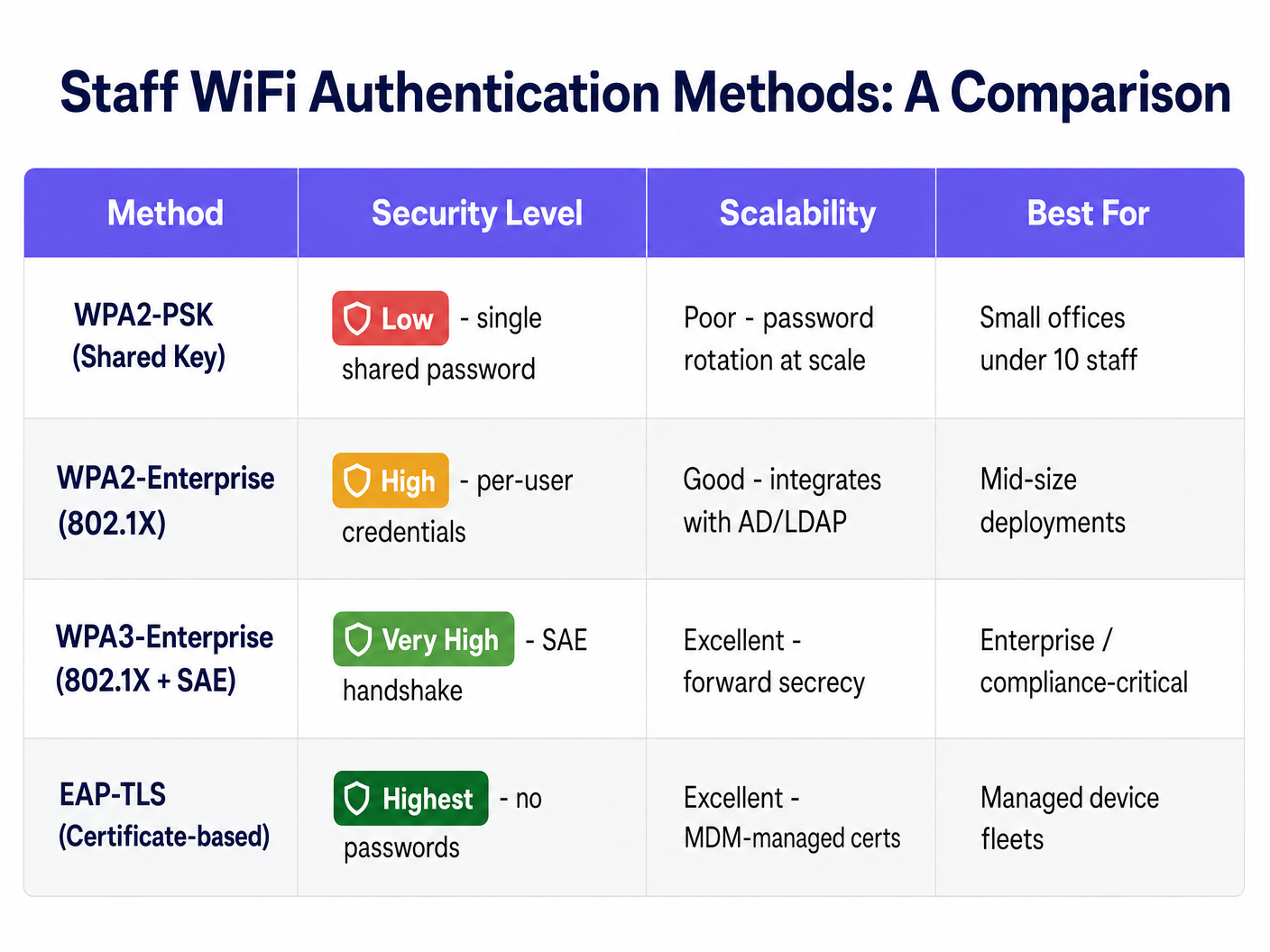
Deploying separate VLANs is ineffective if the entry points to those VLANs are poorly secured. Many organisations make the critical error of securing their staff WiFi with a Pre-Shared Key (WPA2-PSK). PSK-based networks use a single, shared password for all devices. This introduces severe operational and security liabilities: if an employee leaves, the password must be rotated on every single device across the estate, or the former employee retains network access.
The enterprise standard for staff wireless security is IEEE 802.1X authentication combined with WPA3-Enterprise [4]. This architecture shifts authentication from a shared password to individual, directory-linked credentials or digital certificates, validated by a central RADIUS (Remote Authentication Dial-In User Service) server.
1. Credential-Based Authentication (PEAP-MSCHAPv2)
In this deployment, staff devices authenticate using their individual corporate directory credentials (e.g., Active Directory, LDAP, Okta, or Microsoft Entra ID) [5].
- The Handshake: The AP acts as an authenticator, forwarding the client's credentials encapsulated in an Extensible Authentication Protocol (EAP) tunnel to the RADIUS server.
- Security Uplift: Eliminates shared passwords. When an employee is offboarded and deactivated in the central directory, their network access is terminated instantly.
2. Certificate-Based Authentication (EAP-TLS)
For managed corporate device fleets, EAP-TLS represents the gold standard of wireless security [6].
- The Handshake: Rather than passwords, authentication relies on asymmetric cryptography. The client device presents a unique digital certificate issued by the organisation's Public Key Infrastructure (PKI) or Mobile Device Management (MDM) platform.
- Security Uplift: Immune to credential harvesting, phishing, and shoulder-surfing. Authentication is cryptographically bound to the specific physical device.
3. WPA3-Enterprise vs. WPA2-Enterprise
While WPA2-Enterprise has been the standard for two decades, modern deployments must mandate WPA3-Enterprise. WPA3 introduces Simultaneous Authentication of Equals (SAE), which replaces the WPA2 4-way handshake, completely eliminating offline dictionary attacks [7]. WPA3 also mandates Protected Management Frames (PMF), preventing attackers from injecting deauthentication frames to disconnect staff devices or perform rogue AP "evil twin" attacks.
Implementation Guide
Phase 1: VLAN and Subnet Provisioning
- Define IP Subnets: Allocate non-overlapping CIDR blocks for each network segment. For example:
- Staff (VLAN 10):
10.10.10.0/24(254 hosts) - Guest (VLAN 20):
172.16.0.0/20(4,094 hosts - sized for high-density guest concurrency) - IoT (VLAN 30):
10.10.30.0/24(254 hosts)
- Staff (VLAN 10):
- Configure Core Switches: Provision the VLANs on your core and distribution switches. Ensure that the switchports connecting to your Access Points are configured as 802.1Q trunk ports, carrying VLAN 10, 20, and 30, with a dedicated, non-default native VLAN (e.g., VLAN 99) for AP management traffic.
Phase 2: RADIUS Server and Directory Integration
- Deploy RADIUS: Set up redundant RADIUS servers. For on-premises Active Directory, deploy Microsoft Network Policy Server (NPS). For cloud-first environments, deploy a Cloud RADIUS solution integrated with Microsoft Entra ID or Okta [5].
- Register Network Access Servers (NAS): Add the IP addresses of all wireless controllers or standalone APs as RADIUS clients, configuring a strong, randomly generated shared secret.
- Configure Connection Request and Network Policies:
- Create a policy that matches connection requests from the Staff SSID.
- Restrict access to a specific Active Directory security group (e.g.,
GG-WiFi-Staff). - Enforce PEAP-MSCHAPv2 or EAP-TLS as the allowed EAP type.
Phase 3: Wireless Controller and SSID Configuration
- Create Staff SSID: Configure the SSID (e.g.,
Corporate-Staff).- Security Type: WPA3-Enterprise (or WPA2/WPA3 transition mode if legacy devices exist).
- Authentication: 802.1X targeting your RADIUS server group.
- VLAN Mapping: Map the SSID directly to VLAN 10.
- Create Guest SSID: Configure the SSID (e.g.,
Guest-WiFi).- Security Type: Open with Opportunistic Wireless Encryption (OWE) to encrypt guest traffic without a password [8].
- VLAN Mapping: Map the SSID directly to VLAN 20.
- Portal Redirection: Redirect unauthenticated HTTP/S traffic to your captive portal platform (e.g., Purple) for data capture and WiFi Analytics .
- Enable Client Isolation: On the Guest SSID, explicitly enable Client-to-Client Isolation (sometimes called Local Proxy ARP or Station Isolation) at the AP layer. This prevents connected guests from discovering or attacking other devices on the same guest VLAN.
Phase 4: Quality of Service (QoS) and Bandwidth Allocation
To prevent guest traffic from saturating internet gateways and disrupting staff operations, configure strict Quality of Service policies on your WAN edge and wireless controller [9]:
- Bandwidth Reservation: Allocate a minimum guaranteed bandwidth pool for VLAN 10 (Staff). For example, reserve 20% of your total WAN capacity exclusively for staff traffic.
- Rate Limiting: Enforce per-user bandwidth limits on the Guest VLAN (e.g., maximum 5 Mbps download / 1 Mbps upload per guest device) using the captive portal management plane.
- Traffic Prioritisation (802.11e / WMM): Classify staff voice (VoIP) and video traffic as Voice (AC_VO) or Video (AC_VI) classes, while placing guest traffic into the Background (AC_BK) or Best Effort (AC_BE) queues.
Best Practices & Industry Standards
PCI DSS Compliance (Requirement 1.3 & 11.4)
For retail, hospitality, and stadium venues processing credit card transactions, securing the network is a strict legal requirement under the Payment Card Industry Data Security Standard (PCI DSS) [10].
- Requirement 1.3: Enforce a formal firewall configuration that restricts traffic between the Cardholder Data Environment (CDE) and other networks, including guest WiFi.
- Requirement 11.4: Implement a Wireless Intrusion Prevention System (WIPS) to actively scan the radio frequency spectrum, detecting and automatically blocking rogue APs or "evil twin" networks attempting to impersonate your staff SSID.
GDPR and Privacy Compliance
When operating guest networks that capture user data, compliance with the General Data Protection Regulation (GDPR) is mandatory [11].
- Unbundled Consent: The captive portal splash page must separate consent for network access from consent for marketing communications.
- Data Isolation: Any personal data captured via the Guest WiFi splash page must be stored securely in an isolated, encrypted database (such as Purple's ISO 27001-certified platform) and must not sit on any local server connected to the staff network.
Troubleshooting & Risk Mitigation
IT teams frequently encounter deployment issues during 802.1X rollouts. The table below details common failure modes, diagnostic indicators, and immediate remediation steps:
| Issue / Symptom | Root Cause | Diagnostic Step | Remediation |
|---|---|---|---|
| RADIUS Timeout / "Server Unreachable" | UDP ports blocked, or incorrect shared secret configured. | Run tcpdump port 1812 on the RADIUS server during a connection attempt. |
Verify that firewall policies allow UDP ports 1812 (Authentication) and 1813 (Accounting) between APs and RADIUS. Double-check shared secrets. |
| "Certificate Untrusted" error on client | Client device does not trust the RADIUS server's SSL certificate. | Inspect client-side WiFi logs or check if the RADIUS certificate is self-signed. | Deploy a public, trusted SSL certificate from a commercial Certificate Authority (CA) on the RADIUS server, or push the private CA root certificate to staff devices via MDM. |
| Frequent disconnections when staff walk | Fast Roaming (802.11r) is disabled or misconfigured. | Monitor wireless controller logs for high re-authentication times (>500ms) during AP transitions. | Enable 802.11r (Fast BSS Transition) and 802.11k/v on the staff SSID to allow devices to cache credentials and roam seamlessly. |
| Staff PMS/ERP applications run slowly | Guest traffic is saturating the shared internet leased line. | Check WAN interface utilisation graphs on the firewall during peak guest hours. | Enforce strict QoS bandwidth reservation policies on the WAN firewall. Implement per-device rate limits on the guest captive portal. |
ROI & Business Impact
Designing and deploying a segmented, secure staff WiFi network is not merely a technical exercise—it is a strategic business investment. When presenting this initiative to executive leadership or CFOs, focus on these key business outcomes:
1. Risk Mitigation and Liability Reduction
A single data breach resulting from a compromised guest device moving laterally into a corporate network can cost millions in regulatory fines, forensic audits, and brand damage. For retail and hospitality operators, maintaining strict PCI DSS compliance prevents the catastrophic loss of card-processing capabilities.
2. Operational Efficiency and Staff Productivity
In high-density environments like stadiums or hotels , front-line staff rely on mobile devices for operations (e.g., mobile check-in, digital housekeeping, table-side ordering). By implementing QoS and reserving bandwidth for staff, you eliminate operational downtime, directly increasing table turnover in restaurants, reducing guest check-in queues, and improving staff satisfaction.
3. Trustworthy Analytics and Marketing ROI
By separating staff devices from the guest network, you clean up your marketing data. Staff devices that connect daily can skew footfall analytics, dwell times, and return-visitor metrics. Proper segmentation ensures that your WiFi Analytics platform captures pure, unpolluted guest behaviour data, enabling marketing teams to execute highly targeted, high-conversion campaigns that drive direct bookings and customer loyalty.
References
- IEEE 802.1Q Standard for Local and Metropolitan Area Networks: Bridges and Bridged Networks. https://standards.ieee.org
- NIST Special Publication 800-162: Guide to Attribute-Based Access Control (ABAC) Definition and Considerations. https://csrc.nist.gov
- OWASP Top 10 IoT Vulnerabilities and Mitigation Framework. https://owasp.org
- Wi-Fi Alliance: WPA3 Security Specification. https://www.wi-fi.org
- Microsoft TechNet: Deploying 802.1X Wireless Access with NPS. https://learn.microsoft.com
- IETF RFC 5216: The EAP-TLS Authentication Protocol. https://datatracker.ietf.org
- IETF RFC 7664: Simultaneous Authentication of Equals (SAE) Cryptographic Handshake. https://datatracker.ietf.org
- IETF RFC 8110: Opportunistic Wireless Encryption (OWE). https://datatracker.ietf.org
- IEEE 802.11e Quality of Service Enhancements. https://standards.ieee.org
- PCI Security Standards Council: Payment Card Industry Data Security Standard (PCI DSS) v4.0. https://www.pcisecuritystandards.org
- European Data Protection Board (EDPB): Guidelines 05/2020 on Consent under Regulation 2016/679. https://edpb.europa.eu
Key Definitions
VLAN (Virtual Local Area Network)
A logical subnetwork that groups together a collection of devices on one or more physical local area networks, isolating their traffic broadcast domains.
Used to separate guest devices from staff hardware on the same physical switches and access points.
IEEE 802.1X
An IEEE standard for port-based Network Access Control (NAC) that provides an authentication mechanism to devices wishing to attach to a LAN or WLAN.
The standard protocol used to enforce per-user credential or certificate authentication on enterprise staff WiFi networks.
RADIUS (Remote Authentication Dial-In User Service)
A networking protocol that provides centralised Authentication, Authorization, and Accounting (AAA) management for users who connect and use a network service.
The server (e.g., Microsoft NPS or Cloud RADIUS) that validates staff credentials against Active Directory before allowing network access.
WPA3-Enterprise
The latest generation of Wi-Fi Protected Access security for enterprise networks, mandating 192-bit cryptographic strength and Protected Management Frames.
The required wireless security protocol for new staff networks, eliminating offline dictionary attacks and rogue AP deauthentication exploits.
Client Isolation
A security setting on wireless access points that prevents connected wireless clients from communicating directly with each other.
Mandatory configuration on guest networks to block lateral attacks and malware spreading between guest devices.
EAP-TLS (Extensible Authentication Protocol - Transport Layer Security)
An EAP type that uses digital certificates for mutual authentication between the client and the RADIUS server, eliminating the need for passwords.
The highest-security authentication method for corporate-managed device fleets, deployed via MDM platforms.
WIPS (Wireless Intrusion Prevention System)
A security device or software capability that monitors the radio spectrum for the presence of unauthorised access points and automatically takes countermeasures.
Required for PCI DSS compliance to detect and mitigate rogue APs or 'evil twin' attacks in retail and hospitality environments.
Airtime Fairness
A wireless scheduling feature that allocates equal transmission time (airtime) to each wireless client, rather than equal packet counts.
Prevents slow, legacy guest devices from hogging wireless channel capacity and dragging down the performance of fast staff devices.
Worked Examples
A 250-room luxury hotel running a shared, unsegmented network is preparing for a PCI DSS audit. The hotel uses mobile tablets for front-desk check-in, a PMS server on-premises, and offers free guest WiFi. How should the network architect redesign the wireless infrastructure to ensure compliance and security?
- Physical & Logical Segmentation: Create VLAN 10 for Staff (PMS & tablets), VLAN 20 for Guest WiFi, and VLAN 30 for IoT (smart TVs, thermostats). Configure the switchports connecting to the APs as 802.1Q trunks.
- Authentication Hardening: Replace the shared WPA2-PSK on the staff network with WPA3-Enterprise (802.1X). Integrate the wireless controller with the hotel's Active Directory via NPS (RADIUS). Provision the front-desk tablets with WPA3-Enterprise credentials or EAP-TLS certificates via MDM.
- Firewall Access Control: Deploy a stateful firewall. Write rules to allow VLAN 10 to access the PMS server IP over HTTPS/SQL ports, but deny all traffic from VLAN 20 (Guest) to VLAN 10 and VLAN 30. Enable Client Isolation on VLAN 20.
- Compliance Validation: Enable WIPS on the wireless controller to monitor and alert on rogue APs, satisfying PCI DSS Requirement 11.4.
A high-density retail chain with 50 stores wants to deploy guest WiFi to capture customer analytics while ensuring that store-operational handheld scanners (used for inventory and stock management) do not suffer from wireless congestion or dropouts during peak trading hours. How should the IT team design the SSID and QoS architecture?
- SSID Separation: Deploy two SSIDs across all stores:
Retail-Operations(VLAN 10) andGuest-Free-WiFi(VLAN 20). - 802.1X Authentication: Secure
Retail-Operationsusing WPA3-Enterprise. Authenticate the handheld scanners using certificate-based EAP-TLS, pre-provisioned via the chain's MDM platform. Configure the guest SSID with an open network behind a captive portal managed by Purple. - Quality of Service (QoS) & WMM: On the wireless controller, enable Wi-Fi Multi-Media (WMM). Map the
Retail-Operationstraffic to the Video (AC_VI) or Voice (AC_VO) access categories, ensuring priority over guest traffic. MapGuest-Free-WiFito Best Effort (AC_BE). - Bandwidth Rate Limiting: On the WAN edge firewall, configure a traffic-shaping policy. Guarantee a minimum of 15 Mbps symmetrical bandwidth for VLAN 10 at each store. On the Purple captive portal platform, enforce a per-user rate limit of 3 Mbps download and 1 Mbps upload for guest devices on VLAN 20.
A municipal public-sector conference centre frequently hosts large events with up to 5,000 concurrent guest users. The IT director notices that during events, administrative staff on the same physical network experience severe latency on corporate video calls and file transfers. How can this be resolved without purchasing additional physical internet lines?
- VLAN Segmentation: Verify that admin staff sit on VLAN 100 and guests sit on VLAN 200.
- WAN-Edge Traffic Shaping: On the primary internet gateway (e.g., a 1 Gbps symmetrical leased line), configure a Class-Based Weighted Fair Queueing (CBWFQ) policy. Define a class for VLAN 100 with a guaranteed bandwidth of 200 Mbps and a priority queue for real-time voice/video traffic.
- Dynamic Bandwidth Allocation: Configure a policy on the firewall that dynamically limits the total bandwidth allocated to VLAN 200 (Guest) to a maximum of 80% of total WAN capacity (800 Mbps) during business hours, leaving 200 Mbps always available for staff.
- Wireless Airtime Fairness: On the wireless access points, enable Airtime Fairness. This prevents slow legacy guest devices (e.g., older 802.11n smartphones) from monopolising the wireless channels and dragging down the throughput of modern staff devices.
Practice Questions
Q1. A hotel group is deploying a new staff WiFi network. The network architect suggests using WPA2-Personal (PSK) with a strong password because it is easier for staff to enter on their devices. As the Senior Technical Content Strategist, write a decision-forcing scenario exercise that demonstrates why this approach is a security risk and what the recommended alternative is.
Hint: Consider what happens when a disgruntled employee is terminated or leaves the company.
View model answer
Recommended Approach: Reject the WPA2-Personal (PSK) proposal and mandate WPA3-Enterprise (802.1X) authentication.
Reasoning: Using WPA2-PSK creates a massive security blind spot. If a staff member leaves the company, they still know the shared password. To maintain security, the IT team would have to change the password on every single staff device (laptops, PMS tablets, VoIP phones) across the hotel. In practice, this operational overhead is so high that passwords are rarely changed, leaving the network vulnerable to unauthorized access by former employees.
By deploying WPA3-Enterprise with 802.1X, each employee authenticates using their individual corporate directory credentials (e.g., Active Directory). When an employee is offboarded, their account is disabled in Active Directory, and their network access is revoked instantly and automatically, without affecting any other staff devices.
Q2. During a network audit of a retail chain, the auditor notes that the guest WiFi network and the POS payment terminals sit on different IP subnets but are connected to the same physical Layer 3 switch without any ACLs configured. The IT manager argues that because they are on different subnets, they are secure. Create a scenario-based exercise to evaluate this setup against PCI DSS requirements.
Hint: Does an IP subnet boundary block traffic by default on a Layer 3 switch?
View model answer
Recommended Approach: The current setup is non-compliant and highly insecure. The IT team must implement strict VLAN segmentation and stateful firewall rules to isolate the POS network from the guest network.
Reasoning: IP subnets only define logical groupings; they do not enforce security boundaries. On a standard Layer 3 switch, routing between subnets is enabled by default. This means any device on the guest subnet can route traffic directly to the POS subnet simply by sending packets to the switch's gateway IP. An attacker on the guest WiFi could easily scan, discover, and attempt to exploit vulnerabilities on the POS payment terminals, violating PCI DSS Requirement 1.3.
To remediate this, the POS terminals must be placed on a dedicated VLAN (e.g., VLAN 40) and the guest WiFi on VLAN 20. A stateful firewall must sit between these VLANs, with an explicit rule configured to DENY all traffic originating from VLAN 20 (Guest) destined for VLAN 40 (POS). Additionally, Client Isolation must be enabled on the guest SSID to prevent lateral attacks within the guest network itself.
Q3. A conference centre is hosting a major tech summit with 3,000 attendees. The administrative staff, who share the same internet connection, report that they cannot access their cloud-based ticketing system or make clear VoIP calls due to extreme network slowness. Explain how to design a traffic management strategy to resolve this issue without upgrading the physical internet bandwidth.
Hint: Think about over-the-air channel congestion and WAN-link saturation.
View model answer
Recommended Approach: Implement a multi-layered traffic management strategy combining wireless-level QoS, WAN-edge bandwidth reservation, and per-user rate limiting.
Reasoning: The slowness is caused by two bottlenecks: over-the-air channel congestion (RF saturation) and WAN-link saturation. To resolve this without upgrading the physical line:
- WAN Bandwidth Reservation: On the edge firewall, configure Class-Based Weighted Fair Queueing (CBWFQ). Reserve a minimum guaranteed pool of 150 Mbps symmetrical bandwidth exclusively for the staff VLAN (VLAN 10), ensuring it can never be starved by guest traffic.
- Per-User Rate Limiting: On the captive portal platform (e.g., Purple), configure a traffic-shaping profile that limits each guest connection to a maximum of 3 Mbps download and 1 Mbps upload. This prevents a small number of high-bandwidth guest users (e.g., streaming 4K video) from saturating the WAN link.
- Wireless Quality of Service (QoS): Enable Wi-Fi Multi-Media (WMM) on the access points. Map staff VoIP and ticketing traffic to high-priority queues (AC_VO and AC_VI), while mapping all guest traffic to the Best Effort (AC_BE) or Background (AC_BK) queues.
- Airtime Fairness: Enable Airtime Fairness on all APs to ensure that slow legacy devices do not monopolise wireless channel transmission time, preserving channel capacity for fast staff devices.
Continue reading in this series
Roaming Optimization for VoIP and Video Calls on Corporate WiFi
This guide provides IT managers, network architects, and CTOs with a comprehensive, vendor-neutral blueprint for optimizing WiFi roaming to support seamless VoIP and video calls on corporate staff networks. It covers the IEEE 802.11k/r/v protocol stack, WMM QoS configuration, RF cell design, and end-to-end wired QoS mapping required to achieve sub-50ms handoff latency. Applicable across hospitality, retail, healthcare, and large-venue environments, this reference includes real-world implementation scenarios, troubleshooting frameworks, and a measurable ROI analysis.
Certificate-Based Authentication for Corporate Devices (EAP-TLS)
This authoritative technical reference guide covers the architecture, deployment, and operational best practices of EAP-TLS certificate-based authentication for corporate devices. Designed for IT architects and venue operations leaders, it provides a practical roadmap to eliminate password-based credential risks and achieve robust 802.1X network access control across multi-site enterprise environments.
WPA3-Enterprise vs. WPA2-Enterprise: Upgrading Your Staff WiFi
This authoritative technical reference guide outlines the architectural differences, security enhancements, and migration strategies for upgrading staff wireless networks from WPA2-Enterprise to WPA3-Enterprise. Designed for senior IT decision-makers and network architects, it provides actionable deployment blueprints, real-world case studies in hospitality and retail, and a comprehensive risk-mitigation framework to ensure a seamless transition while maintaining compliance with PCI DSS v4.0 and GDPR Article 32.