
Integración de Huawei AirEngine y CloudCampus con Purple WiFi
Esta guía proporciona instrucciones paso a paso para integrar los puntos de acceso Huawei AirEngine e iMaster NCE-Campus con Purple WiFi. Cubre la configuración de Captive Portal, la autenticación de personal mediante 802.1X y el direccionamiento dinámico de VLAN mediante PPSK para redes empresariales.
Escuchar esta guía
Ver transcripción del podcast

Resumen ejecutivo
Las redes empresariales exigen un hardware fiable combinado con una gestión de identidades inteligente. Los puntos de acceso Huawei AirEngine y el controlador iMaster NCE-Campus ofrecen conectividad de alta densidad, mientras que Purple proporciona la capa en la nube para la autenticación, la analítica y la aplicación de políticas. Esta guía detalla la arquitectura de integración necesaria para implementar Guest WiFi , un WiFi seguro para el personal y WiFi multiinquilino utilizando un único controlador Huawei.
Al integrar Huawei CloudCampus con Purple, sustituirá los silos de autenticación dispares por una red unificada basada en la identidad. Operamos en más de 80 000 recintos activos y procesamos 440 millones de inicios de sesión en 2024. Nuestra plataforma, independiente del hardware, se integra de forma nativa con Huawei a través de protocolos estándar de RADIUS y Captive Portal. Esta integración permite el consentimiento explícito y consciente de los visitantes, la validación de certificados 802.1X para los empleados y el direccionamiento dinámico de VLAN a través de claves privadas precompartidas (PPSK) para los inquilinos.
Tanto si gestiona un estadio, un campus universitario o una cadena de tiendas, este documento le proporciona los pasos de configuración exactos, los atributos RADIUS y las listas de control de acceso necesarios para proteger su extremo inalámbrico y capturar datos de origen a escala.
Escuche el pódcast de información técnica:
Análisis técnico detallado
La integración se basa en protocolos estándar: RADIUS (UDP 1812/1813) para autenticación y contabilidad, y HTTPS (TCP 443) para la redirección de Captive Portal. iMaster NCE-Campus actúa como servidor de acceso a la red (NAS) y relé RADIUS, reenviando las solicitudes de los puntos de acceso AirEngine a la infraestructura RADIUS en la nube de Purple.
Resumen de la arquitectura
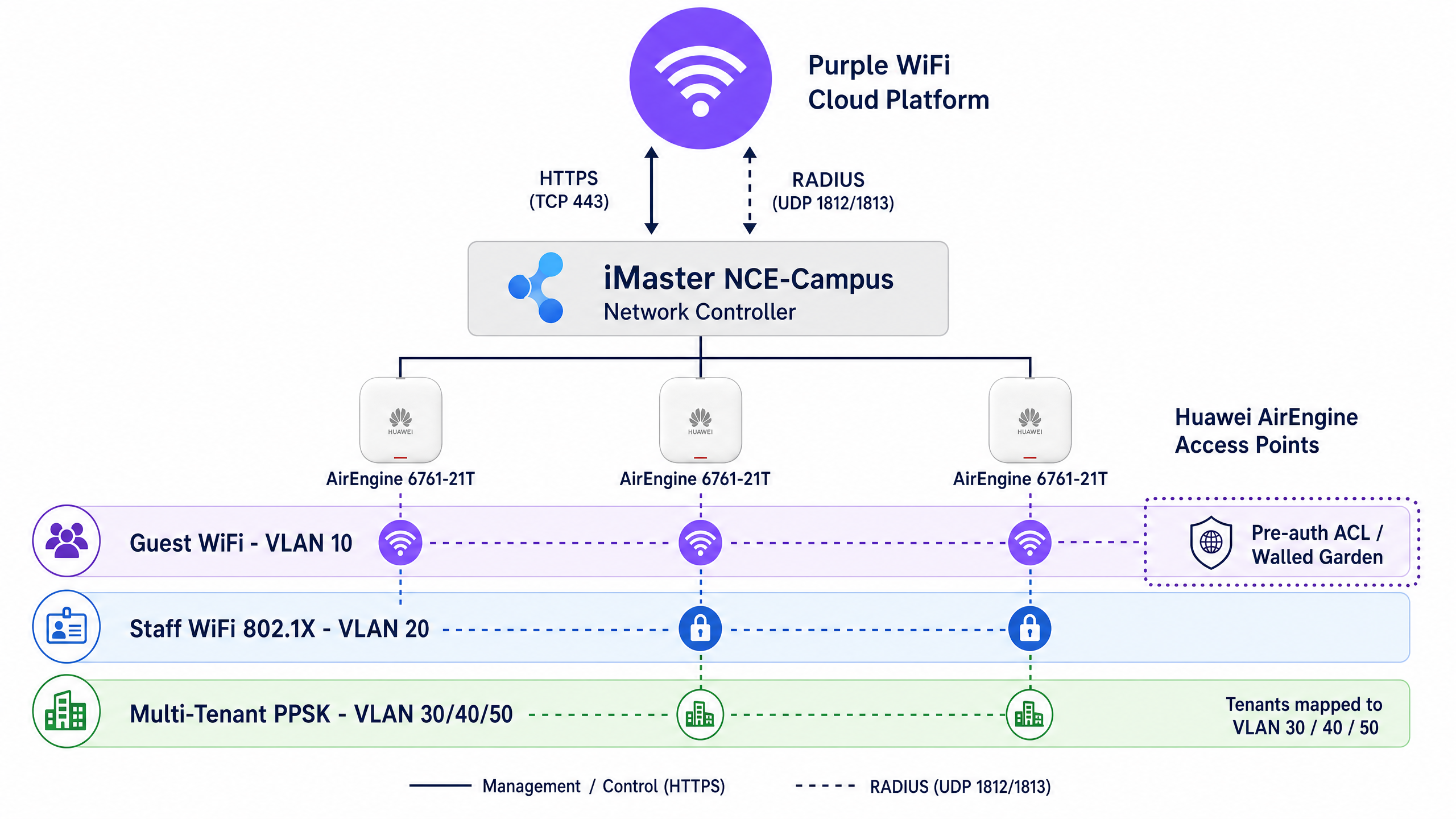
Purple admite tres modelos de autenticación principales en el hardware de Huawei:
- Guest WiFi (Captive Portal): El controlador de Huawei intercepta el tráfico no autenticado y lo redirige a la página de bienvenida (splash page) de Purple. El acceso previo a la autenticación está restringido por una ACL de Walled Garden. Tras un inicio de sesión correcto, Purple envía un mensaje RADIUS Access-Accept, otorgando al cliente acceso total a la red.
- Staff WiFi (802.1X): Los empleados se autentican utilizando sus credenciales corporativas a través de EAP-PEAP o EAP-TLS. Purple valida estas credenciales frente a proveedores de identidad como Microsoft Entra ID, Okta o Google Workspace.
- WiFi multiinquilino (PPSK): Los inquilinos se conectan a un único SSID compartido utilizando contraseñas únicas. Purple valida la contraseña y devuelve atributos RADIUS específicos para dirigir dinámicamente al inquilino a su VLAN aislada.
Walled Garden y ACL de preautenticación
Un Captive Portal requiere un Walled Garden: una lista de control de acceso (ACL) que permite el tráfico a servicios esenciales antes de que el usuario se autentique. Si el Walled Garden está incompleto, la página de bienvenida no se cargará, lo que provocará una mala experiencia para el visitante.
Para Huawei iMaster NCE-Campus, la ACL de preautenticación debe permitir:
- Resolución DNS (UDP 53)
- Los dominios de Captive Portal de Purple (
*.purpleportal.net,*.purple.ai) - Redes de distribución de contenido (CDN) que alojan los recursos de la página de bienvenida
- Dominios de proveedores de identidad si el inicio de sesión social (Apple, Google, Facebook) está habilitado
Todo el resto del tráfico debe denegarse hasta que Purple devuelva el RADIUS Access-Accept.
Direccionamiento dinámico de VLAN y atributos RADIUS
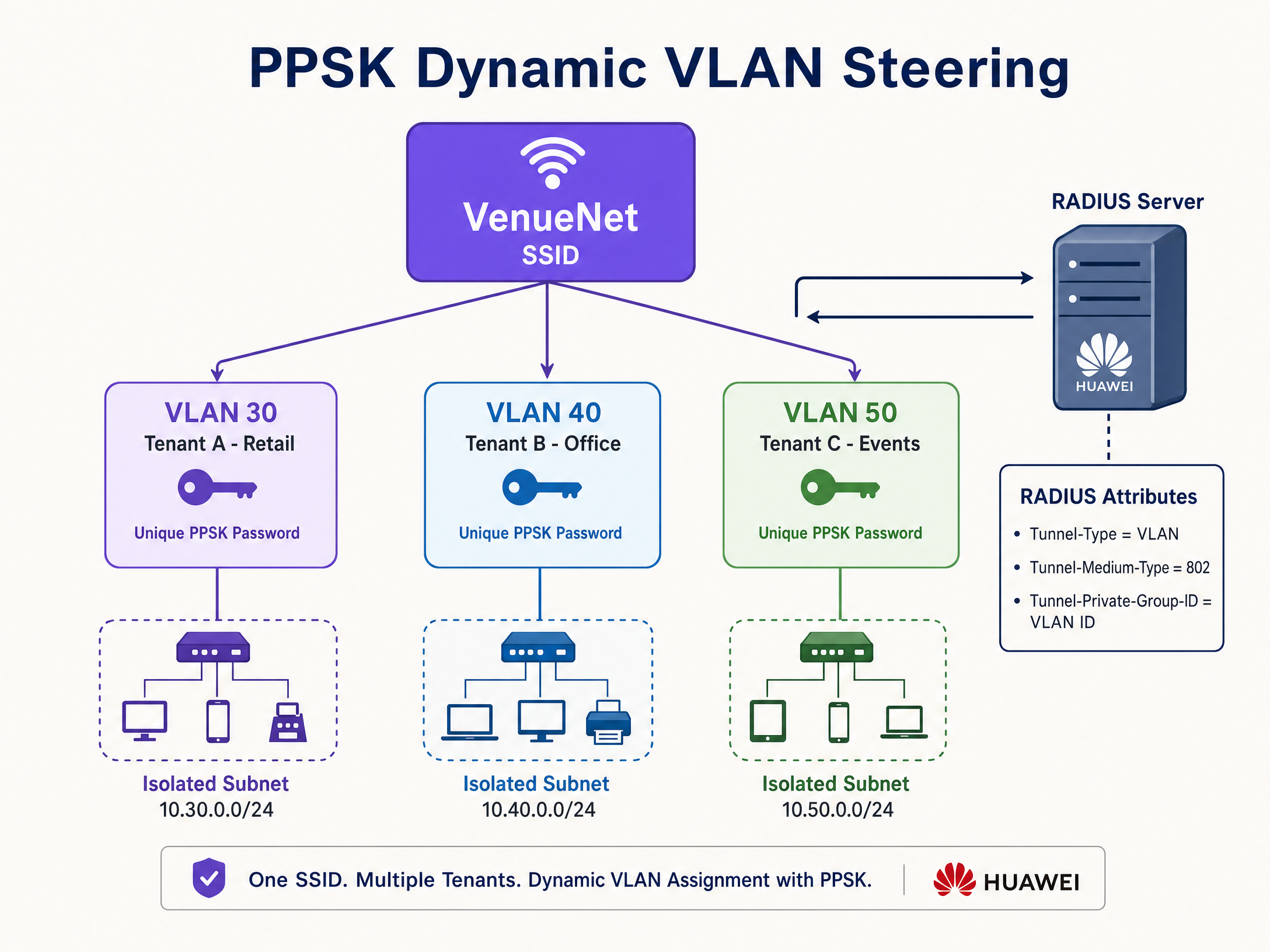
Para aislar el tráfico de red, Purple utiliza la asignación dinámica de VLAN. En lugar de transmitir múltiples SSID, se transmite un único SSID y se asigna la VLAN de forma dinámica en función de la identidad del usuario.
Cuando Purple autentica a un usuario (a través de 802.1X o PPSK), devuelve un paquete Access-Accept que contiene tres atributos RADIUS estándar de la IETF obligatorios:
Tunnel-Type=VLAN(o 13)Tunnel-Medium-Type=802(o 6)Tunnel-Private-Group-ID=[VLAN ID]
El controlador de Huawei recibe estos atributos e indica al punto de acceso AirEngine que etiquete el tráfico del cliente con el ID de VLAN especificado.
Guía de implementación
Esta sección cubre los pasos exactos para configurar iMaster NCE-Campus para la integración con Purple.
Paso 1: Configurar el servidor de relé RADIUS
En primer lugar, defina Purple como el servidor de autenticación externo.
- En iMaster NCE-Campus, navegue a Design > Network Design > Template Management.
- Seleccione RADIUS Server y haga clic en Create.
- Establezca Authentication service en Portal authentication.
- Introduzca las direcciones IP de RADIUS primaria y secundaria de Purple (disponibles en su panel de control de Purple).
- Establezca el puerto de autenticación en 1812 y el puerto de contabilidad en 1813.
- Introduzca el secreto compartido (Shared Secret) de RADIUS proporcionado por Purple.
- Establezca NAS identifier en Device MAC.
Paso 2: Crear la ACL de Walled Garden
Cree la ACL para permitir el tráfico previo a la autenticación.
- Navegue a Design > Network Design > Template Management > ACL.
- Cree una nueva ACL llamada
Purple_Walled_Garden. - Establezca ACL Type en User.
- Añada reglas de permiso (permit) para DNS y los dominios requeridos de Purple (por ejemplo,
*.purpleportal.net). - Guarde la plantilla de ACL.
Paso 3: Configurar la plantilla de URL de Captive Portal
Huawei requiere una plantilla de URL para asignar los parámetros de redirección estándar al formato requerido por Purple.
- Navegue a Design > Network Design > Template Management > URL Template.
- Cree una nueva plantilla llamada
Purple_URL_Template`. - Establezca el Template Type en Cloud platform-based relay authentication.
- Configure la asignación de parámetros exactamente de la siguiente manera:
redirect-urlse asigna aredirect-urlloginurlse asigna alogin-urldevice-macse asigna aap-macuser-ipse asigna auaddressuser-macse asigna aumacssidse asigna assid
Paso 4: Aprovisionar el SSID de invitados
Asocie el servidor RADIUS, la ACL y la plantilla de URL al SSID.
- Vaya a Provision > Device Configuration > Site Configuration.
- Seleccione AP y cree un nuevo SSID.
- Establezca el Network Type en Open.
- Seleccione Open+Portal authentication.
- Establezca el tipo de autenticación en Relay authentication by cloud platform.
- Establezca el modo de interconexión en RADIUS relay.
- Seleccione la plantilla
Purple_URL_Templatecreada anteriormente. - En el campo de URL de autenticación de terceros, pegue su URL única de la página de inicio de Purple.
- Seleccione la plantilla de servidor RADIUS de Purple.
- Seleccione la ACL
Purple_Walled_Gardenpara la regla de permiso predeterminada. - Guarde y despliegue la configuración en los puntos de acceso AirEngine.
Buenas prácticas
Para garantizar un despliegue seguro y fiable, siga estas buenas prácticas independientes del proveedor:
- Implemente 802.1X para empleados: No utilice nunca PSK compartidas para las redes del personal. Despliegue 802.1X con EAP-TLS utilizando el complemento SecurePass de Purple para emitir certificados de cliente. Esto elimina los vectores de phishing basados en contraseñas y cumple con los requisitos de la norma ISO 27001.
- Consolide los SSID: La transmisión de demasiados SSID reduce la eficiencia del tiempo de transmisión debido a la sobrecarga de las tramas de gestión. Utilice PPSK y el direccionamiento dinámico de VLAN para consolidar las redes multiinquilino en un único SSID.
- Verifique las configuraciones de trunk: La asignación dinámica de VLAN falla de forma silenciosa si la VLAN asignada no está permitida en el puerto trunk del switch que conecta el punto de acceso. Realice siempre una auditoría de las configuraciones de los puertos del switch antes de probar el direccionamiento RADIUS.
- Supervise la latencia de RADIUS: Los tiempos de espera de autenticación suelen deberse a la latencia de la WAN. Asegúrese de que su controlador iMaster NCE-Campus tenga una ruta de baja latencia hacia la infraestructura regional de RADIUS de Purple.
Resolución de problemas y mitigación de riesgos
Al integrar RADIUS en la nube con controladores empresariales, los problemas suelen limitarse a tres áreas: el Walled Garden, el secreto compartido de RADIUS o el trunking de VLAN.
La página de inicio no se carga
Síntoma: Un dispositivo se conecta al WiFi de invitados, pero el navegador muestra un error de tiempo de espera en lugar de la página de inicio de Purple.
Causa raíz: La ACL del Walled Garden está incompleta, lo que bloquea el acceso a los dominios del portal de Purple o a las CDN requeridas.
Mitigación: Conecte un dispositivo de prueba al SSID. Intente hacer ping a purpleportal.net. Si el ping falla, revise la configuración de la ACL de iMaster NCE-Campus y asegúrese de que se aplique al estado de preautenticación del SSID.
Fallos de autenticación silenciosos
Síntoma: Un usuario introduce credenciales válidas, pero la conexión se interrumpe sin ningún mensaje de error. Causa raíz: Discrepancia en el secreto compartido de RADIUS entre iMaster NCE-Campus y Purple. Mitigación: Copie el secreto compartido directamente desde el panel de control de Purple y péguelo en la plantilla del servidor RADIUS de Huawei. Un solo espacio al final romperá el hash MD5 utilizado en los paquetes RADIUS.
Tiempo de espera de DHCP agotado tras la autenticación
Síntoma: Un miembro del personal se autentica correctamente a través de 802.1X, pero el dispositivo recibe una dirección APIPA 169.254.x.x en lugar de una IP válida.
Causa raíz: Purple asignó correctamente una VLAN dinámica a través de RADIUS, pero esa VLAN no está en modo trunk en el punto de acceso AirEngine.
Mitigación: Inicie sesión en el switch de acceso y verifique que el comando port trunk allow-pass vlan incluya el ID de VLAN de destino en la interfaz conectada al AP.
ROI e impacto empresarial
El despliegue de Huawei AirEngine con Purple transforma una infraestructura de red estándar en un activo empresarial medible.
Para los operadores de comercio minorista , esta integración recopila datos de primera mano de los compradores, lo que permite realizar campañas de marketing dirigidas que aumentan la afluencia de público y el valor medio de las transacciones. El panel de control de WiFi Analytics de Purple ofrece mapas de calor y métricas de tiempo de permanencia, lo que permite a los gestores de los establecimientos optimizar la distribución de las tiendas en función del comportamiento real de los visitantes.
En entornos de hostelería , la autenticación automatizada a través de OpenRoaming o Passpoint elimina las fricciones de los inicios de sesión manuales, lo que aumenta las puntuaciones de satisfacción de los huéspedes. Para edificios multiinquilino, el direccionamiento dinámico de VLAN mediante PPSK reduce los costes de TI al eliminar la necesidad de aprovisionar y gestionar manualmente SSID independientes para cada nuevo inquilino.
Al unificar la interacción con los invitados, la seguridad del personal y el aislamiento de los inquilinos en una única infraestructura de hardware, las organizaciones maximizan el retorno de su inversión en Huawei CloudCampus.
Definiciones clave
iMaster NCE-Campus
Huawei's cloud-based or on-premises network automation and management platform.
IT teams use this as the central controller to configure SSIDs, push policies to AirEngine APs, and set up RADIUS relay to Purple.
PPSK (Private Pre-Shared Key)
A security feature that allows multiple unique passwords to be used on a single SSID, with each password tying the user to a specific network policy or VLAN.
Essential for multi-tenant environments (like coworking spaces or retail parks) where tenants need isolated networks without broadcasting dozens of SSIDs.
Dynamic VLAN Steering
The process of assigning a device to a specific Virtual Local Area Network based on its authenticated identity, rather than the SSID it connected to.
Used by Purple to ensure that a manager, a cashier, and a guest connecting to the same physical access point are placed on completely separate, secure network segments.
Walled Garden
An Access Control List (ACL) applied to unauthenticated users, permitting access only to specific IP addresses or domains required to complete the login process.
If the Walled Garden is misconfigured, guests will see a blank screen or a timeout error instead of the Purple splash page.
RADIUS Relay
A configuration where the local network controller forwards authentication requests from access points to an external RADIUS server.
Huawei iMaster NCE-Campus acts as the relay, securely passing credentials from the venue to Purple's cloud infrastructure for validation.
802.1X
An IEEE standard for port-based network access control that provides an authentication mechanism to devices wishing to attach to a LAN or WLAN.
The enterprise standard for Staff WiFi. It replaces shared passwords with individual user credentials or digital certificates.
EAP-TLS
Extensible Authentication Protocol - Transport Layer Security. An 802.1X authentication method that relies on client and server certificates rather than passwords.
The most secure authentication method available. Purple's SecurePass issues these certificates to employee devices to eliminate phishing risks.
Captive Portal
A web page that a user of a public-access network is obliged to view and interact with before access is granted.
The primary mechanism Purple uses to capture first-party data and consent from venue visitors.
Ejemplos prácticos
A 200-room hotel needs to provide secure, isolated WiFi for guests, staff, and a third-party coffee shop operating in the lobby, using only two SSIDs to preserve airtime.
Deploy one SSID named 'Hotel_Guest' configured with an Open+Portal authentication policy pointing to Purple's captive portal. Deploy a second SSID named 'Hotel_Secure' configured with WPA3-Enterprise and 802.1X authentication. Staff authenticate via EAP-TLS, and Purple returns a RADIUS attribute assigning them to VLAN 20. The coffee shop uses PPSK on the same 'Hotel_Secure' SSID; they enter a unique passphrase, and Purple returns a RADIUS attribute assigning them to VLAN 30.
A large retail chain is migrating to Huawei AirEngine and needs to ensure their existing Purple splash page loads correctly across all stores without triggering security warnings on modern smartphones.
Configure the iMaster NCE-Campus URL template to map the required parameters (ap-mac, uaddress, umac, ssid, redirect-url) precisely. Build a comprehensive Walled Garden ACL that permits DNS (UDP 53) and HTTPS (TCP 443) traffic to Purple's domains and any required social login APIs. Ensure the controller intercepts HTTP traffic and redirects it to the HTTPS splash page.
Preguntas de práctica
Q1. You have configured the Guest SSID and the Walled Garden ACL on iMaster NCE-Campus. When you test the connection, your phone detects the captive portal, but the screen remains blank. What is the most likely cause?
Sugerencia: Consider what the device needs to load a modern web page hosted on a cloud platform.
Ver respuesta modelo
The Walled Garden ACL is likely missing permit rules for required domains. Specifically, DNS (UDP 53) must be permitted, along with HTTPS access to Purple's portal domains and any Content Delivery Networks (CDNs) hosting the page assets. If social login is enabled, those specific API endpoints must also be permitted pre-authentication.
Q2. A tenant using your PPSK network complains they cannot reach the internet. You check the iMaster NCE-Campus logs and see that Purple returned a RADIUS Access-Accept with Tunnel-Private-Group-ID set to 40. However, the client device has an IP address of 169.254.x.x. What is the configuration error?
Sugerencia: Authentication succeeded, but network routing failed at the edge.
Ver respuesta modelo
The switchport connecting the Huawei AirEngine access point to the network is not configured to trunk VLAN 40. While Purple successfully authorised the user and the controller instructed the AP to tag traffic with VLAN 40, the upstream switch dropped the packets because the VLAN is not permitted on the trunk. You must add VLAN 40 to the trunk allow-pass list on the access switch.
Q3. You are migrating from a legacy controller to Huawei iMaster NCE-Campus. You configure the RADIUS server template exactly as it was on the old system, but all authentication requests fail silently. What should you check first?
Sugerencia: Silent failures in RADIUS usually indicate a cryptographic mismatch.
Ver respuesta modelo
Verify the RADIUS Shared Secret. If the secret configured in iMaster NCE-Campus does not perfectly match the secret in the Purple dashboard, the RADIUS packets cannot be decrypted, resulting in silent failures or Access-Reject messages without clear error codes. Ensure there are no trailing spaces when copying the secret.
Continúe leyendo esta serie
Integración de firmware personalizado OpenWrt con Purple WiFi
Esta guía proporciona el manual de integración completo para desplegar firmware personalizado OpenWrt con Purple WiFi. Cubre la configuración del Captive Portal de CoovaChilli, la gestión del walled garden de iptables, la seguridad de la WiFi para el personal mediante 802.1X con hostapd y la segmentación PPSK multiinquilino con asignación dinámica de VLAN, lo que ofrece a los equipos de TI los pasos de configuración exactos necesarios para crear una red basada en la identidad en cualquier hardware compatible con OpenWrt.
Integración de routers y puntos de acceso DrayTek Vigor con Purple WiFi
Esta guía proporciona instrucciones técnicas paso a paso para integrar los routers DrayTek Vigor y los puntos de acceso VigorAP con la plataforma en la nube de Purple. Cubre la configuración del Captive Portal de DrayTek para Guest WiFi, la autenticación 802.1X para Staff WiFi seguro, la configuración de Walled Garden y la configuración de Multiple PSK (PPSK) de DrayTek para la segmentación de redes multiinquilino con asignación dinámica de VLAN. Diseñado para instaladores de TI y administradores de redes de pymes que implementan Purple en entornos de hostelería, comercio minorista y espacios multiinquilino.
Guía de integración de MikroTik RouterOS Captive Portal y Purple WiFi
Esta guía técnica proporciona instrucciones paso a paso para integrar MikroTik RouterOS con la plataforma Purple WiFi. Cubre la configuración del Captive Portal para Guest WiFi, la autenticación 802.1X para Staff WiFi y WiFi multiinquilino mediante PSK privadas para la segmentación dinámica de VLAN.