

La guía definitiva de canales WiFi: 2.4GHz vs 5GHz explicado
Esta guía autorizada detalla las diferencias críticas entre los canales WiFi de 2.4GHz y 5GHz para entornos empresariales. Proporciona a los gerentes de TI y arquitectos de red estrategias prácticas para la planificación de canales, la mitigación de interferencias y la optimización de implementaciones en ubicaciones de alta densidad para impulsar el ROI.
Escuchar esta guía
Ver transcripción del podcast
Resumen Ejecutivo
Para los gerentes de TI y arquitectos de red que implementan infraestructura inalámbrica de alta densidad, la elección entre 2.4GHz y 5GHz ya no es una simple dicotomía de alcance versus velocidad. En entornos empresariales modernos —desde hoteles de 500 habitaciones hasta grandes complejos comerciales—, la selección de canales es la decisión arquitectónica fundamental que dicta el rendimiento de la red, la experiencia del cliente y la postura de seguridad. Esta guía proporciona un análisis técnico profundo y definitivo sobre el mejor canal para WiFi de 5GHz, la mitigación de la interferencia cocanal en 2.4GHz y la estructuración de un plan de canales escalable.
Al estandarizar el uso de 5GHz para el acceso principal de clientes y restringir el 2.4GHz para dispositivos IoT heredados, los operadores de locales pueden aumentar drásticamente la capacidad total de la red. Cuando se combina con Guest WiFi y una sólida WiFi Analytics , un plan de canales limpio transforma un centro de costes en un motor fiable para la captura de datos y la interacción con el cliente.
Análisis Técnico Profundo: Comprensión de las Bandas de Frecuencia y los Canales
Para diseñar una red resiliente, debemos distinguir entre las bandas de frecuencia y los canales dentro de ellas. Una banda de frecuencia representa el amplio espectro de radio asignado para la comunicación inalámbrica, mientras que los canales son las subdivisiones específicas donde los puntos de acceso (AP) y los dispositivos cliente negocian las conexiones.
La Banda de 2.4GHz: Restricciones Heredadas e Interferencia
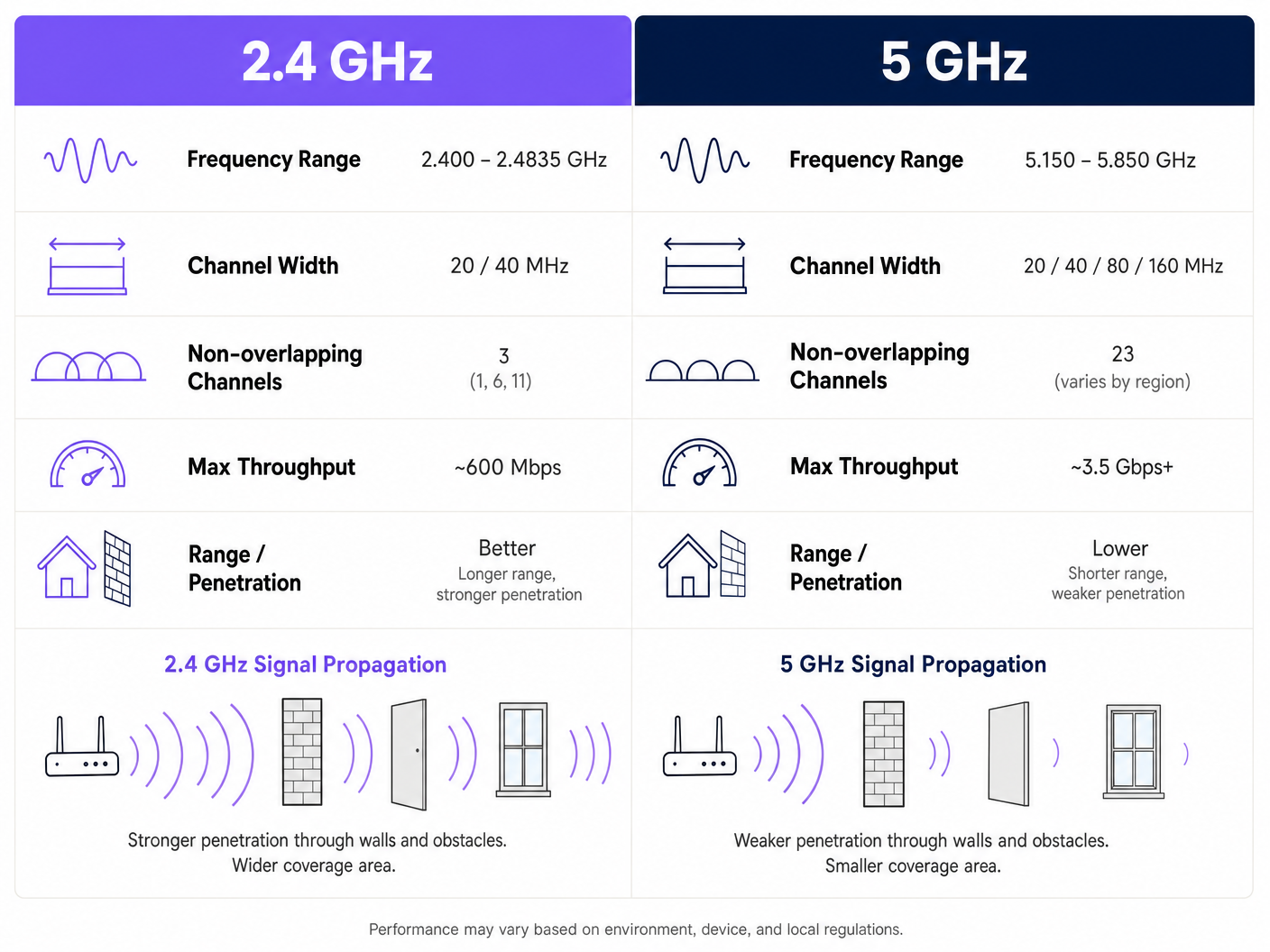
La banda de 2.4GHz (2.400 – 2.4835 GHz) es el caballo de batalla heredado de las redes inalámbricas. Su principal ventaja es la propagación de la señal; las ondas de menor frecuencia penetran paredes, puertas y suelos de manera más efectiva que las frecuencias más altas. Sin embargo, este alcance conlleva una grave penalización arquitectónica en implementaciones de alta densidad.
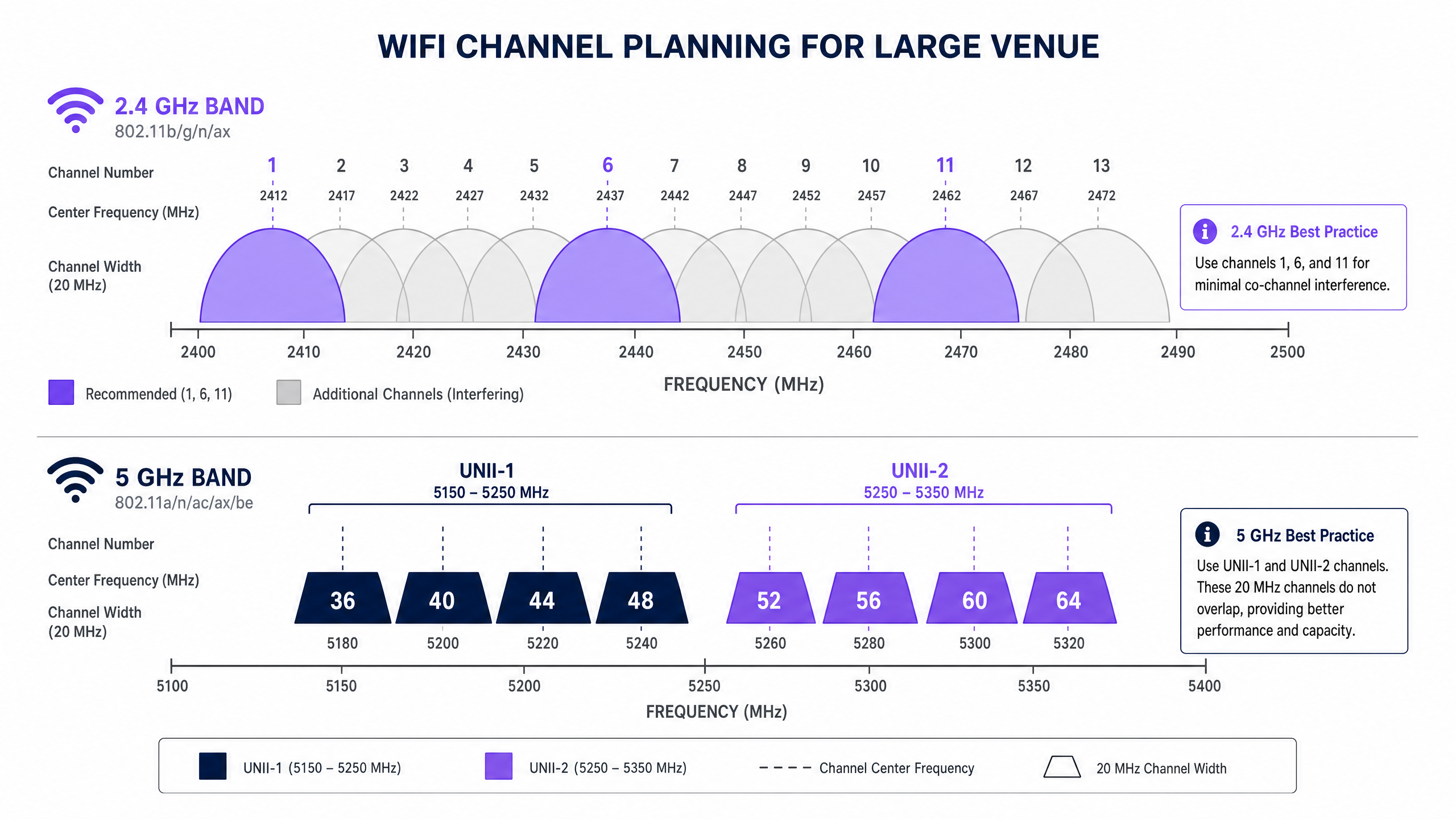
En el Reino Unido y Europa, la banda de 2.4GHz ofrece 13 canales. Cada canal tiene un ancho de 20MHz, pero están espaciados solo 5MHz. Esta superposición estructural significa que solo tres canales —1, 6 y 11— son verdaderamente no superpuestos. En un entorno denso, como un local de Hostelería con APs desplegados en cada dos habitaciones, forzar a cientos de dispositivos a usar solo tres canales conduce inevitablemente a una grave interferencia cocanal (CCI). Además, el espectro de 2.4GHz está fuertemente contaminado por interferencias no WiFi, incluyendo hornos microondas, dispositivos Bluetooth y teléfonos DECT.
La Banda de 5GHz: Capacidad y el Desafío DFS
La banda de 5GHz (5.150 – 5.850 GHz) altera fundamentalmente la ecuación de capacidad. Proporciona un espectro significativamente más utilizable, permitiendo canales más anchos y mayores tasas de datos. En el Reino Unido, la banda de 5GHz se segmenta en sub-bandas de Infraestructura Nacional de Información sin Licencia (UNII), ofreciendo hasta 19 canales de 20MHz no superpuestos.
Al determinar el mejor canal para WiFi de 5GHz, los arquitectos de red deben navegar por la Selección Dinámica de Frecuencia (DFS). DFS es un requisito regulatorio diseñado para evitar que las redes WiFi interfieran con los sistemas de radar existentes, como los radares meteorológicos y militares.
- UNII-1 (Canales 36, 40, 44, 48): Estos canales no requieren DFS. Son el estándar de oro para implementaciones empresariales porque los APs no cambiarán repentinamente de canal si se detecta un radar, asegurando una conectividad estable para el cliente.
- UNII-2A y UNII-2C (Canales 52-144): Estos son canales DFS. Si un AP detecta una señal de radar en su canal operativo, debe desalojar inmediatamente ese canal y moverse a otro, lo que podría interrumpir las sesiones activas de los clientes.
- UNII-3 (Canales 149-165): La disponibilidad varía según la región, pero generalmente son canales no DFS donde está permitido.
Guía de Implementación: Construyendo el Plan de Canales
Una implementación exitosa requiere un enfoque de planificación de canales neutral respecto al proveedor y basado en datos. Ya sea que esté implementando en un entorno de Retail o actualizando un centro de Transporte , estos pasos forman la base para una red de alto rendimiento.
1. Realice un Estudio de Sitio RF Activo
Nunca confíe únicamente en el modelado predictivo. Realice un estudio activo utilizando un analizador de espectro para mapear el entorno RF existente. Identifique APs no autorizados, interferencias no WiFi y redes vecinas. Estos datos empíricos son esenciales para asignar canales que eviten la congestión existente.
2. Defina los Anchos de Canal de Forma Conservadora
El instinto de maximizar el rendimiento uniendo canales (por ejemplo, usando anchos de 80MHz o 160MHz) es un error arquitectónico común en locales densos.
- En 5GHz: Estandarice anchos de canal de 20MHz o 40MHz. Aunque las velocidades máximas por cliente son más bajas que con canales de 80MHz, el rendimiento agregado de la red aumenta porque se conservan más canales no superpuestos, reduciendo así la CCI.
- En 2.4GHz: Aplique estrictamente anchos de canal de 20MHz. Usar 40MHz en 2.4GHz en un entorno empresarial garantiza una interferencia severa.
3. Implemente la Dirección de Banda (Band Steering)
Los APs empresariales modernos soportan la dirección de banda (band steering), una característica que anima a los clientes con capacidad de doble banda a conectarse a la banda de 5GHz. Esto despeja el espectro de 2.4GHz para dispositivos heredados y sensores IoT, como los que se discuten en nuestra guía sobre BLE Low Energy Explained for Enterprise .
4. Optimice la Potencia de Transmisión
Una alta potencia de transmisión no equivale a un mejor rendimiento; equivale a un dominio de interferencia más grande. En una implementación de alta densidad, reduzca la potencia de transmisión en las radios de 2.4GHz (por ejemplo, 8-11 dBm) para reducir el tamaño de la celda y limitar la CCI. Las radios de 5GHz pueden operar a una potencia ligeramente superior (p. ej., 14-17 dBm) para compensar sus capacidades de penetración reducidas.
Mejores Prácticas y Estándares de la Industria
Para mantener el cumplimiento y la excelencia operativa, siga estas recomendaciones estándar de la industria:
- Estandarice en UNII-1 para Infraestructura Crítica: Utilice los canales 36, 40, 44 y 48 para áreas que requieran estabilidad absoluta, como salas de juntas ejecutivas o grupos de puntos de venta (POS).
- Aproveche los Análisis para la Optimización Dinámica: Utilice plataformas como Purple para monitorear continuamente el entorno de RF. Si un inquilino vecino despliega un AP no autorizado, sus análisis deberían detectar el aumento de la utilización del canal y activar un ajuste de canal automático o manual. Para obtener información sobre cómo optimizar entornos de oficina, consulte Office Wi Fi: Optimize Your Modern Office Wi-Fi Network .
- Audite el Comportamiento DFS Antes de la Puesta en Marcha: Si utiliza canales UNII-2, realice pruebas rigurosas para monitorear con qué frecuencia los APs activan eventos DFS. Si la detección de radar es frecuente (p. ej., cerca de un aeropuerto), elimine esos canales específicos de la lista de canales permitidos del AP.
- Prepárese para Wi-Fi 6E: Si va a realizar una actualización de hardware, evalúe Wi-Fi 6E (802.11ax operando en la banda de 6GHz). El espectro de 6GHz proporciona hasta 500MHz de ancho de banda adicional y libre de interferencias en el Reino Unido, resolviendo eficazmente el problema de capacidad de alta densidad. Lea más en Wi Fi Frequencies: A Guide to Wi-Fi Frequencies in 2026 .
Resolución de Problemas y Mitigación de Riesgos
Incluso con una planificación meticulosa, los entornos de RF son dinámicos. Los modos de fallo comunes incluyen:
- El Problema del "Cliente Pegajoso": Clientes que se niegan a moverse a un AP más cercano, manteniendo una conexión débil que reduce el rendimiento general de la celda. Mitigación: Implemente umbrales mínimos de RSSI y utilice protocolos 802.11k/v/r para facilitar la itinerancia sin interrupciones.
- Catástrofes de Auto-Canal: Los algoritmos de auto-canal basados en controladores a menudo convergen en los mismos pocos canales, causando una CCI generalizada. Mitigación: Utilice las funciones de auto-canal solo durante la implementación inicial o las ventanas de mantenimiento programadas. Para una operación continua, confíe en un mapa de canales estático y meticulosamente planificado, validado por análisis.
- Degradación de la Postura de Seguridad: Una mala planificación de canales puede enmascarar la presencia de APs no autorizados o ataques de gemelo malvado. Mitigación: Un entorno de RF limpio hace que la detección de anomalías sea significativamente más fiable. Asegúrese de que su arquitectura se alinee con los marcos de seguridad modernos, como se discute en La lista de verificación para migrar de NAC heredado a NAC nativo de la nube y A Lista de Verificação para Migrar de NAC Legado para NAC Nativo da Nuvem .
ROI e Impacto Empresarial
El impacto empresarial de una red inalámbrica correctamente diseñada va mucho más allá de la reducción de tickets de soporte de TI. En el comercio minorista y la hostelería, la red WiFi es el conducto principal para la interacción con los huéspedes y la adquisición de datos.
Cuando se elimina la interferencia de co-canal y los clientes son dirigidos con éxito a canales limpios de 5GHz, la red puede soportar densidades de clientes más altas sin degradación. Esta fiabilidad asegura que los captive portals se carguen instantáneamente, aumentando la tasa de conversión de los inicios de sesión de Guest WiFi. La captura de datos de primera parte resultante impulsa campañas de marketing dirigidas, impactando directamente en los resultados finales.
Escuche nuestro informe técnico completo sobre este tema:
Definiciones clave
Co-Channel Interference (CCI)
Interference caused when two or more access points operate on the exact same channel and their coverage areas overlap.
CCI forces devices to wait their turn to transmit, drastically reducing network throughput in dense deployments.
Dynamic Frequency Selection (DFS)
A regulatory mandate requiring WiFi devices operating in certain 5GHz bands to detect and avoid incumbent radar systems.
If an AP detects radar on a DFS channel, it must immediately switch channels, causing brief connectivity drops for connected clients.
Band Steering
A feature on enterprise APs that detects dual-band capable clients and actively encourages them to connect to the 5GHz band rather than 2.4GHz.
Essential for preserving the limited 2.4GHz spectrum for legacy IoT devices and ensuring high-performance clients get optimal speeds.
Channel Bonding
The practice of combining two or more adjacent 20MHz channels into a single wider channel (e.g., 40MHz, 80MHz) to increase data throughput.
While it increases speed, it reduces the total number of non-overlapping channels available, making it dangerous in high-density environments.
UNII-1 Band
The lower segment of the 5GHz spectrum (channels 36, 40, 44, 48) that does not require DFS compliance.
The most stable and reliable channels for mission-critical enterprise wireless traffic.
Adjacent Channel Interference (ACI)
Interference caused by transmissions on overlapping but not identical frequencies (e.g., using channel 3 and channel 6 in 2.4GHz).
ACI is more destructive than CCI because devices cannot properly decode the overlapping signals, leading to high packet loss.
RSSI (Received Signal Strength Indicator)
A measurement of the power present in a received radio signal.
Used by network administrators to set minimum connection thresholds, forcing 'sticky clients' to roam to closer access points.
BSS Coloring
A feature introduced in Wi-Fi 6 (802.11ax) that adds a 'color' identifier to transmissions, allowing APs on the same channel to ignore each other's traffic if the color doesn't match.
Significantly mitigates the impact of co-channel interference in extremely dense deployments like stadiums.
Ejemplos prácticos
A 400-room hotel in a dense urban environment is experiencing widespread guest complaints regarding WiFi speeds during the evening peak (7 PM - 10 PM). The current deployment uses dual-band APs in every other room, with auto-channel selection enabled and 80MHz channel widths on 5GHz.
- Disable auto-channel selection to prevent continuous channel thrashing. 2. Reduce 5GHz channel width from 80MHz to 20MHz to increase the number of available non-overlapping channels and eliminate co-channel interference. 3. Statically assign 5GHz channels, prioritizing UNII-1 (36, 40, 44, 48) and clean UNII-2 channels. 4. Reduce 2.4GHz transmit power to 8dBm and restrict to channels 1, 6, and 11 to minimize cell overlap.
A large retail chain is deploying a new point-of-sale (POS) system that relies on wireless connectivity. The store is located in a shopping centre with dozens of neighboring retail WiFi networks visible. The POS vendor recommends using 2.4GHz for 'better range'.
- Reject the vendor's 2.4GHz recommendation for critical infrastructure. 2. Configure a dedicated SSID for the POS system operating exclusively on the 5GHz band. 3. Assign this SSID to UNII-1 channels (36, 40, 44, 48) to avoid any potential DFS radar disruptions. 4. Implement band steering on the public Guest WiFi SSID to keep consumer devices off the 2.4GHz spectrum as much as possible.
Preguntas de práctica
Q1. You are deploying WiFi in a hospital where life-critical telemetry equipment operates on 2.4GHz. The hospital also wants to offer high-speed Guest WiFi in the waiting areas. How do you architect the channel plan?
Sugerencia: Consider physical separation and band dedication.
Ver respuesta modelo
- Dedicate the 2.4GHz band entirely to the telemetry equipment, statically assigning channels 1, 6, and 11. 2. Disable the Guest WiFi SSID on the 2.4GHz radios completely. 3. Broadcast the Guest WiFi exclusively on the 5GHz band using UNII-1 and UNII-2 channels. This ensures the life-critical 2.4GHz spectrum remains uncontended while providing high capacity for guests.
Q2. A stadium deployment is suffering from massive interference on 5GHz, despite using 20MHz channels. The APs are mounted very high up and are 'hearing' each other across the bowl. What configuration change is required?
Sugerencia: Think about how far the signal is traveling and how APs decide when the channel is clear.
Ver respuesta modelo
- Significantly reduce the transmit (Tx) power on the 5GHz radios to shrink the cell size. 2. Increase the RX-SOP (Receive Start of Packet) threshold, which makes the AP 'deaf' to weak signals from distant APs across the stadium bowl, allowing it to transmit simultaneously without triggering carrier sense mechanisms.
Q3. Your corporate office is located less than 2 miles from a major commercial airport. You are currently using channels 36, 40, 44, 48, 52, 56, 60, and 64. Users are complaining of random, brief disconnects. What is the likely cause and solution?
Sugerencia: Consider the regulatory requirements for specific 5GHz channels.
Ver respuesta modelo
The disconnects are caused by DFS (Dynamic Frequency Selection) events. The APs on channels 52-64 are detecting airport radar and vacating the channel. The solution is to remove the UNII-2 DFS channels (52-64) from the allowed channel list and rely solely on the non-DFS UNII-1 channels (36-48), or upgrade to Wi-Fi 6E to utilize the non-DFS 6GHz band.