
Soluciones WiFi para Hostelería: Qué buscar en un proveedor
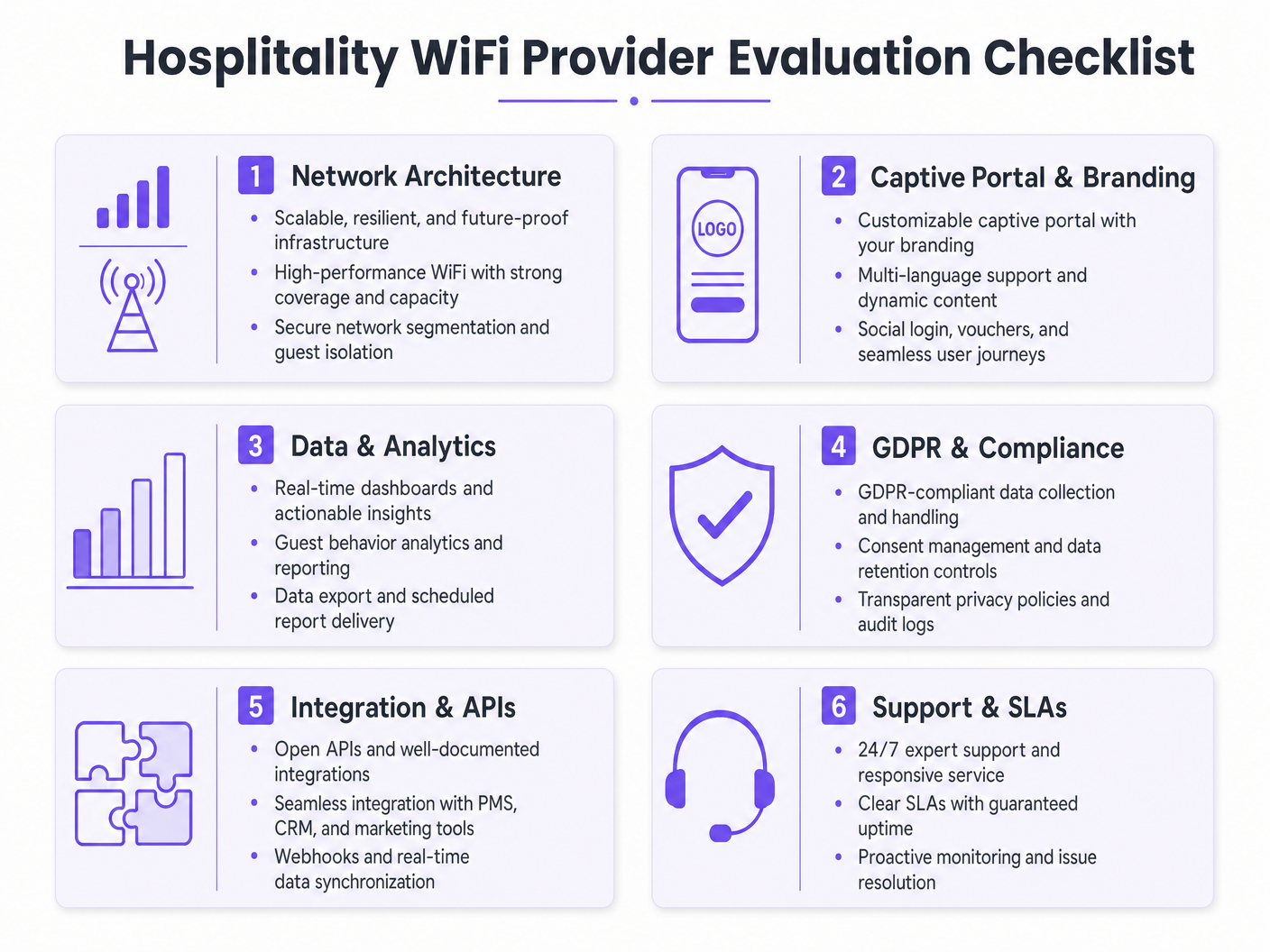
Esta guía autorizada detalla las consideraciones técnicas y comerciales críticas para seleccionar un proveedor de WiFi para hostelería. Cubre la arquitectura de red, los estándares de seguridad, el diseño del Captive Portal y el análisis de datos compatible con GDPR para ayudar a los líderes de TI a implementar soluciones que impulsen los ingresos y la eficiencia operativa.
Escuchar esta guía
Ver transcripción del podcast
Resumen Ejecutivo
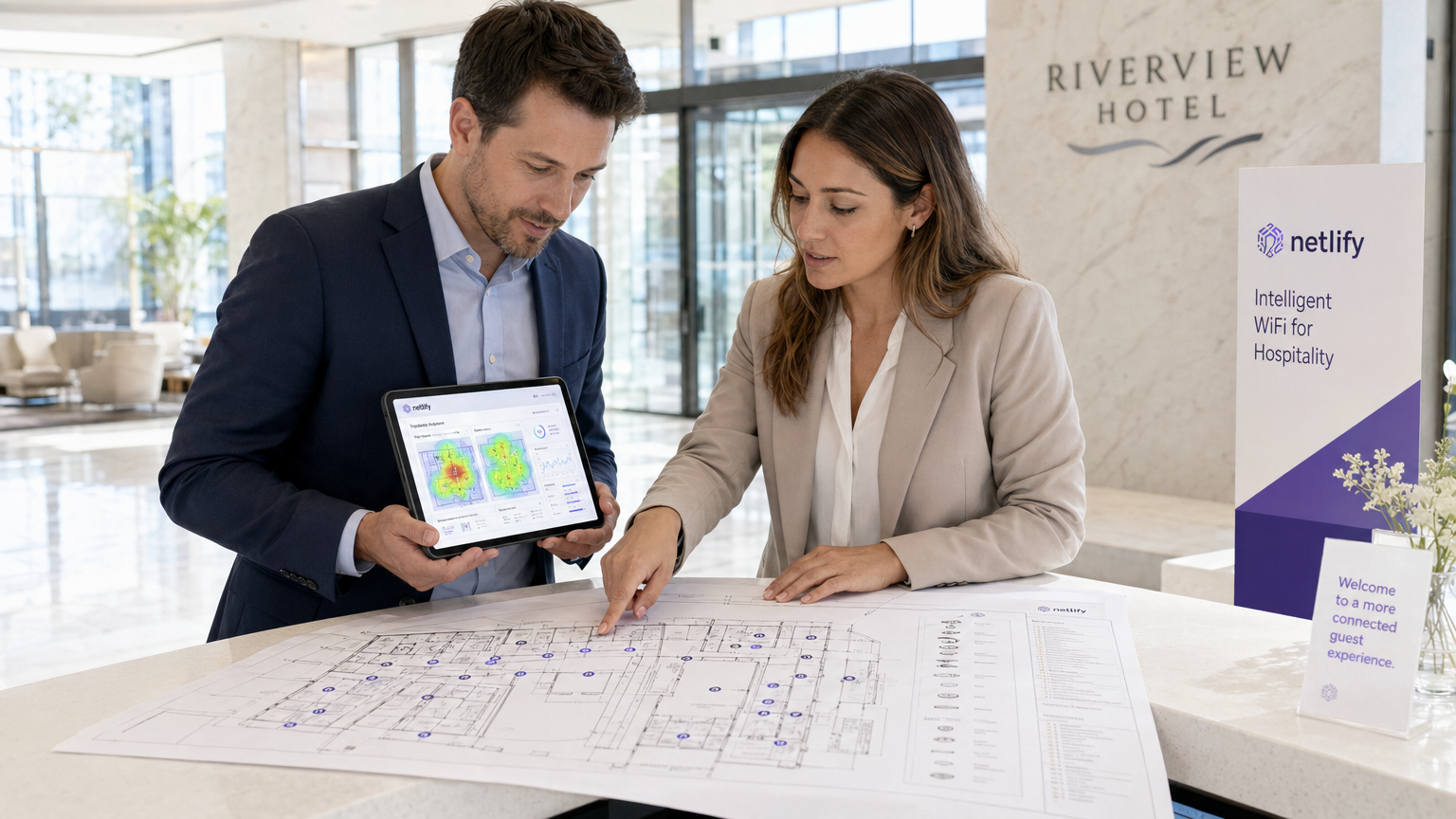
Para los operadores de locales modernos, el WiFi para invitados ya no es un centro de costes; es un activo de datos crítico y un motor de ingresos. A medida que los gerentes de TI, arquitectos de red y CTOs evalúan las soluciones WiFi para hostelería, el enfoque debe pasar de la conectividad básica a la analítica, el cumplimiento y la integración de nivel empresarial. Esta guía proporciona un marco neutral para el proveedor para evaluar a los proveedores de WiFi para invitados, detallando la arquitectura de red esencial, los requisitos del Captive Portal y las capacidades de análisis de datos necesarias para una implementación exitosa en entornos de hostelería, comercio minorista y sector público.
Implementar una solución robusta de Guest WiFi requiere equilibrar el rendimiento de alta densidad con estrictos estándares de seguridad como WPA3 y PCI DSS. Además, la capacidad de capturar datos de primera parte a través de una plataforma de WiFi Analytics transforma la red en un motor de marketing. Esta guía de referencia describe las especificaciones técnicas y las consideraciones de impacto comercial necesarias para seleccionar un proveedor capaz de ofrecer tanto conectividad segura como inteligencia procesable.
Análisis Técnico Detallado
Arquitectura de Red y Estándares de Radio
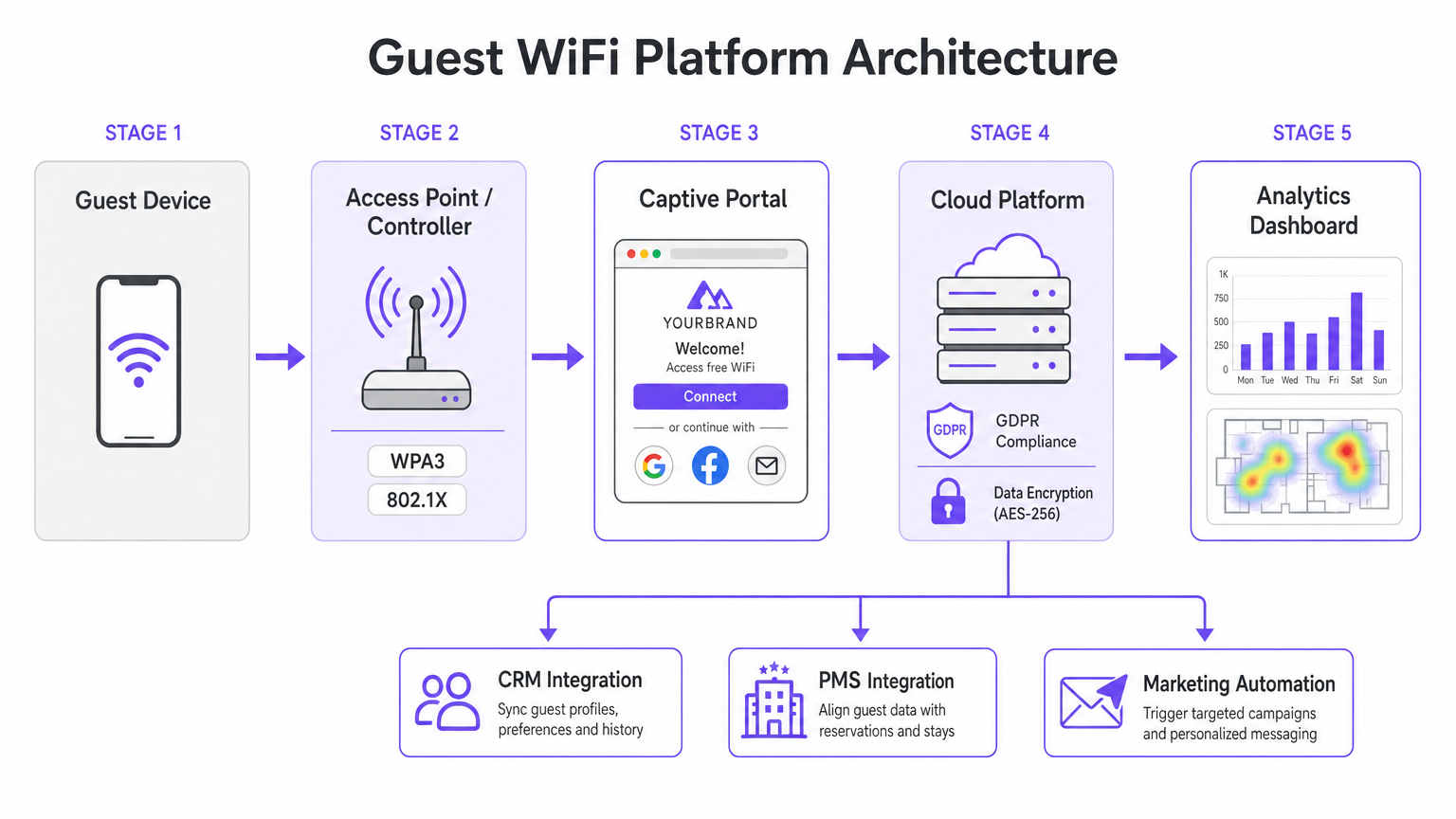
La base de cualquier implementación de WiFi empresarial es la arquitectura de red subyacente. Para operadores multisitio, una arquitectura gestionada en la nube es muy superior a los controladores tradicionales en las instalaciones. La gestión en la nube permite el aprovisionamiento sin intervención, la aplicación centralizada de políticas y las actualizaciones de firmware sin interrupciones en cientos de ubicaciones sin requerir recursos de TI locales.
Al evaluar las especificaciones de los puntos de acceso (AP), Wi-Fi 6 (802.11ax) debe ser el estándar de referencia. Wi-Fi 6 introduce el Acceso Múltiple por División de Frecuencia Ortogonal (OFDMA), que permite que un solo AP se comunique con múltiples clientes simultáneamente a través de diferentes subcanales. En entornos de alta densidad —como centros de conferencias o pasillos de estadios— esto reduce drásticamente la latencia y mejora el rendimiento en comparación con el estándar anterior Wi-Fi 5 (802.11ac). Para locales que anticipan una densidad extrema de dispositivos, Wi-Fi 6E extiende estas capacidades al espectro de 6 GHz no congestionado.
Seguridad y Segmentación de Red
La arquitectura de seguridad en el WiFi para hostelería debe abordar tanto la seguridad de los huéspedes como el cumplimiento corporativo. La segmentación de red es un requisito no negociable; el tráfico de invitados debe estar lógicamente aislado de las redes corporativas y de punto de venta (POS). Esto se logra típicamente utilizando el etiquetado VLAN a nivel de AP, aplicado por estrictas reglas de firewall en la puerta de enlace. Este aislamiento es un requisito fundamental para el cumplimiento de PCI DSS si los terminales de pago comparten la infraestructura de red física.
Los estándares de autenticación son igualmente críticos. WPA3 debería ser el predeterminado para todas las nuevas redes de invitados, mitigando las vulnerabilidades inherentes a WPA2 (como los ataques KRACK). Para las redes de personal interno que operan en el mismo hardware, la autenticación IEEE 802.1X respaldada por un servidor RADIUS proporciona una seguridad robusta basada en certificados que supera con creces la protección de las claves precompartidas.
Guía de Implementación
El Captive Portal y la Captura de Datos
El Captive Portal sirve como puerta de enlace entre el punto de acceso y el internet, actuando como la interfaz principal para la interacción con los huéspedes y la captura de datos. Una página HTML estática básica es insuficiente para implementaciones empresariales. Los operadores requieren un portal dinámico, completamente personalizado y con marca que admita múltiples métodos de autenticación, incluyendo inicio de sesión social (Google, Facebook), registro por correo electrónico y verificación por SMS.
Cada método de autenticación produce diferentes activos de datos. El inicio de sesión social proporciona datos demográficos verificados, mientras que el registro por correo electrónico es crucial para construir una base de datos de marketing. Sin embargo, esta captura de datos debe regirse estrictamente por protocolos de gestión de consentimiento. Según el GDPR, el consentimiento de marketing debe ser explícito, informado y otorgado libremente. Los proveedores deben admitir casillas de verificación separadas y sin marcar para el acceso a la red y las comunicaciones de marketing, junto con mecanismos transparentes para las solicitudes de acceso de los interesados (DSARs).
Integración y Analítica
El verdadero valor de una solución WiFi moderna para hostelería reside en sus capacidades analíticas. Los recuentos básicos de conexiones son insuficientes; los equipos de TI y marketing necesitan información procesable derivada del análisis del tiempo de permanencia, la identificación de visitantes recurrentes y los mapas de calor de afluencia.
Para maximizar el ROI, la plataforma WiFi debe integrarse sin problemas con la pila tecnológica existente del local. Busque proveedores que ofrezcan APIs robustas y soporte de webhooks para la sincronización de datos en tiempo real con sistemas CRM, plataformas de automatización de marketing y Sistemas de Gestión de Propiedades (PMS). Esta integración permite campañas automatizadas y dirigidas basadas en el comportamiento de los huéspedes en tiempo real.
Mejores Prácticas
- Realice Estudios de Sitio RF Rigurosos: Nunca estime la ubicación de los AP basándose únicamente en planos. Realice estudios de sitio RF exhaustivos para tener en cuenta la atenuación de paredes, acero estructural y grupos de usuarios de alta densidad. Una regla general común para áreas de alta densidad es un AP por cada 25-30 usuarios concurrentes.
- Asegure un Backhaul Adecuado: La red Wi-Fi 6 más rápida fallará si el enlace de internet es un cuello de botella. Para locales que soportan más de 100 usuarios concurrentes, invierta en líneas dedicadas para garantizar un ancho de banda sin contención. Para más información, consulte nuestra guía: ¿Qué es una Línea Dedicada? Internet Empresarial Dedicado .
- ContinuoOptimice el Portal: Trate el Captive Portal como un canal de marketing dinámico. Actualice la marca, las promociones y los mensajes de fidelización estacionalmente para maximizar la participación y las tasas de captura de datos.
Solución de problemas y mitigación de riesgos
Modos de fallo comunes
- Segmentación de red inadecuada: No aislar el tráfico de invitados de los sistemas POS expone el establecimiento a riesgos significativos de cumplimiento de PCI DSS y posibles filtraciones de datos. Verifique siempre las configuraciones de VLAN y las reglas del firewall durante la implementación.
- Captura de datos no conforme: Agrupar la aceptación de los Términos de Servicio con el consentimiento de marketing viola el GDPR. Asegúrese de que el Captive Portal utilice mecanismos de aceptación explícitos y separados para evitar la aplicación de normativas y el daño a la reputación.
- Densidad de AP insuficiente: Desplegar demasiados puntos de acceso en áreas de alto tráfico provoca contención de canales, conexiones caídas y una mala experiencia para el invitado. Diseñe para la capacidad, no solo para la cobertura.
ROI e impacto empresarial
El retorno de la inversión para una solución de WiFi empresarial para hostelería va más allá de la conectividad básica. Al aprovechar una plataforma de WiFi Analytics , los establecimientos pueden transformar el tráfico peatonal anónimo en perfiles de clientes conocidos. Estos datos de primera parte impulsan campañas de marketing dirigidas, aumentando las tasas de visitas repetidas y el gasto medio por invitado.
Además, se logran eficiencias operativas a través de la gestión centralizada en la nube y las integraciones automatizadas de CRM, reduciendo la carga de TI. En última instancia, una solución WiFi bien diseñada mejora la experiencia del invitado al tiempo que proporciona inteligencia de negocio medible a los equipos de operaciones y marketing, particularmente en sectores clave como Hostelería y Retail .
Definiciones clave
Wi-Fi 6 (802.11ax)
The current standard for wireless networking that significantly improves performance in high-density environments through technologies like OFDMA.
Essential for venues with large numbers of simultaneous users, such as conference centres and stadiums, to prevent network congestion.
OFDMA (Orthogonal Frequency Division Multiple Access)
A technology that allows a single wireless channel to be divided into smaller sub-channels, enabling an access point to communicate with multiple clients simultaneously.
Crucial for reducing latency and improving throughput when many guests are trying to access the network at the same time.
Network Segmentation
The practice of dividing a computer network into multiple logical subnets (VLANs) to improve performance and security.
Mandatory for isolating untrusted guest traffic from sensitive corporate data and payment processing systems.
Captive Portal
A web page that a user of a public-access network is obliged to view and interact with before access is granted.
The primary touchpoint for guest interaction, branding, and GDPR-compliant data capture.
WPA3
The latest Wi-Fi security certification program, providing stronger encryption and better protection against offline dictionary attacks compared to WPA2.
The baseline security standard that should be deployed on all new guest and corporate wireless networks.
PCI DSS (Payment Card Industry Data Security Standard)
An information security standard for organizations that handle branded credit cards from the major card schemes.
Relevant when a venue processes payments; requires strict isolation of the payment network from the guest WiFi network.
Webhook
A method of augmenting or altering the behaviour of a web page or web application with custom callbacks, allowing real-time data transfer between applications.
Used to instantly sync guest data captured on the WiFi portal with a venue's CRM or marketing automation platform.
Dwell Time
The length of time a visitor spends in a specific physical location, measured by tracking the presence of their mobile device's MAC address.
A key analytics metric used by operations teams to understand venue utilization and by marketing teams to gauge engagement.
Ejemplos prácticos
A 200-room hotel needs to upgrade its legacy Wi-Fi 4 network to support high-density conference facilities and seamless guest roaming, while ensuring PCI DSS compliance for its new mobile point-of-sale terminals.
Deploy a cloud-managed Wi-Fi 6 architecture with access points configured for OFDMA to handle the high client density in the conference rooms. Implement strict network segmentation using VLANs to isolate guest traffic from the mobile POS devices, enforcing the separation at the gateway firewall. Configure the captive portal to require explicit GDPR-compliant consent for marketing data capture.
A national pub chain wants to use guest WiFi to build a marketing database and understand customer dwell times across its 50 locations.
Implement an enterprise guest WiFi platform featuring a branded captive portal with social login and email registration options. Ensure the portal includes separate, un-ticked checkboxes for marketing consent. Utilize the platform's analytics dashboard to track MAC addresses (hashed for privacy) to calculate dwell times and repeat visit frequencies. Set up webhook integrations to push verified email addresses directly to the chain's CRM system in real-time.
Preguntas de práctica
Q1. Your marketing director wants to automatically add every guest who connects to the WiFi to the weekly promotional email blast to increase F&B revenue. How do you configure the captive portal to support this?
Sugerencia: Consider GDPR requirements regarding consent for marketing communications.
Ver respuesta modelo
You cannot automatically add guests to a marketing list just because they connected to the WiFi. The captive portal must be configured with a clear privacy notice and a separate, un-ticked checkbox explicitly requesting consent for marketing communications. Only guests who actively check this box can be synced to the CRM via API or webhook for the email blast.
Q2. A stadium IT director is evaluating a vendor who proposes deploying 802.11ac (Wi-Fi 5) access points, arguing it will save 30% on hardware costs while providing sufficient coverage. How should the director respond?
Sugerencia: Consider the difference between coverage and capacity in a stadium environment.
Ver respuesta modelo
The director should reject the proposal. While Wi-Fi 5 might provide adequate physical coverage, it lacks the capacity management features required for a stadium. Wi-Fi 6 (802.11ax) is essential in this environment because OFDMA allows the APs to handle many simultaneous connections efficiently, preventing the network from collapsing under high client density.
Q3. During a network upgrade at a retail chain, the deployment team suggests running the new guest WiFi and the staff inventory scanners on the same VLAN to simplify IP address management. What is the risk, and what is the correct approach?
Sugerencia: Think about security best practices and compliance requirements.
Ver respuesta modelo
Running guest and corporate traffic on the same VLAN is a severe security risk and violates best practices (and potentially PCI DSS if payment data is involved). It exposes internal systems to untrusted guest devices. The correct approach is strict network segmentation: configure separate SSIDs mapped to separate VLANs, and use firewall rules to block all traffic between the guest VLAN and the corporate VLAN.
Continúe leyendo esta serie
Gestión del ancho de banda para WiFi de empleados: modelado, QoS y reducción de tráfico
Esta guía detalla métodos prácticos para gestionar el ancho de banda para el WiFi de empleados en entornos empresariales. Cubre el modelado de tráfico, la implementación de QoS y cómo el despliegue de Purple Shield reduce la carga de la red sin necesidad de actualizar la infraestructura.
¿Qué es una solicitud de sondeo (Probe Request)? Entendiendo cómo los dispositivos descubren redes
Esta guía de referencia técnica ofrece un análisis en profundidad de las solicitudes de sondeo IEEE 802.11, el escaneo activo frente al pasivo y el impacto de la aleatorización de MAC en el análisis de ubicaciones. Proporciona estrategias de implementación prácticas para que los arquitectos de red optimicen las implementaciones de alta densidad, mitiguen las 'tormentas de sondeo' y garanticen una recopilación de datos precisa y compatible con GDPR utilizando capas de identidad autenticadas.
Cómo solucionar el WiFi lento sin actualizar tu plan de internet
Una guía de referencia técnica completa para gerentes de TI y arquitectos de red sobre cómo optimizar el rendimiento del WiFi empresarial sin aumentar el ancho de banda del ISP. Cubre la sintonización de RF, la gestión de la densidad de clientes, la implementación de QoS y cómo aprovechar el análisis de WiFi para diagnosticar y resolver cuellos de botella.