
WiFi en centros comerciales: Guía para administradores de propiedades
Esta guía proporciona un plan técnico y comercial completo para implementar WiFi en toda una propiedad de centro comercial. Cubre la arquitectura de red de tres niveles, el diseño de RF de alta densidad, la captura de datos compatible con GDPR y las estrategias de monetización de medios minoristas. Los administradores de propiedades, los equipos de TI y los CTOs encontrarán una guía de implementación práctica junto con un marco claro de ROI para transformar la conectividad de los visitantes en un activo de datos de primera parte.
Escuchar esta guía
Ver transcripción del podcast
Resumen Ejecutivo
Implementar WiFi en toda una propiedad minorista ya no es simplemente un gasto operativo o un servicio genérico para los visitantes. Para los centros comerciales modernos, una red inalámbrica robusta y de alta densidad constituye la base de una estrategia de negocio basada en datos. Al implementar una red correctamente diseñada, los administradores de propiedades y los líderes de TI pueden transformar el tráfico anónimo en datos de primera parte accionables, impulsando tanto la eficiencia operativa como nuevas fuentes de ingresos a través de la monetización de medios minoristas.
Esta guía describe la arquitectura técnica, las consideraciones de implementación y el caso de negocio para el Guest WiFi de nivel empresarial en entornos minoristas. Cierra la brecha entre la compleja ingeniería de redes y los resultados comerciales tangibles, proporcionando un plan para que los gerentes de TI, los arquitectos de red y los CTOs ofrezcan una solución de conectividad resiliente, escalable y segura que soporte tanto el acceso de los visitantes como los requisitos operativos. Los mismos principios se aplican en sectores adyacentes, incluyendo Retail, Hospitality y grandes recintos públicos.
Análisis Técnico Detallado
Arquitectura y Topología de Red
La arquitectura de una red WiFi de centro comercial debe tener en cuenta la escala masiva, la alta densidad de clientes y los entornos de RF desafiantes. Un modelo jerárquico estándar de tres niveles es esencial para cualquier implementación de este tamaño.
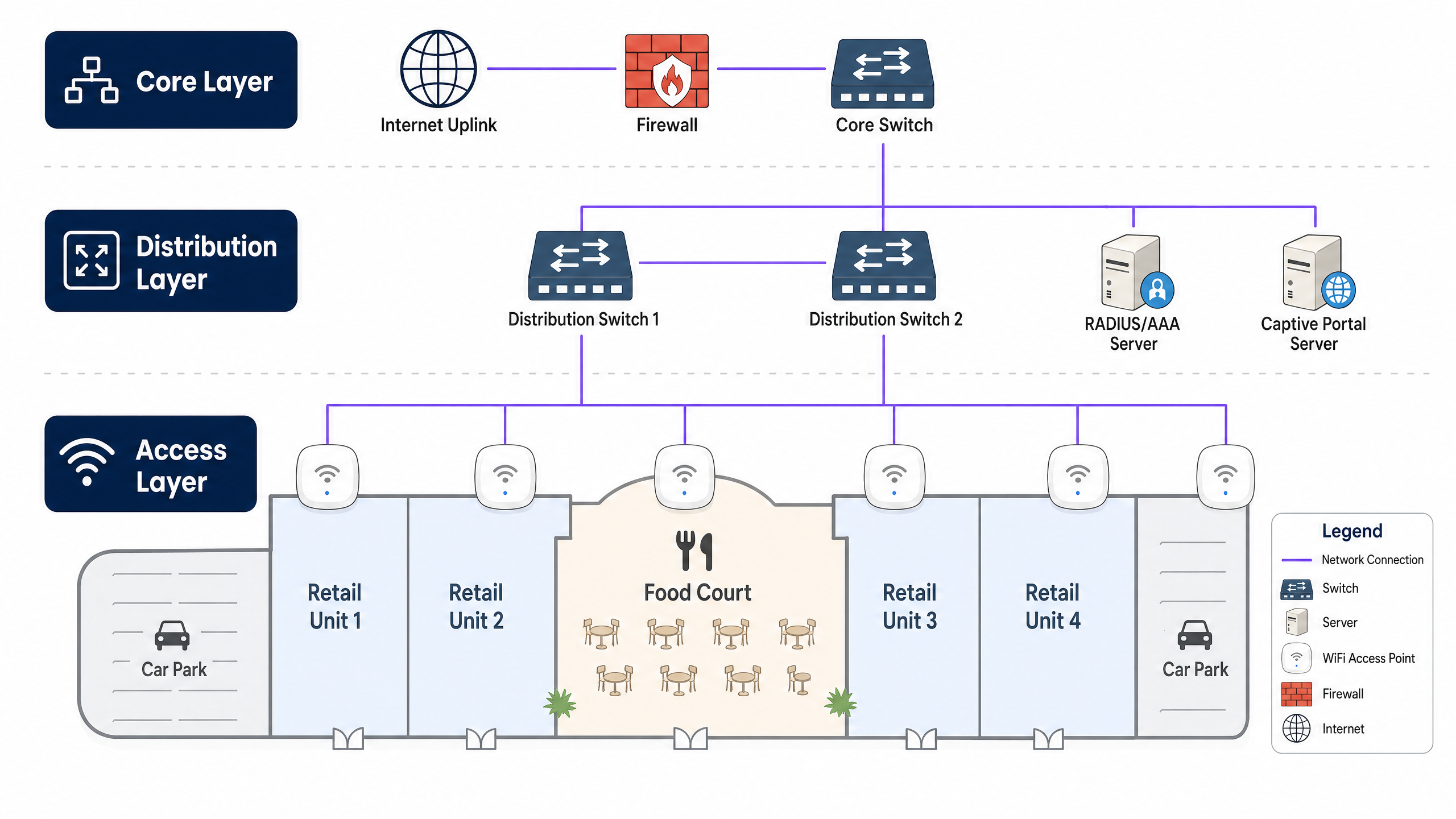
La Capa Central forma la columna vertebral de alta velocidad, proporcionando enrutamiento redundante, servicios de firewall y conectividad de enlace ascendente a internet. Esta capa debe soportar un alto rendimiento para manejar cargas de tráfico pico sin cuellos de botella. La Capa de Distribución agrega el tráfico de la capa de acceso, aplicando políticas de QoS (Quality of Service) y enrutando el tráfico hacia el núcleo. Típicamente alberga servidores RADIUS/AAA para autenticación y servidores de Captive Portal para la incorporación de visitantes. La Capa de Acceso es el borde de la red donde se conectan los clientes, comprendiendo switches Power over Ethernet (PoE) y puntos de acceso WiFi de alta densidad distribuidos por la zona comercial, las zonas de restauración y los aparcamientos.
Estándares y Frecuencias Inalámbricas
Las implementaciones modernas deben estandarizarse en WiFi 6 (802.11ax) o WiFi 6E, que ofrecen mejoras significativas en entornos de alta densidad a través de tecnologías como OFDMA (Orthogonal Frequency-Division Multiple Access) y MU-MIMO. Estos estándares permiten que los APs se comuniquen con múltiples dispositivos simultáneamente, reduciendo drásticamente la latencia en áreas concurridas como las zonas de restauración.
Se requieren APs de doble banda (2.4 GHz y 5 GHz) o de triple banda (añadiendo 6 GHz). Aunque 2.4 GHz proporciona una mejor penetración a través de paredes y un mayor alcance, está muy congestionada. 5 GHz y 6 GHz ofrecen canales más amplios y un mayor rendimiento, pero requieren una ubicación más densa de los APs. Una red bien diseñada dirigirá activamente a los clientes con capacidad de doble banda a las bandas de 5 GHz o 6 GHz (Band Steering) para optimizar la utilización general del espectro.
Seguridad y Cumplimiento
La seguridad es primordial, especialmente al manejar datos de visitantes y al integrar potencialmente con sistemas de punto de venta (POS) o tecnología operativa (OT).
Para el Acceso de Visitantes, implemente un Captive Portal seguro para la incorporación. Utilice WPA3-Personal (SAE) donde sea compatible, o Open/Enhanced Open (OWE) para un acceso sin interrupciones. Fundamentalmente, el aislamiento de clientes debe estar habilitado a nivel de AP para evitar la comunicación peer-to-peer entre dispositivos de visitantes. Para la Privacidad de Datos, el mecanismo de recopilación de datos debe cumplir con GDPR, CCPA o las regulaciones locales de protección de datos. Una plataforma robusta de Guest WiFi gestionará el consentimiento explícitamente durante el proceso de incorporación. Para el Acceso Corporativo/OT, segregue el tráfico operativo (por ejemplo, sensores HVAC, cámaras de seguridad, POS) en VLANs dedicadas, aseguradas con autenticación 802.1X (WPA3-Enterprise).
Guía de Implementación
Paso 1: Estudio de Sitio y Planificación de RF
Un estudio de sitio predictivo y activo es el primer paso crítico. Los entornos minoristas son dinámicos; los diseños de las tiendas cambian y las exhibiciones estacionales pueden alterar significativamente la propagación de RF.
Un Estudio Predictivo utiliza herramientas de software para modelar el entorno basándose en planos y materiales de construcción, proporcionando una estimación inicial del número y la ubicación de los AP. Un Estudio Activo (AP-on-a-stick) prueba físicamente la cobertura y la interferencia de los AP in situ. Esto es vital en los centros comerciales para tener en cuenta variables como escaparates de cristal, accesorios metálicos y redes WiFi existentes de los inquilinos que causan interferencia cocanal.
Paso 2: Aprovisionamiento de Infraestructura
Asegúrese de que la infraestructura cableada pueda soportar las demandas inalámbricas. Despliegue cableado Cat6A en todas las ubicaciones de los AP para soportar un rendimiento multigigabit y mayores presupuestos de PoE (PoE+ o PoE++). Seleccione switches de acceso con presupuestos de PoE adecuados para alimentar todos los APs simultáneamente, especialmente crítico al desplegar APs WiFi 6/6E que consumen mucha energía. Una conexión a internet robusta es esencial; considere una línea dedicada para garantizar el ancho de banda y los SLAs. Obtenga más información en nuestra guía: ¿Qué es una línea dedicada? Internet empresarial dedicado .
Paso 3: Ubicación y Configuración de los AP
En áreas de alta densidad como zonas de restauración o espacios para eventos, utilice APs con antenas direccionales para crear microcélulas más pequeñas y enfocadas, aumentando la capacidad sin aumentar la interferencia cocanal. En pasillos y zonas de paso, escalone la ubicación de los AP para proporcionar cobertura continua a los clientes en itinerancia. Ajuste cuidadosamente los niveles de potencia de transmisión; los AP no deben emitir a máxima potencia, ya que esto crea clientes 'pegajosos' —dispositivos que se niegan a conectarse a un AP más cercano— y aumenta la interferencia.
Paso 4: Integración de Captive Portal y Análisis
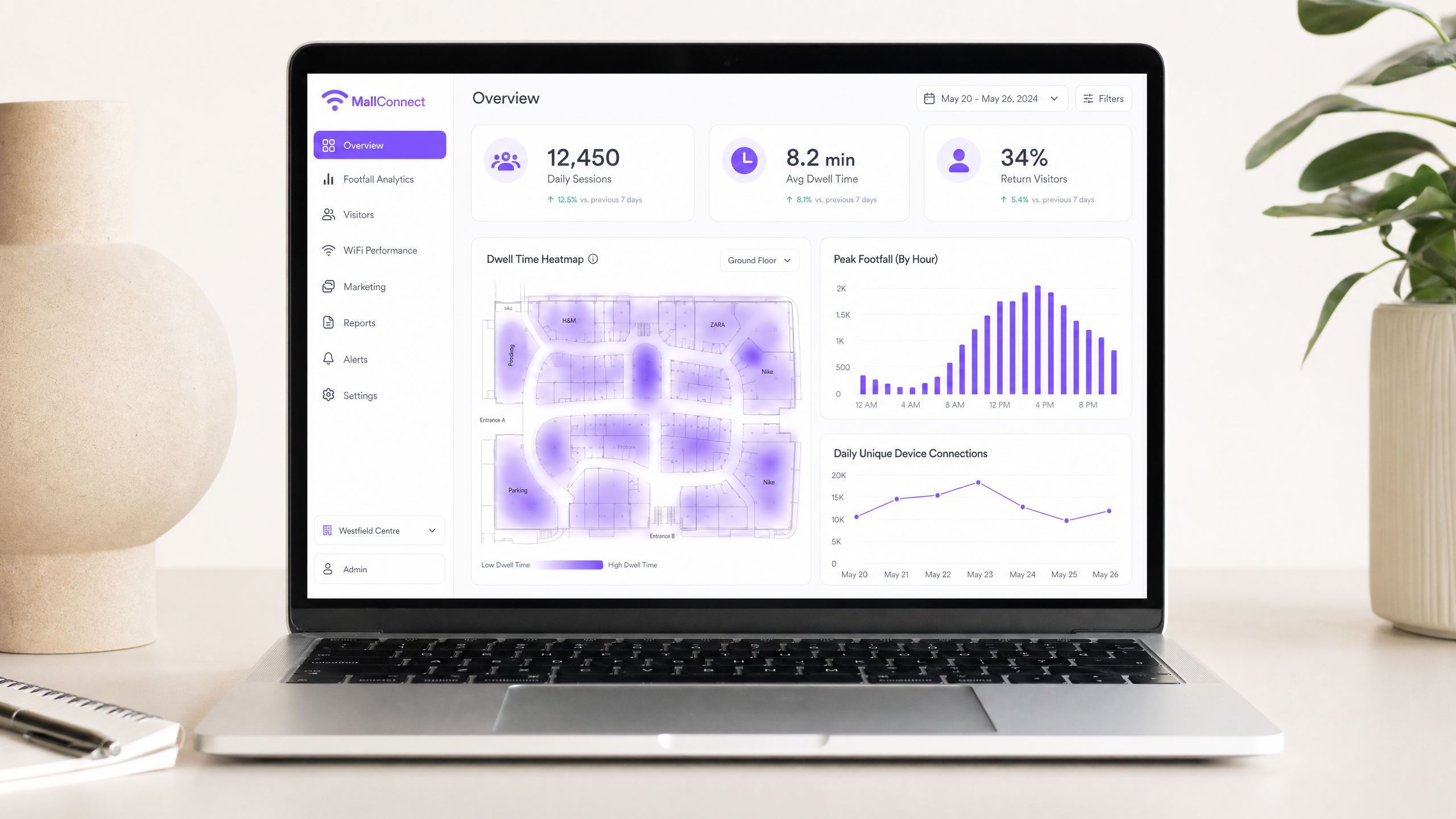
Integre la red con una sólida plataforma de análisis. El Captive Portal es la puerta de entrada a la recopilación de datos. Mantenga el proceso de incorporación sin fricciones ofreciendo inicio de sesión social, registro por correo electrónico o autenticación sin interrupciones como OpenRoaming. Una vez conectada, la plataforma debe comenzar a agregar datos de ubicación, tiempos de permanencia y frecuencias de visitas recurrentes. Esto transforma la red de un centro de costes en un activo de marketing. Explore las capacidades de una solución integral de WiFi Analytics .
Mejores Prácticas
Separar el tráfico de invitados y el corporativo: Utilice siempre VLAN para separar lógicamente el tráfico de invitados de los datos corporativos y operativos. Este es un requisito de seguridad fundamental, especialmente en entornos sujetos al cumplimiento de PCI DSS donde los datos de tarjetas de pago pueden transitar por la red.
Implementar Band Steering: Dirija activamente a los clientes compatibles a las bandas de 5 GHz o 6 GHz para liberar el espectro congestionado de 2.4 GHz para dispositivos heredados y sensores IoT.
Optimizar DHCP y DNS: Entornos de alta rotación como los centros comerciales agotan rápidamente los pools de DHCP. Reduzca los tiempos de concesión de DHCP (por ejemplo, a 1 o 2 horas) para recuperar direcciones IP de manera eficiente. Asegure una infraestructura DNS robusta para manejar grandes volúmenes de consultas. Lea más sobre cómo Proteger su red con un DNS y seguridad robustos .
Monitorización Continua: El entorno de RF cambia constantemente. Utilice un sistema de gestión inalámbrica (WMS) que proporcione visibilidad en tiempo real del estado del cliente, el estado del AP y los niveles de interferencia.
Resolución de Problemas y Mitigación de Riesgos
Modos de Fallo Comunes
Interferencia de Co-Canal (CCI) ocurre cuando múltiples AP operan en el mismo canal y pueden escucharse entre sí, lo que hace que los dispositivos esperen tiempo de aire libre y reduce drásticamente el rendimiento. Mitigue esto con una planificación cuidadosa de canales, gestión dinámica de radio (RRM) y reduciendo la potencia de transmisión del AP.
Clientes Adheridos son dispositivos que permanecen conectados a un AP incluso cuando hay un AP más cercano y más potente disponible. Implemente umbrales de RSSI mínimos para desconectar suavemente a los clientes con señales débiles, forzándolos a moverse a un AP mejor conectado.
Agotamiento del Pool de DHCP impide que los usuarios se conecten porque la red se ha quedado sin direcciones IP. Utilice subredes más grandes (por ejemplo, /22 o /21) para redes de invitados y reduzca los tiempos de concesión de DHCP.
APs Maliciosos son puntos de acceso no autorizados conectados a la red, lo que representa un grave riesgo de seguridad. Habilite los Sistemas de Prevención de Intrusiones Inalámbricas (WIPS) para detectar y contener dispositivos maliciosos automáticamente.
ROI e Impacto Empresarial
Recopilación y Análisis de Datos
Una red correctamente configurada captura análisis pasivos (afluencia, tiempo de permanencia, patrones de movimiento) y análisis activos (datos demográficos, detalles de contacto a través del Captive Portal). Estos datos proporcionan a los operadores de recintos información detallada sobre el comportamiento del comprador, lo que permite tomar decisiones basadas en datos sobre la ubicación de los inquilinos, la valoración del alquiler y la eficacia del marketing. El mismo enfoque basado en datos es eficaz en recintos de alta afluencia, como se detalla en nuestra WiFi para Zoológicos y Parques Temáticos: Guía de Conectividad para Recintos de Alta Afluencia .
Monetización de Medios en Retail
El propio Captive Portal es un espacio digital de primera. Los administradores de propiedades pueden monetizar esto sirviendo anuncios dirigidos o patrocinios de inquilinos minoristas o marcas de terceros durante el proceso de incorporación. Esto transforma la red WiFi en un canal directo de generación de ingresos.
Mejora de la Experiencia del Cliente
La conectividad sin interrupciones permite la navegación interior, ofertas basadas en la ubicación y comunicación personalizada. Al integrar los datos de WiFi con los programas de CRM o fidelización existentes, los recintos pueden ofrecer experiencias altamente dirigidas y contextualizadas que impulsan el compromiso y aumentan el gasto por visita.
Definiciones clave
Co-Channel Interference (CCI)
Occurs when multiple access points transmit on the same frequency channel and can 'hear' each other. Because WiFi is a half-duplex medium (only one device can talk at a time on a channel), CCI forces devices to wait, severely degrading network performance and throughput.
A primary cause of poor WiFi performance in dense retail environments where too many APs are deployed without proper channel planning or power management.
Band Steering
A network feature that detects dual-band capable clients and actively encourages or forces them to connect to the less congested 5 GHz or 6 GHz bands rather than the crowded 2.4 GHz band.
Essential for maximising throughput and capacity in high-density areas like shopping centre food courts where the 2.4 GHz band is saturated.
Captive Portal
A web page that the user of a public-access network is obliged to view and interact with before internet access is granted. Typically used for authentication, accepting terms of service, and marketing data capture.
The primary mechanism for converting anonymous footfall into known contacts and gathering first-party data for marketing and analytics purposes.
Client Isolation
A security feature configured on the access point that prevents connected wireless clients from communicating directly with one another over the local network.
A mandatory security control for public guest networks to prevent peer-to-peer attacks and malware spread among shoppers' devices.
Dwell Time
The length of time a visitor spends within a specific defined area (zone) of the venue, calculated based on the presence of their WiFi-enabled device as detected by the access point infrastructure.
A key metric for venue operators to understand shopper engagement, value different retail zones, and measure the effectiveness of marketing campaigns and store layouts.
RSSI (Received Signal Strength Indicator)
A measurement of the power present in a received radio signal, expressed in dBm (decibels relative to one milliwatt). It indicates how well a device can 'hear' an access point.
Used in network design to determine AP placement and configured in minimum RSSI thresholds to force sticky clients to roam to a stronger access point.
OpenRoaming
A federation of WiFi networks that allows users to seamlessly and securely connect automatically across different venues without needing to repeatedly log in or use captive portals. Based on the Passpoint (802.11u) standard.
A modern approach to frictionless connectivity that improves the user experience while still allowing venues to maintain secure, authenticated connections and capture analytics data.
Power over Ethernet (PoE)
A technology standardised in IEEE 802.3af, 802.3at (PoE+), and 802.3bt (PoE++) that passes electric power along with data on twisted pair Ethernet cabling, allowing a single cable to provide both data connection and power to devices such as wireless access points.
Critical for deploying APs across a large retail estate, as it eliminates the need to install separate electrical outlets at every AP location, significantly reducing installation cost and complexity.
VLAN (Virtual Local Area Network)
A logical subdivision of a physical network that groups devices together regardless of their physical location. Traffic between VLANs requires routing through a Layer 3 device, providing logical isolation between network segments.
The fundamental mechanism for separating guest WiFi traffic from corporate, POS, and operational technology networks in a retail environment.
Ejemplos prácticos
A regional shopping centre (approx. 50,000 sqm) is experiencing severe connectivity issues in its central food court during peak lunch hours. Users report being connected to WiFi but unable to load web pages. The current setup uses 4 standard omni-directional APs mounted on the 10-metre high ceiling.
- Conduct an active RF survey to confirm Co-Channel Interference (CCI) and capacity exhaustion. Validate that the APs are all operating on the same or overlapping channels, and measure the concurrent client count during peak hours.
- Replace the 4 omni-directional APs with 8-10 high-density APs utilising directional (patch) antennas. Mount them lower where possible, or angle them to create focused micro-cells over specific seating areas.
- Implement strict Band Steering to force 5GHz/6GHz connections for all capable clients.
- Reduce transmit power on all food court APs to minimise cell overlap and reduce CCI.
- Verify DHCP pool size and reduce lease time to 30 minutes for this specific zone to prevent pool exhaustion.
- Validate backhaul capacity from the distribution switch to the core to ensure the wired network is not the bottleneck.
A luxury retail outlet village wants to implement a guest WiFi network to collect shopper demographics and build a marketing database. However, the IT team is concerned about GDPR compliance and the security of the tenant POS networks.
- Network Segmentation: Create a dedicated, isolated VLAN specifically for guest WiFi traffic, completely separate from the corporate and POS VLANs. Route this guest VLAN directly to the internet firewall, bypassing all internal networks.
- Client Isolation: Enable Layer 2 client isolation on all guest APs to prevent devices from communicating with each other.
- Captive Portal Configuration: Implement a captive portal integrated with a compliant Guest WiFi platform such as Purple.
- Consent Management: Configure the portal to require explicit, opt-in consent for marketing communications and data processing, clearly linking to the privacy policy before granting access. Separate the marketing consent checkbox from the mandatory Terms of Service acceptance.
- Authentication: Offer social login or email registration to capture verified demographic data, and ensure all data is processed and stored in compliance with GDPR Article 6 (lawful basis for processing).
Preguntas de práctica
Q1. Your marketing team wants to implement a new augmented reality (AR) indoor navigation app that relies heavily on the guest WiFi network. The current network was designed three years ago primarily for basic web browsing. What is the most critical technical assessment you must perform before launching the app, and what specific metrics should you measure?
Sugerencia: Consider the difference between a network designed for coverage versus one designed for high throughput, low latency, and precise location accuracy.
Ver respuesta modelo
You must perform a capacity analysis and active site survey. The existing network was likely designed for coverage (basic connectivity). AR applications require high throughput (minimum 10–25 Mbps per active user), low latency (sub-20ms), and sufficient AP density for accurate location triangulation (typically APs within 10–15 metres of each user). Measure concurrent client counts per AP, average and peak throughput per user, RSSI variance across the estate, and roaming event frequency. If the network cannot meet these thresholds, an AP densification project and upgrade to WiFi 6 will be required before the app launch.
Q2. A tenant in the shopping centre complains that their wireless Point-of-Sale (POS) terminals frequently drop connections, especially during busy weekend hours. You observe that the tenant's AP is operating on channel 6 on the 2.4GHz band, and several nearby mall guest APs are also broadcasting on channel 6. What is the immediate recommended action, and what longer-term architectural change should be considered?
Sugerencia: Think about how WiFi devices share airtime on the same frequency, and the implications of POS systems being on the same network as guest devices.
Ver respuesta modelo
The immediate action is to mitigate Co-Channel Interference. Coordinate a channel plan: if the POS terminals support 5GHz, migrate the tenant's AP to the 5GHz band immediately. If 2.4GHz is required, ensure the tenant's AP and surrounding mall APs use non-overlapping channels (1, 6, or 11) with no adjacent APs on the same channel. The longer-term architectural change is to ensure POS systems are on a dedicated, isolated VLAN with a separate SSID, completely segregated from the guest network. This also addresses PCI DSS compliance requirements for cardholder data environments.
Q3. The property management team wants to monetize the guest WiFi by selling targeted ads on the captive portal. The legal team has flagged GDPR concerns. How should the network architecture and onboarding flow be designed to satisfy both the commercial requirement and legal compliance?
Sugerencia: Focus on the specific GDPR requirements for consent, and how the captive portal flow must be structured to make consent freely given, specific, informed, and unambiguous.
Ver respuesta modelo
The onboarding flow must implement a two-stage consent model. Stage one presents the mandatory Terms of Service (required for network access). Stage two presents a clearly separate, optional opt-in checkbox for marketing communications and data processing for targeted advertising. These must not be pre-ticked and must be independent of each other. The platform must log the timestamp, IP address, and specific consent given for each user. Users must be able to access, modify, or withdraw consent at any time via a self-service portal. Architecturally, all user data must be stored in a GDPR-compliant data store (ideally within the EEA), and the captive portal platform must provide a Data Processing Agreement (DPA). Only users who have explicitly opted in should be served targeted ads.
Continúe leyendo esta serie
Gestión del ancho de banda para WiFi de empleados: modelado, QoS y reducción de tráfico
Esta guía detalla métodos prácticos para gestionar el ancho de banda para el WiFi de empleados en entornos empresariales. Cubre el modelado de tráfico, la implementación de QoS y cómo el despliegue de Purple Shield reduce la carga de la red sin necesidad de actualizar la infraestructura.
¿Qué es una solicitud de sondeo (Probe Request)? Entendiendo cómo los dispositivos descubren redes
Esta guía de referencia técnica ofrece un análisis en profundidad de las solicitudes de sondeo IEEE 802.11, el escaneo activo frente al pasivo y el impacto de la aleatorización de MAC en el análisis de ubicaciones. Proporciona estrategias de implementación prácticas para que los arquitectos de red optimicen las implementaciones de alta densidad, mitiguen las 'tormentas de sondeo' y garanticen una recopilación de datos precisa y compatible con GDPR utilizando capas de identidad autenticadas.
Cómo solucionar el WiFi lento sin actualizar tu plan de internet
Una guía de referencia técnica completa para gerentes de TI y arquitectos de red sobre cómo optimizar el rendimiento del WiFi empresarial sin aumentar el ancho de banda del ISP. Cubre la sintonización de RF, la gestión de la densidad de clientes, la implementación de QoS y cómo aprovechar el análisis de WiFi para diagnosticar y resolver cuellos de botella.