
WiFi en Museos y Galerías: Creando una Experiencia Conectada para el Visitante
Esta guía proporciona un plan técnico integral para desplegar WiFi de alta densidad en museos y galerías. Cubre la arquitectura de red, las estrategias de interacción con el visitante y cómo aprovechar los análisis de WiFi para impulsar el ROI y la eficiencia operativa.
Escuchar esta guía
Ver transcripción del podcast
Resumen Ejecutivo
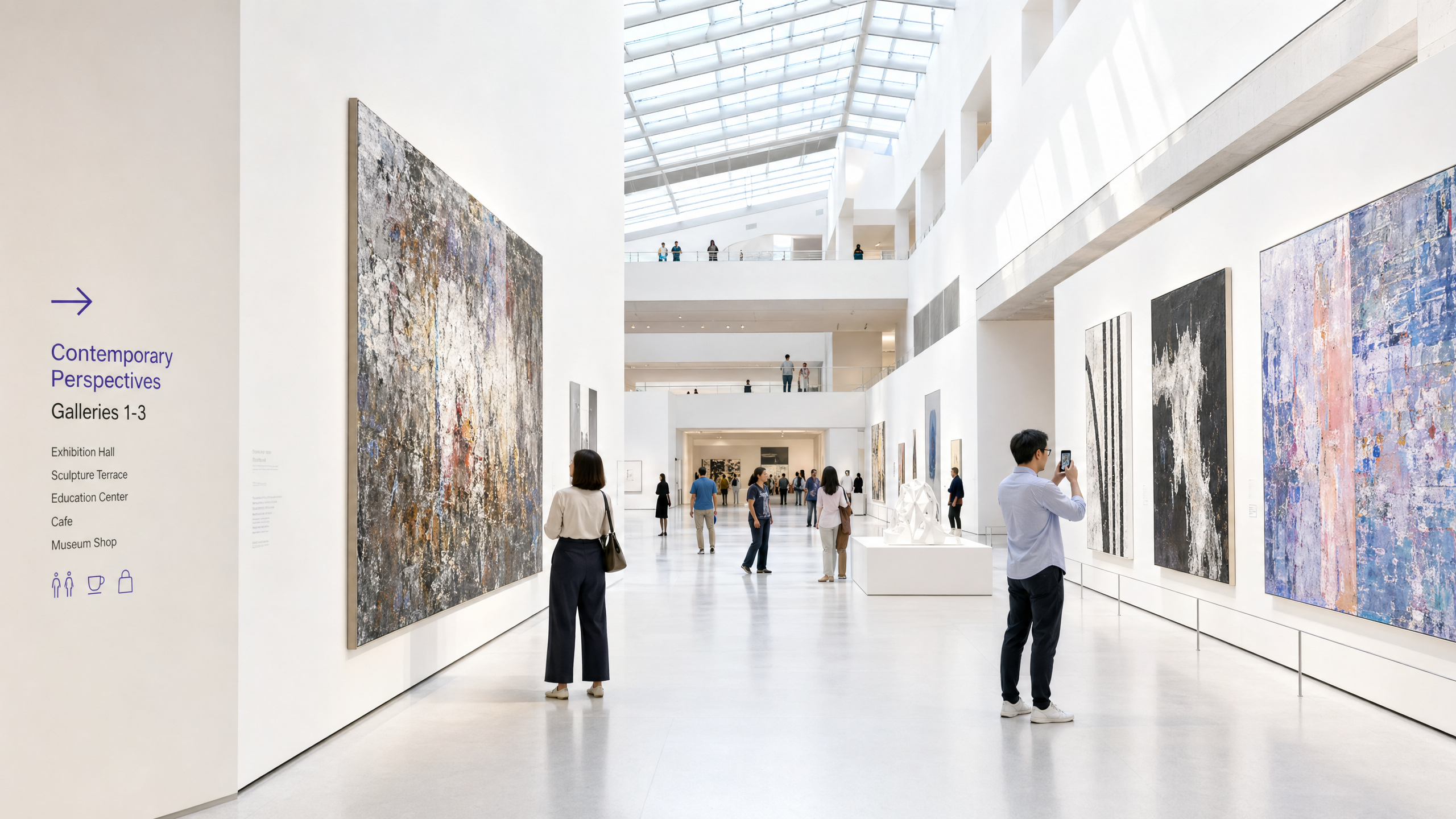
Para los museos y galerías modernos, el WiFi ya no es una utilidad pasiva; es la infraestructura fundamental del recorrido digital del visitante. A medida que las instituciones culturales transitan de exhibiciones estáticas a entornos interactivos y ricos en multimedia, la demanda sobre las redes inalámbricas ha crecido exponencialmente. Esta guía proporciona a los gerentes de TI, arquitectos de red y directores de operaciones de recintos un plan práctico para diseñar y desplegar redes WiFi de alta densidad en complejos espacios culturales.
Exploraremos los desafíos específicos de RF que presentan los edificios históricos y la alta afluencia de público, los requisitos arquitectónicos para una conectividad fluida, y cómo plataformas como Purple pueden transformar un centro de costes en un activo estratégico a través de la incorporación de Guest WiFi y análisis avanzados de WiFi Analytics . Al implementar las estrategias aquí descritas, los recintos pueden ofrecer conectividad fiable para la venta de entradas digitales, la orientación y las exposiciones interactivas, al tiempo que capturan datos de primera mano accionables para impulsar la membresía y los ingresos.
Análisis Técnico Detallado
El Desafío de RF en Instituciones Culturales
Los museos presentan entornos de RF (Radio Frequency) únicos. A diferencia de los espacios de oficina estándar, estos recintos a menudo cuentan con paredes de piedra gruesas, una extensa estructura metálica y diseños amplios de varios niveles. Estas características físicas causan una atenuación significativa de la señal e interferencia multitrayecto.
Además, la densidad de usuarios puede fluctuar enormemente. Una exposición especial podría atraer a miles de visitantes a un espacio confinado, saturando una red mal diseñada. Para mitigar estos problemas, se requiere una arquitectura de red robusta y de alta densidad.
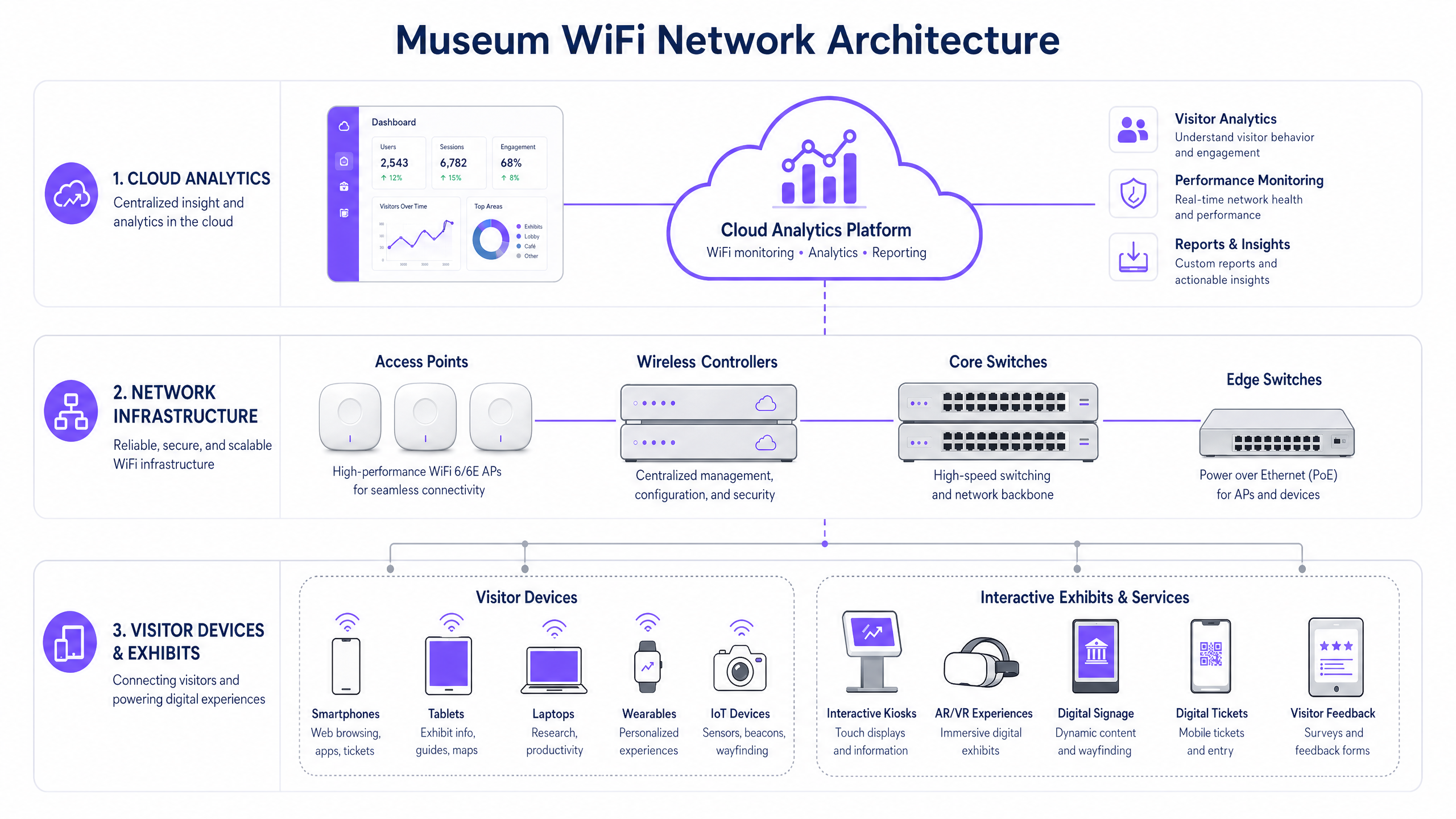
Arquitectura de Red de Alta Densidad
Para soportar una experiencia conectada para el visitante, la infraestructura subyacente debe ser resiliente y escalable.
- Estándar WiFi 6/6E: El despliegue de IEEE 802.11ax (WiFi 6) o WiFi 6E es fundamental. Estos estándares introducen OFDMA (Acceso Múltiple por División de Frecuencia Ortogonal) y MU-MIMO (Múltiples Usuarios, Múltiples Entradas, Múltiples Salidas), que mejoran drásticamente la eficiencia de la red en entornos de alta densidad al permitir que los puntos de acceso se comuniquen con múltiples dispositivos simultáneamente.
- Densidad y Ubicación de Puntos de Acceso (AP): Un estudio de sitio predictivo es innegociable. Los AP deben colocarse estratégicamente para proporcionar cobertura superpuesta sin causar interferencia cocanal. En edificios históricos donde el cableado está restringido, puede ser necesaria la red mallada o puentes inalámbricos punto a punto, aunque las conexiones cableadas siempre son preferibles para la infraestructura central.
- Segregación de Red: El tráfico de visitantes debe segregarse estrictamente de las redes corporativas, los sistemas de Punto de Venta (POS) y los Sistemas de Gestión de Edificios (BMS). Esto se logra típicamente utilizando VLANs (Redes de Área Local Virtuales) y políticas de firewall robustas para garantizar la seguridad y el cumplimiento.
Guía de Implementación
El despliegue de una red WiFi en un museo requiere una planificación cuidadosa para equilibrar el rendimiento, la estética y la experiencia del usuario.
Paso 1: La Experiencia de Incorporación Digital
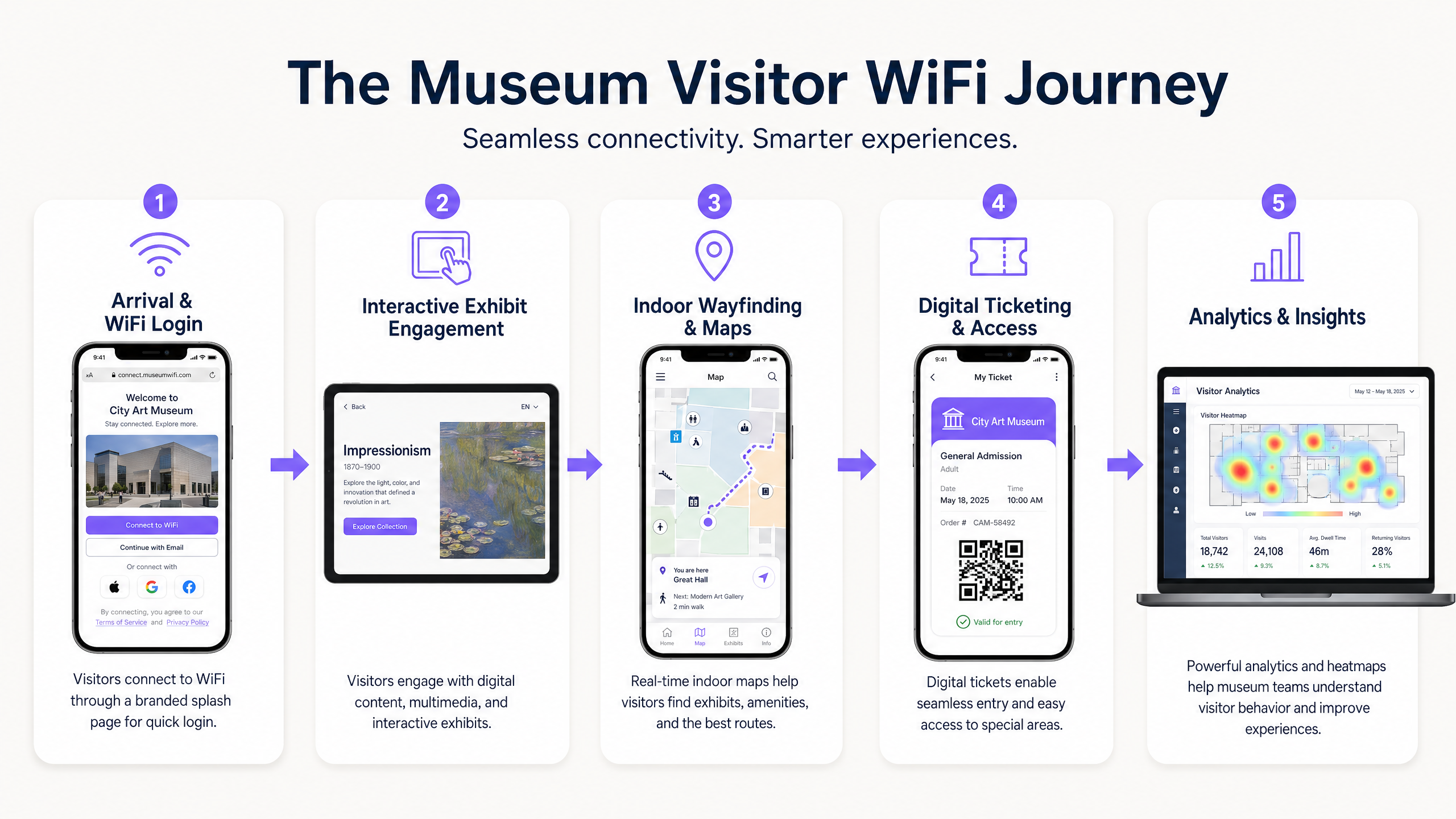
El Captive Portal es el primer punto de contacto digital. Debe ser fluido pero seguro. La integración de una solución como Guest WiFi de Purple permite la autenticación basada en perfiles. Los visitantes pueden autenticarse a través de redes sociales, correo electrónico o protocolos fluidos como OpenRoaming. Esto reduce la fricción y fomenta la adopción de la red, lo cual es crucial para la recopilación de datos.
Paso 2: Habilitando el Recorrido del Visitante
Una vez conectado, la red debe soportar todo el recorrido del visitante:
- Venta de Entradas Digitales y Acceso: La alta disponibilidad en los puntos de entrada es esencial para escanear entradas digitales sin demoras.
- Exposiciones Interactivas: Se debe asignar ancho de banda dedicado para la transmisión multimedia y las experiencias de AR/VR asociadas con las exposiciones.
- Orientación Interior: Al utilizar la red WiFi en conjunto con balizas BLE (Bluetooth Low Energy), los recintos pueden ofrecer navegación interior precisa, guiando a los visitantes a través de complejos diseños de galerías.
Paso 3: Captura de Datos y Análisis
El verdadero valor de la red reside en los datos que genera. La implementación de WiFi Analytics permite a los equipos de TI y marketing visualizar el comportamiento del visitante. Los mapas de calor pueden revelar exposiciones populares, tiempos de permanencia y patrones de flujo. Estos datos son invaluables para optimizar la disposición del recinto, programar personal y adaptar campañas de marketing.
Mejores Prácticas
- Priorizar la Seguridad y el Cumplimiento: Asegúrese de que la red cumpla con las regulaciones de protección de datos como GDPR. Al capturar datos de visitantes, los mecanismos de consentimiento deben ser transparentes y claramente comunicados. Proteja la red utilizando cifrado WPA3 siempre que sea posible, y aplique un aislamiento estricto entre el tráfico de invitados y el corporativo.
- Implementar Gestión de Ancho de Banda: Utilice protocolos de Calidad de Servicio (QoS) para priorizar el tráfico crítico (por ejemplo, escáneres de entradas) sobre la navegación general de los invitados. Implemente límites de ancho de banda por usuario para evitar que un solo usuario degrade la experiencia de los demás.
- Monitorización Continua: El rendimiento de la red no es estático. Utilice paneles de control de gestión basados en la nube para monitorizar la salud de los AP, las tasas de conexión de los clientes y el rendimiento general de la red en tiempo real.
Resolución de Problemas y Mitigación de Riesgos
Incluso las redes mejor diseñadas encuentran problemas. Los modos de fallo comunes include:
- Interferencia de Co-Canal (CCI): En despliegues densos, los APs en el mismo canal pueden interferir entre sí. Mitigación: Implementar asignación dinámica de canales y ajustar cuidadosamente los niveles de potencia de transmisión.
- Fallos del Captive Portal: Si el Captive Portal no se carga, los visitantes no pueden conectarse. Mitigación: Asegurar que la infraestructura DNS sea robusta y considerar implementar acceso de 'jardín vallado' (walled garden) para servicios esenciales incluso antes de la autenticación completa. (Ver: Proteja su red con un DNS y seguridad robustos ).
- Incompatibilidad de Dispositivos: La red debe ser compatible con una amplia gama de dispositivos cliente, incluyendo hardware heredado más antiguo. Mitigación: Mantener la compatibilidad con estándares antiguos (por ejemplo, 802.11ac) mientras se optimiza para dispositivos modernos, asegurando que el mínimo común denominador no degrade el rendimiento general de la red.
ROI e Impacto Comercial
Desplegar una red WiFi de nivel empresarial es una inversión significativa. Sin embargo, el ROI es medible en varias dimensiones:
- Eficiencia Operativa: La recopilación automatizada de datos reduce la necesidad de encuestas manuales a los visitantes. La orientación en interiores reduce la carga del personal para proporcionar indicaciones.
- Aumento de Ingresos: Las campañas de marketing dirigidas, impulsadas por datos de primera mano capturados a través de Guest WiFi , pueden impulsar mejoras de membresía, ventas de entradas para exposiciones especiales y compras en tiendas/cafeterías.
- Mejora de la Satisfacción del Visitante: Una experiencia digital fluida se correlaciona directamente con puntuaciones más altas de satisfacción del visitante y reseñas positivas en línea, impulsando la asistencia futura.
Al ver la red WiFi no solo como un gasto de TI, sino como una plataforma estratégica para el compromiso y el análisis, los museos y galerías pueden mejorar significativamente su éxito operativo y comercial.
Definiciones clave
High-Density Environment
A physical space where a large number of client devices are connecting to the network simultaneously, requiring specialized RF design and AP configuration.
Museum atriums, special exhibition halls, and auditoriums are prime examples where standard office WiFi designs will fail.
Captive Portal
A web page that the user of a public-access network is obliged to view and interact with before access is granted.
This is the primary tool for visitor onboarding and data capture in a museum setting, often integrated with CRM systems.
WiFi 6 (802.11ax)
The current standard for wireless networks, designed specifically to improve efficiency and capacity in high-density environments.
Essential for modern museum deployments to handle the multitude of visitor smartphones and interactive exhibit devices.
VLAN (Virtual Local Area Network)
A logical grouping of devices on a network, allowing for the segmentation of traffic even if devices share the same physical infrastructure.
Used to separate visitor WiFi traffic from sensitive corporate or ticketing data, ensuring security.
Band Steering
A feature that encourages dual-band capable clients to connect to the less congested 5GHz or 6GHz bands rather than the crowded 2.4GHz band.
Crucial for optimizing performance in crowded museum spaces.
First-Party Data
Information a company collects directly from its customers and owns.
Gathered via the WiFi captive portal, this data is highly valuable for targeted marketing and understanding the visitor demographic.
RSSI (Received Signal Strength Indicator)
A measurement of the power present in a received radio signal.
Used during site surveys and troubleshooting to determine if a visitor has sufficient signal strength to maintain a reliable connection.
OpenRoaming
A roaming federation service enabling an automatic and secure WiFi experience globally.
Allows visitors to seamlessly connect to the museum WiFi without manually interacting with a captive portal, improving the user experience.
Ejemplos prácticos
A historic gallery with strict preservation orders needs to deploy WiFi to support a new AR (Augmented Reality) exhibit. Running new CAT6 cabling to the exhibit space is prohibited. How should the network architect proceed?
The architect should design a wireless mesh network or utilize point-to-point wireless bridges. High-capacity APs (WiFi 6) should be placed at the perimeter where cabling is permitted. These edge APs will wirelessly backhaul traffic from mesh APs located near the AR exhibit. The mesh APs should be housed in aesthetically appropriate, non-metallic enclosures to comply with preservation orders.
A large science museum is experiencing network congestion in its main atrium during peak weekend hours, leading to slow captive portal load times and visitor complaints.
The IT team should implement several optimization steps: 1) Enable band steering to force capable devices onto the less congested 5GHz band. 2) Implement strict per-user bandwidth limits (e.g., 5 Mbps down/up) to prevent bandwidth hogging. 3) Review the AP deployment in the atrium; if APs are maxed out on client connections, additional APs with directional antennas may be required to sectorize the coverage area and increase overall capacity.
Preguntas de práctica
Q1. A museum is planning a temporary outdoor exhibit in an adjacent courtyard. The exhibit will require reliable WiFi for digital interactive kiosks. Running cabling to the courtyard is not feasible. What is the most appropriate wireless architecture?
Sugerencia: Consider the need for reliable backhaul for the kiosks without physical cabling.
Ver respuesta modelo
Deploy a point-to-multipoint wireless bridge from the main building to the courtyard. Use outdoor-rated, directional antennas on the building to establish a strong backhaul link to outdoor APs in the courtyard. These outdoor APs will then provide localized WiFi coverage for the kiosks.
Q2. The marketing director wants to use WiFi analytics to track how many visitors enter a specific, small gallery room (5m x 5m). Currently, there is one AP in the adjacent hallway providing coverage to the room. Will this setup provide accurate location data for that specific room?
Sugerencia: Think about how location tracking works using WiFi and the requirements for accuracy.
Ver respuesta modelo
No, it will likely not provide accurate data. WiFi location analytics generally require trilateration, meaning a client device needs to be heard by at least three APs to accurately determine its position. A single AP in an adjacent hallway can only determine that the device is nearby, not its precise location within a small 5x5m room. Additional APs or BLE beacons would be required for precise indoor location tracking.
Q3. During a busy weekend, the IT dashboard shows that the 2.4GHz band is heavily congested, while the 5GHz band has plenty of capacity. However, many dual-band capable devices are still connecting to 2.4GHz. What configuration change should be implemented?
Sugerencia: What feature forces or encourages capable devices to use a specific frequency band?
Ver respuesta modelo
Enable and aggressively configure 'Band Steering' on the wireless controller. This feature will actively encourage dual-band capable clients to connect to the 5GHz band, freeing up airtime on the 2.4GHz band for legacy devices that only support 2.4GHz.
Continúe leyendo esta serie
Gestión del ancho de banda para WiFi de empleados: modelado, QoS y reducción de tráfico
Esta guía detalla métodos prácticos para gestionar el ancho de banda para el WiFi de empleados en entornos empresariales. Cubre el modelado de tráfico, la implementación de QoS y cómo el despliegue de Purple Shield reduce la carga de la red sin necesidad de actualizar la infraestructura.
¿Qué es una solicitud de sondeo (Probe Request)? Entendiendo cómo los dispositivos descubren redes
Esta guía de referencia técnica ofrece un análisis en profundidad de las solicitudes de sondeo IEEE 802.11, el escaneo activo frente al pasivo y el impacto de la aleatorización de MAC en el análisis de ubicaciones. Proporciona estrategias de implementación prácticas para que los arquitectos de red optimicen las implementaciones de alta densidad, mitiguen las 'tormentas de sondeo' y garanticen una recopilación de datos precisa y compatible con GDPR utilizando capas de identidad autenticadas.
Cómo solucionar el WiFi lento sin actualizar tu plan de internet
Una guía de referencia técnica completa para gerentes de TI y arquitectos de red sobre cómo optimizar el rendimiento del WiFi empresarial sin aumentar el ancho de banda del ISP. Cubre la sintonización de RF, la gestión de la densidad de clientes, la implementación de QoS y cómo aprovechar el análisis de WiFi para diagnosticar y resolver cuellos de botella.