
WiFi Universitario: Cómo construir una red inalámbrica en todo el campus
Esta guía completa proporciona a los profesionales de TI sénior estrategias prácticas para diseñar, implementar y gestionar una red inalámbrica robusta en todo el campus. Cubre la arquitectura de red jerárquica, los estándares de seguridad (IEEE 802.1X, WPA3, GDPR) y cómo aprovechar el análisis de datos para impulsar el ROI en entornos de educación superior. Ya sea que esté actualizando una infraestructura heredada o construyendo desde cero, esta guía traza cada punto de decisión, desde el estudio de sitio hasta la optimización continua.
Escuchar esta guía
Ver transcripción del podcast
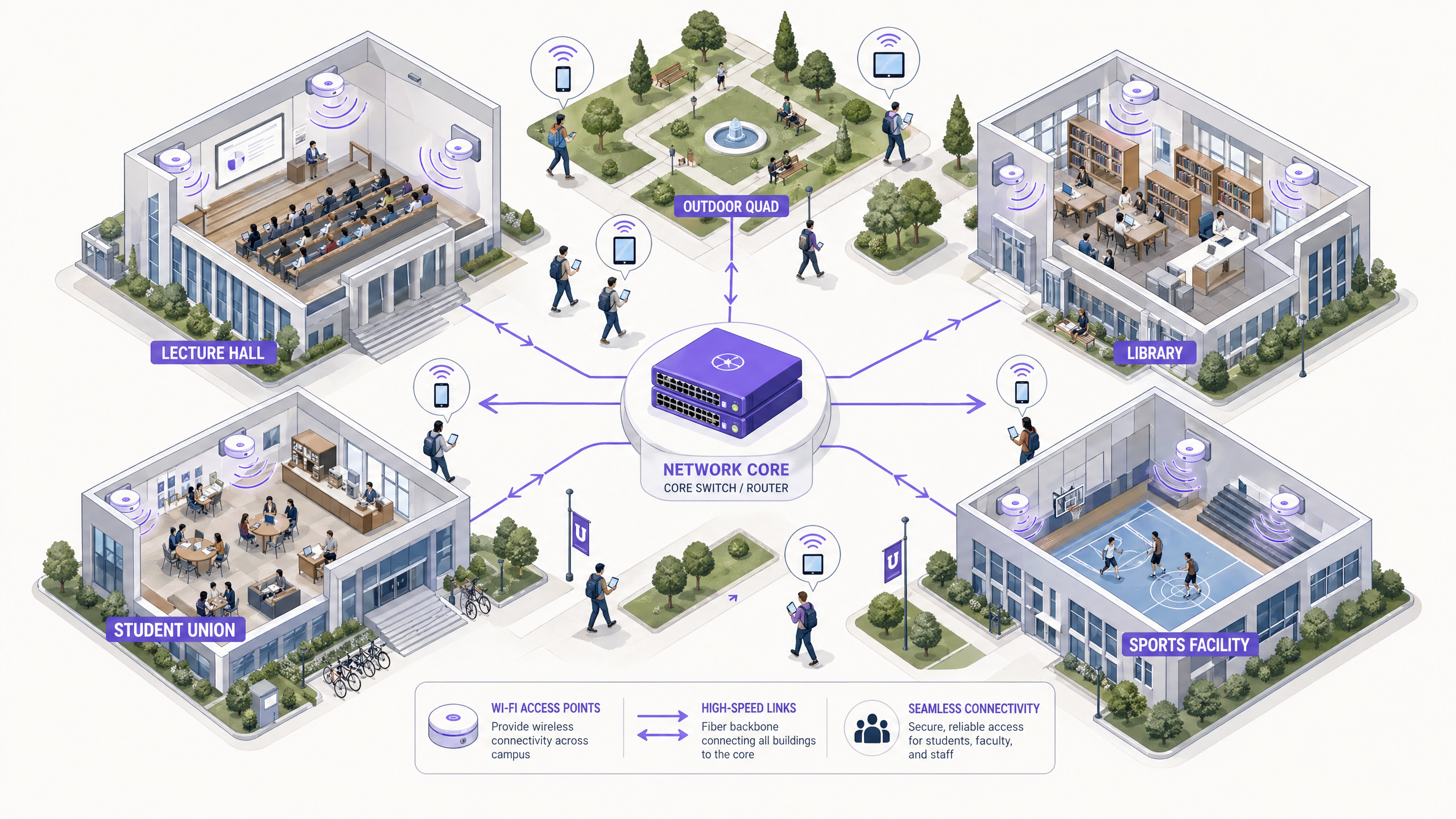
Resumen Ejecutivo
Para las instituciones de educación superior, una red inalámbrica fiable en todo el campus ya no es una comodidad, es una infraestructura crítica a la par de la energía y el agua. Las universidades modernas deben soportar entornos de alta densidad, roaming sin interrupciones a través de amplias huellas físicas y acceso seguro para una base de usuarios diversa que abarca estudiantes, profesores, investigadores e invitados. Esta guía proporciona a los gerentes de TI, arquitectos de red y CTOs un plan autorizado para implementar y gestionar una red WiFi universitaria de alto rendimiento. Al centrarse en una arquitectura jerárquica robusta, protocolos de seguridad estrictos que incluyen IEEE 802.1X y WPA3 Enterprise, y una integración estratégica de análisis de datos, las instituciones pueden garantizar una conectividad óptima mientras mitigan el riesgo y demuestran un ROI medible. Exploramos las fases prácticas de implementación, desde los estudios de sitio iniciales hasta la optimización continua, utilizando plataformas como Guest WiFi y WiFi Analytics de Purple.
Análisis Técnico Detallado
Arquitectura y Topología de Red
Construir una red inalámbrica en todo el campus requiere una arquitectura escalable y jerárquica. El enfoque estándar implica tres capas distintas: las capas de Núcleo, Distribución y Acceso.
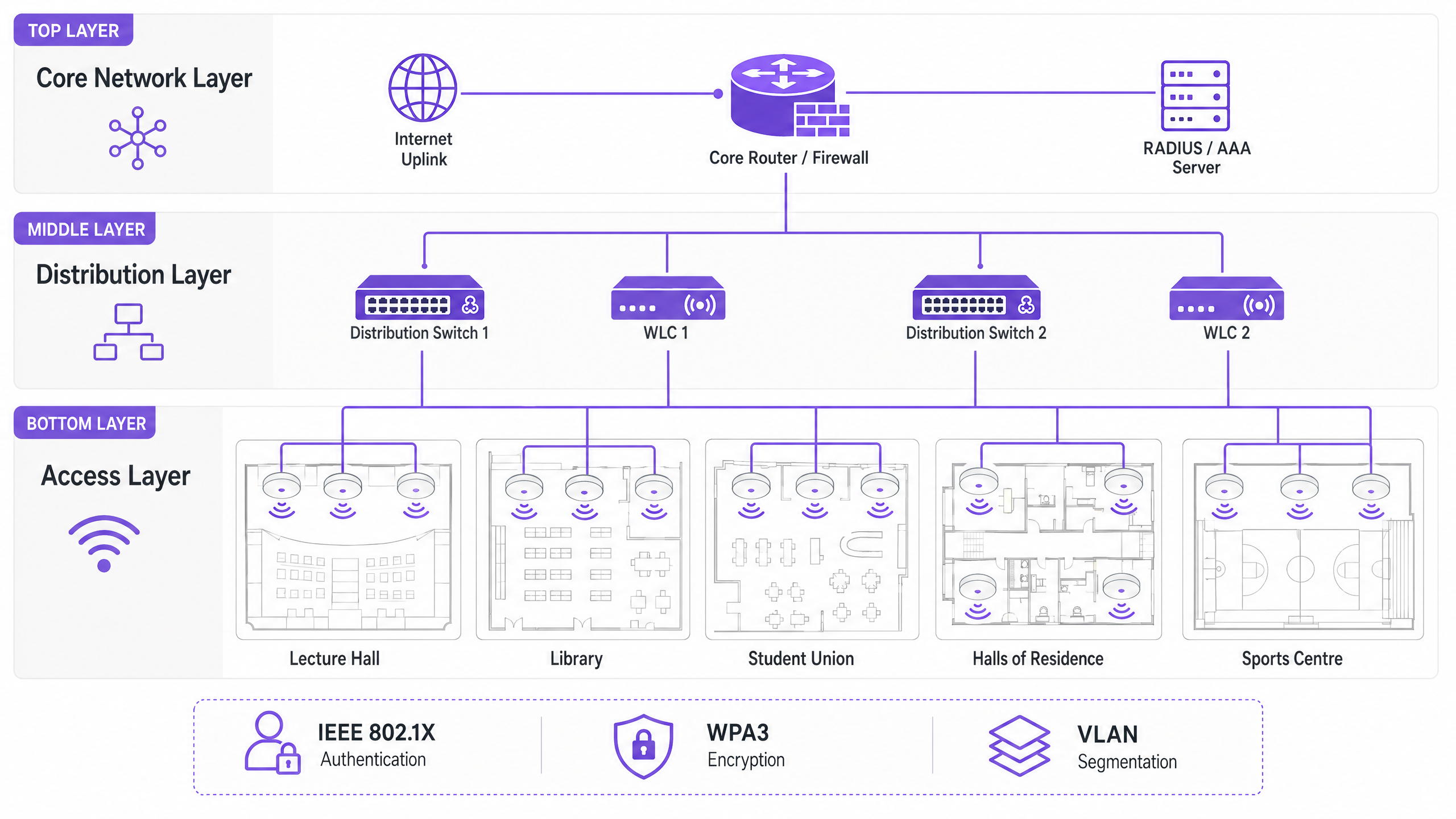
La Capa de Núcleo forma la columna vertebral de alta velocidad de la red. Gestiona el enrutamiento del tráfico entre diferentes partes del campus y hacia internet. La alta disponibilidad y la redundancia son primordiales aquí: los routers y firewalls del núcleo deben ser capaces de manejar un rendimiento masivo sin introducir latencia. Los uplinks de doble conexión y las fuentes de alimentación redundantes son una práctica estándar.
La Capa de Distribución actúa como intermediaria, agregando el tráfico de los switches de acceso y aplicando las políticas de red. Los Controladores de LAN Inalámbrica (WLCs) suelen residir aquí, gestionando el conjunto de Puntos de Acceso (APs), manejando la gestión de RF y asegurando un roaming sin interrupciones para los usuarios que se mueven entre edificios. Esta capa es también donde se aplican las políticas de Calidad de Servicio (QoS).
La Capa de Acceso es el borde de la red donde se conectan los dispositivos cliente. Consiste en switches PoE (Power over Ethernet) y los APs físicos desplegados en aulas, bibliotecas, centros de estudiantes y zonas al aire libre. Los APs de alta densidad que soportan Wi-Fi 6 (802.11ax) o Wi-Fi 6E son esenciales para áreas con un alto número de dispositivos concurrentes.
Estándares de Seguridad y Autenticación
Asegurar una red universitaria implica equilibrar una protección robusta con la accesibilidad del usuario en un entorno complejo y multi-inquilino.
WPA3 Enterprise e IEEE 802.1X son innegociables para asegurar las conexiones del personal y los estudiantes. 802.1X proporciona Control de Acceso a la Red (NAC) basado en puertos, asegurando que solo los usuarios y dispositivos autenticados puedan acceder a la red. Se integra con un servidor RADIUS central (como FreeRADIUS o Microsoft NPS) vinculado al Active Directory o directorio LDAP de la universidad. Esto significa que las credenciales de red de un estudiante son las mismas que su inicio de sesión universitario, lo que reduce drásticamente la carga de trabajo del servicio de asistencia.
El Acceso para Invitados y los Captive Portals sirven a visitantes, asistentes a conferencias y futuros estudiantes. Un captive portal seguro garantiza el cumplimiento del GDPR mientras proporciona una experiencia de incorporación controlada. La integración con soluciones como Purple permite un acceso de invitados sin interrupciones mientras se capturan datos de primera parte valiosos para uso de marketing y operativo. Para una mirada más profunda a la seguridad de la base de la red, consulte Proteja su red con DNS y seguridad robustos .
La Segmentación VLAN es esencial para aislar tipos de tráfico. El tráfico de estudiantes, los recursos del profesorado, los dispositivos IoT (sensores de edificios inteligentes, controladores HVAC) y el acceso de invitados deben residir en VLANs separadas. Esto contiene posibles brechas de seguridad, previene tormentas de difusión y permite una gestión granular del ancho de banda por clase de usuario.
Guía de Implementación
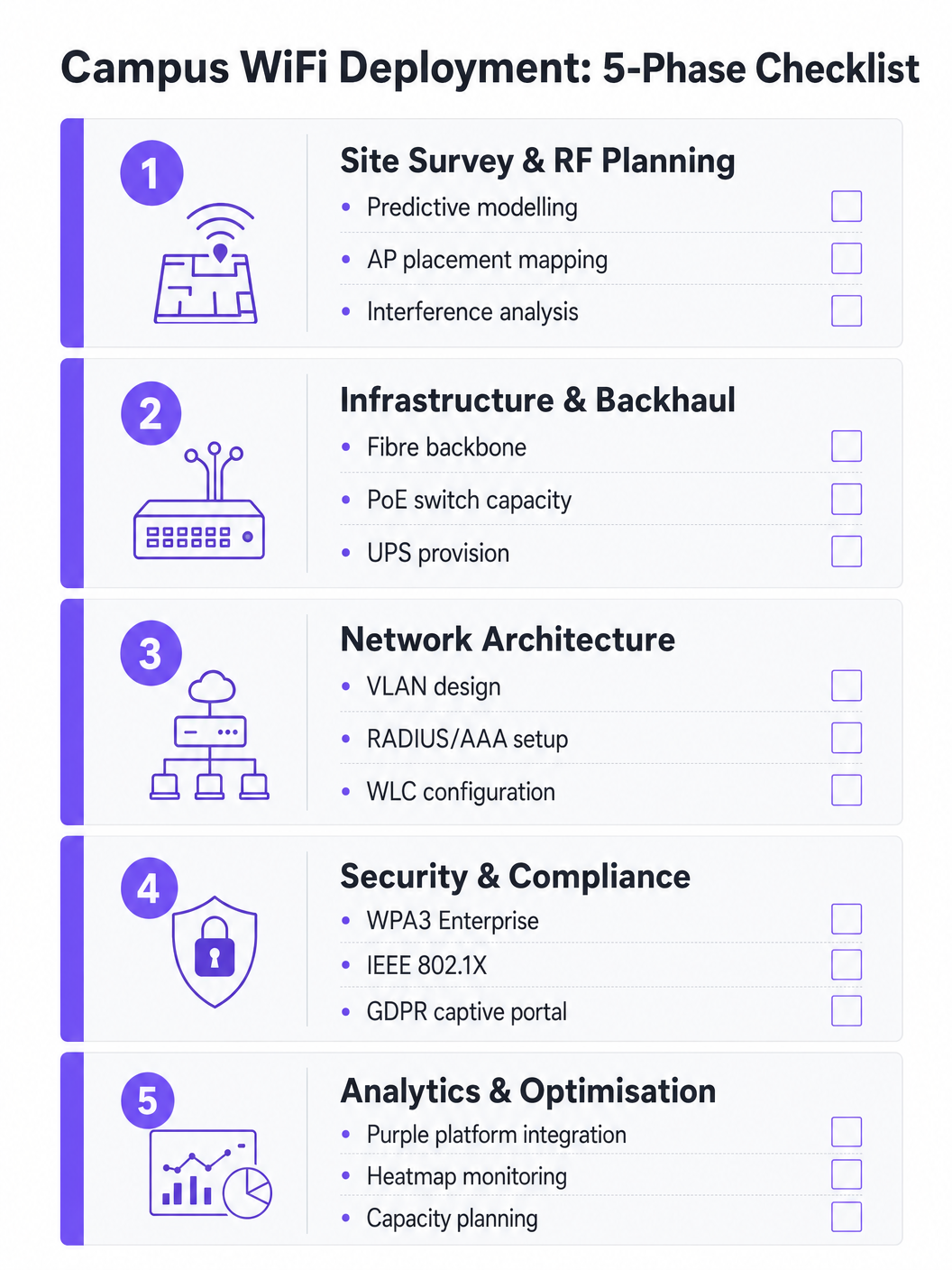
Fase 1: Estudio de Sitio y Planificación de RF
Nunca adivine la ubicación de los AP. Un estudio de sitio predictivo y activo exhaustivo es la inversión más importante del proyecto. Se deben utilizar herramientas como Ekahau o AirMagnet para mapear el entorno físico, teniendo en cuenta los materiales de construcción (hormigón, vidrio, metal), las fuentes de interferencia (dispositivos Bluetooth heredados, hornos microondas, redes vecinas) y la densidad de usuarios esperada por zona. El objetivo es asegurar una cobertura y capacidad adecuadas sin causar interferencias de co-canal. Los modelos predictivos deben validarse con estudios activos una vez que se implementen los AP iniciales.
Fase 2: Actualizaciones de Infraestructura y Backhaul
Antes de implementar nuevos APs, la infraestructura cableada subyacente debe ser evaluada y actualizada donde sea necesario. Asegúrese de que se implemente cableado CAT6A para soportar Ethernet Multi-Gigabit (mGig) requerido por los APs modernos de Wi-Fi 6/6E. Verifique que los switches de borde puedan suministrar suficiente energía PoE+ o PoE++ a los nuevos modelos de AP. La red central debe tener suficiente ancho de banda; considere conexiones de internet dedicadas para empresas para mayor resiliencia. Para obtener contexto sobre las opciones de backhaul, revise ¿Qué es una línea dedicada? Internet empresarial dedicado .
Fase 3: Configuración de la Arquitectura de Red
Configure los WLCs y APs de acuerdo con el darquitectura diseñada. Implemente políticas de QoS para priorizar el tráfico crítico (VoIP, videoconferencias, transferencias de datos de investigación) sobre las descargas masivas y el streaming. Asegúrese de que los protocolos de roaming sin interrupciones (802.11r para una transición rápida de BSS, 802.11k para informes de vecinos y 802.11v para la gestión de la transición de BSS) estén configurados correctamente, permitiendo que los dispositivos transicionen entre APs sin perder las conexiones.
Fase 4: Refuerzo de la Seguridad y el Cumplimiento
Implemente WPA3 Enterprise en los SSID del personal y los estudiantes. Configure IEEE 802.1X con EAP-TLS o PEAP-MSCHAPv2 según las capacidades de gestión de dispositivos. Implemente un Captive Portal compatible con GDPR para los SSID de invitados. Asegúrese de que todas las interfaces de gestión estén protegidas con credenciales sólidas y autenticación basada en certificados. Realice una prueba de penetración antes de la puesta en marcha.
Fase 5: Integración de Análisis y Optimización Continua
Integre la red con una plataforma de análisis para obtener visibilidad sobre el estado de los AP, la densidad de clientes, los patrones de roaming y la utilización del ancho de banda. La plataforma WiFi Analytics de Purple proporciona paneles operativos que benefician tanto al equipo de TI como a las operaciones del recinto. Esto no es un ejercicio puntual: los entornos de RF cambian a medida que se renuevan los edificios y evolucionan los tipos de dispositivos.
Mejores Prácticas
Diseñe para la Capacidad, No Solo para la Cobertura. En la educación superior, la cobertura es fácil; la capacidad es difícil. Un aula de conferencias puede tener una señal fuerte en todas partes, pero si 300 estudiantes se conectan simultáneamente a un solo AP, la red fallará. Implemente APs de alta densidad y utilice funciones como la dirección de banda (band steering) para dirigir a los clientes capaces a las bandas de 5 GHz o 6 GHz menos congestionadas. Deshabilite las tasas de datos heredadas (1, 2, 5.5 y 11 Mbps) para forzar a los clientes 'pegajosos' (sticky clients) a conectarse a APs más cercanos.
Implemente Monitorización Continua. La red no es una implementación de configurar y olvidar. Utilice plataformas de análisis para monitorizar el estado de los AP, la densidad de clientes y los patrones de roaming en tiempo real. Los análisis de Purple pueden proporcionar información sobre cómo se utilizan los espacios, lo que ayuda a tomar decisiones futuras sobre la infraestructura y estrategias de utilización del espacio.
Aproveche OpenRoaming para una Incorporación sin Problemas. Para académicos visitantes y estudiantes de instituciones asociadas, la implementación de OpenRoaming elimina la fricción del inicio de sesión manual en la red. Purple actúa como un proveedor de identidad gratuito para OpenRoaming bajo la licencia Connect, permitiendo a los usuarios de las instituciones participantes conectarse de forma automática y segura, una mejora significativa en la experiencia del visitante.
Segmente Todo. Nunca permita el tráfico de invitados en la misma VLAN que los recursos internos. Utilice SSID, VLANs y reglas de firewall separadas para cada clase de usuario. Aplique límites de ancho de banda a las VLANs de invitados para evitar que un solo usuario sature el enlace ascendente durante los períodos pico.
Resolución de Problemas y Mitigación de Riesgos
La Interferencia Co-Canal (CCI) ocurre cuando múltiples APs en el mismo canal pueden escucharse entre sí, lo que hace que se turnen para transmitir y degrada gravemente el rendimiento. Esta es la causa más común de un WiFi deficiente en implementaciones densas. La mitigación implica una planificación de RF adecuada, la utilización de funciones de asignación dinámica de canales (DCA) en el WLC y la reducción de la potencia de transmisión en los APs en áreas densas.
Los Clientes 'Pegajosos' (Sticky Clients) son dispositivos que se niegan a conectarse a un AP más cercano, manteniendo una conexión débil con uno distante. Esto es particularmente común en smartphones y portátiles más antiguos. La mitigación implica ajustar las tasas de datos mínimas obligatorias; deshabilitar las tasas más bajas obliga al controlador del cliente a buscar una mejor conexión.
El Agotamiento de DHCP es un modo de fallo sorprendentemente común en áreas de alta rotación como patios exteriores y uniones de estudiantes. Cuando el pool de DHCP se queda sin direcciones IP, los nuevos dispositivos no pueden conectarse a pesar de tener una señal fuerte. La mitigación implica implementar tiempos de arrendamiento de DHCP más cortos (una o dos horas) para las VLANs de invitados y estudiantes, y asegurar que los ámbitos de DHCP estén correctamente dimensionados para el número máximo de dispositivos concurrentes.
Los Puntos de Acceso Maliciosos (Rogue Access Points) plantean un riesgo de seguridad significativo. Un empleado o estudiante que conecta un router de consumo crea un punto de entrada no seguro. La mitigación implica habilitar la detección de APs maliciosos en el WLC y realizar auditorías físicas periódicas.
ROI e Impacto Empresarial
Una red WiFi robusta en el campus ofrece retornos medibles más allá de la conectividad básica. Al integrar plataformas como Purple, las universidades pueden cuantificar los siguientes resultados:
| Métrica | Enfoque de Medición | Resultado Típico |
|---|---|---|
| Satisfacción del Estudiante | Encuestas NPS, volumen de tickets de soporte de TI | Reducción de quejas relacionadas con el WiFi |
| Utilización del Espacio | Análisis de mapas de calor, datos de tiempo de permanencia | Asignación optimizada de espacios de biblioteca y estudio |
| Eficiencia Operacional de TI | Volumen de tickets de soporte, tiempo de incorporación | Reducción de la sobrecarga de aprovisionamiento manual |
| Captura de Datos de Invitados | Registros en el Captive Portal | Crecimiento de la base de datos de marketing de primera parte |
| Tiempo de Actividad de la Red | Monitorización de SLA, informes de incidentes | Mejora en el cumplimiento de los SLA |
Las capacidades de análisis y datos de invitados de la plataforma Purple también abren oportunidades de ingresos, particularmente durante grandes eventos públicos en el campus, donde se pueden implementar modelos de acceso por niveles. Marcos de ROI similares se aplican en entornos de Retail , Hostelería , Sanidad y Transporte donde opera Purple. Para una perspectiva más amplia sobre implementaciones de WiFi en grandes recintos, consulte WiFi en Aeropuertos: Cómo los Operadores Ofrecen Conectividad entre Terminales y WiFi Aeroportuale: Come gli Operatori Forniscono Connettività tra i Terminal .
Definiciones clave
IEEE 802.1X
A standard for port-based Network Access Control (NAC) that provides an authentication mechanism for devices wishing to connect to a LAN or WLAN. It requires a supplicant (client device), an authenticator (the AP or switch), and an authentication server (RADIUS).
Used to authenticate students and staff before they are allowed onto the network, integrating with a RADIUS server and Active Directory for credential validation. Eliminates shared PSK passwords and enables per-user policy enforcement.
WLC (Wireless LAN Controller)
A centralised hardware or software appliance that manages and configures multiple Access Points from a single point of control. It handles RF management, roaming, firmware updates, and policy enforcement across the AP fleet.
Essential for large deployments to ensure consistent policy enforcement, dynamic channel assignment, and seamless roaming across the campus. Can be physical hardware or a cloud-managed virtual instance.
Co-Channel Interference (CCI)
Interference that occurs when two or more APs operating on the same frequency channel are within range of each other. Both APs must wait for the channel to be clear before transmitting, severely reducing throughput.
The primary cause of poor performance in dense deployments. Mitigated by careful channel planning, dynamic channel assignment (DCA) on the WLC, and reducing AP transmit power.
Band Steering
A technique used by APs to encourage dual-band capable client devices to connect to the 5 GHz or 6 GHz band rather than the more congested 2.4 GHz band, by delaying or suppressing probe responses on 2.4 GHz.
Critical for maximising capacity and throughput in high-density areas. The 5 GHz and 6 GHz bands offer more non-overlapping channels and higher throughput, but shorter range.
Captive Portal
A web page that users are redirected to before gaining full network access. It typically requires acceptance of terms of service, authentication, or data capture before the user's MAC address is permitted through the firewall.
Used for guest access management, GDPR-compliant data collection, and branded onboarding experiences. Platforms like Purple provide customisable captive portal solutions with analytics integration.
VLAN (Virtual Local Area Network)
A logical grouping of network devices that behave as if they are on the same physical network, regardless of their actual physical location. VLANs are defined at Layer 2 and are used to segment broadcast domains.
Used to isolate different user classes (students, staff, guests, IoT devices) for security and performance. Prevents guest traffic from reaching internal resources and allows per-VLAN bandwidth policies.
PoE (Power over Ethernet)
A technology that passes electrical power along with data on twisted-pair Ethernet cabling, allowing a single cable to provide both data connection and electrical power to devices such as APs.
Allows APs to be installed in locations without dedicated power outlets. IT teams must verify that edge switches have sufficient PoE budget (total watts) to power all connected APs, particularly with power-hungry Wi-Fi 6E models requiring PoE++ (802.3bt).
OpenRoaming
A global WiFi roaming federation built on the Hotspot 2.0 (Passpoint) standard, allowing users to automatically and securely connect to participating networks without manual login, using their existing identity credentials.
Improves the experience for visiting academics and students from partner institutions. Purple can act as an identity provider for OpenRoaming under the Connect licence, enabling automatic secure connections for eligible users.
WPA3 Enterprise
The latest generation of the Wi-Fi Protected Access security protocol for enterprise networks. It uses 192-bit minimum-strength security protocols and mandates the use of Protected Management Frames (PMF), providing stronger protection against offline dictionary attacks.
The recommended security standard for all staff and student SSIDs. Replaces WPA2 Enterprise and provides significantly stronger protection for sensitive research and personal data transmitted over the wireless network.
RADIUS (Remote Authentication Dial-In User Service)
A networking protocol that provides centralised Authentication, Authorisation, and Accounting (AAA) management for users who connect and use a network service.
The backbone of 802.1X authentication on campus networks. The RADIUS server validates credentials against Active Directory and returns the appropriate VLAN assignment and access policy for each authenticated user.
Ejemplos prácticos
A large university is upgrading its main lecture theatre (capacity 500) to Wi-Fi 6. The previous deployment used 4 APs mounted on the high ceiling, resulting in poor performance and frequent disconnects during peak times. What is the correct approach?
The IT team must shift from a coverage-centric design to a capacity-centric one. First, conduct a new site survey specifically for the lecture theatre, modelling the expected device count (assume 1,000+ devices given 2+ devices per student). Replace the ceiling-mounted omni-directional APs with either under-seat AP deployments or directional (patch) antenna arrays mounted on the side walls, creating smaller, focused micro-cells. Increase the AP count to 8-12 Wi-Fi 6 APs, each serving a defined section of seating. Disable 2.4 GHz radios on alternating APs to reduce co-channel interference, relying primarily on 5 GHz and 6 GHz bands. Implement strict band steering and disable legacy data rates below 12 Mbps. Configure the WLC to use 20 MHz channel widths in the 5 GHz band (rather than 40 or 80 MHz) to allow more non-overlapping channels and reduce interference.
A campus network is experiencing intermittent connectivity issues in the outdoor quad area. Users report strong signal but inability to load web pages during the lunch period (12:00-13:30). What is the diagnostic approach?
Strong signal with no connectivity is a Layer 2/3 issue, not an RF problem. The diagnostic sequence should be: (1) Check the DHCP scope for the outdoor VLAN — query the DHCP server for scope utilisation. If it is above 80%, DHCP exhaustion is the likely cause. Reduce lease times to 1 hour and expand the scope if possible. (2) If DHCP is healthy, check the uplink capacity of the outdoor distribution switch. If the APs are connected via a congested uplink, the bottleneck is wired, not wireless. (3) Analyse the RF environment for external interference using a spectrum analyser — municipal WiFi networks or nearby businesses may be causing noise floor elevation. (4) Review the firewall and NAT table for session exhaustion during peak periods.
Preguntas de práctica
Q1. A university is planning to deploy WiFi in a newly constructed outdoor sports stadium with a capacity of 8,000 spectators. The stadium has no roof and an open bowl design. What is the most critical RF consideration and how should AP placement be approached?
Sugerencia: Consider the lack of physical boundaries, signal propagation in an open environment, and the extreme device density during events.
Ver respuesta modelo
The most critical consideration is controlling signal propagation and minimising Co-Channel Interference in an environment with no natural RF attenuation. Unlike indoor environments, the open bowl means signals travel freely, causing APs to interfere with each other across the entire space. The correct approach is to use directional (sector) antennas mounted under the seating tiers, pointing downward into the seating rows to create highly focused micro-cells. Transmit power must be carefully tuned to limit cell size. Wi-Fi 6 APs with OFDMA and BSS Colouring features should be specified to handle the extreme device density. Separate SSIDs and VLANs should be configured for event staff, media, and public attendees.
Q2. During a network upgrade, the IT team notices that older IoT devices (legacy HVAC sensors and door access controllers) are failing to connect to the new campus WiFi network after the security upgrade to WPA3 Enterprise.
Sugerencia: Consider the security protocol compatibility of legacy embedded devices and the need to maintain security for other user classes.
Ver respuesta modelo
The new network enforcing WPA3 Enterprise is incompatible with older IoT devices that only support WPA2 or earlier protocols. The solution is to create a dedicated, isolated SSID and VLAN specifically for legacy IoT devices, utilising WPA2-PSK with a strong, rotated passphrase, or MAC Authentication Bypass (MAB) for devices that cannot support any EAP method. This VLAN must be tightly firewalled — IoT devices should only be able to communicate with their specific management servers, not the broader campus network. The main student and staff SSIDs remain on WPA3 Enterprise, maintaining security for the primary user population.
Q3. The university wants to monetise its guest WiFi network during large public events (open days, graduation ceremonies, public lectures) while remaining GDPR-compliant. What is the recommended architecture?
Sugerencia: Consider data capture requirements, consent mechanisms, and the difference between free and premium access tiers.
Ver respuesta modelo
Deploy a captive portal solution such as Purple integrated with the guest VLAN. Configure a tiered access model: a free tier offering basic internet access (with bandwidth caps) in exchange for email address and explicit GDPR-compliant marketing consent, and an optional premium tier offering higher bandwidth for a fee (processed via a payment gateway integration). The captive portal must display a clear privacy notice and record consent timestamps to satisfy GDPR Article 7 requirements. Captured first-party data feeds into the university's CRM for post-event marketing. All guest traffic must be isolated from internal university systems via firewall rules, and data retention policies must be documented and enforced.
Q4. The IT team receives complaints that WiFi performance in the main library is poor between 10:00 and 14:00 on weekdays, despite the network showing healthy AP status in the management console. How should the team approach diagnosis?
Sugerencia: Consider time-based patterns and what changes between off-peak and peak hours.
Ver respuesta modelo
The time-based pattern is the key diagnostic clue — the issue only occurs during peak occupancy hours, suggesting a capacity problem rather than a hardware or configuration fault. The diagnostic sequence should be: (1) Check per-AP client association counts during the problem window — if any AP is serving more than 30-40 clients simultaneously, it is overloaded. (2) Review DHCP scope utilisation for the library VLAN. (3) Check uplink utilisation on the distribution switch serving the library — the wired backhaul may be saturated. (4) Review the channel utilisation and retry rates on the APs using the WLC's RF statistics. The likely resolution is either deploying additional APs to distribute the client load, or implementing stricter band steering and minimum data rate policies to improve per-client throughput.
Continúe leyendo esta serie
Gestión del ancho de banda para WiFi de empleados: modelado, QoS y reducción de tráfico
Esta guía detalla métodos prácticos para gestionar el ancho de banda para el WiFi de empleados en entornos empresariales. Cubre el modelado de tráfico, la implementación de QoS y cómo el despliegue de Purple Shield reduce la carga de la red sin necesidad de actualizar la infraestructura.
¿Qué es una solicitud de sondeo (Probe Request)? Entendiendo cómo los dispositivos descubren redes
Esta guía de referencia técnica ofrece un análisis en profundidad de las solicitudes de sondeo IEEE 802.11, el escaneo activo frente al pasivo y el impacto de la aleatorización de MAC en el análisis de ubicaciones. Proporciona estrategias de implementación prácticas para que los arquitectos de red optimicen las implementaciones de alta densidad, mitiguen las 'tormentas de sondeo' y garanticen una recopilación de datos precisa y compatible con GDPR utilizando capas de identidad autenticadas.
Cómo solucionar el WiFi lento sin actualizar tu plan de internet
Una guía de referencia técnica completa para gerentes de TI y arquitectos de red sobre cómo optimizar el rendimiento del WiFi empresarial sin aumentar el ancho de banda del ISP. Cubre la sintonización de RF, la gestión de la densidad de clientes, la implementación de QoS y cómo aprovechar el análisis de WiFi para diagnosticar y resolver cuellos de botella.