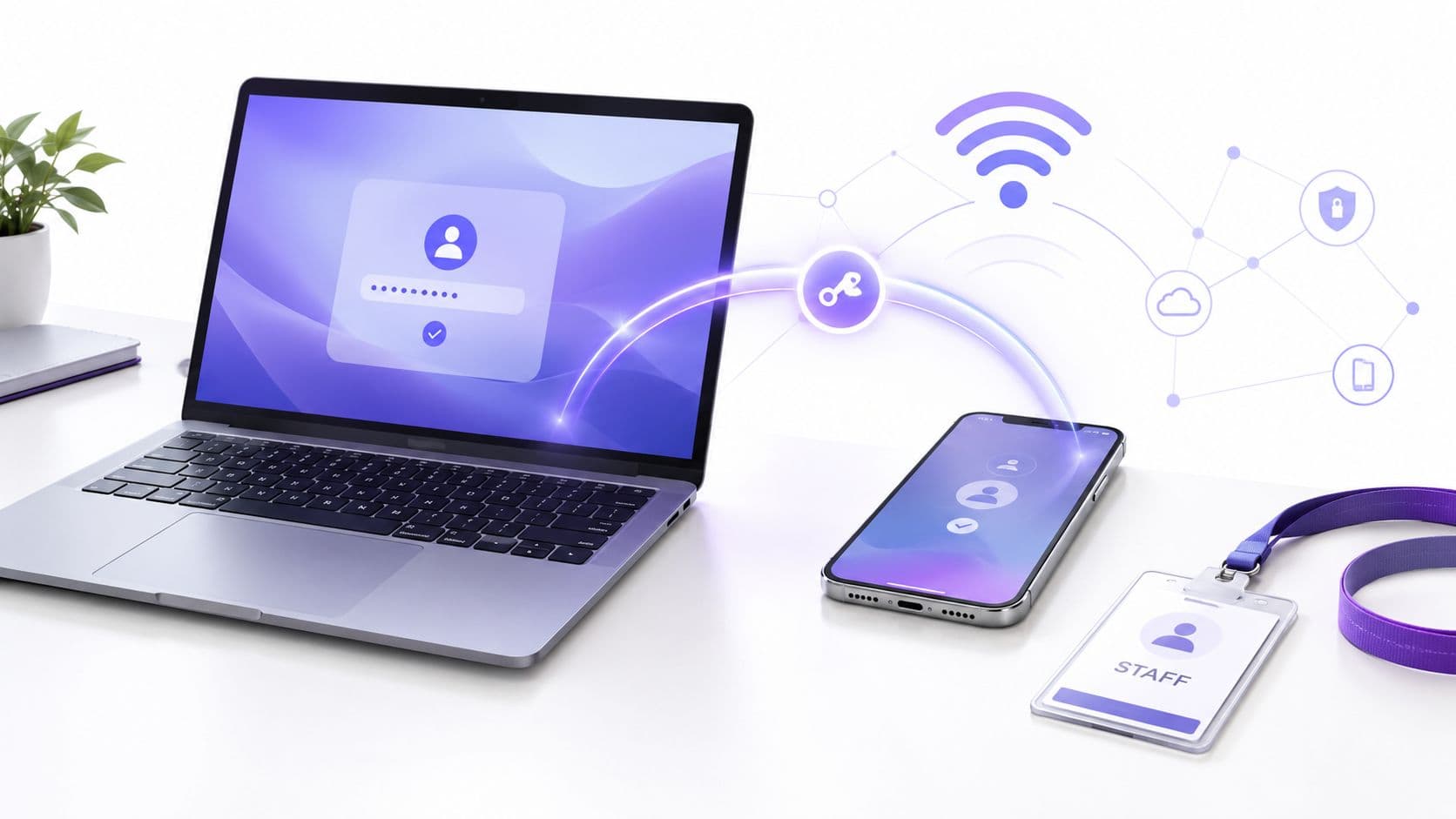
Vous y êtes probablement déjà confronté. Le personnel se connecte à Microsoft 365, puis à un outil de réservation, puis aux RH, puis à une application métier, puis au WiFi de l'entreprise, souvent avec une méthode différente pour chacun d'entre eux. Un groupe hôtelier dispose d'un ensemble de systèmes au siège social et d'un autre sur place. Un hôpital possède des applications cliniques, des postes de travail partagés et un accès sans fil segmenté. Un opérateur de vente au détail a du personnel qui se déplace entre les magasins, les tablettes, les POS et les tableaux de bord du back-office.
Ce mélange crée rapidement des frictions. Les utilisateurs oublient leurs mots de passe, les équipes informatiques réinitialisent les comptes et les identifiants WiFi partagés persistent bien plus longtemps qu'ils ne le devraient. Le résultat n'est pas seulement une source d'agacement. C'est un contrôle plus faible sur qui peut accéder à quoi, à partir de quel appareil et pour combien de temps.
C'est là que le single sign-on, ou SSO, devient utile. Si vous cherchez à savoir ce qu'est le single sign on, la réponse courte est simple : il permet à un utilisateur de s'authentifier une fois, puis d'accéder à plusieurs systèmes approuvés sans avoir à saisir à nouveau ses identifiants. La réponse la plus utile est opérationnelle. Le SSO offre à l'informatique une couche d'identité unique pour l'accès aux applications et, dans une configuration appropriée, il peut également prendre en charge la manière dont les personnes et les appareils rejoignent les réseaux sécurisés.
La fin du chaos des mots de passe
La plupart des environnements d'entreprise ne sont pas devenus désordonnés exprès. Ils se sont développés ainsi. Une application cloud est devenue cinq. Un bureau est devenu plusieurs sites. Un réseau sans fil pour l'informatique est devenu des SSID distincts pour le personnel, les invités, les sous-traitants et les appareils.
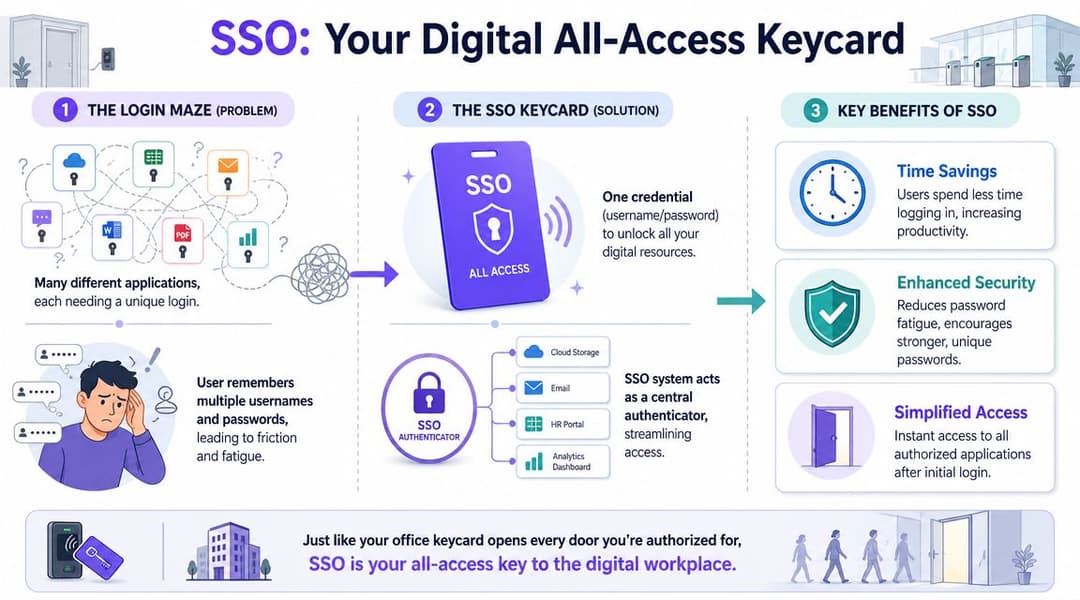
C'est ainsi que commence la prolifération des mots de passe. Un membre du personnel peut avoir besoin d'un accès aux e-mails, aux RH, à la planification, aux fichiers, aux tableaux de bord internes et au réseau, tout cela avant de pouvoir effectuer un travail réel. IBM décrit le SSO comme un schéma dans lequel les utilisateurs se connectent une seule fois avec un ensemble unique d'identifiants et accèdent à plusieurs applications au cours de la même session, grâce à une relation de confiance entre les fournisseurs de services et un fournisseur d'identité. L'aperçu d'IBM sur le single sign-on correspond étroitement à ce dont les organisations britanniques avaient besoin lorsque l'adoption du cloud et le travail à distance se sont accélérés.
L'impact de la prolifération des mots de passe sur les opérations
Chaque fois qu'une application demande sa propre connexion, les utilisateurs commencent à prendre des raccourcis. Ils réutilisent les mots de passe. Ils les enregistrent dans les navigateurs. Ils demandent à leurs collègues le "mot de passe du WiFi du personnel" parce que c'est plus rapide que d'attendre l'informatique.
Pour un responsable informatique d'entreprise, le contrôle est la préoccupation absolue. Des connexions distinctes créent des îlots d'accès distincts, et ces îlots sont plus difficiles à gérer lorsque les personnes changent de rôle, quittent l'entreprise ou travaillent sur plusieurs sites.
Le chaos des mots de passe est rarement une seule grande défaillance. Il s'agit généralement d'une centaine de petites décisions d'accès que personne ne peut gérer de manière cohérente.
Pourquoi le SSO change la donne
Le SSO réduit le nombre de mots de passe que les utilisateurs doivent gérer, ce qui améliore l'expérience de connexion et renforce la sécurité lorsqu'il est associé à une politique centralisée et au MFA. Il s'adapte également à la réalité des organisations distribuées où le personnel a besoin d'un identifiant unique pour sa messagerie, ses RH, ses outils de réservation, son point de vente, ses applications internes et ses services sur site.
Cette même logique façonne aujourd'hui l'accès au réseau. Si vous évoluez déjà vers un accès basé sur l'identité pour vos applications, il est logique d'envisager le WiFi sans mot de passe dans le cadre de la même approche de conception, et non comme un problème distinct.
Comprendre le concept fondamental du SSO
Le SSO déplace l'authentification de chaque application individuelle vers un système d'identité de confiance unique. L'utilisateur se connecte une seule fois, cette identité est vérifiée, et les services connectés acceptent ce résultat au lieu de demander un autre mot de passe.
Cela semble simple, mais la valeur est d'ordre architectural. Vous modifiez le lieu où réside la confiance.
Les trois parties de chaque flux SSO
Chaque conception SSO implique trois participants, chacun ayant un rôle différent :
- L'utilisateur souhaite accéder à une application, un service ou une ressource réseau.
- Le fournisseur d'identité ou IdP vérifie l'identité et applique la politique de connexion. Les exemples courants incluent Microsoft Entra ID et Okta.
- Le fournisseur de services ou SP est le système que l'utilisateur tente d'atteindre, tel que Salesforce, une plateforme de réservation, un intranet ou un autre système d'entreprise.
Le point qui suscite souvent de la confusion est la relation de confiance. L'application n'a pas besoin de collecter et de vérifier elle-même le mot de passe. Elle s'en remet à l'IdP pour effectuer cette tâche correctement, puis en accepte le résultat.
Ce que signifie réellement la relation de confiance
Auth0 explique clairement le SSO en termes d'entreprise : l'IdP authentifie l'utilisateur une fois, puis émet un artefact de session ou un jeton que les fournisseurs de services de confiance valident pour un accès ultérieur. En pratique, l'utilisateur est redirigé vers l'IdP, s'y authentifie, et est renvoyé vers chaque application sans nouvelle demande d'identifiant. Le guide d'Auth0 sur le fonctionnement du single sign-on est particulièrement pertinent dans les environnements utilisant Entra ID sur l'ensemble de leurs applications SaaS et de leurs systèmes internes.
Voici une façon concrète de lire ce processus :
- Un utilisateur ouvre une application.
- L'application vérifie si un IdP de confiance a déjà authentifié cet utilisateur.
- Si aucune session active n'existe, l'utilisateur se connecte auprès de l'IdP.
- L'IdP confirme l'identité et renvoie une preuve que l'application peut valider.
- D'autres systèmes connectés peuvent accepter cette même preuve pendant la session.
Règle pratique : Le SSO ne transforme pas chaque système en une plateforme unique. Il donne à plusieurs systèmes un endroit unique pour vérifier l'identité.
Pourquoi cela compte en dehors des applications web
C'est également là que le SSO devient plus qu'une simple commodité SaaS. Une fois l'identité centralisée, le même modèle peut être utilisé pour autre chose que des sessions de navigateur. Il peut également façonner la manière dont vous contrôlez l'accès aux services internes et, avec la bonne architecture, la manière dont les utilisateurs rejoignent le réseau sans fil de l'entreprise.
Cela est crucial pour les opérations informatiques. Une application financière, une session VPN et une connexion WiFi pour les employés peuvent être des services différents, mais ils commencent tous par la même question : qui est cet utilisateur et doit-il être autorisé à entrer ? Lorsque Microsoft Entra ID ou Okta répond à cette question de manière cohérente, la politique d'accès devient plus facile à gérer, tant pour les applications que pour les points d'entrée du réseau.
Pour les équipes qui gèrent encore le WiFi du personnel avec un mot de passe partagé, il s'agit d'un changement majeur. Au lieu d'authentifier un appareil avec un mot de passe que tout le monde connaît, vous authentifiez une personne ou un appareil géré par rapport à une source d'identité de confiance. Cela vous donne un contrôle plus strict, des pistes d'audit plus claires et un moyen plus propre de supprimer l'accès lorsque les rôles changent ou que les contrats de travail prennent fin.
Comment fonctionne le SSO - Les protocoles fondamentaux
L'expérience utilisateur semble simple. En coulisses, le SSO repose sur des protocoles standards qui permettent à une application de faire confiance à une décision d'identité prise ailleurs.
Pour un responsable informatique d'entreprise, la question pratique n'est pas seulement de savoir "qu'est-ce que le SSO ?". Elle est de savoir "comment un système accepte-t-il la preuve d'un autre système sans demander à l'utilisateur de se reconnecter ?". La réponse dépend d'un ensemble restreint de protocoles qui transfèrent les données d'identité entre l'application, le fournisseur d'identité et parfois l'appareil lui-même.
Cela dépasse le cadre des simples connexions par navigateur. Le même modèle de confiance utilisé pour ouvrir une application SaaS peut également influencer la manière dont les utilisateurs se connectent aux VPN, aux réseaux filaires et au WiFi d'entreprise lorsque ces décisions d'accès sont liées à Microsoft Entra ID, Okta ou à une autre source d'identité centrale.
SAML en langage clair
SAML 2.0 est encore très courant dans le SSO d'entreprise, en particulier pour les plateformes SaaS établies et les systèmes métiers.
SAML fonctionne en transmettant des déclarations d'identité de confiance entre l'application et le fournisseur d'identité. Un utilisateur tente d'ouvrir une application. L'application le redirige vers l'IdP. L'IdP authentifie l'utilisateur et renvoie une assertion signée numériquement. L'application vérifie cette signature, accepte la revendication d'identité et crée une session.
Ce flux convient aux environnements où le navigateur effectue la majeure partie du travail et où l'application attend un échange formel et standardisé.
SAML est souvent parfaitement adapté pour :
- SaaS d'entreprise tels que les RH, la finance ou les applications métier héritées
- Flux de travail basés sur un navigateur où les utilisateurs accèdent aux systèmes via une session web
- Application centrale des politiques lorsque le service informatique souhaite un lieu unique pour régir l'authentification
OAuth et OIDC en clair
OAuth 2.0 a commencé comme un moyen d'accorder un accès limité à une ressource sans partager un ensemble complet d'identifiants. En soi, il s'agit d'autorisation.
OpenID Connect, ou OIDC, ajoute l'identité par-dessus OAuth 2.0. Cela donne aux applications modernes un moyen standard de confirmer l'identité de l'utilisateur tout en utilisant des modèles d'accès basés sur des jetons. Si SAML convient souvent aux anciens SaaS centrés sur le navigateur, OIDC convient généralement aux applications web plus récentes, aux applications mobiles et aux services pilotés par API.
En pratique, OIDC a tendance à sembler plus léger pour les équipes de développement modernes car les jetons fonctionnent bien sur les applications front-end, les services back-end et les clients mobiles. Pour le service informatique, cela signifie moins de solutions de contournement fastidieuses lorsque l'application n'est pas une session de navigateur traditionnelle.
OIDC convient généralement pour :
- Les applications cloud modernes
- Les applications mobiles et sur page unique (SPA)
- Les environnements riches en API où les jetons font déjà partie de la conception
Un mot rapide sur Kerberos
Vous entendrez peut-être également parler de Kerberos dans les discussions sur le SSO. Kerberos est étroitement lié aux environnements Active Directory traditionnels et à l'authentification Windows sur site. Il reste pertinent dans les parcs informatiques internes des entreprises, en particulier là où les appareils joints à un domaine et les applications héritées sont encore courants.
Cela dit, de nombreux projets SSO actuels se concentrent sur l'identité fédérée à travers les services cloud et hybrides. Dans ce cas, SAML et OIDC retiennent généralement plus l'attention car ils se connectent plus naturellement aux plateformes SaaS et aux services accessibles de l'extérieur.
SAML vs OIDC en un coup d'œil
| Fonctionnalité | SAML 2.0 | OAuth 2.0 / OIDC |
|---|---|---|
| Rôle principal | Authentification pour les applications web d'entreprise | Autorisation avec identité ajoutée via OIDC |
| Cas d'usage courant | SaaS établi et applications d'entreprise basées sur un navigateur | Applications web modernes, applications mobiles, API |
| Format | Assertions basées sur XML | Flux basés sur des jetons |
| Flux type | Redirection vers l'IdP, authentification, retour de l'assertion signée | Redirection ou flux de jetons, puis l'application utilise les jetons pour l'identité et l'accès |
| Meilleure adéquation | Intégrations SSO d'entreprise traditionnelles | Architectures plus récentes, cloud-natives et centrées sur les applications |
Ce qui compte pour un responsable informatique
Le nom des protocoles importe moins que vos choix de conception. Vous devez apporter des réponses claires à quatre questions opérationnelles :
- Quelles applications prennent en charge SAML ou OIDC
- Quel IdP servira de plan de contrôle centralisé
- Comment l'expiration de session, le MFA et l'accès conditionnel seront appliqués
- Si l'accès au réseau, y compris le WiFi du personnel, doit également valider l'identité par rapport à cette même source
Ce dernier point est l'aspect où le SSO devient particulièrement utile pour les équipes d'infrastructure. Si votre plateforme sans fil peut utiliser la même couche d'identité que votre parc SaaS, la politique d'accès devient plus cohérente, depuis la page de connexion jusqu'à la périphérie du réseau. C'est l'une des raisons pour lesquelles de nombreuses équipes qui étudient les avantages de l'authentification unique pour le contrôle d'accès et les opérations commencent également à s'intéresser à l'authentification WiFi basée sur l'identité, et pas seulement aux connexions aux applications Web.
Évaluer les avantages et les compromis en matière de sécurité
Le SSO est souvent présenté comme une fonctionnalité de confort pour l'utilisateur. C'est le sous-estimer. Conçu correctement, c'est un modèle de contrôle d'accès qui permet à la fois d'améliorer l'expérience utilisateur et de renforcer la sécurité opérationnelle.
Okta souligne que l'avantage technique du SSO ne réside pas seulement dans la commodité. Il réduit la prolifération des mots de passe et les sessions de connexion répétées qui augmentent la charge du support technique et les frictions pour les utilisateurs. La présentation d'Okta sur la sécurité de l'authentification unique met également en avant un point crucial pour les architectes : si la session IdP est invalidée, les applications connectées peuvent refuser l'accès lors de la vérification suivante du jeton.
Là où réside la valeur commerciale
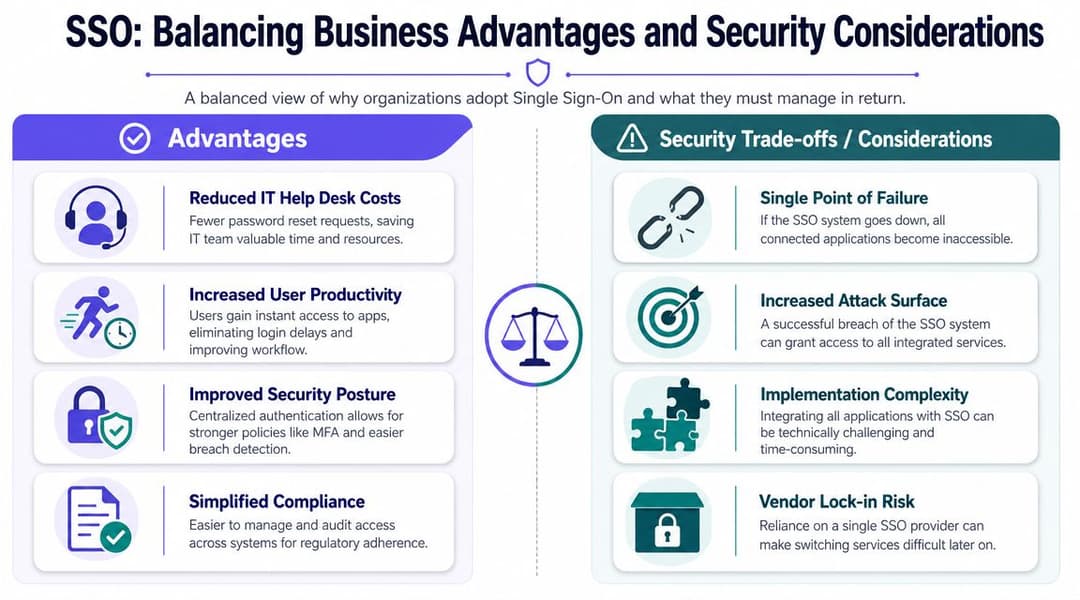
Le premier avantage est un accès simplifié. Les utilisateurs se connectent une seule fois, commencent à travailler plus rapidement et cessent de considérer l'authentification comme un obstacle quotidien.
Le second est un contrôle centralisé renforcé. Les équipes informatiques peuvent appliquer le MFA, l'accès conditionnel, les politiques de session et la révocation depuis une seule couche d'identité, au lieu de devoir configurer les paramètres dans chaque application individuelle.
Un troisième avantage est la gestion plus fluide des arrivées, des mutations et des départs (joiners, movers, leavers). Lorsque l'identité est centralisée, l'onboarding et l'offboarding deviennent plus cohérents. C'est pourquoi les équipes qui explorent les avantages du single sign-on associent souvent les projets de SSO à des chantiers plus larges de gouvernance des identités.
Les compromis à prendre au sérieux
Il existe une réelle problématique de "clés du royaume". Si un pirate compromet la session principale d'un utilisateur, le rayon d'impact peut être plus large car un seul compte peut donner accès à de nombreux systèmes.
Il y a aussi un risque de résilience. Si l'IdP est indisponible, l'accès aux services connectés peut être perturbé. Et l'intégration n'est pas toujours simple. Les applications plus anciennes, les systèmes de niche et les services réseau locaux ne s'intègrent pas toujours facilement dans un modèle SSO moderne.
La bonne question n'est pas de savoir si le SSO présente des inconvénients. C'est de savoir si vous préférez gérer ces inconvénients de manière centralisée ou continuer à en gérer des dizaines de manière dispersée.
Mesures d'atténuation courantes
Utilisez une approche multicouche :
- Protégez l'IdP de manière renforcée avec le MFA, l'accès conditionnel, la confiance des appareils et des contrôles d'administration stricts.
- Planifiez la résilience afin qu'un problème d'IdP ne paralyse pas l'ensemble de l'organisation.
- Déployez par phases en commençant par les applications à forte valeur ajoutée et des groupes d'utilisateurs bien définis.
- Révisez régulièrement les accès pour éviter que des autorisations obsolètes ne subsistent longtemps après avoir cessé d'être nécessaires.
Un déploiement SSO faible peut centraliser les problèmes. Un déploiement solide centralise le contrôle.
Le SSO au-delà des applications web - Accès au réseau et au WiFi
La plupart des articles s'arrêtent au SaaS. C'est utile, mais incomplet. Dans les environnements réels, le personnel n'a pas seulement besoin d'accéder aux applications. Ils ont besoin d'un accès réseau sécurisé lorsqu'ils arrivent sur site, connectent un ordinateur portable géré, ouvrent une tablette dans une succursale ou se déplacent entre plusieurs sites.
C'est là que la discussion sur le SSO devient plus intéressante. Le même fournisseur d'identité qui gère l'accès à Microsoft 365, aux systèmes RH ou aux tableaux de bord internes peut également devenir la source unique de vérité pour les politiques d'authentification sans fil.
Optimal IdM rapporte que 52 % des professionnels de l'IT en Amérique du Nord utilisent le SSO pour la gestion des identités dans sa discussion sur l'adoption du single sign-on. Pour les organisations britanniques disposant de plusieurs sites ou propriétés, cette maturité est essentielle car le personnel a souvent besoin d'un accès sécurisé aux systèmes partagés sans avoir à se reconnecter à plusieurs reprises.
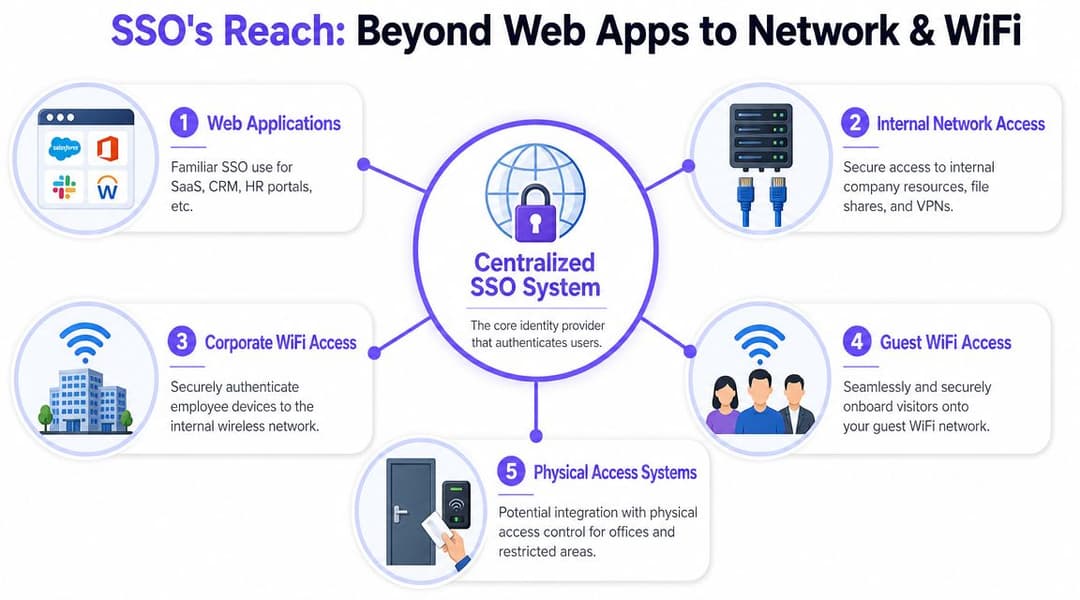
Le SSO applicatif et l'identité réseau sont liés, mais pas identiques
Un point de confusion fréquent pour les lecteurs est que le SSO pour les applications et l'accès réseau basé sur l'identité sont des concepts connectés, mais qu'ils ne reposent pas sur le même mécanisme.
Le SSO applicatif signifie généralement que l'utilisateur s'authentifie une seule fois auprès d'un IdP et reçoit un jeton ou une session acceptée par les applications connectées. L'accès au réseau utilise souvent des contrôles différents, tels que des certificats d'appareil, des méthodes d'authentification sans fil, des politiques basées sur l'annuaire et des contrôles de posture ou de confiance.
Le point commun est la source d'identité. Si Entra ID ou Okta sait déjà qui est l'utilisateur, à quel groupe il appartient et si son appareil est géré, vous pouvez utiliser ce contexte d'identité pour décider s'il doit rejoindre le réseau du personnel.
Ce à quoi cela ressemble sur le WiFi d'entreprise
Dans une architecture mature, le personnel ne saisit aucun mot de passe WiFi partagé. Leur appareil géré par l'organisation est enregistré, approuvé et associé à leur identité. Lorsqu'ils entrent dans le bâtiment, l'appareil se connecte au SSID sécurisé approprié à l'aide d'une authentification d'entreprise basée sur des certificats ou équivalente.
Cela change beaucoup de choses sur le plan opérationnel :
- Les mots de passe partagés disparaissent, ainsi un seul identifiant compromis n'affecte pas l'ensemble du réseau de l'entreprise.
- L'accès s'adapte aux rôles, car la politique peut suivre les groupes d'identité.
- La révocation devient plus rapide, car lorsque l'accès à l'annuaire change, l'accès au réseau peut changer avec lui.
- Le roaming devient plus simple, en particulier sur les parcs multisites où les utilisateurs s'attendent à la même expérience partout.
Pourquoi cela compte dans l'hôtellerie, le commerce de détail et la santé
Ces secteurs regorgent de cas particuliers. Vous avez des travailleurs postés, des appareils partagés, du personnel d'agence, des équipes itinérantes et un mélange constant de besoins d'accès professionnels, semi-professionnels et invités.
Un groupe hôtelier peut souhaiter qu'une seule identité de personnel régisse l'accès au PMS, aux applications d'arrière-guichet et au WiFi interne sécurisé dans l'ensemble des établissements. Une chaîne de magasins de détail peut souhaiter que les terminaux portables gérés se connectent automatiquement au WiFi du magasin tandis que le trafic des invités reste isolé. Un prestataire de soins de santé peut souhaiter une séparation plus forte entre les utilisateurs cliniques, les visiteurs et les appareils connectés.
C'est également là que les solutions de contrôle d'accès au réseau entrent dans le débat. Elles permettent d'étendre la politique d'identité de la couche application à la couche réseau.
Où Purple se positionne
Une option pratique est Purple, qui prend en charge la mise en réseau basée sur l'identité pour le personnel et les environnements multi-locataires, y compris des intégrations avec Entra ID, Google Workspace et Okta pour un accès sécurisé sans dépendre de mots de passe partagés. Ce type d'approche est utile lorsque vous souhaitez que l'identité applicative et l'identité réseau fonctionnent à partir de la même source de vérité.
Le SSO dans votre secteur d'activité Cas d'utilisation pratiques
Le moyen le plus simple de voir la valeur du SSO est d'observer le travail quotidien, et non des diagrammes d'architecture.
Hôtellerie
Un directeur des opérations hôtelières commence sa journée dans un établissement et la termine dans un autre. Il a besoin d'accéder à la planification, à un système de gestion d'établissement, aux documents partagés et au WiFi interne dans les deux endroits.
Avec le SSO, cette identité les suit. Ils se connectent une seule fois, et les systèmes approuvés reconnaissent cette session. Si l'organisation lie également l'accès au réseau à la même source d'identité, leur appareil géré rejoint le WiFi du personnel sans que quelqu'un ait besoin d'envoyer le dernier mot de passe par SMS au responsable de service.
Commerce de détail
Un responsable régional entre dans un magasin avec une tablette. Il a immédiatement besoin d'accéder aux tableaux de bord des ventes, aux outils de gestion des stocks et aux applications de communication interne.
Dans une configuration fragmentée, chaque étape peut signifier une nouvelle invite de connexion, un autre mot de passe expiré ou un énième appel au support. Dans un modèle basé sur l'identité, la tablette s'authentifie proprement, l'accès reflète le rôle de l'utilisateur et le personnel du magasin n'a pas besoin de partager des identifiants locaux pour travailler.
Un bon SSO ne rend pas l'accès invisible. Il rend l'accès légitime prévisible.
Santé
Un clinicien commence sa garde et a besoin d'un accès rapide et contrôlé aux systèmes essentiels. Il peut être amené à se déplacer entre des postes de travail, des appareils partagés et des segments de réseau restreints au cours de la journée.
Ici, le SSO permet de réduire les connexions répétées aux applications approuvées, tandis que les contrôles réseau basés sur l'identité permettent de s'assurer que les bons utilisateurs et appareils se connectent aux bons environnements sans fil. Cette séparation est essentielle. L'accès clinique, l'accès invité et l'accès aux appareils ne doivent pas tous être gérés de la même manière.
Propriétés multi-locataires et campus
Dans les résidences étudiantes, les centres d'affaires et les propriétés à usage mixte, le personnel et les résidents coexistent souvent sur la même infrastructure physique, mais ne devraient jamais partager le même modèle d'accès.
Le personnel peut avoir besoin des systèmes du bâtiment, des outils de support et des applications d'administration interne. Les résidents ou les locataires ont besoin d'une connectivité fiable, mais pas d'un accès aux plateformes opérationnelles. Dans ce contexte, la conception de l'identité est primordiale. Le SSO peut prendre en charge l'accès du personnel, tandis que des politiques d'identité réseau distinctes maintiennent le trafic des locataires et des invités isolé.
Mise en œuvre du SSO et bonnes pratiques
Un projet SSO réussi commence par une décision : choisir le fournisseur d'identité qui servira de plan de contrôle. Pour de nombreuses organisations, il s'agit de Microsoft Entra ID ou d'Okta, car ces plateformes sont déjà au plus près du cycle de vie des utilisateurs, de la MFA et de la politique des appareils.
Le déploiement doit être progressif. Commencez par les applications les plus importantes et les groupes d'utilisateurs les plus susceptibles d'en bénéficier. Nettoyez les comptes en double, définissez correctement les groupes de rôles et testez le comportement des sessions avant d'élargir le périmètre.
Les contrôles les plus importants
Quelques pratiques font toute la différence entre une démonstration réussie et un déploiement durable :
- Exiger la MFA au point de connexion principal. Si une seule connexion peut donner accès à de nombreuses ressources, cette connexion doit bénéficier d'une protection renforcée.
- Concevoir des processus de départ basés sur une révocation immédiate. L'identité centralisée n'est utile que si les modifications de compte sont répercutées rapidement.
- Examinez l'accès par rôle. Le SSO peut rendre le sur-octroi de droits plus difficile à détecter si personne ne vérifie qui a encore accès.
- Prévoyez des plans en cas de perturbation de l'IdP. Sachez ce qui se passe si votre service d'identité est indisponible et quels systèmes nécessitent une gestion de secours.
Sachez quand le SSO n'est pas le bon outil
Ce point est souvent omis dans de nombreuses explications génériques. OneLogin note une distinction croissante entre le SSO pour le personnel et l'accès pour les invités ou les appareils dans les déploiements réels, et pose une question utile aux acheteurs dans son explication de fonctionnement du Single Sign-On : quand le SSO est-il le mauvais outil, et quand l'identité devrait-elle être appliquée à l'accès réseau plutôt qu'à la connexion aux applications ?
Cela compte énormément dans la conception du WiFi. Le personnel devrait souvent utiliser un accès basé sur l'identité et régi par des politiques. Les invités ont généralement besoin de quelque chose de plus léger, de plus simple et de distinct. Essayer de forcer chaque problème d'accès à passer par le SSO du personnel crée des frictions là où elles ne sont pas nécessaires.
Si vous examinez le SSO dans le cadre d'une stratégie d'accès plus large, incluez les applications, le WiFi du personnel, l'intégration des invités, les appareils partagés et les flux de révocation dans la même conversation. C'est généralement là que se situent les gains opérationnels les plus importants.
Si vous repensez l'accès à travers les applications, le WiFi du personnel, l'intégration des invités ou les réseaux multi-locataires, Purple mérite que l'on s'y intéresse. Il offre une mise en réseau basée sur l'identité qui peut fonctionner avec des plateformes telles que Entra ID, Okta et Google Workspace, aidant les équipes à remplacer les mots de passe partagés et les Captive Portals fastidieux par un accès contrôlé pour le personnel, les invités et les résidents.