
How to leverage SMS messages marketing to increase return visits
This technical reference guide details how venue operators can leverage their existing Guest WiFi infrastructure to capture verified phone numbers and automate SMS marketing campaigns. It covers captive portal consent architecture, campaign triggers, CRM integration, and performance benchmarks for driving return visits.
Listen to this guide
View podcast transcript
Executive Summary
For IT managers and venue operations directors, the physical footprint of your venues represents an untapped data asset. Every week, thousands of visitors connect to your Guest WiFi networks. By reconfiguring the captive portal to capture verified phone numbers alongside explicit marketing consent, you can build a highly engaged SMS subscriber list with zero additional hardware investment.
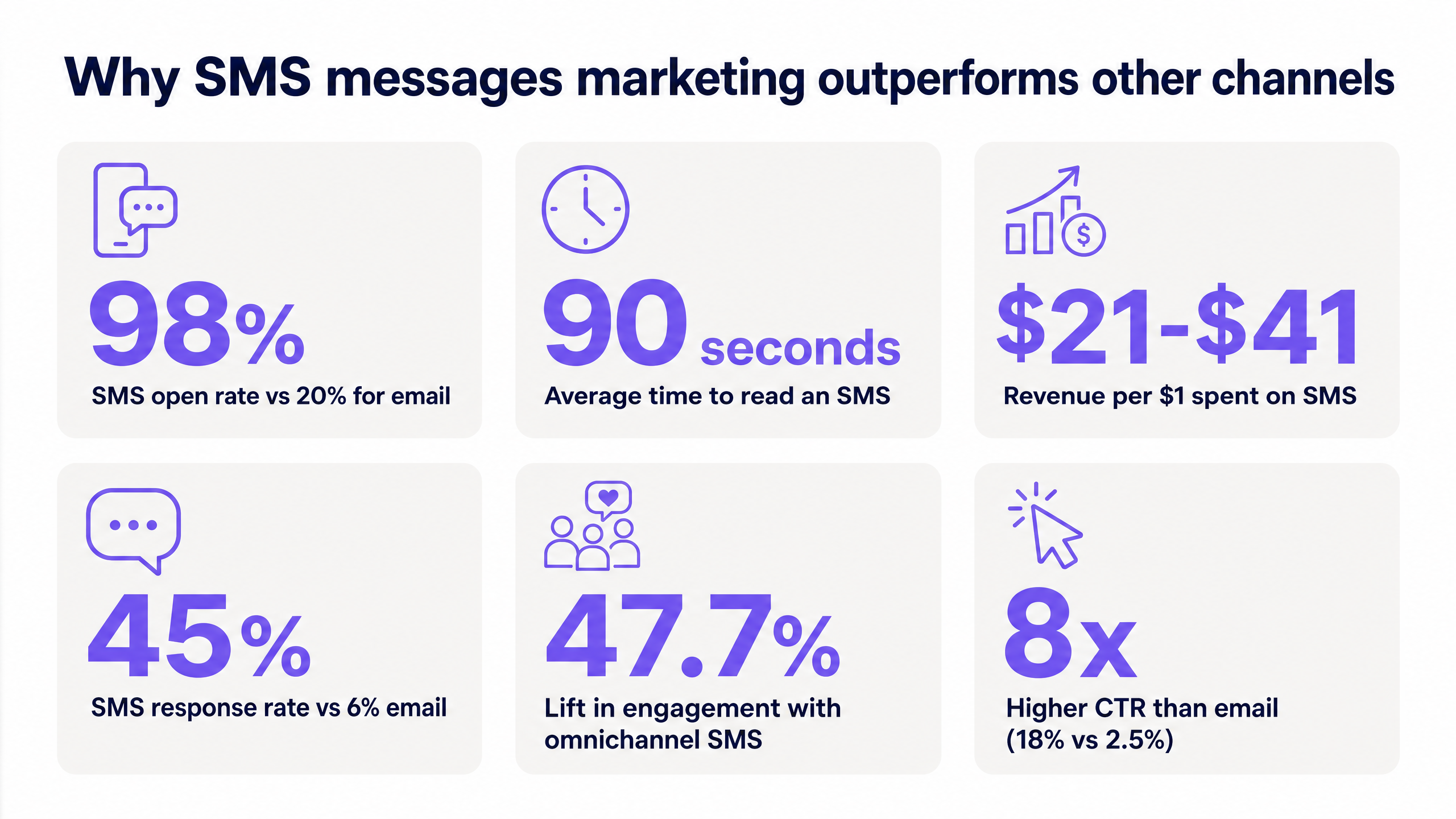
SMS messages marketing delivers a 98% open rate and an 18% click-through rate [1] [2]. However, scaling this channel requires strict adherence to GDPR and CCPA consent frameworks, clean integration with existing identity providers, and automated campaign triggers based on actual venue behaviour. This guide details the deployment architecture required to use Purple Engage for SMS marketing, focusing on compliance, data flow, and measurable return visit lift.
Technical Deep-Dive: The Data Foundation
The foundation of an effective SMS marketing programme is identity-grade, first-party data. Unlike lists built through passive web forms or third-party data brokers, phone numbers captured at the Guest WiFi login represent high-intent users who are physically present in your venue.
Captive Portal Architecture
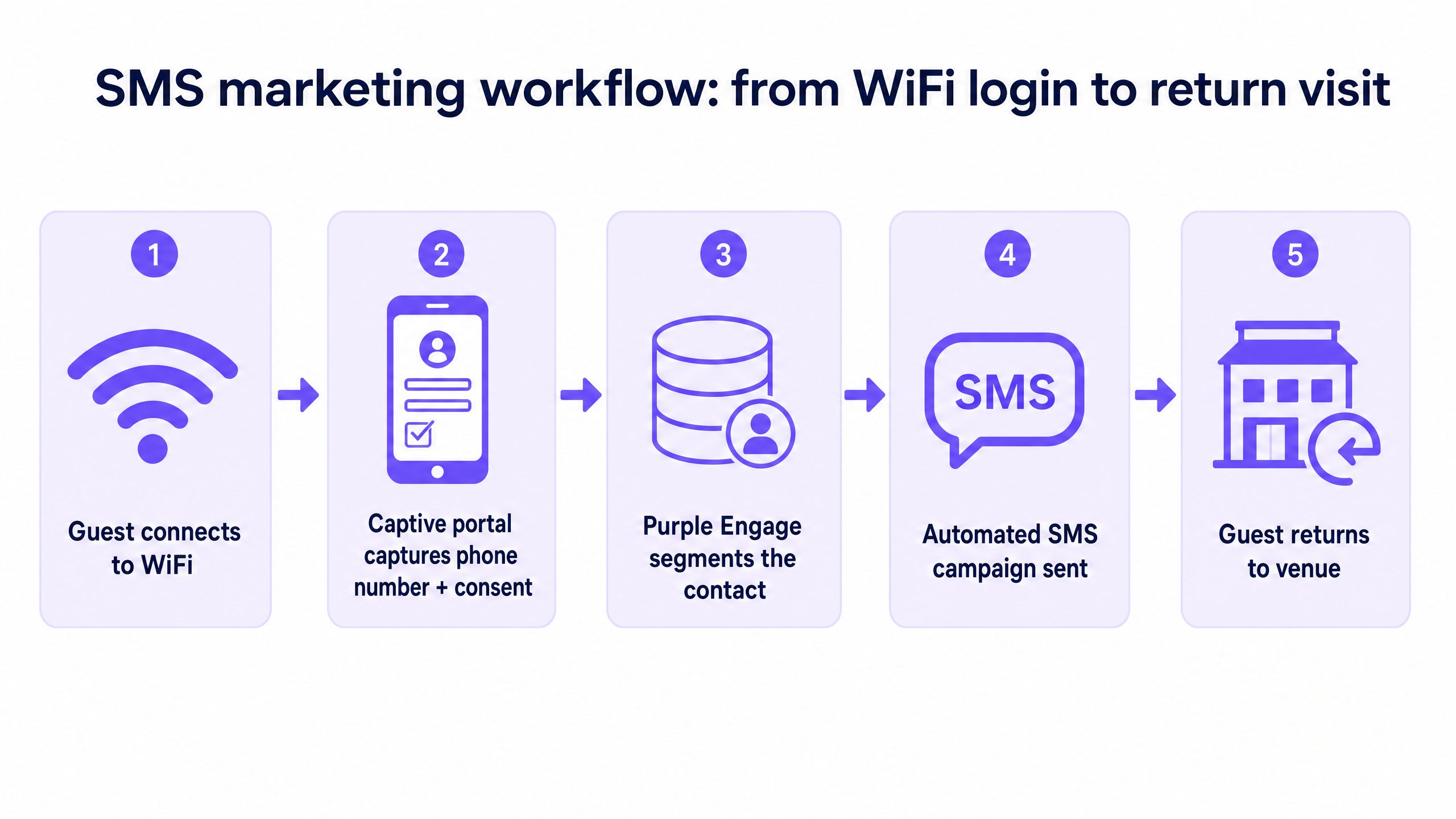
The captive portal sits between the user's device and the internet gateway. When a guest attempts to access the network, Purple intercepts the traffic and presents a branded splash page. To build an SMS list, you must configure this page to require a phone number for authentication.
Purple operates as a cloud overlay on your existing hardware (including Cisco Meraki, HPE Aruba, Ruckus, Juniper Mist, Ubiquiti UniFi, Cambium, Extreme, and Fortinet). When a guest submits their phone number, Purple validates the input format and can optionally trigger a One-Time Password (OTP) via SMS to verify ownership. Once authenticated, Purple writes the device MAC address, phone number, and connection timestamp to a centralised guest profile.
Consent Architecture and GDPR Compliance
Capturing the phone number is only the first step; capturing explicit, auditable consent is the critical compliance requirement. Under GDPR Article 7, you must be able to demonstrate that the data subject has consented to processing [3].
Do not bundle SMS marketing consent with the Terms and Conditions for WiFi access. The consent flow must be:
- Unbundled: A distinct, unchecked checkbox specifically for SMS marketing.
- Clear: State the purpose (e.g., "I agree to receive promotional SMS messages from [Venue Name]").
- Recorded: Purple Engage automatically logs the timestamp, IP address, MAC address, and the exact consent language displayed to the user.
Implementation Guide
Deploying an automated SMS campaign architecture requires aligning your WiFi analytics platform with your CRM and marketing automation tools.
Step 1: Configure the Splash Page
Access the Purple portal and navigate to the splash page editor. Add the 'Phone Number' field to the login form. Enable SMS verification if data quality is a higher priority than login speed. Add a custom checkbox for SMS marketing consent, ensuring it is not pre-ticked.
Step 2: Establish CRM Integration
Purple integrates natively with Salesforce, HubSpot, Mailchimp, and Klaviyo via API and webhooks. Configure the integration to sync the guest profile data (phone number, first name, last name, and consent status) to your CRM in real time. Ensure that opt-outs (e.g., a guest replying "STOP") are synced bidirectionally to maintain compliance.
Step 3: Build Automated Triggers in Purple Engage
Instead of relying on manual batch-and-blast sends, use Purple Engage to trigger SMS messages based on physical venue behaviour.
- The Welcome Series: Trigger an SMS 24 hours after a guest's first WiFi connection. Offer a tangible incentive to return.
- The Re-engagement Trigger: Identify guests who have not connected to the WiFi in 45 days. Trigger a "We miss you" SMS offer.
- The High-Value Segment: Identify guests who connect more than three times a month. Trigger an exclusive loyalty reward SMS.
Best Practices
- Optimise the Value Exchange: If your phone number capture rate is below 15%, your splash page copy is likely failing to articulate the benefit. "Enter your number to get online and receive 10% off your next coffee" will significantly outperform "Enter your number to connect."
- Limit Message Frequency: Cap promotional SMS messages at two to four per month to prevent list fatigue and high opt-out rates.
- Use Personalisation: Insert the guest's first name and reference their specific venue location to increase relevance.
Troubleshooting & Risk Mitigation
| Failure Mode | Root Cause | Mitigation Strategy |
|---|---|---|
| High Bounce Rate | Invalid phone numbers entered at login. | Enable OTP SMS verification on the captive portal to ensure only valid numbers are captured. |
| Compliance Breach | Bundled consent or missing audit trails. | Separate WiFi T&Cs from marketing consent. Use Purple's built-in consent logging to maintain an audit trail. |
| Low Return Visit Attribution | Inability to link an SMS send to a physical visit. | Ensure Purple Engage campaigns are correctly tagged so that subsequent WiFi logins from the targeted MAC address are attributed to the campaign. |
 |
ROI & Business Impact
SMS marketing is highly measurable. By tying SMS campaign sends to subsequent Guest WiFi connections, venue operators can directly attribute return visits to specific messages.
Industry benchmarks indicate that well-run SMS campaigns return between $21 and $41 in revenue for every $1 spent [4]. For a multi-site retail or hospitality operator, converting 20% of WiFi logins into SMS opt-ins and driving a 15% increase in repeat visit frequency among that cohort represents a significant, measurable impact on top-line revenue.
References
[1] Sender, "SMS Open Rates," 2026. https://www.sender.net/blog/sms-open-rates/ [2] Infobip, "SMS marketing statistics: Key figures for 2026," 2026. https://www.infobip.com/blog/sms-marketing-statistics [3] MyWiFi Networks, "GDPR & WiFi Data Collection: 2026 Compliance Checklist," 2026. https://www.mywifinetworks.com/blog/gdpr-wifi-data-collection-guide [4] Upcity, "SMS Marketing ROI: Data, Benchmarks & Pilot Template," 2026. https://messageflow.com/blog/how-to-justify-investment-sms-marketing-roi/
Key Definitions
Captive Portal
A web page that the user of a public-access network is obliged to view and interact with before access is granted. Used by Purple to capture guest data and consent.
The primary mechanism for converting anonymous venue footfall into known, marketable contacts.
First-Party Data
Information a company collects directly from its customers. In this context, phone numbers and visit history collected via Guest WiFi.
Highly valuable for marketing because it is accurate, privacy-compliant, and unique to the venue operator.
Double Opt-In
A process where a user signs up for a marketing list and then receives a confirmation message requiring them to verify their intent.
Implemented via SMS OTP at the WiFi login to ensure data accuracy and robust compliance.
Omnichannel Strategy
A seamless, integrated approach to marketing across multiple channels (e.g. email, SMS, in-app) to provide a unified customer experience.
Purple Engage allows operators to integrate SMS triggers with their broader CRM and email campaigns.
MAC Address
A unique identifier assigned to a network interface controller (NIC) for use as a network address in communications within a network segment.
Used by Purple to anonymously track device presence and attribute return visits to SMS marketing campaigns.
Purple Engage
Purple's marketing automation platform that uses Guest WiFi data to trigger targeted, behaviour-based campaigns.
The engine that turns passive WiFi data into active SMS marketing outreach.
GDPR Article 7
The section of the General Data Protection Regulation detailing the conditions for consent, requiring the controller to be able to demonstrate that consent was given.
The legal framework dictating how the captive portal must be designed to capture and log SMS marketing opt-ins.
Attribution
The process of identifying a set of user actions that contribute in some manner to a desired outcome, and then assigning a value to each of these events.
Measuring the success of an SMS campaign by tracking how many recipients subsequently connect to the Guest WiFi.
Worked Examples
A 50-location retail chain wants to implement SMS marketing but is concerned about GDPR compliance and data quality. They currently offer frictionless, one-click Guest WiFi.
The IT team reconfigures the captive portal to require a phone number for access, implementing an SMS OTP flow to verify the number. They add a separate, unticked checkbox for SMS marketing consent. Purple Engage is configured to sync these verified numbers and consent records to their central CRM via API. They launch a 'Welcome' campaign triggered 24 hours after the first login.
A stadium operator has a large database of phone numbers but low engagement. They want to use Guest WiFi to drive return visits on non-match days.
The operator uses Purple Engage to segment their WiFi user base, identifying guests who attend matches but haven't visited the stadium's retail store or cafe on non-match days. They trigger an automated SMS campaign offering a 20% discount at the retail store, sent only to guests who haven't connected to the WiFi in the last 30 days.
Practice Questions
Q1. Your marketing director wants to rapidly grow the SMS subscriber list and suggests making the SMS marketing opt-in checkbox pre-ticked on the Guest WiFi captive portal. How do you advise them?
Hint: Consider the specific requirements of GDPR Article 7 regarding how consent must be given.
View model answer
Advise against it. Under GDPR, consent must be a freely given, specific, informed, and unambiguous indication of the user's wishes. Pre-ticked boxes do not constitute valid consent. The checkbox must be unticked by default, requiring an active affirmative action from the guest.
Q2. A hotel group has launched an SMS campaign offering 20% off a future stay. They are tracking click-through rates on the link provided in the SMS, but the operations director wants to know how many people actually walked back into the hotel as a result. How do you measure this?
Hint: Think about how Purple tracks physical presence in a venue.
View model answer
Use Purple's WiFi analytics to track return visit attribution. Because the SMS campaign was sent to contacts whose phone numbers are linked to their device MAC addresses in the Purple guest profile, you can track how many of those specific devices subsequently connected to the Guest WiFi network following the campaign send.
Q3. You are deploying Guest WiFi across a 100-site retail estate using Cisco Meraki hardware. The CRM team needs the phone numbers captured at the portal to sync to Salesforce immediately to trigger a real-time welcome SMS. How is this achieved?
Hint: Consider how Purple integrates with external platforms.
View model answer
Configure a native API or webhook integration between Purple and Salesforce. Purple operates as a hardware-agnostic cloud overlay on the Meraki infrastructure. When a guest authenticates at the portal, Purple captures the data and instantly pushes the profile (including phone number and consent status) to Salesforce via the API, triggering the CRM's automated welcome workflow.