
Comment améliorer l'expérience client dans les supermarchés grâce au WiFi
Ce guide de référence technique détaille comment l'infrastructure WiFi d'entreprise peut être exploitée pour améliorer de manière mesurable l'expérience client dans les supermarchés. Il fournit des stratégies de mise en œuvre concrètes pour les responsables informatiques, couvrant l'architecture réseau, les analyses en temps réel, la gestion des files d'attente, la navigation en magasin et l'intégration de la fidélité — avec des conseils de déploiement concrets, des considérations de conformité et des cadres de ROI pour les environnements de vente au détail de produits alimentaires.
Écouter ce guide
Voir la transcription du podcast
📚 Fait partie de notre série principale : WiFi Marketing Guide →
कार्यकारी सारांश
आधुनिक किराना खुदरा विक्रेताओं के लिए, एंटरप्राइज़ WiFi अब केवल एक लागत केंद्र नहीं है — यह एक महत्वपूर्ण सेंसर नेटवर्क है। जैसे-जैसे मार्जिन कम हो रहा है और उपभोक्ताओं की उम्मीदें बढ़ रही हैं, सुपरमार्केट को भौतिक स्टोर संचालन और डिजिटल इंटेलिजेंस के बीच की दूरी को पाटने के लिए अपने वायरलेस बुनियादी ढांचे का लाभ उठाना चाहिए। यह गाइड IT प्रबंधकों, नेटवर्क आर्किटेक्ट्स और CTOs को एक तकनीकी रोडमैप प्रदान करती है ताकि वे उच्च-प्रदर्शन, सुरक्षित WiFi तैनात कर सकें जो सीधे ग्राहक अनुभव को बेहतर बनाता है।
मजबूत 802.11ax (Wi-Fi 6) आर्किटेक्चर को लागू करके और इसे Purple's Guest WiFi और WiFi Analytics जैसे उन्नत एनालिटिक्स प्लेटफॉर्म के साथ एकीकृत करके, ऑपरेटर फुटफॉल, ड्वेल टाइम (ठहराव का समय) और कतार की लंबाई में रीयल-टाइम दृश्यता प्राप्त कर सकते हैं। यह गाइड VLAN सेगमेंटेशन, Captive Portal अनुपालन (GDPR, PCI DSS), और मौजूदा CRM और लॉयल्टी सिस्टम के साथ सहज एकीकरण सहित महत्वपूर्ण तैनाती विचारों को संबोधित करती है। पूरे गाइड में ध्यान उच्च-घनत्व वाले खुदरा वातावरण में मापने योग्य ROI और परिचालन दक्षता पर है।
तकनीकी गहन विश्लेषण
इन-स्टोर WiFi अब एक रणनीतिक संपत्ति क्यों है
सुपरमार्केट में ग्राहक अनुभव को कैसे बेहतर बनाया जाए, यह सवाल काफी विकसित हो चुका है। एक दशक पहले, इसका उत्तर काफी हद तक परिचालन संबंधी था — बेहतर उत्पाद प्लेसमेंट, छोटी कतारें, अधिक अनुकूल कर्मचारी। आज, इसका उत्तर तेजी से डेटा-संचालित होता जा रहा है, और WiFi नेटवर्क एक भौतिक खुदरा विक्रेता के लिए बड़े पैमाने पर उपलब्ध प्राथमिक डेटा संग्रह तंत्र है।
जब कोई ग्राहक अपनी जेब में स्मार्टफोन लेकर स्टोर में प्रवेश करता है, तो उसका डिवाइस ज्ञात नेटवर्क की खोज (probing) शुरू कर देता है। यह पैसिव प्रोब ट्रैफ़िक किसी भी एंटरप्राइज़-ग्रेड एक्सेस पॉइंट द्वारा पता लगाने योग्य होता है। Purple's WiFi Analytics जैसे प्लेटफॉर्म के माध्यम से एकत्रित और संसाधित, यह टेलीमेट्री ग्राहक की आवाजाही, ज़ोन अधिभोग (zone occupancy), और ड्वेल टाइम की एक निरंतर, रीयल-टाइम तस्वीर उत्पन्न करती है — बिना ग्राहक को किसी भी चीज़ से सक्रिय रूप से कनेक्ट करने की आवश्यकता के।
यह WiFi-सक्षम ग्राहक अनुभव सुधार की नींव है: एक पैसिव सेंसर लेयर के रूप में नेटवर्क, जो सक्रिय डेटा कैप्चर द्वारा तब और बढ़ जाता है जब ग्राहक स्वेच्छा से Captive Portal के माध्यम से प्रमाणित होते हैं।
नेटवर्क आर्किटेक्चर और मानक
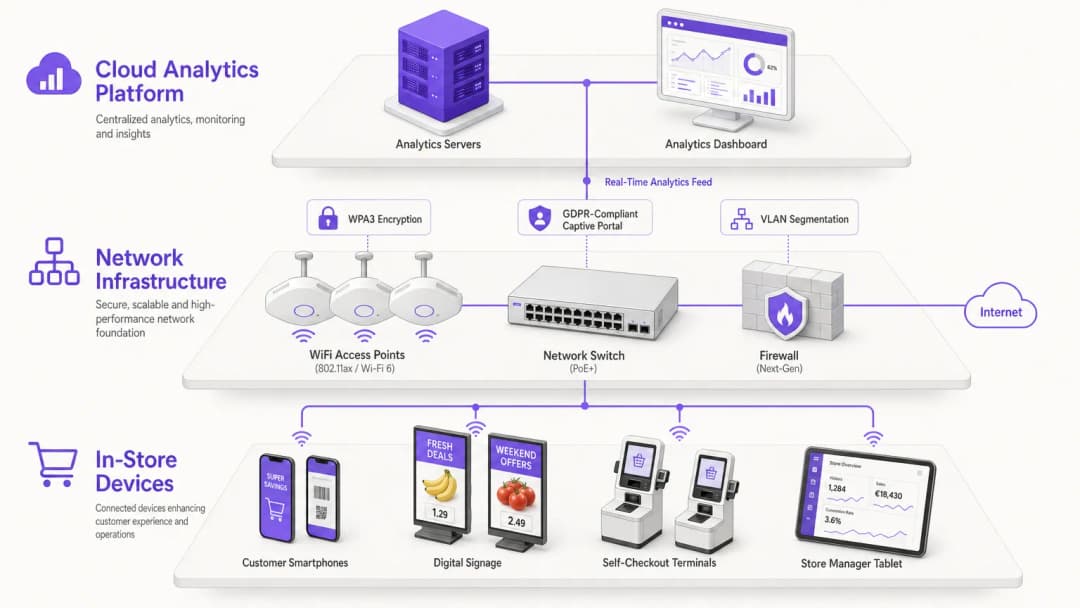
एक उच्च-प्रदर्शन सुपरमार्केट WiFi तैनाती के लिए एक अच्छी तरह से इंजीनियर किए गए अंतर्निहित आर्किटेक्चर की आवश्यकता होती है। आधुनिक खुदरा वातावरण की विशिष्ट उच्च डिवाइस घनत्व को संभालने के लिए पुराने मानकों से Wi-Fi 6 (802.11ax) पर संक्रमण आवश्यक है। Wi-Fi 6 OFDMA (Orthogonal Frequency-Division Multiple Access) और Target Wake Time (TWT) पेश करता है, जो कनेक्टेड IoT उपकरणों जैसे कि इलेक्ट्रॉनिक shelf labels (ESLs), हैंडहेल्ड स्कैनर और ग्राहक स्मार्टफोन के लिए थ्रूपुट और बैटरी लाइफ में महत्वपूर्ण सुधार करता है।
सुरक्षा और अनुपालन आर्किटेक्चर:
सुरक्षा को शुरू से ही डिजाइन किया जाना चाहिए, बाद में जोड़ा नहीं जाना चाहिए। तैनाती को निम्नलिखित मानकों का पालन करना चाहिए:
- WPA3: WPA2 के खिलाफ व्यवहार्य रहने वाले ब्रूट-फोर्स डिक्शनरी हमलों से बचाने के लिए सभी नई तैनातियों के लिए WPA3 एन्क्रिप्शन अनिवार्य करें।
- VLAN Segmentation: VLAN का उपयोग करके कॉर्पोरेट POS (Point of Sale) और इन्वेंट्री प्रबंधन प्रणालियों से गेस्ट ट्रैफ़िक को पूरी तरह से अलग करें। यह PCI DSS अनुपालन के लिए एक अनिवार्य आर्किटेक्चरल आवश्यकता है। गेस्ट डिवाइस कभी भी कार्डधारक डेटा वातावरण (CDE) तक रूट करने में सक्षम नहीं होने चाहिए।
- IEEE 802.1X: कॉर्पोरेट और IoT SSIDs के लिए, यह सुनिश्चित करने के लिए 802.1X पोर्ट-आधारित नेटवर्क एक्सेस कंट्रोल लागू करें कि केवल अधिकृत डिवाइस ही कॉर्पोरेट सेगमेंट में शामिल हो सकें।
- Captive Portals: गेस्ट SSID पर एक सुरक्षित, GDPR-अनुपालक Captive Portal लागू करें। यह पोर्टल डेटा कैप्चर और सहमति प्रबंधन के लिए प्राथमिक संपर्क बिंदु के रूप में कार्य करता है, जो सीधे एनालिटिक्स इंजन को फीड करता है।
ग्राहक अनुभव में WiFi Analytics की भूमिका
सुपरमार्केट WiFi का वास्तविक मूल्य इसके द्वारा उत्पन्न डेटा में निहित है। MAC पतों को ट्रैक करके — गोपनीयता अनुपालन के लिए किनारे (edge) पर अनाम और हैश किए गए — या प्रोफ़ाइल-आधारित प्रमाणीकरण का उपयोग करके, नेटवर्क एक रीयल-टाइम लोकेशन सिस्टम (RTLS) के रूप में कार्य करता है।

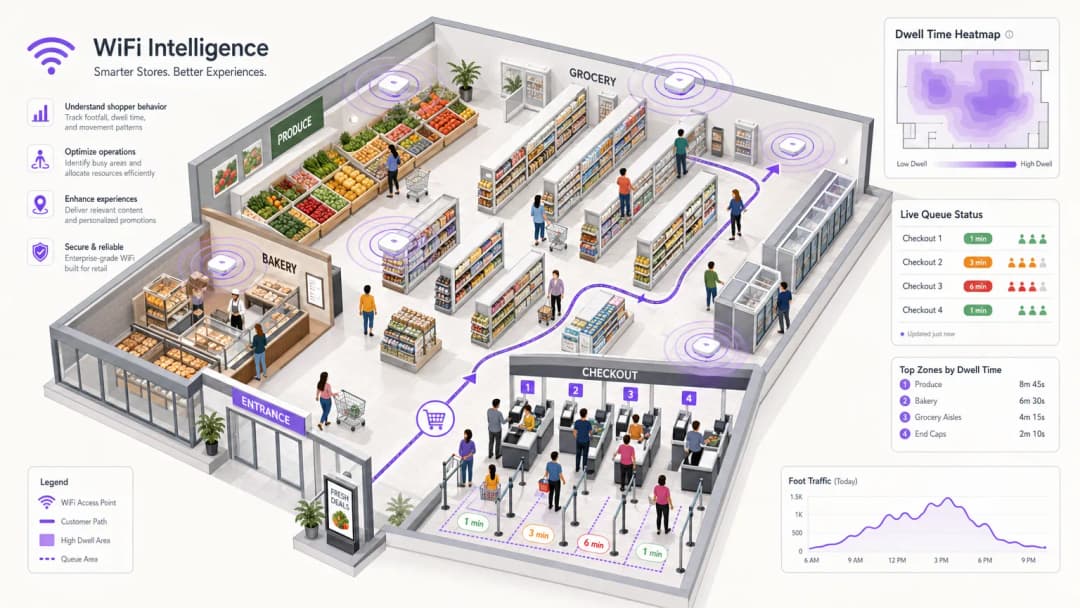
ड्वेल टाइम और फुटफॉल एनालिटिक्स: एक्सेस पॉइंट निष्क्रिय रूप से प्रोबिंग उपकरणों का पता लगाते हैं, जिससे सिस्टम विभिन्न ज़ोन में फुटफॉल और ड्वेल टाइम की गणना कर सकता है। Purple जैसा प्लेटफॉर्म इन ज़ोन को सीधे स्टोर फ्लोर प्लान पर मैप कर सकता है, जिससे ऑपरेशंस प्रबंधकों को ग्राहक घनत्व का लाइव हीटमैप मिलता है। बेकरी या ताज़ा उपज अनुभागों में उच्च ड्वेल टाइम अक्सर उच्च बास्केट मूल्यों के साथ सहसंबद्ध होता है — डेटा जो सीधे मर्चेंडाइजिंग निर्णयों को सूचित करता है।
कतार प्रबंधन: चेकआउट ज़ोन के पास डिवाइस घनत्व की निगरानी करके, सिस्टम स्टोर प्रबंधकों को स्वचालित अलर्ट ट्रिगर कर सकता है जब कतार प्रतीक्षा समय पूर्वनिर्धारित सीमाओं से अधिक हो जाता है। यह ग्राहकों के निराश होने से पहले गतिशील रूप से कर्मचारियों के पुनर्वितरण को सक्षम बनाता है — कतार प्रबंधन के लिए एक प्रतिक्रियाशील के बजाय सक्रिय दृष्टिकोण।
लॉयल्टी एकीकरण: जब कोई ग्राहक Captive Portal के माध्यम से प्रमाणित होता है, तो उनके डिवाइस आइडेंटिफायर को उनके CRM प्रोफ़ाइल से लिंक कर दिया जाता है। बाद की यात्राओं को स्वचालित रूप से पहचाना जा सकता है, जिससे व्यक्तिगत ऑफ़र, लॉयल्टी पॉइंट नोटिफिकेशन और विज़िट फ़्रीक्वेंसी ट्रैकिंग सक्षम होती है — बिना ग्राहक को कोई ऐप खोलने की आवश्यकता के।
कार्यान्वयन गाइड
ग्राहक अनुभव में सुधार के लिए एंटरप्राइज़-ग्रेड WiFi समाधान तैनात करने के लिए तीन अलग-अलग चरणों में सावधानीपूर्वक योजना बनाने की आवश्यकता होती है।
चरण 1: साइट सर्वेक्षण और RF योजना
एक भी एक्सेस पॉइंट स्थापित करने से पहले, एक व्यापक भविष्य कहनेवाला और सक्रिय साइट सर्वेक्षण करें। सुपरमार्केट अद्वितीय RF चुनौतियाँ पेश करते हैं: धातु की अलमारियाँ, तरल से भरे उत्पाद और प्रशीतन इकाइयाँ सभी महत्वपूर्ण सिग्नल क्षीणन (attenuation) का कारण बनते हैं जो कार्यालय के वातावरण में मौजूद नहीं होते हैं।
- पर्यावरण को मैप करें: स्टोर लेआउट को मॉडल करने के लिए RF प्लानिंग सॉफ़्टवेयर का उपयोग करें, विभिन्न शेल्फ प्रकारों और प्रशीतन इकाइयों के विशिष्ट क्षीणन मूल्यों को इनपुट करें।
- क्षमता के लिए डिज़ाइन करें: चेकआउट जैसे उच्च-घनत्व वाले क्षेत्रों में, को-चैनल हस्तक्षेप को कम करने के लिए दिशात्मक एंटेना के साथ APs तैनात करें ताकि माइक्रो-सेल बनाए जा सकें। लक्ष्य यह सुनिश्चित करना है कि प्रत्येक AP समवर्ती ग्राहकों की एक प्रबंधनीय संख्या की सेवा करे, न कि केवल कवरेज प्राप्त करना।
- बुनियादी ढांचे की तैयारी: Wi-Fi 6 हार्डवेयर के लिए मल्टी-गीगाबिट बैकहॉल और PoE+ (Power over Ethernet Plus) आवश्यकताओं का समर्थन करने के लिए सभी AP स्थानों पर श्रेणी 6A (Category 6A) केबल बिछाना सुनिश्चित करें।
चरण 2: कॉन्फ़िगरेशन और एकीकरण
- SSID रणनीति: प्रबंधन ओवरहेड और बीकन प्रदूषण को कम करने के लिए SSIDs की संख्या को सीमित करें। आमतौर पर तीन SSIDs पर्याप्त होते हैं:
Store_Guest,Store_Corp, औरStore_IoT। - Captive Portal सेटअप: ब्रांड दिशानिर्देशों के अनुरूप गेस्ट पोर्टल को कॉन्फ़िगर करें। उपयोगकर्ता लॉगिन पर सहज डेटा सिंक्रनाइज़ेशन सक्षम करने के लिए API के माध्यम से पोर्टल को CRM के साथ एकीकृत करें। लौटने वाले ग्राहकों के लिए घर्षण को कम करने के लिए सोशल लॉगिन या प्रोफ़ाइल-आधारित प्रमाणीकरण की पेशकश करने पर विचार करें।
- एनालिटिक्स एकीकरण: वायरलेस LAN कंट्रोलर (WLC) या क्लाउड प्रबंधन प्लेटफॉर्म को एनालिटिक्स इंजन से कनेक्ट करें। सुनिश्चित करें कि डेटा फीड ठीक से कॉन्फ़िगर किए गए हैं और क्लाउड एनालिटिक्स प्लेटफॉर्म पर टेलीमेट्री डेटा को सुरक्षित रूप से प्रसारित कर रहे हैं।
- ज़ोन कॉन्फ़िगरेशन: एनालिटिक्स प्लेटफॉर्म के भीतर, तार्किक ज़ोन (logical zones) को परिभाषित करें जो भौतिक स्टोर क्षेत्रों (उत्पाद, बेकरी, चेकआउट, कैफे) को मैप करते हैं। यही ज़ोन-विशिष्ट ड्वेल टाइम और फुटफॉल रिपोर्टिंग को सक्षम बनाता है।
चरण 3: सत्यापन और अनुकूलन
तैनाती के बाद, मूल डिज़ाइन उद्देश्य के विरुद्ध सिस्टम को सत्यापित करें। चैनल असाइनमेंट सही होने और को-चैनल हस्तक्षेप स्वीकार्य सीमाओं के भीतर होने की पुष्टि करने के लिए स्पेक्ट्रम विश्लेषक के साथ स्टोर का चक्कर लगाएं। यह पुष्टि करने के लिए एनालिटिक्स डैशबोर्ड की समीक्षा करें कि ज़ोन की सीमाएं सटीक हैं और फुटफॉल डेटा ज्ञात पीक ट्रेडिंग अवधियों के साथ संरेखित है।
सर्वोत्तम प्रथाएं
सहज ऑनबोर्डिंग को प्राथमिकता दें: लॉगिन प्रक्रिया यथासंभव घर्षण रहित होनी चाहिए। लौटने वाले ग्राहकों को हर यात्रा पर Captive Portal के साथ बातचीत किए बिना स्वचालित रूप से कनेक्ट होने की अनुमति देने के लिए जहां संभव हो Passpoint (Hotspot 2.0) या प्रोफ़ाइल-आधारित प्रमाणीकरण का उपयोग करें। यह किराना संदर्भ में विशेष रूप से महत्वपूर्ण है जहां ग्राहक प्रति सप्ताह कई बार आ सकते हैं।
स्थान-आधारित सेवाओं का लाभ उठाएं: ब्लू-डॉट नेविगेशन और स्थान-ट्रिगर पुश नोटिफिकेशन को सक्षम करने के लिए स्टोर के मोबाइल ऐप के साथ WiFi नेटवर्क को एकीकृत करें। अपने स्मार्टफोन के माध्यम से ग्राहक को सही गलियारे (aisle) में निर्देशित करना इन-स्टोर अनुभव में एक सीधा, मापने योग्य सुधार है।
सतत निगरानी: नेटवर्क को 'सेट-एंड-फॉरगेट' तैनाती के रूप में न मानें। विसंगतियों की पहचान करने और प्रदर्शन को अनुकूलित करने के लिए लगातार RF स्वास्थ्य, क्लाइंट वितरण और एनालिटिक्स डैशबोर्ड की निगरानी करें। एंटरप्राइज़ कनेक्टिविटी विचारों पर व्यापक परिप्रेक्ष्य के लिए, लीज़्ड लाइन क्या है? समर्पित व्यावसायिक इंटरनेट पर गाइड समर्पित कनेक्टिविटी विकल्पों पर उपयोगी संदर्भ प्रदान करती है जो एक विश्वसनीय इन-स्टोर नेटवर्क को रेखांकित कर सकते हैं।
क्षेत्र के साथियों के खिलाफ बेंचमार्क: यहां वर्णित रणनीतियां केवल किराना तक सीमित नहीं हैं। खुदरा वातावरण में लागू वही WiFi एनालिटिक्स सिद्धांत आतिथ्य और परिवहन स्थलों में समान रूप से प्रासंगिक हैं। क्रॉस-सेक्टर बेंचमार्किंग उन सर्वोत्तम प्रथाओं को सामने ला सकती है जिन्हें अभी तक किराना में व्यापक रूप से नहीं अपनाया गया है।
समस्या निवारण और जोखिम शमन
को-चैनल हस्तक्षेप (CCI): घनी तैनातियों में, एक ही चैनल पर APs एक-दूसरे के साथ हस्तक्षेप करेंगे, जिससे सभी क्लाइंट्स के लिए प्रदर्शन खराब हो जाएगा। शमन: चैनल असाइनमेंट और ट्रांसमिट पावर को स्वचालित रूप से समायोजित करने के लिए डायनेमिक रेडियो मैनेजमेंट (DRM) लागू करें। चैनल योजना पर उचित ध्यान दिए बिना AP घनत्व को अत्यधिक बढ़ाने से बचें।
Captive Portal विफलताएं: यदि Captive Portal लोड होने में विफल रहता है, तो मेहमान कनेक्ट नहीं हो सकते हैं, और डेटा कैप्चर पूरी तरह से बंद हो जाता है। शमन: निरर्थक (redundant) पोर्टल सर्वर लागू करें और सुनिश्चित करें कि DNS और DHCP सेवाएं अत्यधिक उपलब्ध हैं। आवश्यक डोमेन (Apple के Captive Portal डिटेक्शन URLs, Google के कनेक्टिविटी चेक एंडपॉइंट्स) को श्वेतसूची (whitelist) में डालें ताकि यह सुनिश्चित हो सके कि संकेत सभी प्रकार के उपकरणों पर विश्वसनीय रूप से दिखाई दे।
MAC रैंडमाइजेशन: आधुनिक iOS और Android डिवाइस नेटवर्क की खोज करते समय रैंडमाइज्ड MAC पते प्रसारित करते हैं, जो फुटफॉल काउंट को विकृत कर सकते हैं। शमन: उन्नत एनालिटिक्स प्लेटफॉर्म रैंडमाइज्ड प्रोब डेटा से वास्तविक अद्वितीय विज़िटर काउंट का अनुमान लगाने के लिए सांख्यिकीय एल्गोरिदम का उपयोग करते हैं। एक बार जब कोई उपयोगकर्ता पोर्टल के माध्यम से प्रमाणित हो जाता है, तो उनका सत्र MAC उनके प्रोफ़ाइल से लिंक हो जाता है, जिससे उस यात्रा के लिए सटीक व्यक्तिगत-स्तरीय ट्रैकिंग सक्षम हो जाती है।
डेटा गोपनीयता उल्लंघन: ग्राहक डेटा को गलत तरीके से संभालने से गंभीर ICO दंड और प्रतिष्ठा को नुकसान हो सकता है। शमन: सुनिश्चित करें कि भंडारण से पहले सभी MAC पते अपरिवर्तनीय रूप से हैश किए गए हैं। डेटा प्रतिधारण नीतियों का नियमित रूप से ऑडिट करें। सुनिश्चित करें कि UK GDPR के पूर्ण अनुपालन में, एनालिटिक्स ट्रैकिंग और मार्केटिंग संचार के लिए अलग-अलग ऑप्ट-इन के साथ, Captive Portal के माध्यम से स्पष्ट, विस्तृत सहमति प्राप्त की जाए।
ROI और व्यावसायिक प्रभाव
एक उचित रूप से कार्यान्वित WiFi एनालिटिक्स समाधान कई डोमेन में मापने योग्य व्यावसायिक प्रभाव प्रदान करता है। आंतरिक व्यावसायिक मामला बनाने के लिए निम्नलिखित ढांचे का उपयोग किया जा सकता है।
| मूल्य चालक | मापन मीट्रिक | विशिष्ट परिणाम |
|---|---|---|
| कतार प्रबंधन | औसत चेकआउट प्रतीक्षा समय | 20-35% की कमी |
| लॉयल्टी अधिग्रहण | प्रति नए लॉयल्टी सदस्य की लागत | पारंपरिक चैनलों की तुलना में 40-60% कम |
| मार्केटिंग एट्रिब्यूशन | भौतिक विज़िट-टू-अभियान एट्रिब्यूशन | प्रत्यक्ष CPA गणना सक्षम |
| परिचालन दक्षता | कर्मचारी पुनर्वितरण प्रतिक्रिया समय | मैन्युअल अवलोकन बनाम लगभग रीयल-टाइम |
| ड्वेल टाइम अनुकूलन | उच्च-मार्जिन वाले ज़ोन में औसत समय | लक्षित हस्तक्षेपों के साथ मापने योग्य वृद्धि |
परिचालन दक्षता: स्वचालित कतार अलर्ट चेकआउट प्रतीक्षा समय को कम करते हैं, सीधे ग्राहक संतुष्टि स्कोर (NPS) में सुधार करते हैं और खरीद यात्रा के अंतिम चरण में कार्ट परित्याग (cart abandonment) को कम करते हैं।
मार्केटिंग ROI: CRM के साथ WiFi डेटा को एकीकृत करके, विपणक भौतिक स्टोर विज़िट को डिजिटल अभियानों से जोड़ सकते हैं, जिससे प्रति अधिग्रहण वास्तविक लागत (CPA) की गणना की जा सकती है। यह एट्रिब्यूशन लूप को बंद करता है जो ऐतिहासिक रूप से भौतिक खुदरा विपणन में एक बड़ा अंतर रहा है।
लॉयल्टी अधिग्रहण: Captive Portal लॉयल्टी कार्यक्रम साइन-अप के लिए एक उच्च-रूपांतरण चैनल के रूप में कार्य करता है। सत्यापित ईमेल पते और स्पष्ट सहमति के बदले मुफ्त, हाई-स्पीड WiFi की पेशकश करने से इन-स्टोर लीफलेट या चेकआउट संकेतों जैसे पारंपरिक चैनलों की तुलना में ग्राहक अधिग्रहण की लागत काफी कम हो जाती है।
इन तकनीकों को आस-पास के क्षेत्रों में कैसे लागू किया जाता है, इस बारे में जानकारी के लिए, आतिथ्य WiFi समाधान: प्रदाता में क्या देखना है गाइड एंटरप्राइज़ WiFi विक्रेताओं के मूल्यांकन के लिए एक उपयोगी तुलनात्मक ढांचा प्रदान करती है।
Définitions clés
802.11ax (Wi-Fi 6)
La norme de réseau sans fil de génération actuelle, conçue spécifiquement pour améliorer les performances dans les environnements à haute densité en permettant à plusieurs appareils de transmettre des données simultanément grâce à la technologie OFDMA.
Indispensable pour les supermarchés où des centaines de smartphones de clients, de tablettes de personnel et d'appareils IoT se disputent le temps d'antenne sur les mêmes points d'accès.
Captive Portal
Une page web qu'un utilisateur d'un réseau d'accès public est obligé de consulter et avec laquelle il doit interagir avant de pouvoir accéder à Internet. C'est le mécanisme par lequel les opérateurs recueillent le consentement et les données des clients.
Le mécanisme principal pour recueillir le consentement des clients en vertu du GDPR et collecter des données marketing (adresse e-mail, synchronisation CRM) dans un déploiement WiFi pour le commerce de détail.
VLAN (Virtual Local Area Network)
Un sous-réseau logique qui regroupe une collection d'appareils provenant de différents réseaux locaux physiques, permettant l'isolation du trafic sans nécessiter d'infrastructure physique distincte.
Crucial pour la sécurité dans les déploiements de supermarchés. Le trafic des invités doit être segmenté sur un VLAN distinct de celui des points de vente (POS) et des systèmes d'entreprise du magasin afin de maintenir la conformité PCI DSS.
Dwell Time
Le temps qu'un appareil client passe dans une zone de localisation définie, tel que mesuré par la plateforme d'analyse WiFi.
Une mesure opérationnelle clé. Un temps de visite accru dans les zones à forte marge telles que la boulangerie ou le rayon vin est souvent corrélé à une augmentation de la taille du panier, ce qui en fait un indicateur direct de l'efficacité du merchandising.
MAC Randomisation
Une fonctionnalité de confidentialité dans les smartphones modernes où l'appareil diffuse une adresse MAC générée de manière aléatoire lors de la recherche de réseaux, plutôt que son adresse matérielle permanente, afin d'empêcher le suivi passif.
Les équipes informatiques doivent en tenir compte lors de l'analyse des données de fréquentation. Les plateformes d'analyse avancées utilisent la déduplication statistique pour estimer le nombre réel de visiteurs uniques à partir du trafic de sondage aléatoire.
Passpoint (Hotspot 2.0)
Une norme de la Wi-Fi Alliance qui permet une itinérance transparente, sécurisée et de type cellulaire entre les réseaux Wi-Fi sans que les utilisateurs n'aient à interagir avec un Captive Portal lors de leurs visites ultérieures.
La solution optimale pour une expérience client sans friction, permettant aux acheteurs reconnus de se connecter automatiquement à chaque fois qu'ils entrent dans le magasin, éliminant ainsi complètement l'interaction avec le portail.
RSSI (Received Signal Strength Indicator)
Une mesure du niveau de puissance d'un signal radio reçu, exprimée en décibels par rapport à un milliwatt (dBm).
Utilisé par les moteurs d'analyse pour estimer la distance physique d'un appareil par rapport à un point d'accès. La triangulation des lectures RSSI de plusieurs points d'accès est la base du suivi de la localisation et de la génération de cartes de chaleur.
PCI DSS
Payment Card Industry Data Security Standard. Un ensemble de normes de sécurité exigeant que toutes les organisations qui acceptent, traitent, stockent ou transmettent des informations sur les cartes de paiement maintiennent un environnement sécurisé.
Les déploiements WiFi des supermarchés doivent être architecturés de manière à garantir que le réseau invité ne puisse pas accéder à l'environnement des données de titulaires de cartes (CDE). La segmentation VLAN est le principal contrôle technique utilisé pour y parvenir.
OFDMA (Orthogonal Frequency-Division Multiple Access)
Une version multi-utilisateur de l'OFDM qui permet à un point d'accès de diviser un canal en sous-canaux plus petits et de servir plusieurs clients simultanément.
Une fonctionnalité clé du Wi-Fi 6 qui améliore considérablement l'efficacité dans les environnements de vente au détail denses en réduisant le temps d'attente de chaque client pour accéder au canal.
Dynamic Radio Management (DRM)
Une fonctionnalité automatisée des contrôleurs de réseau local sans fil d'entreprise qui ajuste en continu l'attribution des canaux des points d'accès et la puissance de transmission afin d'optimiser les performances du réseau et de minimiser les interférences.
Essentiel dans les déploiements de supermarchés où l'environnement RF change tout au long de la journée en fonction de la fréquentation. La planification manuelle des canaux ne suffit pas à elle seule à maintenir des performances optimales.
Exemples concrets
Une chaîne régionale de supermarchés comptant 50 points de vente fait face à de nombreuses plaintes de clients concernant les temps d'attente aux caisses pendant les heures de pointe (16h00-18h00). Le directeur des opérations a besoin d'une solution basée sur les données pour affecter de manière dynamique le personnel aux caisses avant que les files d'attente ne deviennent ingérables. Le réseau existant est un mélange de points d'accès 802.11ac existants et d'un WLC géré dans le cloud.
Déployer des points d'accès Wi-Fi 6 supplémentaires spécifiquement positionnés au-dessus des zones de caisse afin d'augmenter la densité des points d'accès et d'améliorer la précision de la localisation dans cette zone. Intégrer l'infrastructure sans fil à une plateforme d'analyse de localisation telle que Purple. Au sein de la plateforme, configurer des zones virtuelles cartographiées précisément sur la zone de caisse. Configurer des alertes automatisées — envoyées par SMS ou via une intégration API sur les tablettes des directeurs de magasin — déclenchées lorsque le nombre d'appareils dans la zone de caisse dépasse un seuil prédéfini (par exemple, plus de 20 appareils pendant plus de trois minutes consécutives). Cela permet aux directeurs d'ouvrir de nouvelles caisses de manière proactive, avant que la file d'attente ne devienne visible. Calibrer les valeurs de seuil sur une période de référence de deux semaines pour tenir compte des modèles de trafic spécifiques à chaque magasin.
Un distributeur alimentaire national souhaite augmenter le taux d'adoption de sa nouvelle application de fidélité numérique. Actuellement, les clients doivent télécharger manuellement l'application et saisir leurs coordonnées à la caisse, ce qui crée des frictions et ralentit le temps de transaction. L'équipe informatique a besoin d'une solution qui capture les données des clients plus tôt dans le parcours d'achat.
Mettre en œuvre un processus d'intégration WiFi invité sans friction à l'aide d'un Captive Portal personnalisé. Configurer le portail pour proposer une connexion en un clic via les réseaux sociaux ou les identifiants de fidélité existants. Une fois la connexion établie, rediriger l'utilisateur vers une page d'accueil faisant la promotion du téléchargement de l'application avec une incitation ciblée (par exemple, une réduction sur le panier en cours). Utiliser l'intégration de l'API CRM pour associer automatiquement l'appareil authentifié au profil de fidélité du client, permettant ainsi une identification transparente lors des prochaines visites. Pour les clients qui ne s'authentifient pas, les analyses par sondage passif fournissent tout de même des données de fréquentation et de temps de visite à un niveau global.
Questions d'entraînement
Q1. Votre magasin subit une forte congestion du réseau près de l'entrée principale, là où les clients chargent leurs cartes de fidélité numériques, et où les terminaux de caisse automatique traitent les transactions par carte. Les deux se trouvent actuellement sur la même infrastructure réseau physique, sans séparation logique. Quel est le changement d'architecture le plus critique requis, et quelle norme de conformité l'impose ?
Conseil : Prenez en compte les exigences de sécurité et de performance pour les systèmes de paiement par rapport à l'accès Internet public.
Voir la réponse type
Mettre en œuvre immédiatement une segmentation VLAN stricte. Les terminaux de caisse automatique (systèmes POS) doivent être placés sur un VLAN d'entreprise sécurisé et prioritaire afin de garantir la conformité PCI DSS — plus précisément, pour empêcher le réseau invité de pouvoir s'orienter vers l'environnement des données de titulaires de cartes. Le trafic des clients doit être isolé sur un VLAN invité distinct avec une limitation du débit de bande passante afin d'éviter que les utilisateurs intensifs ne dégradent les performances pour les autres. Il s'agit d'une exigence obligatoire de la norme PCI DSS, et non d'une simple bonne pratique.
Q2. L'équipe marketing souhaite lancer une campagne ciblée pour les clients qui passent plus de 10 minutes dans le rayon vin. Le tableau de bord d'analyse actuel n'affiche que le temps de visite global dans le magasin. Quelles sont les étapes techniques requises pour permettre ce suivi granulaire et spécifique à une zone ?
Conseil : Pensez à la fois aux exigences de conception RF et à la configuration de la plateforme d'analyse.
Voir la réponse type
Tout d'abord, examinez l'emplacement des points d'accès dans et autour du rayon vin. Un suivi précis de la localisation au niveau de la zone nécessite une densité de points d'accès suffisante — généralement trois points d'accès ou plus recevant le signal du client — pour permettre une triangulation RSSI fiable. Si la disposition actuelle des points d'accès ne permet pas cela, des points d'accès supplémentaires devront peut-être être déployés. Deuxièmement, configurez des zones de localisation spécifiques au sein de la plateforme d'analyse qui cartographient précisément les limites physiques du rayon vin. Troisièmement, configurez un webhook ou un déclencheur d'API dans la plateforme pour envoyer un événement au CRM lorsqu'un appareil reconnu dépasse le seuil de temps de visite de 10 minutes dans cette zone spécifique. Enfin, validez les limites de la zone en parcourant physiquement l'espace avec un appareil de test et en confirmant que la plateforme reflète fidèlement la localisation.
Q3. Un audit interne récent révèle que le Captive Portal collecte les adresses e-mail des clients, mais qu'il n'y a pas de case à cocher d'opt-in explicite et non pré-cochée pour les communications marketing. Le portail est actif depuis six mois. Quels sont les risques juridiques immédiats et quelle est la correction technique et procédurale appropriée ?
Conseil : Prenez en compte à la fois le cadre réglementaire et le statut des données déjà collectées.
Voir la réponse type
Le risque immédiat est la non-conformité au GDPR, en particulier l'exigence d'un consentement libre, spécifique, éclairé et univoque pour les communications marketing. Cela peut entraîner des mesures d'application de la part de l'autorité de contrôle, des amendes pouvant atteindre 20 millions d'euros ou 4 % du chiffre d'affaires annuel mondial (le montant le plus élevé étant retenu), ainsi qu'un préjudice de réputation important. La correction technique consiste à mettre à jour immédiatement la page d'accueil du Captive Portal pour y inclure une case d'opt-in clairement identifiée et non pré-cochée pour les communications marketing, ainsi qu'un lien vers la politique de confidentialité complète. Sur le plan de la procédure, toutes les adresses e-mail collectées pendant la période de non-conformité doivent être mises en quarantaine et ne doivent pas être utilisées à des fins de marketing. Un conseiller juridique doit être sollicité pour évaluer si une notification de violation à l'autorité de contrôle est requise.
Continuer la lecture de cette série
Comment exploiter le SMS en marketing pour augmenter les visites de retour
Ce guide de référence technique décrit comment les sites d'entreprise peuvent intégrer les analyses WiFi aux moteurs de marketing par SMS pour stimuler les visites répétées. Il détaille l'architecture requise pour capturer les données de présence en temps réel, déclencher des campagnes SMS automatisées basées sur le comportement physique et mesurer l'impact direct sur les taux de retour. En alignant l'infrastructure réseau avec l'automatisation du marketing, les équipes informatiques et opérationnelles peuvent établir un canal à haut rendement pour la fidélisation de la clientèle.
Le marketing basé sur les données first-party : un guide complet pour les entreprises
Ce guide explique comment élaborer une stratégie solide de marketing basé sur les données first-party en utilisant les réseaux WiFi invités d'entreprise. Il couvre l'architecture technique pour la capture sécurisée des données via les portails captifs, les flux de consentement conformes au GDPR, les modèles d'intégration CRM et le déploiement de campagnes automatisées. Les exploitants de sites dans les secteurs de l'hôtellerie, du commerce de détail, de l'événementiel et des environnements publics y trouveront des conseils pratiques pour transformer des visiteurs passifs en une audience marketing qualifiée et propriétaire.
Plateforme de gestion des données clients : un guide complet pour les entreprises
Ce guide explique comment les exploitants de sites peuvent déployer une plateforme de gestion des données clients pour unifier les données visiteurs fragmentées. Il couvre l'architecture technique, les stratégies d'intégration et le rôle crucial du Guest WiFi dans la création de profils de données de première partie.