
Minimiser les distractions des étudiants grâce au blocage des publicités au niveau du réseau
Ce guide de référence technique fait autorité sur l'architecture, le déploiement et l'impact commercial du blocage des publicités au niveau du réseau dans les environnements éducatifs. Il fournit aux responsables informatiques et aux architectes réseau des stratégies concrètes pour récupérer de la bande passante, renforcer la conformité et éliminer les risques de malvertising.
Écouter ce guide
Voir la transcription du podcast
Synthèse
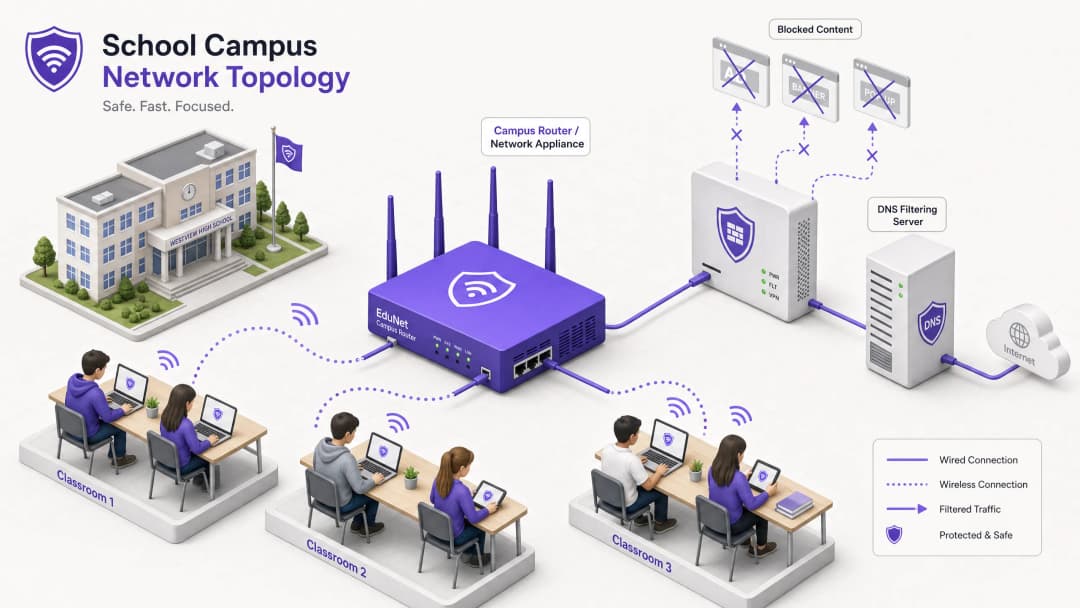
Pour les directeurs informatiques et les architectes réseau gérant des environnements éducatifs, la prolifération des appareils a créé une crise majeure en matière de consommation de bande passante, de risques de sécurité et de conformité. Avec des étudiants apportant en moyenne 2,5 appareils sur le campus, la gestion du filtrage basé sur les terminaux n'est plus une stratégie opérationnelle viable.
Le blocage des publicités au niveau du réseau représente un changement fondamental, passant de la gestion des terminaux à un contrôle au niveau de la couche infrastructure. En interceptant le trafic au niveau du DNS ou du proxy avant qu'il n'atteigne l'appareil client, les équipes informatiques peuvent éliminer unilatéralement jusqu'à 30 % de la consommation de bande passante non éducative, atténuer les risques de malvertising et appliquer la conformité avec les cadres de protection des données tels que le GDPR et la COPPA.
Ce guide de référence technique présente l'architecture, la méthodologie de déploiement et la mesure du ROI pour la mise en œuvre du blocage des publicités au niveau du réseau dans les écoles et les campus universitaires, sur la base de déploiements réels dans des environnements à haute densité.
Écoutez notre podcast d'accompagnement pour un aperçu stratégique :
Analyse technique approfondie
La mise en œuvre du blocage des publicités au niveau de la couche réseau nécessite une approche architecturale multicouche pour gérer la diversité du trafic web moderne, en particulier l'ubiquité du protocole HTTPS et des nouveaux protocoles DNS chiffrés.
Architecture de filtrage au niveau du DNS
La couche fondamentale du blocage des publicités sur le réseau est le filtrage DNS. Lorsqu'un appareil client tente de résoudre des domaines associés à des réseaux publicitaires, à de la télémétrie ou à du suivi, le résolveur DNS du réseau intercepte la requête et la vérifie par rapport à des listes de blocage dynamiques.

Cette approche est extrêmement efficace car elle empêche la connexion d'être établie dès le départ. Le contenu publicitaire n'est jamais téléchargé et les scripts de suivi ne sont jamais exécutés. Cependant, les déploiements modernes doivent prendre en compte le DNS-over-HTTPS (DoH) et le DNS-over-TLS (DoT). Si les appareils clients contournent les résolveurs locaux en utilisant un DNS chiffré, la couche de filtrage est contournée. Les architectes réseau doivent configurer les pare-feu de périmètre pour bloquer les terminaux DoH/DoT connus (tels que 8.8.8.8 sur le port 443) afin de forcer un retour au DNS standard (port 53), ou déployer une solution de passerelle qui inspecte nativement le trafic DoH.
Inspection Proxy et SSL
Bien que le filtrage DNS gère la majeure partie du trafic publicitaire, le proxy HTTP/HTTPS transparent offre un contrôle granulaire sur des URL spécifiques plutôt que sur des domaines entiers. Comme la majeure partie du trafic web est chiffrée, le déploiement de l'inspection SSL (déchiffrement de type Man-in-the-Middle) est nécessaire pour l'inspection approfondie des paquets.
Cela nécessite le déploiement d'un certificat racine de confiance sur tous les appareils gérés. Bien qu'il s'agisse d'une pratique standard dans les environnements d'entreprise, l'inspection SSL en milieu scolaire nécessite un ciblage minutieux pour éviter de déchiffrer le trafic sensible (par exemple, les portails bancaires ou de santé) et doit s'aligner sur la charte d'utilisation informatique de l'organisation.
Intégration avec le Contrôle d'Accès au Réseau (NAC)
Un filtrage efficace nécessite des politiques basées sur l'identité. L'intégration avec la norme IEEE 802.1X permet au réseau d'appliquer des politiques de filtrage différenciées en fonction de l'utilisateur authentifié ou du profil de l'appareil. Un élève qui se connecte au réseau via WPA3-Enterprise reçoit une politique restrictive, tandis qu'un membre du personnel bénéficie d'une politique différente, et qu'un visiteur sur le réseau WiFi invité se voit appliquer une politique de conformité de base.
Vous avez des questions sur votre configuration spécifique ?
Notre équipe collabore avec des exploitants de sites, des responsables informatiques et des ingénieurs réseau au sein de 80 000 sites. Réservez un appel de 20 minutes et nous vous montrerons comment d'autres professionnels comme vous ont résolu ce problème.
Guide de mise en œuvre
Le déploiement du blocage des publicités au niveau du réseau nécessite une approche progressive afin d'éviter de perturber les activités pédagogiques légitimes.
Étape 1 : Audit du trafic et établissement d'une référence
Avant d'appliquer des règles de blocage, déployez la solution de filtrage en mode de surveillance passive (enregistrement uniquement) pendant 14 à 21 jours. Cela permet d'établir une référence du volume et de la catégorisation des requêtes DNS actuelles. Utilisez ces données pour identifier les principaux réseaux publicitaires et domaines de suivi qui consomment actuellement de la bande passante. Cette référence est essentielle pour les calculs de ROI ultérieurs et les rapports WiFi Analytics .
Étape 2 : Déploiement pilote
Sélectionnez un segment de réseau représentatif - tel qu'un seul VLAN d'élèves ou un bâtiment spécifique - pour la phase pilote. Appliquez les premières politiques de liste de blocage ciblant les réseaux publicitaires et les traceurs connus.
Étape critique : Mettez en place un processus d'approbation rapide pour les demandes de liste blanche. Les enseignants seront inévitablement confrontés à des faux positifs où des contenus éducatifs légitimes sont hébergés sur des domaines catégorisés comme publicitaires ou de suivi. Le support informatique doit être prêt à évaluer et à autoriser rapidement ces domaines afin de maintenir la confiance des utilisateurs.
Étape 3 : Déploiement complet et ajustement des politiques
Étendez le déploiement à tous les segments de réseau concernés, en appliquant des politiques différenciées grâce à l'intégration 802.1X. Surveillez les journaux en continu pendant les premières 48 heures pour identifier tout problème systémique.
Assurez-vous que le déploiement s'aligne sur les politiques de sécurité plus larges, comme le maintien d'une piste d'audit pour la sécurité informatique en 2026 afin de démontrer la conformité aux exigences de sécurité.
Bonnes pratiques
- Défense multicouche : Ne vous fiez pas uniquement au filtrage DNS. Combinez-le avec la gestion des terminaux pour les appareils appartenant à l'école et des règles de pare-feu robustes pour bloquer les tentatives de contournement (par exemple, les protocoles VPN, DoH).2. Sécurité standardisée : Assurez-vous que tous les nouveaux déploiements sans fil utilisent WPA3 pour se prémunir contre le vol d'identifiants, qui est un vecteur courant utilisé par les étudiants tentant d'accéder aux réseaux du personnel afin de contourner le filtrage.
- Alignement sur la conformité : Au Royaume-Uni, assurez-vous que vos politiques de filtrage respectent les exigences de base décrites dans la section IWF Compliance for Public WiFi Networks in the UK (ou Cumplimiento IWF para redes WiFi públicas en el Reino Unido pour les opérations hispanophones).
- Revues régulières : Les réseaux publicitaires changent constamment de domaine pour échapper aux listes de blocage. Assurez-vous que votre solution de filtrage utilise des flux de renseignements sur les menaces mis à jour de manière dynamique plutôt que des listes statiques.
Résolution des problèmes et atténuation des risques
| Mode de défaillance | Cause racine | Stratégie d'atténuation |
|---|---|---|
| Contournement via DNS chiffré | Les étudiants configurent les navigateurs pour utiliser DoH/DoT (par exemple, Cloudflare, Google DNS). | Bloquez les adresses IP des fournisseurs de DoH connus au niveau du pare-feu ; imposez la résolution DNS locale via DHCP. |
| Contournement via VPN | Utilisation de clients VPN commerciaux ou d'extensions de navigateur. | Bloquez les protocoles VPN courants (IPsec, OpenVPN, WireGuard) et les domaines de fournisseurs de VPN connus sur le VLAN des étudiants. |
| Sur-blocage (Faux positifs) | Un filtrage heuristique agressif bloque le contenu éducatif. | Mettez en place un processus de demande de liste blanche rationalisé et garanti par un SLA pour le personnel enseignant ; pilotez minutieusement les politiques avant le déploiement complet. |
| Fuite IPv6 | Le filtrage est uniquement appliqué à IPv4, permettant des contournements via la résolution DNS IPv6. | Assurez-vous que la solution de filtrage et l'infrastructure réseau prennent entièrement en charge et appliquent les politiques sur l'ensemble de la pile IPv6. |
ROI et impact commercial
L'analyse de rentabilisation du blocage des publicités au niveau du réseau va au-delà de la sécurité ; elle offre une efficacité opérationnelle mesurable.
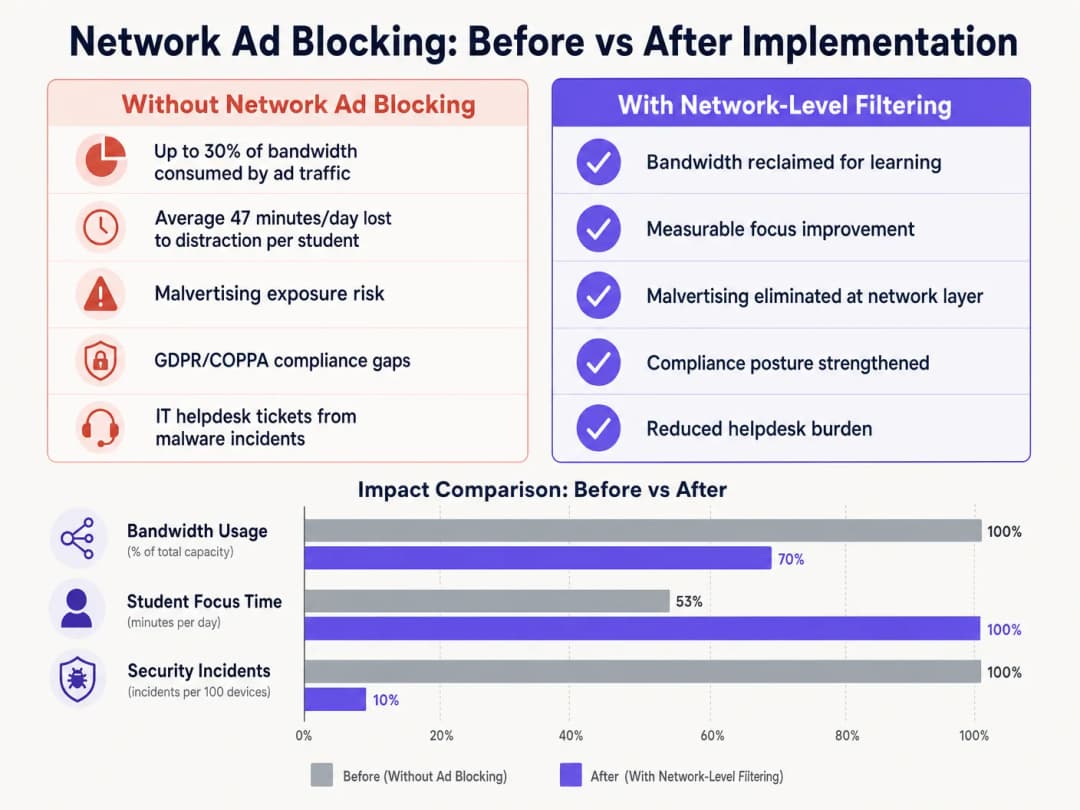
En éliminant les charges utiles publicitaires et les scripts de suivi à la périphérie du réseau, les établissements récupèrent généralement entre 15 % et 30 % de leur bande passante totale. Cette capacité récupérée permet de différer le besoin de mises à niveau coûteuses des circuits et améliore les performances des applications cloud critiques. De plus, le blocage des domaines de malvertising au niveau DNS réduit considérablement le volume d'incidents liés aux logiciels malveillants, ce qui diminue directement le volume de tickets d'assistance informatique et les coûts de résolution.Qu'il s'agisse d'un déploiement dans des écoles, d'optimiser le Office Wi Fi: Optimise Your Modern Office Wi-Fi Network ou de gérer des environnements à haute densité dans le Retail , la Healthcare , l' Hospitality ou les Transport , comprendre la couche physique, comme les Wi Fi Frequencies: A Guide to Wi-Fi Frequencies in 2026 , et sécuriser la couche logique grâce au filtrage DNS sont des composants essentiels de l'architecture réseau moderne.
Définitions clés
Filtrage DNS
Le processus consistant à utiliser le Domain Name System pour bloquer les sites web malveillants et filtrer le contenu nocif ou indésirable en renvoyant une adresse IP nulle pour les domaines bloqués.
Le mécanisme principal pour le blocage des publicités au niveau du réseau, fonctionnant en amont des appareils clients.
DNS-over-HTTPS (DoH)
Un protocole permettant d'effectuer une résolution de Domain Name System à distance via le protocole HTTPS, chiffrant les données entre le client DoH et le résolveur DNS basé sur DoH.
Une méthode courante utilisée pour contourner les politiques locales de filtrage DNS du réseau.
Malvertising
L'utilisation de la publicité en ligne pour propager des logiciels malveillants, souvent via des réseaux publicitaires légitimes à l'insu de l'éditeur.
Un risque de sécurité majeur atténué par le blocage des publicités au niveau du réseau.
Inspection SSL
Le processus consistant à intercepter, déchiffrer et inspecter le trafic HTTPS à la recherche de contenus malveillants ou de violations de politiques avant de le chiffrer à nouveau et de le transmettre.
Requise pour l'inspection approfondie des paquets du trafic web chiffré, bien que complexe à déployer dans les environnements BYOD.
IEEE 802.1X
Une norme IEEE pour le contrôle d'accès réseau basé sur les ports (PNAC), fournissant un mécanisme d'authentification aux appareils souhaitant se connecter à un réseau local ou un WLAN.
Utilisé pour identifier les utilisateurs et les appareils afin d'appliquer des politiques de filtrage différenciées.
WPA3-Enterprise
La dernière génération de sécurité WiFi, offrant une force cryptographique renforcée et protégeant contre les attaques par dictionnaire.
Essentiel pour sécuriser les réseaux de campus et garantir que les utilisateurs ne peuvent pas facilement usurper des identités pour contourner le filtrage.
VLAN (Virtual Local Area Network)
Un sous-réseau logique qui regroupe un ensemble d'équipements provenant de différents réseaux LAN physiques.
Utilisé pour segmenter le trafic des étudiants, du personnel et des invités afin d'appliquer des politiques de sécurité et de filtrage différentes.
Proxy transparent
Un système intermédiaire qui se situe entre un utilisateur et un fournisseur de contenu, interceptant les requêtes sans nécessiter de configuration côté client.
Utilisé pour appliquer des politiques de filtrage au niveau des URL sans déployer d'agents sur les terminaux.
Exemples concrets
Un grand groupement de plusieurs établissements comptant 15 000 étudiants répartis sur 12 campus doit mettre en œuvre un blocage des publicités. Ils utilisent actuellement un mélange de Chromebooks fournis par l'école et une politique BYOD pour les étudiants de terminale. Le réseau souffre de congestion de bande passante pendant les heures de pointe.
- Déployer une solution de filtrage DNS gérée dans le cloud sur les 12 campus, en orientant tous les paramètres DNS attribués par DHCP vers les résolveurs cloud.
- Configurer le pare-feu pour bloquer le trafic sortant du port 53 vers toute IP externe autre que les résolveurs cloud approuvés afin d'empêcher les contournements manuels du DNS.
- Bloquer les IP des fournisseurs DoH connus au niveau du pare-feu.
- Intégrer la solution de filtrage DNS avec l'Active Directory du groupement via 802.1X pour appliquer différentes politiques de filtrage : une politique stricte pour le VLAN des Chromebooks et une politique légèrement plus permissive pour le VLAN BYOD, tout en maintenant le blocage de base des publicités et du malvertising sur les deux.
L'équipe informatique d'un campus universitaire reçoit des plaintes de la faculté d'informatique indiquant que la nouvelle solution de blocage des publicités sur le réseau empêche l'accès à des outils de développement légitimes et à des API utilisés dans le cadre des cours.
- Examiner les journaux de requêtes DNS pour le VLAN de la faculté d'informatique afin d'identifier les domaines spécifiques bloqués.
- Créer un groupe de politiques dédié pour les VLAN de la faculté d'informatique et des étudiants.
- Mettre en œuvre une liste blanche ciblée pour les domaines de développement requis, en l'appliquant uniquement au groupe de politiques de la faculté d'informatique afin de maintenir la sécurité sur le reste du campus.
- Établir une catégorie de tickets informatiques prioritaires spécifiquement pour le "Blocage de contenu éducatif" afin de gérer les futures demandes avec un SLA de 2 heures.
Questions d'entraînement
Q1. Vous avez déployé un filtrage DNS sur l'ensemble du réseau du campus, mais la surveillance montre qu'un nombre important d'équipements BYOD d'étudiants continuent de charger des publicités et d'accéder à des contenus restreints. Quelle en est la cause la plus probable et comment devez-vous y remédier ?
Conseil : Réfléchissez à la manière dont les navigateurs modernes gèrent les requêtes DNS indépendamment des paramètres réseau du système d'exploitation.
Voir la réponse type
La cause la plus probable est que les navigateurs modernes sur les équipements BYOD utilisent le protocole DNS-over-HTTPS (DoH) pour contourner le résolveur DNS du réseau local. Pour y remédier, configurez le pare-feu de périmètre pour bloquer les adresses IP des fournisseurs DoH connus et rejeter le trafic sortant sur le port 53 qui ne provient pas des résolveurs DNS approuvés du campus. Cela force les équipements à basculer vers l'infrastructure DNS locale filtrée.
Q2. La direction de l'école souhaite bloquer tous les réseaux sociaux et réseaux publicitaires de manière globale sur l'ensemble du campus pour garantir une conformité maximale. En tant que directeur informatique, pourquoi pourriez-vous déconseiller une politique globale unique, et quelle architecture proposeriez-vous à la place ?
Conseil : Prenez en compte les différents groupes d'utilisateurs sur le campus et leurs besoins spécifiques.
Voir la réponse type
Une politique globale unique provoquera inévitablement des frictions opérationnelles. Le personnel peut avoir besoin d'accéder aux réseaux sociaux pour la communication ou le marketing, et certains réseaux publicitaires peuvent être requis pour des outils pédagogiques légitimes. Proposez plutôt une architecture segmentée utilisant l'intégration 802.1X pour appliquer des politiques basées sur l'identité. Créez des VLAN et des groupes de politiques distincts pour les étudiants, le personnel et les invités, en appliquant un blocage strict aux étudiants tout en permettant les accès nécessaires au personnel.
Q3. Avant de passer la nouvelle solution de filtrage DNS en mode d'application active, quel processus opérationnel critique doit être établi avec le support informatique ?
Conseil : Pensez à l'impact des faux positifs sur le personnel enseignant.
Voir la réponse type
Un processus de demande de liste blanche à réponse rapide doit être établi. Le filtrage heuristique bloquera inévitablement certaines ressources éducatives légitimes (faux positifs). Sans un processus rapide et soutenu par des engagements de niveau de service (SLA) permettant aux enseignants de demander le déblocage de domaines, le déploiement perturbera l'apprentissage et suscitera de la résistance de la part des parties prenantes.
Continuer la lecture de cette série
Captive Portals vs. Réseaux Ouverts : Équilibrer Sécurité et Expérience Utilisateur
Ce guide de référence technique fournit aux architectes réseau et aux directeurs informatiques un plan complet pour le déploiement de réseaux WiFi invités. Il analyse les compromis techniques entre réseaux ouverts et portails captifs, en détaillant comment équilibrer les protocoles de sécurité avec l'expérience utilisateur. Les lecteurs apprendront à configurer des mécanismes de redirection résilients, à gérer la randomisation MAC et à mettre en œuvre des flux d'authentification fluides.
Comment implémenter des restrictions de temps et de bande passante sur un réseau WiFi invité
Un guide de référence technique faisant autorité sur l'implémentation de restrictions de temps et de bande passante sur les réseaux WiFi invités d'entreprise. Ce guide fournit des schémas d'architecture exploitables, des configurations indépendantes des fournisseurs et des études de cas réels pour aider les responsables informatiques à équilibrer performances réseau, conformité de sécurité et expérience visiteur.
Monetizing Guest WiFi Through Data Analytics and Splash Pages
This authoritative guide provides IT managers, network architects, and CTOs with a comprehensive technical framework for transforming guest WiFi from a cost centre into a high-yield first-party data asset. It outlines network architecture, data analytics integration, captive portal optimization, and global compliance strategies to drive measurable venue revenue.
Vous avez des questions sur votre configuration spécifique ?
Notre équipe collabore avec des exploitants de sites, des responsables informatiques et des ingénieurs réseau au sein de 80 000 sites. Réservez un appel de 20 minutes et nous vous montrerons comment d'autres professionnels comme vous ont résolu ce problème.