
Minimizing Student Distractions with Network-Level Ad Blocking
This authoritative technical reference guide details the architecture, deployment, and business impact of network-level ad blocking in educational environments. It provides IT managers and network architects with actionable strategies to reclaim bandwidth, strengthen compliance, and eliminate malvertising risks.
Video overview
Listen to this guide
View podcast transcript
Part of our core series: Enterprise WiFi Security Guide →
Executive Summary
For IT directors and network architects managing educational environments, the proliferation of devices has created a major crisis of bandwidth consumption, security risks, and compliance gaps. With students bringing an average of 2.5 devices to campus, managing endpoint-based filtering is no longer a viable operational strategy.
Network-level ad blocking represents a fundamental shift from endpoint management to infrastructure-layer control. By intercepting traffic at the DNS or proxy level before it reaches the client device, IT teams can unilaterally eliminate up to 30% of non-educational bandwidth consumption, mitigate malvertising risks, and enforce compliance with data protection frameworks such as CCPA/CPRA and COPPA.
This technical reference guide outlines the architecture, deployment methodology, and ROI measurement for implementing network-level ad blocking across K-12 and university campuses, based on real-world deployments in high-density environments.
Listen to our companion podcast for a strategic overview:
Technical Deep-Dive
Implementing ad blocking at the network layer requires a layered architectural approach to handle the diversity of modern web traffic, particularly the ubiquity of HTTPS and emerging encrypted DNS protocols.
DNS-Level Filtering Architecture
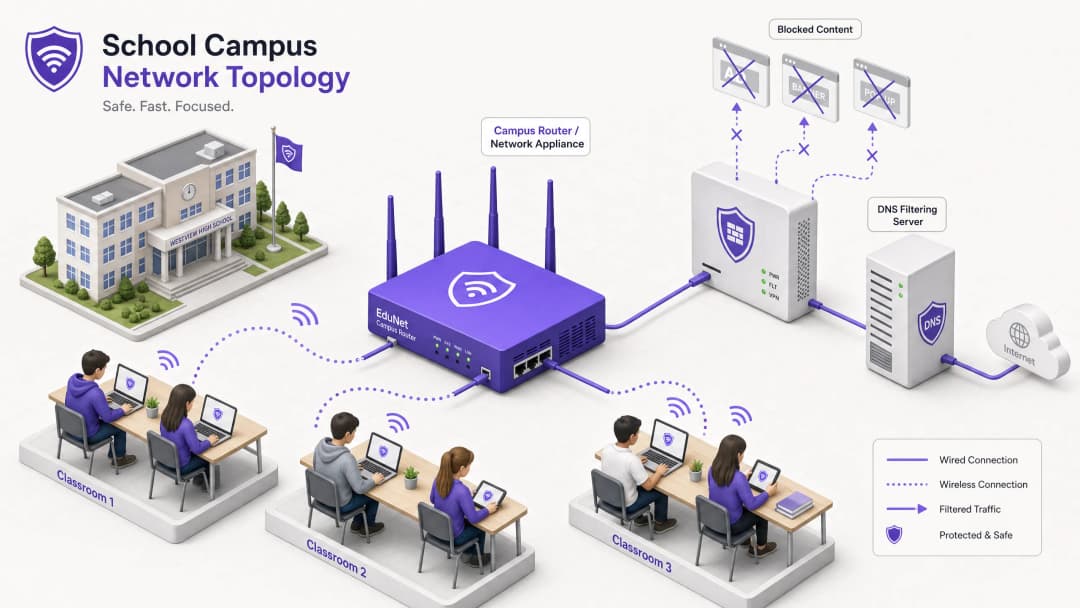
The foundational layer of network ad blocking is DNS filtering. When a client device attempts to resolve domains associated with ad networks, telemetry, or tracking, the network's DNS resolver intercepts the query and checks it against dynamic blocklists.

This approach is highly efficient because it prevents the connection from being established in the first place. The ad payload is never downloaded, and tracking scripts are never executed. However, modern deployments must account for DNS-over-HTTPS (DoH) and DNS-over-TLS (DoT). If client devices bypass local resolvers by using encrypted DNS, the filtering layer is bypassed. Network architects must configure perimeter firewalls to block known DoH/DoT endpoints (such as 8.8.8.8 on port 443) to force a fallback to standard DNS (port 53), or deploy a gateway solution that natively inspects DoH traffic.
Proxy and SSL Inspection
While DNS filtering handles most ad traffic, transparent HTTP/HTTPS proxying provides granular control over specific URLs rather than entire domains. Since most web traffic is encrypted, deploying SSL inspection (Man-in-the-Middle decryption) is necessary for deep packet inspection.
This requires deploying a trusted root certificate on all managed devices. Despite being standard practice in enterprise environments, SSL inspection in educational settings requires careful scoping to avoid decrypting sensitive traffic (e.g., banking or healthcare portals) and must align with the organization's acceptable use policy.
Integration with Network Access Control (NAC)
Effective filtering requires identity-aware policies. Integration with IEEE 802.1X allows the network to enforce differentiated filtering policies based on the authenticated user or device profile. A student logging into the network via WPA3-Enterprise receives a restrictive policy, while a staff member receives a different policy, and a visitor on the Guest WiFi network receives a baseline compliance policy.
Got questions about your specific setup?
Our team works with venue operators, IT managers, and network engineers across 80,000 venues. Book a 20-minute call and we will show you how others like you solved it.
Implementation Guide
Deploying network-level ad blocking requires a phased approach to avoid disrupting legitimate educational activities.
Step 1: Traffic Auditing and Baselining
Before enforcing any blocking rules, deploy the filtering solution in passive monitoring (logging-only) mode for 14 - 21 days. This establishes a baseline of current DNS query volume and categorization. Use this data to identify the top ad networks and tracking domains currently consuming bandwidth. This baseline is crucial for subsequent ROI calculations and WiFi Analytics reporting.
Step 2: Pilot Deployment
Select a representative network segment - such as a single student VLAN or a specific building - for the pilot phase. Apply initial blocklist policies targeting known ad networks and trackers.
Critical Step: Establish a quick-response whitelist request process. Teachers will inevitably encounter false positives where legitimate educational content is hosted on domains categorized as advertising or tracking. The IT helpdesk must be prepared to quickly evaluate and whitelist domains to maintain stakeholder trust.
Step 3: Full Rollout and Policy Tuning
Expand deployment across all relevant network segments, enforcing differentiated policies through 802.1X integration. Monitor logs continuously for the first 48 hours to identify any systemic issues.
Ensure the deployment aligns with broader security policies, such as maintaining an Explain what is audit trail for IT Security in 2026 to demonstrate compliance with security requirements.
Best Practices
- Layered Defense: Do not rely solely on DNS filtering. Combine it with endpoint management for school-owned devices and robust firewall rules to block bypass attempts (e.g., VPN protocols, DoH).
- Standardized Security: Ensure all new wireless deployments use WPA3 to protect against credential theft, which is a common vector for students attempting to access staff networks to bypass filtering.
- Compliance Alignment: Ensure your filtering policies meet the baseline requirements outlined in IWF Compliance for Public WiFi Networks in the UK or local educational and federal standards.
- Regular Reviews: Ad networks constantly change domains to evade blocklists. Ensure your filtering solution uses dynamically updated threat intelligence feeds rather than static lists.
Troubleshooting and Risk Mitigation
| Failure Mode | Root Cause | Mitigation Strategy |
|---|---|---|
| Bypass via Encrypted DNS | Students are configuring browsers to use DoH/DoT (e.g., Cloudflare, Google DNS). | Block known DoH provider IP addresses at the firewall; enforce local DNS resolution via DHCP. |
| Bypass via VPN | Use of commercial VPN clients or browser extensions. | Block common VPN protocols (IPsec, OpenVPN, WireGuard) and known VPN provider domains on the student VLAN. |
| Over-blocking (False Positives) | Aggressive heuristic filtering is blocking educational content. | Implement a streamlined, SLA-backed whitelist request process for teaching staff; pilot policies thoroughly before full deployment. |
| IPv6 Leakage | Filtering is only applied to IPv4, allowing bypasses via IPv6 DNS resolution. | Ensure the filtering solution and network infrastructure fully support and implement policies across the IPv6 stack. |
ROI and Business Impact
The business case for network-level ad blocking extends beyond security; it delivers measurable operational efficiency.
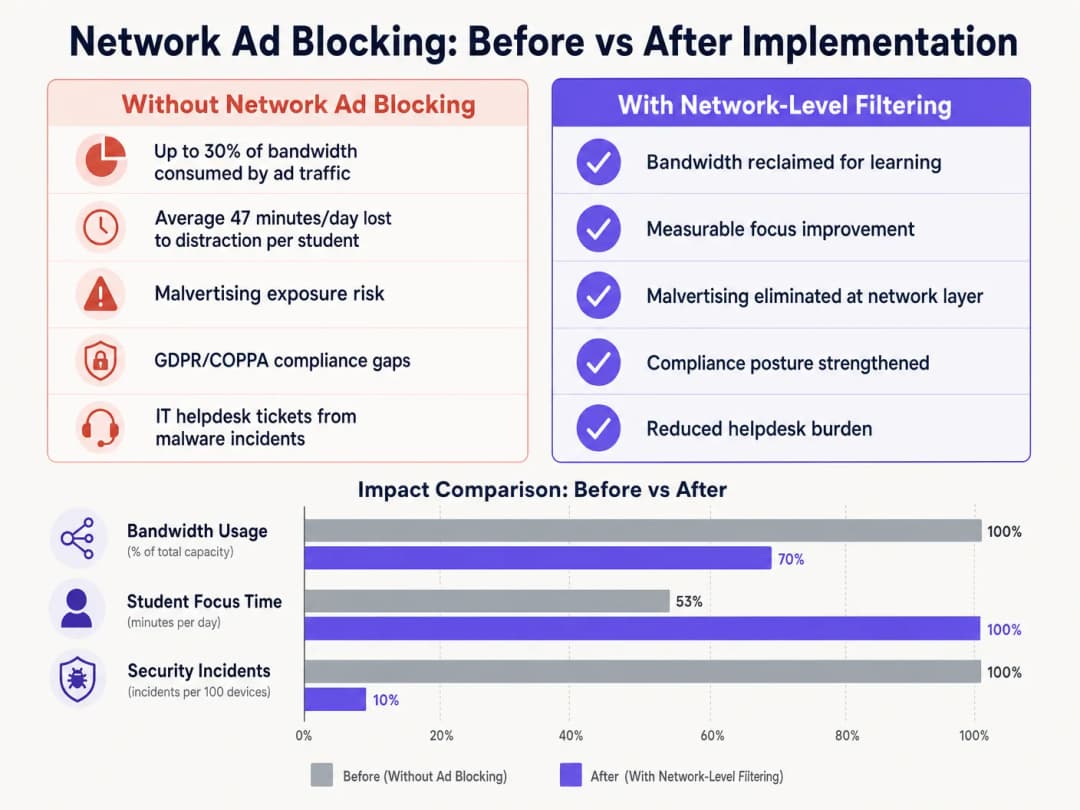
By eliminating ad payloads and tracking scripts at the network edge, venues typically reclaim 15% to 30% of their total bandwidth. This reclaimed capacity defers the need for expensive circuit upgrades and improves the performance of critical cloud applications. Furthermore, blocking malvertising domains at the DNS level significantly reduces the volume of malware incidents, directly lowering IT helpdesk ticket volumes and remediation costs. Whether deploying in schools, optimizing Office WiFi: Optimize Your Modern Office WiFi Network, or managing high-density environments in Retail, Healthcare, Hospitality, or Transportation, understanding the physical layer, such as WiFi Frequencies: A Guide to WiFi Frequencies in 2026, and securing the logical layer through DNS filtering are essential components of modern network architecture.
Key Definitions
DNS Filtering
The process of using the Domain Name System to block malicious websites and filter out harmful or unwanted content by returning a null IP address for blocked domains.
The primary mechanism for network-level ad blocking, operating upstream of client devices.
DNS-over-HTTPS (DoH)
A protocol for performing remote Domain Name System resolution via the HTTPS protocol, encrypting the data between the DoH client and the DoH-based DNS resolver.
A common method used to bypass local network DNS filtering policies.
Malvertising
The use of online advertising to spread malware, often through legitimate advertising networks without the publisher's knowledge.
A key security risk mitigated by network-level ad blocking.
SSL Inspection
The process of intercepting, decrypting, and inspecting HTTPS traffic for malicious content or policy violations before re-encrypting and forwarding it.
Required for deep packet inspection of encrypted web traffic, though complex to deploy in BYOD environments.
IEEE 802.1X
An IEEE Standard for port-based Network Access Control (PNAC), providing an authentication mechanism to devices wishing to attach to a LAN or WLAN.
Used to identify users and devices to apply differentiated filtering policies.
WPA3-Enterprise
The latest generation of WiFi security, providing enhanced cryptographic strength and protecting against dictionary attacks.
Essential for securing campus networks and ensuring users cannot easily spoof identities to bypass filtering.
VLAN (Virtual Local Area Network)
A logical subnetwork that groups a collection of devices from different physical LANs.
Used to segment student, staff, and guest traffic to apply different security and filtering policies.
Transparent Proxy
An intermediary system that sits between a user and a content provider, intercepting requests without requiring client-side configuration.
Used to enforce URL-level filtering policies without deploying endpoint agents.
Worked Examples
A large charter school network with 15,000 students across 12 campuses needs to implement ad blocking. They currently use a mix of school-issued Chromebooks and a BYOD policy for high school juniors and seniors. The network is struggling with bandwidth congestion during peak hours.
- Deploy a cloud-managed DNS filtering solution across all 12 campuses, pointing all DHCP-assigned DNS settings to the cloud resolvers.
- Configure the firewall to block outbound port 53 traffic to any external IP other than the approved cloud resolvers to prevent manual DNS overrides.
- Block known DoH provider IPs at the firewall.
- Integrate the DNS filtering solution with the school network's Active Directory via 802.1X to apply different filtering policies: a strict policy for the Chromebook VLAN and a slightly more permissive policy for the BYOD VLAN, while maintaining core ad and malvertising blocking across both.
A university campus IT team receives complaints from the Computer Science faculty that the new network ad blocking solution is preventing access to legitimate development tools and APIs used in coursework.
- Review the DNS query logs for the Computer Science VLAN to identify the specific domains being blocked.
- Create a dedicated policy group for the Computer Science faculty and student VLANs.
- Implement a scoped whitelist for the required development domains, applying it only to the Computer Science policy group to maintain security across the rest of the campus.
- Establish a fast-track IT ticketing category specifically for 'Educational Content Blocking' to handle future requests with a 2-hour SLA.
Practice Questions
Q1. You have deployed DNS filtering across the campus network, but monitoring shows that a significant number of student BYOD devices are still loading ads and accessing restricted content. What is the most likely cause, and how should you address it?
Hint: Consider how modern browsers handle DNS queries independently of the operating system's network settings.
View model answer
The most likely cause is that modern browsers on the BYOD devices are using DNS-over-HTTPS (DoH) to bypass the local network's DNS resolver. To address this, configure the perimeter firewall to block known DoH provider IP addresses and drop outbound traffic on port 53 that does not originate from the approved campus DNS resolvers. This forces the devices to fall back to the local, filtered DNS infrastructure.
Q2. The school's leadership team wants to block all social media and advertising networks globally across the entire campus to ensure maximum compliance. As the IT Director, why might you advise against a single global policy, and what architecture would you propose instead?
Hint: Consider the different user groups on campus and their specific needs.
View model answer
A single global policy will inevitably cause operational friction. Staff may need access to social media for communications or marketing, and certain ad networks may be required for legitimate educational tools. Instead, propose a segmented architecture using 802.1X integration to apply identity-aware policies. Create distinct VLANs and policy groups for Students, Staff, and Guests, applying strict blocking to students while allowing necessary access for staff.
Q3. Before switching the new DNS filtering solution into active enforcement mode, what critical operational process must be established with the IT helpdesk?
Hint: Think about the impact of false positives on teaching staff.
View model answer
A rapid-response allowlist request process must be established. Heuristic filtering will inevitably block some legitimate educational resources (false positives). Without a fast, SLA-backed process for teachers to request domains be unblocked, the deployment will disrupt learning and cause stakeholder resistance.
Continue reading in this series
How to revoke WiFi access when an employee leaves
This guide shows IT and venue operations teams how to remove Staff WiFi access when an employee leaves without disrupting the rest of the workforce. It compares certificate-based 802.1X, identity-specific iPSK and SCIM-driven deprovisioning, then provides a same-day runbook, test method and audit evidence model.
Planning a WiFi 7 deployment in a clinical environment: IoMT devices, interference, and HIPAA
This comprehensive guide explores planning a WiFi 7 deployment in a clinical environment, focusing on 6 GHz band strategy, legacy IoMT device compatibility, IEC 60601 - 1 - 2 RF interference obligations, and HIPAA-aligned network segmentation. It provides actionable architecture advice for healthcare IT leaders to secure mixed device fleets using Purple's cloud RADIUS platform.
How to Securely Segment Staff and Guest WiFi Networks: Best Practices for Enterprise LANs
This guide provides IT managers and network architects with a vendor-neutral, technical blueprint for securing enterprise LANs by properly segmenting staff and guest WiFi traffic. It covers 802.1X authentication, cloud RADIUS, VLAN isolation, and the credential lifecycle management required to eliminate shared passphrases and protect corporate assets.
Got questions about your specific setup?
Our team works with venue operators, IT managers, and network engineers across 80,000 venues. Book a 20-minute call and we will show you how others like you solved it.