व्यवसाय के लिए WiFi सेट करने की अधिकांश सलाह उपभोक्ता युग में अटकी हुई है। यह इस काम को एक प्लेसमेंट अभ्यास के रूप में मानती है: बीच में एक राउटर रखें, कुछ एक्सेस पॉइंट जोड़ें, एक पासवर्ड चुनें, और इसे समाप्त मानें। यह मॉडल वास्तविक वातावरण में तेजी से टूट जाता है जहां गेस्ट, स्टाफ डिवाइस, स्कैनर, टिल, कैमरे, टीवी, टैबलेट, और ठेकेदार सभी शेष नेटवर्क को उजागर किए बिना स्थिर एक्सेस की अपेक्षा करते हैं।
बड़ी समस्या यह है कि खराब वायरलेस डिज़ाइन अब सुरक्षा जोखिम, परिचालन में रुकावट और टाले जा सकने वाले सपोर्ट के काम को जन्म देता है। एक साझा पासवर्ड तब तक सरल लगता है जब तक कि आपको एक यूज़र को हटाना न हो, एक डिवाइस को ट्रेस न करना हो, एक जोखिम भरे एंडपॉइंट को अलग न करना हो, या व्यावसायिक सिस्टम वाले समान फ्लैट नेटवर्क पर किसी एक प्रभावित फोन को एक्सेस करने से रोकना न हो।
केवल कवरेज से कहीं अधिक - बिजनेस WiFi के नए नियम
कवरेज अभी भी मायने रखता है। लेकिन यह पूरी कहानी नहीं है।
कई गाइडों में कमजोरी यह है कि वे सिग्नल की शक्ति पर ही रुक जाते हैं और कभी भी पहचान, एक्सेस कंट्रोल, और ज़ीरो-ट्रस्ट डिज़ाइन पर ध्यान नहीं देते हैं। यूके-केंद्रित इंस्टॉलेशन मार्गदर्शन पहले से ही इस बदलाव को दर्शाता है। अब अधिक उपयोगी प्रश्न केवल कवरेज प्राप्त करना नहीं है, बल्कि क्रेडेंशियल साझाकरण और व्यवस्थापक ओवरहेड को कम करते हुए घर्षण-रहित एक्सेस प्रदान करना है, विशेष रूप से ऐसे वातावरण में जहां आधुनिक अतिथि प्रमाणीकरण और उपयोगकर्ताओं तथा उपकरणों के बीच मजबूत अलगाव की आवश्यकता होती है, जैसा कि The Network Installers on business WiFi installation द्वारा उल्लेख किया गया है।
पुरानी सलाह कहाँ गलत साबित होती है
पुराना पैटर्न आमतौर पर इस तरह दिखता है:
- सभी के लिए एक SSID: मेहमान, कर्मचारी, और अप्रबंधित डिवाइस सभी एक ही नेटवर्क पर या कमजोर नीति नियंत्रण वाले हल्के अलग किए गए नेटवर्क पर आते हैं।
- एक साझा पासवर्ड: बांटना आसान है, निरस्त करना कठिन है, ठीक से ऑडिट करना असंभव है।
- सुरक्षा बाद में जोड़ी जाती है: हार्डवेयर लाइव होने के बाद एन्क्रिप्शन, गेस्ट आइसोलेशन, और एक्सेस नियमों को साफ-सफाई के काम के रूप में माना जाता है।
यह दृष्टिकोण बड़े पैमाने पर काम नहीं करता है। यह घटनाओं के दौरान भ्रम भी पैदा करता है, क्योंकि कोई भी बुनियादी सवालों के जवाब जल्दी नहीं दे पाता - किसने कनेक्ट किया, किस डिवाइस ने किस क्रेडेंशियल का उपयोग किया, उस उपयोगकर्ता को किस चीज़ तक पहुंच की अनुमति होनी चाहिए थी।
साझा क्रेडेंशियल्स केवल एक सुरक्षा समस्या नहीं हैं। वे एक ऑपरेशन्स की समस्या भी हैं। वे स्टाफिंग, किरायेदारी या सप्लायर एक्सेस में हर बदलाव को एक मैनुअल क्लीन-अप काम में बदल देते हैं।
वास्तव में आधुनिक बिजनेस WiFi क्या है
एक वर्तमान बिजनेस WLAN आपके पहचान स्टैक का हिस्सा है। इसे इनके बीच का अंतर पता होना चाहिए:
- एक गेस्ट जिसे केवल इंटरनेट की आवश्यकता है
- एक कर्मचारी जिसे कंपनी निर्देशिका के माध्यम से प्रमाणित होना चाहिए
- एक IoT डिवाइस जिसे संकीर्ण, अनुमानित एक्सेस की आवश्यकता है
- एक ठेकेदार या भागीदार जिसे समय-बद्ध अनुमतियों की आवश्यकता है
- एक निवासी या बार-बार आने वाला विजिटर जो घर्षण रहित पुन: कनेक्शन की अपेक्षा करता है
यह बिजनेस के लिए WiFi सेटअप करने के डिज़ाइन विवरण को बदल देता है। आप न केवल सिग्नल का वितरण कर रहे हैं। आप यह तय कर रहे हैं कि एक्सेस कैसे दी जाए, इसे कैसे निरस्त किया जाए, ट्रैफिक को कैसे सेगमेंट किया जाए, और बिना नियंत्रण को कमजोर किए यूजर एक्सपीरियंस को कैसे बनाए रखा जाए।
व्यावहारिक बेंचमार्क सरल है। यदि आपका वायरलेस नेटवर्क अभी भी बहुत सारे लोगों द्वारा जाने जाने वाले साझा पासवर्ड पर निर्भर है, तो आप एक आधुनिक एक्सेस मॉडल नहीं चला रहे हैं।
अपनी वायरलेस नींव की योजना बनाना
SSIDs को छूने से पहले, यह तय करें कि नेटवर्क को सामान्य लोड, चरम व्यस्तता और विफलता की स्थिति में क्या करना चाहिए। हार्डवेयर पर मढ़े जाने वाले अधिकांश वायरलेस मुद्दे वास्तव में योजना बनाने की गलतियां होते हैं।
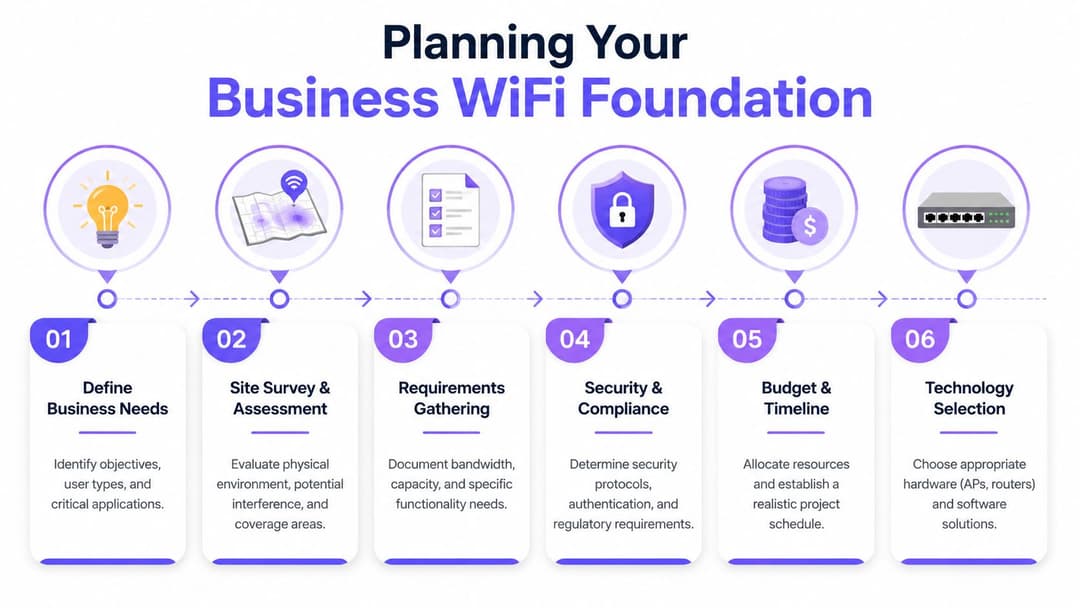
व्यावसायिक आवश्यकताओं के साथ शुरुआत करें
यहाँ UK का संदर्भ मायने रखता है। मई 2025 तक, 96% UK परिसरों के पास गीगाबिट-सक्षम ब्रॉडबैंड तक पहुंच थी, जैसा कि Ofcom data cited in AVSystem's UK WiFi statistics summary में बताया गया है। व्यवहार में, इसका मतलब है कि कई व्यवसायों को अब इमारत में सक्षम लाइन प्राप्त करने के लिए संघर्ष नहीं करना पड़ता है। बाधा अक्सर इसके अंदर का वायरलेस डिज़ाइन होता है।
यह प्लानिंग के क्रम को बदल देता है। "मैं कितने APs का खर्च उठा सकता हूँ?" से शुरुआत न करें। इससे शुरू करें:
किसे एक्सेस की आवश्यकता है कर्मचारी, अतिथि, ठेकेदार, निवासी, कियोस्क, भुगतान टर्मिनल, कैमरे, सेंसर।
वे नेटवर्क पर क्या करते हैं वीडियो कॉल, क्लाउड POS, रोमिंग वॉयस डिवाइस, स्ट्रीमिंग, गेस्ट ब्राउज़िंग, डोर एक्सेस, बिल्डिंग मैनेजमेंट।
वे इसे कहां करते हैं ओपन ऑफिस, बेडरूम, कॉरिडोर, वेयरहाउस आइल, रिसेप्शन, टैरेस, कॉन्फ्रेंस रूम, लिफ्ट, बैक-ऑफ-हाउस।
विफलता कैसी दिखती है क्या कोई डेड स्पॉट कष्टप्रद है, या यह व्यापार को रोकता है।
एक अच्छा संक्षिप्त तरीका कॉनकरेंसी (concurrency) के इर्द-गिर्द डिज़ाइन करना है, न कि कर्मचारियों की संख्या के। मध्यम ऑक्यूपेंसी लेकिन भारी डिवाइस उपयोग वाली इमारत को संभालना, कम वर्कलोड वाले व्यस्त स्थान की तुलना में अधिक कठिन हो सकता है।
पहले सर्वे करें, बाद में खरीदें
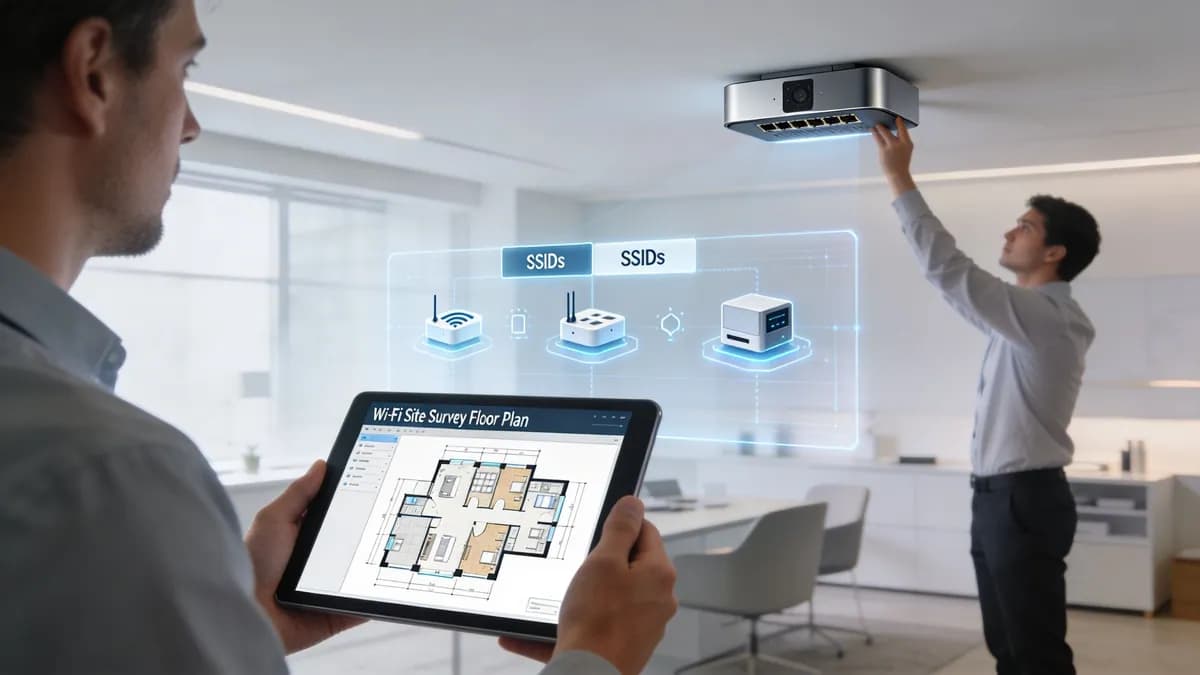
एक उचित साइट सर्वेक्षण कोई कागजी खानापूर्ति नहीं है। इसी के माध्यम से आप गलत मात्रा और प्रकार के हार्डवेयर खरीदने से बचते हैं।
साइट का दौरा करें और ध्यान दें:
- निर्माण सामग्री: कंक्रीट, ईंट, फ़ॉइल-बैक इन्सुलेशन, धातु की अलमारियां, रसोई के उपकरण, और लिफ्ट शाफ्ट सभी तरंग प्रसार को प्रभावित करते हैं।
- छत की ऊंचाई और माउंटिंग विकल्प: आकर्षक AP प्लेसमेंट अक्सर अच्छे RF प्लेसमेंट के साथ विरोधाभास पैदा करता है।
- हस्तक्षेप के स्रोत: पड़ोसी WLAN, भारी ब्लूटूथ क्षेत्र, कॉर्डलेस सहायक उपकरण, विशेषज्ञ उपकरण।
- रोमिंग पथ: लोग कैसे आवाजाही करते हैं, न कि फ़्लोर प्लान कैसे संकेत देता है कि वे आवाजाही करते हैं।
यदि आपको वायरलेस व्यवहार की बुनियादी बातों को दोबारा समझने की आवश्यकता है, तो कवरेज और क्लाइंट मूवमेंट को मॉडल करने से पहले वायरलेस कनेक्शन और वे कैसे काम करते हैं के बारे में यह गाइड एक उपयोगी शुरुआती बिंदु है।
व्यावहारिक नियम: यदि साइट पर कई मंजिलें, घने विभाजन या मिश्रित उपयोग वाले क्षेत्र हैं, तो कभी भी केवल फ्लोर प्लान से अंतिम AP प्लेसमेंट को मंजूरी न दें।
क्लाउड-मैनेज्ड या कंट्रोलर-बेस्ड
यह निर्णय रेडियो प्रदर्शन से अधिक संचालन को प्रभावित करता है।
वितरित परिसंपत्तियों, छोटी IT टीमों और उन संगठनों के लिए जो हल्के ऑन-साइट प्रबंधन के साथ केंद्रीय पॉलिसी चाहते हैं, Meraki, Mist, Aruba Central, या UniFi जैसे क्लाउड-मैनेज्ड WLAN आमतौर पर एक बेहतर विकल्प होते हैं। यह कॉन्फ़िगरेशन निरंतरता, फ़र्मवेयर नियंत्रण और रिमोट समस्या निवारण को सरल बनाता है।
एक कंट्रोलर-बेस्ड डिजाइन अभी भी वहां सही साबित होता है जहां आपको अधिक कड़े स्थानीय नियंत्रण, स्थापित परिचालन मानकों की आवश्यकता होती है, या आपने पहले से ही इन-हाउस विशेषज्ञता वाले प्लेटफॉर्म पर मानकीकरण कर लिया है। यह उन साइटों के लिए भी उपयुक्त हो सकता है जहां सख्त स्थानीय हैंडलिंग आवश्यकताएं या जटिल लीगेसी इंटीग्रेशन हैं।
इस परीक्षण का उपयोग करें:
| निर्णय बिंदु | क्लाउड-प्रबंधित WLAN | कंट्रोलर-आधारित WLAN |
|---|---|---|
| दैनिक व्यवस्थापक | वितरित टीमों के लिए सरल | वहां मजबूत जहां स्थानीय नेटवर्क टीमें पहले से कंट्रोलर प्रबंधित करती हैं |
| बहु-साइट निरंतरता | आमतौर पर आसान | कंट्रोलर आर्किटेक्चर और टीम के अनुशासन पर निर्भर करता है |
| परिवर्तन रोलआउट | तेज और केंद्रीकृत | नियंत्रित, लेकिन अक्सर परिचालन रूप से अधिक भारी |
| निर्भरता | विक्रेता क्लाउड संचालन मायने रखता है | ऑन-प्रिमाइसेस डिज़ाइन और लचीलापन अधिक मायने रखता है |
क्षमता विवरणिका में दिए गए कवरेज से बेहतर काम करती है
वेंडर्स को कवरेज मैप्स पसंद आते हैं। ऑपरेशन्स टीमें एयरटाइम विवाद, खराब रोमिंग और स्टिकी क्लाइंट्स के साथ जीती हैं।
इसके लिए योजना बनाएं:
- सघन क्षेत्र पहले: रिसेप्शन, बिलिंग काउंटर, बैठक कक्ष, बार, व्याख्यान स्थल, प्रतीक्षा क्षेत्र।
- एप्लिकेशन प्रकार: वॉयस और सहयोग ट्रैफ़िक को सामान्य ब्राउज़िंग की तुलना में अधिक स्पष्ट रोमिंग की आवश्यकता होती है।
- अपलिंक और स्विचिंग: PoE बजट, स्विच प्लेसमेंट, और केबलिंग मार्ग यदि जल्दी अनदेखा किए जाएं तो एक स्पष्ट डिज़ाइन को पटरी से उतार सकते हैं।
- परीक्षण कार्यप्रणाली: स्थापना के बाद सिग्नल की गुणवत्ता, हैंडऑफ़ व्यवहार और वास्तविक क्लाइंट अनुभव को सत्यापित करें।
सबसे महंगी वायरलेस डिज़ाइन गलती आमतौर पर बहुत अधिक खरीदना नहीं है। यह व्यस्त हिस्सों को कम क्षमता का बनाना और अगला पूरा साल यह समझाने में बिताना है कि नेटवर्क "चालू" तो है लेकिन उपयोगकर्ता फिर भी ठीक से काम क्यों नहीं कर पा रहे हैं।
सुरक्षा और स्केल के लिए अपना नेटवर्क डिज़ाइन करना
एक फ्लैट वायरलेस नेटवर्क अप्रचलित हो चुका है। यह सालों पहले नाजुक था, और अब यह एक लायबिलिटी है।
UK व्यावसायिक मार्गदर्शन लगातार एक चरणबद्ध वर्कफ़्लो की सिफारिश करता है: साइट का आकलन करें, डेड ज़ोन का नक्शा बनाएं, एक्सेस पॉइंट रखें, और केवल तभी SSID कॉन्फ़िगर करें। यह समवर्तीता के लिए कम-डिज़ाइनिंग के खिलाफ भी चेतावनी देता है, क्योंकि इससे रोमिंग की समस्याएं और सपोर्ट स्पाइक्स पैदा होते हैं, जैसा कि TS Cables' commercial WiFi installation guidance में रेखांकित किया गया है।

थ्री-नेटवर्क मॉडल
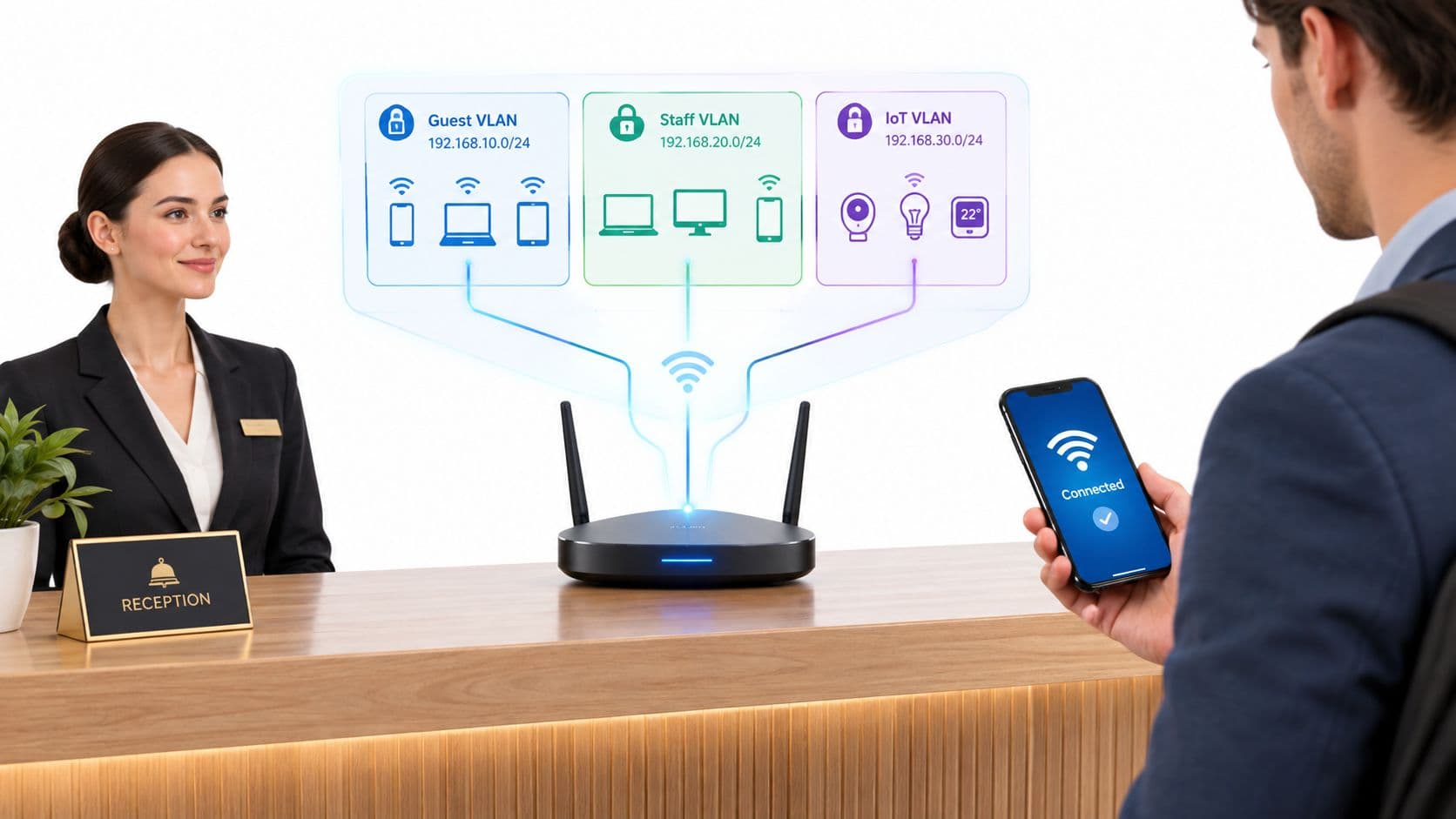
अधिकांश व्यवसायों को तीन लॉजिकल नेटवर्क के साथ शुरुआत करनी चाहिए, भले ही वे सभी एक ही स्विचिंग एस्टेट और एक्सेस लेयर पर चल रहे हों।
अतिथि
यह नेटवर्क आंतरिक प्रणालियों से पूरी तरह से अलग होना चाहिए। केवल इंटरनेट एक्सेस होना चाहिए, जिसमें बैंडविड्थ, सेशन हैंडलिंग और ऑनबोर्डिंग के संबंध में स्पष्ट नीतियां हों। यदि कोई गेस्ट डिवाइस असुरक्षित होती है, तो उसका प्रभाव वहीं तक सीमित रहना चाहिए।
स्टाफ
यह विश्वसनीय नेटवर्क है, लेकिन विश्वसनीय होने का मतलब अप्रतिबंधित होना नहीं है। स्टाफ ट्रैफ़िक को अभी भी पॉलिसी, भूमिका की समझ और ऑडिटेबिलिटी की आवश्यकता होती है। फाइनेंस, ऑपरेशन्स, फ्रंट डेस्क और अस्थायी स्टाफ को हमेशा एक ही प्रकार की पहुंच की आवश्यकता नहीं होती है।
IoT और लेगेसी
इस सेगमेंट में वे डिवाइस शामिल हैं जो नेटवर्क टीमों को चिंतित करते हैं और इसके पीछे वाजिब कारण भी हैं: प्रिंटर, डिस्प्ले, बिल्डिंग कंट्रोल, कैमरे, स्कैनर, स्मार्ट टीवी और जटिल अपडेट चक्रों वाले विशेष उपकरण। इनमें से कई डिवाइसों को कनेक्टिविटी की आवश्यकता होती है लेकिन उन्हें कभी भी यूजर ट्रैफिक के करीब नहीं रखा जाना चाहिए।
VLANs वास्तव में क्या करते हैं
VLANs समान भौतिक बुनियादी ढांचे पर अलग लॉजिकल लेन बनाते हैं। वे अपने आप नेटवर्क को सुरक्षित नहीं बना देते हैं। सुरक्षा उन नीतियों से आती है जिन्हें आप उनके बीच लागू करते हैं।
इसका आमतौर पर मतलब है:
- केवल इंटरनेट के लिए गेस्ट
- स्वीकृत आंतरिक सेवाओं के लिए कर्मचारी
- आवश्यक कंट्रोलर्स या क्लाउड एंडपॉइंट्स के लिए IoT
- डिफ़ॉल्ट रूप से कोई लैटरल मूवमेंट नहीं
यदि आप इस तरह के पृथक्करण के लिए एक व्यापक ढांचा चाहते हैं, तो network and wireless security का यह अवलोकन व्यावहारिक डिज़ाइन निर्णयों के लिए एक उपयोगी सहयोगी है।
यदि कोई गेस्ट SSID प्रिंटर सबनेट, कैमरा इंटरफेस, या आंतरिक एडमिन पेजों तक पहुँच सकता है, तो समस्या गेस्ट अनुभव की नहीं है। यह आर्किटेक्चर की समस्या है।
डिज़ाइन निर्णय जो दबाव में भी काम करते हैं
केवल इसलिए SSIDs न बनाएं क्योंकि आप ऐसा कर सकते हैं। प्रत्येक SSID मैनेजमेंट ओवरहेड, एयरटाइम प्रभाव और सहायता संबंधी जटिलता को बढ़ाता है। एक बेहतर डिज़ाइन वह है जिसमें स्पष्ट नीतियों से जुड़े मुट्ठी भर उद्देश्य-आधारित SSIDs हों।
एक अच्छे प्रोडक्शन बेसलाइन में अक्सर शामिल होते हैं:
- सख्त अलगाव के साथ एक गेस्ट SSID
- पहचान-जागरूक ऑथेंटिकेशन से जुड़ा एक स्टाफ SSID
- एक IoT SSID या कड़ाई से नियंत्रित डिवाइस नेटवर्क का एक छोटा सेट
फिर उनके पीछे के नियंत्रणों पर ध्यान केंद्रित करें:
| लेयर | बेहतर प्रदर्शन कैसा दिखता है |
|---|---|
| SSID डिज़ाइन | न्यूनतम सेट, स्पष्ट उद्देश्य, दर्शकों में कोई ओवरलैप नहीं |
| विभाजन | नीति द्वारा अलग किए गए अतिथि, कर्मचारी और IoT |
| फायरवॉलिंग | स्पष्ट अनुमति नियम, खंडों के बीच डिफ़ॉल्ट अस्वीकार |
| रोमिंग डिज़ाइन | सुसंगत RF योजना और प्रमाणीकरण व्यवहार |
| संचालन | जोड़ने, स्थानांतरित करने, रद्द करने और घटना प्रतिक्रिया के लिए स्पष्ट स्वामित्व |
जो काम नहीं करता है वह एक सजावटी सेगमेंटेशन मॉडल है जहां सब कुछ अभी भी हर महत्वपूर्ण चीज़ से बात कर सकता है।
Beyond Passwords A Guide to Secure WiFi Access
यदि आप अभी भी बिजनेस WiFi के लिए एकल प्री-शेयर की (pre-shared key) का उपयोग कर रहे हैं, तो यह बदलने वाली पहली चीज़ है।
बिजनेस WiFi के लिए सुरक्षा मार्गदर्शन बुनियादी बातों पर स्पष्ट है: WPA3, गेस्ट अलगाव, और मजबूत विशिष्ट क्रेडेंशियल प्रारंभिक निर्माण का हिस्सा होने चाहिए, बाद में जोड़े जाने वाले नहीं। यह डिफ़ॉल्ट क्रेडेंशियल और एकल साझा PSK के खिलाफ भी चेतावनी देता है क्योंकि वे बड़े पैमाने पर ऑडिट और निरस्तीकरण की समस्याएं पैदा करते हैं, जैसा कि Business.com's WiFi setup guidance में बताया गया है।
साझा किए गए पासवर्ड क्यों विफल हो जाते हैं
एक साझा पासवर्ड कुशल दिखता है क्योंकि इसका वितरण आसान है। उसके बाद सब कुछ बदतर होता जाता है।
जब कोई एक व्यक्ति कंपनी छोड़ता है, तो पासवर्ड उसके साथ नहीं जाता। जब किसी एक कॉन्ट्रैक्टर को अब एक्सेस की आवश्यकता नहीं होती है, तो केवल उस कॉन्ट्रैक्टर के एक्सेस को वापस लेने का कोई सुरक्षित तरीका नहीं होता है। जब कोई एक डिवाइस खराब व्यवहार करता है, तो दोष तय करना कठिन होता है क्योंकि कई यूजर एक ही क्रेडेंशियल इतिहास साझा कर सकते हैं।
परिचालन के दृष्टिकोण से, साझा PSKs ड्रिफ्ट भी पैदा करते हैं। फ्रंट डेस्क स्टाफ उन्हें लिख लेता है। फैसिलिटीज टीमें उन्हें सप्लायर्स को सौंप देती हैं। किरायेदार उन्हें अपने पास रख लेते हैं। पुराने डिवाइस महीनों तक दोबारा कनेक्ट होते रहते हैं।
एक बेहतर प्रमाणीकरण सीढ़ी
विभिन्न डिवाइस श्रेणियों को अलग-अलग तरीकों की आवश्यकता होती है। ऑथेंटिकेशन को एक सीढ़ी के रूप में देखें, न कि एक एकल मानक के रूप में।
| विधि | इसके लिए सर्वोत्तम | सुरक्षा स्तर | उपयोगकर्ता अनुभव | व्यवस्थापक का प्रयास |
|---|---|---|---|---|
| Shared PSK | अस्थायी लैब उपयोग या बहुत छोटे कम जोखिम वाले सेटअप | कम | शुरू में सरल, समय के साथ खराब | शुरू में कम, बाद में उच्च |
| Individual PSK | लीगेसी एंडपॉइंट्स और IoT जो एंटरप्राइज़ प्रमाणीकरण नहीं कर सकते | Shared PSK से बेहतर | आमतौर पर अंतिम उपयोगकर्ता के लिए अदृश्य | मध्यम |
| WPA3-Enterprise with RADIUS | स्थापित एंटरप्राइज़ वातावरण में कर्मचारियों के डिवाइस | उच्च | नामांकन के बाद अच्छा | मध्यम से उच्च |
| SSO-आधारित पहुंच | कर्मचारी और प्रबंधित उपयोगकर्ता जो क्लाउड पहचान से जुड़े हैं | उच्च | मजबूत और परिचित | पारंपरिक मैन्युअल क्रेडेंशियल हैंडलिंग से कम |
| Passpoint या OpenRoaming | अतिथि, निवासी, बार-बार आने वाले आगंतुक, भागीदार पारिस्थितिकी तंत्र | मजबूत उपयोगकर्ता सुविधा के साथ उच्च | बहुत मजबूत | रोलआउट के दौरान मध्यम |
प्रत्येक विधि कहाँ उपयुक्त बैठती है
स्टाफ उपयोगकर्ता
स्टाफ के लिए, स्पष्ट लक्ष्य आपकी डायरेक्टरी से जुड़ा पहचान-आधारित एक्सेस है। Microsoft Entra ID, Google Workspace, और Okta इसके सामान्य शुरुआती बिंदु हैं। इससे न केवल सुरक्षा मजबूत होती है, बल्कि लाइफसाइकिल नियंत्रण भी मिलता है।
प्रावधान रोजगार की स्थिति, समूह सदस्यता और डिवाइस पॉस्चर के अनुसार होना चाहिए जहां समर्थित हो। निरस्तीकरण तब होना चाहिए जब डायरेक्टरी में बदलाव हो, न कि तब जब किसी को WiFi पासवर्ड बदलना याद आए।
यह वह दिशा है जिसकी ओर कई टीमें बढ़ रही हैं, जब वे पासवर्ड साझा करने की जगह स्थिर क्रेडेंशियल्स के बजाय पहचान प्लेटफार्मों से जुड़े passwordless WiFi access को अपनाती हैं।
अतिथि और आगंतुक
Captive portals की अभी भी एक भूमिका है, लेकिन वे अब हर स्थान के लिए आदर्श उत्तर नहीं हैं। वे घर्षण बढ़ाते हैं, सहायता संबंधी प्रश्न पैदा करते हैं और अक्सर डिवाइस के प्रकारों में असंगत यूज़र जर्नी उत्पन्न करते हैं।
Passpoint और OpenRoaming वहां बेहतर हैं जहां आप एन्क्रिप्टेड, कम बाधा वाली गेस्ट ऑनबोर्डिंग और बार-बार कनेक्ट होने की सुविधा चाहते हैं, बिना यूज़र्स से हर बार क्रेडेंशियल दोबारा दर्ज करने के लिए कहे। वे अनुभव को "नेटवर्क से जुड़ें, ब्राउज़र खोलें, फॉर्म भरें, काम करने की उम्मीद करें" से बदलकर एक अधिक सहज पहचान-आधारित मॉडल में ले जाते हैं।
पासवर्ड रहित गेस्ट एक्सेस केवल सुविधा के बारे में नहीं है। यह क्रेडेंशियल साझा करने को कम करता है और सार्वजनिक और अर्ध-सार्वजनिक WiFi ऑनबोर्डिंग में सबसे आम विफलता बिंदुओं में से एक को हटाता है।
IoT और पुराने कठिन उपकरण
हर डिवाइस आधुनिक एंटरप्राइज ऑथेंटिकेशन का समर्थन नहीं करता है। यही कारण है कि व्यक्तिगत PSK (iPSK) अभी भी महत्वपूर्ण हैं। वे आपको पूरे परिसर में कमजोर साझा क्रेडेंशियल को थोपने के बजाय प्रति डिवाइस या डिवाइस समूह में अद्वितीय क्रेडेंशियल असाइन करने की अनुमति देते हैं।
यह आपको एक व्यावहारिक समाधान देता है। आप उसी नेटवर्क पर मौजूद हर स्मार्ट टीवी, प्रिंटर या बिल्डिंग सेंसर को प्रभावित किए बिना किसी एक समस्याग्रस्त डिवाइस का एक्सेस ब्लॉक कर सकते हैं।
निर्माण का क्रम मायने रखता है
एक सुरक्षित एक्सेस रोलआउट को एक सख्त क्रम का पालन करना चाहिए:
- उपयोगकर्ता और डिवाइस श्रेणियों को परिभाषित करें
- प्रत्येक श्रेणी को एक प्रमाणीकरण विधि से मैप करें
- प्रत्येक श्रेणी को सही नेटवर्क खंड से बांधें
- ऑनबोर्डिंग, रोमिंग और निरसन का परीक्षण करें
- पुराने साझा-पासवर्ड पथों को हटाएं
"बस यूं ही" के लिए एक भूले-बिसरे यूनिवर्सल पासवर्ड के साथ आधुनिक ऑथेंटिकेशन न चलाएं। उस पिछले दरवाजे के पास मुख्य दरवाजा बन जाने का एक तरीका होता है।
इस क्षेत्र में एक प्लेटफॉर्म विकल्प Purple है, जो पासवर्ड-रहित गेस्ट एक्सेस, OpenRoaming और Passpoint, Entra ID, Google Workspace और Okta के साथ SSO इंटीग्रेशन, और साथ ही Meraki, Aruba, Ruckus, Mist और UniFi जैसे वेंडर्स के बीच लीगेसी डिवाइस परिदृश्यों के लिए iPSK का समर्थन करता है।
योजना से प्रोडक्शन तक - अपना नेटवर्क रोल आउट करना
अधिकांश विफल परिनियोजन इसलिए विफल नहीं होते क्योंकि डिज़ाइन असंभव था। वे इसलिए विफल होते हैं क्योंकि रोलआउट जल्दबाजी में किया गया था, परीक्षण उथला था या टीम ने एक ही बार में हर यूज़र प्रकार को बदलने की कोशिश की थी।
चरणबद्ध रोलआउट का उपयोग करें
एक पायलट क्षेत्र से शुरुआत करें जिसमें वास्तविक जटिलता शामिल हो। भवन के सबसे आसान कोने को चुनकर उसे सत्यापन न मान लें। एक ऐसा स्थान चुनें जिसमें रोमिंग, मिश्रित उपयोगकर्ता प्रकार और कम से कम एक कठिन डिवाइस श्रेणी शामिल हो।
एक समझदारी भरा क्रम है:
- एक प्रतिनिधि क्षेत्र में पायलट चलाएं
- कर्मचारी प्रमाणीकरण को सत्यापित करें
- गेस्ट ऑनबोर्डिंग को सत्यापित करें
- IoT और पुराने डिवाइसों को नियंत्रित बैचों में ले जाएं
- सपोर्ट से जुड़ी समस्याएं कम होने के बाद पूरी साइट पर विस्तार करें
यह दृष्टिकोण आपको उन समस्याओं को पकड़ने का मौका देता है जो आरेख (डायग्राम) में नहीं दिखती हैं - स्टिकी क्लाइंट्स, पोर्टल से जुड़े अजीब मामले, वे डिवाइस जो आधुनिक एन्क्रिप्शन डिफॉल्ट को पसंद नहीं करते हैं, और स्टाफ के फोन जो पुराने और नए पॉलिसी क्षेत्रों के बीच खराब तरीके से रोम करते हैं।
प्री-फ्लाइट चेक जो बाद की परेशानियों से बचाते हैं
गो-लाइव से पहले, उन बुनियादी चीज़ों को सत्यापित करें जिन्हें टीमें अक्सर पहले से ही सही मान लेती हैं:
- स्विचिंग और PoE तत्परता: पर्याप्त पावर बजट, सही ट्रंकिंग, अपेक्षित VLAN प्रस्तुति।
- AP नामकरण और प्लेसमेंट रिकॉर्ड: सपोर्ट टीमों को यह जानने की आवश्यकता है कि क्या कहाँ है।
- SSID-टू-पॉलिसी मैपिंग: प्रत्येक SSID सही फ़ायरवॉल उपचार के साथ सही सेगमेंट में जाना चाहिए।
- फ़ॉलबैक प्लानिंग: जानें कि यदि प्रमाणीकरण टूट जाता है, तो क्या वापस रोल बैक किया जाता है, और कैसे।
फिर उन चीज़ों का परीक्षण करें जिन्हें उपयोगकर्ता महसूस करते हैं:
| परीक्षण क्षेत्र | क्या सत्यापित करें |
|---|---|
| सिग्नल की गुणवत्ता | वास्तविक क्लाइंट प्रदर्शन, केवल RF दृश्यता ही नहीं |
| रोमिंग | आवाजाही के दौरान कॉल, ऐप सत्र और पुनः प्रमाणीकरण |
| अतिथि एक्सेस | जॉइन फ्लो, नीति प्रवर्तन, लॉगआउट और वापसी विजिट |
| कर्मचारी एक्सेस | डिवाइस प्रकारों में SSO या एंटरप्राइज प्रमाणीकरण व्यवहार |
| विरासत डिवाइस | स्थिर पुनः कनेक्शन और सही रोकथाम |
रोलआउट की गुणवत्ता आपके डिज़ाइन दस्तावेज़ की सुंदरता पर कम और इस बात पर अधिक निर्भर करती है कि क्या किसी ने वास्तविक डिवाइस और वास्तविक यूज़र जर्नी के साथ साइट का दौरा किया है।
वेंडर-विशिष्ट नोट्स जो मायने रखते हैं
हार्डवेयर स्टैक परिचालन विवरणों को बदलता है, मुख्य सिद्धांतों को नहीं।
Cisco Meraki आमतौर पर वितरित नीति परिनियोजन को सीधा बनाता है, लेकिन टीमों को टेम्पलेट इनहेरिटेंस और अपवादों पर ध्यान देना चाहिए।
Aruba वातावरण अक्सर शुरुआती भूमिका और नीति डिजाइन को पुरस्कृत करते हैं, विशेष रूप से तब जब आप वायरलेस एक्सेस को व्यापक नेटवर्क प्रवर्तन से जोड़ रहे हों।
Ruckus कठिन RF वातावरण में अच्छा प्रदर्शन करता है, लेकिन यह न मानें कि अच्छे रेडियो कमजोर सेगमेंटेशन या खराब ऑनबोर्डिंग डिजाइन की भरपाई करते हैं।
Mist मजबूत दृश्यता और क्लाइंट अनुभव टूलिंग देता है, जो ट्यूनिंग के दौरान मदद करता है।
UniFi अक्सर लागत और सरलता पर आकर्षक होता है, लेकिन अधिक जटिल पहचान वर्कफ़्लो के लिए टीमों को फीचर की गहराई और समर्थन अपेक्षाओं के बारे में यथार्थवादी होना चाहिए।
आप चाहे किसी भी वेंडर का उपयोग करें, जिम्मेदारियों को स्पष्ट रखें। वायरलेस पॉलिसी, स्विचिंग, पहचान एकीकरण, DHCP व्यवहार और गेस्ट अनुभव अक्सर अलग-अलग टीमों के पास होते हैं। यदि कोई भी इनके बीच के तालमेल की जिम्मेदारी नहीं लेता है, तो उपयोगकर्ता सबसे पहले कमियों को ढूंढ निकालेंगे।
अपने बिजनेस WiFi का संचालन और अनुकूलन करना
एक बिजनेस WiFi नेटवर्क अपनी उपयोगिता गो-लाइव के बाद साबित करता है, न कि इंस्टॉलेशन के दौरान। असली परीक्षा यह है कि जब कर्मचारी, गेस्ट, IoT डिवाइस और बिल्डिंग की स्थितियां सामान्य रूप से काम करना शुरू करती हैं, तो क्या एक्सेस तेज, अनुमानित और सुरक्षित बनी रहती है।

जो टीमें केवल AP अपटाइम पर नज़र रखती हैं, वे उन विफलताओं को छोड़ देती हैं जिन्हें उपयोगकर्ता महसूस करते हैं। 2026 में, ऑप्टिमाइज़ेशन कुछ हद तक RF ट्यूनिंग है और कुछ हद तक आइडेंटिटी ऑपरेशन्स है। यदि IdP पॉलिसी में बदलाव के बाद स्टाफ का साइन-इन विफल हो जाता है, या गेस्ट ऑनबोर्डिंग को इसलिए छोड़ देते हैं क्योंकि एक्सेस फ्लो कठिन है, तो रेडियो मुख्य समस्या नहीं हैं।
हर सप्ताह क्या समीक्षा करें
नेटवर्क की समीक्षा केवल इन्फ्रास्ट्रक्चर स्थिति से नहीं, बल्कि सेवा के परिणामों द्वारा करें।
- क्लाइंट स्थिरता: बार-बार फिर से कनेक्ट होना, स्टिकी क्लाइंट्स, खराब RSSI रुझान, और डिवाइस मॉडल या OS संस्करण द्वारा विफलता के पैटर्न।
- क्षमता और एयरटाइम उपयोग: व्यस्त चैनल, पुनः प्रयास, संघर्ष, और SSIDs जो बहुत अधिक प्रबंधन ओवरहेड का उपभोग करते हैं।
- रोमिंग प्रदर्शन: वॉयस, सहयोग ऐप्स, स्कैनर्स और अन्य डिवाइसों के लिए हैंडऑफ गुणवत्ता जो सक्रिय सत्रों के दौरान चलते हैं।
- प्रमाणीकरण स्वास्थ्य: विफल SSO फ्लो, समाप्त हो चुके प्रमाणपत्र, RADIUS टाइमआउट, नीति बेमेल, और अतिथि ऑनबोर्डिंग ड्रॉप-ऑफ।
- सेगमेंट द्वारा नीति व्यवहार: अतिथि, कर्मचारी, ठेकेदार और IoT को अलग से मापा जाना चाहिए क्योंकि वे अलग-अलग कारणों से विफल होते हैं।
- बैक-एंड निर्भरताएं: DHCP समाप्ति, DNS देरी, फ़ायरवॉल नीति त्रुटियां, और पहचान प्रदाता विलंबता अक्सर उपयोगकर्ताओं को "WiFi समस्याएं" जैसी लगती हैं।
एक उपयोगी डैशबोर्ड परिचालन संबंधी सवालों के जवाब जल्दी देता है। क्या समस्या किसी एक मंजिल, एक AP ग्रुप, एक डिवाइस फैमिली, एक SSID, एक आइडेंटिटी प्रोवाइडर, या एक ऑनबोर्डिंग पाथ से जुड़ी है? यदि टूलिंग आपको वहां तेजी से नहीं ले जा सकती, तो ट्रबलशूटिंग हमेशा धीमी रहेगी।
WiFi संचालन में अब पहचान जीवनचक्र प्रबंधन भी शामिल है
यह वह लेयर है जिसे कई सेटअप गाइड छोड़ देते हैं। कवरेज अभी भी मायने रखता है, लेकिन परिपक्व बिजनेस WiFi अब पहचान, एक्सेस पॉलिसी और एनालिटिक्स से निकटता से जुड़ा हुआ है।
पासवर्ड-आधारित गेस्ट और स्टाफ एक्सेस आवर्ती सहायता लोड बनाता है। साझा PSK अपने इच्छित उपयोगकर्ताओं से आगे फैल जाते हैं। Captive Portal घर्षण बढ़ाते हैं और अक्सर नए डिवाइस या गोपनीयता-केंद्रित ब्राउज़र पर उपयोगकर्ता यात्राओं को बाधित करते हैं। कई संगठनों के लिए, जहां यह फिट बैठता है वहां बेहतर दीर्घकालिक मॉडल पासवर्ड रहित या फ़ेडरेटेड एक्सेस है: कर्मचारियों के लिए SSO, प्रबंधित डिवाइस के लिए प्रमाणपत्र-आधारित एक्सेस, और समर्थित गेस्ट और विजिटर अनुभवों के लिए OpenRoaming।
इसका मतलब यह नहीं है कि हर साइट को कल ही पोर्टल हटा देने चाहिए। एक होटल, क्लिनिक, वेयरहाउस और कोवर्किंग स्पेस की ज़रूरतें और सीमाएं अलग-अलग होती हैं। व्यावहारिक तरीका यह है कि जहां व्यावसायिक मामला स्पष्ट हो, वहां पासवर्ड पर निर्भरता कम की जाए, और फिर हेल्पडेस्क की कम मांगों, तेज़ी से जुड़ने वाले यूज़र्स, बेहतर रिटर्न-यूज़र कन्वर्शन और कम प्रमाणीकरण विफलताओं के माध्यम से परिणाम को मापा जाए।
सही एनालिटिक्स के साथ WiFi ROI साबित करना
अच्छी तरह से संचालित वायरलेस एनालिटिक्स से केवल नेटवर्क टीम को ही नहीं, बल्कि उससे अधिक लोगों को मदद मिलनी चाहिए।
- ऑपरेशन्स टीमें व्यस्त अवधि और भौतिक क्षेत्रों की तुलना स्टाफिंग या सेवा की बाधाओं से कर सकती हैं।
- सुविधाएं और संपत्ति टीमें अनुपयोगी स्थानों, भीड़भाड़ के पैटर्न और विशिष्ट क्षेत्रों से जुड़ी बार-बार होने वाली शिकायतों का पता लगा सकती हैं।
- मार्केटिंग और गेस्ट एक्सपीरियंस टीमें विज़िटर एक्सेस मॉडल के लिए रिटर्न विज़िट, पूर्ण की गई ऑनबोर्डिंग यात्राओं और सहमति प्राप्त जुड़ाव को माप सकती हैं।
- IT और सुरक्षा टीमें यह ट्रैक कर सकती हैं कि क्या पासवर्ड रहित एक्सेस, सर्टिफिकेट नामांकन, या SSO रोलआउट ने टिकट और जोखिम को कम किया है।
कई WiFi प्रोजेक्ट इस स्तर पर या तो परिपक्व होते हैं या रुक जाते हैं। यदि रिपोर्टिंग केवल अपटाइम और थ्रूपुट पर ही रुक जाती है, तो नेटवर्क एक कॉस्ट सेंटर बना रहता है। यदि एनालिटिक्स बेहतर ऑनबोर्डिंग पूर्णता, कम सपोर्ट केस और स्पष्ट ऑक्यूपेंसी पैटर्न दिखाते हैं, तो WiFi प्लेटफॉर्म व्यावसायिक संदर्भ में डिजाइन निर्णयों को सही ठहराना शुरू कर देता है।
ट्रबलशूटिंग पैटर्न जो लाइव वातावरण में दिखाई देते हैं
कुछ त्रुटियां अलग-अलग वेंडर्स और बिल्डिंग प्रकारों में दोहराई जाती हैं।
एक क्षेत्र हमेशा धीमा रहता है
शुरुआत एयरटाइम और इंटरफेरेंस से करें, न कि ISP सर्किट से। चैनल प्लानिंग, AP प्लेसमेंट, ट्रांसमिट पावर, क्लाइंट डेंसिटी और स्थानीय शोर के स्रोतों जैसे कि कैमरे, वायरलेस प्रेजेंटेशन गियर, या आस-पास के नेटवर्क की जांच करें। कई साइटों में, समस्या सिग्नल की कमी नहीं, बल्कि ओवरकवरेज और कन्टेंशन होती है।
केवल कुछ डिवाइस कनेक्ट होने में विफल रहते हैं
रेडियो सेटिंग्स बदलने से पहले एक्सेस विधि की जांच करें। पुराने Android हैंडहेल्ड, मेडिकल डिवाइस, प्रिंटर और स्कैनर अक्सर आधुनिक सुरक्षा सेटिंग्स, सर्टिफिकेट चेन या Captive Portal व्यवहार के साथ काम करने में संघर्ष करते हैं। इसका सही समाधान उस डिवाइस श्रेणी के लिए एक समर्पित पॉलिसी और ऑनबोर्डिंग पथ हो सकता है, जो कर्मचारियों और मेहमानों की पहुंच से अलग हो।
सुरक्षा परिवर्तन के बाद शिकायतें बढ़ती हैं
यह आमतौर पर एक आइडेंटिटी वर्कफ़्लो समस्या की ओर इशारा करता है। MFA संकेत, सर्टिफिकेट रिन्यूअल विफलताएं, टूटी हुई फेडरेशन, या सख्त पॉस्चर जांच - ये सभी अंतिम उपयोगकर्ताओं को वायरलेस अस्थिरता की तरह लग सकते हैं। IdP, RADIUS सेवा, PKI और डिवाइस अनुपालन लॉजिक सहित पूरे ऑथेंटिकेशन पाथ की समीक्षा करें।
अतिथि उपयोग अधिक है, लेकिन दोबारा उपयोग करने वालों की संख्या खराब है
हो सकता है कि नेटवर्क खोजना आसान हो लेकिन उससे जुड़ना कष्टप्रद हो। लंबे फॉर्म, बार-बार सहमति के संकेत और कमज़ोर Captive Portal लॉजिक यूज़र्स को दूर भगाते हैं। OpenRoaming या एक आसान पहचान प्रक्रिया रिटर्न विज़िट में सुधार कर सकती है और सपोर्ट के खर्च को कम कर सकती है, विशेष रूप से हॉस्पिटैलिटी, मल्टी-टेनेंट रेजिडेंशियल और सार्वजनिक स्थानों पर।
ऑप्टिमाइजेशन एक बार-बार होने वाला ऑपरेटिंग कार्य है
बेहतर वायरलेस टीमें शिकायतों की बाढ़ का इंतजार नहीं करतीं। वे ट्रेंड की समीक्षा करती हैं, पुराने एक्सेस तरीकों को हटाती हैं, बड़े पैमाने पर रोलआउट से पहले पहचान के बदलावों का परीक्षण करती हैं, और WiFi को एक ऐसी सर्विस के रूप में देखती हैं जिसके साथ सुरक्षा, यूजर एक्सपीरियंस और मापने योग्य व्यावसायिक परिणाम जुड़े होते हैं।
यही आधुनिक प्लेबुक है। कवरेज यूज़र्स को नेटवर्क पर लाता है। पहचान डिज़ाइन, पॉलिसी कंट्रोल, और एनालिटिक्स यह निर्धारित करते हैं कि नेटवर्क लगातार वैल्यू देता रहे।
आपके उद्योग के लिए विशेष रूप से तैयार की गई WiFi चेकलिस्ट
कवरेज आसान हिस्सा है। कठिन सवाल यह है कि किसे एक्सेस मिलता है, वह एक्सेस कैसे दिया जाता है, और क्या डिवाइस कनेक्ट होने के बाद नेटवर्क ऑपरेशन्स के लिए कुछ उपयोगी परिणाम देता है।
यही कारण है कि इंडस्ट्री डिजाइन अभी भी मायने रखता है, भले ही हार्डवेयर की शॉर्टलिस्ट समान दिखाई दे। एक होटल, एक शॉप फ्लोर, एक क्लिनिक और एक मल्टी-टेनेंट बिल्डिंग सभी समान एक्सेस पॉइंट और क्लाउड डैशबोर्ड चला सकते हैं। लेकिन उनका आइडेंटिटी मॉडल, ऑनबोर्डिंग फ्लो, सपोर्ट बर्डन और रिपोर्टिंग आवश्यकताएं अलग-अलग होती हैं।
हॉस्पिटैलिटी
हॉस्पिटैलिटी WiFi के दो काम हैं। इसे मेहमानों के लिए अदृश्य और कर्मचारियों के लिए भरोसेमंद होना चाहिए, जबकि व्यवसाय को बार-बार आने वाले आगंतुकों, ब्रांडेड एक्सेस और वेन्यू एनालिटिक्स को संभालने का एक साफ तरीका देना चाहिए।
- गेस्ट, स्टाफ और ऑपरेशनल ट्रैफिक को अलग करें: फ्रंट डेस्क सिस्टम, पेमेंट डिवाइस, वॉयस हैंडसेट, IPTV और गेस्ट एक्सेस अलग-अलग नीतियों के अंतर्गत होने चाहिए।
- बदलती डेंसिटी के लिए योजना बनाएं: लोड बढ़ने पर बेडरूम, बार, कॉन्फ्रेंस सुइट और इवेंट स्पेस अलग-अलग तरीकों से विफल होते हैं।
- बार-बार आने वालों के लिए एक्सेस आसान बनाएं: साझा गेस्ट पासवर्ड से सपोर्ट का काम बढ़ता है और रिवोकेशन कमजोर होता है। दोबारा आने वाले विजिटर्स के लिए Passpoint या OpenRoaming जैसे पासवर्ड-मुक्त विकल्प अक्सर बेहतर साबित होते हैं।
- गेस्ट जर्नी को मापें: केवल सिग्नल की शक्ति ही नहीं, बल्कि सफल ऑनबोर्डिंग, ड्रॉप-ऑफ पॉइंट्स और दोबारा आने वाले विजिटर्स को भी ट्रैक करें।
रिटेल
रिटेल WiFi को राजस्व, स्टोर संचालन और ग्राहक इनसाइट का समर्थन करना चाहिए। एक स्पष्ट फ्लोर प्लान सर्वे पर्याप्त नहीं है यदि स्टॉक जांच के दौरान हैंडहेल्ड पिछड़ जाते हैं या गेस्ट एक्सेस वैल्यू से अधिक घर्षण पैदा करता है।
- स्टोर सिस्टम को सुरक्षित रखें: बिलिंग काउंटर, स्कैनर, कैमरे, साइनेज और बैक-ऑफिस डिवाइसों को सार्वजनिक एक्सेस की तुलना में अलग नीति और कड़े नियंत्रण की आवश्यकता होती है।
- वास्तविक भीड़भाड़ वाले बिंदुओं के अनुसार डिज़ाइन करें: प्रवेश द्वार, चेकआउट, फिटिंग रूम और प्रमोशनल क्षेत्रों में क्षमता से जुड़ी समस्याएं सबसे पहले सामने आती हैं।
- स्पष्ट उद्देश्य के लिए गेस्ट एक्सेस का उपयोग करें: यदि ग्राहक कनेक्ट कर सकते हैं, तो यह तय करें कि लक्ष्य सुविधा देना है, लॉयल्टी बढ़ाना है, सहमति-आधारित मार्केटिंग है या फिर फुटफॉल का विश्लेषण करना है।
- उन एनालिटिक्स की समीक्षा करें जिन पर मैनेजर कार्रवाई कर सकें: व्यर्थ के आंकड़ों की तुलना में ड्वेल पैटर्न, व्यस्त समय और दोबारा आने वाले विजिटर्स की संख्या अधिक मायने रखती है।
रिटेल में, अच्छे WiFi का मतलब है कि स्टाफ डिवाइस उत्तरदायी रहें, कस्टमर एक्सेस उपयोग में आसान हो, और नेटवर्क ऐसा डेटा जनरेट करे जिस पर बिजनेस वास्तव में कार्रवाई कर सके।
हेल्थकेयर
हेल्थकेयर वातावरण कमजोर डिज़ाइन को जल्दी उजागर कर देते हैं। सुरक्षा की गलतियां केवल सुविधा से अधिक को प्रभावित करती हैं और विरासत की सीमाएं इतनी सामान्य हैं कि एक्सेस नीति को आमतौर पर पहले दिन से ही अपवादों की आवश्यकता होती है।
- क्लीनिकल, एडमिनिस्ट्रेटिव, गेस्ट और डिवाइस ट्रैफिक को अलग करें: विभिन्न उपयोगकर्ता समूहों और डिवाइस श्रेणियों को अलग-अलग ट्रस्ट स्तरों की आवश्यकता होती है।
- पुराने मेडिकल और विशेषज्ञ एंडपॉइंट्स का ध्यान रखें: कुछ डिवाइस आधुनिक ऑनबोर्डिंग या सर्टिफिकेट वर्कफ़्लो का समर्थन नहीं कर सकते हैं, इसलिए उन्हें पूरी तरह से अलग रखें और उनकी पहुंच को सीमित करें।
- केवल अटैचमेंट ही नहीं, बल्कि मोबिलिटी का भी परीक्षण करें: वार्ड राउंड, वॉयस हैंडसेट, कार्ट और हैंडहेल्ड डिवाइस स्थिर रोमिंग और तेज़ री-ऑथेंटिकेशन पर निर्भर करते हैं।
- रिवोकेशन को डिज़ाइन का हिस्सा बनाएं: यदि कोई कॉन्ट्रैक्टर चला जाता है, कोई डिवाइस बदल दिया जाता है, या कोई सर्टिफिकेट विफल हो जाता है, तो व्यापक परिचालन प्रभाव के बिना एक्सेस को वापस ले लिया जाना चाहिए।
मल्टी-टेनेंट आवासीय
निवासियों को उम्मीद होती है कि नेटवर्क होम ब्रॉडबैंड जितना सरल महसूस हो। ऑपरेटरों को उससे अधिक मजबूत नियंत्रण की आवश्यकता होती है। साझा बिल्डिंग पासवर्ड दोनों ही मामलों में विफल रहते हैं।
- पूरी प्रॉपर्टी के लिए एक पासवर्ड से बचें: निवासियों का बार-बार बदलना, सहायता के लिए आने वाली कॉल्स और कमजोर जवाबदेही जैसी समस्याएं साझा क्रेडेंशियल के साथ और भी बढ़ जाती हैं।
- निवासियों, मेहमानों, कर्मचारियों और बिल्डिंग सिस्टम को अलग रखें: लिफ्ट, CCTV, एक्सेस कंट्रोल और मैनेजमेंट डिवाइस कभी भी किरायेदार के डिवाइस वाले समान ट्रस्ट ज़ोन में नहीं होने चाहिए।
- कंज्यूमर ऑनबोर्डिंग समस्याओं में सहायता करें: टीवी, कंसोल, स्पीकर और स्मार्ट होम डिवाइसों को अक्सर डिवाइस-आधारित रजिस्ट्रेशन या नियंत्रित फ़ॉलबैक पाथ की आवश्यकता होती है।
- किरायेदारी में बदलाव को सामान्य प्रक्रिया बनाएं: एक्सेस हमेशा पहचान, यूनिट और कॉन्ट्रैक्ट की स्थिति के अनुरूप होना चाहिए ताकि नए लोगों के आने और पुराने लोगों के जाने पर पूरे साइट पर मैन्युअल काम न करना पड़े।
सामान्य बात बिल्कुल सरल है। 2026 में इंडस्ट्री WiFi डिज़ाइन का उद्देश्य किसी बिल्डिंग में केवल सिग्नल ब्रॉडकास्ट करने से कहीं अधिक, उस वातावरण के लिए सही पहचान पद्धति, कंटेनमेंट मॉडल और रिपोर्टिंग लेयर को चुनना है। जो टीमें इसे सही तरीके से समझती हैं, वे आमतौर पर सपोर्ट से जुड़ी समस्याओं को कम करती हैं, क्रेडेंशियल के बिखराव को रोकती हैं, और निवेश पर रिटर्न दिखाने का अधिक स्पष्ट तरीका पाती हैं।
बिजनेस WiFi के बारे में अक्सर पूछे जाने वाले प्रश्न
क्या छोटे व्यवसायों को वास्तव में खंडित WiFi की आवश्यकता है
हाँ, यदि उनके पास एक से अधिक उपयोगकर्ता प्रकार या एक से अधिक श्रेणी के डिवाइस हैं। जैसे ही स्टाफ, गेस्ट और व्यावसायिक उपकरण बिना किसी स्पष्ट पॉलिसी सीमाओं के एक ही एक्सेस लेयर साझा करते हैं, जोखिम और समस्या निवारण (ट्रबलशूटिंग) की जटिलता बढ़ जाती है।
क्या अकेले WPA3 ही काफी है
नहीं। WPA3 सुरक्षित बेसलाइन का हिस्सा है, लेकिन यह सेगमेंटेशन, पहचान-जागरूक एक्सेस, या उचित निरसन (revocation) का स्थान नहीं लेता है। एन्क्रिप्शन कनेक्शन को सुरक्षित रखने में मदद करता है। यह यह तय नहीं करता कि किसे किस नेटवर्क पर होना चाहिए या जुड़ने के बाद उन्हें कहां तक पहुंच मिलनी चाहिए।
मुझे captive portals का उपयोग कब करना चाहिए
इनका उपयोग तब करें जब आपको ब्रांडेड ऑनबोर्डिंग, सहमति कैप्चर, या किसी विशिष्ट गेस्ट वर्कफ़्लो की आवश्यकता हो। यह न मानें कि वे हमेशा सबसे अच्छे उपयोगकर्ता अनुभव होते हैं। बार-बार आने वाले विजिटर्स, निवासियों या पार्टनर इकोसिस्टम के लिए, पासवर्ड-रहित दृष्टिकोण जैसे कि Passpoint या OpenRoaming अक्सर परिचालन रूप से बेहतर फिट होते हैं।
मुझे उन डिवाइसों के साथ क्या करना चाहिए जो आधुनिक ऑथेंटिकेशन का समर्थन नहीं कर सकते
उन्हें एक कड़ाई से नियंत्रित IoT या विरासत सेगमेंट पर रखें और जहां तक संभव हो साझा क्रेडेंशियल्स से बचें। संपत्ति में प्रत्येक नॉन-यूज़र डिवाइस के लिए एक सामान्य पासवर्ड रखने की तुलना में व्यक्तिगत PSKs आमतौर पर एक बेहतर समझौता है।
मुझे कैसे पता चलेगा कि WiFi प्रोजेक्ट काम कर रहा है
केवल अपटाइम से आगे देखें। इसे ऑथेंटिकेशन की सफलता, सपोर्ट टिकट के पैटर्न, रोमिंग व्यवहार, गेस्ट ऑनबोर्डिंग की गुणवत्ता, और इस बात से आंके कि क्या एनालिटिक्स ऑपरेशन्स, मार्केटिंग या प्रॉपर्टी टीमों को बेहतर निर्णय लेने में मदद कर रहे हैं या नहीं।
यदि आप आधुनिक व्यावसायिक WiFi एक्सेस के विकल्पों की समीक्षा कर रहे हैं, तो उन संगठनों के लिए Purple देखने योग्य है जो साझा पासवर्ड और बुनियादी Captive Portal से आगे बढ़ना चाहते हैं। यह पासवर्ड रहित अतिथि एक्सेस, OpenRoaming, SSO-आधारित कर्मचारी एक्सेस और सामान्य एंटरप्राइज WLAN विक्रेताओं के विश्लेषण का समर्थन करता है, जो इसे सुरक्षा में सुधार करने और अपने वायरलेस एस्टेट से मूल्य साबित करने की कोशिश करने वाली टीमों के लिए प्रासंगिक बनाता है।