

गेस्ट WiFi पर कनेक्टेड लेकिन इंटरनेट नहीं त्रुटि को हल करना
यह आधिकारिक तकनीकी संदर्भ मार्गदर्शिका बताती है कि कैसे भीड़भाड़ वाले नेटवर्क के कारण होने वाले DNS टाइमआउट गेस्ट WiFi पर 'कनेक्टेड, नो इंटरनेट' त्रुटि को ट्रिगर करते हैं। यह नेटवर्क आर्किटेक्ट्स और IT प्रबंधकों को इन बाधाओं को हल करने और गेस्ट ऑनबोर्डिंग को बेहतर बनाने के लिए एंटरप्राइज़ DNS फ़िल्टर तैनात करने हेतु कार्रवाई योग्य कार्यान्वयन चरण प्रदान करता है।
इस गाइड को सुनें
पॉडकास्ट ट्रांसक्रिप्ट देखें
कार्यकारी सारांश
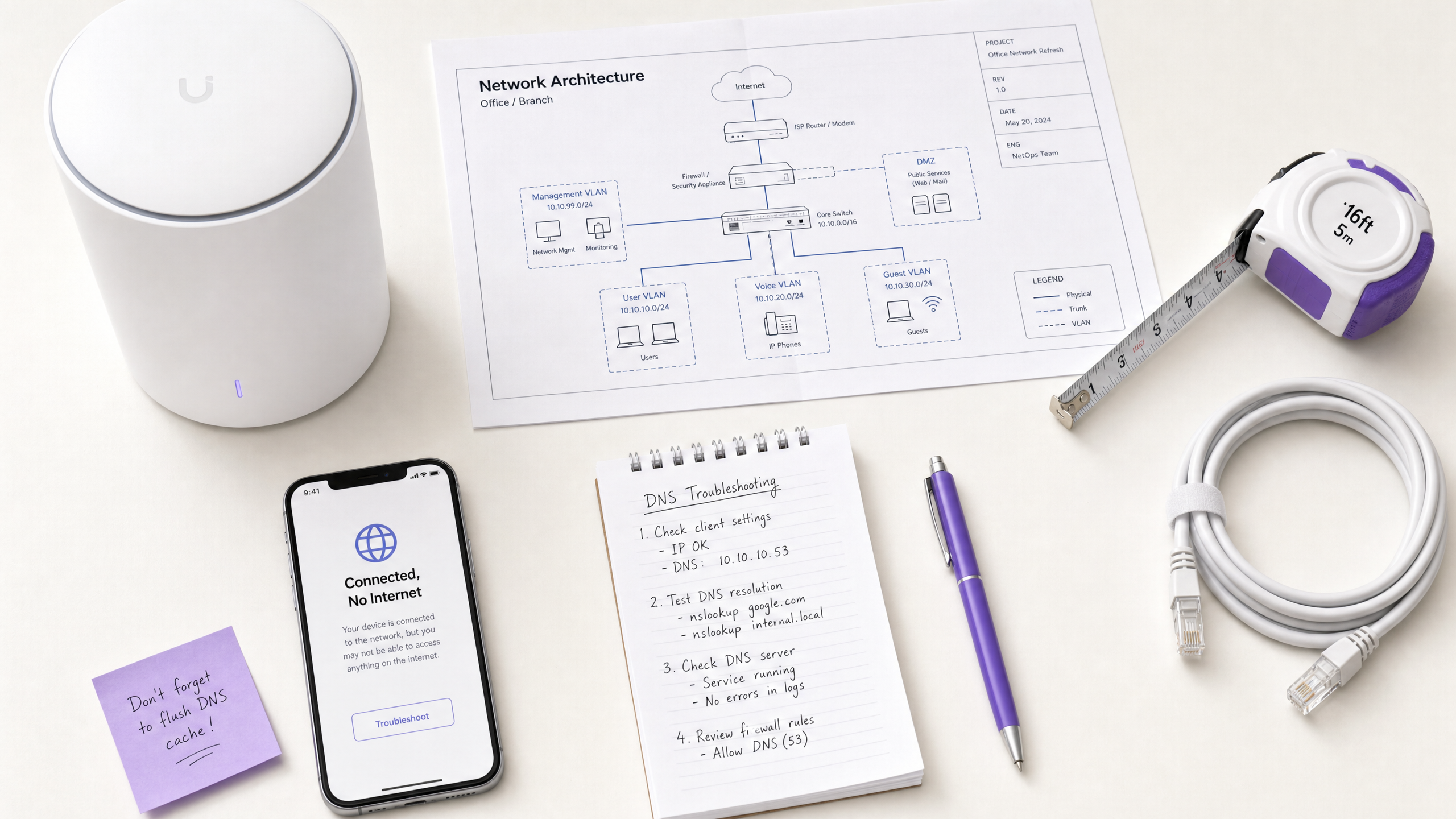
CTO और नेटवर्क आर्किटेक्ट्स के लिए जो उच्च-घनत्व वाले स्थानों की देखरेख करते हैं—जैसे कि खुदरा , आतिथ्य , स्वास्थ्य सेवा , और परिवहन में— Guest WiFi नेटवर्क पर 'Connected, No Internet' त्रुटि एक लगातार परिचालन समस्या है। हालांकि अक्सर AP हार्डवेयर खराबी या अपर्याप्त अपस्ट्रीम बैंडविड्थ के रूप में गलत निदान किया जाता है, एंटरप्राइज़ वातावरण में मूल कारण आमतौर पर नेटवर्क भीड़ के कारण DNS टाइमआउट होता है।
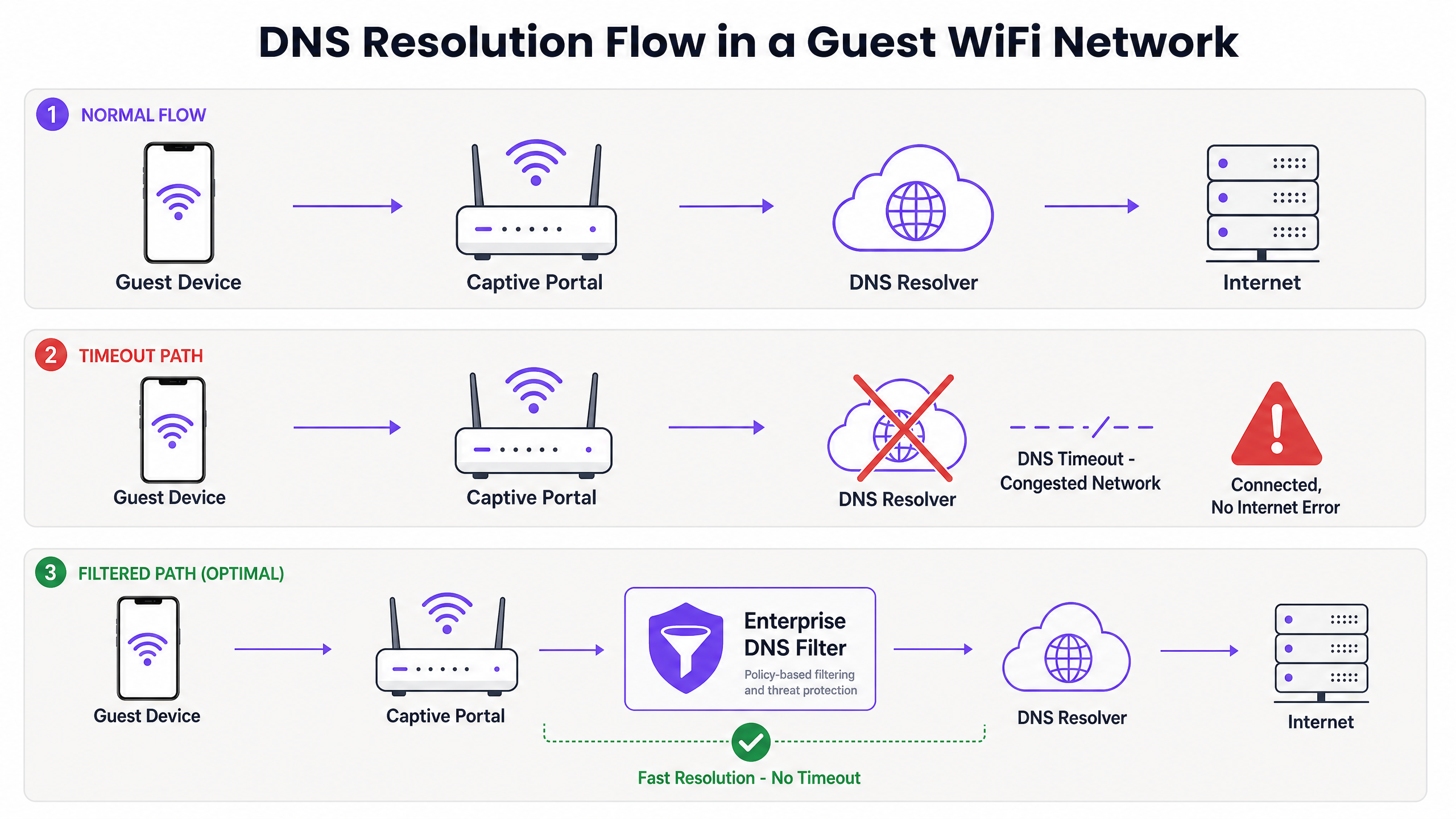
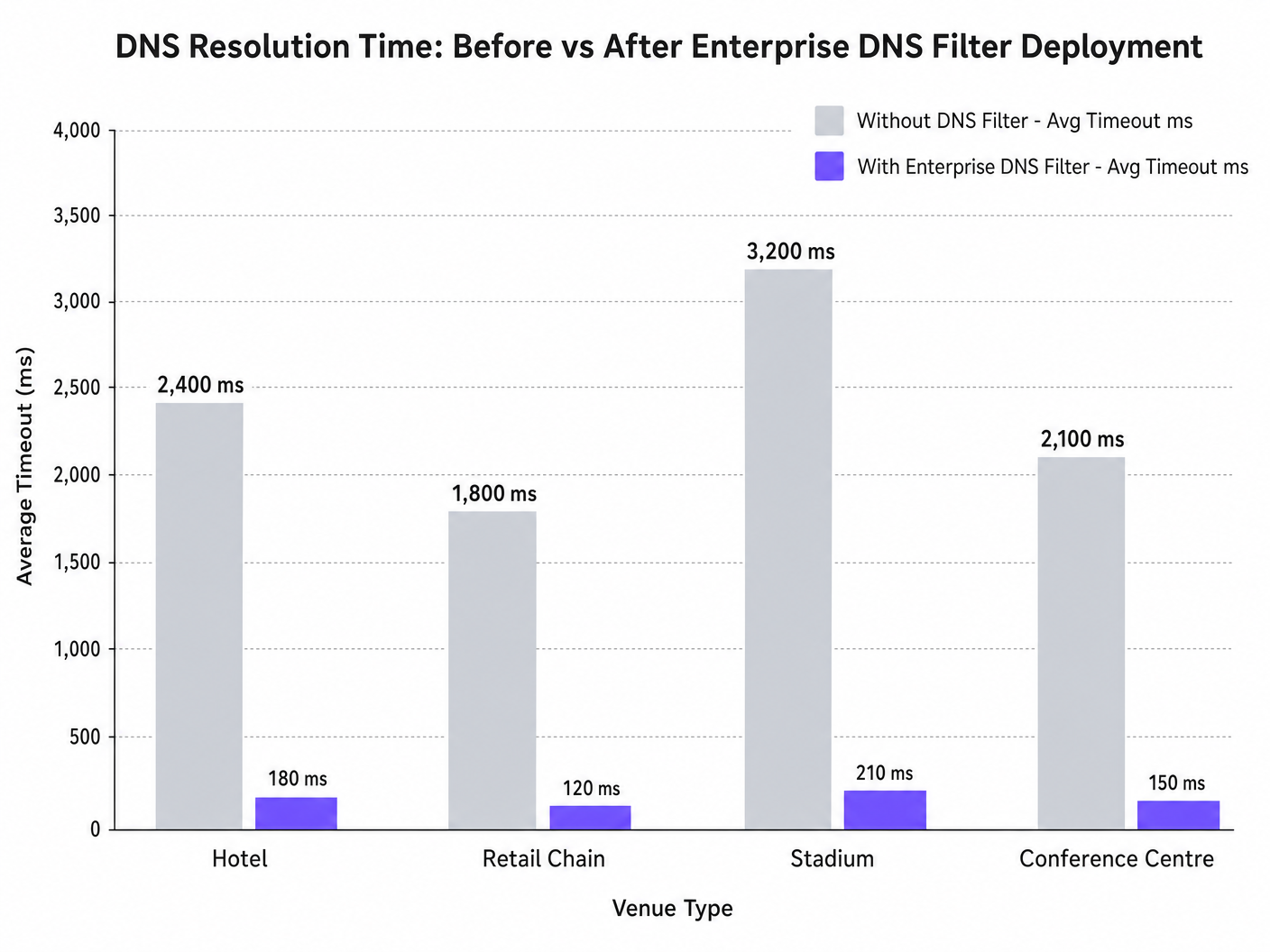
जब सैकड़ों डिवाइस एक साथ Captive Portal डिटेक्शन (उदाहरण के लिए, captive.apple.com) के लिए जांच करते हैं, तो डिफ़ॉल्ट UDP पोर्ट 53 क्वेरीज़ मानक अपस्ट्रीम रिजॉल्वर को अभिभूत कर सकती हैं। यदि DNS प्रतिक्रिया OS-स्तर के टाइमआउट विंडो (आमतौर पर 1-5 सेकंड) से अधिक हो जाती है, तो डिवाइस मान लेता है कि कोई इंटरनेट कनेक्टिविटी मौजूद नहीं है, और Captive Portal को ट्रिगर करने में विफल रहता है। यह मार्गदर्शिका इस विफलता मोड की तकनीकी वास्तुकला का विवरण देती है और प्रदर्शित करती है कि कैसे एक एंटरप्राइज़ DNS फ़िल्टर तैनात करने से बाधा हल होती है, क्वेरी विलंबता को हजारों मिलीसेकंड से 200ms से कम तक कम करती है, IEEE 802.1X और GDPR जैसे मानकों का अनुपालन सुनिश्चित करती है, और गेस्ट ऑनबोर्डिंग अनुभव में नाटकीय रूप से सुधार करती है।
तकनीकी गहन-विश्लेषण
Captive Portal डिटेक्शन तंत्र
जब कोई क्लाइंट डिवाइस किसी एक्सेस पॉइंट से जुड़ता है और DHCP लीज़ प्राप्त करता है, तो उसे पूरी तरह से कनेक्टेड स्थिति में जाने से पहले इंटरनेट पहुंच की पुष्टि करनी होगी। यह Captive Portal डिटेक्शन प्रोब के माध्यम से प्राप्त किया जाता है:
- iOS/macOS: HTTP GET to
captive.apple.com - Android: HTTP GET to
connectivitycheck.gstatic.com - Windows: HTTP GET to
msftconnecttest.com
HTTP GET जारी करने से पहले, डिवाइस को DNS के माध्यम से होस्टनाम को हल करना होगा। यह प्रारंभिक DNS क्वेरी उच्च-घनत्व वाले वातावरण में महत्वपूर्ण विफलता बिंदु है।
भीड़ DNS टाइमआउट क्यों ट्रिगर करती है
DNS क्वेरीज़ आमतौर पर UDP का उपयोग करती हैं, जो ट्रांसपोर्ट-लेयर रीट्रांसमिशन के बिना एक कनेक्शनलेस प्रोटोकॉल है। एक भीड़भाड़ वाले नेटवर्क में—जैसे कि हाफ-टाइम के दौरान एक स्टेडियम या सुबह के व्यस्त घंटों के दौरान एक होटल—UDP पैकेट आसानी से गिर जाते हैं या विलंबित हो जाते हैं।
यदि स्थान एक मानक ISP रिजॉल्वर या सार्वजनिक DNS सेवा (जैसे 8.8.8.8) पर निर्भर करता है, तो राउंड-ट्रिप टाइम (RTT) और रिजॉल्वर पर प्रोसेसिंग टाइम OS की हार्डकोडेड टाइमआउट सीमा से अधिक हो सकता है। जब टाइमआउट समाप्त हो जाता है, तो डिवाइस कनेक्शन को 'Connected, No Internet' के रूप में फ़्लैग करता है और Captive Portal पुनर्निर्देशन प्रक्रिया को रोक देता है।
इसके अलावा, इन प्रोब डोमेन पर छोटे टाइम-टू-लिव (TTL) मान इस समस्या को और बढ़ा देते हैं। जैसे-जैसे डिवाइस लगातार जुड़ते और अलग होते हैं, कैश की गई प्रविष्टियाँ तेजी से समाप्त हो जाती हैं, जिससे ठीक उसी समय एक साथ DNS क्वेरीज़ की बाढ़ आ जाती है जब नेटवर्क अधिकतम लोड के अधीन होता है।
एंटरप्राइज़ DNS फ़िल्टर की भूमिका
एक एंटरप्राइज़ DNS फ़िल्टर, जैसे कि Purple के WiFi Analytics प्लेटफ़ॉर्म में एकीकृत एक, एक उच्च-प्रदर्शन, स्थानीय या एज-प्रॉक्सिमेट रिजॉल्वर के रूप में कार्य करता है। DNS क्वेरीज़ को भीड़भाड़ वाले WAN लिंक को पार करने से पहले रोककर, फ़िल्टर:
- उच्च-आवृत्ति डोमेन को कैश करता है: प्रोब डोमेन को स्थानीय रूप से सेवा प्रदान करता है, RTT को सब-मिलीसेकंड स्तर तक कम करता है।
- नीति प्रवर्तन: दुर्भावनापूर्ण या अवरुद्ध डोमेन के लिए क्वेरीज़ को तुरंत छोड़ देता है, WAN बैंडविड्थ को बचाता है।
- ऑडिट लॉगिंग: IT सुरक्षा के लिए एक ऑडिट ट्रेल प्रदान करता है, GDPR अनुपालन और घटना प्रतिक्रिया में सहायता करता है।
कार्यान्वयन मार्गदर्शिका
एक एंटरप्राइज़ DNS फ़िल्टर तैनात करने के लिए विफलता के नए बिंदु पेश करने से बचने हेतु सावधानीपूर्वक वास्तुशिल्प योजना की आवश्यकता होती है।
1. रिजॉल्वर प्लेसमेंट और विलंबता अनुकूलन
DNS फ़िल्टर को नेटवर्क एज के जितना संभव हो उतना करीब तैनात करें। वितरित खुदरा श्रृंखलाओं के लिए, क्लाउड-डिलीवर किया गया एज नोड उपयुक्त है; स्टेडियम जैसे बड़े एकल-साइट स्थानों के लिए, कोर स्विच पर एक स्थानीयकृत उपकरण या वर्चुअल मशीन को प्राथमिकता दी जाती है। लक्ष्य गेस्ट VLAN और रिजॉल्वर के बीच रूटिंग हॉप्स की संख्या को कम करना है।
2. Captive Portal श्वेतसूचीकरण (पासथ्रू)
सबसे महत्वपूर्ण कॉन्फ़िगरेशन चरण यह सुनिश्चित करना है कि आपका Captive Portal डोमेन स्पष्ट रूप से श्वेतसूचीबद्ध है। यदि DNS फ़िल्टर प्रमाणीकरण पोर्टल के समाधान में देरी करता है या उसे ब्लॉक करता है, तो आप वही त्रुटि उत्पन्न करेंगे जिसे आप हल करने का प्रयास कर रहे हैं।
3. TTL ट्यूनिंग और कैश प्रबंधन
स्थानीय रिजॉल्वर को Captive Portal प्रोब डोमेन को आक्रामक रूप से कैश करने के लिए कॉन्फ़िगर करें। जबकि अपस्ट्रीम TTL का सम्मान करना मानक अभ्यास है, captive.apple.com और समान डोमेन के लिए TTL को स्थानीय रूप से न्यूनतम 60 सेकंड तक ओवरराइड करने से पीक एसोसिएशन घटनाओं के दौरान अपस्ट्रीम क्वेरी वॉल्यूम में भारी कमी आ सकती है।
4. मौजूदा बुनियादी ढांचे के साथ एकीकरण
सुनिश्चित करें कि DNS फ़िल्टर परिनियोजन आपकी मौजूदा नेटवर्क सेगमेंटेशन के अनुरूप है। PCI DSS अनुपालन बनाए रखने के लिए गेस्ट DNS ट्रैफ़िक को कॉर्पोरेट DNS बुनियादी ढांचे से अलग रखा जाना चाहिए। यह अलगाव महत्वपूर्ण है चाहे आप व्यावसायिक यात्रियों के लिए होटल WiFi का अनुकूलन कर रहे हों या सार्वजनिक क्षेत्र के परिनियोजन को सुरक्षित कर रहे हों।
इन कार्यान्वयन चरणों पर अधिक संदर्भ के लिए हमारे तकनीकी ब्रीफिंग पॉडकास्ट को सुनें:
सर्वोत्तम अभ्यास
- गेस्ट नेटवर्क के लिए सार्वजनिक रिजॉल्वर से बचें: प्राथमिक D के रूप में 8.8.8.8 या 1.1.1.1 पर निर्भर रहनाउच्च-घनत्व वाले अतिथि नेटवर्कों के लिए HCP-निर्धारित DNS अस्वीकार्य विलंबता परिवर्तनशीलता प्रस्तुत करता है।
- DNS over HTTPS (DoH) को सावधानी से लागू करें: जबकि DoH गोपनीयता में सुधार करता है, यह पारंपरिक पोर्ट 53 फ़िल्टरिंग को बायपास करता है। सुनिश्चित करें कि आपका एंटरप्राइज़ DNS समाधान DoH ट्रैफ़िक का निरीक्षण या प्रबंधन कर सकता है, यदि स्थल नीति द्वारा इसकी आवश्यकता हो।
- UDP पोर्ट 53 ड्रॉप्स की निगरानी करें: अपने फ़ायरवॉल या कोर स्विच को अत्यधिक UDP पोर्ट 53 पैकेट ड्रॉप्स पर अलर्ट करने के लिए कॉन्फ़िगर करें, जो आसन्न DNS टाइमआउट का एक प्रमुख संकेतक है।
- ब्लॉकलिस्ट की नियमित रूप से समीक्षा करें: अत्यधिक आक्रामक फ़िल्टरिंग वैध अनुप्रयोगों को बाधित कर सकती है। गलत सकारात्मक पहचान के लिए DNS क्वेरी लॉग की साप्ताहिक समीक्षा करें।
सार्वजनिक क्षेत्र की तैनाती के लिए, मजबूत कनेक्टिविटी सुनिश्चित करना व्यापक डिजिटल समावेशन पहलों का हिस्सा है, जैसा कि हाल ही में तब उजागर हुआ जब Purple ने इयान फॉक्स को VP ग्रोथ – पब्लिक सेक्टर नियुक्त किया ।
समस्या निवारण और जोखिम न्यूनीकरण
जब "कनेक्टेड, नो इंटरनेट" त्रुटि होती है, तो IT टीमों को तुरंत बैंडविड्थ की कमी मानने के बजाय एक संरचित नैदानिक मार्ग का पालन करना चाहिए।
- पैकेट कैप्चर (PCAP): अतिथि VLAN पर
udp port 53के लिए फ़िल्टरिंग करते हुए एक पैकेट कैप्चर चलाएँ। 2-सेकंड की विंडो के भीतर संबंधित प्रतिक्रियाओं के बिना क्वेरीज़ की तलाश करें। - जांच का अनुकरण करें: अतिथि VLAN पर एक परीक्षण डिवाइस से
curlयाwgetका उपयोग करके मैन्युअल रूप सेhttp://captive.apple.com/hotspot-detect.htmlपर जाएँ। DNS रिज़ॉल्यूशन समय बनाम HTTP प्रतिक्रिया समय को मापें। - फ़ायरवॉल नियमों की जाँच करें: सत्यापित करें कि कोई दर-सीमित या QoS नीतियां अनजाने में अतिथि सबनेट से UDP पोर्ट 53 ट्रैफ़िक को धीमा नहीं कर रही हैं।
- ऑफ़लाइन क्षमताओं को सत्यापित करें: रुक-रुक कर WAN कनेक्टिविटी वाले वातावरण में, Purple के ऑफ़लाइन मैप्स मोड जैसी सुविधाओं पर विचार करें ताकि उपयोगकर्ता जुड़ाव का कुछ स्तर बनाए रखा जा सके, भले ही अपस्ट्रीम इंटरनेट खराब हो।
ROI और व्यावसायिक प्रभाव
DNS टाइमआउट को हल करने से स्थल संचालकों के लिए सीधे लाभ पर असर पड़ता है।
- कम समर्थन ओवरहेड: "कनेक्टेड, नो इंटरनेट" त्रुटि आतिथ्य और खुदरा में लेवल 1 समर्थन टिकटों का एक प्राथमिक कारण है। इसे समाप्त करने से IT परिचालन व्यय कम होता है।
- बढ़ा हुआ डेटा कैप्चर: एक विफल Captive Portal लोड का मतलब डेटा कैप्चर और उपयोगकर्ता प्रमाणीकरण के लिए एक खोया हुआ अवसर है। तीव्र पोर्टल रेंडरिंग सुनिश्चित करके, स्थल अपने WiFi Analytics प्लेटफॉर्म के ROI को अधिकतम करते हैं।
- बढ़ी हुई अतिथि संतुष्टि: निर्बाध कनेक्टिविटी एक आधारभूत अपेक्षा है। ऑनबोर्डिंग घर्षण को कम करना सीधे बेहतर नेट प्रमोटर स्कोर (NPS) और सकारात्मक स्थल समीक्षाओं से संबंधित है।
"हमें अधिक बैंडविड्थ की आवश्यकता है" से "हमें अनुकूलित DNS रिज़ॉल्यूशन की आवश्यकता है" की ओर परिप्रेक्ष्य बदलकर, नेटवर्क आर्किटेक्ट एंटरप्राइज़-ग्रेड अतिथि WiFi प्रदान कर सकते हैं जो दबाव में भी सहजता से स्केल करता है।
मुख्य परिभाषाएं
Captive Portal Detection Probe
An automated HTTP request sent by a mobile OS (e.g., to captive.apple.com) immediately upon network association to determine if a login page is required.
If this probe fails due to DNS timeout, the OS assumes there is no internet access and shows the error.
DNS Timeout
The event where a client device abandons a DNS query because the resolver took too long to respond (typically >2-5 seconds).
The primary technical cause of 'Connected, No Internet' errors in high-density environments.
Enterprise DNS Filter
A dedicated DNS resolver that caches queries locally and applies policy-based blocking to prevent access to malicious or unwanted domains.
Used to offload query volume from congested upstream resolvers and reduce latency.
UDP Port 53
The standard connectionless transport protocol and port used for DNS queries.
Because UDP has no guaranteed delivery, DNS packets are easily dropped during network congestion.
Time-To-Live (TTL)
A value in a DNS record that dictates how long a resolver or client should cache the IP address before querying again.
Short TTLs on probe domains cause frequent re-querying, exacerbating congestion.
IEEE 802.1X
A standard for port-based Network Access Control (PNAC) providing an authentication mechanism to devices wishing to attach to a LAN or WLAN.
While secure, 802.1X environments still rely on robust DNS infrastructure for post-authentication routing.
Local Internet Breakout
Routing internet-bound traffic directly from a branch location to the internet, rather than backhauling it to a central data center.
Crucial for reducing DNS latency in distributed retail or hospitality networks.
WPA3
The latest Wi-Fi security standard that provides enhanced encryption for open and password-protected networks.
WPA3 improves security but does not alter the fundamental DNS resolution path or mitigate timeout issues.
हल किए गए उदाहरण
A 400-room hotel experiences a surge of 'Connected, No Internet' complaints every morning between 7:30 AM and 8:30 AM when guests wake up and connect to the WiFi. The 1Gbps WAN link shows only 40% utilization during this time.
- Run a packet capture on the guest VLAN filtering for UDP port 53 during the morning peak.
- Identify that DNS queries to captive portal probe domains (e.g., captive.apple.com) are taking >3000ms to resolve via the ISP's default DNS.
- Deploy a local enterprise DNS filter on the guest subnet.
- Configure the DHCP server to assign the local DNS filter IP to guest devices.
- Whitelist the hotel's captive portal domain in the filter.
- Monitor resolution times, which should drop to <50ms.
A large retail chain rolls out a new guest WiFi network across 50 stores, but users in high-footfall flagship stores cannot load the captive portal, while users in smaller stores have no issues.
- Analyze the architecture: all 50 stores are tunneling guest traffic back to a central data center firewall, which then forwards DNS queries to a public resolver.
- In high-footfall stores, the sheer volume of concurrent association events exhausts the NAT/PAT state tables on the central firewall, causing UDP port 53 packets to be dropped.
- Implement a cloud-delivered enterprise DNS filter.
- Reconfigure the local branch routers to forward guest DNS queries directly to the cloud filter via local internet breakout, rather than backhauling them to the data center.
अभ्यास प्रश्न
Q1. A stadium IT director notices that during half-time, thousands of users connect to the WiFi but fail to reach the captive portal. The core switch shows heavy UDP packet drops. Should they increase the WAN bandwidth from 2Gbps to 5Gbps?
संकेत: Consider what protocol is being dropped and whether it's related to payload bandwidth or connection state limits.
मॉडल उत्तर देखें
No. Increasing WAN bandwidth will not solve the issue. The UDP packet drops indicate that the firewall or resolver cannot handle the sheer volume of concurrent DNS queries (state table exhaustion or CPU limits). The correct approach is to deploy a high-performance local DNS filter at the edge to cache and respond to these queries locally, bypassing the WAN bottleneck entirely.
Q2. You have just deployed an enterprise DNS filter on a hotel guest network. Guests can now resolve public websites quickly, but when they first connect, they are not redirected to the hotel's login page. What is the most likely configuration error?
संकेत: Think about the domain name of the login page itself.
मॉडल उत्तर देखें
The most likely error is that the captive portal's own domain has not been explicitly whitelisted (passthrough) in the DNS filter. The filter is either blocking or delaying the resolution of the portal URL, preventing the redirection from completing.
Q3. A public sector organization requires all guest WiFi traffic to be logged for 90 days to comply with security policies. How does deploying an enterprise DNS filter assist with this requirement?
संकेत: Consider what data a DNS filter processes versus a standard firewall.
मॉडल उत्तर देखें
An enterprise DNS filter natively logs all DNS queries made by client devices. This provides a clear, searchable audit trail of which domains were requested and when, satisfying the 90-day logging requirement without needing to perform deep packet inspection on all encrypted HTTPS payload traffic.