

Captive Portal अनुकूलन और सुरक्षा सर्वोत्तम अभ्यास
यह मार्गदर्शिका IT प्रबंधकों, नेटवर्क आर्किटेक्ट्स और CTOs के लिए एक व्यापक तकनीकी संदर्भ प्रदान करती है जो आतिथ्य, खुदरा, आयोजनों और सार्वजनिक क्षेत्र के वातावरण में Captive Portal तैनात कर रहे हैं। इसमें पूर्ण परिनियोजन जीवनचक्र शामिल है — VLAN आर्किटेक्चर और प्रमाणीकरण विधि चयन से लेकर GDPR अनुपालन, पोर्टल अपहरण की रोकथाम और बैकएंड एकीकरण तक। जो संगठन इन प्रथाओं को लागू करते हैं, वे सुरक्षा जोखिम को कम करेंगे, नियामक अनुपालन प्राप्त करेंगे, और अतिथि Wi-Fi को एक मापने योग्य व्यावसायिक संपत्ति में बदल देंगे।
🎧 इस गाइड को सुनें
ट्रांसक्रिप्ट देखें
कार्यकारी सारांश
एक सुरक्षित और अत्यधिक अनुकूलित Captive Portal को तैनात करना अब केवल एक नेटवर्किंग आवश्यकता नहीं है; यह इंफ्रास्ट्रक्चर सुरक्षा, उपयोगकर्ता अनुभव और डेटा गवर्नेंस का एक महत्वपूर्ण प्रतिच्छेदन है। CTOs, नेटवर्क आर्किटेक्ट्स और IT निदेशकों के लिए, चुनौती आतिथ्य , खुदरा और बड़े सार्वजनिक स्थानों जैसे विविध वातावरणों में कठोर सुरक्षा नियंत्रणों के साथ सहज पहुंच को संतुलित करने में निहित है। यह मार्गदर्शिका लचीले Captive Portal बनाने के लिए आवश्यक तकनीकी आर्किटेक्चर, परिनियोजन रणनीतियों और सुरक्षा सर्वोत्तम अभ्यासों की रूपरेखा प्रस्तुत करती है। मजबूत प्रमाणीकरण विधियों, उचित VLAN विभाजन को लागू करके, और GDPR और PCI DSS जैसे अनुपालन मानकों का पालन करके, संगठन Purple के WiFi Analytics जैसे प्लेटफार्मों के माध्यम से कार्रवाई योग्य बुद्धिमत्ता निकालते हुए जोखिमों को कम कर सकते हैं।
तकनीकी गहन-विश्लेषण
आर्किटेक्चर और ट्रैफिक फ्लो
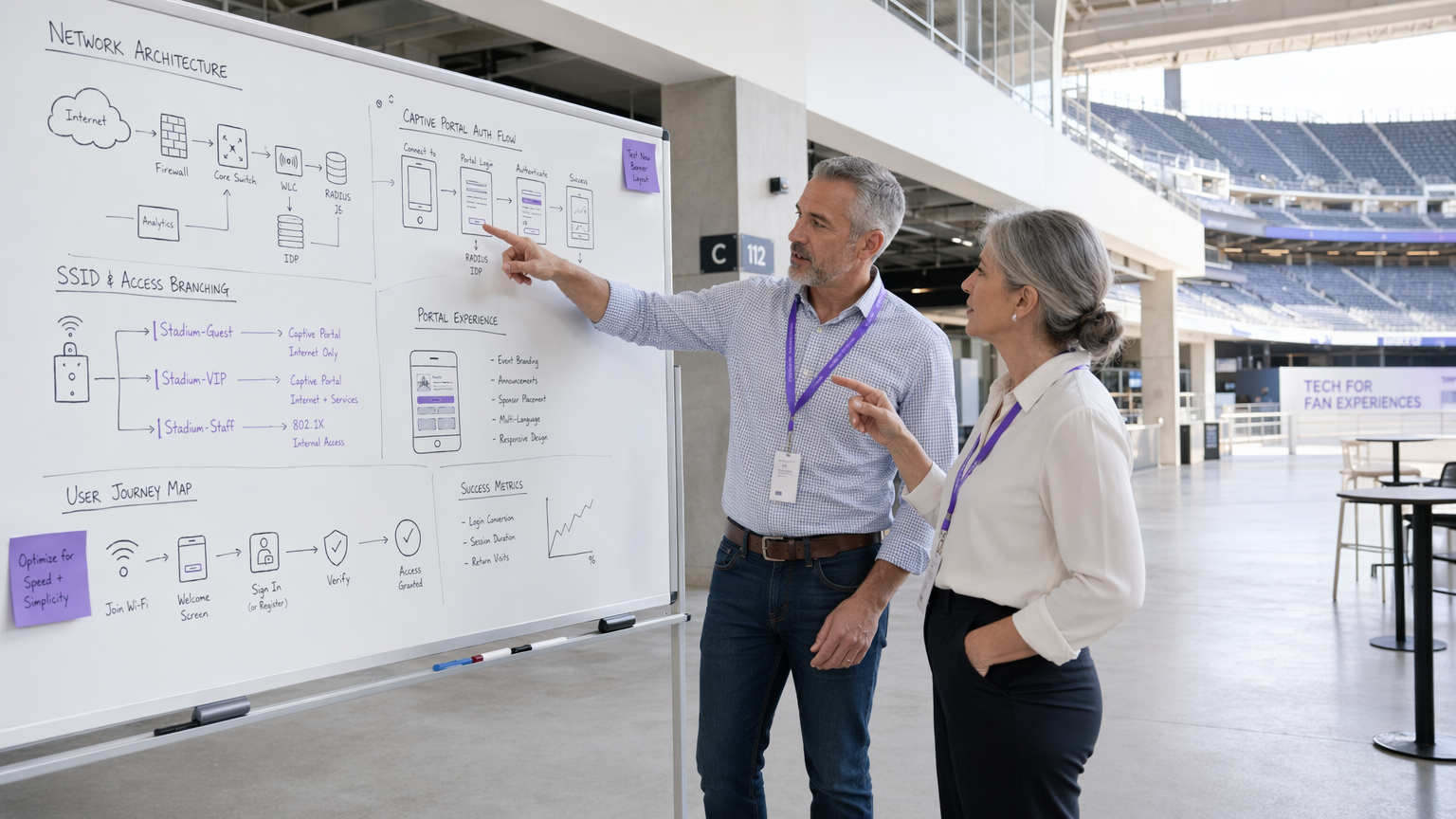
एक मजबूत Captive Portal परिनियोजन एक संरचित ट्रैफिक फ्लो पर निर्भर करता है जो अप्रमाणित उपयोगकर्ताओं को अलग करता है जबकि प्रमाणीकरण के लिए एक स्पष्ट मार्ग प्रदान करता है। जब कोई उपयोगकर्ता अतिथि WiFi से जुड़ता है, तो एक्सेस पॉइंट या वायरलेस LAN कंट्रोलर (WLC) उनके प्रारंभिक HTTP/HTTPS अनुरोधों को रोकता है। इस ट्रैफिक को Captive Portal पर रीडायरेक्ट किया जाता है जो या तो स्थानीय रूप से या क्लाउड में होस्ट किया जाता है। आर्किटेक्चर को डायनामिक VLAN असाइनमेंट का समर्थन करना चाहिए: अप्रमाणित उपयोगकर्ताओं को एक प्रतिबंधित 'प्री-ऑथ' VLAN में रखा जाता है, जिसमें Captive Portal और आवश्यक सेवाओं (DNS और DHCP) तक ही पहुंच सीमित होती है। एक RADIUS सर्वर के माध्यम से सफल प्रमाणीकरण पर, WLC को एक चेंज ऑफ ऑथराइजेशन (CoA) संदेश प्राप्त होता है, जो उपयोगकर्ता को इंटरनेट एक्सेस के साथ 'पोस्ट-ऑथ' VLAN में ले जाता है।
वॉल्ड गार्डन एक महत्वपूर्ण कॉन्फ़िगरेशन तत्व है। यह प्रमाणीकरण से पहले पहुंच योग्य URLs और IP श्रेणियों के सेट को परिभाषित करता है। एक खराब स्कोप वाला वॉल्ड गार्डन DNS टनलिंग हमलों के लिए सबसे आम वैक्टरों में से एक है, जहां एक दुर्भावनापूर्ण अभिनेता पोर्टल को पूरी तरह से बायपास करने के लिए DNS प्रश्नों के भीतर मनमाने IP ट्रैफिक को इनकैप्सुलेट करता है। प्री-ऑथ DNS रिज़ॉल्यूशन को केवल पोर्टल के अपने डोमेन और ज्ञात पहचान प्रदाताओं तक सीमित करना एक गैर-परक्राम्य आधारभूत है।
प्रमाणीकरण तंत्र
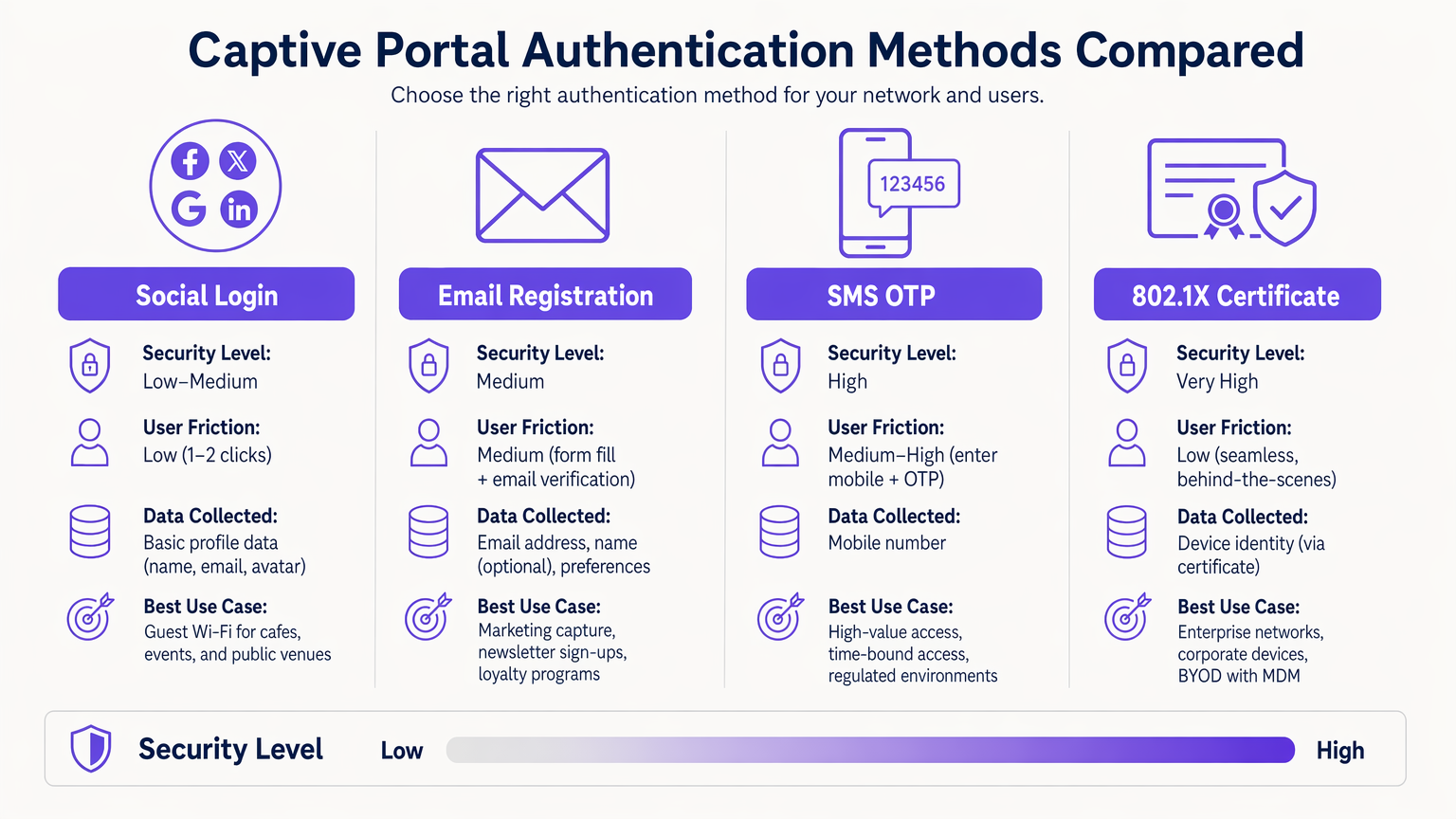
सही प्रमाणीकरण तंत्र का चयन एक जोखिम-बनाम-घर्षण व्यापार-बंद है जिसे प्रत्येक परिनियोजन संदर्भ के लिए जानबूझकर किया जाना चाहिए।
| विधि | सुरक्षा स्तर | उपयोगकर्ता घर्षण | प्राथमिक उपयोग का मामला |
|---|---|---|---|
| 802.1X प्रमाणपत्र | बहुत उच्च | बहुत कम (सहज) | कॉर्पोरेट BYOD, स्टाफ नेटवर्क |
| SMS OTP | उच्च | मध्यम-उच्च | उच्च-मूल्य या समय-बद्ध पहुंच |
| ईमेल पंजीकरण | मध्यम | मध्यम | मार्केटिंग डेटा कैप्चर, वफादारी |
| सोशल लॉगिन (OAuth 2.0) | निम्न-मध्यम | निम्न | अतिथि Wi-Fi, सार्वजनिक स्थान |
| Passpoint / Hotspot 2.0 | उच्च | बहुत कम (स्वचालित) | लौटने वाले उपयोगकर्ता, रोमिंग |
802.1X प्रमाणपत्र-आधारित प्रमाणीकरण उद्यम वातावरण के लिए स्वर्ण मानक है। यह एक MDM प्लेटफॉर्म के माध्यम से प्रबंधित डिवाइस प्रमाणपत्रों का उपयोग करके सहज, अत्यधिक सुरक्षित पहुंच प्रदान करता है, जिससे क्रेडेंशियल चोरी का जोखिम समाप्त हो जाता है। सामान्य परिनियोजन समस्याओं के लिए, Windows 11 802.1X प्रमाणीकरण समस्याओं का निवारण देखें।
Passpoint (Hotspot 2.0) पर विशेष ध्यान देना चाहिए। यह WPA2/WPA3-एंटरप्राइज़ सुरक्षा का उपयोग करके Wi-Fi नेटवर्क के बीच स्वचालित, सुरक्षित रोमिंग को सक्षम बनाता है। Purple Connect लाइसेंस के तहत OpenRoaming जैसी सेवाओं के लिए एक मुफ्त पहचान प्रदाता के रूप में कार्य करता है, जो लौटने वाले उपयोगकर्ताओं के लिए मैन्युअल पोर्टल इंटरैक्शन के बिना सहज कनेक्टिविटी की सुविधा प्रदान करता है।
पोर्टल डिज़ाइन और अनुकूलन
पोर्टल का डिज़ाइन सीधे प्रमाणीकरण रूपांतरण दरों को प्रभावित करता है। एक पोर्टल जिसे मोबाइल डिवाइस पर लोड होने में तीन सेकंड से अधिक लगते हैं, उसमें महत्वपूर्ण गिरावट देखी जाएगी। हल्के HTML/CSS का उपयोग करें, JavaScript निर्भरताओं को कम करें, और CDN से संपत्तियां परोसें। पोर्टल पूरी तरह से प्रतिक्रियाशील होना चाहिए — आतिथ्य और खुदरा वातावरण में, अधिकांश कनेक्शन मोबाइल उपकरणों से उत्पन्न होते हैं।
ब्रांडिंग भी एक अनुपालन मुद्दा है। GDPR के तहत, पोर्टल को कोई भी PII एकत्र करने से पहले एक स्पष्ट, सकारात्मक सहमति तंत्र प्रस्तुत करना होगा। पहले से टिक किए गए चेकबॉक्स स्वतंत्र रूप से दी गई, विशिष्ट, सूचित और स्पष्ट सहमति के मानक को पूरा नहीं करते हैं। गोपनीयता नीति और सेवा की शर्तें प्रमाणीकरण पूरा किए बिना लिंक और पहुंच योग्य होनी चाहिए।
कार्यान्वयन मार्गदर्शिका
Captive Portal को तैनात करने के लिए इंफ्रास्ट्रक्चर, सॉफ्टवेयर और अनुपालन आयामों में एक व्यवस्थित दृष्टिकोण की आवश्यकता होती है।
चरण 1 — इंफ्रास्ट्रक्चर तैयारी: सुनिश्चित करें कि आपके WLCs और एक्सेस पॉइंट WPA3-SAE और डायनामिक VLAN असाइनमेंट का समर्थन करते हैं। सत्यापित करें कि आपका RADIUS इंफ्रास्ट्रक्चर अपेक्षित पीक प्रमाणीकरण लोड को संभाल सकता है — बड़े स्थानों के लिए, WAN विलंबता को कम करने के लिए स्थानीय रूप से RADIUS प्रॉक्सी तैनात करने पर विचार करें। यदि आप विशिष्ट हार्डवेयर तैनात कर रहे हैं, तो विक्रेता-विशिष्ट कॉन्फ़िगरेशन मार्गदर्शन के लिए वायरलेस एक्सेस पॉइंट रकस के लिए आपकी मार्गदर्शिका जैसे संसाधनों से परामर्श करें।
चरण 2 — VLAN और फ़ायरवॉल आर्किटेक्चर: प्री-ऑथ अतिथि ट्रैफिक, पोस्ट-ऑथ अतिथि ट्रैफिक, स्टाफ और IoT उपकरणों के लिए समर्पित VLANs बनाएं। किसी भी क्रॉस-VLAN संचार को रोकने के लिए वितरण परत पर ACLs लागू करें। अतिथि VLANs को कभी भी कॉर्पोरेट या POS नेटवर्क सेगमेंट में रूट नहीं करना चाहिए।
चरण 3 — वॉलवॉलड गार्डन कॉन्फ़िगरेशन: प्री-ऑथ एक्सेस के लिए डोमेन और IP रेंज का न्यूनतम आवश्यक सेट परिभाषित करें। इसमें पोर्टल होस्टनेम, पोर्टल एसेट के लिए CDN डोमेन, और पहचान प्रदाता एंडपॉइंट (जैसे, सोशल लॉगिन के लिए accounts.google.com, graph.facebook.com) शामिल होने चाहिए। यह सुनिश्चित करने के लिए कि पोर्टल सही ढंग से ट्रिगर हो, प्रमुख ऑपरेटिंग सिस्टम (Android के लिए connectivitycheck.gstatic.com, iOS के लिए captive.apple.com) के लिए Captive Portal डिटेक्शन एंडपॉइंट शामिल करें।
चरण 4 — पोर्टल परिनियोजन और एकीकरण: एक विश्वसनीय CA से वैध TLS प्रमाणपत्र के साथ पोर्टल को परिनियोजित करें। यह सुनिश्चित करने के लिए कि कैप्चर किया गया डेटा सीधे आपके ग्राहक डेटा इंफ्रास्ट्रक्चर में प्रवाहित हो, अपने CRM या मार्केटिंग प्लेटफॉर्म के साथ API के माध्यम से एकीकृत करें। Purple का WiFi Analytics प्लेटफॉर्म प्रमुख CRM सिस्टम के साथ आउट-ऑफ-द-बॉक्स एकीकरण प्रदान करता है।
चरण 5 — MAC एड्रेस रैंडमाइजेशन हैंडलिंग: आधुनिक iOS और Android डिवाइस रैंडमाइज्ड MAC एड्रेस का उपयोग करते हैं। लौटने वाले उपयोगकर्ताओं के लिए एक सुसंगत अनुभव सुनिश्चित करने के लिए, अपने सत्र प्रबंधन को स्थिर MAC एड्रेस के बजाय प्रमाणित सत्र टोकन या डिवाइस प्रमाणपत्रों पर निर्भर करने के लिए बदलें।
चरण 6 — परीक्षण और सत्यापन: iOS, Android, Windows और macOS पर परीक्षण करें। RADIUS थ्रूपुट को मान्य करने के लिए पीक लोड परिदृश्यों का अनुकरण करें। वॉलड गार्डन कॉन्फ़िगरेशन और DNS फ़िल्टरिंग नियंत्रणों को विशेष रूप से लक्षित करते हुए पेनेट्रेशन परीक्षण करें।
सर्वोत्तम अभ्यास
नेटवर्क सुरक्षा नियंत्रण
व्यापक सुरक्षा परिदृश्य के विस्तृत अवलोकन के लिए, अतिथि WiFi नेटवर्क को सुरक्षित करना: सर्वोत्तम अभ्यास और कार्यान्वयन देखें।
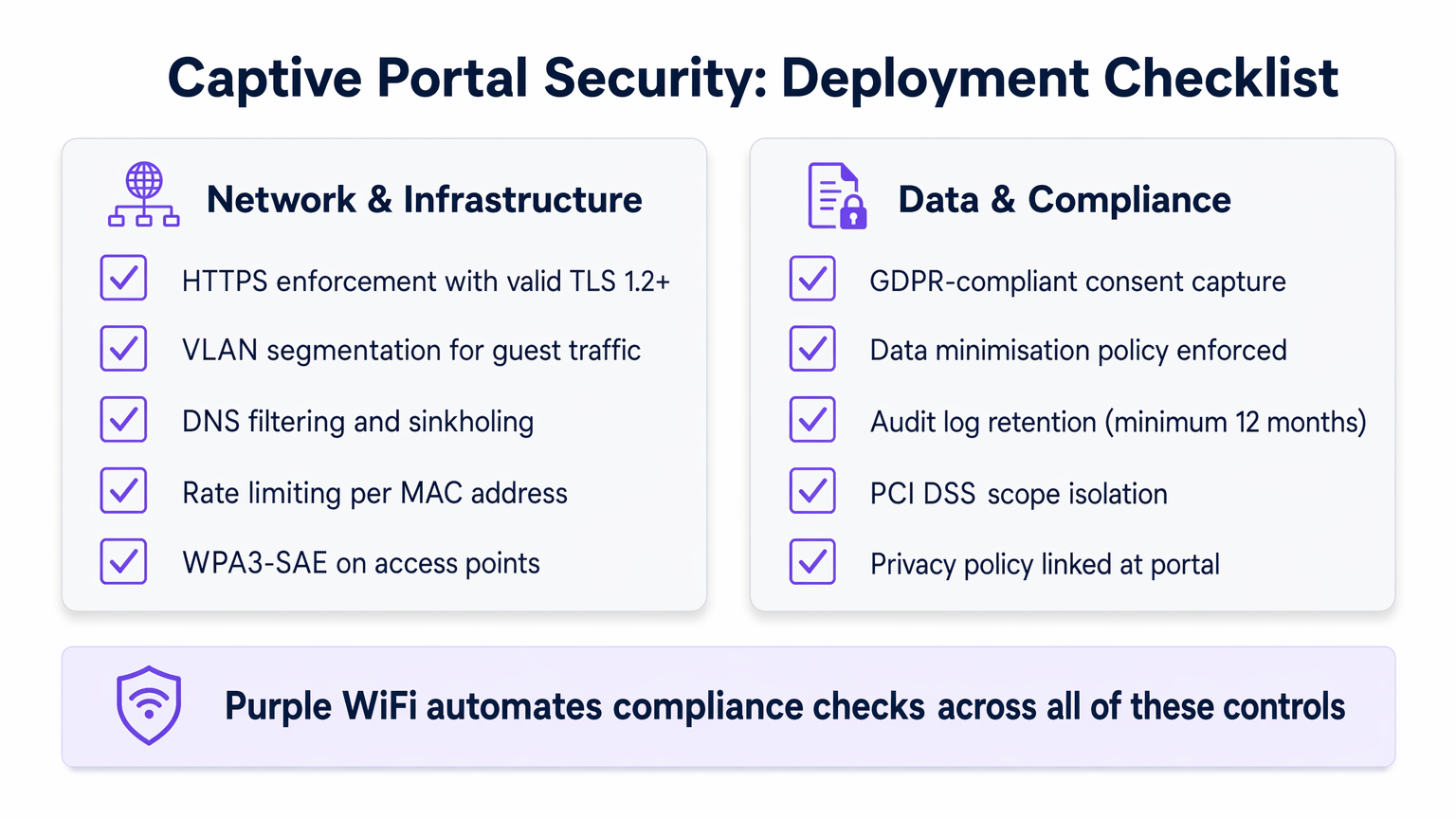
HTTPS लागू करें: सभी पोर्टल ट्रैफ़िक को TLS 1.2 या उच्चतर का उपयोग करके एन्क्रिप्ट किया जाना चाहिए। प्रोटोकॉल डाउनग्रेड हमलों को रोकने के लिए HTTP Strict Transport Security (HSTS) हेडर लागू करें। एक स्व-हस्ताक्षरित प्रमाणपत्र ब्राउज़र चेतावनियाँ उत्पन्न करेगा और उपयोगकर्ता के विश्वास को नष्ट कर देगा; हमेशा एक विश्वसनीय CA से प्रमाणपत्र का उपयोग करें।
क्लाइंट आइसोलेशन: अतिथि नेटवर्क पर डिवाइस-टू-डिवाइस संचार को रोकने के लिए अतिथि एक्सेस पॉइंट पर क्लाइंट आइसोलेशन सक्षम करें। यह नेटवर्क से जुड़े दुर्भावनापूर्ण अभिनेताओं द्वारा पार्श्व गति को कम करता है।
रेट लिमिटिंग: पोर्टल के खिलाफ ब्रूट-फोर्स हमलों को रोकने और DNS टनलिंग प्रयासों के प्रभाव को सीमित करने के लिए प्री-ऑथ स्थिति में प्रति-MAC-एड्रेस रेट लिमिटिंग लागू करें।
WPA3-SAE: जहाँ हार्डवेयर इसका समर्थन करता है, अतिथि SSIDs पर WPA3-SAE (Simultaneous Authentication of Equals) को परिनियोजित करें। यह फॉरवर्ड सीक्रेसी प्रदान करता है, यह सुनिश्चित करता है कि यदि सत्र कुंजी से समझौता भी हो जाता है, तो भी ऐतिहासिक ट्रैफ़िक को डिक्रिप्ट नहीं किया जा सकता है।
डेटा गोपनीयता और अनुपालन
Captive Portal प्रमुख डेटा संग्रह बिंदु हैं, जो अनुपालन को एक महत्वपूर्ण इंजीनियरिंग आवश्यकता बनाते हैं न कि बाद का विचार।
GDPR और CCPA अनुपालन: किसी भी PII को एकत्र करने से पहले स्पष्ट, सकारात्मक सहमति प्राप्त की जानी चाहिए। विपणन संचार के लिए एक डबल ऑप्ट-इन तंत्र लागू करें। सुनिश्चित करें कि तृतीय-पक्ष प्लेटफॉर्म के साथ आपके डेटा प्रोसेसर समझौते अद्यतित हैं।
डेटा न्यूनीकरण: केवल वही एकत्र करें जो बिल्कुल आवश्यक है। एक अतिथि Wi-Fi परिनियोजन के लिए, इसका आमतौर पर मतलब एक ईमेल एड्रेस और स्पष्ट मार्केटिंग सहमति होता है। जन्म तिथि, फोन नंबर, या जनसांख्यिकीय डेटा एकत्र करने से बचें जब तक कि कोई स्पष्ट, प्रलेखित व्यावसायिक औचित्य न हो।
PCI DSS स्कोप आइसोलेशन: खुदरा वातावरण को यह सुनिश्चित करना चाहिए कि अतिथि नेटवर्क पूरी तरह से PCI DSS दायरे से बाहर हो। इसके लिए POS सिस्टम से सख्त भौतिक और तार्किक अलगाव की आवश्यकता होती है, जिसे एक योग्य सुरक्षा मूल्यांकनकर्ता (QSA) द्वारा सालाना मान्य किया जाता है।
ऑडिट लॉग प्रतिधारण: घटना की जांच और नियामक अनुरोधों का समर्थन करने के लिए न्यूनतम 12 महीनों के लिए प्रमाणीकरण लॉग बनाए रखें। सुनिश्चित करें कि लॉग छेड़छाड़-प्रूफ प्रारूप में संग्रहीत हैं।
समस्या निवारण और जोखिम न्यूनीकरण
यहां तक कि अच्छी तरह से आर्किटेक्टेड परिनियोजन भी अनुमानित विफलता मोड का सामना करते हैं। निम्न तालिका सबसे सामान्य मुद्दों और उनके समाधानों को रेखांकित करती है।
| समस्या | मूल कारण | समाधान |
|---|---|---|
| iOS/Android पर पोर्टल ट्रिगर नहीं हो रहा है | वॉलड गार्डन में CPD एंडपॉइंट ब्लॉक किए गए | वॉलड गार्डन में captive.apple.com और connectivitycheck.gstatic.com जोड़ें |
| RADIUS प्रमाणीकरण टाइमआउट | RADIUS सर्वर पर उच्च WAN विलंबता | स्थानीय RADIUS प्रॉक्सी परिनियोजित करें; UDP 1812/1813 पर फ़ायरवॉल नियमों की जाँच करें |
| DNS टनलिंग का पता चला | अत्यधिक अनुमेय प्री-ऑथ DNS | DNS सिंकहोलिंग लागू करें; प्री-ऑथ DNS को केवल पोर्टल रिसॉल्वर तक सीमित करें |
| लौटने वाले उपयोगकर्ताओं को हर विज़िट पर फिर से प्रॉम्प्ट किया जाता है | MAC रैंडमाइजेशन सत्र ट्रैकिंग को तोड़ रहा है | कुकी-आधारित या प्रमाणपत्र-आधारित सत्र प्रबंधन पर माइग्रेट करें |
| पोर्टल SSL प्रमाणपत्र चेतावनी | समाप्त या स्व-हस्ताक्षरित प्रमाणपत्र | Let's Encrypt या एंटरप्राइज़ CA के माध्यम से स्वतः-नवीनीकरण प्रमाणपत्र परिनियोजित करें |
| IoT डिवाइस कनेक्ट करने में असमर्थ | हेडलेस डिवाइस पोर्टल प्रवाह को पूरा नहीं कर सकते | पंजीकृत IoT डिवाइस के लिए MAC Authentication Bypass (MAB) लागू करें |
जटिल नैदानिक या विनियमित नेटवर्क आवश्यकताओं वाले वातावरण के लिए, जैसे NHS ट्रस्ट या निजी अस्पताल, अतिरिक्त नियंत्रण लागू होते हैं। क्षेत्र-विशिष्ट मार्गदर्शन के लिए अस्पतालों में WiFi: सुरक्षित नैदानिक नेटवर्क के लिए एक गाइड देखें। इसी तरह, वितरित RADIUS इंफ्रास्ट्रक्चर वाले परिवहन हब अद्वितीय विलंबता चुनौतियाँ प्रस्तुत करते हैं — परिवहन वातावरण से संबंधित उच्च-घनत्व, वितरित परिनियोजन पैटर्न के लिए एंटरप्राइज़ इन कार Wi-Fi समाधानों के लिए आपकी गाइड देखें।
ROI और व्यावसायिक प्रभाव
एक ठीक से लागू किया गया Captive Portal एक लागत केंद्र को मापने योग्य रिटर्न के साथ एक रणनीतिक संपत्ति में बदल देता है।
डेटा अधिग्रहण और CRM एकीकरण: निर्बाध Wi-Fi की पेशकश करके, स्थल कनेक्शन बिंदु पर मूल्यवान फर्स्ट-पार्टी डेटा कैप्चर करते हैं। यह डेटा सीधे CRM सिस्टम में प्रवाहित होता है, जिससे लक्षित मार्केटिंग अभियान सक्षम होते हैं। हॉस्पिटैलिटी ओPurple के प्लेटफॉर्म का उपयोग करने वाले ऑपरेटरों ने 60-75% की प्रमाणीकरण-से-ईमेल-कैप्चर दरें बताई हैं, जिसमें व्यक्तिगत आउटरीच के लिए उस डेटा का उपयोग करने पर बार-बार विज़िट दरों में मापने योग्य वृद्धि हुई है।
परिचालन दक्षता: स्वचालित ऑनबोर्डिंग और स्व-सेवा पहुंच हेल्पडेस्क के बोझ को कम करती है। 802.1X का उपयोग करने वाले एंटरप्राइज़ डिप्लॉयमेंट में, साझा पासवर्ड को खत्म करने से क्रेडेंशियल रोटेशन से जुड़े IT ओवरहेड कम हो जाते हैं।
प्रतिस्पर्धी विभेदक के रूप में अनुपालन: जो संगठन GDPR-अनुरूप डेटा कैप्चर और PCI DSS स्कोप आइसोलेशन प्रदर्शित कर सकते हैं, उन्हें एंटरप्राइज़ क्लाइंट और सार्वजनिक-क्षेत्र की खरीद टीमों द्वारा तेजी से पसंद किया जा रहा है। अनुपालन केवल जोखिम कम करने का अभ्यास नहीं है; यह एक व्यावसायिक लाभ है।
मापने योग्य KPIs: प्रमाणीकरण रूपांतरण दर (लक्ष्य: >70%), औसत सत्र अवधि, वापसी आगंतुक दर, और CRM डेटा संवर्धन दर को ट्रैक करें। Purple के WiFi Analytics प्लेटफॉर्म के माध्यम से उपलब्ध ये मेट्रिक्स, पोर्टल इन्फ्रास्ट्रक्चर में निरंतर निवेश के लिए व्यावसायिक तर्क प्रदान करते हैं।
Healthcare सेटिंग्स में, विश्वसनीय और सुरक्षित कनेक्टिविटी स्पष्ट रूप से रोगी और आगंतुक संतुष्टि स्कोर में सुधार करती है, जिसमें कई NHS ट्रस्टों ने संरचित गेस्ट Wi-Fi डिप्लॉयमेंट के बाद CSAT में 15-20% सुधार की सूचना दी है।
मुख्य शब्द और परिभाषाएं
Captive Portal
A network access control mechanism that intercepts HTTP/HTTPS traffic from unauthenticated clients and redirects them to a web-based authentication or registration page before granting internet access.
IT teams encounter this as the primary onboarding mechanism for guest Wi-Fi. The portal is the enforcement boundary between untrusted devices and the network, and its configuration directly impacts both security posture and user experience.
VLAN Segmentation
The practice of dividing a physical network into multiple logical networks (VLANs) to isolate traffic between different user groups or system types, enforced via 802.1Q tagging and ACLs.
Critical for any deployment where guest users share physical infrastructure with corporate systems or POS terminals. Proper VLAN segmentation is a prerequisite for PCI DSS compliance in retail environments.
RADIUS (Remote Authentication Dial-In User Service)
A networking protocol (RFC 2865) that provides centralised Authentication, Authorisation, and Accounting (AAA) for network access. In captive portal deployments, the RADIUS server validates credentials and instructs the WLC to assign the appropriate VLAN via Change of Authorisation (CoA).
The backbone of enterprise Wi-Fi authentication. IT teams must size RADIUS infrastructure for peak concurrent authentication load and ensure low latency between WLCs and the RADIUS server to prevent authentication timeouts.
Walled Garden
A restricted set of URLs, IP addresses, and domains that unauthenticated users are permitted to access before completing the captive portal flow. All other traffic is blocked.
A misconfigured walled garden is one of the most common security vulnerabilities in captive portal deployments. It must be as restrictive as possible while including captive portal detection endpoints for major operating systems to ensure the portal triggers correctly.
MAC Authentication Bypass (MAB)
A mechanism that allows headless devices (those without a browser, such as IoT sensors, smart TVs, or printers) to bypass the captive portal by pre-registering their MAC address in the RADIUS server.
Essential for any venue deploying IoT devices on the same physical infrastructure as guest Wi-Fi. MAB devices should always be assigned to a dedicated, restricted IoT VLAN, never to the general guest VLAN.
Passpoint (Hotspot 2.0)
A Wi-Fi Alliance specification (based on IEEE 802.11u) that enables automatic, secure authentication to Wi-Fi networks using WPA2/WPA3-Enterprise, eliminating the need for manual portal interaction for credentialed users.
Increasingly relevant for venues with high return-visitor rates, such as hotels and transport hubs. Purple provides identity provider services for OpenRoaming, a Passpoint-based global roaming network, under the Connect licence.
Change of Authorisation (CoA)
A RADIUS extension (RFC 5176) that allows the RADIUS server to dynamically modify an active session — typically to reassign a user to a different VLAN after successful authentication via the captive portal.
The mechanism that enables dynamic VLAN assignment in captive portal deployments. Without CoA support, the WLC cannot move a user from the pre-auth VLAN to the post-auth VLAN without forcing a full re-association.
DNS Tunnelling
An attack technique that encodes arbitrary data within DNS query and response packets to bypass network access controls, including captive portals, by exploiting the fact that DNS traffic is often permitted in the pre-auth state.
A significant risk in captive portal deployments with permissive pre-auth DNS configurations. Mitigated by restricting pre-auth DNS resolution to a controlled resolver and implementing DNS sinkholing and rate-limiting.
WPA3-SAE (Simultaneous Authentication of Equals)
The authentication protocol introduced in WPA3 that replaces the Pre-Shared Key (PSK) handshake with a Dragonfly key exchange, providing forward secrecy and resistance to offline dictionary attacks.
The recommended encryption standard for guest SSIDs on modern hardware. Forward secrecy ensures that compromising one session key does not expose historical traffic, which is particularly important on shared guest networks.
TLS (Transport Layer Security)
A cryptographic protocol that provides encrypted communication between a client and server. For captive portals, TLS 1.2 or higher is required to protect credentials and PII transmitted during the authentication flow.
All captive portal traffic must be served over HTTPS with a valid TLS certificate from a trusted CA. A self-signed certificate will trigger browser security warnings, destroying user trust and reducing authentication conversion rates.
केस स्टडीज
A 200-room hotel group with 15 properties needs to deploy a branded captive portal that captures guest email addresses for their loyalty programme, handles peak loads of 500 concurrent authentications per property, and complies with GDPR. Their existing infrastructure uses a mix of Cisco and Ruckus access points. How should they approach this deployment?
The recommended architecture is a cloud-hosted captive portal with local RADIUS proxies at each property. Deploy a central RADIUS server (or use a managed RADIUS-as-a-Service) with local proxy instances at each site to handle authentication requests with sub-100ms latency regardless of WAN conditions. Configure dynamic VLAN assignment: VLAN 10 for pre-auth guests, VLAN 20 for post-auth guests, VLAN 30 for staff (802.1X authenticated). The walled garden must include the portal domain, CDN assets, and social login provider endpoints. For the portal itself, use email registration with a GDPR-compliant double opt-in flow: the user enters their email, receives a confirmation link, and is granted access upon clicking. This ensures verified email capture. Integrate the portal API with the hotel's CRM (e.g., Salesforce or HubSpot) to push new contacts in real time. For the Cisco/Ruckus mixed environment, use RADIUS CoA (RFC 5176) for post-authentication VLAN assignment — both vendors support this natively. Test the walled garden configuration specifically on iOS 16+ and Android 12+ to validate captive portal detection behaviour with MAC randomisation enabled.
A national retail chain with 80 stores needs to deploy guest Wi-Fi across all locations. Their POS systems are on the same physical network infrastructure. They need to ensure PCI DSS compliance while capturing marketing consent from shoppers. What is the correct network architecture?
The non-negotiable first step is network segmentation. Deploy dedicated SSIDs: one for guest access (captive portal) and one for staff/POS (802.1X, WPA3-Enterprise). Assign these to separate VLANs with ACLs at the distribution switch layer that explicitly deny any traffic between the guest VLAN and the POS VLAN. The guest VLAN should route directly to the internet via a dedicated uplink or VLAN-tagged subinterface, never through the corporate routing infrastructure. For the captive portal, use email registration with explicit marketing consent capture. The consent checkbox must be unchecked by default and must clearly state the marketing purpose. Integrate the portal with the retail chain's marketing platform (e.g., Klaviyo or Dotdigital) via API. Implement DNS filtering on the guest VLAN to block known malicious domains and prevent DNS tunnelling. Conduct an annual PCI DSS scope review with a QSA to validate that the guest network remains out of scope. Document the network segmentation controls in the PCI DSS compliance evidence pack.
परिदृश्य विश्लेषण
Q1. A conference centre hosts 50 events per year, ranging from 200-person seminars to 5,000-person trade shows. They want a single captive portal deployment that can handle both scenarios. The IT team is concerned about RADIUS capacity at peak load and about ensuring the portal triggers correctly on all devices. What architecture decisions should they prioritise?
💡 संकेत:Consider the difference in authentication load between a 200-person and a 5,000-person event, and think about what happens to the RADIUS server if it is the single point of failure.
अनुशंसित दृष्टिकोण दिखाएं
The architecture must be designed for the peak case (5,000 concurrent users) but must remain cost-effective for smaller events. Deploy a cloud-hosted RADIUS service with auto-scaling capability rather than a fixed on-premises RADIUS server. This eliminates the capacity planning problem. For captive portal detection reliability, ensure the walled garden includes all major OS captive portal detection endpoints (Apple, Google, Microsoft). Use a CDN to serve portal assets to minimise load time regardless of concurrent user count. Implement per-AP rate limiting to prevent any single access point from overwhelming the RADIUS server during simultaneous association bursts (common when a session break ends at a large event). Consider deploying Passpoint for returning attendees to eliminate portal friction entirely for credentialed users.
Q2. An NHS trust wants to deploy guest Wi-Fi across a 600-bed hospital. Clinical staff use the same physical network infrastructure. The trust's Information Governance team has flagged concerns about patient data exposure and GDPR compliance for visitor data capture. What are the three most critical architectural controls to implement?
💡 संकेत:Think about the three distinct user groups (patients/visitors, clinical staff, medical devices) and the data sensitivity associated with each.
अनुशंसित दृष्टिकोण दिखाएं
The three critical controls are: (1) Strict VLAN segmentation with three separate VLANs — guest/visitor (captive portal), clinical staff (802.1X WPA3-Enterprise), and medical devices (MAB with dedicated IoT VLAN). ACLs must prevent any cross-VLAN traffic. (2) GDPR-compliant consent capture on the visitor portal, with data minimisation enforced — collect only email and explicit marketing consent, with automated 30-day purge for inactive records. The portal must link to the trust's privacy notice. (3) Client isolation on the guest SSID to prevent device-to-device communication, which is particularly important in a healthcare environment where patients may be vulnerable to social engineering or device exploitation. See the dedicated guide at WiFi in Hospitals for further sector-specific controls.
Q3. A retail IT director has received a finding from their PCI DSS QSA stating that the guest Wi-Fi network is 'potentially in scope' for PCI DSS because the guest VLAN is routed through the same core switch as the POS VLAN. The QSA has given them 90 days to remediate. What is the fastest path to achieving scope isolation without replacing the core switch?
💡 संकेत:Physical replacement of infrastructure is not always necessary — consider what logical controls can achieve the same outcome as physical separation, and what evidence the QSA will need to close the finding.
अनुशंसित दृष्टिकोण दिखाएं
The fastest remediation path is to implement explicit deny ACLs on the core switch between the guest VLAN and all POS VLANs, combined with a network penetration test to validate that no traffic path exists between the two segments. Document the ACL rules and the test results as evidence for the QSA. Additionally, configure the guest VLAN to route directly to the internet via a dedicated subinterface or VLAN-tagged uplink to the ISP, bypassing the corporate routing table entirely. This removes the guest VLAN from the corporate routing domain, which is the strongest logical isolation achievable without physical separation. The QSA will typically accept this as a compensating control if it is accompanied by a documented penetration test confirming no cross-VLAN traffic paths exist.




