

Captive Portal Anpassung und Best Practices für Sicherheit
Dieser Leitfaden bietet eine umfassende technische Referenz für IT-Manager, Netzwerkarchitekten und CTOs, die Captive Portals in den Bereichen Gastgewerbe, Einzelhandel, Veranstaltungen und im öffentlichen Sektor einsetzen. Er deckt den gesamten Bereitstellungslebenszyklus ab – von der VLAN-Architektur und der Auswahl der Authentifizierungsmethode bis hin zur GDPR-Konformität, der Verhinderung von Portal-Hijacking und der Backend-Integration. Organisationen, die diese Praktiken implementieren, werden Sicherheitsrisiken reduzieren, die Einhaltung gesetzlicher Vorschriften erreichen und Gast-Wi-Fi in ein messbares Geschäftsgut verwandeln.
🎧 Diesen Leitfaden anhören
Transkript anzeigen
Zusammenfassung für Führungskräfte
Die Bereitstellung eines sicheren und hochgradig angepassten Captive Portals ist nicht länger nur eine Netzwerkanforderung; es ist eine kritische Schnittstelle zwischen Infrastruktursicherheit, Benutzererfahrung und Daten-Governance. Für CTOs, Netzwerkarchitekten und IT-Direktoren besteht die Herausforderung darin, nahtlosen Zugang mit strengen Sicherheitskontrollen in verschiedenen Umgebungen wie dem Gastgewerbe , dem Einzelhandel und großen öffentlichen Veranstaltungsorten in Einklang zu bringen. Dieser Leitfaden beschreibt die technische Architektur, Bereitstellungsstrategien und Best Practices für die Sicherheit, die zum Aufbau widerstandsfähiger Captive Portals erforderlich sind. Durch die Implementierung robuster Authentifizierungsmethoden, einer ordnungsgemäßen VLAN-Segmentierung und der Einhaltung von Compliance-Standards wie GDPR und PCI DSS können Organisationen Risiken mindern und gleichzeitig verwertbare Informationen über Plattformen wie Purple's WiFi Analytics gewinnen.
Technischer Überblick
Architektur und Datenfluss
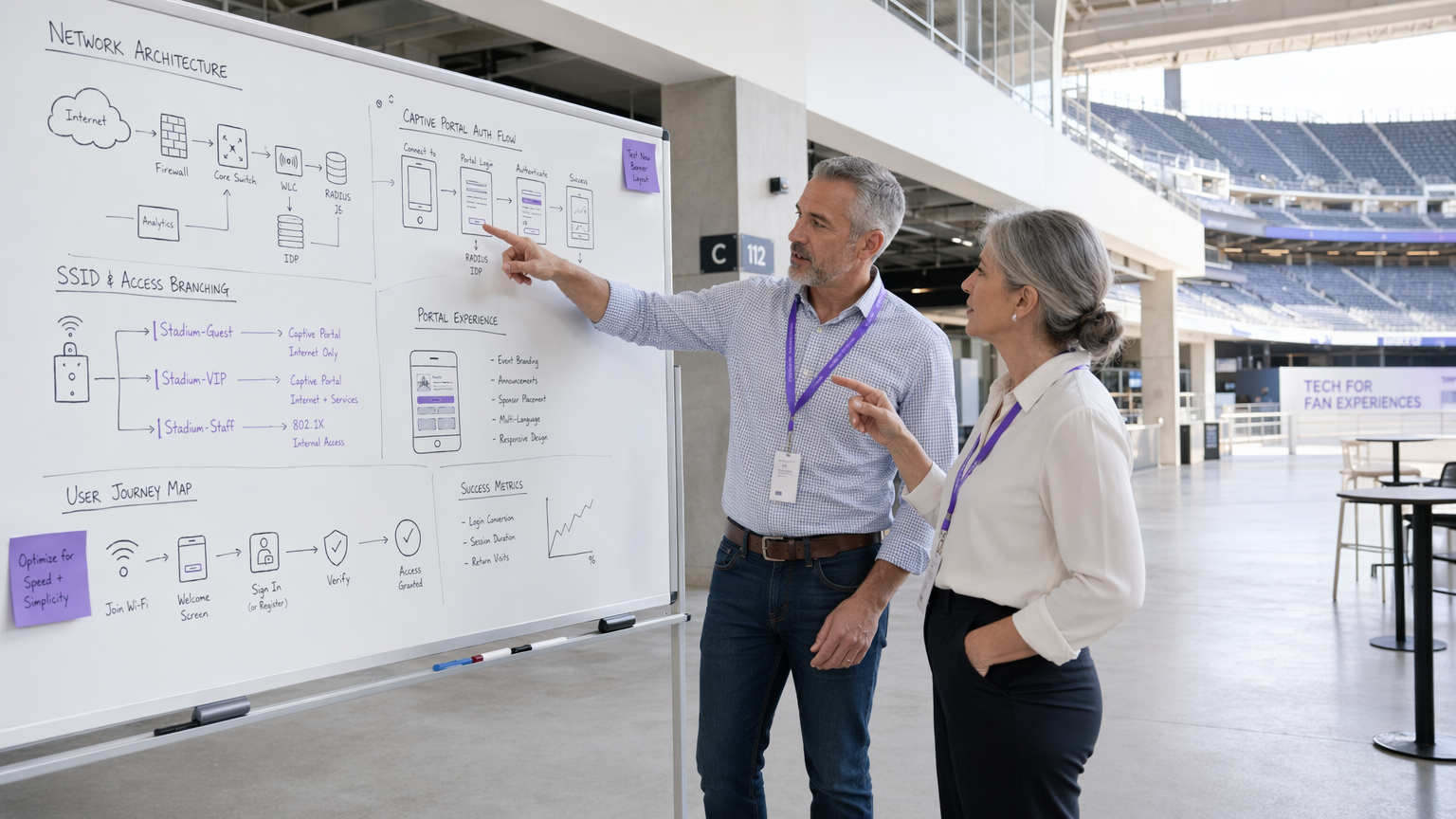
Eine robuste Captive Portal Bereitstellung basiert auf einem strukturierten Datenfluss, der nicht authentifizierte Benutzer isoliert und gleichzeitig einen klaren Weg zur Authentifizierung bietet. Wenn ein Benutzer sich mit dem Guest WiFi verbindet, fängt der Access Point oder Wireless LAN Controller (WLC) seine anfänglichen HTTP/HTTPS-Anfragen ab. Dieser Datenverkehr wird zum Captive Portal umgeleitet, das entweder lokal oder in der Cloud gehostet wird. Die Architektur muss eine dynamische VLAN-Zuweisung unterstützen: Nicht authentifizierte Benutzer werden in ein eingeschränktes 'Pre-Auth'-VLAN mit Zugriff, der streng auf das Captive Portal und wesentliche Dienste (DNS und DHCP) beschränkt ist, platziert. Nach erfolgreicher Authentifizierung über einen RADIUS-Server empfängt der WLC eine Change of Authorisation (CoA)-Nachricht, die den Benutzer in ein 'Post-Auth'-VLAN mit Internetzugang verschiebt.
Der Walled Garden ist ein kritisches Konfigurationselement. Er definiert die Menge der URLs und IP-Bereiche, die vor der Authentifizierung zugänglich sind. Ein schlecht definierter Walled Garden ist einer der häufigsten Vektoren für DNS-Tunneling-Angriffe, bei denen ein böswilliger Akteur beliebigen IP-Verkehr in DNS-Abfragen kapselt, um das Portal vollständig zu umgehen. Die Beschränkung der Pre-Auth-DNS-Auflösung auf die eigene Domain des Portals und bekannte Identitätsanbieter ist eine nicht verhandelbare Grundlage.
Authentifizierungsmechanismen
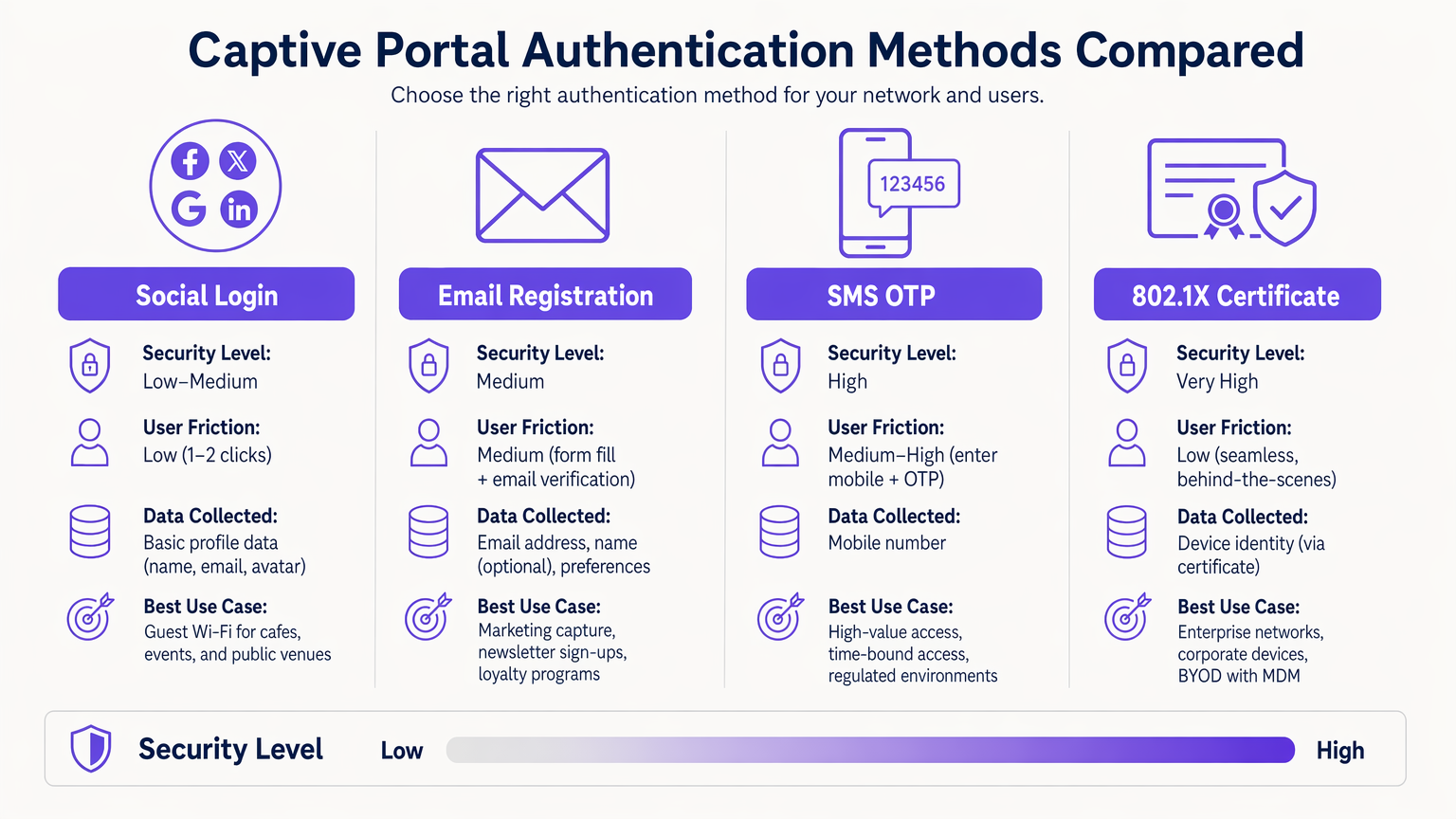
Die Auswahl des richtigen Authentifizierungsmechanismus ist ein Abwägen zwischen Risiko und Aufwand, das für jeden Bereitstellungskontext bewusst getroffen werden muss.
| Methode | Sicherheitsstufe | Benutzeraufwand | Primärer Anwendungsfall |
|---|---|---|---|
| 802.1X Certificate | Sehr hoch | Sehr niedrig (nahtlos) | Corporate BYOD, Mitarbeiternetzwerke |
| SMS OTP | Hoch | Mittel-Hoch | Hochwertiger oder zeitlich begrenzter Zugang |
| Email Registration | Mittel | Mittel | Erfassung von Marketingdaten, Kundenbindung |
| Social Login (OAuth 2.0) | Niedrig-Mittel | Niedrig | Guest Wi-Fi, öffentliche Orte |
| Passpoint / Hotspot 2.0 | Hoch | Sehr niedrig (automatisch) | Wiederkehrende Benutzer, Roaming |
802.1X Zertifikatbasierte Authentifizierung ist der Goldstandard für Unternehmensumgebungen. Sie bietet nahtlosen, hochsicheren Zugang unter Verwendung von Gerätezertifikaten, die über eine MDM-Plattform verwaltet werden, wodurch das Risiko des Diebstahls von Anmeldeinformationen eliminiert wird. Für häufige Bereitstellungsprobleme siehe Fehlerbehebung bei Windows 11 802.1X Authentifizierungsproblemen .
Passpoint (Hotspot 2.0) verdient besondere Aufmerksamkeit. Es ermöglicht automatisches, sicheres Roaming zwischen Wi-Fi-Netzwerken unter Verwendung von WPA2/WPA3-Enterprise-Sicherheit. Purple fungiert als kostenloser Identitätsanbieter für Dienste wie OpenRoaming unter der Connect-Lizenz und erleichtert so eine nahtlose Konnektivität ohne manuelle Portalinteraktion für wiederkehrende Benutzer.
Portal-Design und Anpassung
Das Design des Portals wirkt sich direkt auf die Authentifizierungskonversionsraten aus. Ein Portal, das auf einem mobilen Gerät länger als drei Sekunden zum Laden benötigt, wird einen erheblichen Rückgang verzeichnen. Verwenden Sie leichtgewichtiges HTML/CSS, minimieren Sie JavaScript-Abhängigkeiten und stellen Sie Assets von einem CDN bereit. Das Portal muss vollständig responsiv sein – in Gastgewerbe- und Einzelhandelsumgebungen stammen die meisten Verbindungen von mobilen Geräten.
Branding ist auch ein Compliance-Problem. Gemäß GDPR muss das Portal einen klaren, zustimmenden Einwilligungsmechanismus präsentieren, bevor personenbezogene Daten (PII) gesammelt werden. Vorausgewählte Kontrollkästchen erfüllen nicht den Standard für eine freiwillige, spezifische, informierte und eindeutige Einwilligung. Die Datenschutzrichtlinie und die Nutzungsbedingungen müssen verlinkt und ohne Abschluss der Authentifizierung zugänglich sein.
Implementierungsleitfaden
Die Bereitstellung eines Captive Portals erfordert einen methodischen Ansatz über Infrastruktur-, Software- und Compliance-Dimensionen hinweg.
Schritt 1 — Infrastrukturvorbereitung: Stellen Sie sicher, dass Ihre WLCs und Access Points WPA3-SAE und dynamische VLAN-Zuweisung unterstützen. Überprüfen Sie, ob Ihre RADIUS-Infrastruktur die erwartete Spitzenlast bei der Authentifizierung bewältigen kann – für große Veranstaltungsorte sollten Sie die lokale Bereitstellung von RADIUS-Proxys in Betracht ziehen, um die WAN-Latenz zu reduzieren. Wenn Sie spezifische Hardware bereitstellen, konsultieren Sie Ressourcen wie Ihr Leitfaden zu einem Wireless Access Point Ruckus für herstellerspezifische Konfigurationsanleitungen.
Schritt 2 — VLAN- und Firewall-Architektur: Erstellen Sie dedizierte VLANs für Pre-Auth-Gastverkehr, Post-Auth-Gastverkehr, Personal und IoT-Geräte. Wenden Sie ACLs auf der Verteilungsebene an, um jegliche Cross-VLAN-Kommunikation zu verhindern. Gast-VLANs dürfen niemals zu Unternehmens- oder POS-Netzwerksegmenten routen.
Schritt 3 — Walled Garden Konfiguration: Definieren Sie den minimal erforderlichen Satz von Domains und IP-Bereichen für den Pre-Auth-Zugriff. Dies muss den Portal-Hostnamen, CDN-Domains für Portal-Assets und Endpunkte von Identitätsanbietern (z. B. accounts.google.com, graph.facebook.com für Social Login) umfassen. Fügen Sie Captive Portal-Erkennungsendpunkte für gängige Betriebssysteme (connectivitycheck.gstatic.com für Android, captive.apple.com für iOS) hinzu, um sicherzustellen, dass das Portal korrekt ausgelöst wird.
Schritt 4 — Portal-Bereitstellung und Integration: Stellen Sie das Portal mit einem gültigen TLS-Zertifikat einer vertrauenswürdigen CA bereit. Integrieren Sie es über die API in Ihr CRM oder Ihre Marketingplattform, um sicherzustellen, dass erfasste Daten direkt in Ihre Kundendateninfrastruktur fließen. Die WiFi Analytics -Plattform von Purple bietet sofort einsatzbereite Integrationen mit gängigen CRM-Systemen.
Schritt 5 — Umgang mit MAC-Adressen-Randomisierung: Moderne iOS- und Android-Geräte verwenden randomisierte MAC-Adressen. Stellen Sie Ihr Sitzungsmanagement so um, dass es sich auf authentifizierte Sitzungstoken oder Gerätezertifikate statt auf statische MAC-Adressen stützt, um eine konsistente Erfahrung für wiederkehrende Benutzer zu gewährleisten.
Schritt 6 — Testen und Validierung: Testen Sie über iOS, Android, Windows und macOS hinweg. Simulieren Sie Spitzenlastszenarien, um den RADIUS-Durchsatz zu validieren. Führen Sie Penetrationstests durch, die speziell auf die Walled Garden-Konfiguration und DNS-Filterkontrollen abzielen.
Best Practices
Netzwerksicherheitskontrollen
Für einen umfassenden Überblick über die breitere Sicherheitslandschaft siehe Sichere Gast-WiFi-Netzwerke: Best Practices und Implementierung .
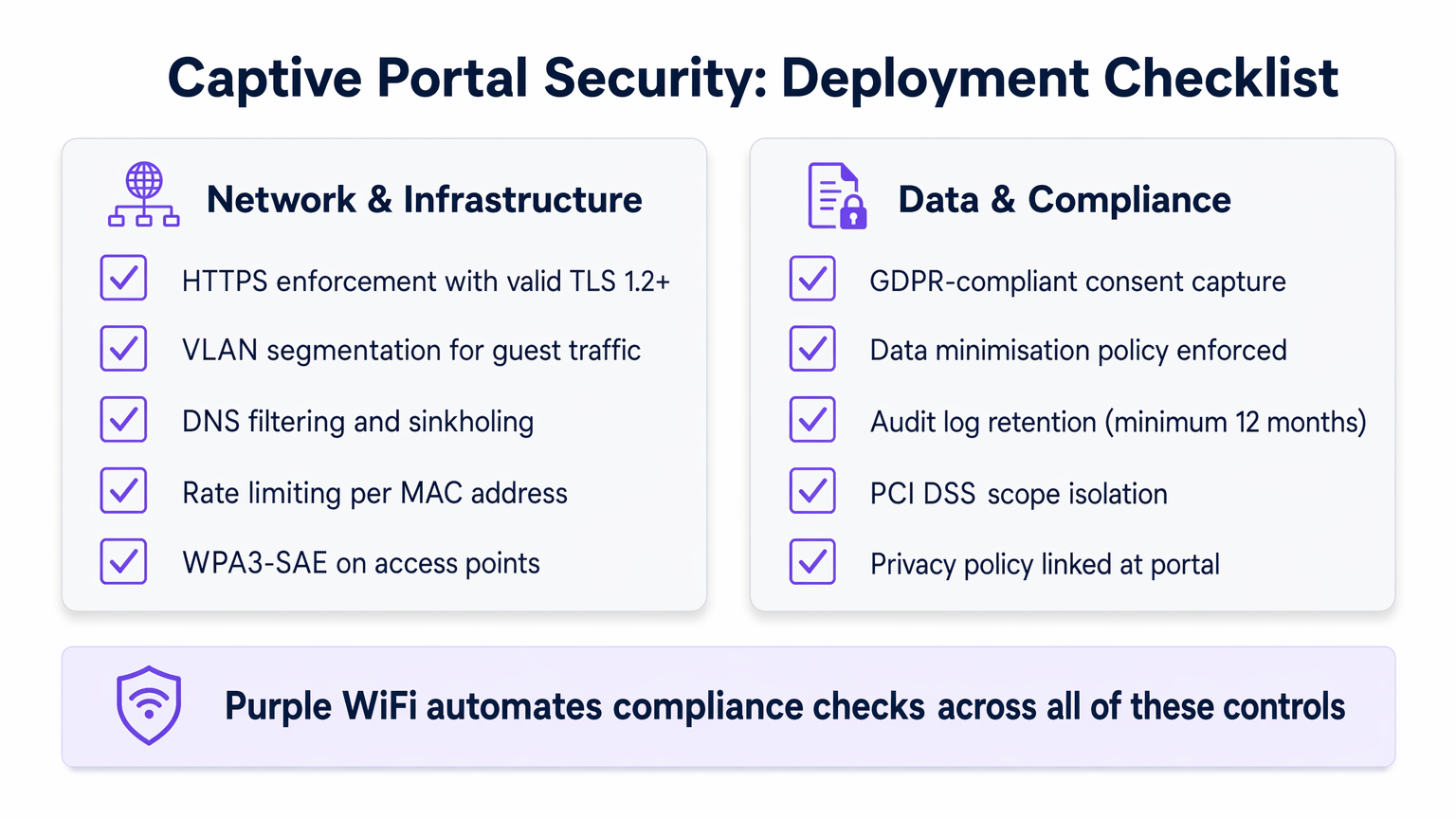
HTTPS erzwingen: Der gesamte Portal-Traffic muss mit TLS 1.2 oder höher verschlüsselt werden. Implementieren Sie HTTP Strict Transport Security (HSTS)-Header, um Protokoll-Downgrade-Angriffe zu verhindern. Ein selbstsigniertes Zertifikat führt zu Browserwarnungen und zerstört das Benutzervertrauen; verwenden Sie immer ein Zertifikat einer vertrauenswürdigen CA.
Client-Isolation: Aktivieren Sie die Client-Isolation auf Gast-Access Points, um die Geräte-zu-Geräte-Kommunikation im Gastnetzwerk zu verhindern. Dies mindert die laterale Bewegung durch böswillige Akteure, die sich mit dem Netzwerk verbunden haben.
Ratenbegrenzung: Implementieren Sie eine Ratenbegrenzung pro MAC-Adresse im Pre-Auth-Zustand, um Brute-Force-Angriffe auf das Portal zu verhindern und die Auswirkungen von DNS-Tunneling-Versuchen zu begrenzen.
WPA3-SAE: Wo die Hardware es unterstützt, implementieren Sie WPA3-SAE (Simultaneous Authentication of Equals) auf Gast-SSIDs. Dies bietet Forward Secrecy und stellt sicher, dass selbst wenn ein Sitzungsschlüssel kompromittiert wird, der historische Traffic nicht entschlüsselt werden kann.
Datenschutz und Compliance
Captive Portals sind primäre Datenerfassungspunkte, was Compliance zu einer kritischen technischen Anforderung und nicht zu einem nachträglichen Gedanken macht.
GDPR und CCPA Compliance: Eine explizite, affirmative Zustimmung muss erfasst werden, bevor personenbezogene Daten (PII) gesammelt werden. Implementieren Sie einen Double-Opt-in-Mechanismus für Marketingkommunikation. Stellen Sie sicher, dass Ihre Datenverarbeitungsvereinbarungen mit Drittanbieterplattformen aktuell sind.
Datenminimierung: Sammeln Sie nur das, was unbedingt notwendig ist. Für eine Gast-Wi-Fi-Bereitstellung bedeutet dies typischerweise eine E-Mail-Adresse und eine explizite Marketingzustimmung. Vermeiden Sie das Sammeln von Geburtsdaten, Telefonnummern oder demografischen Daten, es sei denn, es gibt eine klare, dokumentierte geschäftliche Begründung.
PCI DSS Scope Isolation: Einzelhandelsumgebungen müssen sicherstellen, dass das Gastnetzwerk vollständig außerhalb des PCI DSS-Geltungsbereichs liegt. Dies erfordert eine strikte physische und logische Trennung von POS-Systemen, die jährlich von einem Qualified Security Assessor (QSA) validiert wird.
Audit-Log-Aufbewahrung: Bewahren Sie Authentifizierungsprotokolle für mindestens 12 Monate auf, um die Untersuchung von Vorfällen und behördliche Anfragen zu unterstützen. Stellen Sie sicher, dass die Protokolle in einem manipulationssicheren Format gespeichert werden.
Fehlerbehebung & Risikominderung
Selbst gut konzipierte Bereitstellungen stoßen auf vorhersehbare Fehler. Die folgende Tabelle listet die häufigsten Probleme und deren Lösungen auf.
| Problem | Ursache | Lösung |
|---|---|---|
| Portal wird auf iOS/Android nicht ausgelöst | CPD-Endpunkte im Walled Garden blockiert | captive.apple.com und connectivitycheck.gstatic.com zum Walled Garden hinzufügen |
| RADIUS-Authentifizierungs-Timeouts | Hohe WAN-Latenz zum RADIUS-Server | Lokalen RADIUS-Proxy bereitstellen; Firewall-Regeln für UDP 1812/1813 prüfen |
| DNS-Tunneling erkannt | Zu permissive Pre-Auth-DNS | DNS-Sinkholing implementieren; Pre-Auth-DNS nur auf Portal-Resolver beschränken |
| Wiederkehrende Benutzer werden bei jedem Besuch erneut aufgefordert | MAC-Randomisierung unterbricht Sitzungsverfolgung | Auf Cookie-basierte oder Zertifikat-basierte Sitzungsverwaltung migrieren |
| Portal-SSL-Zertifikatswarnung | Abgelaufenes oder selbstsigniertes Zertifikat | Automatisch erneuerndes Zertifikat über Let's Encrypt oder Unternehmens-CA bereitstellen |
| IoT-Geräte können keine Verbindung herstellen | Headless-Geräte können den Portal-Flow nicht abschließen | MAC Authentication Bypass (MAB) für registrierte IoT-Geräte implementieren |
Für Umgebungen mit komplexen klinischen oder regulierten Netzwerkanforderungen, wie NHS-Trusts oder Privatkliniken, gelten zusätzliche Kontrollen. Siehe WiFi in Krankenhäusern: Ein Leitfaden für sichere klinische Netzwerke für sektorspezifische Anleitungen. Ähnlich stellen Verkehrsknotenpunkte mit verteilter RADIUS-Infrastruktur einzigartige Latenzherausforderungen dar – siehe Ihr Leitfaden für Enterprise In Car Wi Fi Lösungen für Bereitstellungsmuster mit hoher Dichte und Verteilung, die für Transport -Umgebungen relevant sind.
ROI & Geschäftsauswirkungen
Ein richtig implementiertes Captive Portal verwandelt ein Kosten-Center in ein strategisches Asset mit messbaren Erträgen.
Datenerfassung und CRM-Integration: Durch das Angebot von nahtlosem Wi-Fi erfassen Veranstaltungsorte wertvolle Erstanbieterdaten am Verbindungspunkt. Diese Daten fließen direkt in CRM-Systeme und ermöglichen gezielte Marketingkampagnen. Gastgewerbe uBetreiber, die die Plattform von Purple nutzen, haben Authentifizierungs-zu-E-Mail-Erfassungsraten von 60–75 % gemeldet, mit messbaren Steigerungen der Wiederbesuchsraten, wenn diese Daten für personalisierte Ansprache verwendet werden.
Operative Effizienz: Automatisiertes Onboarding und Self-Service-Zugang reduzieren die Belastung des Helpdesks. In Unternehmensbereitstellungen, die 802.1X nutzen, reduziert die Eliminierung gemeinsamer Passwörter den IT-Aufwand, der mit der Rotation von Anmeldeinformationen verbunden ist.
Compliance als Wettbewerbsvorteil: Organisationen, die eine GDPR-konforme Datenerfassung und PCI DSS-Bereichsisolierung nachweisen können, werden zunehmend von Unternehmenskunden und Beschaffungsteams des öffentlichen Sektors bevorzugt. Compliance ist nicht nur eine Risikominderungsübung; sie ist ein kommerzieller Vorteil.
Messbare KPIs: Verfolgen Sie die Authentifizierungskonversionsrate (Ziel: >70 %), die durchschnittliche Sitzungsdauer, die Wiederbesuchsrate und die CRM-Datenanreicherungsrate. Diese Metriken, verfügbar über die WiFi Analytics -Plattform von Purple, liefern die Geschäftsgrundlage für kontinuierliche Investitionen in die Portalinfrastruktur.
Im Healthcare -Bereich verbessert eine zuverlässige und sichere Konnektivität nachweislich die Zufriedenheitswerte von Patienten und Besuchern, wobei mehrere NHS-Trusts CSAT-Verbesserungen von 15–20 % nach strukturierten Gast-Wi-Fi-Implementierungen melden.
Schlüsselbegriffe & Definitionen
Captive Portal
A network access control mechanism that intercepts HTTP/HTTPS traffic from unauthenticated clients and redirects them to a web-based authentication or registration page before granting internet access.
IT teams encounter this as the primary onboarding mechanism for guest Wi-Fi. The portal is the enforcement boundary between untrusted devices and the network, and its configuration directly impacts both security posture and user experience.
VLAN Segmentation
The practice of dividing a physical network into multiple logical networks (VLANs) to isolate traffic between different user groups or system types, enforced via 802.1Q tagging and ACLs.
Critical for any deployment where guest users share physical infrastructure with corporate systems or POS terminals. Proper VLAN segmentation is a prerequisite for PCI DSS compliance in retail environments.
RADIUS (Remote Authentication Dial-In User Service)
A networking protocol (RFC 2865) that provides centralised Authentication, Authorisation, and Accounting (AAA) for network access. In captive portal deployments, the RADIUS server validates credentials and instructs the WLC to assign the appropriate VLAN via Change of Authorisation (CoA).
The backbone of enterprise Wi-Fi authentication. IT teams must size RADIUS infrastructure for peak concurrent authentication load and ensure low latency between WLCs and the RADIUS server to prevent authentication timeouts.
Walled Garden
A restricted set of URLs, IP addresses, and domains that unauthenticated users are permitted to access before completing the captive portal flow. All other traffic is blocked.
A misconfigured walled garden is one of the most common security vulnerabilities in captive portal deployments. It must be as restrictive as possible while including captive portal detection endpoints for major operating systems to ensure the portal triggers correctly.
MAC Authentication Bypass (MAB)
A mechanism that allows headless devices (those without a browser, such as IoT sensors, smart TVs, or printers) to bypass the captive portal by pre-registering their MAC address in the RADIUS server.
Essential for any venue deploying IoT devices on the same physical infrastructure as guest Wi-Fi. MAB devices should always be assigned to a dedicated, restricted IoT VLAN, never to the general guest VLAN.
Passpoint (Hotspot 2.0)
A Wi-Fi Alliance specification (based on IEEE 802.11u) that enables automatic, secure authentication to Wi-Fi networks using WPA2/WPA3-Enterprise, eliminating the need for manual portal interaction for credentialed users.
Increasingly relevant for venues with high return-visitor rates, such as hotels and transport hubs. Purple provides identity provider services for OpenRoaming, a Passpoint-based global roaming network, under the Connect licence.
Change of Authorisation (CoA)
A RADIUS extension (RFC 5176) that allows the RADIUS server to dynamically modify an active session — typically to reassign a user to a different VLAN after successful authentication via the captive portal.
The mechanism that enables dynamic VLAN assignment in captive portal deployments. Without CoA support, the WLC cannot move a user from the pre-auth VLAN to the post-auth VLAN without forcing a full re-association.
DNS Tunnelling
An attack technique that encodes arbitrary data within DNS query and response packets to bypass network access controls, including captive portals, by exploiting the fact that DNS traffic is often permitted in the pre-auth state.
A significant risk in captive portal deployments with permissive pre-auth DNS configurations. Mitigated by restricting pre-auth DNS resolution to a controlled resolver and implementing DNS sinkholing and rate-limiting.
WPA3-SAE (Simultaneous Authentication of Equals)
The authentication protocol introduced in WPA3 that replaces the Pre-Shared Key (PSK) handshake with a Dragonfly key exchange, providing forward secrecy and resistance to offline dictionary attacks.
The recommended encryption standard for guest SSIDs on modern hardware. Forward secrecy ensures that compromising one session key does not expose historical traffic, which is particularly important on shared guest networks.
TLS (Transport Layer Security)
A cryptographic protocol that provides encrypted communication between a client and server. For captive portals, TLS 1.2 or higher is required to protect credentials and PII transmitted during the authentication flow.
All captive portal traffic must be served over HTTPS with a valid TLS certificate from a trusted CA. A self-signed certificate will trigger browser security warnings, destroying user trust and reducing authentication conversion rates.
Fallstudien
A 200-room hotel group with 15 properties needs to deploy a branded captive portal that captures guest email addresses for their loyalty programme, handles peak loads of 500 concurrent authentications per property, and complies with GDPR. Their existing infrastructure uses a mix of Cisco and Ruckus access points. How should they approach this deployment?
The recommended architecture is a cloud-hosted captive portal with local RADIUS proxies at each property. Deploy a central RADIUS server (or use a managed RADIUS-as-a-Service) with local proxy instances at each site to handle authentication requests with sub-100ms latency regardless of WAN conditions. Configure dynamic VLAN assignment: VLAN 10 for pre-auth guests, VLAN 20 for post-auth guests, VLAN 30 for staff (802.1X authenticated). The walled garden must include the portal domain, CDN assets, and social login provider endpoints. For the portal itself, use email registration with a GDPR-compliant double opt-in flow: the user enters their email, receives a confirmation link, and is granted access upon clicking. This ensures verified email capture. Integrate the portal API with the hotel's CRM (e.g., Salesforce or HubSpot) to push new contacts in real time. For the Cisco/Ruckus mixed environment, use RADIUS CoA (RFC 5176) for post-authentication VLAN assignment — both vendors support this natively. Test the walled garden configuration specifically on iOS 16+ and Android 12+ to validate captive portal detection behaviour with MAC randomisation enabled.
A national retail chain with 80 stores needs to deploy guest Wi-Fi across all locations. Their POS systems are on the same physical network infrastructure. They need to ensure PCI DSS compliance while capturing marketing consent from shoppers. What is the correct network architecture?
The non-negotiable first step is network segmentation. Deploy dedicated SSIDs: one for guest access (captive portal) and one for staff/POS (802.1X, WPA3-Enterprise). Assign these to separate VLANs with ACLs at the distribution switch layer that explicitly deny any traffic between the guest VLAN and the POS VLAN. The guest VLAN should route directly to the internet via a dedicated uplink or VLAN-tagged subinterface, never through the corporate routing infrastructure. For the captive portal, use email registration with explicit marketing consent capture. The consent checkbox must be unchecked by default and must clearly state the marketing purpose. Integrate the portal with the retail chain's marketing platform (e.g., Klaviyo or Dotdigital) via API. Implement DNS filtering on the guest VLAN to block known malicious domains and prevent DNS tunnelling. Conduct an annual PCI DSS scope review with a QSA to validate that the guest network remains out of scope. Document the network segmentation controls in the PCI DSS compliance evidence pack.
Szenarioanalyse
Q1. A conference centre hosts 50 events per year, ranging from 200-person seminars to 5,000-person trade shows. They want a single captive portal deployment that can handle both scenarios. The IT team is concerned about RADIUS capacity at peak load and about ensuring the portal triggers correctly on all devices. What architecture decisions should they prioritise?
💡 Hinweis:Consider the difference in authentication load between a 200-person and a 5,000-person event, and think about what happens to the RADIUS server if it is the single point of failure.
Empfohlenen Ansatz anzeigen
The architecture must be designed for the peak case (5,000 concurrent users) but must remain cost-effective for smaller events. Deploy a cloud-hosted RADIUS service with auto-scaling capability rather than a fixed on-premises RADIUS server. This eliminates the capacity planning problem. For captive portal detection reliability, ensure the walled garden includes all major OS captive portal detection endpoints (Apple, Google, Microsoft). Use a CDN to serve portal assets to minimise load time regardless of concurrent user count. Implement per-AP rate limiting to prevent any single access point from overwhelming the RADIUS server during simultaneous association bursts (common when a session break ends at a large event). Consider deploying Passpoint for returning attendees to eliminate portal friction entirely for credentialed users.
Q2. An NHS trust wants to deploy guest Wi-Fi across a 600-bed hospital. Clinical staff use the same physical network infrastructure. The trust's Information Governance team has flagged concerns about patient data exposure and GDPR compliance for visitor data capture. What are the three most critical architectural controls to implement?
💡 Hinweis:Think about the three distinct user groups (patients/visitors, clinical staff, medical devices) and the data sensitivity associated with each.
Empfohlenen Ansatz anzeigen
The three critical controls are: (1) Strict VLAN segmentation with three separate VLANs — guest/visitor (captive portal), clinical staff (802.1X WPA3-Enterprise), and medical devices (MAB with dedicated IoT VLAN). ACLs must prevent any cross-VLAN traffic. (2) GDPR-compliant consent capture on the visitor portal, with data minimisation enforced — collect only email and explicit marketing consent, with automated 30-day purge for inactive records. The portal must link to the trust's privacy notice. (3) Client isolation on the guest SSID to prevent device-to-device communication, which is particularly important in a healthcare environment where patients may be vulnerable to social engineering or device exploitation. See the dedicated guide at WiFi in Hospitals for further sector-specific controls.
Q3. A retail IT director has received a finding from their PCI DSS QSA stating that the guest Wi-Fi network is 'potentially in scope' for PCI DSS because the guest VLAN is routed through the same core switch as the POS VLAN. The QSA has given them 90 days to remediate. What is the fastest path to achieving scope isolation without replacing the core switch?
💡 Hinweis:Physical replacement of infrastructure is not always necessary — consider what logical controls can achieve the same outcome as physical separation, and what evidence the QSA will need to close the finding.
Empfohlenen Ansatz anzeigen
The fastest remediation path is to implement explicit deny ACLs on the core switch between the guest VLAN and all POS VLANs, combined with a network penetration test to validate that no traffic path exists between the two segments. Document the ACL rules and the test results as evidence for the QSA. Additionally, configure the guest VLAN to route directly to the internet via a dedicated subinterface or VLAN-tagged uplink to the ISP, bypassing the corporate routing table entirely. This removes the guest VLAN from the corporate routing domain, which is the strongest logical isolation achievable without physical separation. The QSA will typically accept this as a compensating control if it is accompanied by a documented penetration test confirming no cross-VLAN traffic paths exist.




