

Personalização do Captive Portal e Melhores Práticas de Segurança
Este guia fornece uma referência técnica abrangente para gestores de TI, arquitetos de rede e CTOs que implementam captive portals em ambientes de hotelaria, retalho, eventos e setor público. Abrange todo o ciclo de vida da implementação — desde a arquitetura de VLAN e seleção do método de autenticação até à conformidade com o GDPR, prevenção de sequestro de portal e integração de backend. As organizações que implementarem estas práticas reduzirão o risco de segurança, alcançarão a conformidade regulamentar e transformarão o Wi-Fi de convidado num ativo de negócio mensurável.
🎧 Ouça este Guia
Ver Transcrição
Resumo Executivo
A implementação de um captive portal seguro e altamente personalizado já não é apenas um requisito de rede; é uma intersecção crítica entre segurança da infraestrutura, experiência do utilizador e governação de dados. Para CTOs, arquitetos de rede e diretores de TI, o desafio reside em equilibrar o acesso contínuo com controlos de segurança rigorosos em diversos ambientes como Hotelaria , Retalho e grandes espaços públicos. Este guia descreve a arquitetura técnica, estratégias de implementação e melhores práticas de segurança necessárias para construir captive portals resilientes. Ao implementar métodos de autenticação robustos, segmentação de VLAN adequada e aderir a padrões de conformidade como GDPR e PCI DSS, as organizações podem mitigar riscos enquanto extraem inteligência acionável através de plataformas como o WiFi Analytics da Purple.
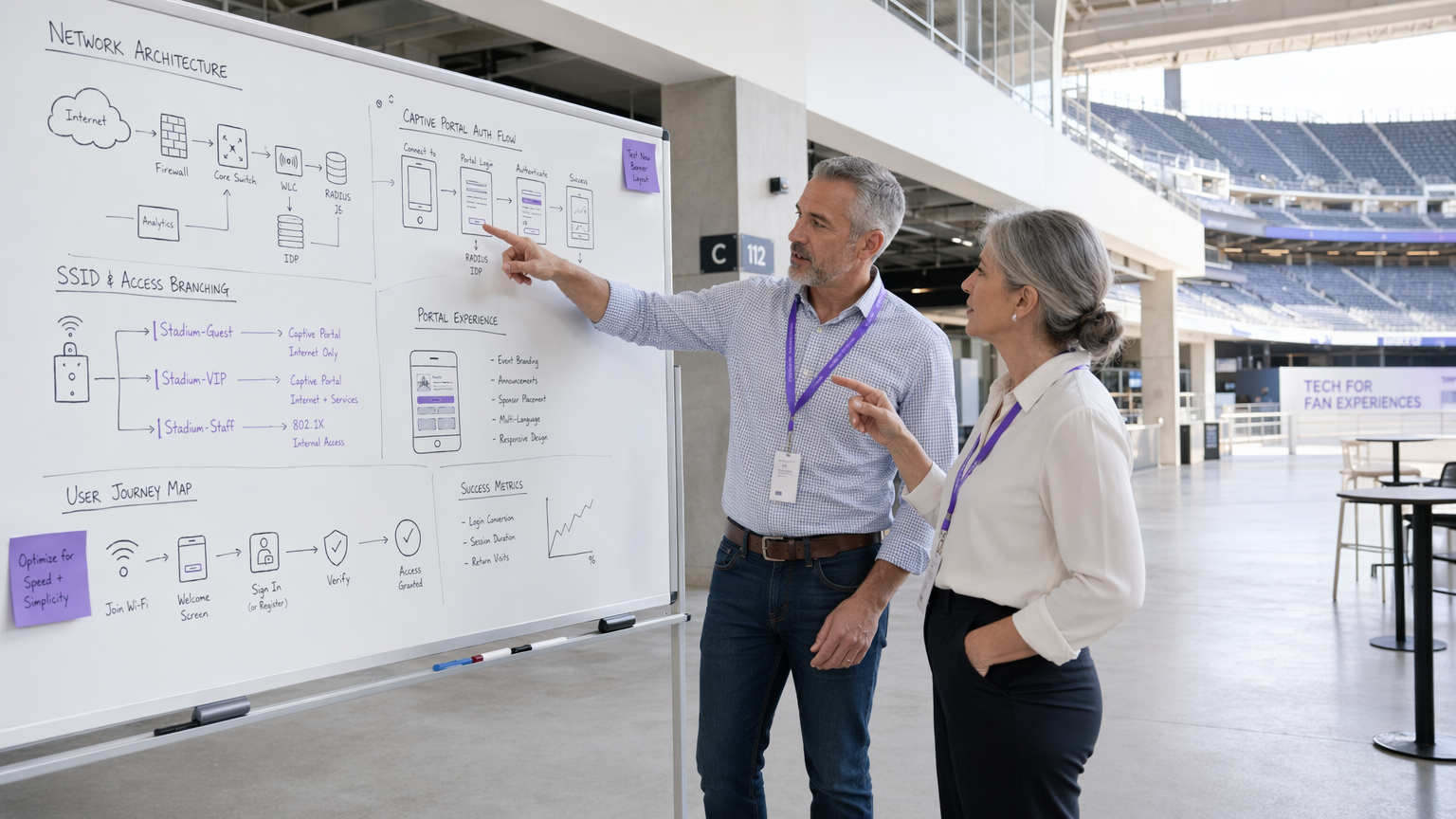
Análise Técnica Detalhada
Arquitetura e Fluxo de Tráfego
Uma implementação robusta de captive portal depende de um fluxo de tráfego estruturado que isola utilizadores não autenticados, ao mesmo tempo que fornece um caminho claro para a autenticação. Quando um utilizador se conecta ao Guest WiFi , o ponto de acesso ou o controlador de LAN sem fios (WLC) interceta os seus pedidos HTTP/HTTPS iniciais. Este tráfego é redirecionado para o captive portal alojado localmente ou na cloud. A arquitetura deve suportar atribuição dinâmica de VLAN: utilizadores não autenticados são colocados numa VLAN 'pré-autenticação' restrita com acesso limitado estritamente ao captive portal e serviços essenciais (DNS e DHCP). Após autenticação bem-sucedida através de um servidor RADIUS, o WLC recebe uma mensagem de Alteração de Autorização (CoA), movendo o utilizador para uma VLAN 'pós-autenticação' com acesso à internet.
O walled garden é um elemento de configuração crítico. Ele define o conjunto de URLs e intervalos de IP acessíveis antes da autenticação. Um walled garden mal configurado é um dos vetores mais comuns para ataques de tunelamento de DNS, onde um ator malicioso encapsula tráfego IP arbitrário dentro de consultas DNS para contornar o portal por completo. Restringir a resolução de DNS pré-autenticação apenas ao domínio do próprio portal e a fornecedores de identidade conhecidos é uma base inegociável.
Mecanismos de Autenticação
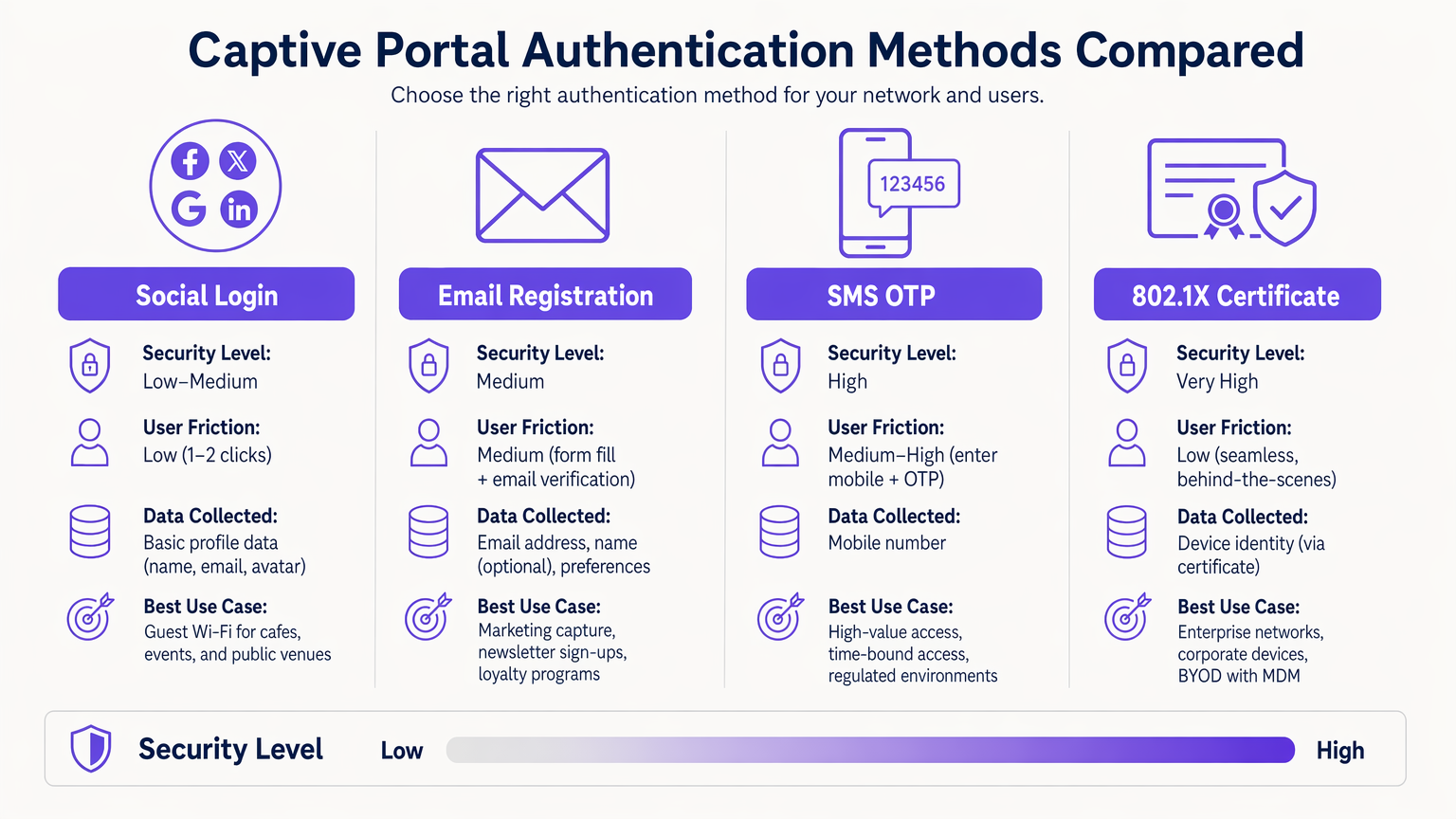
A seleção do mecanismo de autenticação correto é uma troca entre risco e atrito que deve ser feita deliberadamente para cada contexto de implementação.
| Método | Nível de Segurança | Atrito do Utilizador | Caso de Uso Principal |
|---|---|---|---|
| 802.1X Certificate | Muito Alto | Muito Baixo (contínuo) | BYOD Corporativo, redes de funcionários |
| SMS OTP | Alto | Médio-Alto | Acesso de alto valor ou com limite de tempo |
| Email Registration | Médio | Médio | Captura de dados de marketing, fidelização |
| Social Login (OAuth 2.0) | Baixo-Médio | Baixo | Guest Wi-Fi, espaços públicos |
| Passpoint / Hotspot 2.0 | Alto | Muito Baixo (automático) | Utilizadores recorrentes, roaming |
A Autenticação Baseada em Certificado 802.1X é o padrão ouro para ambientes empresariais. Proporciona acesso contínuo e altamente seguro utilizando certificados de dispositivo geridos através de uma plataforma MDM, eliminando o risco de roubo de credenciais. Para problemas de implementação comuns, consulte Resolução de Problemas de Autenticação 802.1X no Windows 11 .
Passpoint (Hotspot 2.0) merece atenção especial. Permite o roaming automático e seguro entre redes Wi-Fi utilizando segurança WPA2/WPA3-Enterprise. A Purple atua como um fornecedor de identidade gratuito para serviços como o OpenRoaming sob a licença Connect, facilitando a conectividade contínua sem interação manual com o portal para utilizadores recorrentes.
Design e Personalização do Portal
O design do portal impacta diretamente as taxas de conversão de autenticação. Um portal que demore mais de três segundos a carregar num dispositivo móvel terá uma queda significativa. Utilize HTML/CSS leve, minimize as dependências de JavaScript e sirva os ativos de uma CDN. O portal deve ser totalmente responsivo — em ambientes de hotelaria e retalho, a maioria das conexões tem origem em dispositivos móveis.
A marca também é uma questão de conformidade. Sob o GDPR, o portal deve apresentar um mecanismo de consentimento claro e afirmativo antes de recolher qualquer PII. Caixas de seleção pré-marcadas não cumprem o padrão de consentimento livremente dado, específico, informado e inequívoco. A política de privacidade e os termos de serviço devem estar ligados e acessíveis sem completar a autenticação.
Guia de Implementação
Implementar um captive portal requer uma abordagem metódica em termos de infraestrutura, software e conformidade.
Passo 1 — Preparação da Infraestrutura: Certifique-se de que os seus WLCs e pontos de acesso suportam WPA3-SAE e atribuição dinâmica de VLAN. Valide que a sua infraestrutura RADIUS consegue lidar com a carga de autenticação de pico esperada — para grandes espaços, considere implementar proxies RADIUS localmente para reduzir a latência da WAN. Se estiver a implementar hardware específico, consulte recursos como O Seu Guia para um Ponto de Acesso Sem Fios Ruckus para orientação de configuração específica do fornecedor.
Passo 2 — Arquitetura de VLAN e Firewall: Crie VLANs dedicadas para tráfego de convidado pré-autenticação, tráfego de convidado pós-autenticação, funcionários e dispositivos IoT. Aplique ACLs na camada de distribuição para evitar qualquer comunicação entre VLANs. As VLANs de convidado nunca devem encaminhar para segmentos de rede corporativos ou de POS.
Passo 3 — WallConfiguração do Walled Garden: Defina o conjunto mínimo de domínios e intervalos de IP necessários para acesso pré-autenticação. Isto deve incluir o hostname do portal, domínios CDN para os ativos do portal e endpoints de provedores de identidade (por exemplo, accounts.google.com, graph.facebook.com para social login). Inclua endpoints de deteção de Captive Portal para os principais sistemas operativos (connectivitycheck.gstatic.com para Android, captive.apple.com para iOS) para garantir que o portal é acionado corretamente.
Passo 4 — Implementação e Integração do Portal: Implemente o portal com um certificado TLS válido de uma CA fidedigna. Integre com o seu CRM ou plataforma de marketing via API para garantir que os dados recolhidos fluem diretamente para a sua infraestrutura de dados de clientes. A plataforma WiFi Analytics da Purple oferece integrações prontas a usar com os principais sistemas CRM.
Passo 5 — Gestão da Aleatorização de Endereços MAC: Dispositivos iOS e Android modernos utilizam endereços MAC aleatórios. Transfira a sua gestão de sessões para depender de tokens de sessão autenticados ou certificados de dispositivo, em vez de endereços MAC estáticos, para garantir uma experiência consistente para utilizadores recorrentes.
Passo 6 — Testes e Validação: Teste em iOS, Android, Windows e macOS. Simule cenários de carga máxima para validar o débito RADIUS. Realize testes de penetração visando especificamente a configuração do walled garden e os controlos de filtragem de DNS.
Melhores Práticas
Controlos de Segurança de Rede
Para uma visão geral abrangente do panorama de segurança mais amplo, consulte Proteger Redes WiFi de Convidados: Melhores Práticas e Implementação .
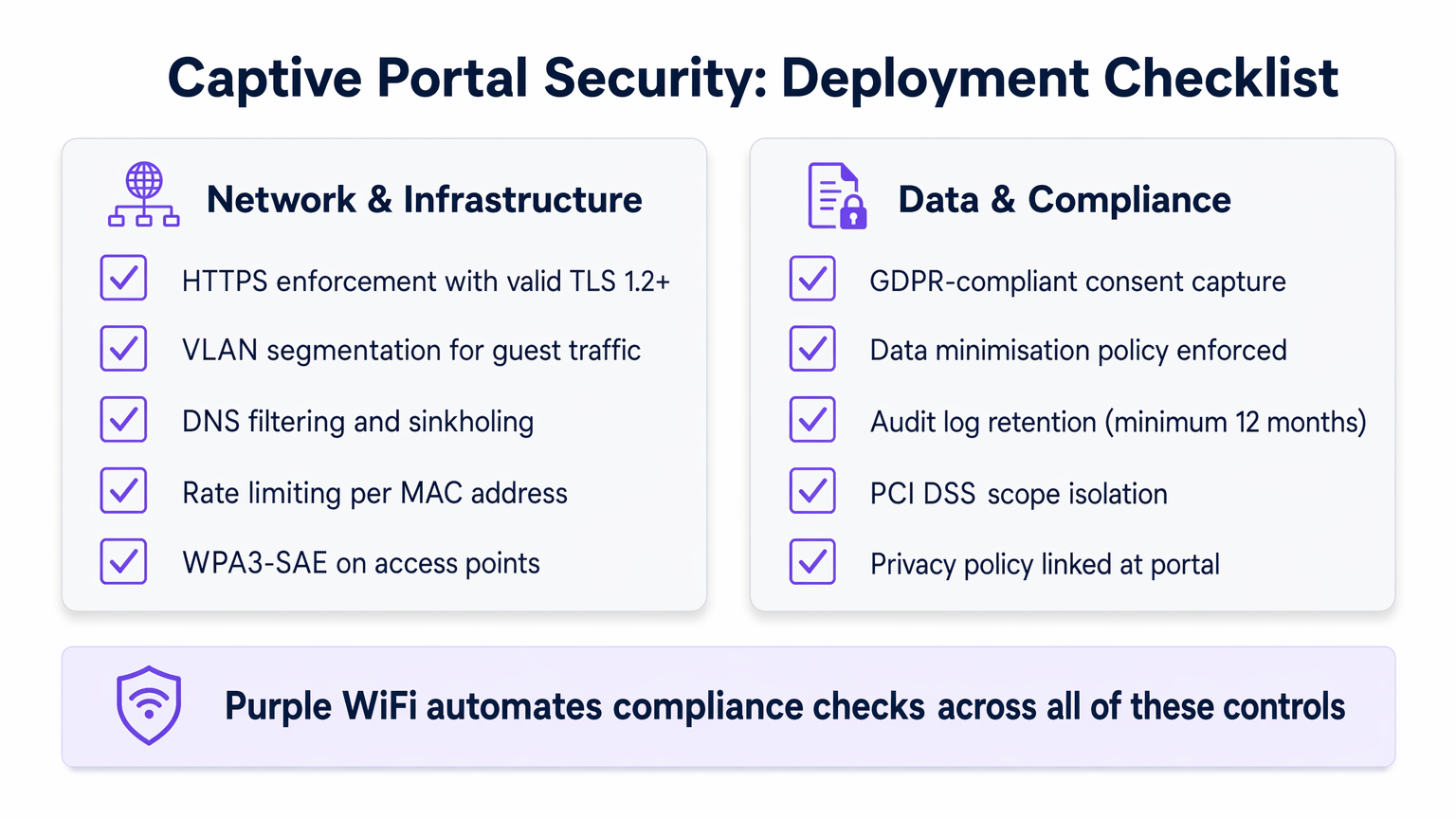
Impor HTTPS: Todo o tráfego do portal deve ser encriptado usando TLS 1.2 ou superior. Implemente cabeçalhos HTTP Strict Transport Security (HSTS) para prevenir ataques de downgrade de protocolo. Um certificado autoassinado causará avisos no navegador e destruirá a confiança do utilizador; utilize sempre um certificado de uma CA fidedigna.
Isolamento de Cliente: Ative o isolamento de cliente nos pontos de acesso de convidados para prevenir a comunicação dispositivo a dispositivo na rede de convidados. Isto mitiga o movimento lateral por atores maliciosos que se conectaram à rede.
Limitação de Taxa: Implemente a limitação de taxa por endereço MAC no estado de pré-autenticação para prevenir ataques de força bruta contra o portal e para limitar o impacto de tentativas de tunelamento de DNS.
WPA3-SAE: Onde o hardware o suportar, implemente WPA3-SAE (Simultaneous Authentication of Equals) em SSIDs de convidados. Isto proporciona sigilo de encaminhamento, garantindo que, mesmo que uma chave de sessão seja comprometida, o tráfego histórico não pode ser desencriptado.
Privacidade e Conformidade de Dados
Os Captive Portals são pontos primários de recolha de dados, tornando a conformidade um requisito de engenharia crítico, em vez de uma reflexão tardia.
Conformidade com GDPR e CCPA: O consentimento explícito e afirmativo deve ser obtido antes de recolher qualquer PII. Implemente um mecanismo de double opt-in para comunicações de marketing. Garanta que os seus acordos de processamento de dados com plataformas de terceiros estão atualizados.
Minimização de Dados: Recolha apenas o que é estritamente necessário. Para uma implementação de Wi-Fi para convidados, isto geralmente significa um endereço de e-mail e consentimento explícito para marketing. Evite recolher data de nascimento, números de telefone ou dados demográficos, a menos que haja uma justificação comercial clara e documentada.
Isolamento do Âmbito PCI DSS: Ambientes de retalho devem garantir que a rede de convidados está totalmente fora do âmbito PCI DSS. Isto requer uma separação física e lógica rigorosa dos sistemas POS, validada anualmente por um Qualified Security Assessor (QSA).
Retenção de Registos de Auditoria: Mantenha registos de autenticação por um mínimo de 12 meses para apoiar a investigação de incidentes e pedidos regulamentares. Garanta que os registos são armazenados num formato à prova de adulteração.
Resolução de Problemas e Mitigação de Riscos
Mesmo implementações bem arquitetadas encontram modos de falha previsíveis. A tabela seguinte descreve os problemas mais comuns e as suas resoluções.
| Problema | Causa Raiz | Resolução |
|---|---|---|
| Portal não é acionado em iOS/Android | Endpoints CPD bloqueados no walled garden | Adicionar captive.apple.com e connectivitycheck.gstatic.com ao walled garden |
| Tempos limite de autenticação RADIUS | Alta latência WAN para o servidor RADIUS | Implementar proxy RADIUS local; verificar regras de firewall em UDP 1812/1813 |
| Tunelamento de DNS detetado | DNS pré-autenticação excessivamente permissivo | Implementar DNS sinkholing; restringir DNS pré-autenticação apenas ao resolvedor do portal |
| Utilizadores recorrentes são solicitados novamente a cada visita | Aleatorização de MAC quebra o rastreamento de sessão | Migrar para gestão de sessão baseada em cookies ou certificados |
| Aviso de certificado SSL do portal | Certificado expirado ou autoassinado | Implementar certificado de renovação automática via Let's Encrypt ou CA empresarial |
| Dispositivos IoT incapazes de conectar | Dispositivos sem interface não conseguem completar o fluxo do portal | Implementar MAC Authentication Bypass (MAB) para dispositivos IoT registados |
Para ambientes com requisitos de rede clínicos ou regulamentados complexos, como trusts do NHS ou hospitais privados, aplicam-se controlos adicionais. Consulte WiFi em Hospitais: Um Guia para Redes Clínicas Seguras para orientação específica do setor. Da mesma forma, centros de transporte com infraestrutura RADIUS distribuída apresentam desafios de latência únicos — consulte O Seu Guia para Soluções Wi-Fi Empresariais em Carros para padrões de implementação de alta densidade e distribuídos relevantes para ambientes de Transporte .
ROI e Impacto no Negócio
Um Captive Portal devidamente implementado transforma um centro de custos num ativo estratégico com retornos mensuráveis.
Aquisição de Dados e Integração com CRM: Ao oferecer Wi-Fi sem interrupções, os locais capturam dados valiosos de primeira parte no ponto de conexão. Estes dados alimentam diretamente os sistemas CRM, permitindo campanhas de marketing direcionadas. Hospitalidade operadores que utilizam a plataforma da Purple reportaram taxas de autenticação para captura de e-mail de 60–75%, com aumentos mensuráveis nas taxas de visitas repetidas quando esses dados são usados para comunicação personalizada.
Eficiência Operacional: O onboarding automatizado e o acesso self-service reduzem a carga de trabalho do helpdesk. Em implementações empresariais que utilizam 802.1X, a eliminação de palavras-passe partilhadas reduz a sobrecarga de TI associada à rotação de credenciais.
Conformidade como Diferenciador Competitivo: Organizações que conseguem demonstrar captura de dados em conformidade com o GDPR e isolamento do âmbito PCI DSS são cada vez mais preferidas por clientes empresariais e equipas de contratação do setor público. A conformidade não é apenas um exercício de mitigação de riscos; é uma vantagem comercial.
KPIs Mensuráveis: Acompanhe a taxa de conversão de autenticação (meta: >70%), duração média da sessão, taxa de visitantes recorrentes e taxa de enriquecimento de dados de CRM. Estas métricas, disponíveis através da plataforma WiFi Analytics da Purple, fornecem o caso de negócio para o investimento contínuo na infraestrutura do portal.
Em ambientes de Saúde , a conectividade fiável e segura melhora comprovadamente os índices de satisfação de pacientes e visitantes, com vários trusts do NHS a reportar melhorias de CSAT de 15–20% após implementações estruturadas de Wi-Fi para convidados.
Termos-Chave e Definições
Captive Portal
A network access control mechanism that intercepts HTTP/HTTPS traffic from unauthenticated clients and redirects them to a web-based authentication or registration page before granting internet access.
IT teams encounter this as the primary onboarding mechanism for guest Wi-Fi. The portal is the enforcement boundary between untrusted devices and the network, and its configuration directly impacts both security posture and user experience.
VLAN Segmentation
The practice of dividing a physical network into multiple logical networks (VLANs) to isolate traffic between different user groups or system types, enforced via 802.1Q tagging and ACLs.
Critical for any deployment where guest users share physical infrastructure with corporate systems or POS terminals. Proper VLAN segmentation is a prerequisite for PCI DSS compliance in retail environments.
RADIUS (Remote Authentication Dial-In User Service)
A networking protocol (RFC 2865) that provides centralised Authentication, Authorisation, and Accounting (AAA) for network access. In captive portal deployments, the RADIUS server validates credentials and instructs the WLC to assign the appropriate VLAN via Change of Authorisation (CoA).
The backbone of enterprise Wi-Fi authentication. IT teams must size RADIUS infrastructure for peak concurrent authentication load and ensure low latency between WLCs and the RADIUS server to prevent authentication timeouts.
Walled Garden
A restricted set of URLs, IP addresses, and domains that unauthenticated users are permitted to access before completing the captive portal flow. All other traffic is blocked.
A misconfigured walled garden is one of the most common security vulnerabilities in captive portal deployments. It must be as restrictive as possible while including captive portal detection endpoints for major operating systems to ensure the portal triggers correctly.
MAC Authentication Bypass (MAB)
A mechanism that allows headless devices (those without a browser, such as IoT sensors, smart TVs, or printers) to bypass the captive portal by pre-registering their MAC address in the RADIUS server.
Essential for any venue deploying IoT devices on the same physical infrastructure as guest Wi-Fi. MAB devices should always be assigned to a dedicated, restricted IoT VLAN, never to the general guest VLAN.
Passpoint (Hotspot 2.0)
A Wi-Fi Alliance specification (based on IEEE 802.11u) that enables automatic, secure authentication to Wi-Fi networks using WPA2/WPA3-Enterprise, eliminating the need for manual portal interaction for credentialed users.
Increasingly relevant for venues with high return-visitor rates, such as hotels and transport hubs. Purple provides identity provider services for OpenRoaming, a Passpoint-based global roaming network, under the Connect licence.
Change of Authorisation (CoA)
A RADIUS extension (RFC 5176) that allows the RADIUS server to dynamically modify an active session — typically to reassign a user to a different VLAN after successful authentication via the captive portal.
The mechanism that enables dynamic VLAN assignment in captive portal deployments. Without CoA support, the WLC cannot move a user from the pre-auth VLAN to the post-auth VLAN without forcing a full re-association.
DNS Tunnelling
An attack technique that encodes arbitrary data within DNS query and response packets to bypass network access controls, including captive portals, by exploiting the fact that DNS traffic is often permitted in the pre-auth state.
A significant risk in captive portal deployments with permissive pre-auth DNS configurations. Mitigated by restricting pre-auth DNS resolution to a controlled resolver and implementing DNS sinkholing and rate-limiting.
WPA3-SAE (Simultaneous Authentication of Equals)
The authentication protocol introduced in WPA3 that replaces the Pre-Shared Key (PSK) handshake with a Dragonfly key exchange, providing forward secrecy and resistance to offline dictionary attacks.
The recommended encryption standard for guest SSIDs on modern hardware. Forward secrecy ensures that compromising one session key does not expose historical traffic, which is particularly important on shared guest networks.
TLS (Transport Layer Security)
A cryptographic protocol that provides encrypted communication between a client and server. For captive portals, TLS 1.2 or higher is required to protect credentials and PII transmitted during the authentication flow.
All captive portal traffic must be served over HTTPS with a valid TLS certificate from a trusted CA. A self-signed certificate will trigger browser security warnings, destroying user trust and reducing authentication conversion rates.
Estudos de Caso
A 200-room hotel group with 15 properties needs to deploy a branded captive portal that captures guest email addresses for their loyalty programme, handles peak loads of 500 concurrent authentications per property, and complies with GDPR. Their existing infrastructure uses a mix of Cisco and Ruckus access points. How should they approach this deployment?
The recommended architecture is a cloud-hosted captive portal with local RADIUS proxies at each property. Deploy a central RADIUS server (or use a managed RADIUS-as-a-Service) with local proxy instances at each site to handle authentication requests with sub-100ms latency regardless of WAN conditions. Configure dynamic VLAN assignment: VLAN 10 for pre-auth guests, VLAN 20 for post-auth guests, VLAN 30 for staff (802.1X authenticated). The walled garden must include the portal domain, CDN assets, and social login provider endpoints. For the portal itself, use email registration with a GDPR-compliant double opt-in flow: the user enters their email, receives a confirmation link, and is granted access upon clicking. This ensures verified email capture. Integrate the portal API with the hotel's CRM (e.g., Salesforce or HubSpot) to push new contacts in real time. For the Cisco/Ruckus mixed environment, use RADIUS CoA (RFC 5176) for post-authentication VLAN assignment — both vendors support this natively. Test the walled garden configuration specifically on iOS 16+ and Android 12+ to validate captive portal detection behaviour with MAC randomisation enabled.
A national retail chain with 80 stores needs to deploy guest Wi-Fi across all locations. Their POS systems are on the same physical network infrastructure. They need to ensure PCI DSS compliance while capturing marketing consent from shoppers. What is the correct network architecture?
The non-negotiable first step is network segmentation. Deploy dedicated SSIDs: one for guest access (captive portal) and one for staff/POS (802.1X, WPA3-Enterprise). Assign these to separate VLANs with ACLs at the distribution switch layer that explicitly deny any traffic between the guest VLAN and the POS VLAN. The guest VLAN should route directly to the internet via a dedicated uplink or VLAN-tagged subinterface, never through the corporate routing infrastructure. For the captive portal, use email registration with explicit marketing consent capture. The consent checkbox must be unchecked by default and must clearly state the marketing purpose. Integrate the portal with the retail chain's marketing platform (e.g., Klaviyo or Dotdigital) via API. Implement DNS filtering on the guest VLAN to block known malicious domains and prevent DNS tunnelling. Conduct an annual PCI DSS scope review with a QSA to validate that the guest network remains out of scope. Document the network segmentation controls in the PCI DSS compliance evidence pack.
Análise de Cenários
Q1. A conference centre hosts 50 events per year, ranging from 200-person seminars to 5,000-person trade shows. They want a single captive portal deployment that can handle both scenarios. The IT team is concerned about RADIUS capacity at peak load and about ensuring the portal triggers correctly on all devices. What architecture decisions should they prioritise?
💡 Dica:Consider the difference in authentication load between a 200-person and a 5,000-person event, and think about what happens to the RADIUS server if it is the single point of failure.
Mostrar Abordagem Recomendada
The architecture must be designed for the peak case (5,000 concurrent users) but must remain cost-effective for smaller events. Deploy a cloud-hosted RADIUS service with auto-scaling capability rather than a fixed on-premises RADIUS server. This eliminates the capacity planning problem. For captive portal detection reliability, ensure the walled garden includes all major OS captive portal detection endpoints (Apple, Google, Microsoft). Use a CDN to serve portal assets to minimise load time regardless of concurrent user count. Implement per-AP rate limiting to prevent any single access point from overwhelming the RADIUS server during simultaneous association bursts (common when a session break ends at a large event). Consider deploying Passpoint for returning attendees to eliminate portal friction entirely for credentialed users.
Q2. An NHS trust wants to deploy guest Wi-Fi across a 600-bed hospital. Clinical staff use the same physical network infrastructure. The trust's Information Governance team has flagged concerns about patient data exposure and GDPR compliance for visitor data capture. What are the three most critical architectural controls to implement?
💡 Dica:Think about the three distinct user groups (patients/visitors, clinical staff, medical devices) and the data sensitivity associated with each.
Mostrar Abordagem Recomendada
The three critical controls are: (1) Strict VLAN segmentation with three separate VLANs — guest/visitor (captive portal), clinical staff (802.1X WPA3-Enterprise), and medical devices (MAB with dedicated IoT VLAN). ACLs must prevent any cross-VLAN traffic. (2) GDPR-compliant consent capture on the visitor portal, with data minimisation enforced — collect only email and explicit marketing consent, with automated 30-day purge for inactive records. The portal must link to the trust's privacy notice. (3) Client isolation on the guest SSID to prevent device-to-device communication, which is particularly important in a healthcare environment where patients may be vulnerable to social engineering or device exploitation. See the dedicated guide at WiFi in Hospitals for further sector-specific controls.
Q3. A retail IT director has received a finding from their PCI DSS QSA stating that the guest Wi-Fi network is 'potentially in scope' for PCI DSS because the guest VLAN is routed through the same core switch as the POS VLAN. The QSA has given them 90 days to remediate. What is the fastest path to achieving scope isolation without replacing the core switch?
💡 Dica:Physical replacement of infrastructure is not always necessary — consider what logical controls can achieve the same outcome as physical separation, and what evidence the QSA will need to close the finding.
Mostrar Abordagem Recomendada
The fastest remediation path is to implement explicit deny ACLs on the core switch between the guest VLAN and all POS VLANs, combined with a network penetration test to validate that no traffic path exists between the two segments. Document the ACL rules and the test results as evidence for the QSA. Additionally, configure the guest VLAN to route directly to the internet via a dedicated subinterface or VLAN-tagged uplink to the ISP, bypassing the corporate routing table entirely. This removes the guest VLAN from the corporate routing domain, which is the strongest logical isolation achievable without physical separation. The QSA will typically accept this as a compensating control if it is accompanied by a documented penetration test confirming no cross-VLAN traffic paths exist.




