

Personnalisation et Bonnes Pratiques de Sécurité du Captive Portal
Ce guide constitue une référence technique complète pour les responsables informatiques, les architectes réseau et les CTO qui déploient des Captive Portals dans les secteurs de l'hôtellerie, du commerce de détail, de l'événementiel et du secteur public. Il couvre l'intégralité du cycle de vie du déploiement — de l'architecture VLAN et de la sélection des méthodes d'authentification à la conformité GDPR, la prévention du détournement de portail et l'intégration backend. Les organisations qui mettent en œuvre ces pratiques réduiront les risques de sécurité, atteindront la conformité réglementaire et transformeront le Wi-Fi invité en un actif commercial mesurable.
🎧 Écouter ce guide
Voir la transcription
Résumé Exécutif
Le déploiement d'un Captive Portal sécurisé et hautement personnalisé n'est plus seulement une exigence réseau ; c'est un point de convergence critique entre la sécurité de l'infrastructure, l'expérience utilisateur et la gouvernance des données. Pour les CTO, les architectes réseau et les directeurs informatiques, le défi consiste à équilibrer un accès fluide avec des contrôles de sécurité rigoureux dans des environnements divers tels que l' Hôtellerie , le Commerce de Détail et les grands lieux publics. Ce guide décrit l'architecture technique, les stratégies de déploiement et les bonnes pratiques de sécurité nécessaires pour construire des Captive Portals résilients. En mettant en œuvre des méthodes d'authentification robustes, une segmentation VLAN appropriée et en respectant les normes de conformité telles que GDPR et PCI DSS, les organisations peuvent atténuer les risques tout en extrayant des informations exploitables via des plateformes comme WiFi Analytics de Purple.
Approfondissement Technique
Architecture et Flux de Trafic
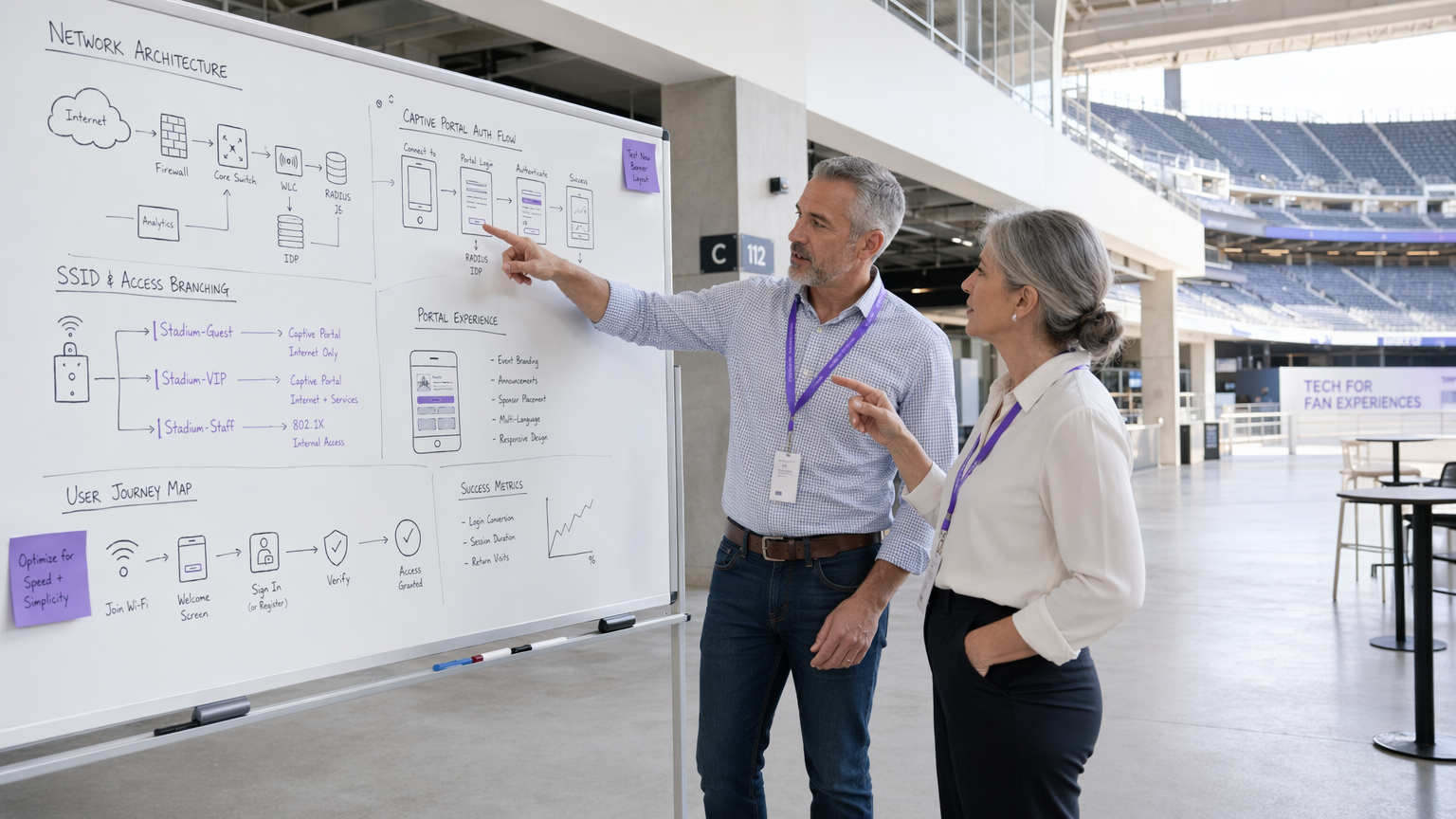
Un déploiement robuste de Captive Portal repose sur un flux de trafic structuré qui isole les utilisateurs non authentifiés tout en offrant un chemin clair vers l'authentification. Lorsqu'un utilisateur se connecte au WiFi Invité , le point d'accès ou le contrôleur de réseau local sans fil (WLC) intercepte ses requêtes HTTP/HTTPS initiales. Ce trafic est redirigé vers le Captive Portal hébergé localement ou dans le cloud. L'architecture doit prendre en charge l'attribution dynamique de VLAN : les utilisateurs non authentifiés sont placés dans un VLAN 'pré-authentification' restreint avec un accès strictement limité au Captive Portal et aux services essentiels (DNS et DHCP). Après une authentification réussie via un serveur RADIUS, le WLC reçoit un message de Changement d'Autorisation (CoA), déplaçant l'utilisateur vers un VLAN 'post-authentification' avec accès à Internet.
Le jardin clos (walled garden) est un élément de configuration critique. Il définit l'ensemble des URL et des plages IP accessibles avant l'authentification. Un jardin clos mal configuré est l'un des vecteurs les plus courants d'attaques par tunneling DNS, où un acteur malveillant encapsule du trafic IP arbitraire dans des requêtes DNS pour contourner entièrement le portail. Restreindre la résolution DNS pré-authentification uniquement au propre domaine du portail et aux fournisseurs d'identité connus est une exigence de base non négociable.
Mécanismes d'Authentification
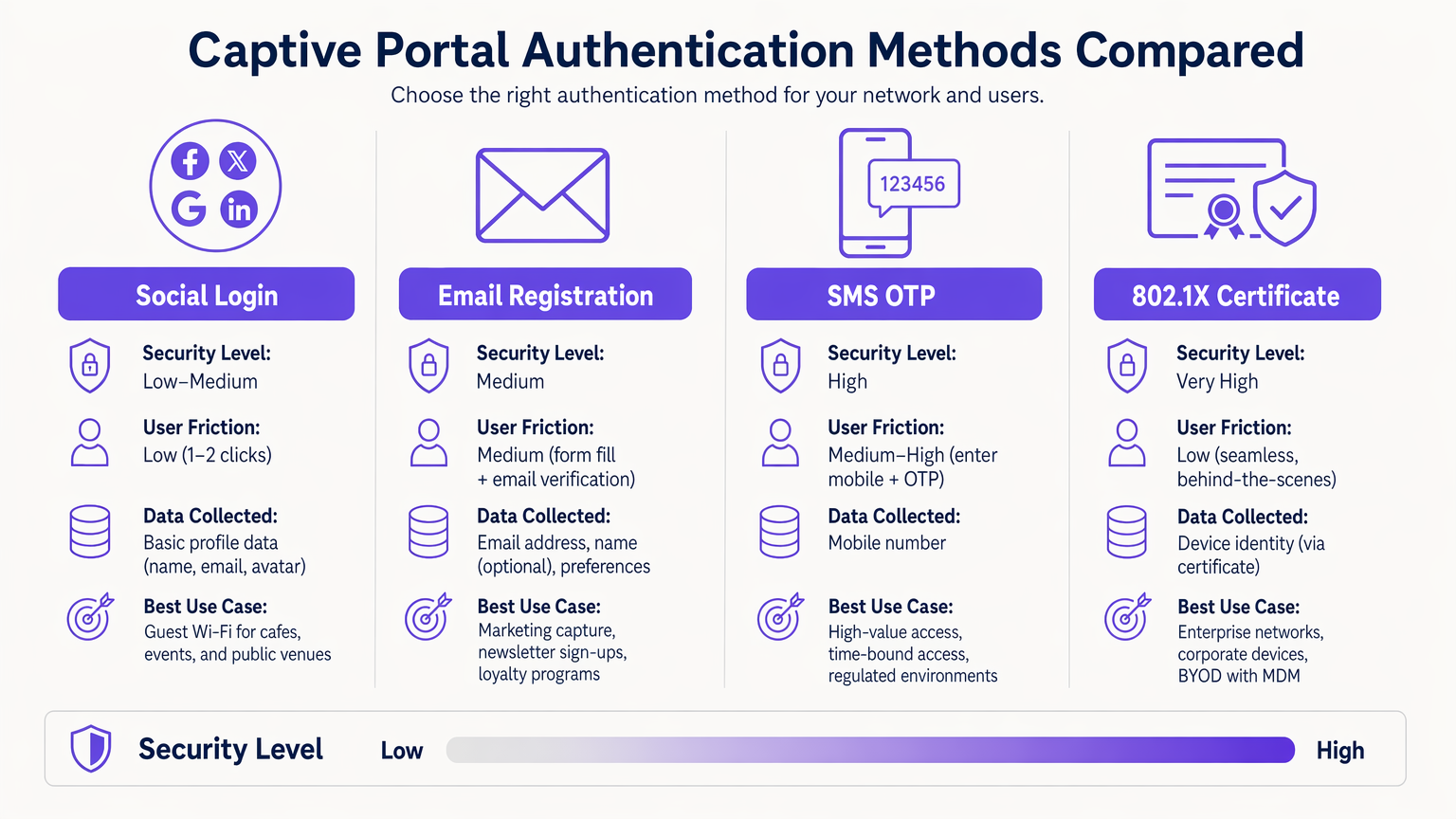
Le choix du bon mécanisme d'authentification est un compromis entre risque et friction qui doit être fait délibérément pour chaque contexte de déploiement.
| Méthode | Niveau de Sécurité | Friction Utilisateur | Cas d'Utilisation Principal |
|---|---|---|---|
| Certificat 802.1X | Très Élevé | Très Faible (fluide) | BYOD d'entreprise, réseaux du personnel |
| SMS OTP | Élevé | Moyen-Élevé | Accès à forte valeur ou limité dans le temps |
| Enregistrement par E-mail | Moyen | Moyen | Capture de données marketing, fidélisation |
| Connexion Sociale (OAuth 2.0) | Faible-Moyen | Faible | Wi-Fi Invité, lieux publics |
| Passpoint / Hotspot 2.0 | Élevé | Très Faible (automatique) | Utilisateurs récurrents, itinérance |
L'authentification basée sur certificat 802.1X est la référence pour les environnements d'entreprise. Elle offre un accès fluide et hautement sécurisé à l'aide de certificats d'appareil gérés via une plateforme MDM, éliminant le risque de vol d'identifiants. Pour les problèmes de déploiement courants, consultez Dépannage des problèmes d'authentification 802.1X sous Windows 11 .
Passpoint (Hotspot 2.0) mérite une attention particulière. Il permet une itinérance automatique et sécurisée entre les réseaux Wi-Fi en utilisant la sécurité WPA2/WPA3-Enterprise. Purple agit comme un fournisseur d'identité gratuit pour des services comme OpenRoaming sous la licence Connect, facilitant une connectivité fluide sans interaction manuelle avec le portail pour les utilisateurs récurrents.
Conception et Personnalisation du Portail
La conception du portail a un impact direct sur les taux de conversion d'authentification. Un portail qui prend plus de trois secondes à charger sur un appareil mobile connaîtra un abandon significatif. Utilisez du HTML/CSS léger, minimisez les dépendances JavaScript et servez les ressources depuis un CDN. Le portail doit être entièrement réactif — dans les environnements hôteliers et de commerce de détail, la majorité des connexions proviennent d'appareils mobiles.
L'image de marque est également une question de conformité. En vertu du GDPR, le portail doit présenter un mécanisme de consentement clair et affirmatif avant de collecter toute PII. Les cases à cocher pré-remplies ne répondent pas à la norme de consentement libre, spécifique, éclairé et univoque. La politique de confidentialité et les conditions d'utilisation doivent être liées et accessibles sans avoir à compléter l'authentification.
Guide d'Implémentation
Le déploiement d'un Captive Portal nécessite une approche méthodique couvrant les dimensions de l'infrastructure, du logiciel et de la conformité.
Étape 1 — Préparation de l'Infrastructure : Assurez-vous que vos WLC et points d'accès prennent en charge WPA3-SAE et l'attribution dynamique de VLAN. Validez que votre infrastructure RADIUS peut gérer la charge d'authentification maximale attendue — pour les grands sites, envisagez de déployer des proxys RADIUS localement pour réduire la latence WAN. Si vous déployez du matériel spécifique, consultez des ressources comme Votre Guide pour un Point d'Accès Sans Fil Ruckus pour des conseils de configuration spécifiques au fournisseur.
Étape 2 — Architecture VLAN et Pare-feu : Créez des VLAN dédiés pour le trafic invité pré-authentification, le trafic invité post-authentification, le personnel et les appareils IoT. Appliquez des ACL au niveau de la couche de distribution pour empêcher toute communication inter-VLAN. Les VLAN invités ne doivent jamais router vers les segments de réseau d'entreprise ou de point de vente.
Étape 3 — Mured Garden Configuration : Définissez l'ensemble minimal requis de domaines et de plages d'adresses IP pour l'accès pré-authentification. Cela doit inclure le nom d'hôte du portail, les domaines CDN pour les ressources du portail et les points de terminaison du fournisseur d'identité (par exemple, accounts.google.com, graph.facebook.com pour la connexion sociale). Incluez les points de terminaison de détection de Captive Portal pour les principaux systèmes d'exploitation (connectivitycheck.gstatic.com pour Android, captive.apple.com pour iOS) afin de garantir que le portail se déclenche correctement.
Étape 4 — Déploiement et intégration du portail : Déployez le portail avec un certificat TLS valide d'une autorité de certification de confiance. Intégrez-le à votre CRM ou à votre plateforme marketing via une API pour garantir que les données capturées s'intègrent directement dans votre infrastructure de données client. La plateforme WiFi Analytics de Purple offre des intégrations prêtes à l'emploi avec les principaux systèmes CRM.
Étape 5 — Gestion de la randomisation des adresses MAC : Les appareils iOS et Android modernes utilisent des adresses MAC randomisées. Faites évoluer votre gestion de session pour qu'elle repose sur des jetons de session authentifiés ou des certificats d'appareil plutôt que sur des adresses MAC statiques afin d'assurer une expérience cohérente pour les utilisateurs récurrents.
Étape 6 — Tests et validation : Testez sur iOS, Android, Windows et macOS. Simulez des scénarios de charge maximale pour valider le débit RADIUS. Effectuez des tests d'intrusion ciblant spécifiquement la configuration du jardin clos et les contrôles de filtrage DNS.
Bonnes pratiques
Contrôles de sécurité réseau
Pour un aperçu complet du paysage de sécurité plus large, consultez Sécuriser les réseaux WiFi invités : Bonnes pratiques et implémentation .
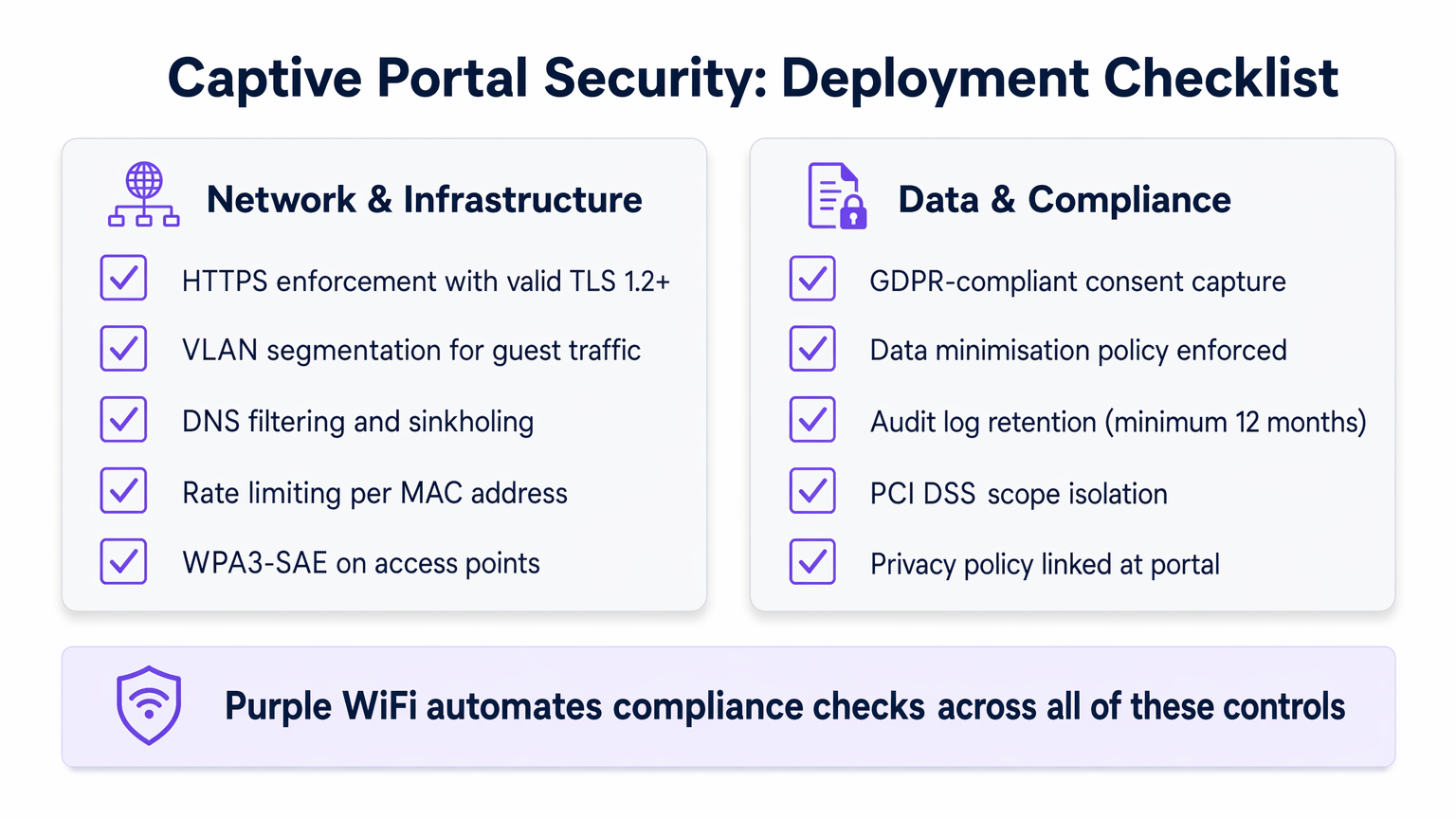
Appliquer HTTPS : Tout le trafic du portail doit être chiffré à l'aide de TLS 1.2 ou supérieur. Implémentez les en-têtes HTTP Strict Transport Security (HSTS) pour prévenir les attaques de rétrogradation de protocole. Un certificat auto-signé entraînera des avertissements de navigateur et détruira la confiance des utilisateurs ; utilisez toujours un certificat d'une autorité de certification de confiance.
Isolation des clients : Activez l'isolation des clients sur les points d'accès invités pour empêcher la communication d'appareil à appareil sur le réseau invité. Cela atténue les mouvements latéraux des acteurs malveillants qui se sont connectés au réseau.
Limitation de débit : Implémentez une limitation de débit par adresse MAC dans l'état de pré-authentification pour prévenir les attaques par force brute contre le portail et pour limiter l'impact des tentatives de tunneling DNS.
WPA3-SAE : Lorsque le matériel le permet, déployez WPA3-SAE (Simultaneous Authentication of Equals) sur les SSID invités. Cela offre une confidentialité persistante, garantissant que même si une clé de session est compromise, le trafic historique ne peut pas être déchiffré.
Confidentialité des données et conformité
Les Captive Portals sont des points de collecte de données privilégiés, faisant de la conformité une exigence d'ingénierie critique plutôt qu'une considération après coup.
Conformité GDPR et CCPA : Un consentement explicite et affirmatif doit être recueilli avant de collecter toute PII. Implémentez un mécanisme de double opt-in pour les communications marketing. Assurez-vous que vos accords de traitement de données avec les plateformes tierces sont à jour.
Minimisation des données : Ne collectez que ce qui est strictement nécessaire. Pour un déploiement Wi-Fi invité, cela signifie généralement une adresse e-mail et un consentement marketing explicite. Évitez de collecter la date de naissance, les numéros de téléphone ou les données démographiques, sauf s'il existe une justification commerciale claire et documentée.
Isolation du périmètre PCI DSS : Les environnements de vente au détail doivent s'assurer que le réseau invité est entièrement hors du périmètre PCI DSS. Cela nécessite une séparation physique et logique stricte des systèmes de point de vente (POS), validée annuellement par un évaluateur de sécurité qualifié (QSA).
Rétention des journaux d'audit : Conservez les journaux d'authentification pendant un minimum de 12 mois pour soutenir les enquêtes d'incidents et les demandes réglementaires. Assurez-vous que les journaux sont stockés dans un format infalsifiable.
Dépannage et atténuation des risques
Même les déploiements bien conçus rencontrent des modes de défaillance prévisibles. Le tableau suivant décrit les problèmes les plus courants et leurs résolutions.
| Problème | Cause première | Résolution |
|---|---|---|
| Le portail ne se déclenche pas sur iOS/Android | Points de terminaison CPD bloqués dans le jardin clos | Ajouter captive.apple.com et connectivitycheck.gstatic.com au jardin clos |
| Délais d'authentification RADIUS | Latence WAN élevée vers le serveur RADIUS | Déployer un proxy RADIUS local ; vérifier les règles de pare-feu sur UDP 1812/1813 |
| Tunneling DNS détecté | DNS pré-authentification trop permissif | Implémenter le sinkholing DNS ; restreindre le DNS pré-authentification au seul résolveur du portail |
| Les utilisateurs récurrents sont invités à nouveau à chaque visite | La randomisation MAC interrompt le suivi de session | Migrer vers une gestion de session basée sur les cookies ou les certificats |
| Avertissement de certificat SSL du portail | Certificat expiré ou auto-signé | Déployer un certificat à renouvellement automatique via Let's Encrypt ou une autorité de certification d'entreprise |
| Les appareils IoT ne peuvent pas se connecter | Les appareils sans interface ne peuvent pas compléter le flux du portail | Implémenter le MAC Authentication Bypass (MAB) pour les appareils IoT enregistrés |
Pour les environnements avec des exigences réseau cliniques ou réglementées complexes, tels que les trusts NHS ou les hôpitaux privés, des contrôles supplémentaires s'appliquent. Voir WiFi in Hospitals: A Guide to Secure Clinical Networks pour des conseils spécifiques au secteur. De même, les pôles de transport avec une infrastructure RADIUS distribuée présentent des défis de latence uniques — voir Your Guide to Enterprise In Car Wi Fi Solutions pour les modèles de déploiement haute densité et distribués pertinents pour les environnements de Transport .
ROI et impact commercial
Un Captive Portal correctement implémenté transforme un centre de coûts en un atout stratégique avec des retours mesurables.
Acquisition de données et intégration CRM : En offrant un Wi-Fi transparent, les lieux collectent des données propriétaires précieuses au point de connexion. Ces données alimentent directement les systèmes CRM, permettant des campagnes marketing ciblées. L'hôtellerie oLes opérateurs utilisant la plateforme de Purple ont signalé des taux de conversion de l'authentification à la capture d'e-mails de 60 à 75 %, avec des augmentations mesurables des taux de visites répétées lorsque ces données sont utilisées pour des communications personnalisées.
Efficacité opérationnelle : L'intégration automatisée et l'accès en libre-service réduisent la charge du support technique. Dans les déploiements d'entreprise utilisant le 802.1X, l'élimination des mots de passe partagés réduit la surcharge informatique associée à la rotation des identifiants.
La conformité comme différenciateur concurrentiel : Les organisations capables de démontrer une capture de données conforme au GDPR et une isolation du périmètre PCI DSS sont de plus en plus privilégiées par les clients d'entreprise et les équipes d'approvisionnement du secteur public. La conformité n'est pas seulement un exercice d'atténuation des risques ; c'est un avantage commercial.
KPI mesurables : Suivez le taux de conversion de l'authentification (cible : >70 %), la durée moyenne de la session, le taux de visiteurs récurrents et le taux d'enrichissement des données CRM. Ces métriques, disponibles via la plateforme WiFi Analytics de Purple, justifient la poursuite de l'investissement dans l'infrastructure du portail.
Dans les environnements de Santé , une connectivité fiable et sécurisée améliore de manière démontrable les scores de satisfaction des patients et des visiteurs, plusieurs trusts du NHS signalant des améliorations du CSAT de 15 à 20 % suite à des déploiements structurés de Wi-Fi invité.
Termes clés et définitions
Captive Portal
A network access control mechanism that intercepts HTTP/HTTPS traffic from unauthenticated clients and redirects them to a web-based authentication or registration page before granting internet access.
IT teams encounter this as the primary onboarding mechanism for guest Wi-Fi. The portal is the enforcement boundary between untrusted devices and the network, and its configuration directly impacts both security posture and user experience.
VLAN Segmentation
The practice of dividing a physical network into multiple logical networks (VLANs) to isolate traffic between different user groups or system types, enforced via 802.1Q tagging and ACLs.
Critical for any deployment where guest users share physical infrastructure with corporate systems or POS terminals. Proper VLAN segmentation is a prerequisite for PCI DSS compliance in retail environments.
RADIUS (Remote Authentication Dial-In User Service)
A networking protocol (RFC 2865) that provides centralised Authentication, Authorisation, and Accounting (AAA) for network access. In captive portal deployments, the RADIUS server validates credentials and instructs the WLC to assign the appropriate VLAN via Change of Authorisation (CoA).
The backbone of enterprise Wi-Fi authentication. IT teams must size RADIUS infrastructure for peak concurrent authentication load and ensure low latency between WLCs and the RADIUS server to prevent authentication timeouts.
Walled Garden
A restricted set of URLs, IP addresses, and domains that unauthenticated users are permitted to access before completing the captive portal flow. All other traffic is blocked.
A misconfigured walled garden is one of the most common security vulnerabilities in captive portal deployments. It must be as restrictive as possible while including captive portal detection endpoints for major operating systems to ensure the portal triggers correctly.
MAC Authentication Bypass (MAB)
A mechanism that allows headless devices (those without a browser, such as IoT sensors, smart TVs, or printers) to bypass the captive portal by pre-registering their MAC address in the RADIUS server.
Essential for any venue deploying IoT devices on the same physical infrastructure as guest Wi-Fi. MAB devices should always be assigned to a dedicated, restricted IoT VLAN, never to the general guest VLAN.
Passpoint (Hotspot 2.0)
A Wi-Fi Alliance specification (based on IEEE 802.11u) that enables automatic, secure authentication to Wi-Fi networks using WPA2/WPA3-Enterprise, eliminating the need for manual portal interaction for credentialed users.
Increasingly relevant for venues with high return-visitor rates, such as hotels and transport hubs. Purple provides identity provider services for OpenRoaming, a Passpoint-based global roaming network, under the Connect licence.
Change of Authorisation (CoA)
A RADIUS extension (RFC 5176) that allows the RADIUS server to dynamically modify an active session — typically to reassign a user to a different VLAN after successful authentication via the captive portal.
The mechanism that enables dynamic VLAN assignment in captive portal deployments. Without CoA support, the WLC cannot move a user from the pre-auth VLAN to the post-auth VLAN without forcing a full re-association.
DNS Tunnelling
An attack technique that encodes arbitrary data within DNS query and response packets to bypass network access controls, including captive portals, by exploiting the fact that DNS traffic is often permitted in the pre-auth state.
A significant risk in captive portal deployments with permissive pre-auth DNS configurations. Mitigated by restricting pre-auth DNS resolution to a controlled resolver and implementing DNS sinkholing and rate-limiting.
WPA3-SAE (Simultaneous Authentication of Equals)
The authentication protocol introduced in WPA3 that replaces the Pre-Shared Key (PSK) handshake with a Dragonfly key exchange, providing forward secrecy and resistance to offline dictionary attacks.
The recommended encryption standard for guest SSIDs on modern hardware. Forward secrecy ensures that compromising one session key does not expose historical traffic, which is particularly important on shared guest networks.
TLS (Transport Layer Security)
A cryptographic protocol that provides encrypted communication between a client and server. For captive portals, TLS 1.2 or higher is required to protect credentials and PII transmitted during the authentication flow.
All captive portal traffic must be served over HTTPS with a valid TLS certificate from a trusted CA. A self-signed certificate will trigger browser security warnings, destroying user trust and reducing authentication conversion rates.
Études de cas
A 200-room hotel group with 15 properties needs to deploy a branded captive portal that captures guest email addresses for their loyalty programme, handles peak loads of 500 concurrent authentications per property, and complies with GDPR. Their existing infrastructure uses a mix of Cisco and Ruckus access points. How should they approach this deployment?
The recommended architecture is a cloud-hosted captive portal with local RADIUS proxies at each property. Deploy a central RADIUS server (or use a managed RADIUS-as-a-Service) with local proxy instances at each site to handle authentication requests with sub-100ms latency regardless of WAN conditions. Configure dynamic VLAN assignment: VLAN 10 for pre-auth guests, VLAN 20 for post-auth guests, VLAN 30 for staff (802.1X authenticated). The walled garden must include the portal domain, CDN assets, and social login provider endpoints. For the portal itself, use email registration with a GDPR-compliant double opt-in flow: the user enters their email, receives a confirmation link, and is granted access upon clicking. This ensures verified email capture. Integrate the portal API with the hotel's CRM (e.g., Salesforce or HubSpot) to push new contacts in real time. For the Cisco/Ruckus mixed environment, use RADIUS CoA (RFC 5176) for post-authentication VLAN assignment — both vendors support this natively. Test the walled garden configuration specifically on iOS 16+ and Android 12+ to validate captive portal detection behaviour with MAC randomisation enabled.
A national retail chain with 80 stores needs to deploy guest Wi-Fi across all locations. Their POS systems are on the same physical network infrastructure. They need to ensure PCI DSS compliance while capturing marketing consent from shoppers. What is the correct network architecture?
The non-negotiable first step is network segmentation. Deploy dedicated SSIDs: one for guest access (captive portal) and one for staff/POS (802.1X, WPA3-Enterprise). Assign these to separate VLANs with ACLs at the distribution switch layer that explicitly deny any traffic between the guest VLAN and the POS VLAN. The guest VLAN should route directly to the internet via a dedicated uplink or VLAN-tagged subinterface, never through the corporate routing infrastructure. For the captive portal, use email registration with explicit marketing consent capture. The consent checkbox must be unchecked by default and must clearly state the marketing purpose. Integrate the portal with the retail chain's marketing platform (e.g., Klaviyo or Dotdigital) via API. Implement DNS filtering on the guest VLAN to block known malicious domains and prevent DNS tunnelling. Conduct an annual PCI DSS scope review with a QSA to validate that the guest network remains out of scope. Document the network segmentation controls in the PCI DSS compliance evidence pack.
Analyse de scénario
Q1. A conference centre hosts 50 events per year, ranging from 200-person seminars to 5,000-person trade shows. They want a single captive portal deployment that can handle both scenarios. The IT team is concerned about RADIUS capacity at peak load and about ensuring the portal triggers correctly on all devices. What architecture decisions should they prioritise?
💡 Astuce :Consider the difference in authentication load between a 200-person and a 5,000-person event, and think about what happens to the RADIUS server if it is the single point of failure.
Afficher l'approche recommandée
The architecture must be designed for the peak case (5,000 concurrent users) but must remain cost-effective for smaller events. Deploy a cloud-hosted RADIUS service with auto-scaling capability rather than a fixed on-premises RADIUS server. This eliminates the capacity planning problem. For captive portal detection reliability, ensure the walled garden includes all major OS captive portal detection endpoints (Apple, Google, Microsoft). Use a CDN to serve portal assets to minimise load time regardless of concurrent user count. Implement per-AP rate limiting to prevent any single access point from overwhelming the RADIUS server during simultaneous association bursts (common when a session break ends at a large event). Consider deploying Passpoint for returning attendees to eliminate portal friction entirely for credentialed users.
Q2. An NHS trust wants to deploy guest Wi-Fi across a 600-bed hospital. Clinical staff use the same physical network infrastructure. The trust's Information Governance team has flagged concerns about patient data exposure and GDPR compliance for visitor data capture. What are the three most critical architectural controls to implement?
💡 Astuce :Think about the three distinct user groups (patients/visitors, clinical staff, medical devices) and the data sensitivity associated with each.
Afficher l'approche recommandée
The three critical controls are: (1) Strict VLAN segmentation with three separate VLANs — guest/visitor (captive portal), clinical staff (802.1X WPA3-Enterprise), and medical devices (MAB with dedicated IoT VLAN). ACLs must prevent any cross-VLAN traffic. (2) GDPR-compliant consent capture on the visitor portal, with data minimisation enforced — collect only email and explicit marketing consent, with automated 30-day purge for inactive records. The portal must link to the trust's privacy notice. (3) Client isolation on the guest SSID to prevent device-to-device communication, which is particularly important in a healthcare environment where patients may be vulnerable to social engineering or device exploitation. See the dedicated guide at WiFi in Hospitals for further sector-specific controls.
Q3. A retail IT director has received a finding from their PCI DSS QSA stating that the guest Wi-Fi network is 'potentially in scope' for PCI DSS because the guest VLAN is routed through the same core switch as the POS VLAN. The QSA has given them 90 days to remediate. What is the fastest path to achieving scope isolation without replacing the core switch?
💡 Astuce :Physical replacement of infrastructure is not always necessary — consider what logical controls can achieve the same outcome as physical separation, and what evidence the QSA will need to close the finding.
Afficher l'approche recommandée
The fastest remediation path is to implement explicit deny ACLs on the core switch between the guest VLAN and all POS VLANs, combined with a network penetration test to validate that no traffic path exists between the two segments. Document the ACL rules and the test results as evidence for the QSA. Additionally, configure the guest VLAN to route directly to the internet via a dedicated subinterface or VLAN-tagged uplink to the ISP, bypassing the corporate routing table entirely. This removes the guest VLAN from the corporate routing domain, which is the strongest logical isolation achievable without physical separation. The QSA will typically accept this as a compensating control if it is accompanied by a documented penetration test confirming no cross-VLAN traffic paths exist.




