

Personalizzazione del Captive Portal e Migliori Pratiche di Sicurezza
Questa guida fornisce un riferimento tecnico completo per IT manager, architetti di rete e CTO che implementano captive portal in ambienti di ospitalità, vendita al dettaglio, eventi e settore pubblico. Copre l'intero ciclo di vita dell'implementazione — dall'architettura VLAN e la selezione del metodo di autenticazione fino alla conformità GDPR, alla prevenzione del dirottamento del portale e all'integrazione backend. Le organizzazioni che implementano queste pratiche ridurranno il rischio di sicurezza, raggiungeranno la conformità normativa e trasformeranno il Wi-Fi per gli ospiti in una risorsa aziendale misurabile.
🎧 Ascolta questa guida
Visualizza trascrizione
Sintesi Esecutiva
L'implementazione di un captive portal sicuro e altamente personalizzato non è più solo un requisito di rete; è un'intersezione critica tra sicurezza dell'infrastruttura, esperienza utente e governance dei dati. Per CTO, architetti di rete e direttori IT, la sfida consiste nel bilanciare un accesso senza interruzioni con rigorosi controlli di sicurezza in ambienti diversi come Ospitalità , Vendita al Dettaglio e grandi luoghi pubblici. Questa guida delinea l'architettura tecnica, le strategie di implementazione e le migliori pratiche di sicurezza necessarie per costruire captive portal resilienti. Implementando metodi di autenticazione robusti, una corretta segmentazione VLAN e aderendo agli standard di conformità come GDPR e PCI DSS, le organizzazioni possono mitigare i rischi estraendo al contempo informazioni utili tramite piattaforme come WiFi Analytics di Purple.
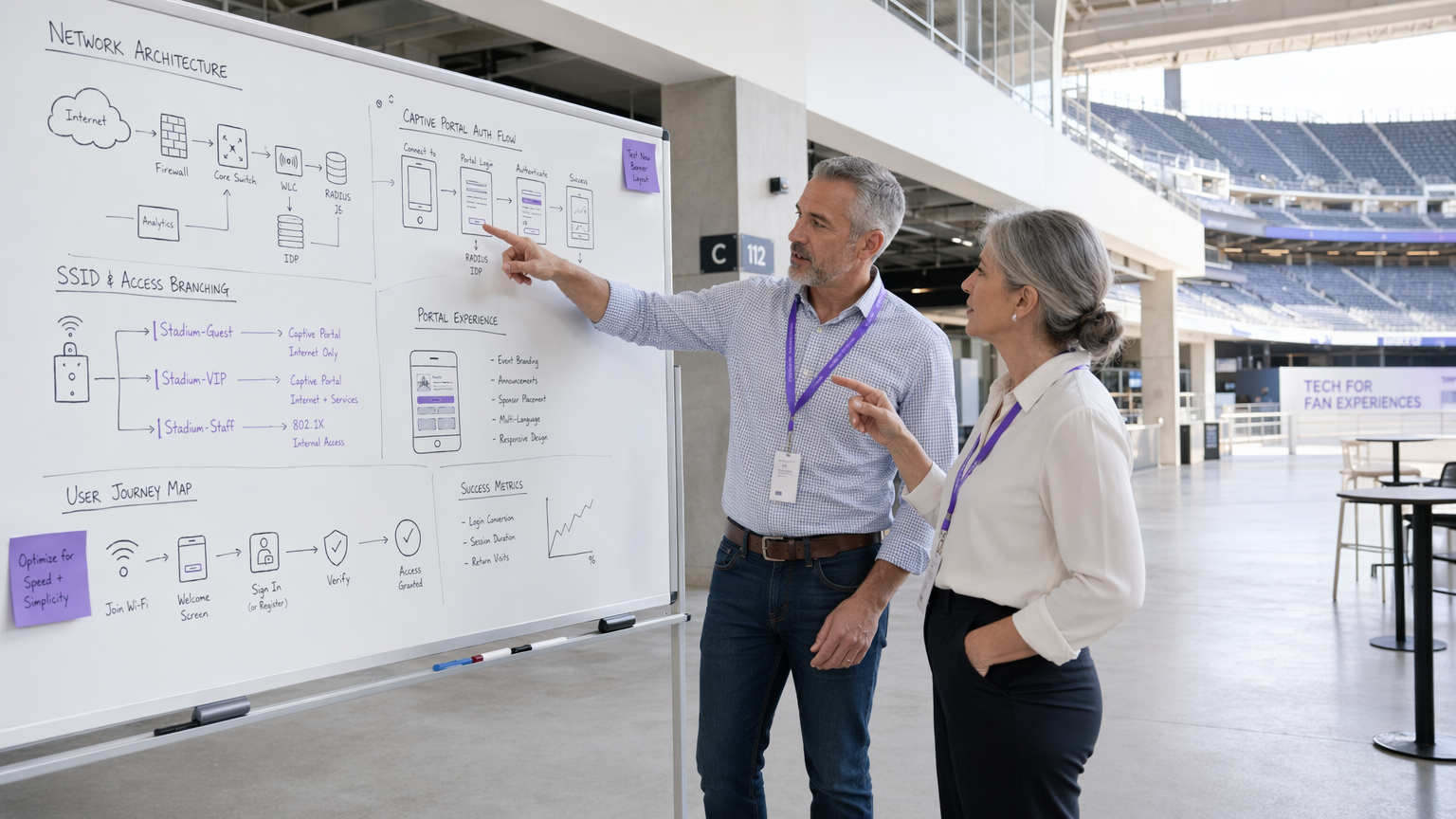
Approfondimento Tecnico
Architettura e Flusso di Traffico
Un'implementazione robusta del captive portal si basa su un flusso di traffico strutturato che isola gli utenti non autenticati fornendo al contempo un percorso chiaro per l'autenticazione. Quando un utente si connette al Guest WiFi , l'access point o il controller LAN wireless (WLC) intercetta le sue richieste HTTP/HTTPS iniziali. Questo traffico viene reindirizzato al captive portal ospitato localmente o nel cloud. L'architettura deve supportare l'assegnazione dinamica di VLAN: gli utenti non autenticati vengono inseriti in una VLAN 'pre-autenticazione' ristretta con accesso limitato strettamente al captive portal e ai servizi essenziali (DNS e DHCP). Dopo l'autenticazione riuscita tramite un server RADIUS, il WLC riceve un messaggio di Change of Authorisation (CoA), spostando l'utente in una VLAN 'post-autenticazione' con accesso a internet.
Il walled garden è un elemento di configurazione critico. Definisce l'insieme di URL e intervalli IP accessibili prima dell'autenticazione. Un walled garden mal configurato è uno dei vettori più comuni per gli attacchi di tunneling DNS, in cui un attore malevolo incapsula traffico IP arbitrario all'interno di query DNS per bypassare completamente il portale. Limitare la risoluzione DNS pre-autenticazione solo al dominio del portale e ai provider di identità noti è una base non negoziabile.
Meccanismi di Autenticazione
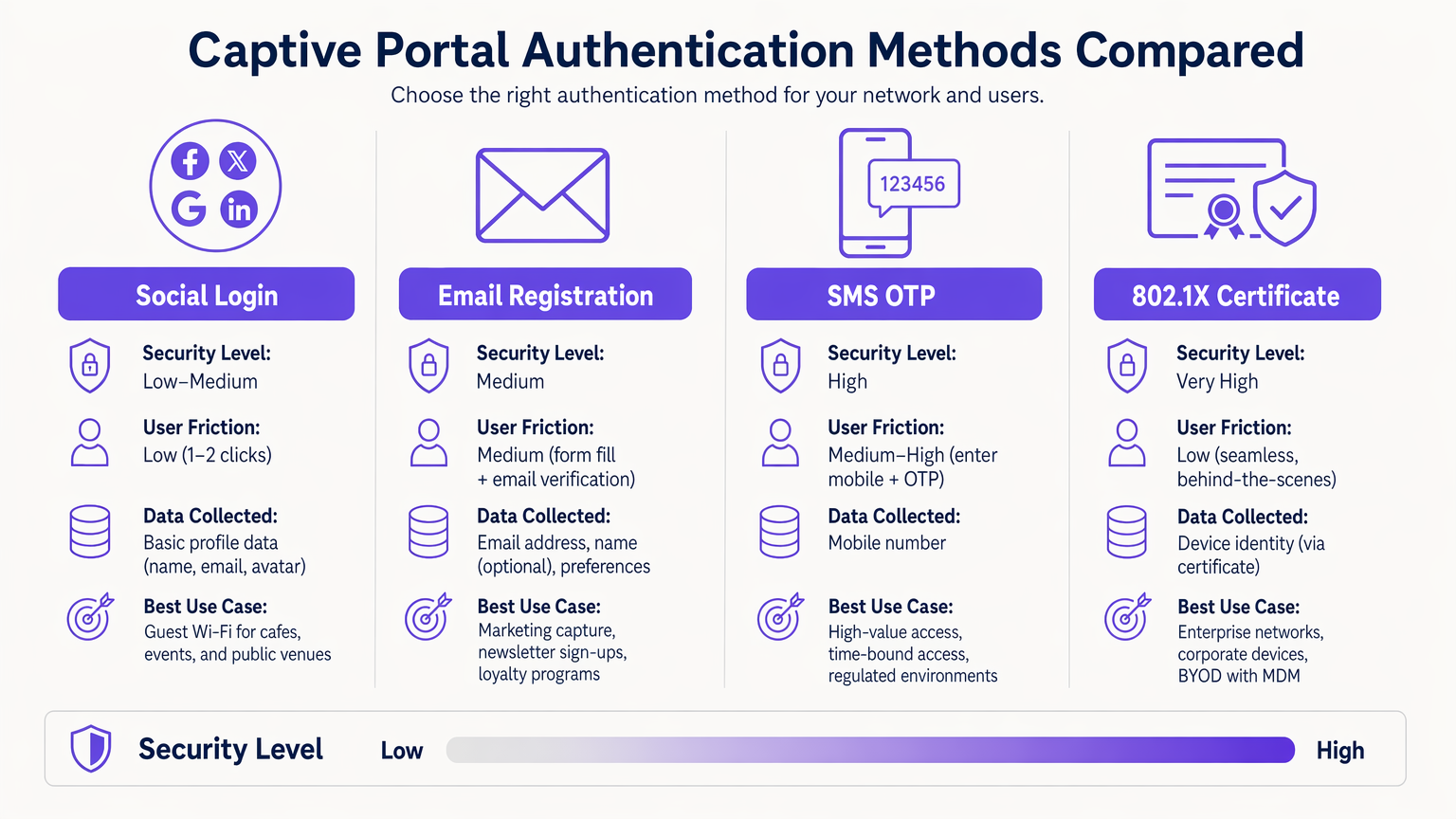
La selezione del meccanismo di autenticazione corretto è un compromesso tra rischio e attrito che deve essere fatto deliberatamente per ogni contesto di implementazione.
| Metodo | Livello di Sicurezza | Attrito Utente | Caso d'Uso Primario |
|---|---|---|---|
| 802.1X Certificate | Molto Alto | Molto Basso (senza interruzioni) | BYOD aziendale, reti del personale |
| SMS OTP | Alto | Medio-Alto | Accesso di alto valore o a tempo limitato |
| Registrazione Email | Medio | Medio | Acquisizione dati di marketing, fedeltà |
| Social Login (OAuth 2.0) | Basso-Medio | Basso | Wi-Fi per ospiti, luoghi pubblici |
| Passpoint / Hotspot 2.0 | Alto | Molto Basso (automatico) | Utenti di ritorno, roaming |
L'autenticazione basata su certificato 802.1X è lo standard di riferimento per gli ambienti aziendali. Fornisce un accesso senza interruzioni e altamente sicuro utilizzando certificati di dispositivo gestiti tramite una piattaforma MDM, eliminando il rischio di furto di credenziali. Per problemi di implementazione comuni, fare riferimento a Risoluzione dei problemi di autenticazione 802.1X di Windows 11 .
Passpoint (Hotspot 2.0) merita un'attenzione particolare. Consente il roaming automatico e sicuro tra reti Wi-Fi utilizzando la sicurezza WPA2/WPA3-Enterprise. Purple agisce come provider di identità gratuito per servizi come OpenRoaming sotto la licenza Connect, facilitando la connettività senza interruzioni e senza interazione manuale con il portale per gli utenti di ritorno.
Progettazione e Personalizzazione del Portale
Il design del portale influisce direttamente sui tassi di conversione dell'autenticazione. Un portale che impiega più di tre secondi per caricarsi su un dispositivo mobile registrerà un calo significativo. Utilizzare HTML/CSS leggero, minimizzare le dipendenze JavaScript e servire le risorse da una CDN. Il portale deve essere completamente responsive — negli ambienti di ospitalità e vendita al dettaglio, la maggior parte delle connessioni proviene da dispositivi mobili.
Il branding è anche una questione di conformità. Secondo il GDPR, il portale deve presentare un meccanismo di consenso chiaro e affermativo prima di raccogliere qualsiasi PII. Le caselle di controllo preselezionate non soddisfano lo standard per un consenso liberamente dato, specifico, informato e inequivocabile. L'informativa sulla privacy e i termini di servizio devono essere collegati e accessibili senza completare l'autenticazione.
Guida all'Implementazione
L'implementazione di un captive portal richiede un approccio metodico che attraversi le dimensioni dell'infrastruttura, del software e della conformità.
Fase 1 — Preparazione dell'Infrastruttura: Assicurati che i tuoi WLC e access point supportino WPA3-SAE e l'assegnazione dinamica di VLAN. Verifica che la tua infrastruttura RADIUS possa gestire il carico di autenticazione di picco previsto — per grandi sedi, considera l'implementazione di proxy RADIUS localmente per ridurre la latenza WAN. Se stai implementando hardware specifico, consulta risorse come La tua guida a un Access Point Wireless Ruckus per indicazioni sulla configurazione specifica del fornitore.
Fase 2 — Architettura VLAN e Firewall: Crea VLAN dedicate per il traffico ospite pre-autenticazione, il traffico ospite post-autenticazione, il personale e i dispositivi IoT. Applica ACL al livello di distribuzione per prevenire qualsiasi comunicazione tra VLAN. Le VLAN ospiti non devono mai instradare verso segmenti di rete aziendali o POS.
Fase 3 — WallConfigurazione Walled Garden: Definire il set minimo richiesto di domini e intervalli IP per l'accesso pre-autenticazione. Questo deve includere il nome host del portale, i domini CDN per le risorse del portale e gli endpoint del provider di identità (ad es. accounts.google.com, graph.facebook.com per il social login). Includere gli endpoint di rilevamento del Captive Portal per i principali sistemi operativi (connectivitycheck.gstatic.com per Android, captive.apple.com per iOS) per garantire che il portale si attivi correttamente.
Fase 4 — Implementazione e Integrazione del Portale: Implementare il portale con un certificato TLS valido da una CA fidata. Integrare con il vostro CRM o piattaforma di marketing tramite API per garantire che i dati acquisiti fluiscano direttamente nella vostra infrastruttura di dati del cliente. La piattaforma WiFi Analytics di Purple offre integrazioni pronte all'uso con i principali sistemi CRM.
Fase 5 — Gestione della Randomizzazione degli Indirizzi MAC: I moderni dispositivi iOS e Android utilizzano indirizzi MAC randomizzati. Transizionare la gestione delle sessioni per fare affidamento su token di sessione autenticati o certificati di dispositivo piuttosto che su indirizzi MAC statici per garantire un'esperienza coerente agli utenti di ritorno.
Fase 6 — Test e Validazione: Testare su iOS, Android, Windows e macOS. Simulare scenari di carico di punta per convalidare il throughput RADIUS. Condurre penetration testing mirati specificamente alla configurazione del walled garden e ai controlli di filtraggio DNS.
Migliori Pratiche
Controlli di Sicurezza della Rete
Per una panoramica completa del più ampio panorama della sicurezza, fare riferimento a Messa in Sicurezza delle Reti WiFi Ospiti: Migliori Pratiche e Implementazione .
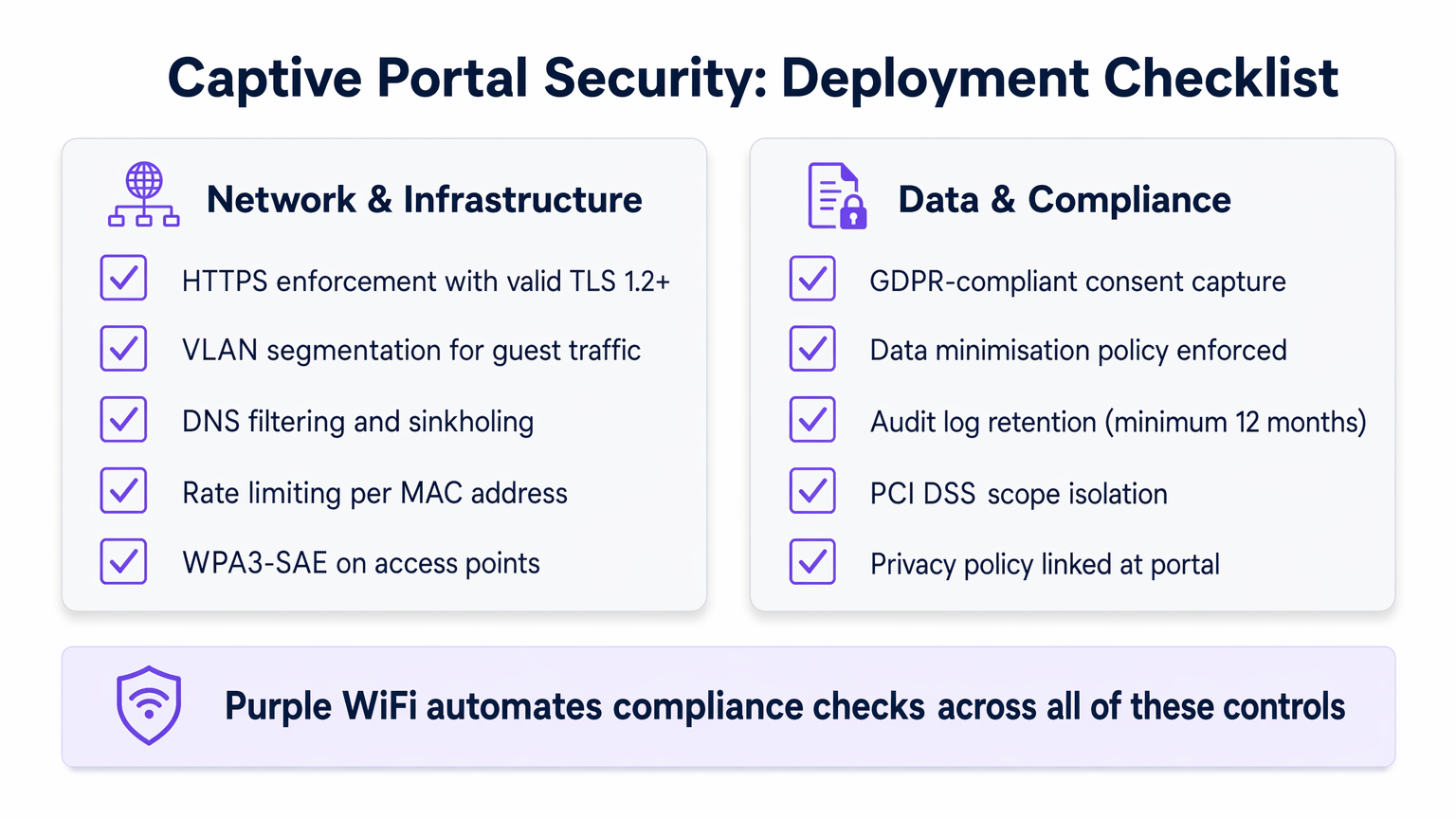
Imporre HTTPS: Tutto il traffico del portale deve essere crittografato utilizzando TLS 1.2 o superiore. Implementare le intestazioni HTTP Strict Transport Security (HSTS) per prevenire attacchi di downgrade del protocollo. Un certificato autofirmato causerà avvisi del browser e distruggerà la fiducia dell'utente; utilizzare sempre un certificato da una CA fidata.
Isolamento del Cliente: Abilitare l'isolamento del cliente sugli access point ospiti per prevenire la comunicazione da dispositivo a dispositivo sulla rete ospite. Questo mitiga il movimento laterale da parte di attori malintenzionati che si sono connessi alla rete.
Limitazione della Velocità (Rate Limiting): Implementare la limitazione della velocità per indirizzo MAC nello stato di pre-autenticazione per prevenire attacchi di forza bruta contro il portale e per limitare l'impatto dei tentativi di tunnelling DNS.
WPA3-SAE: Laddove l'hardware lo supporti, implementare WPA3-SAE (Simultaneous Authentication of Equals) sugli SSID ospiti. Questo fornisce la forward secrecy, garantendo che anche se una chiave di sessione viene compromessa, il traffico storico non possa essere decifrato.
Privacy dei Dati e Conformità
I Captive Portal sono punti primari di raccolta dati, rendendo la conformità un requisito ingegneristico critico piuttosto che un ripensamento.
Conformità GDPR e CCPA: Il consenso esplicito e affermativo deve essere acquisito prima di raccogliere qualsiasi PII. Implementare un meccanismo di double opt-in per le comunicazioni di marketing. Assicurarsi che i vostri accordi con i responsabili del trattamento dei dati con piattaforme di terze parti siano aggiornati.
Minimizzazione dei Dati: Raccogliere solo ciò che è strettamente necessario. Per un'implementazione Wi-Fi ospite, questo tipicamente significa un indirizzo email e un consenso esplicito al marketing. Evitare di raccogliere data di nascita, numeri di telefono o dati demografici a meno che non ci sia una chiara e documentata giustificazione aziendale.
Isolamento dall'Ambito PCI DSS: Gli ambienti di vendita al dettaglio devono garantire che la rete ospite sia interamente al di fuori dell'ambito PCI DSS. Ciò richiede una rigorosa separazione fisica e logica dai sistemi POS, convalidata annualmente da un Qualified Security Assessor (QSA).
Conservazione dei Log di Audit: Mantenere i log di autenticazione per un minimo di 12 mesi per supportare l'indagine sugli incidenti e le richieste normative. Assicurarsi che i log siano archiviati in un formato a prova di manomissione.
Risoluzione dei Problemi e Mitigazione del Rischio
Anche le implementazioni ben architettate incontrano modalità di fallimento prevedibili. La seguente tabella illustra i problemi più comuni e le loro risoluzioni.
| Problema | Causa Radice | Risoluzione |
|---|---|---|
| Il portale non si attiva su iOS/Android | Endpoint CPD bloccati nel walled garden | Aggiungere captive.apple.com e connectivitycheck.gstatic.com al walled garden |
| Timeout di autenticazione RADIUS | Elevata latenza WAN al server RADIUS | Implementare un proxy RADIUS locale; controllare le regole del firewall su UDP 1812/1813 |
| Rilevato tunnelling DNS | DNS pre-autenticazione eccessivamente permissivo | Implementare il DNS sinkholing; limitare il DNS pre-autenticazione al solo resolver del portale |
| Agli utenti di ritorno viene richiesto di nuovo ad ogni visita | La randomizzazione MAC interrompe il tracciamento della sessione | Migrare alla gestione delle sessioni basata su cookie o certificati |
| Avviso certificato SSL del portale | Certificato scaduto o autofirmato | Implementare un certificato a rinnovo automatico tramite Let's Encrypt o CA aziendale |
| I dispositivi IoT non riescono a connettersi | I dispositivi headless non possono completare il flusso del portale | Implementare il MAC Authentication Bypass (MAB) per i dispositivi IoT registrati |
Per ambienti con requisiti di rete clinici o regolamentati complessi, come gli NHS trust o gli ospedali privati, si applicano controlli aggiuntivi. Vedere WiFi negli Ospedali: Una Guida alle Reti Cliniche Sicure per una guida specifica del settore. Allo stesso modo, gli hub di trasporto con infrastrutture RADIUS distribuite presentano sfide di latenza uniche — vedere La Tua Guida alle Soluzioni Wi-Fi Aziendali In-Car per modelli di implementazione ad alta densità e distribuiti rilevanti per gli ambienti Trasporto .
ROI e Impatto Aziendale
Un Captive Portal correttamente implementato trasforma un centro di costo in un asset strategico con ritorni misurabili.
Acquisizione Dati e Integrazione CRM: Offrendo un Wi-Fi senza interruzioni, le sedi acquisiscono preziosi dati di prima parte nel punto di connessione. Questi dati alimentano direttamente i sistemi CRM, consentendo campagne di marketing mirate. Ospitalità ooperatori che utilizzano la piattaforma di Purple hanno riportato tassi di acquisizione email tramite autenticazione del 60–75%, con aumenti misurabili nei tassi di visite ripetute quando tali dati vengono utilizzati per comunicazioni personalizzate.
Efficienza Operativa: L'onboarding automatizzato e l'accesso self-service riducono il carico sull'helpdesk. Nelle implementazioni aziendali che utilizzano 802.1X, l'eliminazione delle password condivise riduce il sovraccarico IT associato alla rotazione delle credenziali.
Conformità come Fattore Differenziante Competitivo: Le organizzazioni che possono dimostrare l'acquisizione di dati conforme al GDPR e l'isolamento dell'ambito PCI DSS sono sempre più preferite dai clienti aziendali e dai team di approvvigionamento del settore pubblico. La conformità non è solo un esercizio di mitigazione del rischio; è un vantaggio commerciale.
KPI Misurabili: Monitora il tasso di conversione dell'autenticazione (obiettivo: >70%), la durata media della sessione, il tasso di visitatori di ritorno e il tasso di arricchimento dei dati CRM. Queste metriche, disponibili tramite la piattaforma WiFi Analytics di Purple, forniscono il business case per un investimento continuo nell'infrastruttura del portale.
Negli ambienti Healthcare , la connettività affidabile e sicura migliora in modo dimostrabile i punteggi di soddisfazione di pazienti e visitatori, con diversi trust del NHS che riportano miglioramenti del CSAT del 15–20% a seguito di implementazioni strutturate di guest Wi-Fi.
Termini chiave e definizioni
Captive Portal
A network access control mechanism that intercepts HTTP/HTTPS traffic from unauthenticated clients and redirects them to a web-based authentication or registration page before granting internet access.
IT teams encounter this as the primary onboarding mechanism for guest Wi-Fi. The portal is the enforcement boundary between untrusted devices and the network, and its configuration directly impacts both security posture and user experience.
VLAN Segmentation
The practice of dividing a physical network into multiple logical networks (VLANs) to isolate traffic between different user groups or system types, enforced via 802.1Q tagging and ACLs.
Critical for any deployment where guest users share physical infrastructure with corporate systems or POS terminals. Proper VLAN segmentation is a prerequisite for PCI DSS compliance in retail environments.
RADIUS (Remote Authentication Dial-In User Service)
A networking protocol (RFC 2865) that provides centralised Authentication, Authorisation, and Accounting (AAA) for network access. In captive portal deployments, the RADIUS server validates credentials and instructs the WLC to assign the appropriate VLAN via Change of Authorisation (CoA).
The backbone of enterprise Wi-Fi authentication. IT teams must size RADIUS infrastructure for peak concurrent authentication load and ensure low latency between WLCs and the RADIUS server to prevent authentication timeouts.
Walled Garden
A restricted set of URLs, IP addresses, and domains that unauthenticated users are permitted to access before completing the captive portal flow. All other traffic is blocked.
A misconfigured walled garden is one of the most common security vulnerabilities in captive portal deployments. It must be as restrictive as possible while including captive portal detection endpoints for major operating systems to ensure the portal triggers correctly.
MAC Authentication Bypass (MAB)
A mechanism that allows headless devices (those without a browser, such as IoT sensors, smart TVs, or printers) to bypass the captive portal by pre-registering their MAC address in the RADIUS server.
Essential for any venue deploying IoT devices on the same physical infrastructure as guest Wi-Fi. MAB devices should always be assigned to a dedicated, restricted IoT VLAN, never to the general guest VLAN.
Passpoint (Hotspot 2.0)
A Wi-Fi Alliance specification (based on IEEE 802.11u) that enables automatic, secure authentication to Wi-Fi networks using WPA2/WPA3-Enterprise, eliminating the need for manual portal interaction for credentialed users.
Increasingly relevant for venues with high return-visitor rates, such as hotels and transport hubs. Purple provides identity provider services for OpenRoaming, a Passpoint-based global roaming network, under the Connect licence.
Change of Authorisation (CoA)
A RADIUS extension (RFC 5176) that allows the RADIUS server to dynamically modify an active session — typically to reassign a user to a different VLAN after successful authentication via the captive portal.
The mechanism that enables dynamic VLAN assignment in captive portal deployments. Without CoA support, the WLC cannot move a user from the pre-auth VLAN to the post-auth VLAN without forcing a full re-association.
DNS Tunnelling
An attack technique that encodes arbitrary data within DNS query and response packets to bypass network access controls, including captive portals, by exploiting the fact that DNS traffic is often permitted in the pre-auth state.
A significant risk in captive portal deployments with permissive pre-auth DNS configurations. Mitigated by restricting pre-auth DNS resolution to a controlled resolver and implementing DNS sinkholing and rate-limiting.
WPA3-SAE (Simultaneous Authentication of Equals)
The authentication protocol introduced in WPA3 that replaces the Pre-Shared Key (PSK) handshake with a Dragonfly key exchange, providing forward secrecy and resistance to offline dictionary attacks.
The recommended encryption standard for guest SSIDs on modern hardware. Forward secrecy ensures that compromising one session key does not expose historical traffic, which is particularly important on shared guest networks.
TLS (Transport Layer Security)
A cryptographic protocol that provides encrypted communication between a client and server. For captive portals, TLS 1.2 or higher is required to protect credentials and PII transmitted during the authentication flow.
All captive portal traffic must be served over HTTPS with a valid TLS certificate from a trusted CA. A self-signed certificate will trigger browser security warnings, destroying user trust and reducing authentication conversion rates.
Casi di studio
A 200-room hotel group with 15 properties needs to deploy a branded captive portal that captures guest email addresses for their loyalty programme, handles peak loads of 500 concurrent authentications per property, and complies with GDPR. Their existing infrastructure uses a mix of Cisco and Ruckus access points. How should they approach this deployment?
The recommended architecture is a cloud-hosted captive portal with local RADIUS proxies at each property. Deploy a central RADIUS server (or use a managed RADIUS-as-a-Service) with local proxy instances at each site to handle authentication requests with sub-100ms latency regardless of WAN conditions. Configure dynamic VLAN assignment: VLAN 10 for pre-auth guests, VLAN 20 for post-auth guests, VLAN 30 for staff (802.1X authenticated). The walled garden must include the portal domain, CDN assets, and social login provider endpoints. For the portal itself, use email registration with a GDPR-compliant double opt-in flow: the user enters their email, receives a confirmation link, and is granted access upon clicking. This ensures verified email capture. Integrate the portal API with the hotel's CRM (e.g., Salesforce or HubSpot) to push new contacts in real time. For the Cisco/Ruckus mixed environment, use RADIUS CoA (RFC 5176) for post-authentication VLAN assignment — both vendors support this natively. Test the walled garden configuration specifically on iOS 16+ and Android 12+ to validate captive portal detection behaviour with MAC randomisation enabled.
A national retail chain with 80 stores needs to deploy guest Wi-Fi across all locations. Their POS systems are on the same physical network infrastructure. They need to ensure PCI DSS compliance while capturing marketing consent from shoppers. What is the correct network architecture?
The non-negotiable first step is network segmentation. Deploy dedicated SSIDs: one for guest access (captive portal) and one for staff/POS (802.1X, WPA3-Enterprise). Assign these to separate VLANs with ACLs at the distribution switch layer that explicitly deny any traffic between the guest VLAN and the POS VLAN. The guest VLAN should route directly to the internet via a dedicated uplink or VLAN-tagged subinterface, never through the corporate routing infrastructure. For the captive portal, use email registration with explicit marketing consent capture. The consent checkbox must be unchecked by default and must clearly state the marketing purpose. Integrate the portal with the retail chain's marketing platform (e.g., Klaviyo or Dotdigital) via API. Implement DNS filtering on the guest VLAN to block known malicious domains and prevent DNS tunnelling. Conduct an annual PCI DSS scope review with a QSA to validate that the guest network remains out of scope. Document the network segmentation controls in the PCI DSS compliance evidence pack.
Analisi degli scenari
Q1. A conference centre hosts 50 events per year, ranging from 200-person seminars to 5,000-person trade shows. They want a single captive portal deployment that can handle both scenarios. The IT team is concerned about RADIUS capacity at peak load and about ensuring the portal triggers correctly on all devices. What architecture decisions should they prioritise?
💡 Suggerimento:Consider the difference in authentication load between a 200-person and a 5,000-person event, and think about what happens to the RADIUS server if it is the single point of failure.
Mostra l'approccio consigliato
The architecture must be designed for the peak case (5,000 concurrent users) but must remain cost-effective for smaller events. Deploy a cloud-hosted RADIUS service with auto-scaling capability rather than a fixed on-premises RADIUS server. This eliminates the capacity planning problem. For captive portal detection reliability, ensure the walled garden includes all major OS captive portal detection endpoints (Apple, Google, Microsoft). Use a CDN to serve portal assets to minimise load time regardless of concurrent user count. Implement per-AP rate limiting to prevent any single access point from overwhelming the RADIUS server during simultaneous association bursts (common when a session break ends at a large event). Consider deploying Passpoint for returning attendees to eliminate portal friction entirely for credentialed users.
Q2. An NHS trust wants to deploy guest Wi-Fi across a 600-bed hospital. Clinical staff use the same physical network infrastructure. The trust's Information Governance team has flagged concerns about patient data exposure and GDPR compliance for visitor data capture. What are the three most critical architectural controls to implement?
💡 Suggerimento:Think about the three distinct user groups (patients/visitors, clinical staff, medical devices) and the data sensitivity associated with each.
Mostra l'approccio consigliato
The three critical controls are: (1) Strict VLAN segmentation with three separate VLANs — guest/visitor (captive portal), clinical staff (802.1X WPA3-Enterprise), and medical devices (MAB with dedicated IoT VLAN). ACLs must prevent any cross-VLAN traffic. (2) GDPR-compliant consent capture on the visitor portal, with data minimisation enforced — collect only email and explicit marketing consent, with automated 30-day purge for inactive records. The portal must link to the trust's privacy notice. (3) Client isolation on the guest SSID to prevent device-to-device communication, which is particularly important in a healthcare environment where patients may be vulnerable to social engineering or device exploitation. See the dedicated guide at WiFi in Hospitals for further sector-specific controls.
Q3. A retail IT director has received a finding from their PCI DSS QSA stating that the guest Wi-Fi network is 'potentially in scope' for PCI DSS because the guest VLAN is routed through the same core switch as the POS VLAN. The QSA has given them 90 days to remediate. What is the fastest path to achieving scope isolation without replacing the core switch?
💡 Suggerimento:Physical replacement of infrastructure is not always necessary — consider what logical controls can achieve the same outcome as physical separation, and what evidence the QSA will need to close the finding.
Mostra l'approccio consigliato
The fastest remediation path is to implement explicit deny ACLs on the core switch between the guest VLAN and all POS VLANs, combined with a network penetration test to validate that no traffic path exists between the two segments. Document the ACL rules and the test results as evidence for the QSA. Additionally, configure the guest VLAN to route directly to the internet via a dedicated subinterface or VLAN-tagged uplink to the ISP, bypassing the corporate routing table entirely. This removes the guest VLAN from the corporate routing domain, which is the strongest logical isolation achievable without physical separation. The QSA will typically accept this as a compensating control if it is accompanied by a documented penetration test confirming no cross-VLAN traffic paths exist.




