
Best practice per la segmentazione VLAN in ambienti multi-tenant
Questa guida fornisce a IT manager, network architect, CTO e direttori operativi delle location un modello autorevole e indipendente dai vendor per implementare la segmentazione VLAN in ambienti WiFi multi-tenant. Copre lo standard IEEE 802.1Q, l'assegnazione dinamica delle VLAN (Dynamic VLAN Assignment) tramite 802.1X e RADIUS, e una guida all'implementazione passo-passo per strutture ricettive, retail, stadi e settore pubblico. Una corretta segmentazione VLAN rappresenta il controllo fondamentale per la conformità PCI DSS e GDPR, la prevenzione dei movimenti laterali e l'erogazione di una connettività wireless ad alte prestazioni su un'infrastruttura fisica condivisa.
Ascolta questa guida
Visualizza trascrizione del podcast
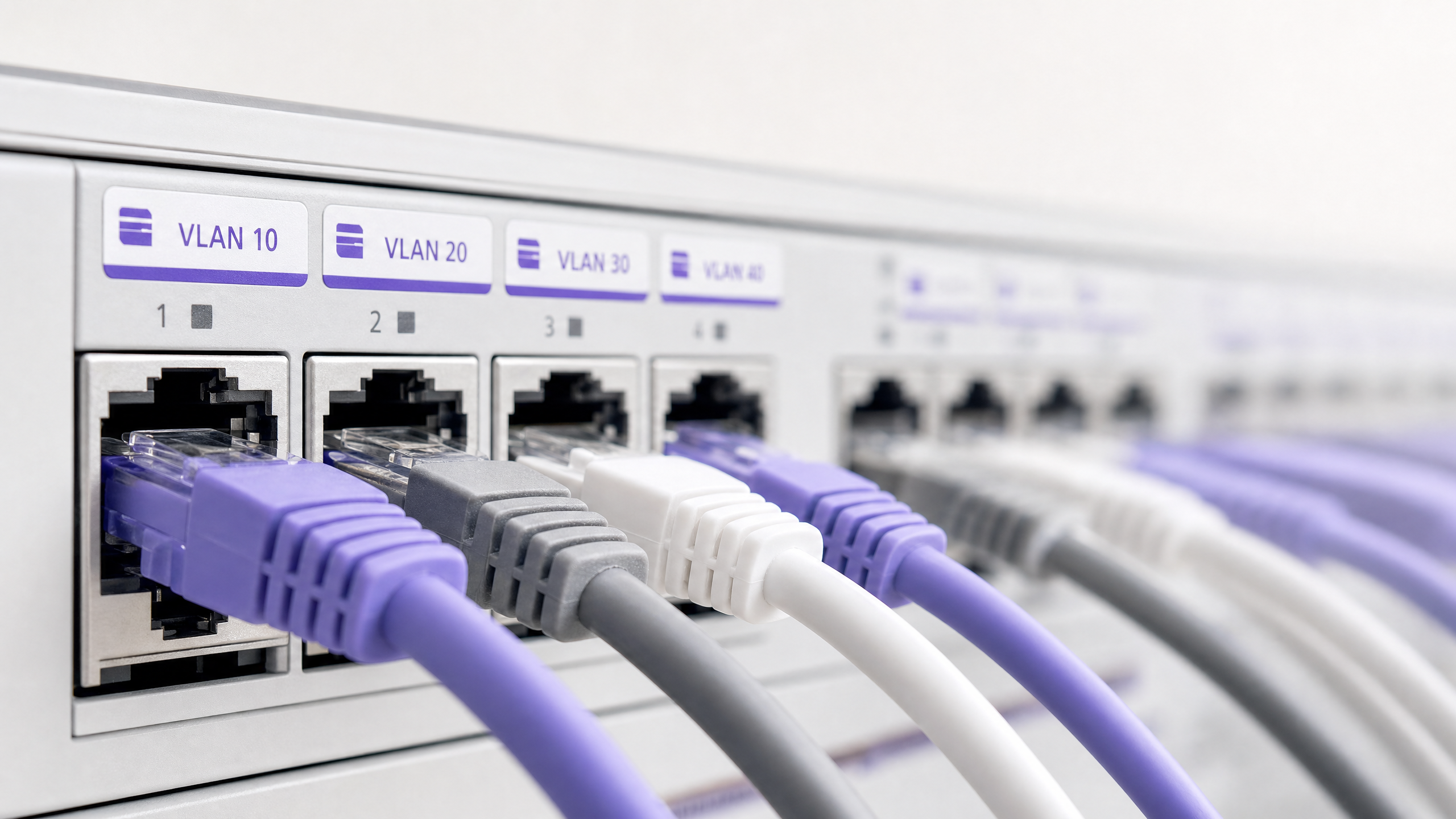
Sintesi operativa
Per le moderne location fisiche aziendali — che spaziano dai portfolio Retail multi-sito e dalle vaste proprietà del settore Hospitality fino agli stadi ad alta densità e alle strutture sanitarie ( Healthcare ) — la segmentazione della rete non è più una best practice opzionale, bensì un requisito architetturale fondamentale. Gestire un ambiente multi-tenant su un'unica rete fisica piatta rappresenta una grave responsabilità operativa. Espone i dati aziendali sensibili a minacce di sicurezza laterali, degrada le prestazioni wireless a causa della congestione da broadcast e complica gli audit di conformità normativa.
Le Virtual Local Area Network (VLAN), definite dallo standard IEEE 802.1Q, forniscono il partizionamento logico necessario per isolare gruppi di utenti distinti, organizzazioni tenant e tipi di dispositivi su un'infrastruttura fisica condivisa. Mappando specifici Service Set Identifier (SSID) wireless su VLAN dedicate, i network architect possono applicare policy di sicurezza granulari e il contenimento del traffico a livello di switch cablati. Inoltre, l'implementazione di tecniche avanzate come la Dynamic VLAN Assignment tramite IEEE 802.1X e RADIUS consente alle location di consolidare il proprio ambiente a radiofrequenza (RF) in un unico SSID sicuro, eliminando il grave degrado delle prestazioni causato dalla trasmissione di molteplici SSID.
Questa guida funge da riferimento tecnico autorevole per IT manager, network architect, CTO e direttori operativi delle location. Fornisce modelli pratici e indipendenti dai vendor per la progettazione e l'implementazione di un'architettura di segmentazione VLAN sicura e scalabile. Integrando queste pratiche con le piattaforme enterprise Guest WiFi e WiFi Analytics di Purple, le organizzazioni possono ottenere un solido isolamento a livello Layer 2, semplificare la conformità con PCI DSS e GDPR e offrire un'esperienza wireless sicura e ad alte prestazioni in grado di incrementare il ROI della location.
Approfondimento tecnico
La transizione da una rete a singolo occupante a un'architettura multi-tenant sicura richiede il passaggio da un modello piatto a fiducia implicita a un framework segmentato zero-trust. L'obiettivo è garantire che molteplici tenant indipendenti, reti guest e dispositivi operativi coesistano su un'infrastruttura fisica condivisa senza compromettere la sicurezza, le prestazioni o la privacy.
Il protocollo di tagging VLAN 802.1Q
La base della segmentazione logica della rete è la Virtual Local Area Network (VLAN), standardizzata secondo la norma IEEE 802.1Q. In un frame Ethernet standard, un header 802.1Q inserisce un tag di 4 byte tra i campi Source MAC Address ed EtherType. Questo tag contiene un VLAN Identifier (VID) a 12 bit, che supporta fino a 4.094 segmenti logici univoci (i VLAN ID 1 e 4095 sono riservati).
Quando a un Access Point (AP) si connette un client wireless, l'AP associa il traffico di quel client a un SSID specifico. L'AP incapsula quindi i frame wireless del client in frame Ethernet, taggandoli con il VLAN ID mappato prima di inoltrarli alla porta dello switch. Le porte fisiche dello switch che si collegano agli AP devono essere configurate come 802.1Q Trunk Port per trasportare simultaneamente il traffico di più VLAN, mentre le porte che si collegano ai dispositivi cablati di un singolo tenant sono configurate come Access Port assegnate a una singola VLAN.
Il costo in termini di overhead e prestazioni di SSID multipli
Un approccio comune ma errato alla segmentazione multi-tenant consiste nel trasmettere un SSID univoco per ogni tenant (ad es. TenantA_WiFi, TenantB_WiFi, TenantC_WiFi). Ogni SSID trasmesso da un AP deve inviare frame di beacon — in genere ogni 102,4 millisecondi — alla velocità di trasmissione dati minima obbligatoria (spesso 1 Mbps o 6 Mbps) per garantire la compatibilità con i client legacy.
All'aumentare del numero di SSID, il tempo di trasmissione (airtime) consumato dall'overhead di gestione cresce in modo sostanziale. La trasmissione di 8 SSID su un singolo AP può consumare fino al 30% dell'airtime wireless disponibile solo per l'overhead dei beacon, lasciando solo il 70% per i dati effettivi degli utenti. In ambienti ad alta densità come centri commerciali o centri congressi, ciò comporta un'elevata latenza, perdita di pacchetti e un grave degrado del throughput. Le best practice impongono di limitare il numero di SSID trasmessi a un massimo di 3 o 4 per banda radio.
Dynamic VLAN Assignment tramite 802.1X e RADIUS
Per aggirare i limiti degli SSID multipli mantenendo un rigoroso isolamento dei tenant, i network architect implementano la Dynamic VLAN Assignment (DVA). Questa architettura consolida l'ambiente wireless in un unico SSID sicuro (ad es. Enterprise_Secure) utilizzando l'autenticazione IEEE 802.1X.
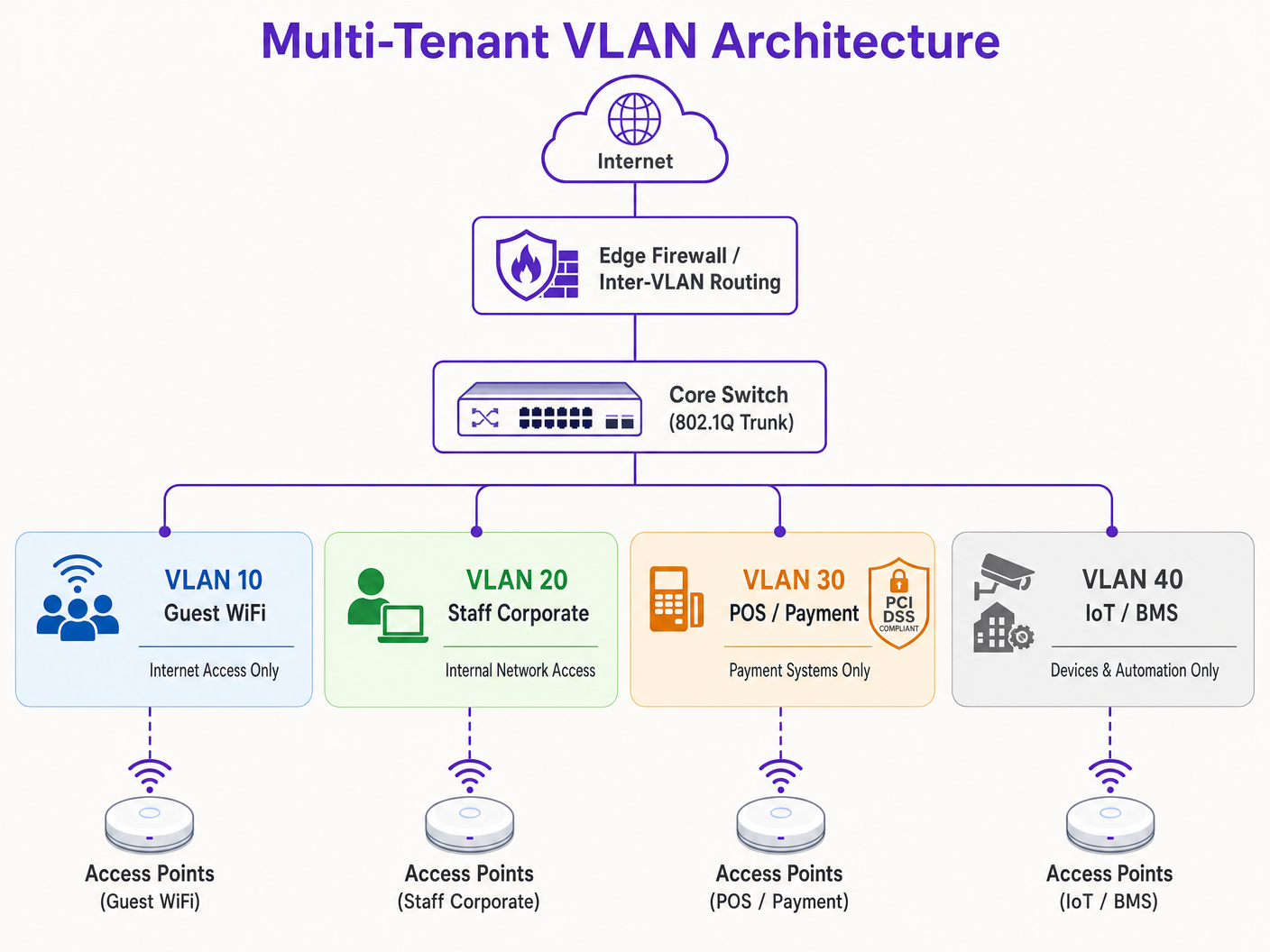
Il framework 802.1X comprende tre componenti chiave:
- Supplicant: Il dispositivo client che esegue un software che supporta lo standard 802.1X (ad es. Windows, macOS, iOS, Android).
- Authenticator: L'AP wireless o il controller LAN wireless (WLC) che blocca tutto il traffico non di autenticazione proveniente dal client fino a quando non viene autorizzato.
- Authentication Server: Un server RADIUS (Remote Authentication Dial-In User Service) integrato con un archivio di identità (ad es. Active Directory, LDAP o provider di identità cloud).
Durante l'handshake di autenticazione, il client si connette all'unico SSID sicuro e fornisce le credenziali o un certificato client (tramite EAP-TLS o PEAP). L'AP inoltra la richiesta al server RADIUS. In caso di convalida riuscita, il server RADIUS restituisce un messaggio di Access-Accept contenente specifici standard IETFattributi standard che istruiscono l'AP ad assegnare dinamicamente la sessione del client alla VLAN designata:
- Tunnel-Type (64): impostato su
VLAN(Valore 13) - Tunnel-Medium-Type (65): impostato su
802(Valore 6) - Tunnel-Private-Group-ID (81): impostato sulla stringa dell'ID VLAN specifico (ad es.
"101"per il Tenant A,"102"per il Tenant B)
L'AP riceve questi attributi, sblocca la porta e mappa tutto il traffico successivo proveniente dall'indirizzo MAC di quel client sulla VLAN specificata. Ciò consente a centinaia di utenti di diverse organizzazioni di connettersi esattamente allo stesso SSID sullo stesso AP fisico, rimanendo completamente isolati gli uni dagli altri al Layer 2. Per una guida dettagliata sulla distribuzione di questa architettura, consulta la guida su Come implementare l'autenticazione 802.1X con Cloud RADIUS .
Contenimento del dominio di broadcast e sicurezza Layer 2
Segmentando una rete fisica in VLAN logiche più piccole, i domini di broadcast vengono limitati. I protocolli di rete standard come ARP, DHCP e mDNS si affidano a frame di broadcast che vengono inviati a ogni dispositivo nel dominio di broadcast. Su una rete ampia e piatta con migliaia di dispositivi, questo "chattering" consuma una quantità significativa di tempo di trasmissione wireless e cicli di elaborazione sui dispositivi client. Limitare i broadcast a singole sottoreti VLAN riduce drasticamente il sovraccarico, previene le tempeste di broadcast e aumenta il throughput complessivo della rete.
Inoltre, l'isolamento a livello Layer 2 viene potenziato abilitando il Client Isolation (noto anche come Peer-to-Peer Blocking) sugli SSID guest. Ciò impedisce ai client wireless sulla stessa VLAN di comunicare direttamente tra loro, mitigando il rischio di scansioni laterali, packet sniffing e attacchi man-in-the-middle.
Guida all'implementazione
La distribuzione di un'architettura VLAN multi-tenant sicura richiede una configurazione coordinata tra l'edge wireless, l'infrastruttura di switch cablata e il firewall centrale. Il seguente piano di implementazione passo-passo è indipendente dal fornitore e allineato agli standard aziendali.
Passaggio 1: Progettazione logica e allocazione delle sottoreti IP
Prima di configurare qualsiasi hardware, stabilisci una mappa logica di rete completa. Assegna ID VLAN, sottoreti IP e zone di sicurezza distinti a ciascuna classe di traffico.
| Nome segmento | ID VLAN | Sottorete IP / CIDR | Zona di sicurezza | Autenticazione primaria |
|---|---|---|---|---|
| Gestione di rete | VLAN 10 | 10.10.10.0/24 | Gestione | Statica / Out-of-Band |
| Guest WiFi (Purple) | VLAN 20 | 172.16.0.0/20 | Guest (Solo Internet) | Open + Captive Portal |
| Personale aziendale | VLAN 30 | 10.10.30.0/23 | Aziendale interna | WPA3-Enterprise (802.1X) |
| POS / Pagamenti | VLAN 40 | 192.168.40.0/24 | PCI-CDE (Limitata) | WPA3-Enterprise / MAB |
| IoT / Sistemi dell'edificio | VLAN 50 | 10.10.50.0/24 | IoT (Limitata) | WPA3-SAE / Dynamic PSK |
> Regola critica: Non utilizzare mai la VLAN 1 per il traffico attivo o la gestione. Disabilita la VLAN 1 su tutte le porte trunk e modifica la VLAN nativa impostandola su un ID VLAN non utilizzato e non instradabile (ad es. VLAN 999) per prevenire attacchi di VLAN hopping.
Passaggio 2: Configurazione dell'infrastruttura di switch cablata
Configura gli switch core, di distribuzione e di accesso per supportare la struttura logica delle VLAN. Le porte degli switch collegate direttamente agli AP devono trasportare più VLAN e devono essere configurate come porte trunk 802.1Q. Definisci esplicitamente quali VLAN sono consentite su ciascun trunk per ridurre al minimo la superficie di esposizione della sicurezza. Le porte che si collegano a singoli dispositivi cablati (como un terminale POS statico o il PC di un receptionist) devono essere impostate in modalità di accesso e assegnate a una singola VLAN.
Passaggio 3: Configurazione del controller LAN wireless e dell'AP
Mappa gli SSID wireless sulle rispettive VLAN e configura i controlli di sicurezza edge. Per l'SSID Guest, configura la sicurezza su Open o WPA3-Enhanced Open (OWE) per fornire crittografia wireless opportunistica, abilita il Client Isolation e reindirizza al captive portal gestito in cloud di Purple per l'onboarding degli utenti e l'analisi dei dati in conformità con il GDPR. Per l'SSID aziendale, configura WPA3-Enterprise con 802.1X, definisci gli indirizzi dei server RADIUS primario e secondario e abilita 802.11r Fast BSS Transition e Opportunistic Key Caching per un roaming senza interruzioni. Per i dispositivi IoT, distribuisci WPA3-SAE con una passphrase complessa e periodicamente modificata, oppure implementa il Multi-PSK (MPSK) per assegnare chiavi univoche ai singoli dispositivi e mapparle dinamicamente su sotto-VLAN.
Passaggio 4: Firewall centrale e criteri di instradamento inter-VLAN
La sicurezza di un'architettura VLAN dipende interamente dalle regole del firewall che gestiscono l'instradamento inter-VLAN. Sul firewall deve essere applicata una rigida politica di Default-Deny, consentendo solo i flussi esplicitamente autorizzati.
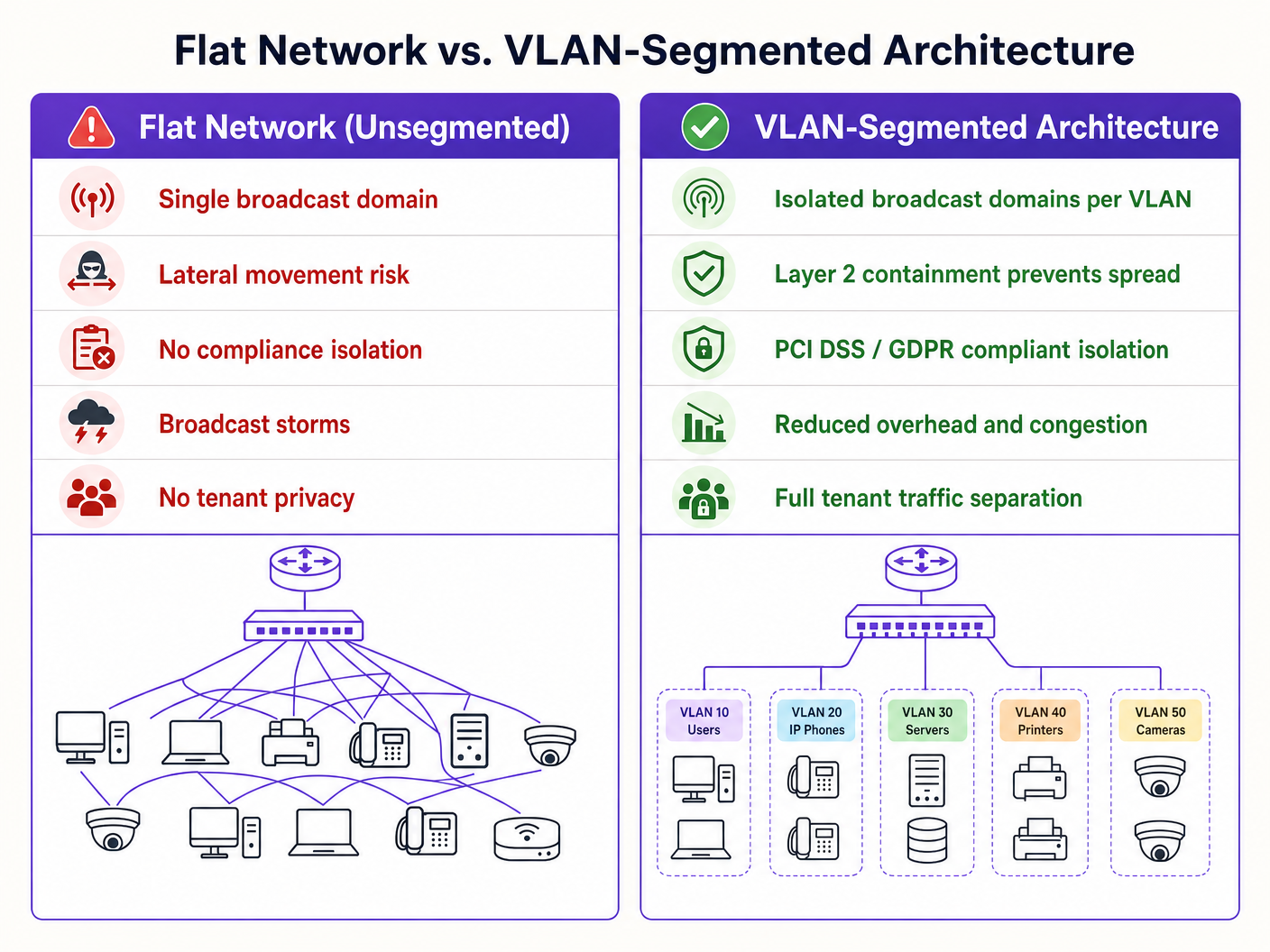
Per la Zona Guest (VLAN 20), consenti il traffico in uscita verso la WAN sulle porte 80 e 443 e consenti il traffico UDP verso i servizi DNS e DHCP. Nega tutto il traffico verso le sottoreti interne. Per la Zona POS (VLAN 40), consenti il traffico TCP in uscita solo verso gli indirizzi IP dei gateway di pagamento designati sulla porta 443 e nega tutto il traffico da e verso tutte le altre VLAN. Per la Zona IoT (VLAN 50), consenti il traffico in uscita solo verso server di aggiornamento specifici del produttore e controller di gestione locali, e nega tutto l'altro traffico interno ed esterno.
Best practice
Per garantire stabilità a lungo termine, prestazioni elevate e massima sicurezza, attieniti a questi principi di progettazione VLAN standard del settore.
L'isolamento del piano di gestione (Management Plane Isolation) non è negoziabile. Non consentire mai il traffico degli utenti finali sulla VLAN di gestione della rete. AP, switch, router e WLC dovrebbero ottenere i propri indirizzi IP su una VLAN di gestione dedicata e altamente limitata. L'accesso a questa VLAN deve essere limitato ai dispositivi degli amministratori autorizzati, idealmente tramite una VPN sicura o una porta console fisica. Se un utente malintenzionato ottiene l'accesso al piano di gestione, ha il controllo effettivo sull'intera infrastructure.
Uno schema VLAN standardizzato è essenziale per gli operatori multi-sito. Per le organizzazioni che gestiscono portafogli multi-sito — come una catena retail con 500 negozi o un marchio alberghiero con 50 proprietà — è fondamentale implementare uno schema VLAN basato su modelli applicato in modo coerente in ogni sede. L'uso di un terzo ottetto coerente nell'indirizzo IP per corrispondere all'ID VLAN semplifica la risoluzione dei problemi da remoto, l'implementazione dei modelli WLC e la gestione delle regole del firewall in tutto l'ambiente aziendale. Questo approccio riduce inoltre drasticamente i tempi necessari per l'onboarding di nuove sedi.
L'ottimizzazione del DHCP Lease Time previene l'esaurimento degli indirizzi IP. In ambienti ad alta densità, i tempi di lease DHCP devono essere gestiti con attenzione. Per il segmento Guest WiFi, dove gli utenti entrano ed escono frequentemente, imposta il DHCP Lease Time su 1 o 2 ore. Per le reti aziendali interne, è appropriato un tempo di lease standard da 8 a 24 ore. Assicurati che i server DNS locali non siano esposti alle reti guest; configura le VLAN guest per utilizzare resolver DNS pubblici e filtrati per ridurre il carico sui server interni.
L'allineamento alla conformità deve essere integrato nell'architettura fin dal primo giorno. Il requisito PCI DSS 1.2 impone l'installazione di firewall per limitare il traffico tra il Cardholder Data Environment (CDE) e le altre reti. Isolando i terminali POS su una VLAN dedicata, il resto della rete della struttura viene escluso dalla rigorosa e costosa valutazione di conformità PCI. Il principio "Privacy by Design" del GDPR è soddisfatto isolando il traffico degli utenti guest e gestendo il consenso tramite il Captive Portal di Purple. L'adozione del WPA3 dovrebbe essere accelerata su tutti gli SSID, poiché il protocollo Simultaneous Authentication of Equals (SAE) di WPA3-Personal elimina la vulnerabilità agli attacchi con dizionario offline presente in WPA2-PSK. Per ulteriori indicazioni sull'architettura del controllo degli accessi, consulta le 10 migliori soluzioni di Network Access Control (NAC) per il 2026 .
Risoluzione dei problemi e mitigazione dei rischi
Anche un'architettura VLAN progettata meticolosamente può riscontrare problemi operativi. Di seguito sono riportate le modalità di guasto più comuni e le relative mitigazioni tecniche.
La perdita di VLAN (VLAN Leakage) e le porte trunk configurate in modo errato rappresentano la causa principale più frequente dei ticket di supporto post-implementazione. Il sintomo è che i client wireless si autenticano correttamente su uno specifico SSID ma non riescono a ricevere un indirizzo IP. La causa principale è che la porta dello switch collegata all'AP è configurata in modo errato: la VLAN di destinazione non è consentita sul trunk 802.1Q oppure la VLAN non è stata creata nel database locale dello switch. Verifica la configurazione del trunk dello switch e assicurati che l'elenco delle VLAN consentite sulla porta dello switch corrisponda agli SSID configurati sull'AP. Esegui sempre un audit delle configurazioni dello switch dopo ogni modifica e convalidale durante la messa in servizio.
I guasti del DHCP Relay si verificano quando una VLAN appena creata non ha un IP Helper Address corrispondente configurato sull'interfaccia Layer 3. Poiché le richieste DHCP sono pacchetti broadcast, non possono superare i confini della VLAN senza un agente relay. Se il server DHCP risiede su una VLAN diversa rispetto ai client, il router o lo switch Layer 3 deve essere configurato con un IP Helper Address che punti al server DHCP centralizzato.
La scadenza del certificato RADIUS è un rischio silenzioso che può causare il blocco simultaneo dell'intera rete aziendale. Il sintomo è che tutti i client autenticati tramite 802.1X non riescono improvvisamente a connettersi, con errori di avviso del certificato sui dispositivi client. Implementa avvisi di monitoraggio automatizzati che si attivano 30 giorni prima della scadenza del certificato e configura pipeline di rinnovo automatico dei certificati per evitare sviste manuali.
La proliferazione degli SSID e la congestione RF si manifestano con un'elevata latenza e velocità ridotte nonostante un'eccellente potenza del segnale e un backhaul ad alta velocità. La causa principale è l'utilizzo eccessivo dei canali dovuto al sovraccarico di gestione e all'interferenza co-canale. Consolida gli SSID, passa al Dynamic VLAN Assignment, disattiva la radio a 2.4 GHz su un sottoinsieme di AP in aree ad alta densità e applica il band steering per spingere i client dual-band verso le bande più pulite a 5 GHz e 6 GHz.
ROI e impatto aziendale
L'implementazione di una solida strategia di segmentazione VLAN genera un valore aziendale significativo e misurabile per i gestori delle strutture e le organizzazioni aziendali.
La riduzione dell'ambito dell'audit PCI offre risparmi diretti sui costi. Per le strutture che elaborano pagamenti con carta di credito, una rete flat inserisce l'intera infrastruttura nell'ambito della conformità PCI DSS. Ciò significa che ogni switch, AP, server e PC dell'ufficio deve essere sottoposto a audit, con un costo di decine di migliaia di sterline all'anno in valutazioni di conformità, penetration test e costi amministrativi. Segmentando la rete e isolando il Cardholder Data Environment in una VLAN POS dedicata con rigidi controlli firewall, l'ambito dell'audit viene limitato esclusivamente a quella VLAN. Questa riduzione dell'ambito può ridurre i costi di conformità fino al 70% e diminuire drasticamente il rischio di sanzioni per non conformità.
La mitigazione dei costi delle violazioni è il risultato di sicurezza di maggior valore. Il fattore principale delle gravi violazioni dei dati è il movimento laterale, in cui un utente malintenzionato ottiene l'accesso a un dispositivo a bassa sicurezza e si sposta all'interno di una rete flat per compromettere database di alto valore o sistemi POS. La segmentazione VLAN, combinata con rigide regole di firewall inter-VLAN, elimina completamente questo vettore. Se un dispositivo IoT sulla VLAN 50 viene compromesso, l'attaccante rimane intrappolato all'interno di quel segmento logico. Il raggio d'azione della violazione è ridotto al minimo, proteggendo le risorse aziendali sensibili.
La monetizzazione e l'analisi dei dati degli ospiti (Guest Analytics) trasformano la rete da un centro di costo a una risorsa strategica. Una rete adeguatamente segmentata consente ai gestori delle strutture di offrire in sicurezza un servizio Guest WiFi di alta qualità senza rischiare la sicurezza interna. Instradando il traffico degli ospiti attraverso una VLAN dedicata alla piattaforma di Purple, le strutture possono acquisire preziosi dati sui clienti di prima parte tramite un Captive Portal personalizzato, integrato direttamente con le piattaforme CRM e di marketing automation. Ciò consente campagne di marketing mirate, aumenta la fidelizzazione dei clienti e consente agli operatori di monetizzare la propria infrastruttura wireless attraverso upgrade di banda a scaglioni e pubblicità sulla splash page del Captive Portal. Per approfondire come gli analytics guidino i risultati aziendali, consulta la documentazione della piattaforma WiFi Analytics di Purple.
Riferimenti
- Access Point Wireless Cisco: Guida 2026 ai prodotti e all'implementazione
- Le 10 migliori soluzioni di Network Access Control (NAC) per il 2026
- WiFi nelle scuole: Guida 2026 per amministratori e IT
- Come implementare l'autenticazione 802.1X con Cloud RADIUS
- Piattaforma Purple Guest WiFi
- Piattaforma Purple WiFi Analytics
- Soluzioni WiFi per l'hospitality
- Soluzioni WiFi per il retail
- Soluzioni WiFi per i trasporti
Definizioni chiave
VLAN (Virtual Local Area Network)
A logical grouping of network devices that communicate as if they were on the same physical LAN, regardless of their physical location. Defined under IEEE 802.1Q, VLANs partition a single physical switch fabric into multiple isolated broadcast domains using a 12-bit VLAN Identifier (VID) embedded in the Ethernet frame header.
IT teams encounter VLANs as the primary mechanism for separating guest, staff, POS, and IoT traffic on shared physical infrastructure. Without VLANs, all devices share a single broadcast domain, creating security and performance risks.
802.1Q Trunk Port
A switch port configured to carry traffic for multiple VLANs simultaneously by tagging each Ethernet frame with its corresponding VLAN ID. The trunk port carries tagged frames between switches and to access points, while access ports carry only untagged frames for a single VLAN.
Network engineers configure trunk ports on the switch interfaces connected to access points and uplink ports between switches. A misconfigured trunk port — where the allowed VLAN list does not include a required VLAN — is the most common cause of post-deployment connectivity failures.
Dynamic VLAN Assignment (DVA)
An architecture that uses IEEE 802.1X authentication and a RADIUS server to dynamically assign a wireless client to a specific VLAN based on their authenticated identity, rather than the SSID they connected to. The RADIUS server returns IETF standard attributes (Tunnel-Type, Tunnel-Medium-Type, Tunnel-Private-Group-ID) in the Access-Accept message to instruct the AP which VLAN to assign.
DVA is the recommended approach for multi-tenant buildings where broadcasting multiple SSIDs would degrade RF performance. It allows a single SSID to serve multiple tenant organisations with full Layer 2 isolation between them.
RADIUS (Remote Authentication Dial-In User Service)
A client-server networking protocol that provides centralised Authentication, Authorisation, and Accounting (AAA) management for network access. In a WiFi context, the wireless controller acts as the RADIUS client, forwarding authentication requests from wireless clients to the RADIUS server, which validates credentials against an identity store (Active Directory, LDAP, etc.) and returns authorisation attributes including VLAN assignments.
RADIUS is the backbone of enterprise WiFi security. IT teams deploy RADIUS servers (such as Microsoft NPS, FreeRADIUS, or cloud RADIUS services) to enforce per-user and per-device network policies, including Dynamic VLAN Assignment and certificate-based authentication.
PCI DSS (Payment Card Industry Data Security Standard)
A set of security standards designed to ensure that all companies that accept, process, store, or transmit credit card information maintain a secure environment. PCI DSS Requirement 1 mandates the installation and maintenance of network security controls, including firewalls that restrict traffic between the Cardholder Data Environment (CDE) and other networks.
Venue operators with POS terminals or payment processing systems must comply with PCI DSS. Proper VLAN segmentation isolates the CDE to a dedicated VLAN, reducing the scope of the PCI audit to only that segment and the firewall policies governing it, rather than the entire network.
Broadcast Domain
The set of all network devices that will receive a broadcast frame sent by any one device in the group. On a flat, unsegmented network, all devices share a single broadcast domain. VLANs partition the network into smaller broadcast domains, confining broadcast traffic (ARP, DHCP, mDNS) to only the devices within that VLAN.
In high-density venues with hundreds or thousands of connected devices, a single large broadcast domain generates enormous volumes of broadcast traffic that consumes wireless airtime and degrades performance. Reducing broadcast domain size via VLANs is a primary performance optimisation technique.
WPA3-Enterprise
The current enterprise-grade WiFi security standard, using IEEE 802.1X authentication and EAP (Extensible Authentication Protocol) for per-user or per-device authentication. WPA3-Enterprise provides 128-bit (standard) or 192-bit (high-security mode) cryptographic protection and eliminates the vulnerabilities associated with WPA2's 4-way handshake.
IT teams should deploy WPA3-Enterprise on all corporate and regulated SSIDs (staff, POS). It requires a RADIUS server and either client certificates (EAP-TLS) or username/password credentials (PEAP-MSCHAPv2). WPA3-Enterprise is the authentication standard required for PCI DSS-compliant wireless deployments.
Client Isolation (Peer-to-Peer Blocking)
A wireless access point feature that prevents devices connected to the same SSID from communicating directly with each other at Layer 2. When enabled, all inter-client traffic is blocked at the AP, forcing it to traverse the firewall before reaching another device.
Client isolation is a mandatory configuration on all guest WiFi SSIDs. Without it, a malicious user on the guest network can scan, probe, and attack other guest devices on the same SSID. It is also a requirement for GDPR compliance, as it prevents one guest from intercepting another guest's unencrypted traffic.
MAC Authentication Bypass (MAB)
A fallback authentication mechanism that allows devices incapable of performing 802.1X authentication (such as printers, smart TVs, and IoT sensors) to authenticate to the network using their MAC address. The RADIUS server is pre-populated with the MAC addresses of authorised devices and returns the appropriate VLAN assignment upon a successful MAB request.
IT teams use MAB for IoT and legacy devices in multi-tenant environments. Because MAC addresses can be spoofed, MAB should always be combined with strict firewall ACLs on the assigned VLAN, limiting the device's network access to only the specific external services it requires.
Native VLAN
The VLAN assigned to untagged traffic on an 802.1Q trunk port. By default on most switches, VLAN 1 is the native VLAN. Untagged frames arriving on a trunk port are assigned to the native VLAN. This is a well-known attack vector for VLAN hopping, where an attacker sends double-tagged frames to escape their VLAN.
Best practice is to change the native VLAN on all trunk ports to an unused, non-routable VLAN ID (e.g., VLAN 999) and to ensure that no active devices are assigned to VLAN 1. This is a mandatory hardening step in any PCI DSS-compliant network design.
Esempi pratici
A 350-room hotel group operating 12 properties needs to consolidate its network infrastructure. Currently, each property runs a single flat network serving guest rooms, staff laptops, restaurant POS terminals, CCTV cameras, HVAC controllers, and a conference centre with multiple concurrent event holders. The IT director has flagged that the entire network is in scope for PCI DSS compliance, costing the group approximately £45,000 per year in audit fees and remediation work. How should the network be redesigned?
The solution is a five-VLAN architecture deployed consistently across all 12 properties using a standardised template. VLAN 10 (Management, 10.XX.10.0/24) carries only switch, AP, and WLC management traffic, accessible exclusively via a dedicated admin VPN. VLAN 20 (Guest WiFi, 172.16.0.0/20) routes all guest traffic through Purple's captive portal for GDPR-compliant onboarding and analytics, with client isolation enabled and a 2-hour DHCP lease time to prevent IP exhaustion. VLAN 30 (Staff Corporate, 10.XX.30.0/23) uses WPA3-Enterprise with 802.1X authentication against the group's Azure AD via a cloud RADIUS service. VLAN 40 (POS/Payments, 192.168.40.0/24) is a strictly isolated PCI-CDE segment with a default-deny firewall policy permitting only outbound HTTPS to the payment gateway provider's IP addresses. VLAN 50 (IoT/BMS, 10.XX.50.0/24) isolates all CCTV, HVAC, smart locks, and building management devices with egress filtering restricted to their respective management platforms. The conference centre is handled by provisioning temporary event VLANs (VLAN 60-99) via the WLC dashboard, each with a custom Purple captive portal and bandwidth limits. The standardised third-octet IP scheme (XX = site number) allows the NOC team to identify any device's site and segment from its IP address alone, dramatically reducing troubleshooting time.
A national retail chain with 220 stores is experiencing widespread WiFi performance complaints. Despite having 200 Mbps fibre connections at each store, customers and staff report speeds of under 5 Mbps. An audit reveals that each store's access points are broadcasting 9 SSIDs: one for customers, one for staff, one for POS, one for CCTV, one for digital signage, one for stock management handhelds, one for a third-party logistics partner, one for a coffee shop concession, and one legacy SSID from a previous provider that was never decommissioned. How should the network be redesigned to resolve the performance issues while maintaining security?
The solution is a three-phase consolidation. Phase 1 (Immediate): Immediately decommission the legacy SSID and any SSIDs with zero active clients. This alone reduces beacon overhead from 9 SSIDs to 7. Phase 2 (30-day rollout): Consolidate the staff, stock management handhelds, logistics partner, and digital signage SSIDs into a single enterprise SSID using Dynamic VLAN Assignment via 802.1X and RADIUS. Each user group authenticates with their corporate credentials or device certificate, and the RADIUS server returns the appropriate Tunnel-Private-Group-ID attribute to assign them to their dedicated VLAN (VLAN 30 for staff, VLAN 50 for IoT/handhelds, VLAN 60 for logistics, VLAN 70 for signage). This reduces the SSID count from 7 to 4. Phase 3 (60-day rollout): Migrate the coffee shop concession to a dedicated VLAN with a separate Purple captive portal instance, and consolidate the POS and CCTV SSIDs onto their respective isolated VLANs. The final architecture broadcasts 3 SSIDs: one enterprise SSID with Dynamic VLAN Assignment, one guest/customer SSID via Purple's captive portal, and one POS SSID. Enable band steering on all APs to push dual-band clients to 5 GHz, and configure per-client rate limiting on the guest VLAN (10 Mbps downstream) to prevent any single user from saturating the uplink.
Domande di esercitazione
Q1. A conference centre operator runs a 50,000 sq ft venue with 200 access points. They currently broadcast 6 SSIDs: one for event attendees, one for exhibitors, one for venue staff, one for AV equipment, one for catering POS terminals, and one for building management systems. The IT manager reports that WiFi performance is poor during large events, with average client speeds dropping to under 3 Mbps despite a 1 Gbps fibre uplink. The venue is also preparing for a PCI DSS audit. How would you redesign the wireless architecture to resolve both the performance and compliance issues?
Suggerimento: Consider which SSIDs can be consolidated using Dynamic VLAN Assignment, which traffic classes have PCI DSS implications, and how SSID beacon overhead contributes to the performance problem in a high-density environment.
Visualizza risposta modello
The redesign consolidates 6 SSIDs down to 3 using Dynamic VLAN Assignment for the corporate segments. SSID 1 (Event Attendees): Open SSID with WPA3-Enhanced Open, mapped to VLAN 20, routed through Purple's captive portal for GDPR-compliant onboarding and per-client rate limiting (10 Mbps downstream). Client isolation enabled. SSID 2 (Enterprise Secure): Single WPA3-Enterprise SSID using 802.1X with Dynamic VLAN Assignment. Exhibitors authenticate with temporary credentials issued at registration and are placed on VLAN 60 (internet-only, isolated). Venue staff authenticate with corporate AD credentials and are placed on VLAN 30 (internal access). AV equipment uses MAC Authentication Bypass and is placed on VLAN 50 (restricted to AV management servers). SSID 3 (POS Secure): Dedicated WPA3-Enterprise SSID for catering POS terminals, mapped to VLAN 40 (PCI-CDE). Strict firewall rules permit only outbound HTTPS to the payment gateway. Building management systems are migrated to a wired connection on VLAN 50 where possible, or to a dedicated IoT SSID if wireless is required. Reducing from 6 to 3 SSIDs eliminates approximately 15-20% of beacon overhead, directly improving available airtime and client throughput. The PCI audit scope is reduced to VLAN 40 and its firewall policies, satisfying PCI DSS Requirement 1.2 and 1.3.
Q2. A network architect is designing the WiFi infrastructure for a new 80-unit mixed-use commercial building. The building will house 15 independent business tenants, a ground-floor café, and shared co-working spaces. Each tenant requires complete network isolation from other tenants, their own bandwidth allocation, and the ability to connect their own devices. The building owner wants to manage the entire infrastructure centrally and onboard new tenants within 30 minutes. What architecture would you recommend, and what are the key design decisions?
Suggerimento: Consider the trade-offs between per-tenant VLANs with dedicated SSIDs versus Dynamic VLAN Assignment with a single SSID. Think about the operational requirements for rapid tenant onboarding and centralised management.
Visualizza risposta modello
The recommended architecture is a Dynamic VLAN Assignment model with a single enterprise SSID for all business tenants, supplemented by a separate guest SSID for the café and co-working spaces. Each tenant is assigned a unique VLAN ID (e.g., VLAN 101-115 for tenants, VLAN 200 for co-working, VLAN 201 for café). The RADIUS server is integrated with a cloud identity provider that supports per-tenant user directories. When a new tenant is onboarded, the administrator creates a new VLAN on the core switch, configures a DHCP scope for the new subnet, adds the VLAN to the allowed list on all trunk ports, creates a new tenant group in the identity provider, and configures the RADIUS server to return the new VLAN ID for that tenant's users. This entire process can be templated and completed in under 30 minutes. Each tenant's VLAN is isolated from all other tenant VLANs by a default-deny inter-VLAN firewall policy. Per-tenant bandwidth policies are enforced at the WLC using QoS profiles, guaranteeing each tenant their contracted bandwidth tier. The café and co-working guest SSID routes through Purple's captive portal on VLAN 200, providing the building owner with visitor analytics and a branded onboarding experience. The key design decision is to use a single enterprise SSID rather than per-tenant SSIDs, which would require broadcasting up to 15 SSIDs and would severely degrade RF performance in the high-density building environment.
Q3. An IT manager at a large retail chain discovers during a routine network audit that VLAN 1 is being used as the native VLAN on all trunk ports across 300 stores, and that the management SSID for accessing the wireless controllers is on the same subnet as the guest WiFi network. The security team has flagged this as a critical vulnerability. What immediate remediation steps should be taken, and what is the risk if these issues are left unaddressed?
Suggerimento: Consider the specific attack vectors that VLAN 1 as the native VLAN enables (VLAN hopping), and the implications of management traffic being accessible from the guest network. Prioritise remediation steps by risk severity.
Visualizza risposta modello
Immediate remediation in order of priority: Step 1 (Critical — same day): Isolate the management SSID. Disable the management SSID entirely if it is accessible from the guest network. Move all wireless controller management access to a dedicated Management VLAN (e.g., VLAN 10) with access restricted to administrator devices via a site-to-site VPN or dedicated management workstations. This eliminates the most critical risk: a guest user or attacker on the guest network gaining access to the wireless controllers and reconfiguring or disabling the entire wireless infrastructure. Step 2 (High — within 1 week): Change the native VLAN on all trunk ports from VLAN 1 to an unused, non-routable VLAN (e.g., VLAN 999). Ensure no active devices are assigned to VLAN 1. This mitigates the VLAN hopping attack vector, where an attacker sends double-tagged 802.1Q frames to escape their VLAN and gain access to another VLAN's traffic. Step 3 (Medium — within 30 days): Conduct a full trunk port audit across all 300 stores to verify that the allowed VLAN list on each trunk port is explicitly defined and matches the design documentation. Remove any VLANs from trunk ports that are not required at that location. The risk of leaving these issues unaddressed is severe: an attacker on the guest WiFi network could potentially reach the wireless controller management interface, modify SSID configurations, extract pre-shared keys, redirect traffic, or disable the entire wireless infrastructure. The VLAN 1 native VLAN vulnerability could allow an attacker to escape the guest VLAN and access POS terminals or internal servers, resulting in a PCI DSS breach with potential fines of up to £100,000 per month of non-compliance.
Continua a leggere questa serie
Progettazione di reti WiFi per il personale sicure e separate dal traffico ospiti
Una guida di riferimento tecnica e autorevole per architetti di rete e leader IT sulla progettazione di reti WiFi per il personale sicure e ad alte prestazioni. Dettaglia la segmentazione logica e fisica del traffico operativo dalle reti ospiti pubbliche utilizzando VLAN, autenticazione 802.1X e WPA3-Enterprise per soddisfare i requisiti di conformità (PCI DSS, GDPR) ed eliminare i rischi di sicurezza legati al movimento laterale.
Le 10 principali cause di timeout DHCP sulle reti wireless ad alta densità
Questa guida di riferimento tecnica e autorevole identifica le dieci principali cause di timeout DHCP sulle reti wireless ad alta densità e fornisce strategie di risoluzione pratiche e indipendenti dai fornitori. Progettata per leader IT senior, architetti di rete e direttori operativi delle strutture, copre principi ingegneristici approfonditi, flussi di lavoro di implementazione passo-passo e risultati aziendali misurabili. Scopri come eliminare i colli di bottiglia della connessione e ottimizzare la tua infrastruttura wireless per offrire una connettività fluida in ambienti aziendali esigenti.
Guida passo-passo alla diagnosi dei problemi di roaming WiFi
Questa guida completa fornisce ai leader IT aziendali e agli architetti di rete una metodologia autorevole e passo-passo per diagnosticare e risolvere i problemi di roaming WiFi. Combinando approfondimenti tecnici sugli standard IEEE 802.11k/v/r con casi di studio reali e analisi a livello di pacchetto, questo riferimento consente ai team di eliminare il problema dello 'sticky client' e offrire una connettività mobile fluida. Copre l'intero flusso di lavoro diagnostico, dai rilievi del sito RF e gli audit di configurazione dei controller fino all'analisi dell'acquisizione dei pacchetti over-the-air e alla validazione post-risoluzione.