

Bloccare Malware e Phishing al Perimetro della Rete
Questa guida tecnica di riferimento illustra l'architettura, l'implementazione e l'impatto aziendale della protezione dalle minacce a livello di rete per mettere in sicurezza i dispositivi guest e IoT non gestiti al perimetro della rete. Fornisce indicazioni pratiche ai leader IT per bloccare proattivamente malware e phishing.
Ascolta questa guida
Visualizza trascrizione del podcast
Riepilogo Esecutivo
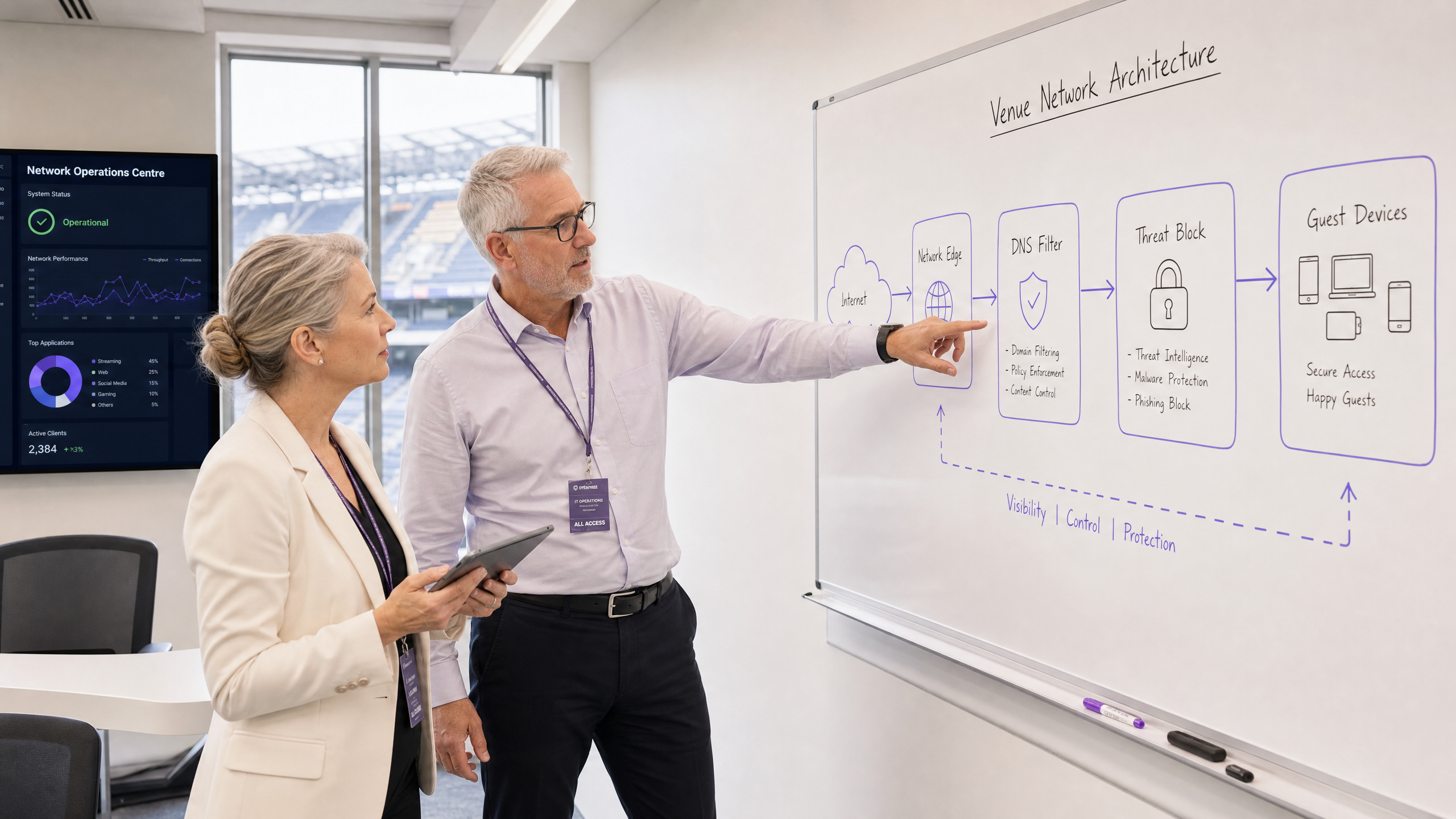
Per i CTO e gli architetti di rete che gestiscono sedi ad alto traffico, la messa in sicurezza dei dispositivi non gestiti è una sfida operativa critica. Non è possibile distribuire agenti endpoint sugli smartphone degli ospiti, né si può fare affidamento sugli utenti per evitare link dannosi. Questa guida descrive come l'implementazione della protezione dalle minacce a livello di rete blocchi malware e phishing al perimetro della rete prima che raggiungano i dispositivi degli ospiti. Applicando le policy di sicurezza al gateway tramite il filtro DNS e l'integrazione della threat intelligence, le sedi possono proteggere proattivamente il traffico BYOD, IoT e degli ospiti. Questo approccio riduce il sovraccarico di risposta agli incidenti, garantisce la conformità a standard come GDPR e PCI DSS e mantiene un ambiente sicuro per gli utenti Guest WiFi nei settori Hospitality , Retail e Transport .
Approfondimento Tecnico
L'Architettura della Protezione al Perimetro della Rete
La protezione dal malware al perimetro della rete sposta il punto di applicazione della sicurezza dall'endpoint al gateway. Quando un dispositivo si connette a una rete di una sede e tenta di risolvere un dominio, la query DNS viene intercettata dal gateway di perimetro. Invece della risoluzione standard, la query viene valutata rispetto a feed di threat intelligence continuamente aggiornati.
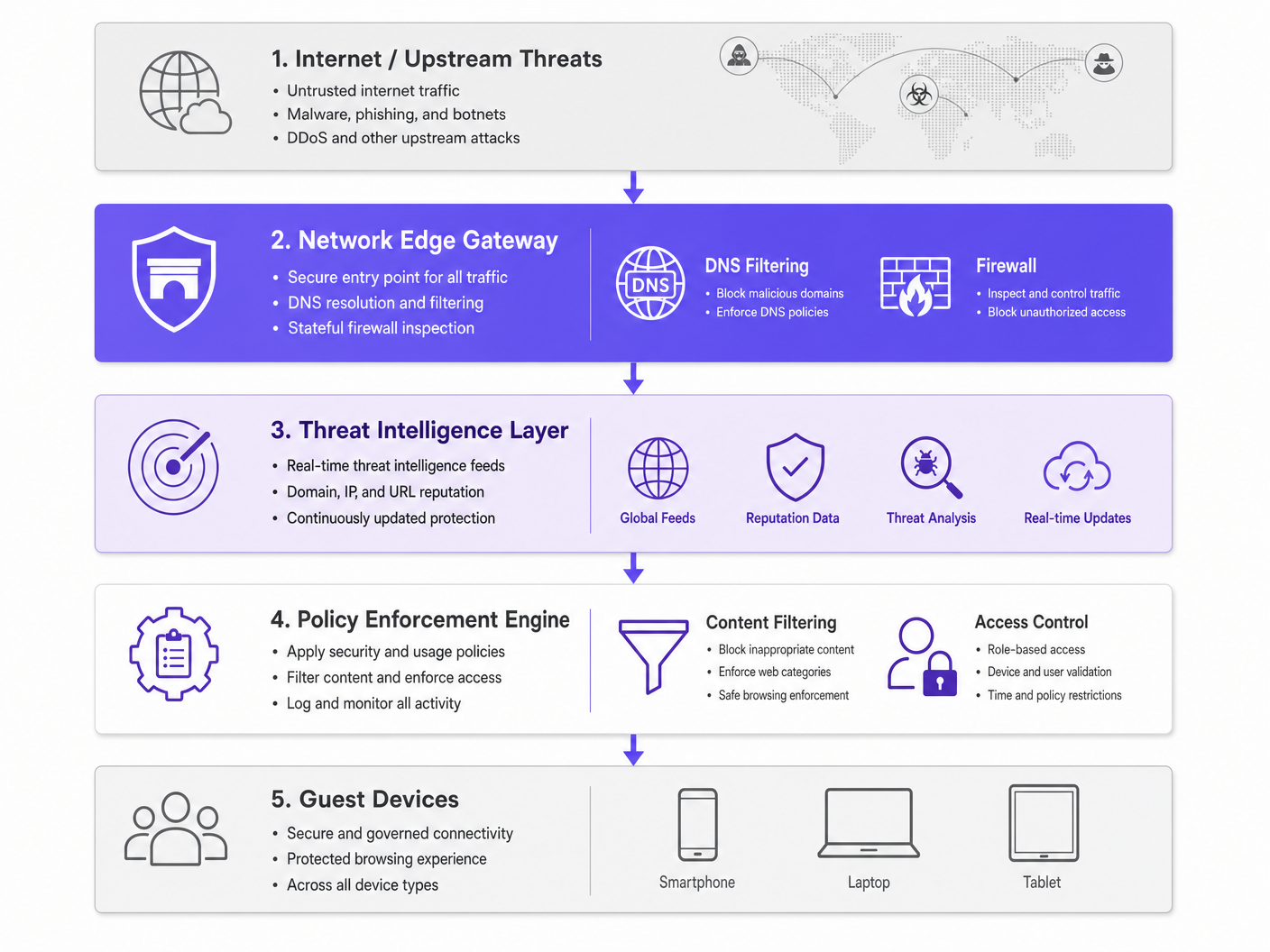
Se il dominio è associato alla distribuzione di malware, a campagne di phishing o all'infrastruttura di comando e controllo (C2) di botnet, la richiesta DNS viene dirottata. La connessione viene interrotta prima che il payload dannoso possa essere scaricato. Questo blocco proattivo previene il movimento laterale e protegge la reputazione IP della sede.
Componenti Chiave
- Motore di Filtro DNS: Ispeziona tutte le richieste DNS in uscita. È fondamentale configurare questo motore per bloccare i resolver DoH (DNS over HTTPS) pubblici noti, al fine di impedire agli utenti di aggirare il DNS sicuro della sede.
- Integrazione della Threat Intelligence: Si abbona a feed globali che classificano i domini in tempo reale in base alla reputazione, allo stato di dominio appena registrato e all'attività dannosa nota.
- Applicazione delle Policy: Applica regole granulari basate sui ruoli utente (es. personale vs. ospite) e sulle categorie di contenuto, garantendo la Conformità IWF per le Reti WiFi Pubbliche nel Regno Unito .
Guida all'Implementazione
L'implementazione della protezione al perimetro della rete richiede un approccio graduale per minimizzare le interruzioni e massimizzare la copertura di sicurezza.
Fase 1: Segmentazione della Rete
Assicurarsi che la rete sia correttamente segmentata utilizzando le VLAN. Il traffico degli ospiti, il personale aziendale, i dispositivi IoT e i sistemi POS devono risiedere su segmenti isolati. Ciò limita il raggio d'azione in caso di compromissione di un dispositivo prima che si unisca alla rete.
Fase 2: Configurazione del Gateway
Configurare i router o i firewall di perimetro per inoltrare tutto il traffico DNS al servizio di filtro DNS sicuro. Implementare regole firewall per bloccare il traffico in uscita sulla porta 53 (DNS) e sulla porta 853 (DoT) verso qualsiasi destinazione diversa dai resolver sicuri approvati. Per maggiori informazioni sull'ottimizzazione delle reti moderne, consultare Wi-Fi per Uffici: Ottimizzare la Rete Wi-Fi del Tuo Ufficio Moderno .
Fase 3: Definizione delle Policy
Stabilire policy di base. Bloccare globalmente le categorie dannose note. Per il filtro dei contenuti, applicare policy specifiche in base al tipo di sede, ad esempio, un filtro più rigoroso negli ambienti Sanitari rispetto al commercio al dettaglio generale.
Best Practice
- Applicazione Granulare delle Policy: Evitare blocchi generalizzati che generano ticket per l'helpdesk. Utilizzare il controllo degli accessi basato sui ruoli (RBAC) integrato con il proprio provider di identità (es. licenza Connect di Purple).
- Registrazione Completa: Mantenere un registro di audit completo delle query DNS e delle minacce bloccate. Questo è essenziale per la risposta agli incidenti e la rendicontazione della conformità. Vedere Spiegare cos'è un audit trail per la sicurezza IT nel 2026 per i requisiti dettagliati.
- Monitoraggio Continuo: Sfruttare WiFi Analytics per monitorare le prestazioni della rete e gli eventi di sicurezza in tempo reale.
Risoluzione dei Problemi e Mitigazione del Rischio
Gestione del DNS Crittografato
I moderni sistemi operativi utilizzano sempre più DoH e DoT, che crittografano le query DNS e possono aggirare il filtro di perimetro tradizionale. Per mitigare ciò, mantenere una blocklist aggiornata di resolver DoH pubblici noti (es. 8.8.8.8, 1.1.1.1) per costringere i dispositivi a ripiegare sul DNS sicuro fornito dalla sede tramite la porta standard 53.
Blocco Eccessivo del Traffico Legittimo
Feed di threat intelligence aggressivi possono occasionalmente segnalare domini legittimi, specialmente quelli appena registrati utilizzati per campagne di marketing. Stabilire un processo rapido di allowlisting e autorizzare il team operativo IT a risolvere rapidamente i falsi positivi.
ROI e Impatto Aziendale
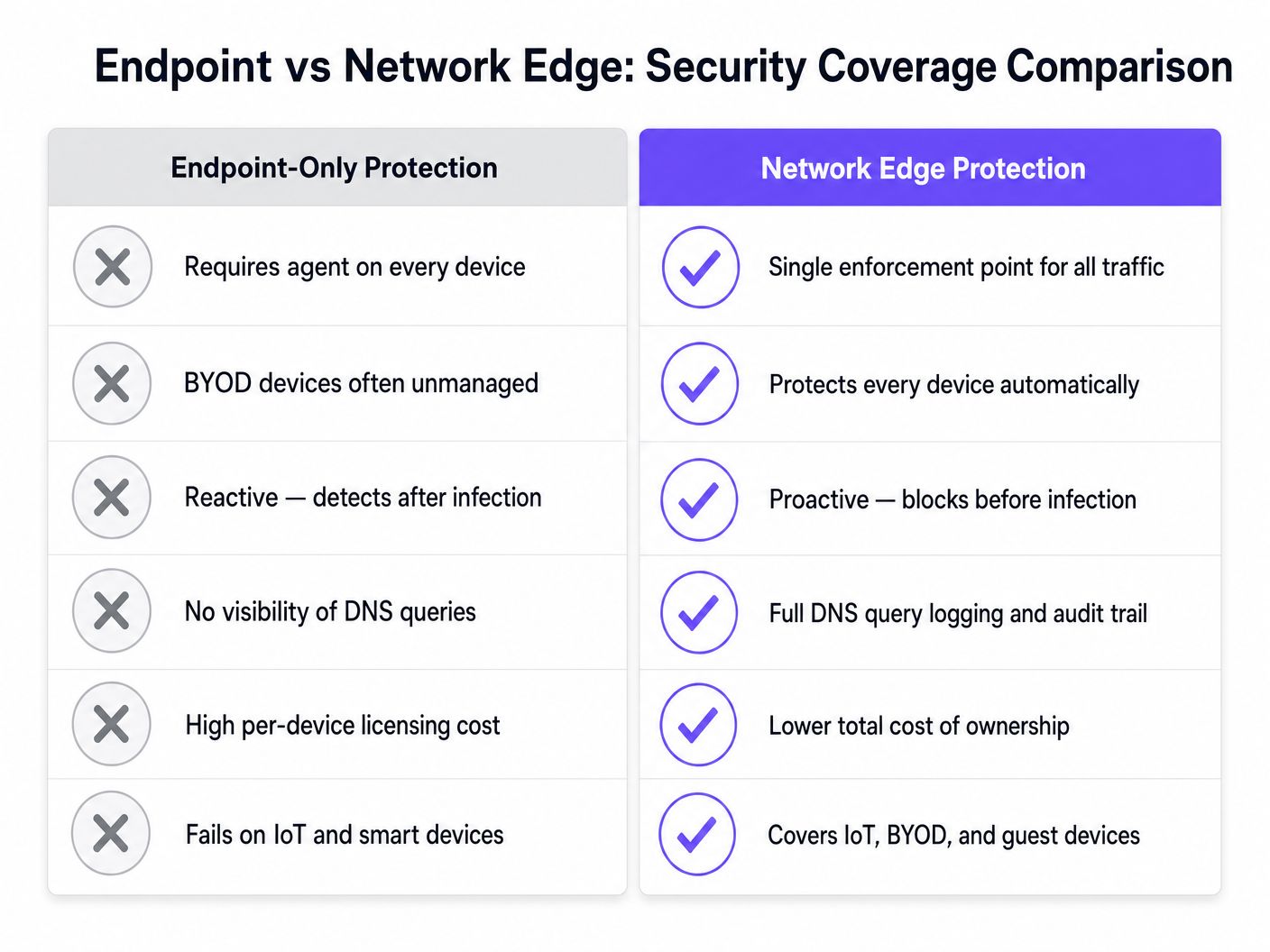
Il business case per la protezione dal malware al perimetro della rete si basa sulla mitigazione del rischio e sull'efficienza operativa. Bloccando le minacce al gateway, le sedi eliminano i costi di licenza per dispositivo associati alla sicurezza degli endpoint per i dispositivi BYOD e degli ospiti. Inoltre, riduce drasticamente le ore di helpdesk IT dedicate all'indagine su dispositivi compromessi o alla gestione di indirizzi IP blacklistati. La connettività sicura e affidabile che ne deriva migliora l'esperienza degli ospiti e protegge la reputazione del marchio della sede.
Definizioni chiave
Network Edge
The boundary where a local network connects to the internet, typically managed by a router, firewall, or gateway.
This is the optimal location to deploy security controls for unmanaged devices, as all traffic must pass through it.
DNS Filtering
The process of blocking access to certain websites or IP addresses by intercepting DNS queries and evaluating them against a policy or threat feed.
Used to proactively stop devices from connecting to malicious domains before any data is transferred.
Sinkholing
Redirecting malicious traffic to a safe, controlled IP address instead of its intended destination.
When a guest device tries to reach a malware server, the edge gateway sinkholes the request, preventing infection.
Threat Intelligence Feed
A continuously updated stream of data regarding potential or current cyber threats, including known malicious domains and IP addresses.
Edge gateways use these feeds to make real-time decisions on whether to allow or block traffic.
DoH (DNS over HTTPS)
A protocol for performing remote Domain Name System resolution via the HTTPS protocol, encrypting the data.
While good for privacy, DoH can bypass corporate edge filtering unless known DoH resolvers are explicitly blocked.
VLAN Segmentation
Dividing a single physical network into multiple logical networks to isolate traffic.
Essential for separating untrusted guest traffic from sensitive corporate or POS systems.
BYOD (Bring Your Own Device)
The practice of allowing employees or guests to use their personal devices on the organisation's network.
BYOD devices are typically unmanaged, making endpoint security impossible and necessitating network edge protection.
Audit Trail
A chronological record of system activities, including DNS queries and blocked connections.
Required for compliance with frameworks like PCI DSS and GDPR to prove security controls are active.
Esempi pratici
A 500-room hotel needs to secure guest WiFi while ensuring IoT devices (smart TVs, room controls) are protected from external command-and-control servers.
Deploy a network edge gateway with DNS filtering. Segment the network into Guest, IoT, and Corporate VLANs. Configure the gateway to intercept all DNS queries from the IoT and Guest VLANs, forwarding them to the secure DNS service. Apply a strict policy for the IoT VLAN that only allows resolution of known, required domains (allowlisting), while applying a standard threat-blocking policy for the Guest VLAN.
A large retail chain experiences frequent IP blacklisting due to guest devices sending spam while connected to the in-store WiFi.
Implement network edge malware protection with active threat intelligence feeds. Configure the firewall to block outbound SMTP (port 25) for all guest traffic. Enable DNS filtering to sinkhole requests to known botnet and spam-distribution domains.
Domande di esercitazione
Q1. A stadium network administrator notices that while DNS filtering is enabled, some guest devices are still reaching known malicious domains. What is the most likely cause and how should it be addressed?
Suggerimento: Consider modern protocols that might bypass standard port 53 filtering.
Visualizza risposta modello
The devices are likely using encrypted DNS protocols like DNS over HTTPS (DoH) or DNS over TLS (DoT), which bypass standard port 53 filtering. The administrator should update firewall rules to block known public DoH/DoT resolvers and block outbound traffic on port 853, forcing devices to fall back to the venue's secure DNS.
Q2. When deploying network edge protection in a hospital environment, how should the policies differ between the guest WiFi and the medical IoT device VLAN?
Suggerimento: Think about the concept of least privilege and predictable behavior.
Visualizza risposta modello
The guest WiFi should use a standard threat-blocking policy (blocking malware, phishing, and inappropriate content per IWF guidelines) but generally allow internet access. The medical IoT VLAN should use a strict 'default deny' policy with an allowlist, permitting communication only with specific, required vendor servers. IoT devices have predictable traffic patterns, making allowlisting highly effective.
Q3. A retail client wants to implement edge filtering but is concerned about blocking legitimate marketing campaign domains that are newly registered. What process should be implemented?
Suggerimento: Focus on operational workflows and balancing security with business needs.
Visualizza risposta modello
Implement a rapid allowlisting workflow. While 'Newly Registered Domains' is a common threat category, the IT team should have a process to quickly verify and allowlist domains provided by the marketing team before campaigns launch, ensuring security does not impede business operations.