
Come Creare una Pagina Splash WiFi: Design, Contenuto e Best Practice
Questa guida completa esplora l'architettura, i principi di design e le strategie di implementazione necessarie per costruire una pagina splash WiFi efficace. Fornisce approfondimenti pratici per i responsabili IT sull'integrazione dei captive portal con l'infrastruttura di rete, garantendo la conformità al GDPR e massimizzando l'acquisizione di dati di prima parte.
Ascolta questa guida
Visualizza trascrizione del podcast
Sintesi Esecutiva
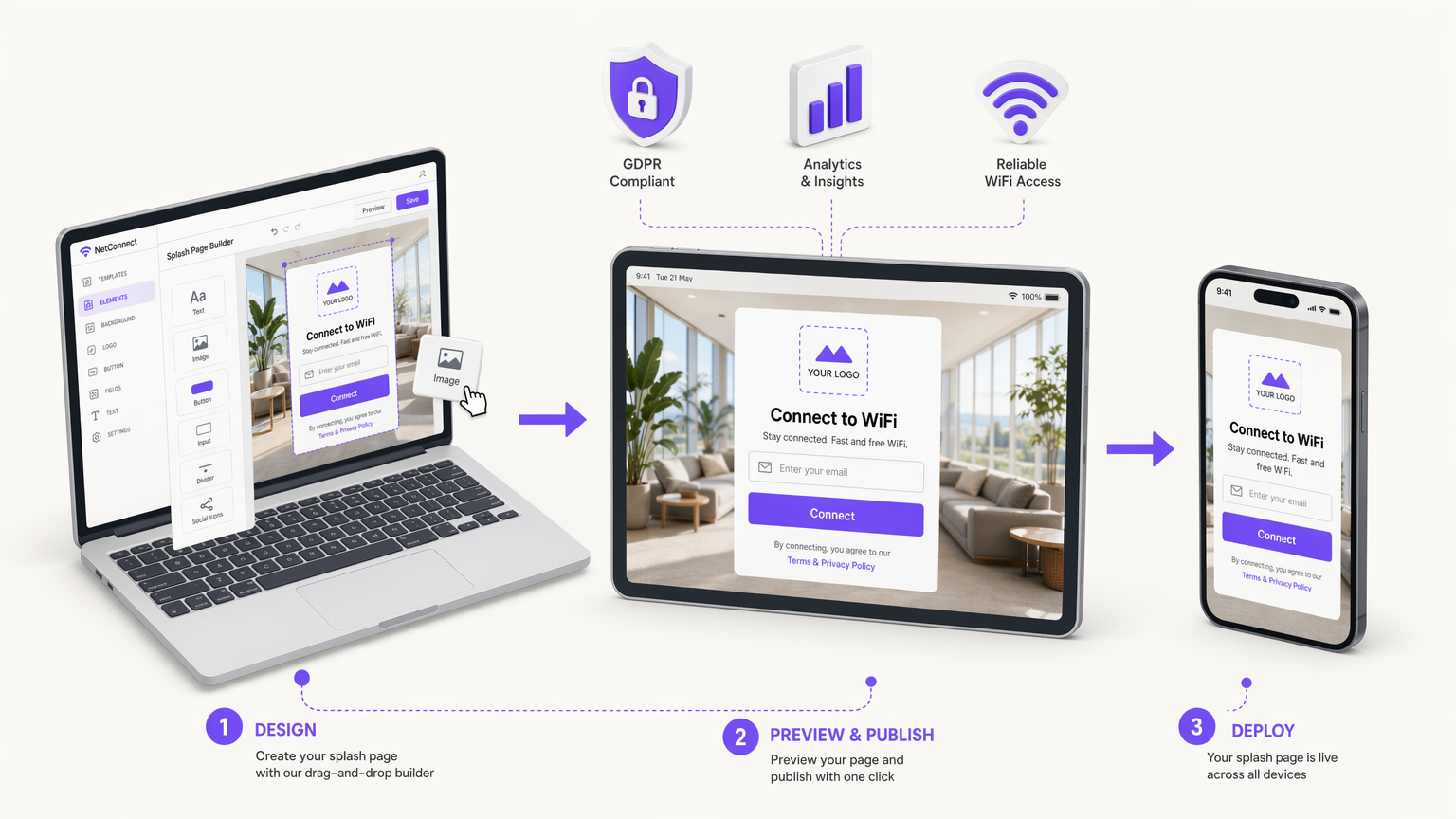
Per i team IT aziendali e i direttori delle operazioni delle sedi, l'implementazione del Guest WiFi non riguarda più solo la fornitura di accesso a internet, ma la creazione di un punto di contatto digitale sicuro, conforme e commercialmente prezioso. La pagina splash WiFi, servita tramite un captive portal, è l'interfaccia critica in cui avviene questo scambio. Una pagina splash ben architettata trasforma il traffico di rete anonimo in dati di prima parte verificati, consentendo un coinvolgimento mirato e analisi operative.
Questa guida di riferimento tecnico descrive come creare una pagina splash WiFi che bilanci l'esperienza utente con rigorosi requisiti di sicurezza e conformità. Esploreremo l'architettura sottostante del captive portal, valutando i meriti delle implementazioni cloud-hosted rispetto a quelle on-premise. Definiremo anche i componenti di design essenziali necessari per minimizzare l'attrito nell'autenticazione, in particolare sui dispositivi mobili, che rappresentano la stragrande maggioranza delle connessioni degli ospiti.
Inoltre, questa guida affronta il mandato critico della conformità al GDPR, delineando come implementare meccanismi di consenso esplicito che resistano al controllo normativo. Integrando questi principi tecnici e di design, le organizzazioni nei settori Retail , Sanità , Ospitalità e Trasporti possono implementare robuste soluzioni Guest WiFi che offrono un ROI misurabile mitigando al contempo i rischi per la privacy dei dati.
Approfondimento Tecnico: Architettura del Captive Portal
Comprendere come creare una pagina splash WiFi richiede una solida conoscenza dell'architettura sottostante del captive portal. Un captive portal è un meccanismo di controllo dell'accesso alla rete che intercetta il traffico HTTP/HTTPS da client non autenticati e li reindirizza a una pagina web specifica—la pagina splash—prima di concedere l'accesso a internet più ampio.
Meccanismi di Reindirizzamento
Il processo di intercettazione e reindirizzamento si basa tipicamente su uno dei due metodi principali a livello di gateway o di controller LAN wireless (WLC):
- Reindirizzamento DNS: Quando un client non autenticato tenta di risolvere un nome di dominio, il gateway intercetta la richiesta DNS e restituisce l'indirizzo IP del server del captive portal invece della destinazione effettiva.
- Reindirizzamenti HTTP 302: Il gateway intercetta le richieste HTTP GET da client non autenticati e risponde con un codice di stato HTTP 302 Found, indirizzando il browser del client all'URL del captive portal.
Contemporaneamente, l'infrastruttura di rete impiega "walled garden" o liste di controllo degli accessi (ACL) di pre-autenticazione. Queste regole del firewall bloccano tutto il traffico in uscita ad eccezione dei servizi essenziali (come DHCP e DNS) e del traffico destinato al server del captive portal e a qualsiasi provider di identità di autenticazione richiesto (ad esempio, i server OAuth di Google o Facebook).
Modelli di Implementazione: Cloud vs. On-Premise
Quando si progetta una soluzione di pagina splash, i responsabili IT devono scegliere tra due modelli di implementazione principali. Per un confronto dettagliato, fare riferimento alla nostra guida su Captive Portal Basato su Cloud vs. On-Premise: Qual è Quello Giusto per la Tua Attività? .
- Captive Portal Cloud-Hosted: La pagina splash e il backend di autenticazione sono ospitati sull'infrastruttura di un fornitore (come la piattaforma di Purple). Il WLC o gateway locale è configurato per reindirizzare i client a questo URL esterno tramite RADIUS (Remote Authentication Dial-In User Service). Questo modello è altamente scalabile, offre una gestione centralizzata su più siti e garantisce alta disponibilità senza fare affidamento sull'hardware del server locale.
- Captive Portal On-Premise: Il software del portale viene eseguito su hardware locale o direttamente sul WLC. Sebbene ciò offra un controllo locale completo e possa funzionare anche se il collegamento WAN è interrotto (anche se l'accesso a internet rimarrebbe comunque non disponibile), richiede un significativo overhead di manutenzione e manca delle capacità di analisi cross-site inerenti alle soluzioni cloud.
Per la maggior parte delle moderne implementazioni aziendali, si raccomanda un'architettura cloud-hosted per facilitare l'acquisizione centralizzata dei dati e l'integrazione senza soluzione di continuità con le piattaforme di WiFi Analytics .
Guida all'Implementazione: Progettare la Pagina Splash
Il design della pagina splash influisce direttamente sui tassi di connessione e sulla qualità dei dati. Una pagina mal progettata introduce attrito, portando a tassi di abbandono elevati. Quando si considera come creare una pagina splash, attenersi ai seguenti principi.
Design Mobile-First e il Captive Network Assistant (CNA)
Oltre il 70% delle connessioni Guest WiFi provengono da smartphone. Pertanto, la pagina splash deve essere rigorosamente ottimizzata per i viewport mobili (a partire da 320px di larghezza). Tuttavia, i dispositivi mobili raramente utilizzano browser standard per l'autenticazione del captive portal.
Invece, i sistemi operativi impiegano pseudo-browser, come il Captive Network Assistant (CNA) di Apple o il Captive Portal Login di Android. Questi ambienti hanno capacità limitate: spesso mancano di supporto per i cookie persistenti, hanno un'esecuzione JavaScript limitata e non supportano schede multiple. Di conseguenza, il flusso di autenticazione deve essere renderizzato lato server e minimizzare la dipendenza da scripting client-side complesso.
Componenti UI Essenziali
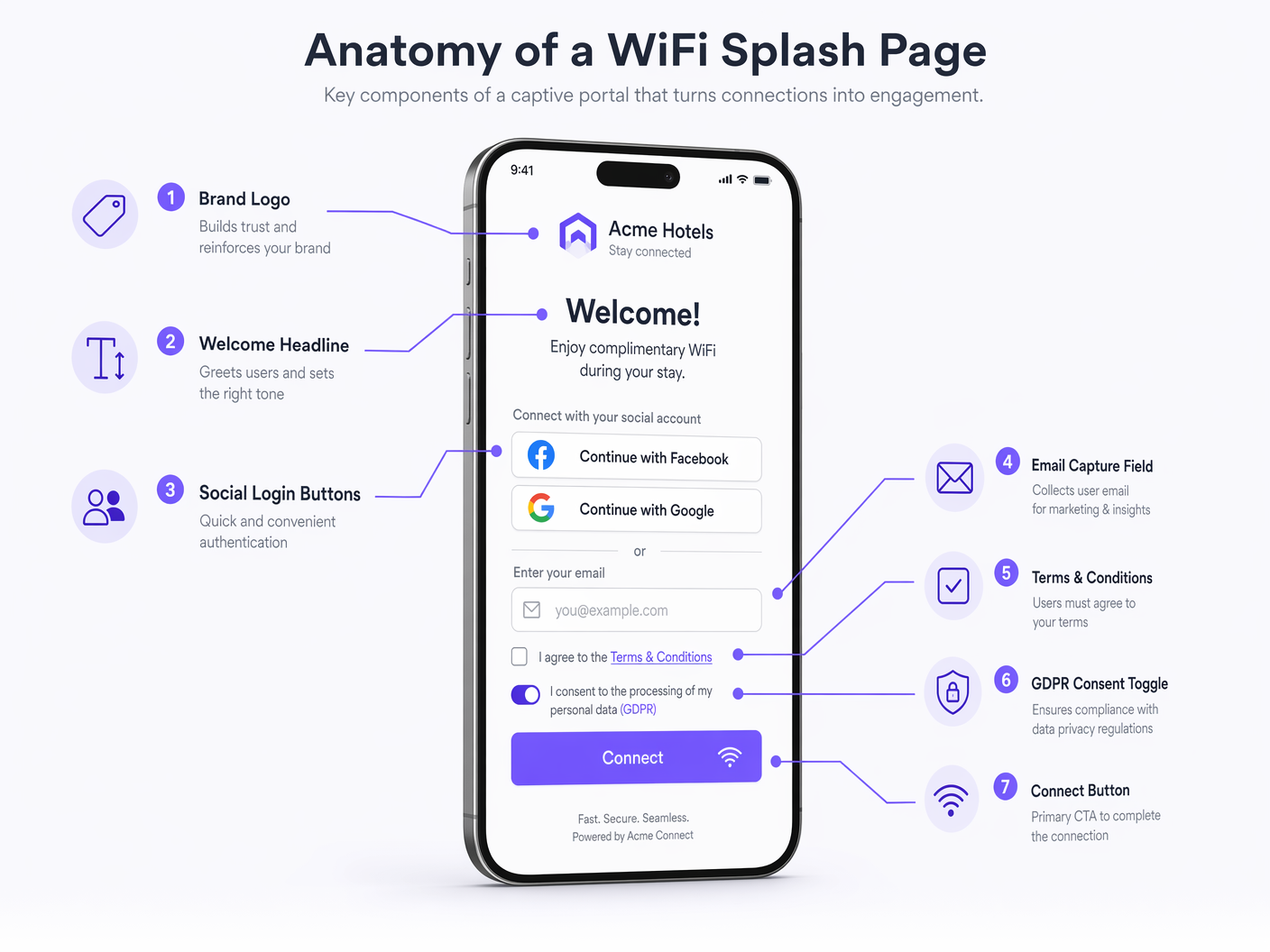
Una pagina splash ad alta conversione dovrebbe includere i seguenti elementi:
- Brand Identity: Visualizzazione prominente del logo aziendale e aderenza a palette di colori del marchio. Ciò stabilisce fiducia e verifica la legittimità della rete.
- Proposta di Valore Chiara: Un titolo conciso (ad es. "Connettiti al WiFi Gratuito ad Alta Velocità").
- Metodi di Autenticazione: Offrire un equilibrio tra raccolta dati e comodità per l'utente.
- Acquisizione Email: Lo standard per la creazione di un database di marketing.
- Social OAuth (Google, Facebook): Riduce l'attrito e fornisce dati demografici verificati, ma richiede la configurazione di voci walled garden per i rispettivi fornitori di identità.
- Click-Through: Attrito minimo ma produce zero dati; generalmente sconsigliato per implementazioni commerciali.
- Call-to-Action (CTA) Evidente: Il pulsante "Connetti" deve essere ben visibile e accessibile senza scorrere (above the fold) sui dispositivi mobili.
- Reindirizzamento Post-Autenticazione: Dopo un'autenticazione riuscita, reindirizzare l'utente a una landing page di alto valore, come un'offerta promozionale, un link per il download di un'app o una mappa del luogo, anziché lasciarlo su una schermata di successo generica.
Best Practice: Conformità e Sicurezza dei Dati
Quando si decide come configurare una splash page WiFi, la conformità legale e la sicurezza dei dati sono fondamentali. La splash page è l'interfaccia principale per ottenere il consenso dell'utente nell'ambito di normative come il General Data Protection Regulation (GDPR) e il California Consumer Privacy Act (CCPA).
Meccanismi di Consenso Conformi al GDPR
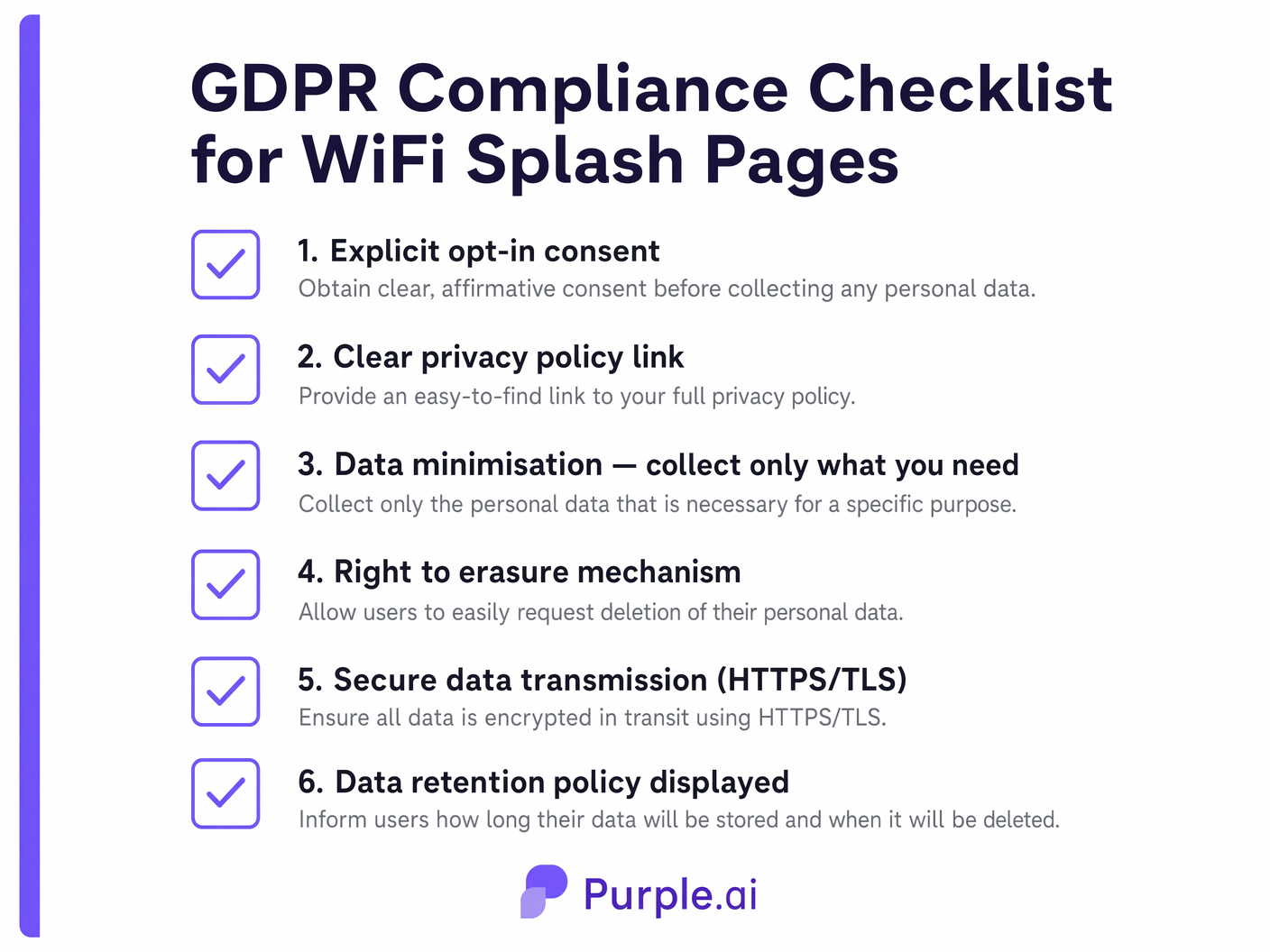
Secondo il GDPR, il consenso al trattamento dei dati personali (specialmente per scopi di marketing) deve essere liberamente dato, specifico, informato e inequivocabile.
- Opt-In Granulari: Non è possibile raggruppare l'accettazione dei Termini di Servizio (necessaria per l'accesso alla rete) con il consenso per le comunicazioni di marketing. Questi devono essere checkbox separati.
- Nessuna Casella Pre-Selezionata: Le caselle di spunta per l'opt-in marketing devono essere deselezionate per impostazione predefinita. L'utente deve compiere un'azione affermativa per dare il consenso.
- Informativa sulla Privacy Chiara: Deve essere fornito un link diretto e accessibile all'informativa sulla privacy dell'organizzazione, che dettagli quali dati vengono raccolti, come vengono utilizzati e per quanto tempo vengono conservati.
- Tracce di Audit: Il backend del Captive Portal deve registrare il timestamp, l'indirizzo IP e la versione esatta dei termini accettati dall'utente per fornire una traccia di audit verificabile del consenso.
Standard di Sicurezza
- Crittografia HTTPS/TLS: La splash page deve essere servita tramite HTTPS. I moderni CNA dei sistemi operativi spesso bloccano o mostrano avvisi gravi per i Captive Portal HTTP. Assicurarsi che un certificato TLS valido e affidabile sia installato sul server del portale.
- Minimizzazione dei Dati: Raccogliere solo i dati strettamente necessari per lo scopo dichiarato. Se è necessaria solo un'email per una newsletter, non imporre la raccolta di un numero di telefono o di un indirizzo fisico.
Risoluzione dei Problemi e Mitigazione del Rischio
Anche le splash page ben progettate possono incontrare problemi di implementazione. I team IT dovrebbero mitigare proattivamente le seguenti modalità di errore comuni:
- Errori di Certificato: Se il gateway intercetta il traffico e reindirizza al portale utilizzando un certificato auto-firmato o non valido, il browser dell'utente presenterà un avviso di sicurezza, bloccando di fatto il processo di connessione. Utilizzare sempre certificati di Autorità di Certificazione (CA) affidabili.
- Errata Configurazione del Walled Garden: Se gli ACL non consentono l'accesso a risorse esterne necessarie (ad es. file CSS ospitati su un CDN o server di autenticazione OAuth), la splash page verrà visualizzata in modo errato o l'autenticazione fallirà. Verificare regolarmente le configurazioni del walled garden.
- Errori Silenziosi del CNA: Poiché i CNA hanno funzionalità limitate, le pagine complesse e ricche di JavaScript potrebbero semplicemente non caricarsi o non elaborare i moduli senza fornire un messaggio di errore all'utente. Mantenere l'HTML/CSS leggero e affidarsi all'elaborazione lato server.
ROI e Impatto sul Business
L'implementazione di una splash page WiFi strategica trasforma il WiFi per gli ospiti da centro di costo a risorsa generatrice di entrate. Acquisendo dati utente verificati, le organizzazioni possono alimentare i sistemi CRM e le piattaforme di automazione del marketing.
Ad esempio, una catena di negozi può analizzare i dati di connessione per misurare il tempo di permanenza e la frequenza delle visite di ritorno, correlando queste metriche con campagne email mirate avviate tramite la splash page. Allo stesso modo, le strutture ricettive possono utilizzare il reindirizzamento post-autenticazione per generare entrate accessorie immediate tramite prenotazioni di ristoranti o spa. L'integrazione del Captive Portal con un'analisi WiFi completa WiFi Analytics fornisce l'intelligenza azionabile necessaria per giustificare l'investimento nell'infrastruttura e ottimizzare continuamente l'esperienza degli ospiti.
Definizioni chiave
Captive Portal
A web page that a user of a public access network is obliged to view and interact with before access is granted.
The fundamental mechanism that intercepts network traffic and serves the splash page.
Splash Page
The specific user interface presented by the captive portal, used for authentication, branding, and data capture.
The digital storefront of the guest WiFi experience; the primary touchpoint for marketing and compliance.
Walled Garden
A restricted environment that controls the user's access to web content and services prior to full network authentication.
Essential for allowing the splash page to load external assets (like logos or CSS) and facilitating social OAuth logins before the user has full internet access.
Captive Network Assistant (CNA)
A limited pseudo-browser built into mobile operating systems (like iOS and Android) that automatically detects captive portals and displays the splash page.
IT teams must design splash pages specifically to function within the restricted capabilities of CNAs to ensure a smooth mobile connection experience.
HTTP 302 Redirect
An HTTP response status code indicating that the requested resource has been temporarily moved to a different URI.
One of the primary technical methods used by network gateways to intercept unauthenticated traffic and route it to the captive portal server.
RADIUS (Remote Authentication Dial-In User Service)
A networking protocol that provides centralized Authentication, Authorization, and Accounting (AAA) management for users who connect and use a network service.
Used to communicate between the local wireless controller and the cloud-hosted captive portal backend to verify user credentials and authorize network access.
MAC Authentication Bypass (MAB)
A mechanism that uses the MAC address of a device as its identity for network access control.
Often used in conjunction with captive portals to allow returning devices to bypass the splash page and connect automatically based on their previously registered MAC address.
First-Party Data
Information a company collects directly from its customers and owns entirely.
The primary business driver for deploying a splash page; capturing verified emails and demographics directly from guests rather than relying on third-party aggregators.
Esempi pratici
A 200-room boutique hotel needs to implement a new guest WiFi solution. The marketing director wants to capture email addresses for a loyalty program, but the IT manager is concerned about GDPR compliance and the impact on the connection experience for international guests using various mobile devices.
The hotel should deploy a cloud-hosted captive portal integrated with their existing WLC. The splash page design must be mobile-first, utilizing server-side rendering to ensure compatibility with all iOS and Android CNAs. For authentication, the page will present a simple form requesting Name and Email Address. Crucially, the form will include two separate, unticked checkboxes: one for accepting the Terms of Service (mandatory for access) and one for opting into the marketing loyalty program (optional). The portal backend will log the timestamp and consent status for audit purposes. Upon connection, users will be redirected to a dynamic landing page offering a discount on room service.
A large stadium with a capacity of 50,000 is upgrading its WiFi infrastructure. They want to use the splash page to encourage fans to download the official team app, but they anticipate massive concurrent connection attempts during the 15-minute half-time interval.
The stadium must prioritize low-friction authentication and high-performance infrastructure. The splash page should offer a 'One-Click Connect' option or social login (e.g., Google/Facebook) to minimize the time spent on the portal. The walled garden must be meticulously configured to allow access to the App Store and Google Play Store prior to full authentication. The splash page itself should be extremely lightweight (minimal high-resolution images, no heavy scripts) to ensure rapid loading even under heavy load. The primary CTA on the splash page, or the immediate post-authentication redirect, should be a direct link to download the team app.
Domande di esercitazione
Q1. A retail client reports that users are seeing a blank screen when attempting to log in via Facebook on their new splash page. Users connecting via standard email capture are unaffected. What is the most likely architectural cause of this issue?
Suggerimento: Consider what network access is required before the user is fully authenticated.
Visualizza risposta modello
The most likely cause is a misconfigured walled garden (pre-authentication ACL). The gateway is blocking access to Facebook's OAuth servers prior to full authentication. The IT team must update the walled garden to whitelist the specific IP ranges or domains required by the Facebook authentication API.
Q2. Your marketing team has requested that the WiFi splash page include a mandatory field for 'Mobile Phone Number' alongside 'Email Address' to support an upcoming SMS campaign. How should you advise them regarding GDPR compliance and user experience?
Suggerimento: Apply the principle of data minimization and consider the impact of friction on conversion rates.
Visualizza risposta modello
You should advise against making the phone number mandatory. Under GDPR's principle of data minimization, you should only collect data strictly necessary for the service. While an email may be justified for account creation, a phone number is excessive for basic WiFi access. Furthermore, adding mandatory, high-friction fields significantly increases splash page abandonment rates. Recommend keeping the phone number field optional or removing it entirely to prioritize connection rates.
Q3. An enterprise customer wants to deploy a splash page across 50 regional offices. They currently have local Windows Server infrastructure at each site. Should they deploy an on-premise portal on their local servers or utilize a cloud-hosted solution? Justify the architectural decision.
Suggerimento: Consider scalability, centralized management, and analytics requirements for multi-site deployments.
Visualizza risposta modello
They should utilize a cloud-hosted solution. While they have local infrastructure, deploying and maintaining portal software across 50 separate servers introduces significant management overhead and inconsistency risks. A cloud-hosted portal provides centralized configuration, unified analytics across all regions, and simplifies updates. It allows the IT team to manage the global WiFi experience from a single dashboard, rather than troubleshooting 50 isolated instances.
Continua a leggere questa serie
Captive Portal vs Splash Page
Questa guida autorevole analizza la distinzione fondamentale tra Captive Portal e splash page nelle reti WiFi per gli ospiti. Chiarisce come il meccanismo di intercettazione di rete sottostante funzioni in sinergia con l'interfaccia visiva per gli ospiti, aiutando i responsabili IT e i gestori delle strutture a prendere decisioni architetturali e di acquisto informate.
Login al Captive Portal: Risoluzione dei problemi e guida esplicativa
Questa guida fornisce un riferimento tecnico completo per comprendere, implementare e risolvere i problemi dei sistemi di login al captive portal in ambienti WiFi aziendali per ospiti. Spiega gli esatti meccanismi di reindirizzamento HTTP e di dirottamento DNS utilizzati dai moderni captive portal, descrive in dettaglio come l'HSTS e i browser HTTPS sicuri possano bloccare i reindirizzamenti locali e fornisce una checklist di risoluzione dei problemi chiara e pratica che copre sia le soluzioni lato client (disattivazione delle VPN, disattivazione della randomizzazione MAC, utilizzo di NeverSSL) sia le risoluzioni lato operatore (configurazione del walled garden, ottimizzazione del tempo di lease DHCP, verifica dell'intercettazione DNS). I gestori delle sedi, i responsabili IT e gli architetti di rete troveranno questa guida essenziale per ridurre al minimo i ticket di supporto degli ospiti e massimizzare il ROI della loro infrastruttura wireless.
Come configurare un hotspot WiFi per la tua attività
Questa guida autorevole fornisce a leader IT, architetti di rete e direttori delle operazioni di sede un modello pratico e indipendente dal fornitore per l'implementazione di hotspot WiFi per ospiti sicuri, conformi e che migliorano il business. Copre decisioni architetturali critiche — dalla segmentazione VLAN e configurazione del Captive Portal alla conformità GDPR e alla modellazione del traffico — e dimostra come trasformare l'infrastruttura di rete da un centro di costo a una piattaforma di analisi che genera entrate utilizzando le capacità di Guest WiFi e analisi di Purple.