
Come il filtro DNS riduce il consumo di larghezza di banda della rete
Questa guida descrive come l'implementazione del filtro DNS sulle reti WiFi aziendali blocchi il traffico pubblicitario, di tracciamento e di telemetria prima che consumi larghezza di banda. Per i responsabili IT e gli operatori di sedi, ciò si traduce in riduzioni immediate dei costi ISP, miglioramento delle prestazioni della rete e una postura di sicurezza rafforzata.
Ascolta questa guida
Visualizza trascrizione del podcast
Riepilogo Esecutivo
Per i responsabili IT aziendali e gli architetti di rete che supervisionano ambienti ad alta densità, come Ospitalità , Vendita al Dettaglio , Trasporti e grandi sedi, la gestione della larghezza di banda è una sfida operativa persistente. Nonostante i continui aggiornamenti delle connessioni ISP e della densità degli access point, una percentuale significativa della capacità disponibile è spesso consumata da traffico non avviato dall'utente. Reti pubblicitarie, beacon di telemetria, pixel di tracciamento e aggiornamenti del sistema operativo in background degradano silenziosamente le prestazioni della rete e gonfiano artificialmente i costi dell'infrastruttura.
Questa guida di riferimento tecnico descrive come l'implementazione del filtro DNS al bordo della rete affronti direttamente questa inefficienza. Intercettando e bloccando le richieste di risoluzione per domini pubblicitari, di tracciamento e dannosi noti, gli operatori di rete possono prevenire l'instaurazione di connessioni TCP non necessarie. Questo approccio riduce il consumo di larghezza di banda della rete fino al 35% in ambienti densi, migliorando l'esperienza dell'utente finale e mitigando i rischi per la sicurezza. Esploreremo l'architettura tecnica, i modelli di implementazione e il ROI misurabile del filtro DNS, fornendo indicazioni pratiche per i professionisti IT senior.
Approfondimento Tecnico
La Meccanica della Risoluzione DNS e lo Spreco di Larghezza di Banda
Il Domain Name System (DNS) opera come livello di routing fondamentale per tutto il traffico internet. Quando un dispositivo client si connette a una rete Guest WiFi , la prima azione che compie prima di stabilire qualsiasi connessione HTTP/HTTPS è una query DNS per risolvere un hostname in un indirizzo IP.
Nelle moderne applicazioni web e mobili, una singola azione dell'utente (ad esempio, il caricamento di un sito web di notizie o l'apertura di un'app di social media) innesca una cascata di query DNS secondarie e terziarie. Queste query sono dirette verso server pubblicitari, piattaforme di analisi e endpoint di telemetria.
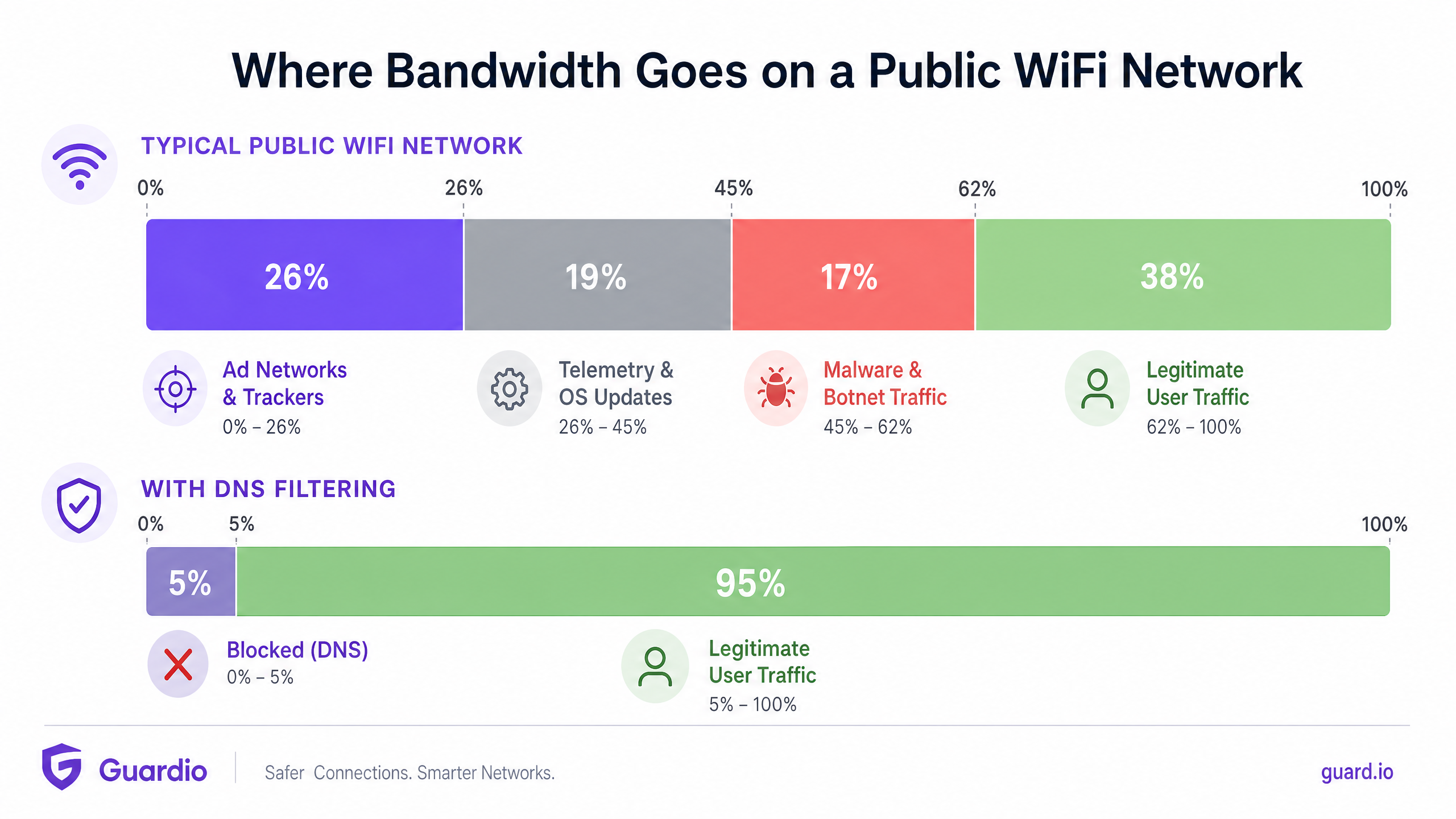
Quando queste query si risolvono con successo, il dispositivo stabilisce una connessione e scarica il payload—spesso file multimediali pesanti per annunci pubblicitari o flussi di dati continui per la telemetria. Questo traffico consuma preziosa larghezza di banda, tempo di trasmissione radio sull'Access Point (AP) e limiti di connessioni concorrenti sul router gateway.
Come il filtro DNS recupera la larghezza di banda
Il filtro DNS intercetta questo processo nella fase di risoluzione. Quando un dispositivo interroga un dominio, il risolutore DNS controlla l'hostname rispetto a una blocklist mantenuta (o feed di intelligence sulle minacce). Se il dominio è contrassegnato come rete pubblicitaria, tracker o entità dannosa nota, il risolutore restituisce una risposta nulla (ad esempio, 0.0.0.0 o NXDOMAIN) invece dell'indirizzo IP effettivo.
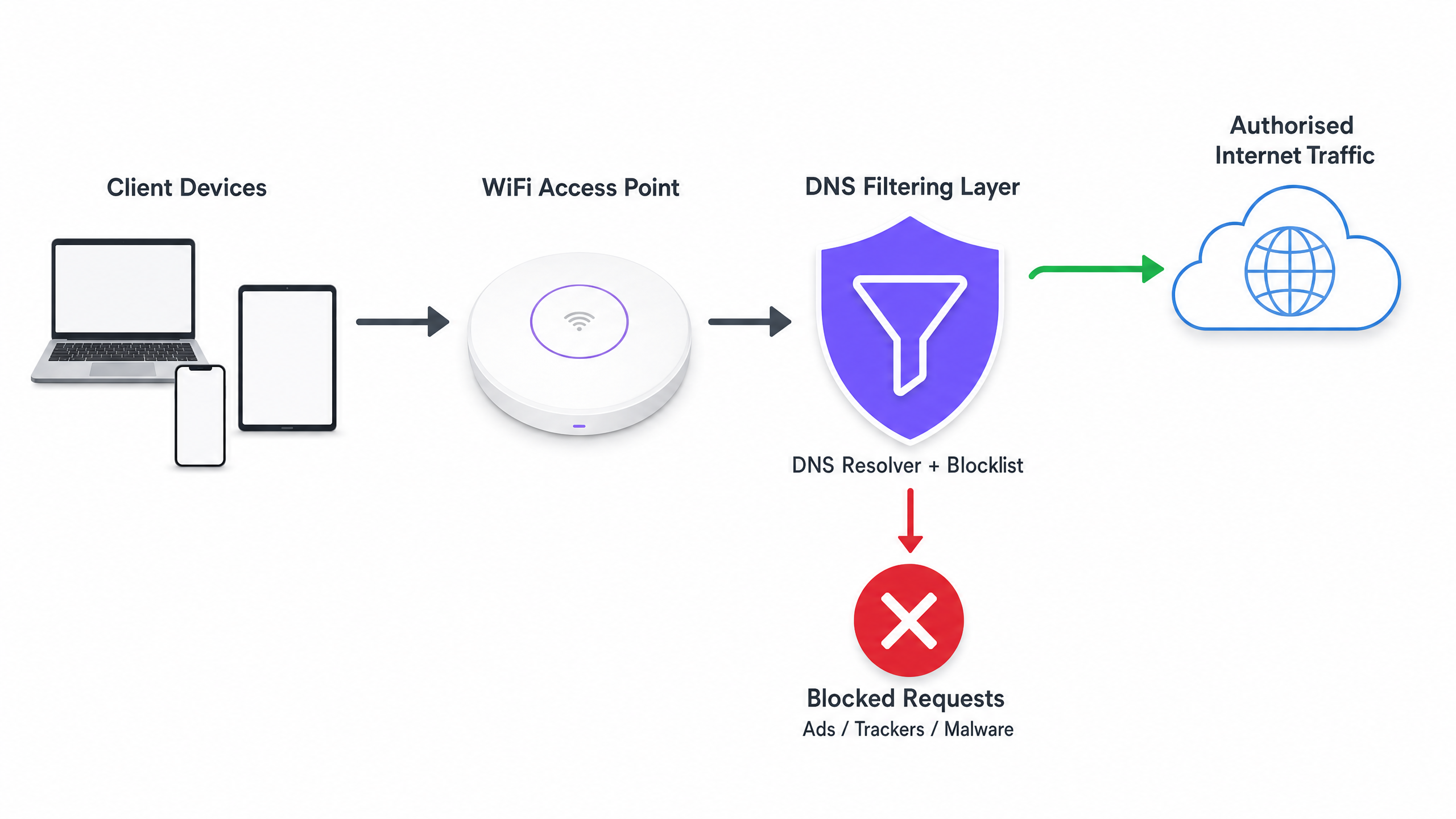
Il guadagno critico in termini di efficienza qui è che la transazione viene terminata prima che possa avvenire un handshake TCP. Non avviene alcuna negoziazione TLS e nessun payload viene scaricato. La larghezza di banda che sarebbe stata consumata dalla pubblicità o dallo script di tracciamento è interamente preservata.
Architetture di Implementazione
Esistono tre modelli architettonici principali per l'implementazione del filtro DNS in un ambiente aziendale:
- Risolutori Basati su Cloud: Il server DHCP locale è configurato per assegnare gli indirizzi IP di un servizio di filtro DNS basato su cloud (ad esempio, Cisco Umbrella, Cloudflare Gateway) ai dispositivi client. Questa è l'implementazione a minore attrito, che non richiede modifiche hardware on-premise. Tuttavia, dipende interamente dalla latenza del provider cloud.
- Appliance On-Premise: Un risolutore DNS dedicato (appliance fisica o virtuale) viene implementato all'interno dell'infrastruttura di rete locale. Ciò fornisce la latenza più bassa per la risoluzione DNS e garantisce che tutti i log delle query DNS rimangano in loco, il che può semplificare la conformità con le normative sulla sovranità dei dati.
- Piattaforme di Gestione WiFi Integrate: Il modello più efficiente per gli operatori multi-sede è l'integrazione del filtro DNS direttamente nel livello di gestione della rete o del captive portal. Le piattaforme che offrono WiFi Analytics complete spesso includono il filtro DNS basato su policy che può essere applicato per SSID, per sede o per gruppo di utenti.
Guida all'Implementazione
L'implementazione del filtro DNS richiede un approccio strutturato per evitare di interrompere il traffico utente legittimo o di compromettere servizi essenziali.
Fase 1: Stabilire una Baseline
Prima di implementare qualsiasi regola di blocco, configurare i risolutori DNS attuali per registrare tutte le query. Eseguire questa operazione in modalità di audit per almeno 14 giorni per acquisire un campione rappresentativo del traffico in tutte le sedi. Analizzare questi log per identificare i domini più interrogati e calcolare la percentuale di query dirette verso reti pubblicitarie e tracker noti. Questa baseline è essenziale per misurare il ROI dopo l'implementazione.
Fase 2: Definire le Policy di Filtro per Segmento di Rete
Una policy di filtro monolitica è raramente efficace in un ambiente aziendale. È necessario segmentare le policy in base allo scopo della rete:
- Guest WiFi: Implementare un blocco aggressivo di reti pubblicitarie, tracker, contenuti per adulti e domini malware noti per massimizzare il risparmio di larghezza di banda e proteggere la reputazione della sede.
- Reti Staff/Aziendali: Applicare un filtro moderato. Sebbene i domini malware e di phishing debbano essere bloccati, un blocco pubblicitario eccessivamente aggressivo potrebbe interferire con i team di marketing o specifiche applicazioni SaaS. Consultare Policy BYOD Sicure per Reti WiFi del Personale per indicazioni su come bilanciaresicurezza e accesso.
- Reti IoT/Operative: Implementare un rigoroso allow-listing (negazione predefinita). I dispositivi IoT (ad es. termostati intelligenti, terminali POS) dovrebbero essere in grado di risolvere solo i domini specifici necessari per il loro funzionamento.
Fase 3: Selezione e Test delle Blocklist
L'efficacia del tuo filtro DNS dipende interamente dalla qualità delle tue blocklist. Affidarsi a una singola fonte è rischioso. Combina i feed di intelligence sulle minacce commerciali con elenchi affidabili mantenuti dalla comunità (ad es. OISD).
Fondamentale è eseguire prima le blocklist selezionate in modalità 'dry-run' o di monitoraggio. Analizza i log per identificare eventuali falsi positivi, ovvero domini legittimi che verrebbero bloccati. Ad esempio, il blocco di un CDN importante potrebbe inavvertitamente compromettere il rendering di applicazioni aziendali critiche.
Fase 4: Gestire DNS over HTTPS (DoH)
I browser moderni (Chrome, Firefox, Edge) utilizzano sempre più spesso per impostazione predefinita DNS over HTTPS (DoH), che crittografa le query DNS e le invia direttamente ai resolver cloud (come Google o Cloudflare), bypassando i server DNS assegnati tramite DHCP della tua rete locale. Se DoH è attivo, il tuo filtro DNS viene bypassato.
Per mitigare ciò, devi configurare i tuoi firewall perimetrali per bloccare il traffico in uscita verso i provider DoH noti sulla porta 443, costringendo i browser a ripiegare sul resolver DNS locale non crittografato dove vengono applicate le tue policy di filtraggio.
Best Practice
- Automatizzare gli Aggiornamenti delle Blocklist: I panorami delle minacce e i domini di ad-serving cambiano quotidianamente. Assicurati che la tua soluzione di filtraggio DNS scarichi automaticamente gli aggiornamenti dai feed di threat intelligence scelti almeno ogni 24 ore.
- Implementare una Cache Locale: Per minimizzare la latenza, assicurati che il tuo resolver DNS locale memorizzi nella cache le query frequenti. Anche se utilizzi un servizio di filtraggio basato su cloud, un forwarder di caching locale riduce il tempo di round-trip per le richieste comuni.
- Mantenere una Allow-List Accessibile: I falsi positivi accadranno. Stabilisci un processo chiaro e rapido per i team di supporto IT per aggiungere domini specifici a una allow-list quando un servizio legittimo viene inavvertitamente bloccato.
- Garantire la Conformità: I log delle query DNS contengono informazioni sul comportamento di navigazione degli utenti, che potrebbero essere soggetti a normative come GDPR o CCPA. Assicurati che le tue pratiche di logging siano allineate con le politiche sulla privacy della tua organizzazione. Per maggiori informazioni sul mantenimento di registrazioni sicure, consulta Spiegazione di cos'è un audit trail per la sicurezza IT nel 2026 .
Risoluzione dei Problemi e Mitigazione del Rischio
Modalità di Guasto Comuni
- Interruzione del Captive Portal: Un filtraggio DNS aggressivo può talvolta bloccare i domini necessari per il rilevamento del Captive Portal del sistema operativo del dispositivo (ad es.
captive.apple.com). Assicurati che questi domini essenziali siano esplicitamente inclusi nella allow-list. - Malfunzionamento dell'Applicazione: Alcune applicazioni mobili non si caricheranno o si bloccheranno se i loro domini di telemetria o ad-serving sono irraggiungibili. Se un'app critica utilizzata dal tuo personale o dagli ospiti non funziona, esamina i log DNS per le query bloccate provenienti da quei dispositivi e regola di conseguenza la allow-list.
- Colli di Bottiglia delle Prestazioni: Se si implementa un'appliance on-premises, assicurarsi che sia adeguatamente dimensionata per gestire il picco di query-per-secondo (QPS) della rete. Un resolver DNS con risorse insufficienti introdurrà una latenza significativa, degradando l'esperienza utente molto più di quanto avrebbero fatto gli annunci.
ROI e Impatto sul Business
L'implementazione del filtraggio DNS offre ritorni misurabili in tre aree chiave:
- Riduzione dei Costi di Larghezza di Banda: Eliminando dal 15% al 35% del traffico non essenziale, le organizzazioni possono spesso ritardare costosi aggiornamenti dei circuiti ISP. In ambienti con connessioni a consumo o backhaul satellitare, i risparmi sui costi sono immediati e sostanziali.
- Miglioramento delle Prestazioni di Rete: Ridurre il volume di connessioni simultanee e il tempo di trasmissione radio consumato dal traffico in background migliora direttamente il throughput e la latenza per le attività legittime degli utenti. Ciò si traduce in meno ticket di helpdesk relativi a 'WiFi lento' e punteggi di soddisfazione utente più elevati.
- Miglioramento della Postura di Sicurezza: Il blocco dei domini di comando e controllo (C2) del malware e dei siti di phishing a livello DNS riduce significativamente il rischio di una violazione riuscita originata da un dispositivo compromesso sulla rete ospiti o del personale.
Con l'espansione delle iniziative del settore pubblico e delle smart city, come quelle promosse nel nostro recente annuncio, Purple nomina Iain Fox VP Growth – Settore Pubblico per promuovere l'inclusione digitale e l'innovazione delle smart city , l'utilizzo efficiente della larghezza di banda diventa fondamentale per fornire connettività equa e ad alte prestazioni su larga scala. Inoltre, funzionalità come Purple lancia la modalità Mappe Offline per una navigazione fluida e sicura verso gli hotspot WiFi dimostrano come l'ottimizzazione delle risorse di rete possa migliorare l'esperienza complessiva dell'utente.
Definizioni chiave
DNS Resolution
The process of translating a human-readable domain name (e.g., example.com) into a machine-readable IP address.
This is the prerequisite step for almost all network traffic; intercepting it here is the most efficient way to block unwanted connections.
DNS over HTTPS (DoH)
A protocol for performing remote DNS resolution via the HTTPS protocol, encrypting the query.
DoH prevents local network administrators from seeing or filtering DNS requests, requiring specific firewall rules to mitigate.
Telemetry Traffic
Automated communications sent by operating systems or applications to their vendors, reporting usage data, diagnostics, or status.
While individually small, the aggregate telemetry traffic from hundreds of devices on a public WiFi network consumes significant bandwidth.
NXDOMAIN
A DNS response indicating that the requested domain name does not exist.
DNS filters often return an NXDOMAIN response for blocked domains, immediately terminating the client's connection attempt.
Threat Intelligence Feed
A continuously updated stream of data providing information on known malicious domains, IPs, and URLs.
Used to dynamically update DNS blocklists to protect networks from newly identified malware and phishing infrastructure.
False Positive
In DNS filtering, when a legitimate, necessary domain is incorrectly categorized and blocked.
False positives cause application breakage and require a rapid allow-listing process to resolve user complaints.
Allow-List (Default Deny)
A security posture where all traffic is blocked by default, and only explicitly approved domains are permitted to resolve.
Best practice for highly secure or operational networks (like IoT or POS systems) where the required domains are known and finite.
Captive Portal Detection
The mechanism by which an OS determines if it is behind a captive portal, usually by attempting to reach a specific vendor domain.
If DNS filtering blocks these specific domains, devices will fail to display the WiFi login page, preventing users from connecting.
Esempi pratici
A 400-room hotel is experiencing severe network congestion during the evening peak (7 PM - 10 PM). The 1Gbps ISP connection is saturated, and guests are complaining about slow video streaming. Upgrading the circuit to 2Gbps will cost an additional £1,500 per month. How can the IT Director use DNS filtering to address this?
- Deploy a cloud-based DNS filtering solution and configure the core router's DHCP scope to assign the new resolvers to the Guest VLAN.
- Enable a comprehensive blocklist targeting ad networks, tracking pixels, and known bandwidth-heavy telemetry endpoints.
- Configure the edge firewall to block outbound DoH (DNS over HTTPS) traffic to ensure all guest devices use the filtered resolvers.
- Monitor the bandwidth utilization during the next evening peak.
A large retail chain offers free Guest WiFi across 50 locations. They have noticed a high volume of background traffic originating from Android devices, primarily Google Play Services telemetry, which is degrading the performance of the in-store point-of-sale (POS) tablets sharing the same WAN link.
- Implement policy-based DNS filtering via the central WiFi management platform.
- Create two distinct policies: one for the Guest SSID and one for the POS SSID.
- On the Guest SSID policy, apply standard ad and malware blocking, plus specific rules to rate-limit or block non-essential OS telemetry domains.
- On the POS SSID policy, implement a strict allow-list, only permitting DNS resolution for the payment gateway, inventory management system, and essential MDM (Mobile Device Management) endpoints.
Domande di esercitazione
Q1. You are deploying DNS filtering across a university campus network. During the pilot phase, students report that they cannot access the login page for the campus WiFi. What is the most likely cause, and how do you resolve it?
Suggerimento: Think about how operating systems determine if they need to display a login screen.
Visualizza risposta modello
The DNS filter is likely blocking the specific domains used by Apple, Android, and Windows for Captive Portal Detection (e.g., captive.apple.com, connectivitycheck.gstatic.com). The resolution is to immediately add these vendor-specific captive portal domains to the global allow-list.
Q2. A stadium IT director wants to implement DNS filtering to save bandwidth during game days. However, they are concerned about the latency introduced by routing all DNS queries to a cloud provider. What architectural approach should you recommend?
Suggerimento: Consider where the DNS resolution process physically takes place.
Visualizza risposta modello
Recommend deploying an On-Premises DNS Appliance or a local caching forwarder. This keeps the initial DNS resolution local to the stadium infrastructure, providing sub-millisecond response times, while still utilizing cloud-based threat intelligence feeds to update the local blocklists asynchronously.
Q3. After implementing DNS filtering, the dashboard shows a 25% reduction in DNS queries, but the overall WAN bandwidth utilization has only dropped by 5%. What is the most likely reason for this discrepancy?
Suggerimento: What protocol bypasses local DNS resolvers entirely?
Visualizza risposta modello
Client devices (specifically modern browsers) are likely using DNS over HTTPS (DoH) to bypass the local DNS resolvers. While some background OS traffic is being caught by the local filter (the 25% query reduction), the heavy browser traffic is encrypted and bypassing the filter. The firewall must be configured to block outbound DoH traffic to force browsers to fall back to the local resolver.