
Wie DNS-Filterung den Netzwerk-Bandbreitenverbrauch reduziert
Dieser Leitfaden beschreibt, wie die Implementierung von DNS-Filterung in Unternehmens-WiFi-Netzwerken Werbe-, Tracking- und Telemetrie-Traffic blockiert, bevor dieser Bandbreite verbraucht. Für IT-Manager und Betreiber von Veranstaltungsorten bedeutet dies sofortige Reduzierungen der ISP-Kosten, verbesserte Netzwerkleistung und eine erhöhte Sicherheitsposition.
Diesen Leitfaden anhören
Podcast-Transkript ansehen
Executive Summary
Für IT-Manager und Netzwerkarchitekten in Unternehmen, die Umgebungen mit hoher Dichte – wie Hospitality , Retail , Transport und große Veranstaltungsorte – betreuen, ist das Bandbreitenmanagement eine anhaltende betriebliche Herausforderung. Trotz kontinuierlicher Upgrades der ISP-Verbindungen und der Dichte der Access Points wird ein erheblicher Prozentsatz des verfügbaren Durchsatzes oft durch nicht vom Benutzer initiierten Traffic verbraucht. Werbenetzwerke, Telemetrie-Beacons, Tracking-Pixel und Hintergrund-OS-Updates beeinträchtigen stillschweigend die Netzwerkleistung und erhöhen künstlich die Infrastrukturkosten.
Dieser technische Referenzleitfaden beschreibt, wie die Implementierung von DNS-Filterung am Netzwerkrand diese Ineffizienz direkt angeht. Durch das Abfangen und Blockieren von Auflösungsanfragen für bekannte Werbe-, Tracking- und bösartige Domains können Netzwerkbetreiber die Einrichtung unnötiger TCP-Verbindungen verhindern. Dieser Ansatz reduziert den Netzwerk-Bandbreitenverbrauch in dichten Umgebungen um bis zu 35 %, verbessert das Endbenutzererlebnis und mindert gleichzeitig Sicherheitsrisiken. Wir werden die technische Architektur, die Bereitstellungsmodelle und den messbaren ROI der DNS-Filterung untersuchen und umsetzbare Anleitungen für erfahrene IT-Experten bereitstellen.
Technischer Deep-Dive
Die Mechanik der DNS-Auflösung und Bandbreitenverschwendung
Das Domain Name System (DNS) fungiert als grundlegende Routing-Schicht für den gesamten Internet-Traffic. Wenn ein Client-Gerät eine Guest WiFi -Netzwerkverbindung herstellt, ist die erste Aktion, die es vor dem Aufbau einer HTTP/HTTPS-Verbindung ausführt, eine DNS-Abfrage zur Auflösung eines Hostnamens in eine IP-Adresse.
In modernen Web- und mobilen Anwendungen löst eine einzelne Benutzeraktion (z. B. das Laden einer Nachrichten-Website oder das Öffnen einer Social-Media-App) eine Kaskade von sekundären und tertiären DNS-Abfragen aus. Diese Abfragen werden an Ad-Server, Analyseplattformen und Telemetrie-Endpunkte gerichtet.
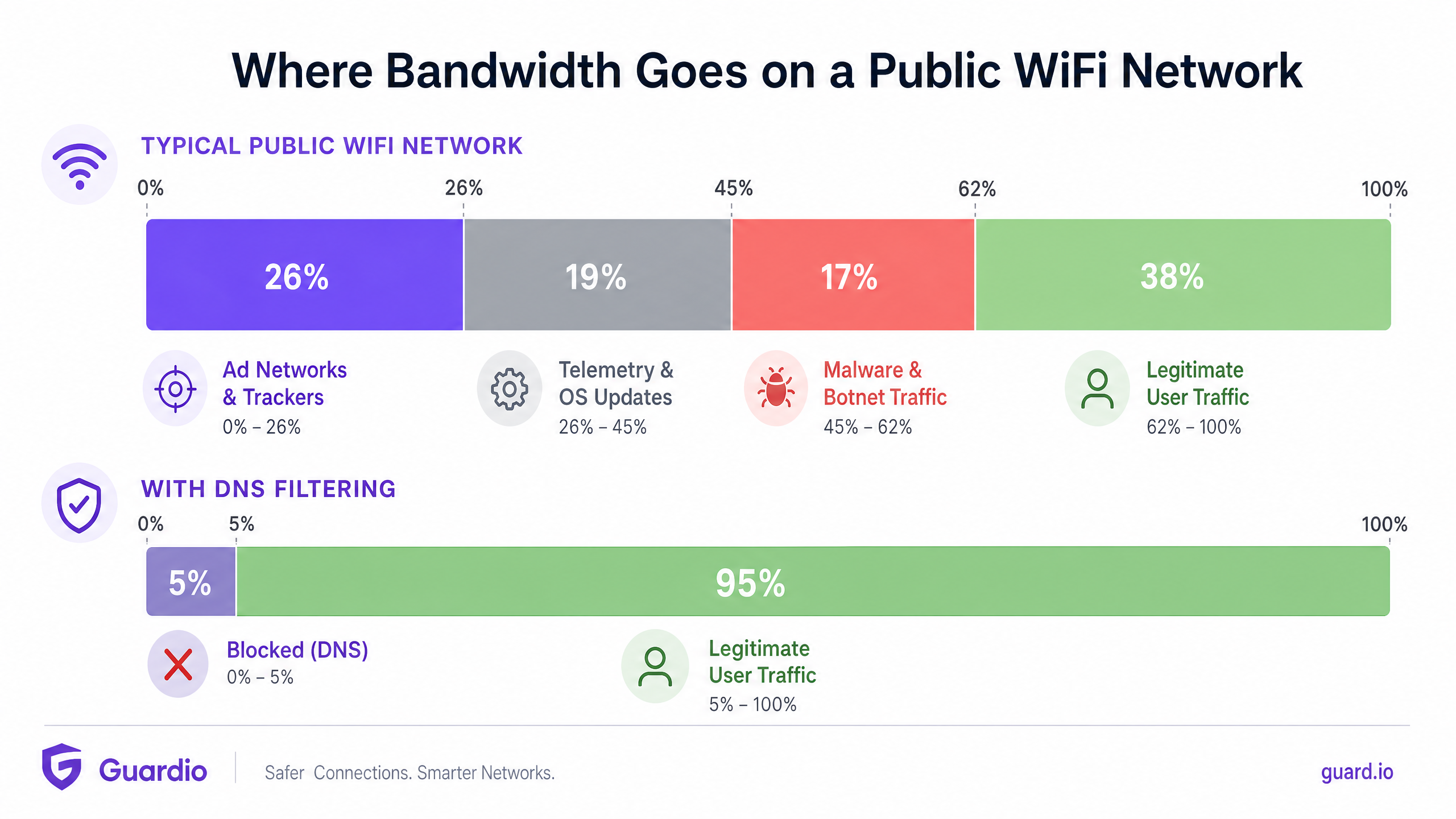
Wenn diese Abfragen erfolgreich aufgelöst werden, stellt das Gerät eine Verbindung her und lädt die Nutzlast herunter – oft große Mediendateien für Werbung oder kontinuierliche Datenströme für Telemetrie. Dieser Traffic verbraucht wertvolle Bandbreite, Funkzeit auf dem Access Point (AP) und gleichzeitige Verbindungslimits auf dem Gateway-Router.
Wie DNS-Filterung Bandbreite zurückgewinnt
Die DNS-Filterung fängt diesen Prozess in der Auflösungsphase ab. Wenn ein Gerät eine Domain abfragt, überprüft der DNS-Resolver den Hostnamen anhand einer gepflegten Blocklist (oder eines Threat Intelligence Feeds). Wenn die Domain als Werbenetzwerk, Tracker oder bekannte bösartige Entität gekennzeichnet ist, gibt der Resolver eine Null-Antwort (z. B. 0.0.0.0 oder NXDOMAIN) anstelle der tatsächlichen IP-Adresse zurück.
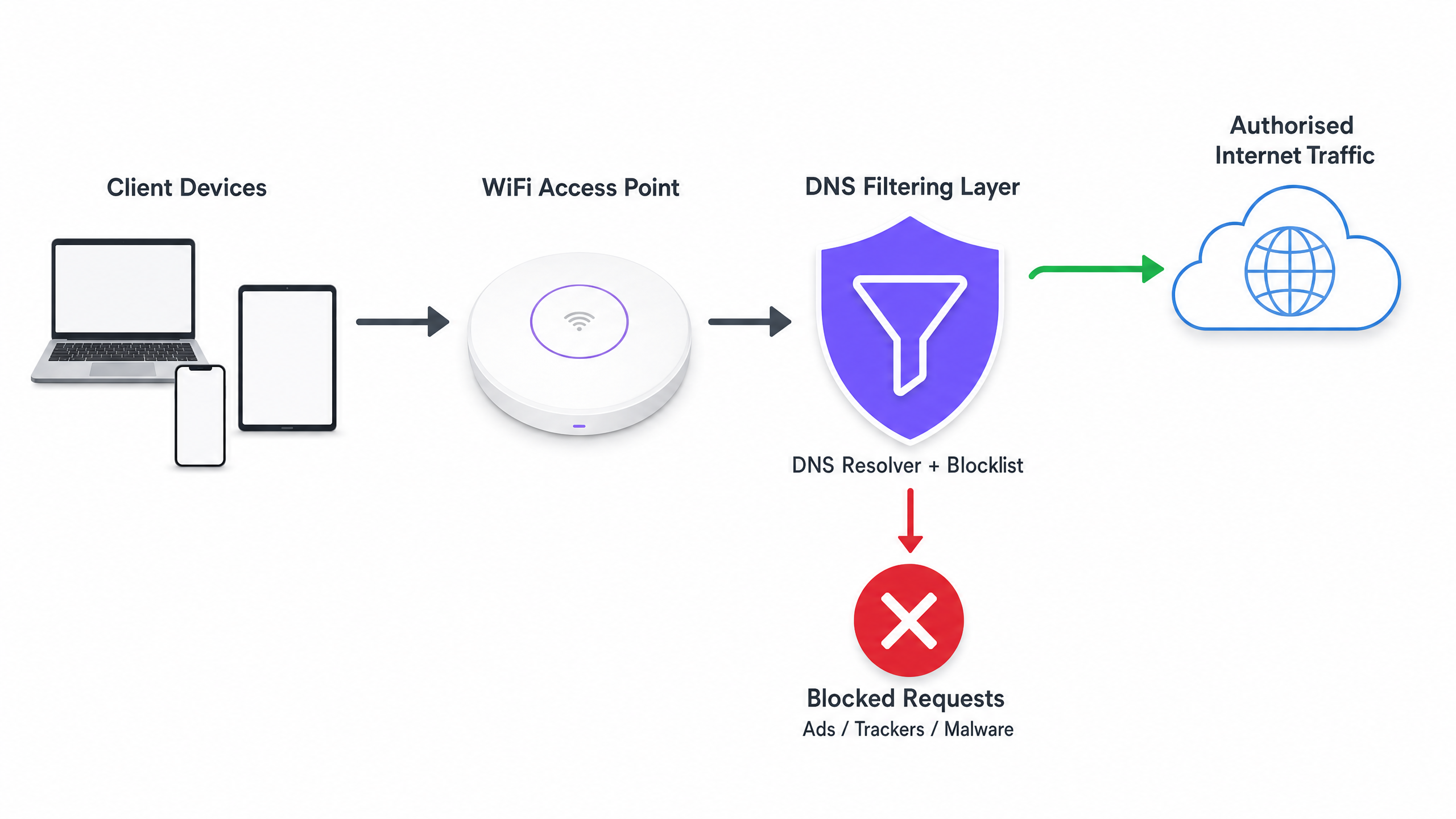
Der entscheidende Effizienzgewinn hierbei ist, dass die Transaktion beendet wird, bevor ein TCP-Handshake stattfinden kann. Es findet keine TLS-Verhandlung statt und es wird keine Nutzlast heruntergeladen. Die Bandbreite, die durch das Werbe- oder Tracking-Skript verbraucht worden wäre, bleibt vollständig erhalten.
Bereitstellungsarchitekturen
Es gibt drei primäre Architekturmodelle für die Bereitstellung von DNS-Filterung in einer Unternehmensumgebung:
- Cloud-Basierte Resolver: Der lokale DHCP-Server wird so konfiguriert, dass er den Client-Geräten die IP-Adressen eines Cloud-basierten DNS-Filterdienstes (z. B. Cisco Umbrella, Cloudflare Gateway) zuweist. Dies ist die Bereitstellung mit dem geringsten Aufwand, da keine Änderungen an der Hardware vor Ort erforderlich sind. Sie hängt jedoch vollständig von der Latenz des Cloud-Anbieters ab.
- On-Premises Appliances: Ein dedizierter DNS-Resolver (physische oder virtuelle Appliance) wird innerhalb der lokalen Netzwerkinfrastruktur bereitgestellt. Dies bietet die geringste Latenz für die DNS-Auflösung und stellt sicher, dass alle DNS-Abfrageprotokolle vor Ort verbleiben, was die Einhaltung von Datenschutzbestimmungen vereinfachen kann.
- Integrierte WiFi Management Plattformen: Das effizienteste Modell für Betreiber mehrerer Veranstaltungsorte ist die direkte Integration der DNS-Filterung in die Netzwerkmanagement- oder Captive Portal-Schicht. Plattformen, die umfassende WiFi Analytics anbieten, enthalten oft eine richtlinienbasierte DNS-Filterung, die pro SSID, pro Veranstaltungsort oder pro Benutzergruppe angewendet werden kann.
Implementierungsleitfaden
Die Bereitstellung von DNS-Filterung erfordert einen strukturierten Ansatz, um die Störung des legitimen Benutzer-Traffics oder das Ausfallen wesentlicher Dienste zu vermeiden.
Schritt 1: Eine Baseline festlegen
Bevor Sie Blockierungsregeln implementieren, konfigurieren Sie Ihre aktuellen DNS-Resolver so, dass alle Abfragen protokolliert werden. Führen Sie dies mindestens 14 Tage lang im Audit-Modus aus, um eine repräsentative Stichprobe des Traffics an allen Veranstaltungsorten zu erfassen. Analysieren Sie diese Protokolle, um die am häufigsten abgefragten Domains zu identifizieren und den Prozentsatz der Abfragen zu berechnen, die an bekannte Werbenetzwerke und Tracker gerichtet sind. Diese Baseline ist entscheidend für die Messung des ROI nach der Bereitstellung.
Schritt 2: Filterrichtlinien nach Netzwerksegment definieren
Eine monolithische Filterrichtlinie ist selten effektiv in einer Unternehmensumgebung. Sie müssen Ihre Richtlinien basierend auf dem Zweck des Netzwerks segmentieren:
- Guest WiFi: Implementieren Sie eine aggressive Blockierung von Werbenetzwerken, Trackern, nicht jugendfreien Inhalten und bekannten Malware-Domains, um Bandbreite maximal einzusparen und den Ruf des Veranstaltungsortes zu schützen.
- Staff/Corporate Networks: Wenden Sie eine moderate Filterung an. Während Malware- und Phishing-Domains blockiert werden sollten, könnte eine übermäßig aggressive Werbeblockierung Marketingteams oder spezifische SaaS-Anwendungen stören. Überprüfen Sie Secure BYOD Policies for Staff WiFi Networks für Anleitungen zum AusgleichSicherheit und Zugriff verwalten.
- IoT/Betriebsnetzwerke: Implementieren Sie striktes Allow-Listing (Standard: Verweigern). IoT-Geräte (z. B. intelligente Thermostate, Kassenterminals) sollten nur die spezifischen Domains auflösen können, die für ihren Betrieb erforderlich sind.
Schritt 3: Blocklisten auswählen und testen
Die Wirksamkeit Ihrer DNS-Filterung hängt vollständig von der Qualität Ihrer Blocklisten ab. Sich auf eine einzige Quelle zu verlassen, ist riskant. Kombinieren Sie kommerzielle Threat-Intelligence-Feeds mit seriösen, von der Community gepflegten Listen (z. B. OISD).
Entscheidend ist, die ausgewählten Blocklisten zunächst im 'Trockenlauf'- oder Überwachungsmodus zu betreiben. Analysieren Sie die Protokolle, um Fehlalarme zu identifizieren – legitime Domains, die blockiert würden. Das Blockieren eines großen CDN könnte beispielsweise unbeabsichtigt die Darstellung kritischer Geschäftsanwendungen beeinträchtigen.
Schritt 4: DNS over HTTPS (DoH) adressieren
Moderne Browser (Chrome, Firefox, Edge) verwenden zunehmend standardmäßig DNS over HTTPS (DoH), das DNS-Abfragen verschlüsselt und direkt an Cloud-Resolver (wie Google oder Cloudflare) sendet, wodurch die DHCP-zugewiesenen DNS-Server Ihres lokalen Netzwerks umgangen werden. Wenn DoH aktiv ist, wird Ihre DNS-Filterung umgangen.
Um dies zu mindern, müssen Sie Ihre Edge-Firewalls so konfigurieren, dass sie ausgehenden Datenverkehr zu bekannten DoH-Anbietern auf Port 443 blockieren, wodurch die Browser gezwungen werden, auf den lokalen, unverschlüsselten DNS-Resolver zurückzugreifen, wo Ihre Filterrichtlinien angewendet werden.
Best Practices
- Blocklisten-Updates automatisieren: Bedrohungslandschaften und Ad-Serving-Domains ändern sich täglich. Stellen Sie sicher, dass Ihre DNS-Filterlösung mindestens alle 24 Stunden automatisch Updates von Ihren ausgewählten Threat-Intelligence-Feeds abruft.
- Lokalen Cache implementieren: Um die Latenz zu minimieren, stellen Sie sicher, dass Ihr lokaler DNS-Resolver häufige Abfragen zwischenspeichert. Selbst wenn Sie einen Cloud-basierten Filterdienst nutzen, reduziert ein lokaler Caching-Forwarder die Round-Trip-Zeit für gängige Anfragen.
- Zugängliche Allow-Liste pflegen: Fehlalarme werden auftreten. Etablieren Sie einen klaren, schnellen Prozess für IT-Support-Teams, um bestimmte Domains zu einer Allow-Liste hinzuzufügen, wenn ein legitimer Dienst unbeabsichtigt blockiert wird.
- Compliance sicherstellen: DNS-Abfrageprotokolle enthalten Informationen über das Surfverhalten von Benutzern, die Vorschriften wie der GDPR oder CCPA unterliegen können. Stellen Sie sicher, dass Ihre Protokollierungspraktiken mit den Datenschutzrichtlinien Ihrer Organisation übereinstimmen. Weitere Informationen zur Pflege sicherer Aufzeichnungen finden Sie unter Erklären Sie, was ein Audit Trail für IT-Sicherheit im Jahr 2026 ist .
Fehlerbehebung & Risikominderung
Häufige Fehlerursachen
- Captive Portal-Fehler: Aggressive DNS-Filterung kann manchmal die für die Erkennung von Captive Portals durch das Geräte-Betriebssystem erforderlichen Domains blockieren (z. B.
captive.apple.com). Stellen Sie sicher, dass diese wesentlichen Domains explizit auf der Allow-Liste stehen. - Anwendungsfehlfunktion: Einige mobile Anwendungen werden nicht geladen oder stürzen ab, wenn ihre Telemetrie- oder Ad-Serving-Domains unerreichbar sind. Wenn eine kritische App, die von Ihren Mitarbeitern oder Gästen verwendet wird, fehlschlägt, überprüfen Sie die DNS-Protokolle auf blockierte Abfragen, die von diesen Geräten stammen, und passen Sie die Allow-Liste entsprechend an.
- Leistungsengpässe: Wenn Sie eine lokale Appliance bereitstellen, stellen Sie sicher, dass diese ausreichend dimensioniert ist, um die Spitzenwerte der Abfragen pro Sekunde (QPS) Ihres Netzwerks zu bewältigen. Ein unterversorgter DNS-Resolver führt zu erheblicher Latenz, was die Benutzererfahrung weitaus stärker beeinträchtigt, als es die Werbung getan hätte.
ROI & Geschäftsauswirkungen
Die Implementierung von DNS-Filterung bietet messbare Vorteile in drei Schlüsselbereichen:
- Reduzierung der Bandbreitenkosten: Durch die Eliminierung von 15 % bis 35 % des nicht-essentiellen Datenverkehrs können Organisationen oft kostspielige ISP-Leitungs-Upgrades verzögern. In Umgebungen mit getakteten Verbindungen oder Satelliten-Backhaul sind die Kosteneinsparungen sofort und erheblich.
- Verbesserte Netzwerkleistung: Die Reduzierung des Volumens gleichzeitiger Verbindungen und der durch Hintergrunddatenverkehr verbrauchten Funkzeit verbessert direkt den Durchsatz und die Latenz für legitime Benutzeraktivitäten. Dies führt zu weniger Helpdesk-Tickets bezüglich 'langsames WiFi' und höheren Benutzerzufriedenheitswerten.
- Verbesserte Sicherheitslage: Das Blockieren von Malware-Command-and-Control (C2)-Domains und Phishing-Seiten auf der DNS-Ebene reduziert das Risiko eines erfolgreichen Angriffs, der von einem kompromittierten Gerät im Gast- oder Mitarbeiternetzwerk ausgeht, erheblich.
Mit der Ausweitung von Initiativen im öffentlichen Sektor und Smart City – wie jenen, die in unserer jüngsten Ankündigung, Purple Appoints Iain Fox as VP Growth – Public Sector to Drive Digital Inclusion and Smart City Innovation , vorgestellt wurden – wird eine effiziente Bandbreitennutzung entscheidend für die Bereitstellung einer gerechten, hochleistungsfähigen Konnektivität in großem Maßstab. Darüber hinaus zeigen Funktionen wie Purple Launches Offline Maps Mode for Seamless, Secure Navigation to WiFi Hotspots , wie die Optimierung von Netzwerkressourcen die gesamte Benutzererfahrung verbessern kann.
Schlüsseldefinitionen
DNS Resolution
The process of translating a human-readable domain name (e.g., example.com) into a machine-readable IP address.
This is the prerequisite step for almost all network traffic; intercepting it here is the most efficient way to block unwanted connections.
DNS over HTTPS (DoH)
A protocol for performing remote DNS resolution via the HTTPS protocol, encrypting the query.
DoH prevents local network administrators from seeing or filtering DNS requests, requiring specific firewall rules to mitigate.
Telemetry Traffic
Automated communications sent by operating systems or applications to their vendors, reporting usage data, diagnostics, or status.
While individually small, the aggregate telemetry traffic from hundreds of devices on a public WiFi network consumes significant bandwidth.
NXDOMAIN
A DNS response indicating that the requested domain name does not exist.
DNS filters often return an NXDOMAIN response for blocked domains, immediately terminating the client's connection attempt.
Threat Intelligence Feed
A continuously updated stream of data providing information on known malicious domains, IPs, and URLs.
Used to dynamically update DNS blocklists to protect networks from newly identified malware and phishing infrastructure.
False Positive
In DNS filtering, when a legitimate, necessary domain is incorrectly categorized and blocked.
False positives cause application breakage and require a rapid allow-listing process to resolve user complaints.
Allow-List (Default Deny)
A security posture where all traffic is blocked by default, and only explicitly approved domains are permitted to resolve.
Best practice for highly secure or operational networks (like IoT or POS systems) where the required domains are known and finite.
Captive Portal Detection
The mechanism by which an OS determines if it is behind a captive portal, usually by attempting to reach a specific vendor domain.
If DNS filtering blocks these specific domains, devices will fail to display the WiFi login page, preventing users from connecting.
Ausgearbeitete Beispiele
A 400-room hotel is experiencing severe network congestion during the evening peak (7 PM - 10 PM). The 1Gbps ISP connection is saturated, and guests are complaining about slow video streaming. Upgrading the circuit to 2Gbps will cost an additional £1,500 per month. How can the IT Director use DNS filtering to address this?
- Deploy a cloud-based DNS filtering solution and configure the core router's DHCP scope to assign the new resolvers to the Guest VLAN.
- Enable a comprehensive blocklist targeting ad networks, tracking pixels, and known bandwidth-heavy telemetry endpoints.
- Configure the edge firewall to block outbound DoH (DNS over HTTPS) traffic to ensure all guest devices use the filtered resolvers.
- Monitor the bandwidth utilization during the next evening peak.
A large retail chain offers free Guest WiFi across 50 locations. They have noticed a high volume of background traffic originating from Android devices, primarily Google Play Services telemetry, which is degrading the performance of the in-store point-of-sale (POS) tablets sharing the same WAN link.
- Implement policy-based DNS filtering via the central WiFi management platform.
- Create two distinct policies: one for the Guest SSID and one for the POS SSID.
- On the Guest SSID policy, apply standard ad and malware blocking, plus specific rules to rate-limit or block non-essential OS telemetry domains.
- On the POS SSID policy, implement a strict allow-list, only permitting DNS resolution for the payment gateway, inventory management system, and essential MDM (Mobile Device Management) endpoints.
Übungsfragen
Q1. You are deploying DNS filtering across a university campus network. During the pilot phase, students report that they cannot access the login page for the campus WiFi. What is the most likely cause, and how do you resolve it?
Hinweis: Think about how operating systems determine if they need to display a login screen.
Musterlösung anzeigen
The DNS filter is likely blocking the specific domains used by Apple, Android, and Windows for Captive Portal Detection (e.g., captive.apple.com, connectivitycheck.gstatic.com). The resolution is to immediately add these vendor-specific captive portal domains to the global allow-list.
Q2. A stadium IT director wants to implement DNS filtering to save bandwidth during game days. However, they are concerned about the latency introduced by routing all DNS queries to a cloud provider. What architectural approach should you recommend?
Hinweis: Consider where the DNS resolution process physically takes place.
Musterlösung anzeigen
Recommend deploying an On-Premises DNS Appliance or a local caching forwarder. This keeps the initial DNS resolution local to the stadium infrastructure, providing sub-millisecond response times, while still utilizing cloud-based threat intelligence feeds to update the local blocklists asynchronously.
Q3. After implementing DNS filtering, the dashboard shows a 25% reduction in DNS queries, but the overall WAN bandwidth utilization has only dropped by 5%. What is the most likely reason for this discrepancy?
Hinweis: What protocol bypasses local DNS resolvers entirely?
Musterlösung anzeigen
Client devices (specifically modern browsers) are likely using DNS over HTTPS (DoH) to bypass the local DNS resolvers. While some background OS traffic is being caught by the local filter (the 25% query reduction), the heavy browser traffic is encrypted and bypassing the filter. The firewall must be configured to block outbound DoH traffic to force browsers to fall back to the local resolver.