
Progettazione di reti WiFi per il personale sicure e separate dal traffico ospiti
Una guida di riferimento tecnica e autorevole per architetti di rete e leader IT sulla progettazione di reti WiFi per il personale sicure e ad alte prestazioni. Dettaglia la segmentazione logica e fisica del traffico operativo dalle reti ospiti pubbliche utilizzando VLAN, autenticazione 802.1X e WPA3-Enterprise per soddisfare i requisiti di conformità (PCI DSS, GDPR) ed eliminare i rischi di sicurezza legati al movimento laterale.
Ascolta questa guida
Visualizza trascrizione del podcast
Sintesi esecutiva
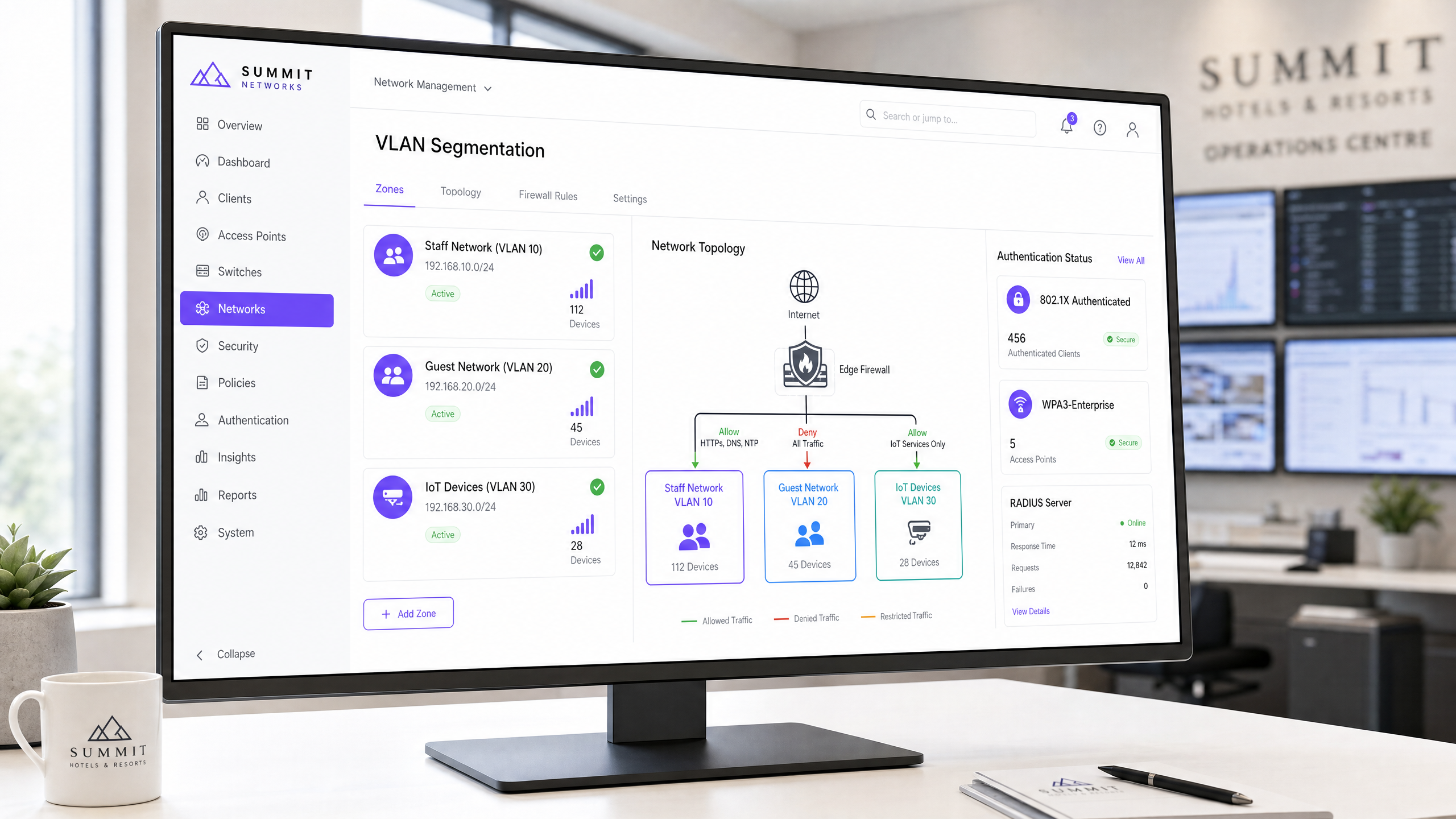
Per i gestori di grandi strutture aziendali, i manager IT e gli architetti di rete nei settori dell'ospitalità, del retail, della sanità e pubblico, la connettività wireless è un servizio mission-critical. Tuttavia, un difetto architetturale comune e pericoloso è la sovrapposizione tra il Guest WiFi pubblico e le reti private per il personale. Una rete con architettura piatta e non segmentata consente il movimento laterale, esponendo i sistemi critici di back-office — come i Property Management Systems (PMS), i terminali Point of Sale (POS) e le cartelle cliniche elettroniche (EHR) — a dispositivi ospiti non attendibili.
Questa guida di riferimento tecnica delinea un framework indipendente dal fornitore e di livello enterprise per la progettazione e l'implementazione di reti WiFi per il personale sicure e rigorosamente segmentate dal traffico degli ospiti pubblici. Implementando Virtual Local Area Network (VLAN), l'autenticazione IEEE 802.1X e WPA3-Enterprise, le organizzazioni possono eliminare i rischi di movimento laterale, garantire la conformità normativa (PCI DSS, GDPR) e assicurare il throughput operativo. Questa guida fornisce sequenze di implementazione pratiche, passaggi di risoluzione dei problemi e casi di studio reali per aiutare i team IT a mettere in sicurezza la propria infrastruttura wireless in questo trimestre.
Ascolta il nostro briefing tecnico di approfondimento sulla progettazione di reti per il personale sicure:
Approfondimento tecnico
Segmentazione logica e fisica della rete
Il controllo di sicurezza fondamentale per separare il traffico del personale da quello degli ospiti è la segmentazione della rete. In un ambiente wireless enterprise, la segmentazione logica si ottiene mappando diversi Service Set Identifier (SSID) a Virtual Local Area Network (VLAN) isolate a livello di Access Point (AP) [1]. Ciò garantisce che i dispositivi degli ospiti e l'hardware del personale risiedano in domini di broadcast completamente separati, impedendo qualsiasi trasmissione diretta di pacchetti tra di essi.
+---------------------------------------------------------------------------------+
|                                    Internet                                     |
+---------------------------------------------------------------------------------+
                                         |
                                         v
+---------------------------------------------------------------------------------+
|                        Edge Firewall / Next-Gen Firewall                        |
+---------------------------------------------------------------------------------+
          |                              |                              |
          | (VLAN 10: Allow PMS/ERP)     | (VLAN 20: Deny Internal)     | (VLAN 30: Restricted)
          v                              v                              v
+--------------------+         +--------------------+         +--------------------+
|   Staff Network    |         |   Guest Network    |         | IoT/Building Sys.  |
|      VLAN 10       |         |      VLAN 20       |         |      VLAN 30       |
+--------------------+         +--------------------+         +--------------------+
          |                              |                              |
          +------------------------------+------------------------------+
                                         |
                                         v
+---------------------------------------------------------------------------------+
|                  Wireless Controller / Cloud Management Platform                 |
+---------------------------------------------------------------------------------+
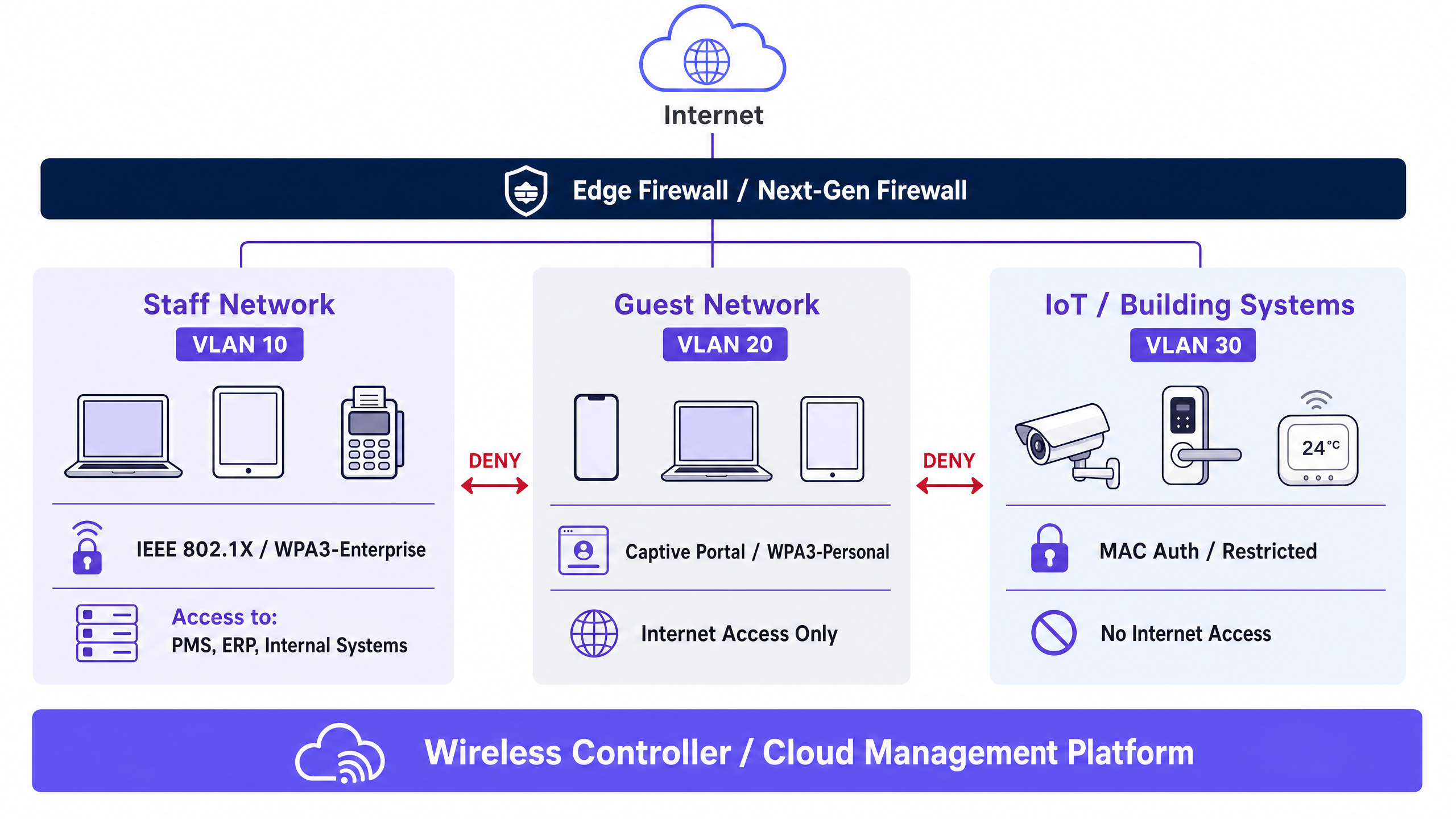
Per imporre un isolamento assoluto, un firewall stateful di Livello 3 o un Next-Generation Firewall (NGFW) deve essere posizionato al confine di queste VLAN [2]. Il firewall impone una postura Zero-Trust, trattando la VLAN ospiti come una zona ostile e non attendibile. La tabella seguente illustra le policy ACL (Access Control List) obbligatorie del firewall:
| VLAN di origine | VLAN di destinazione | Protocollo / Porte | Azione | Giustificazione architetturale |
|---|---|---|---|---|
| VLAN 10 (Personale) | VLAN 20 (Ospiti) | Qualsiasi | DENY | Impedisce ai dispositivi del personale di interagire con hardware degli ospiti non gestito e potenzialmente compromesso. |
| VLAN 20 (Ospiti) | VLAN 10 (Personale) | Qualsiasi | DENY | Impedisce ai dispositivi degli ospiti di scansionare o avviare connessioni verso i sistemi del personale. |
| VLAN 20 (Ospiti) | WAN (Internet) | HTTP/S, DNS, NTP | ALLOW | Limita il traffico degli ospiti esclusivamente all'accesso a Internet in uscita. |
| VLAN 30 (IoT) | VLAN 10 & 20 | Qualsiasi | DENY | Impedisce che l'hardware IoT non sicuro (es. termostati intelligenti, TVCC) venga utilizzato come punto di snodo [3]. |
| VLAN 10 (Personale) | Server interni | HTTPS, SSH, SQL | ALLOW | Limita l'accesso del personale esclusivamente alle applicazioni operative autorizzate (es. PMS, ERP). |
Standard di autenticazione e crittografia enterprise
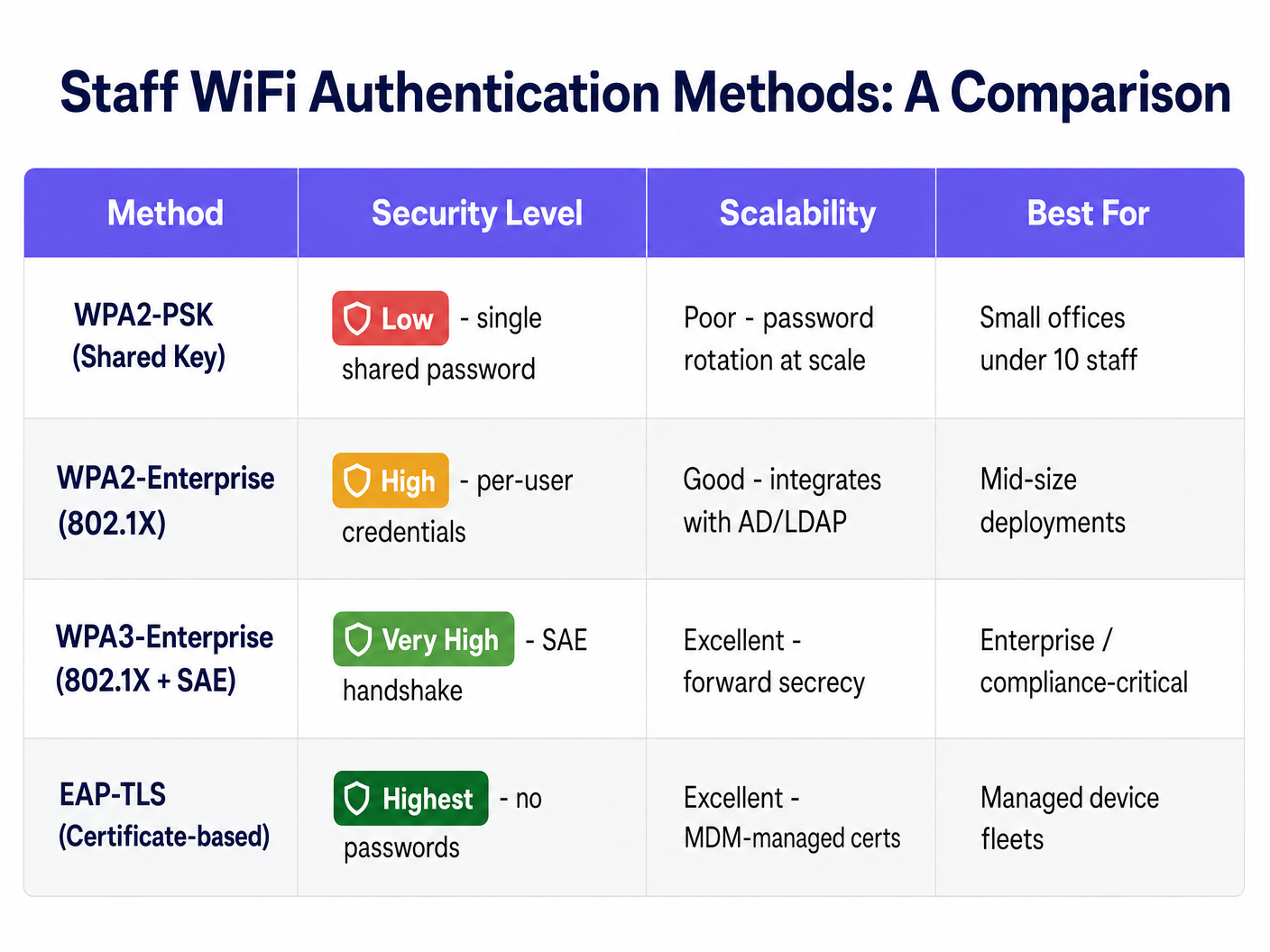
L'implementazione di VLAN separate è inefficace se i punti di accesso a tali VLAN non sono adeguatamente protetti. Molte organizzazioni commettono l'errore critico di proteggere il proprio WiFi per il personale con una chiave pre-condivisa (WPA2-PSK). Le reti basate su PSK utilizzano un'unica password condivisa per tutti i dispositivi. Ciò comporta gravi responsabilità operative e di sicurezza: se un dipendente si dimette, la password deve essere modificata su ogni singolo dispositivo dell'intera infrastruttura, altrimenti l'ex dipendente manterrà l'accesso alla rete.
Lo standard enterprise per la sicurezza wireless del personale è l'autenticazione IEEE 802.1X combinata con WPA3-Enterprise [4]. Questa architettura sposta l'autenticazione da una password condivisa a credenziali individuali collegate alla directorycredenziali o certificati digitali, convalidati da un server RADIUS (Remote Authentication Dial-In User Service) centrale.
1. Autenticazione basata su credenziali (PEAP-MSCHAPv2)
In questa implementazione, i dispositivi del personale si autenticano utilizzando le proprie credenziali individuali della directory aziendale (es. Active Directory, LDAP, Okta o Microsoft Entra ID) [5].
- L'handshake: L'AP funge da autenticatore, inoltrando le credenziali del client incapsulate in un tunnel EAP (Extensible Authentication Protocol) al server RADIUS.
- Miglioramento della sicurezza: Elimina le password condivise. Quando un dipendente viene disattivato nella directory centrale (offboarding), il suo accesso alla rete viene interrotto istantaneamente.
2. Autenticazione basata su certificati (EAP-TLS)
Per le flotte di dispositivi aziendali gestiti, l'EAP-TLS rappresenta il gold standard della sicurezza wireless [6].
- L'handshake: Invece delle password, l'autenticazione si basa sulla crittografia asimmetrica. Il dispositivo client presenta un certificato digitale univoco emesso dalla Public Key Infrastructure (PKI) o dalla piattaforma di Mobile Device Management (MDM) dell'organizzazione.
- Miglioramento della sicurezza: Immune al furto di credenziali (credential harvesting), al phishing e allo shoulder-surfing. L'autenticazione è legata crittograficamente allo specifico dispositivo fisico.
3. WPA3-Enterprise vs. WPA2-Enterprise
Sebbene il WPA2-Enterprise sia stato lo standard per due decenni, le implementazioni moderne devono imporre il WPA3-Enterprise. Il WPA3 introduce la Simultaneous Authentication of Equals (SAE), che sostituisce l'handshake a 4 vie del WPA2, eliminando completamente gli attacchi dizionario offline [7]. Il WPA3 impone anche i Protected Management Frames (PMF), impedendo agli aggressori di iniettare frame di deautenticazione per disconnettere i dispositivi del personale o eseguire attacchi AP canaglia "evil twin".
Guida all'implementazione
Fase 1: Provisioning di VLAN e subnet
- Definire le subnet IP: Allocare blocchi CIDR non sovrapposti per ciascun segmento di rete. Ad esempio:
- Staff (VLAN 10):
10.10.10.0/24(254 host) - Guest (VLAN 20):
172.16.0.0/20(4.094 host - dimensionato per un'elevata densità di utenti guest simultanei) - IoT (VLAN 30):
10.10.30.0/24(254 host)
- Staff (VLAN 10):
- Configurare gli switch core: Configurare le VLAN sugli switch core e di distribuzione. Assicurarsi che le porte dello switch che si collegano agli Access Point siano configurate come porte trunk 802.1Q, che trasportano le VLAN 10, 20 e 30, con una VLAN nativa dedicata e non predefinita (es. VLAN 99) per il traffico di gestione degli AP.
Fase 2: Integrazione del server RADIUS e della directory
- Implementare RADIUS: Configurare server RADIUS ridondanti. Per Active Directory on-premises, implementare Microsoft Network Policy Server (NPS). Per gli ambienti cloud-first, implementare una soluzione Cloud RADIUS integrata con Microsoft Entra ID o Okta [5].
- Registrare i Network Access Server (NAS): Aggiungere gli indirizzi IP di tutti i controller wireless o degli AP autonomi come client RADIUS, configurando un segreto condiviso robusto e generato casualmente.
- Configurare le richieste di connessione e i criteri di rete:
- Creare un criterio che corrisponda alle richieste di connessione provenienti dall'SSID Staff.
- Limitare l'accesso a un gruppo di sicurezza Active Directory specifico (es.
GG-WiFi-Staff). - Imporre PEAP-MSCHAPv2 o EAP-TLS come tipo di EAP consentito.
Fase 3: Configurazione del controller wireless e dell'SSID
- Creare l'SSID Staff: Configurare l'SSID (es.
Corporate-Staff).- Tipo di sicurezza: WPA3-Enterprise (or modalità di transizione WPA2/WPA3 se esistono dispositivi legacy).
- Autenticazione: 802.1X indirizzata al gruppo di server RADIUS.
- Mappatura VLAN: Mappare l'SSID direttamente sulla VLAN 10.
- Creare l'SSID Guest: Configurare l'SSID (es.
Guest-WiFi).- Tipo di sicurezza: Aperta con Opportunistic Wireless Encryption (OWE) per crittografare il traffico guest senza password [8].
- Mappatura VLAN: Mappare l'SSID direttamente sulla VLAN 20.
- Reindirizzamento al portale: Reindirizzare il traffico HTTP/S non autenticato alla piattaforma Captive Portal (es. Purple) per l'acquisizione dei dati e WiFi Analytics .
- Abilitare l'isolamento dei client: Sull'SSID Guest, abilitare esplicitamente l'Isolamento client-to-client (talvolta chiamato Local Proxy ARP o Station Isolation) a livello di AP. Ciò impedisce ai guest connessi di rilevare o attaccare altri dispositivi sulla stessa VLAN guest.
Fase 4: Quality of Service (QoS) e allocazione della larghezza di banda
Per evitare che il traffico guest saturi i gateway Internet e interrompa le attività del personale, configurare criteri rigorosi di Quality of Service sul perimetro WAN e sul controller wireless [9]:
- Riserva di banda: Allocare un pool di larghezza di banda minimo garantito per la VLAN 10 (Staff). Ad esempio, riservare il 20% della capacità WAN totale esclusivamente per il traffico del personale.
- Limitazione della velocità (Rate Limiting): Imporre limiti di larghezza di banda per utente sulla VLAN Guest (es. massimo 5 Mbps in download / 1 Mbps in upload per dispositivo guest) utilizzando il piano di gestione del Captive Portal.
- Prioritizzazione del traffico (802.11e / WMM): Classificare il traffico voce (VoIP) e video del personale come classi Voice (AC_VO) o Video (AC_VI), inserendo al contempo il traffico guest nelle code Background (AC_BK) o Best Effort (AC_BE).
Best practice e standard di settore
Conformità PCI DSS (Requisiti 1.3 e 11.4)
Per i settori retail, hospitality e stadi che elaborano transazioni con carta di credito, la protezione della rete è un requisito legale rigoroso ai sensi del Payment Card Industry Data Security Standard (PCI DSS) [10].
- Requisito 1.3: Imporre una configurazione formale del firewall che limiti il traffico tra il Cardholder Data Environment (CDE) e le altre reti, inclusa la rete WiFi guest.
- Requisito 11.4: Implementare un Wireless Intrusion Prevention System (WIPS) per scansionare attivamente lo spettro delle radiofrequenze, rilevando e bloccando automaticamente gli AP canaglia o le reti "evil twin" che tentano di iimpersonare l'SSID del personale.
GDPR and Privacy Compliance
Quando si gestiscono reti guest che acquisiscono dati degli utenti, la conformità al Regolamento Generale sulla Protezione dei Dati (GDPR) è obbligatoria [11].
- Consenso disaggregato: La splash page del Captive Portal deve separare il consenso per l'accesso alla rete dal consenso per le comunicazioni di marketing.
- Isolamento dei dati: Qualsiasi dato personale acquisito tramite la splash page del Guest WiFi deve essere memorizzato in modo sicuro in un database isolato e crittografato (come la piattaforma certificata ISO 27001 di Purple) e non deve risiedere su alcun server locale connesso alla rete del personale.
Risoluzione dei problemi e mitigazione dei rischi
I team IT riscontrano frequentemente problemi di implementazione durante i rollout di 802.1X. La tabella seguente descrive in dettaglio le modalità di guasto comuni, gli indicatori diagnostici e le fasi di risoluzione immediata:
| Problema / Sintomo | Causa principale | Fase diagnostica | Risoluzione |
|---|---|---|---|
| Timeout RADIUS / "Server non raggiungibile" | Porte UDP bloccate o segreto condiviso configurato in modo errato. | Eseguire tcpdump port 1812 sul server RADIUS durante un tentativo di connessione. |
Verificare che le policy del firewall consentano le porte UDP 1812 (Autenticazione) e 1813 (Accounting) tra gli AP e RADIUS. Ricontrollare i segreti condivisi. |
| Errore "Certificato non attendibile" sul client | Il dispositivo client non considera attendibile il certificato SSL del server RADIUS. | Esaminare i log WiFi lato client o verificare se il certificato RADIUS è autofirmato. | Distribuire un certificato SSL pubblico e attendibile da un'Autorità di Certificazione (CA) commerciale sul server RADIUS, oppure inviare il certificato root della CA privata ai dispositivi del personale tramite MDM. |
| Disconnessioni frequenti durante gli spostamenti del personale | Il Fast Roaming (802.11r) è disabilitato o configurato in modo errato. | Monitorare i log del controller wireless per tempi di riautenticazione elevati (>500 ms) durante le transizioni tra AP. | Abilitare 802.11r (Fast BSS Transition) e 802.11k/v sull'SSID del personale per consentire ai dispositivi di memorizzare nella cache le credenziali e spostarsi senza interruzioni. |
| Le applicazioni PMS/ERP del personale funzionano lentamente | Il traffico guest sta saturando la linea dedicata internet condivisa. | Controllare i grafici di utilizzo dell'interfaccia WAN sul firewall durante le ore di punta dei guest. | Applicare rigide policy di riserva della larghezza di banda QoS sul firewall WAN. Implementare limiti di velocità per dispositivo sul Captive Portal guest. |
ROI e impatto aziendale
La progettazione e l'implementazione di una rete WiFi per il personale segmentata e sicura non è un semplice esercizio tecnico, bensì un investimento aziendale strategico. Quando si presenta questa iniziativa alla dirigenza o ai CFO, occorre concentrarsi su questi risultati aziendali chiave:
1. Mitigazione del rischio e riduzione delle responsabilità
A single data breach derivante da un dispositivo guest compromesso che si sposta lateralmente in una rete aziendale può costare milioni in sanzioni normative, audit forensi e danni al marchio. Per gli operatori del settore retail e hospitality, il mantenimento di una rigorosa conformità PCI DSS previene la perdita catastrofica delle capacità di elaborazione delle carte di pagamento.
2. Efficienza operativa e produttività del personale
In ambienti ad alta densità come stadi o hotel , il personale in prima linea si affida ai dispositivi mobili per le operazioni quotidiane (ad es. check-in mobile, pulizia digitale delle camere, ordinazioni al tavolo). Implementando il QoS e riservando la larghezza di banda per il personale, si eliminano i tempi di inattività operativi, aumentando direttamente la rotazione dei tavoli nei ristoranti, riducendo le code per il check-in dei clienti e migliorando la soddisfazione del personale.
3. Analisi affidabili e ROI di marketing
Separando i dispositivi del personale dalla rete guest, si puliscono i dati di marketing. I dispositivi del personale che si connettono quotidianamente possono falsare le analisi delle presenze, i tempi di permanenza e le metriche dei visitatori di ritorno. Una corretta segmentazione garantisce che la piattaforma di WiFi Analytics acquisisca dati puri e non inquinati sul comportamento dei guest, consentendo ai team di marketing di eseguire campagne altamente mirate e ad alta conversione che guidano le prenotazioni dirette e la fidelizzazione dei clienti.
Riferimenti
- Standard IEEE 802.1Q per reti locali e metropolitane: Bridges and Bridged Networks. https://standards.ieee.org
- Pubblicazione speciale NIST 800-162: Guida alla definizione e alle considerazioni sul controllo degli accessi basato sugli attributi (ABAC). https://csrc.nist.gov
- OWASP Top 10 IoT Vulnerabilities and Mitigation Framework. https://owasp.org
- Wi-Fi Alliance: Specifiche di sicurezza WPA3. https://www.wi-fi.org
- Microsoft TechNet: Implementazione dell'accesso wireless 802.1X con NPS. https://learn.microsoft.com
- IETF RFC 5216: Il protocollo di autenticazione EAP-TLS. https://datatracker.ietf.org
- IETF RFC 7664: Handshake crittografico SAE (Simultaneous Authentication of Equals). https://datatracker.ietf.org
- IETF RFC 8110: Crittografia wireless opportunistica (OWE). https://datatracker.ietf.org
- Miglioramenti della qualità del servizio IEEE 802.11e. https://standards.ieee.org
- PCI Security Standards Council: Payment Card Industry Data Security Standard (PCI DSS) v4.0. https://www.pcisecuritystandards.org
- Comitato europeo per la protezione dei dati (EDPB): Linee guida 05/2020 sul consenso ai sensi del regolamento 2016/679. https://edpb.europa.eu
Definizioni chiave
VLAN (Virtual Local Area Network)
A logical subnetwork that groups together a collection of devices on one or more physical local area networks, isolating their traffic broadcast domains.
Used to separate guest devices from staff hardware on the same physical switches and access points.
IEEE 802.1X
An IEEE standard for port-based Network Access Control (NAC) that provides an authentication mechanism to devices wishing to attach to a LAN or WLAN.
The standard protocol used to enforce per-user credential or certificate authentication on enterprise staff WiFi networks.
RADIUS (Remote Authentication Dial-In User Service)
A networking protocol that provides centralised Authentication, Authorization, and Accounting (AAA) management for users who connect and use a network service.
The server (e.g., Microsoft NPS or Cloud RADIUS) that validates staff credentials against Active Directory before allowing network access.
WPA3-Enterprise
The latest generation of Wi-Fi Protected Access security for enterprise networks, mandating 192-bit cryptographic strength and Protected Management Frames.
The required wireless security protocol for new staff networks, eliminating offline dictionary attacks and rogue AP deauthentication exploits.
Client Isolation
A security setting on wireless access points that prevents connected wireless clients from communicating directly with each other.
Mandatory configuration on guest networks to block lateral attacks and malware spreading between guest devices.
EAP-TLS (Extensible Authentication Protocol - Transport Layer Security)
An EAP type that uses digital certificates for mutual authentication between the client and the RADIUS server, eliminating the need for passwords.
The highest-security authentication method for corporate-managed device fleets, deployed via MDM platforms.
WIPS (Wireless Intrusion Prevention System)
A security device or software capability that monitors the radio spectrum for the presence of unauthorised access points and automatically takes countermeasures.
Required for PCI DSS compliance to detect and mitigate rogue APs or 'evil twin' attacks in retail and hospitality environments.
Airtime Fairness
A wireless scheduling feature that allocates equal transmission time (airtime) to each wireless client, rather than equal packet counts.
Prevents slow, legacy guest devices from hogging wireless channel capacity and dragging down the performance of fast staff devices.
Esempi pratici
A 250-room luxury hotel running a shared, unsegmented network is preparing for a PCI DSS audit. The hotel uses mobile tablets for front-desk check-in, a PMS server on-premises, and offers free guest WiFi. How should the network architect redesign the wireless infrastructure to ensure compliance and security?
- Physical & Logical Segmentation: Create VLAN 10 for Staff (PMS & tablets), VLAN 20 for Guest WiFi, and VLAN 30 for IoT (smart TVs, thermostats). Configure the switchports connecting to the APs as 802.1Q trunks.
- Authentication Hardening: Replace the shared WPA2-PSK on the staff network with WPA3-Enterprise (802.1X). Integrate the wireless controller with the hotel's Active Directory via NPS (RADIUS). Provision the front-desk tablets with WPA3-Enterprise credentials or EAP-TLS certificates via MDM.
- Firewall Access Control: Deploy a stateful firewall. Write rules to allow VLAN 10 to access the PMS server IP over HTTPS/SQL ports, but deny all traffic from VLAN 20 (Guest) to VLAN 10 and VLAN 30. Enable Client Isolation on VLAN 20.
- Compliance Validation: Enable WIPS on the wireless controller to monitor and alert on rogue APs, satisfying PCI DSS Requirement 11.4.
A high-density retail chain with 50 stores wants to deploy guest WiFi to capture customer analytics while ensuring that store-operational handheld scanners (used for inventory and stock management) do not suffer from wireless congestion or dropouts during peak trading hours. How should the IT team design the SSID and QoS architecture?
- SSID Separation: Deploy two SSIDs across all stores:
Retail-Operations(VLAN 10) andGuest-Free-WiFi(VLAN 20). - 802.1X Authentication: Secure
Retail-Operationsusing WPA3-Enterprise. Authenticate the handheld scanners using certificate-based EAP-TLS, pre-provisioned via the chain's MDM platform. Configure the guest SSID with an open network behind a captive portal managed by Purple. - Quality of Service (QoS) & WMM: On the wireless controller, enable Wi-Fi Multi-Media (WMM). Map the
Retail-Operationstraffic to the Video (AC_VI) or Voice (AC_VO) access categories, ensuring priority over guest traffic. MapGuest-Free-WiFito Best Effort (AC_BE). - Bandwidth Rate Limiting: On the WAN edge firewall, configure a traffic-shaping policy. Guarantee a minimum of 15 Mbps symmetrical bandwidth for VLAN 10 at each store. On the Purple captive portal platform, enforce a per-user rate limit of 3 Mbps download and 1 Mbps upload for guest devices on VLAN 20.
A municipal public-sector conference centre frequently hosts large events with up to 5,000 concurrent guest users. The IT director notices that during events, administrative staff on the same physical network experience severe latency on corporate video calls and file transfers. How can this be resolved without purchasing additional physical internet lines?
- VLAN Segmentation: Verify that admin staff sit on VLAN 100 and guests sit on VLAN 200.
- WAN-Edge Traffic Shaping: On the primary internet gateway (e.g., a 1 Gbps symmetrical leased line), configure a Class-Based Weighted Fair Queueing (CBWFQ) policy. Define a class for VLAN 100 with a guaranteed bandwidth of 200 Mbps and a priority queue for real-time voice/video traffic.
- Dynamic Bandwidth Allocation: Configure a policy on the firewall that dynamically limits the total bandwidth allocated to VLAN 200 (Guest) to a maximum of 80% of total WAN capacity (800 Mbps) during business hours, leaving 200 Mbps always available for staff.
- Wireless Airtime Fairness: On the wireless access points, enable Airtime Fairness. This prevents slow legacy guest devices (e.g., older 802.11n smartphones) from monopolising the wireless channels and dragging down the throughput of modern staff devices.
Domande di esercitazione
Q1. A hotel group is deploying a new staff WiFi network. The network architect suggests using WPA2-Personal (PSK) with a strong password because it is easier for staff to enter on their devices. As the Senior Technical Content Strategist, write a decision-forcing scenario exercise that demonstrates why this approach is a security risk and what the recommended alternative is.
Suggerimento: Consider what happens when a disgruntled employee is terminated or leaves the company.
Visualizza risposta modello
Recommended Approach: Reject the WPA2-Personal (PSK) proposal and mandate WPA3-Enterprise (802.1X) authentication.
Reasoning: Using WPA2-PSK creates a massive security blind spot. If a staff member leaves the company, they still know the shared password. To maintain security, the IT team would have to change the password on every single staff device (laptops, PMS tablets, VoIP phones) across the hotel. In practice, this operational overhead is so high that passwords are rarely changed, leaving the network vulnerable to unauthorized access by former employees.
By deploying WPA3-Enterprise with 802.1X, each employee authenticates using their individual corporate directory credentials (e.g., Active Directory). When an employee is offboarded, their account is disabled in Active Directory, and their network access is revoked instantly and automatically, without affecting any other staff devices.
Q2. During a network audit of a retail chain, the auditor notes that the guest WiFi network and the POS payment terminals sit on different IP subnets but are connected to the same physical Layer 3 switch without any ACLs configured. The IT manager argues that because they are on different subnets, they are secure. Create a scenario-based exercise to evaluate this setup against PCI DSS requirements.
Suggerimento: Does an IP subnet boundary block traffic by default on a Layer 3 switch?
Visualizza risposta modello
Recommended Approach: The current setup is non-compliant and highly insecure. The IT team must implement strict VLAN segmentation and stateful firewall rules to isolate the POS network from the guest network.
Reasoning: IP subnets only define logical groupings; they do not enforce security boundaries. On a standard Layer 3 switch, routing between subnets is enabled by default. This means any device on the guest subnet can route traffic directly to the POS subnet simply by sending packets to the switch's gateway IP. An attacker on the guest WiFi could easily scan, discover, and attempt to exploit vulnerabilities on the POS payment terminals, violating PCI DSS Requirement 1.3.
To remediate this, the POS terminals must be placed on a dedicated VLAN (e.g., VLAN 40) and the guest WiFi on VLAN 20. A stateful firewall must sit between these VLANs, with an explicit rule configured to DENY all traffic originating from VLAN 20 (Guest) destined for VLAN 40 (POS). Additionally, Client Isolation must be enabled on the guest SSID to prevent lateral attacks within the guest network itself.
Q3. A conference centre is hosting a major tech summit with 3,000 attendees. The administrative staff, who share the same internet connection, report that they cannot access their cloud-based ticketing system or make clear VoIP calls due to extreme network slowness. Explain how to design a traffic management strategy to resolve this issue without upgrading the physical internet bandwidth.
Suggerimento: Think about over-the-air channel congestion and WAN-link saturation.
Visualizza risposta modello
Recommended Approach: Implement a multi-layered traffic management strategy combining wireless-level QoS, WAN-edge bandwidth reservation, and per-user rate limiting.
Reasoning: The slowness is caused by two bottlenecks: over-the-air channel congestion (RF saturation) and WAN-link saturation. To resolve this without upgrading the physical line:
- WAN Bandwidth Reservation: On the edge firewall, configure Class-Based Weighted Fair Queueing (CBWFQ). Reserve a minimum guaranteed pool of 150 Mbps symmetrical bandwidth exclusively for the staff VLAN (VLAN 10), ensuring it can never be starved by guest traffic.
- Per-User Rate Limiting: On the captive portal platform (e.g., Purple), configure a traffic-shaping profile that limits each guest connection to a maximum of 3 Mbps download and 1 Mbps upload. This prevents a small number of high-bandwidth guest users (e.g., streaming 4K video) from saturating the WAN link.
- Wireless Quality of Service (QoS): Enable Wi-Fi Multi-Media (WMM) on the access points. Map staff VoIP and ticketing traffic to high-priority queues (AC_VO and AC_VI), while mapping all guest traffic to the Best Effort (AC_BE) or Background (AC_BK) queues.
- Airtime Fairness: Enable Airtime Fairness on all APs to ensure that slow legacy devices do not monopolise wireless channel transmission time, preserving channel capacity for fast staff devices.
Continua a leggere questa serie
Gestione della sicurezza BYOD (Bring Your Own Device) sulle reti del personale
An authoritative, technical reference guide for enterprise IT managers and network architects on securing Bring Your Own Device (BYOD) access on staff networks. This guide outlines the exact network architecture, authentication protocols, and MDM integration workflows required to mitigate data leakages and maintain regulatory compliance across high-footfall venues.
Mitigare i punti di accesso non autorizzati sulle reti aziendali
This technical reference guide details the architecture, deployment, and operational procedures for mitigating rogue access points on enterprise networks using Wireless Intrusion Prevention Systems (WIPS) and Wireless Intrusion Detection Systems (WIDS). It provides actionable frameworks for IT security administrators to detect, classify, and neutralise unauthorised APs across complex physical environments including hospitality, retail, healthcare, and public-sector venues. The guide covers threat classification, automated containment mechanisms, compliance implications (PCI DSS, GDPR, HIPAA), and measurable business outcomes.
Autenticazione 802.1X Spiegata per le Reti Aziendali
Questa guida autorevole fornisce ai leader IT e agli architetti di rete un'analisi tecnica approfondita dell'autenticazione 802.1X per le reti aziendali. Copre architettura, metodi EAP, strategie di implementazione e mitigazione del rischio per garantire un accesso WiFi sicuro e conforme in ambienti multi-sito.