
Autenticazione 802.1X Spiegata per le Reti Aziendali
Questa guida autorevole fornisce ai leader IT e agli architetti di rete un'analisi tecnica approfondita dell'autenticazione 802.1X per le reti aziendali. Copre architettura, metodi EAP, strategie di implementazione e mitigazione del rischio per garantire un accesso WiFi sicuro e conforme in ambienti multi-sito.
Ascolta questa guida
Visualizza trascrizione del podcast
Riepilogo Esecutivo
Per gli ambienti aziendali che comprendono operazioni nel settore dell'ospitalità, della vendita al dettaglio e del settore pubblico, il perimetro si è dissolto. Forze lavoro ibride, politiche BYOD e un'esplosione di dispositivi connessi significano che la protezione delle reti aziendali tramite chiavi precondivise (PSKs) non è più una strategia valida. I moderni framework di conformità, inclusi PCI DSS v4.0 e GDPR, richiedono controlli di accesso rigorosi basati sull'identità per qualsiasi rete che gestisca dati sensibili.
Questa guida descrive in dettaglio l'architettura e l'implementazione di IEEE 802.1X, lo standard per il controllo dell'accesso alla rete basato su porta. Spostando l'autenticazione da una password condivisa a un'identità verificata supportata da un'infrastruttura RADIUS centrale, le organizzazioni possono applicare la segmentazione dinamica, mitigare il furto di credenziali e garantire che solo i dispositivi autorizzati accedano alle risorse aziendali. Progettato per architetti di rete e direttori IT, questo documento fornisce la profondità tecnica necessaria per progettare, implementare e risolvere i problemi di 802.1X in topologie complesse e multi-sito.
Approfondimento Tecnico
L'Architettura 802.1X
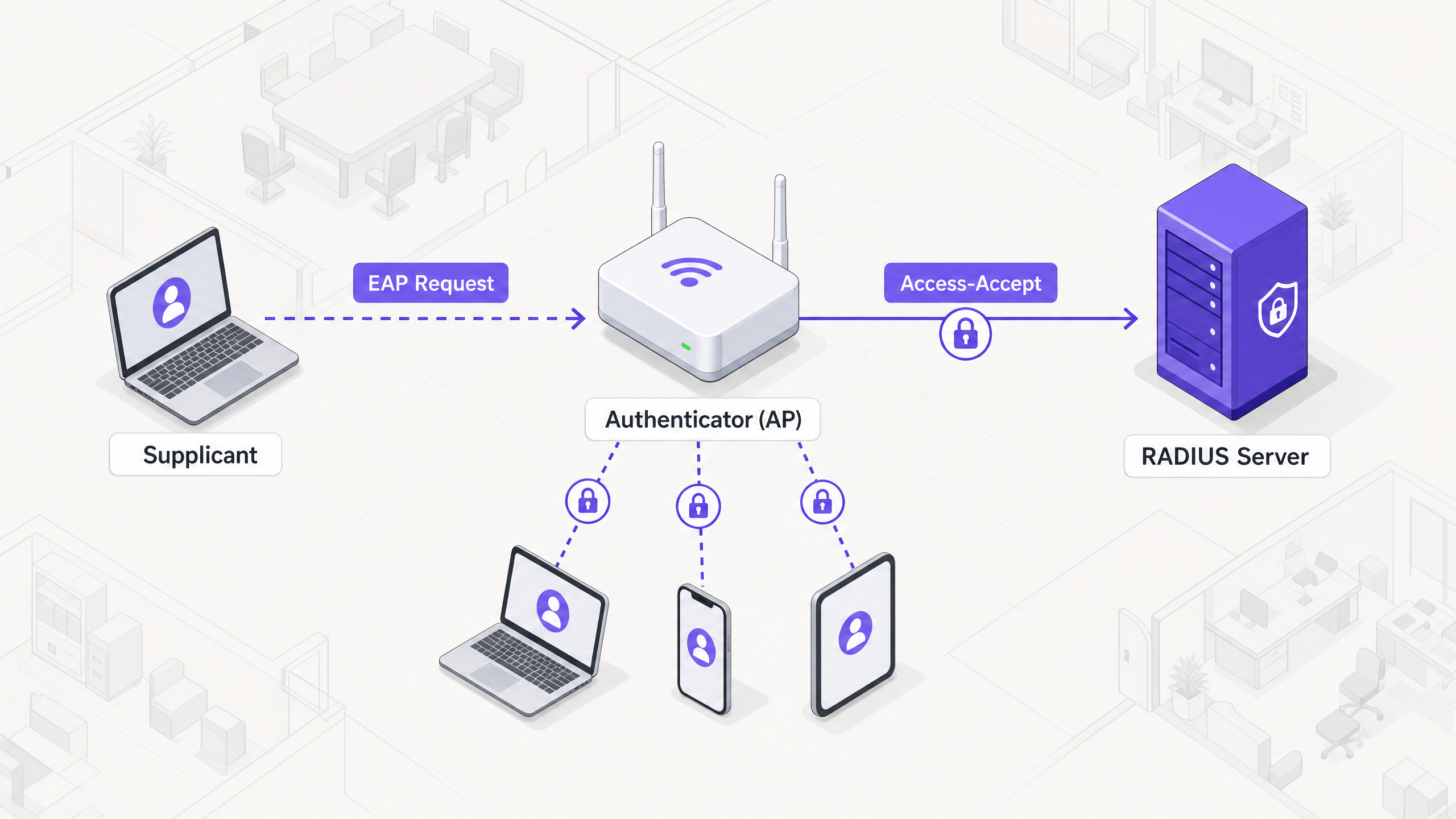
Il framework 802.1X si basa su tre componenti distinti che lavorano in concerto per proteggere l'accesso alla rete:
- Supplicant: Il dispositivo endpoint (ad esempio, laptop, smartphone) che richiede l'accesso alla rete.
- Authenticator: Il dispositivo di rete (tipicamente un access point wireless o uno switch) che controlla l'accesso fisico o logico alla rete.
- Authentication Server: Il database centrale (quasi esclusivamente un server RADIUS) che convalida le credenziali del supplicant e autorizza l'accesso.
Quando un supplicant tenta di connettersi a un SSID protetto da 802.1X, l'authenticator pone la connessione in uno stato non autorizzato, bloccando tutto il traffico eccetto i frame del protocollo di autenticazione estensibile (EAP). L'authenticator agisce come un pass-through, incapsulando i messaggi EAP dal supplicant in pacchetti RADIUS e inoltrandoli al server di autenticazione.
Metodi del Protocollo di Autenticazione Estensibile (EAP)
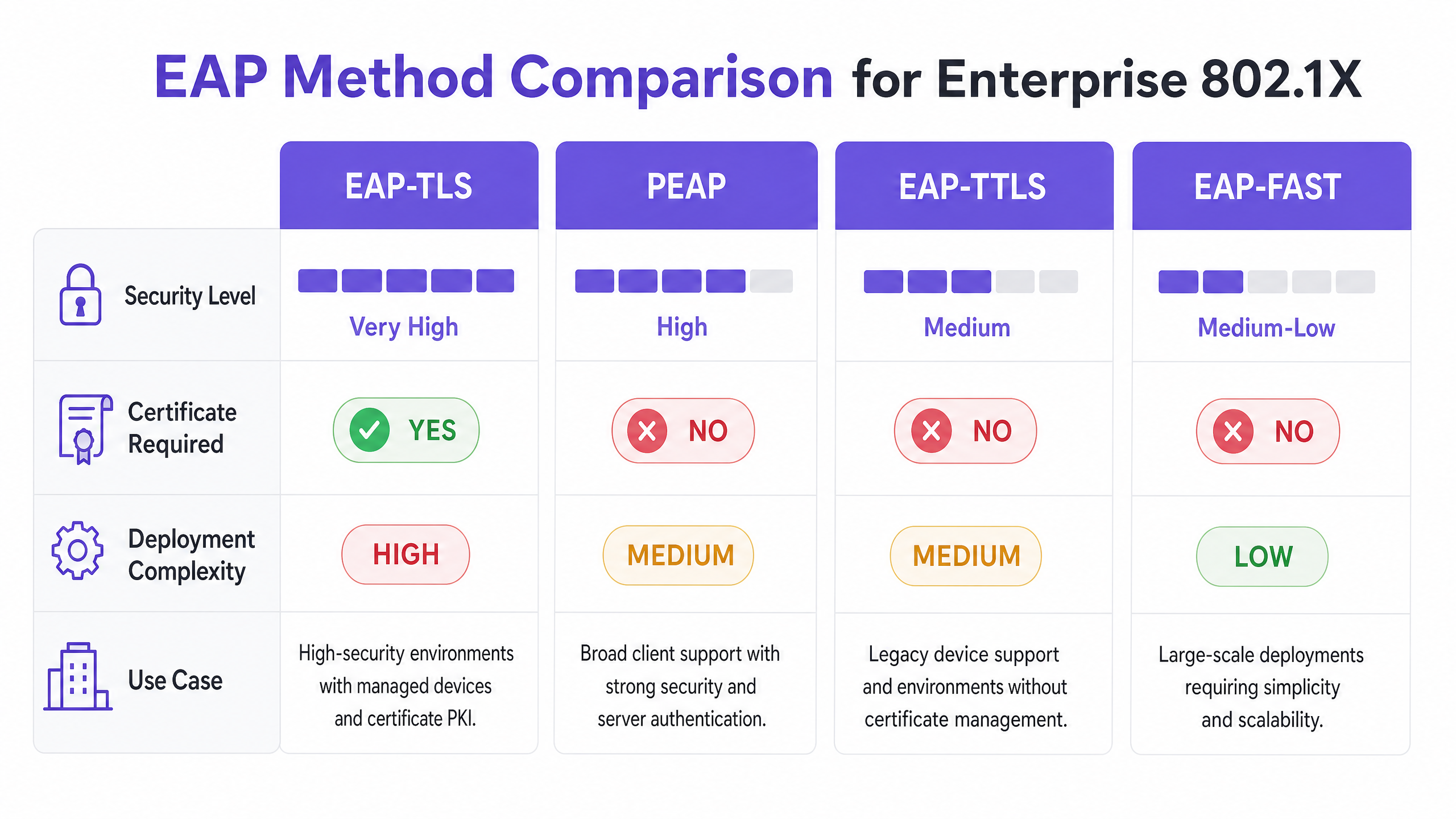
EAP è il meccanismo di trasporto per le credenziali di autenticazione effettive. La selezione del metodo EAP appropriato è una decisione architettonica critica, che bilancia i requisiti di sicurezza con la complessità dell'implementazione.
- EAP-TLS (Transport Layer Security): Lo standard d'oro per la sicurezza aziendale. Richiede sia un certificato server che un certificato client, fornendo autenticazione reciproca. Poiché si basa su certificati anziché password, è immune al phishing delle credenziali e agli attacchi a dizionario offline. Tuttavia, richiede una robusta infrastruttura a chiave pubblica (PKI) e una soluzione di gestione dei dispositivi mobili (MDM) per il provisioning e la gestione dei certificati client su larga scala.
- PEAP (Protected EAP): Il metodo più ampiamente implementato grazie al suo equilibrio tra sicurezza e facilità di implementazione. PEAP richiede un certificato solo sul server RADIUS. Stabilisce un tunnel TLS sicuro tra il supplicant e il server, all'interno del quale le credenziali dell'utente (nome utente e password) vengono trasmesse in modo sicuro. Una configurazione corretta richiede di bloccare il supplicant affinché si fidi solo del certificato specifico del server RADIUS per prevenire attacchi da AP non autorizzati.
- EAP-TTLS (Tunneled TLS): Simile a PEAP, stabilisce un tunnel sicuro utilizzando un certificato server. Tuttavia, EAP-TTLS supporta una gamma più ampia di protocolli di autenticazione interni, rendendolo adatto per ambienti con sistemi legacy o endpoint non Windows che non supportano MSCHAPv2.
- EAP-FAST (Flexible Authentication via Secure Tunneling): Sviluppato da Cisco come alternativa più veloce ai metodi basati su certificati. Utilizza Protected Access Credentials (PACs) stabiliti dinamicamente tra client e server. Sebbene efficiente, è meno comunemente implementato nelle architetture moderne, vendor-neutrali.
Infrastruttura e Integrazione RADIUS
Il server RADIUS è il motore di 802.1X. Le soluzioni aziendali comuni includono Microsoft Network Policy Server (NPS), FreeRADIUS e offerte commerciali come Cisco ISE o Aruba ClearPass. Il server RADIUS si integra con il provider di identità (IdP) dell'organizzazione, come Active Directory, Entra ID o Okta, per convalidare le credenziali.
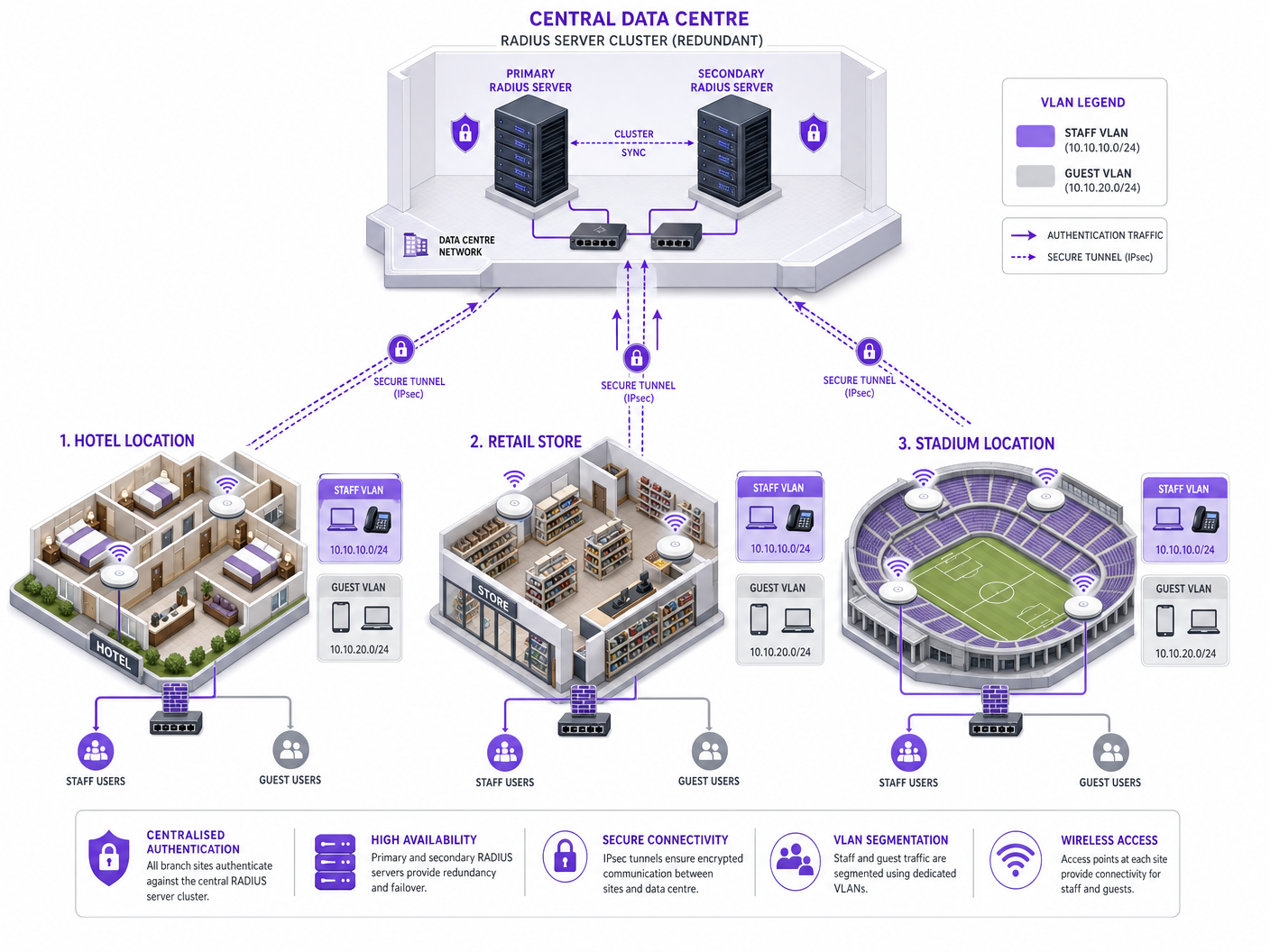
Fondamentalmente, il server RADIUS può restituire attributi specifici nel messaggio Access-Accept, consentendo la configurazione dinamica della rete. Il più potente di questi è l'assegnazione dinamica di VLAN. In base all'appartenenza al gruppo dell'utente o alla postura del dispositivo, il server RADIUS istruisce l'authenticator a posizionare la connessione in una VLAN specifica. Ciò consente una micro-segmentazione senza soluzione di continuità: un membro del personale viene inserito nella VLAN aziendale, un appaltatore in una VLAN con restrizioni e un dispositivo che non supera i controlli di postura in una VLAN di quarantena.
Guida all'Implementazione
L'implementazione di 802.1X in un'azienda multi-sito richiede un approccio graduale e metodico per ridurre al minimo le interruzioni.
Fase 1: Rilevamento e Profilazione della Rete
Prima di modificare qualsiasi configurazione, condurre un audit completo di tutti i dispositivi che si connettono alla rete. Ciò è particolarmente critico in ambienti come Hospitality e Retail , dove i dispositivi headless (stampanti, terminali POS, sensori IoT) sono prevalenti. Questi dispositivi tipicamente non dispongono di un supplicant 802.1X. È necessario identificarli e pianificare metodi di autenticazione alternativi, come MAC Authentication Bypass (MAB), assicurandosi che siano isolati in VLAN con restrizioni.
Fase 2: Infrastruttura RADIUSuzione dell'Architettura
Implementare un'architettura RADIUS ad alta disponibilità. Un singolo server RADIUS è un singolo punto di guasto che può compromettere l'intera rete aziendale. Implementare un cluster di server primario e secondario, idealmente distribuiti su data center o zone di disponibilità cloud distinte. Configurare gli autenticatori (AP e switch) per il failover automatico se il server primario diventa non responsivo.
Fase 3: Configurazione delle Policy e Segmentazione
Definire policy di accesso granulari all'interno del server RADIUS. Mappare i gruppi di Active Directory a VLAN e Access Control Lists (ACL) specifiche. Assicurarsi che le policy applichino il principio del privilegio minimo. Ad esempio, in un contesto Sanitario , il personale clinico dovrebbe avere accesso ai sistemi di registrazione dei pazienti, mentre il personale amministrativo è segmentato in una VLAN diversa con accesso solo ai sistemi di fatturazione.
Fase 4: Provisioning del Supplicante
Per le implementazioni PEAP, utilizzare i Group Policy Objects (GPO) o i profili MDM per distribuire le impostazioni di rete wireless richieste ai dispositivi gestiti. Fondamentalmente, configurare il profilo per convalidare rigorosamente il certificato del server e specificare i nomi esatti dei server RADIUS da considerare attendibili. Ciò impedisce agli utenti di connettersi inavvertitamente a punti di accesso non autorizzati.
Per i dispositivi non gestiti, fare riferimento alla nostra guida sulle Policy BYOD Sicure per le Reti WiFi del Personale per strategie su come integrare in modo sicuro i dispositivi personali senza compromettere la rete aziendale.
Fase 5: Rollout e Test a Fasi
Non eseguire mai un'implementazione "big bang". Iniziare con un gruppo pilota in una singola posizione. Monitorare meticolosamente i log RADIUS per i fallimenti di autenticazione. Testare i casi limite, inclusi il failover del server, la scadenza del certificato e il roaming tra i punti di accesso. Procedere a un rollout più ampio solo una volta che il pilota è stabile.
Best Practice
- Applicare la Validazione del Certificato del Server: Questo è il controllo di sicurezza più critico per le implementazioni PEAP. Se i supplicanti non convalidano il certificato del server, la rete è vulnerabile agli attacchi Man-in-the-Middle (MitM).
- Implementare l'Assegnazione Dinamica delle VLAN: Non fare affidamento su VLAN statiche per SSID. Utilizzare gli attributi RADIUS per assegnare dinamicamente le VLAN in base all'identità dell'utente, riducendo drasticamente la superficie di attacco.
- Proteggere i Dispositivi Headless con MAB: Utilizzare il MAC Authentication Bypass strettamente per i dispositivi che non supportano 802.1X. Assicurarsi che questi dispositivi siano collocati in VLAN fortemente ristrette, poiché gli indirizzi MAC sono facilmente spoofabili.
- Separare il Traffico Ospiti e Aziendale: Mantenere una rigorosa separazione logica tra le reti aziendali protette da 802.1X e le reti ospiti aperte o basate su portale. Per una gestione avanzata dell'accesso ospiti, considerare soluzioni come la piattaforma Guest WiFi di Purple.
Risoluzione dei Problemi e Mitigazione dei Rischi
Modalità di Guasto Comuni
- Scadenza del Certificato: Un certificato del server RADIUS scaduto causerà diffusi fallimenti di autenticazione per i client PEAP ed EAP-TLS. Implementare un robusto monitoraggio e avvisi per i periodi di validità dei certificati.
- Disallineamento dell'Orologio (Clock Skew): 802.1X si basa fortemente su una precisa sincronizzazione temporale, in particolare per la validazione dei certificati. Assicurarsi che tutti i componenti dell'infrastruttura (server RADIUS, IdP, AP) siano sincronizzati con una fonte NTP affidabile.
- Irraggiungibilità del Server RADIUS: Problemi di connettività di rete tra l'autenticatore e il server RADIUS comporteranno la negazione dell'accesso. Implementare percorsi di rete ridondanti e configurare gli AP con più IP di server RADIUS.
- Errata Configurazione del Supplicante: Supplicanti configurati in modo errato (ad esempio, metodo EAP sbagliato, CA radice mancante) sono una fonte comune di ticket per l'helpdesk. Utilizzare MDM per imporre configurazioni coerenti.
Strategie di Mitigazione dei Rischi
Per mitigare il rischio di tempi di inattività indotti dall'implementazione, stabilire una robusta traccia di audit per tutte le modifiche di configurazione all'infrastruttura RADIUS. Ciò garantisce rapide capacità di rollback in caso di un problema imprevisto.
ROI e Impatto Commerciale
L'implementazione di 802.1X offre un significativo valore aziendale oltre la conformità di base alla sicurezza:
- Riduzione dell'Overhead Operativo: Eliminando la necessità di ruotare le Pre-Shared Keys quando il personale lascia l'azienda o le chiavi vengono compromesse, i team IT risparmiano un tempo amministrativo significativo.
- Conformità Migliorata: 802.1X fornisce i controlli di accesso basati sull'identità necessari per soddisfare rigorosi quadri normativi (PCI DSS, HIPAA, GDPR), evitando multe costose e danni alla reputazione.
- Miglior Contenimento delle Minacce: L'assegnazione dinamica delle VLAN garantisce che, se un dispositivo viene compromesso, il raggio d'azione sia limitato a un segmento di rete specifico, prevenendo il movimento laterale all'interno dell'azienda.
- Approfondimenti Basati sui Dati: Se combinato con piattaforme come WiFi Analytics di Purple, i dati di identità forniti da 802.1X possono offrire approfondimenti dettagliati sull'utilizzo della rete e sulla pianificazione della capacità.
Definizioni chiave
Supplicant
The client device or software requesting access to the network.
Essential for understanding where the authentication request originates and how credentials are provided.
Authenticator
The network device (AP or switch) that acts as a gatekeeper, blocking access until authentication succeeds.
The authenticator does not verify credentials; it merely passes them to the RADIUS server.
RADIUS Server
Remote Authentication Dial-In User Service; the central server that validates credentials against an identity store.
The core decision engine of an 802.1X deployment.
EAP (Extensible Authentication Protocol)
A framework for transporting authentication credentials securely over the network.
Understanding EAP is crucial for selecting the right authentication method (e.g., PEAP vs. EAP-TLS).
Dynamic VLAN Assignment
The process where a RADIUS server instructs the authenticator to place a user in a specific VLAN based on their identity.
A key benefit of 802.1X, enabling automated network segmentation.
MAC Authentication Bypass (MAB)
A fallback authentication method that uses a device's MAC address as its credential.
Required for onboarding IoT and legacy devices that cannot support 802.1X.
PKI (Public Key Infrastructure)
The system used to issue, manage, and validate digital certificates.
A prerequisite for deploying EAP-TLS authentication.
Rogue AP Attack
An attack where a malicious access point impersonates the corporate network to harvest credentials.
Highlighting the importance of enforcing server certificate validation in PEAP deployments.
Esempi pratici
A 200-room hotel needs to secure its staff WiFi network. The current setup uses a single PSK for all staff devices (laptops, tablets) and IoT devices (smart thermostats, IP cameras). How should they transition to 802.1X?
- Deploy a redundant RADIUS infrastructure (e.g., FreeRADIUS) integrated with the hotel's Active Directory. 2. Audit all devices. 3. Configure the wireless controller to use 802.1X (PEAP-MSCHAPv2) for the staff SSID. 4. Push MDM profiles to staff laptops and tablets enforcing server certificate validation. 5. For IoT devices, configure MAC Authentication Bypass (MAB) on the RADIUS server, placing them in an isolated IoT VLAN. 6. Use RADIUS attributes to dynamically assign staff devices to the corporate VLAN upon successful authentication.
A retail chain is rolling out 802.1X across 50 stores. During the pilot phase in Store 1, users report intermittent authentication failures, particularly when moving between the stockroom and the shop floor.
The issue is likely related to roaming and re-authentication delays. The solution is to enable Fast BSS Transition (802.11r) and Opportunistic Key Caching (OKC) on the wireless controller and access points. This allows the client device to cache the Pairwise Master Key (PMK) derived during the initial 802.1X authentication, enabling rapid roaming between APs without requiring a full RADIUS round-trip.
Domande di esercitazione
Q1. Your organisation is migrating from PSK to 802.1X. You have a fleet of 5,000 corporate-owned Windows laptops managed via Microsoft Intune. You want the highest level of security to prevent credential theft. Which EAP method should you deploy?
Suggerimento: Consider which method eliminates the use of passwords entirely.
Visualizza risposta modello
EAP-TLS. Since the devices are corporate-owned and managed via Intune, you can leverage MDM to deploy client certificates at scale. EAP-TLS provides mutual authentication and is immune to password-based attacks like phishing or offline dictionary attacks.
Q2. During a security audit, it is discovered that users can connect to the corporate 802.1X network using their personal smartphones without any MDM profile installed. What is the primary security risk, and how should it be remediated?
Suggerimento: Think about how PEAP validates the server.
Visualizza risposta modello
The primary risk is a Man-in-the-Middle (MitM) or Rogue AP attack. If users manually configure the connection, they often accept any server certificate presented to them. To remediate this, the organisation must enforce a policy where only managed devices (with an MDM profile that strictly validates the specific RADIUS server certificate) are allowed on the corporate SSID. Personal devices should be directed to a separate BYOD or Guest network.
Q3. A remote branch office loses WAN connectivity to the central data centre where the primary and secondary RADIUS servers reside. What happens to the wireless clients at the branch office?
Suggerimento: Consider where the authentication decision is made.
Visualizza risposta modello
New clients attempting to connect will fail authentication because the authenticator (AP) cannot reach the RADIUS server to validate credentials. Existing connected clients may remain connected until their session times out or they need to re-authenticate (e.g., roaming to a new AP), at which point they will also lose access. To mitigate this, survivable branch architectures often deploy a local, read-only domain controller and a local RADIUS proxy or server at critical branch sites.