
Autenticação 802.1X Explicada para Redes Corporativas
Este guia autorizado fornece a líderes de TI e arquitetos de rede uma análise técnica aprofundada da autenticação 802.1X para redes corporativas. Abrange arquitetura, métodos EAP, estratégias de implementação e mitigação de riscos para garantir acesso WiFi seguro e compatível em ambientes multi-site.
Ouça este guia
Ver transcrição do podcast
Resumo Executivo
Para ambientes empresariais que abrangem operações de hotelaria, retalho e setor público, o perímetro dissolveu-se. Forças de trabalho híbridas, políticas BYOD e uma explosão de dispositivos conectados significam que proteger redes corporativas através de Chaves Pré-Partilhadas (PSKs) já não é uma estratégia viável. Os modernos frameworks de conformidade — incluindo PCI DSS v4.0 e GDPR — exigem controlos de acesso rigorosos baseados em identidade para qualquer rede que lide com dados sensíveis.
Este guia detalha a arquitetura e implementação do IEEE 802.1X, o padrão para controlo de acesso à rede baseado em porta. Ao mudar a autenticação de uma palavra-passe partilhada para uma identidade verificada, apoiada por uma infraestrutura RADIUS central, as organizações podem impor segmentação dinâmica, mitigar o roubo de credenciais e garantir que apenas dispositivos autorizados acedem aos recursos corporativos. Projetado para arquitetos de rede e diretores de TI, este documento fornece a profundidade técnica necessária para arquitetar, implementar e resolver problemas de 802.1X em topologias complexas e multi-site.
Análise Técnica Aprofundada
A Arquitetura 802.1X
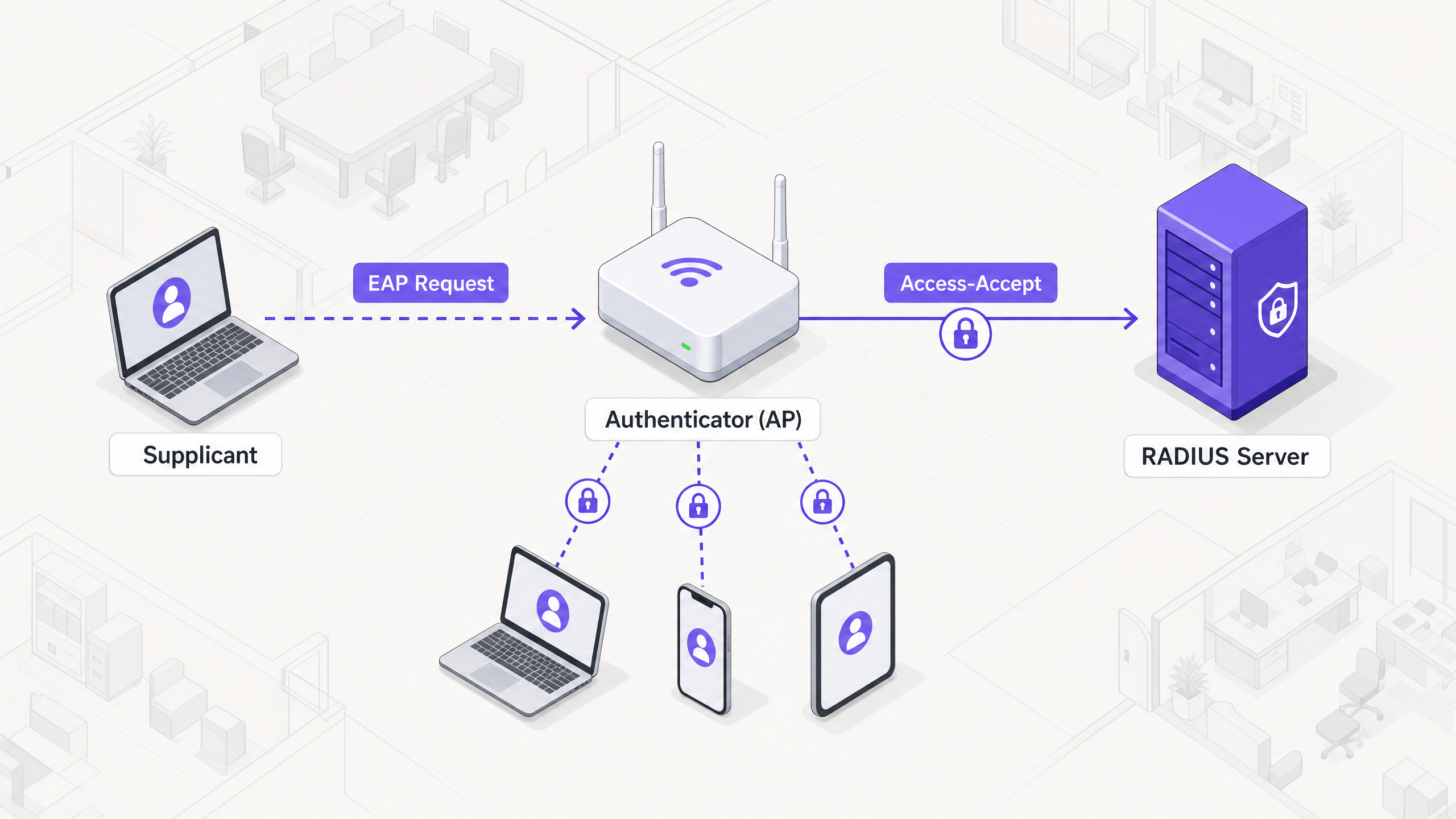
O framework 802.1X baseia-se em três componentes distintos que trabalham em conjunto para proteger o acesso à rede:
- Supplicant: O dispositivo de endpoint (por exemplo, portátil, smartphone) que solicita acesso à rede.
- Authenticator: O dispositivo de rede (tipicamente um ponto de acesso wireless ou switch) que controla o acesso físico ou lógico à rede.
- Authentication Server: A base de dados central (quase exclusivamente um servidor RADIUS) que valida as credenciais do supplicant e autoriza o acesso.
Quando um supplicant tenta conectar-se a um SSID protegido por 802.1X, o authenticator coloca a conexão num estado não autorizado, bloqueando todo o tráfego, exceto os frames do Extensible Authentication Protocol (EAP). O authenticator atua como um pass-through, encapsulando mensagens EAP do supplicant em pacotes RADIUS e encaminhando-os para o servidor de autenticação.
Métodos do Extensible Authentication Protocol (EAP)
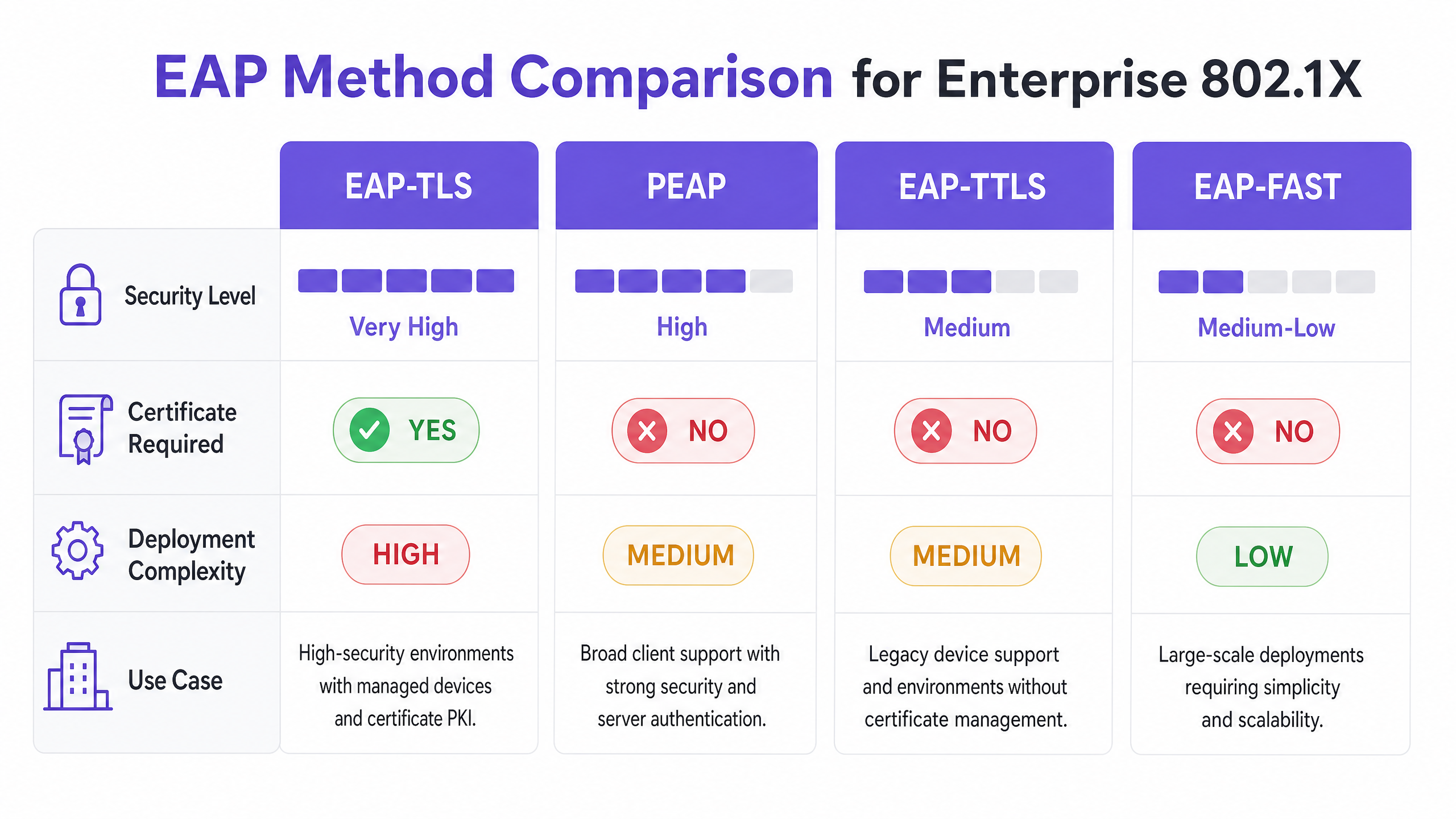
EAP é o mecanismo de transporte para as credenciais de autenticação reais. A seleção do método EAP apropriado é uma decisão arquitetónica crítica, equilibrando os requisitos de segurança com a complexidade da implementação.
- EAP-TLS (Transport Layer Security): O padrão ouro para segurança empresarial. Requer um certificado de servidor e um certificado de cliente, fornecendo autenticação mútua. Como se baseia em certificados em vez de palavras-passe, é imune a phishing de credenciais e ataques de dicionário offline. No entanto, requer uma robusta Public Key Infrastructure (PKI) e uma solução Mobile Device Management (MDM) para provisionar e gerir certificados de cliente em escala.
- PEAP (Protected EAP): O método mais amplamente implementado devido ao seu equilíbrio entre segurança e facilidade de implementação. O PEAP requer um certificado apenas no servidor RADIUS. Estabelece um túnel TLS seguro entre o supplicant e o servidor, dentro do qual as credenciais do utilizador (nome de utilizador e palavra-passe) são transmitidas de forma segura. A configuração adequada exige que o supplicant confie apenas no certificado específico do servidor RADIUS para prevenir ataques de APs maliciosos.
- EAP-TTLS (Tunneled TLS): Semelhante ao PEAP, estabelece um túnel seguro usando um certificado de servidor. No entanto, o EAP-TTLS suporta uma gama mais ampla de protocolos de autenticação internos, tornando-o adequado para ambientes com sistemas legados ou endpoints não-Windows que não suportam MSCHAPv2.
- EAP-FAST (Flexible Authentication via Secure Tunneling): Desenvolvido pela Cisco como uma alternativa mais rápida aos métodos baseados em certificados. Utiliza Protected Access Credentials (PACs) estabelecidas dinamicamente entre o cliente e o servidor. Embora eficiente, é menos comummente implementado em arquiteturas modernas e neutras em relação ao fornecedor.
Infraestrutura e Integração RADIUS
O servidor RADIUS é o motor do 802.1X. As soluções empresariais comuns incluem Microsoft Network Policy Server (NPS), FreeRADIUS e ofertas comerciais como Cisco ISE ou Aruba ClearPass. O servidor RADIUS integra-se com o provedor de identidade (IdP) da organização — como Active Directory, Entra ID ou Okta — para validar credenciais.
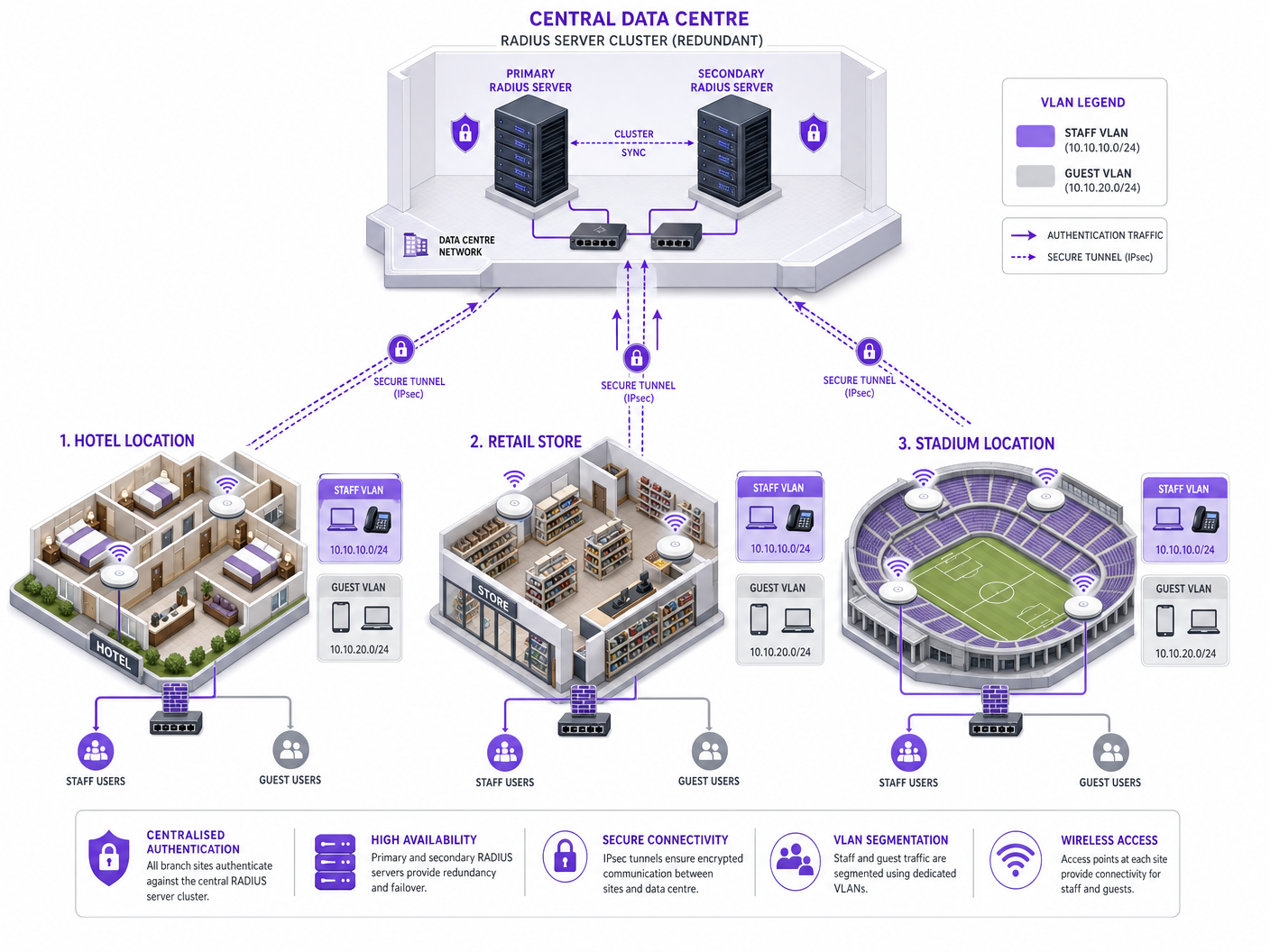
Crucialmente, o servidor RADIUS pode retornar atributos específicos na mensagem Access-Accept, permitindo a configuração dinâmica da rede. O mais poderoso destes é a atribuição dinâmica de VLAN. Com base na associação do utilizador a um grupo ou na postura do dispositivo, o servidor RADIUS instrui o authenticator a colocar a conexão numa VLAN específica. Isso permite uma micro-segmentação perfeita: um membro da equipa é colocado na VLAN corporativa, um contratado numa VLAN restrita e um dispositivo que falha nas verificações de postura numa VLAN de quarentena.
Guia de Implementação
A implementação do 802.1X numa empresa multi-site requer uma abordagem faseada e metódica para minimizar a interrupção.
Fase 1: Descoberta e Criação de Perfis de Rede
Antes de alterar qualquer configuração, realize uma auditoria abrangente de todos os dispositivos que se conectam à rede. Isso é particularmente crítico em ambientes como Hospitality e Retail , onde dispositivos sem interface (impressoras, terminais POS, sensores IoT) são prevalentes. Estes dispositivos normalmente não possuem um supplicant 802.1X. Deve identificá-los e planear métodos de autenticação alternativos, como MAC Authentication Bypass (MAB), garantindo que são isolados em VLANs restritas.
Fase 2: Infraestrutura RADIUSImplementação da Arquitetura
Implemente uma arquitetura RADIUS de alta disponibilidade. Um único servidor RADIUS é um ponto único de falha que pode derrubar toda a rede corporativa. Implemente um cluster de servidores primário e secundário, idealmente distribuído por centros de dados distintos ou zonas de disponibilidade na cloud. Configure os autenticadores (APs e switches) para fazer failover automaticamente se o servidor primário deixar de responder.
Fase 3: Configuração e Segmentação de Políticas
Defina políticas de acesso granulares dentro do servidor RADIUS. Mapeie grupos do Active Directory para VLANs e Access Control Lists (ACLs) específicas. Garanta que as políticas aplicam o princípio do menor privilégio. Por exemplo, num ambiente de Saúde , o pessoal clínico deve ter acesso a sistemas de registos de pacientes, enquanto o pessoal administrativo é segmentado numa VLAN diferente com acesso apenas a sistemas de faturação.
Fase 4: Provisionamento de Suplicantes
Para implementações PEAP, utilize Group Policy Objects (GPOs) ou perfis MDM para enviar as configurações de rede sem fios necessárias para os dispositivos geridos. Crucialmente, configure o perfil para validar rigorosamente o certificado do servidor e especifique os nomes exatos dos servidores RADIUS a confiar. Isto impede que os utilizadores se conectem inadvertidamente a pontos de acesso não autorizados.
Para dispositivos não geridos, consulte o nosso guia sobre Políticas BYOD Seguras para Redes WiFi de Funcionários para estratégias de integração segura de dispositivos pessoais sem comprometer a rede corporativa.
Fase 5: Implementação Faseada e Testes
Nunca execute uma implementação "big bang". Comece com um grupo piloto numa única localização. Monitorize os registos RADIUS meticulosamente para falhas de autenticação. Teste casos extremos, incluindo failover de servidor, expiração de certificado e roaming entre pontos de acesso. Só avance para uma implementação mais ampla quando o piloto estiver estável.
Boas Práticas
- Imponha a Validação do Certificado do Servidor: Este é o controlo de segurança mais crítico para implementações PEAP. Se os suplicantes não validarem o certificado do servidor, a rede fica vulnerável a ataques Man-in-the-Middle (MitM).
- Implemente Atribuição Dinâmica de VLAN: Não dependa de VLANs estáticas por SSID. Utilize atributos RADIUS para atribuir VLANs dinamicamente com base na identidade do utilizador, reduzindo drasticamente a superfície de ataque.
- Proteja Dispositivos Headless com MAB: Utilize o MAC Authentication Bypass estritamente para dispositivos que não suportam 802.1X. Garanta que estes dispositivos são colocados em VLANs fortemente restritas, uma vez que os endereços MAC são facilmente falsificados.
- Separe o Tráfego de Convidados e Corporativo: Mantenha uma separação lógica rigorosa entre redes corporativas seguras com 802.1X e redes de convidados abertas ou baseadas em portal. Para gestão avançada de acesso de convidados, considere soluções como a plataforma Guest WiFi da Purple.
Resolução de Problemas e Mitigação de Riscos
Modos de Falha Comuns
- Expiração do Certificado: Um certificado de servidor RADIUS expirado causará falhas de autenticação generalizadas para clientes PEAP e EAP-TLS. Implemente monitorização e alertas robustos para os períodos de validade dos certificados.
- Desvio de Relógio: O 802.1X depende fortemente da precisão da hora, particularmente para a validação de certificados. Garanta que todos os componentes da infraestrutura (servidores RADIUS, IdPs, APs) estão sincronizados com uma fonte NTP fiável.
- Inacessibilidade do Servidor RADIUS: Problemas de conectividade de rede entre o autenticador e o servidor RADIUS resultarão na negação de acesso. Implemente caminhos de rede redundantes e configure os APs com múltiplos IPs de servidor RADIUS.
- Má Configuração do Suplicante: Suplicantes configurados incorretamente (por exemplo, método EAP errado, CA raiz em falta) são uma fonte comum de tickets de suporte. Utilize MDM para impor configurações consistentes.
Estratégias de Mitigação de Riscos
Para mitigar o risco de tempo de inatividade induzido pela implementação, estabeleça um registo de auditoria robusto para todas as alterações de configuração na infraestrutura RADIUS. Isto garante capacidades de reversão rápidas em caso de um problema imprevisto.
ROI e Impacto no Negócio
A implementação de 802.1X oferece um valor de negócio significativo para além da conformidade básica de segurança:
- Redução de Custos Operacionais: Ao eliminar a necessidade de rodar Chaves Pré-Partilhadas quando os funcionários saem ou as chaves são comprometidas, as equipas de TI poupam um tempo administrativo significativo.
- Conformidade Melhorada: O 802.1X fornece os controlos de acesso baseados em identidade necessários para cumprir quadros regulamentares rigorosos (PCI DSS, HIPAA, GDPR), evitando multas dispendiosas e danos à reputação.
- Melhor Contenção de Ameaças: A atribuição dinâmica de VLAN garante que, se um dispositivo for comprometido, o raio de impacto é limitado a um segmento de rede específico, impedindo o movimento lateral em toda a empresa.
- Insights Baseados em Dados: Quando combinado com plataformas como o WiFi Analytics da Purple, os dados de identidade fornecidos pelo 802.1X podem oferecer insights profundos sobre a utilização da rede e o planeamento de capacidade.
Definições Principais
Supplicant
The client device or software requesting access to the network.
Essential for understanding where the authentication request originates and how credentials are provided.
Authenticator
The network device (AP or switch) that acts as a gatekeeper, blocking access until authentication succeeds.
The authenticator does not verify credentials; it merely passes them to the RADIUS server.
RADIUS Server
Remote Authentication Dial-In User Service; the central server that validates credentials against an identity store.
The core decision engine of an 802.1X deployment.
EAP (Extensible Authentication Protocol)
A framework for transporting authentication credentials securely over the network.
Understanding EAP is crucial for selecting the right authentication method (e.g., PEAP vs. EAP-TLS).
Dynamic VLAN Assignment
The process where a RADIUS server instructs the authenticator to place a user in a specific VLAN based on their identity.
A key benefit of 802.1X, enabling automated network segmentation.
MAC Authentication Bypass (MAB)
A fallback authentication method that uses a device's MAC address as its credential.
Required for onboarding IoT and legacy devices that cannot support 802.1X.
PKI (Public Key Infrastructure)
The system used to issue, manage, and validate digital certificates.
A prerequisite for deploying EAP-TLS authentication.
Rogue AP Attack
An attack where a malicious access point impersonates the corporate network to harvest credentials.
Highlighting the importance of enforcing server certificate validation in PEAP deployments.
Exemplos Práticos
A 200-room hotel needs to secure its staff WiFi network. The current setup uses a single PSK for all staff devices (laptops, tablets) and IoT devices (smart thermostats, IP cameras). How should they transition to 802.1X?
- Deploy a redundant RADIUS infrastructure (e.g., FreeRADIUS) integrated with the hotel's Active Directory. 2. Audit all devices. 3. Configure the wireless controller to use 802.1X (PEAP-MSCHAPv2) for the staff SSID. 4. Push MDM profiles to staff laptops and tablets enforcing server certificate validation. 5. For IoT devices, configure MAC Authentication Bypass (MAB) on the RADIUS server, placing them in an isolated IoT VLAN. 6. Use RADIUS attributes to dynamically assign staff devices to the corporate VLAN upon successful authentication.
A retail chain is rolling out 802.1X across 50 stores. During the pilot phase in Store 1, users report intermittent authentication failures, particularly when moving between the stockroom and the shop floor.
The issue is likely related to roaming and re-authentication delays. The solution is to enable Fast BSS Transition (802.11r) and Opportunistic Key Caching (OKC) on the wireless controller and access points. This allows the client device to cache the Pairwise Master Key (PMK) derived during the initial 802.1X authentication, enabling rapid roaming between APs without requiring a full RADIUS round-trip.
Perguntas de Prática
Q1. Your organisation is migrating from PSK to 802.1X. You have a fleet of 5,000 corporate-owned Windows laptops managed via Microsoft Intune. You want the highest level of security to prevent credential theft. Which EAP method should you deploy?
Dica: Consider which method eliminates the use of passwords entirely.
Ver resposta modelo
EAP-TLS. Since the devices are corporate-owned and managed via Intune, you can leverage MDM to deploy client certificates at scale. EAP-TLS provides mutual authentication and is immune to password-based attacks like phishing or offline dictionary attacks.
Q2. During a security audit, it is discovered that users can connect to the corporate 802.1X network using their personal smartphones without any MDM profile installed. What is the primary security risk, and how should it be remediated?
Dica: Think about how PEAP validates the server.
Ver resposta modelo
The primary risk is a Man-in-the-Middle (MitM) or Rogue AP attack. If users manually configure the connection, they often accept any server certificate presented to them. To remediate this, the organisation must enforce a policy where only managed devices (with an MDM profile that strictly validates the specific RADIUS server certificate) are allowed on the corporate SSID. Personal devices should be directed to a separate BYOD or Guest network.
Q3. A remote branch office loses WAN connectivity to the central data centre where the primary and secondary RADIUS servers reside. What happens to the wireless clients at the branch office?
Dica: Consider where the authentication decision is made.
Ver resposta modelo
New clients attempting to connect will fail authentication because the authenticator (AP) cannot reach the RADIUS server to validate credentials. Existing connected clients may remain connected until their session times out or they need to re-authenticate (e.g., roaming to a new AP), at which point they will also lose access. To mitigate this, survivable branch architectures often deploy a local, read-only domain controller and a local RADIUS proxy or server at critical branch sites.