
Cos'è EAP-TLS? Autenticazione WiFi basata su certificati spiegata
Questa guida fornisce un riferimento tecnico completo su EAP-TLS (Extensible Authentication Protocol with Transport Layer Security), il metodo di autenticazione 802.1X più sicuro disponibile per il WiFi aziendale. Copre l'infrastruttura di certificati X.509 richiesta, l'handshake di autenticazione reciproca e i modelli di implementazione pratici per ambienti di ospitalità, vendita al dettaglio, sanità e settore pubblico. I responsabili IT, gli architetti di rete e i CTO troveranno indicazioni pratiche sulla progettazione PKI, il provisioning di certificati integrato con MDM, la configurazione RADIUS e l'allineamento della conformità con PCI DSS e GDPR.
Ascolta questa guida
Visualizza trascrizione del podcast
Riepilogo Esecutivo
EAP-TLS (Extensible Authentication Protocol – Transport Layer Security) è il metodo di autenticazione IEEE 802.1X che elimina completamente le credenziali condivise dalla catena di autenticazione wireless. Laddove PEAP ed EAP-TTLS si basano su nomi utente e password trasmessi tramite un tunnel crittografato, EAP-TLS richiede che sia il dispositivo client che il server RADIUS presentino certificati X.509 validi emessi da un'Autorità di Certificazione (CA) fidata. Questo modello di autenticazione reciproca significa che una password rubata è irrilevante — senza un certificato valido e non revocato, un dispositivo non può unirsi alla rete.
Per gli operatori di strutture che gestiscono Guest WiFi in hotel, proprietà commerciali o centri congressi, e per i team IT responsabili delle reti per il personale e i dispositivi IoT, EAP-TLS rappresenta il massimo attuale della sicurezza dell'autenticazione wireless. È obbligatorio o fortemente raccomandato da PCI DSS 4.0 per gli ambienti di dati dei titolari di carta, da HIPAA per le reti wireless sanitarie, ed è il metodo richiesto per le implementazioni WPA3 Enterprise 192-bit (Suite B).
Il sovraccarico di implementazione è reale — la gestione del ciclo di vita dei certificati, l'infrastruttura PKI e l'integrazione MDM non sono banali — ma il ROI in termini di sicurezza è sostanziale. Questa guida illustra l'architettura, l'handshake, i modelli di implementazione e le pratiche operative che determinano il successo o il fallimento di un'implementazione EAP-TLS.
Approfondimento Tecnico
Cosa fa realmente EAP-TLS
EAP-TLS opera all'interno del framework di controllo degli accessi basato su porta 802.1X. I tre attori in ogni scambio di autenticazione sono il supplicant (il dispositivo client), l'authenticator (l'access point wireless o lo switch gestito) e l'authentication server (tipicamente un server RADIUS come FreeRADIUS, Microsoft NPS o Cisco ISE). L'access point non prende decisioni di autenticazione da solo — agisce come un relè trasparente, incapsulando i messaggi EAP in pacchetti RADIUS e inoltrandoli al server di autenticazione.
Per una comprensione più approfondita di come RADIUS sia alla base di questa architettura, vedere Cos'è RADIUS? Come i server RADIUS proteggono le reti WiFi .
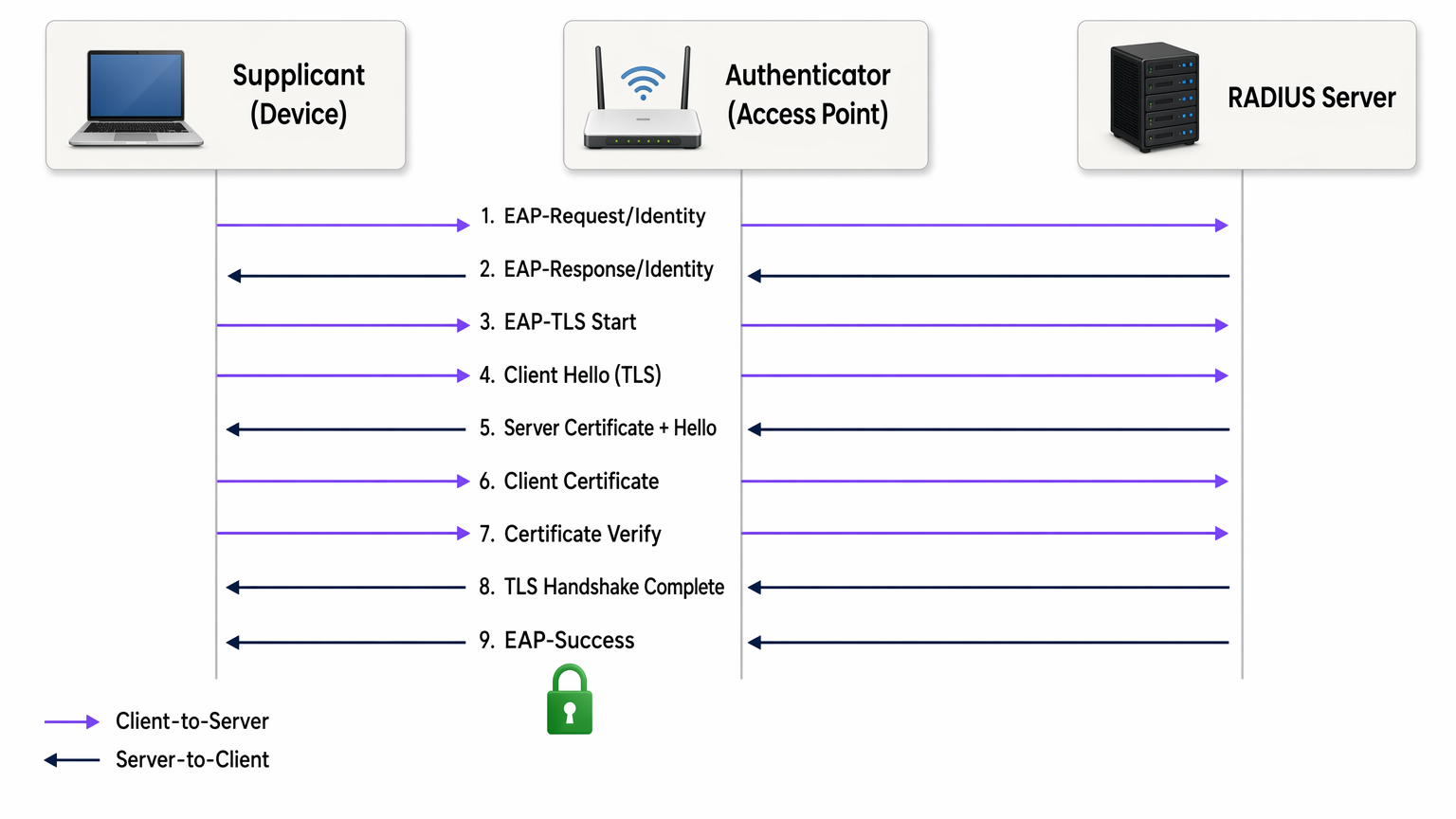
L'handshake EAP-TLS procede come segue:
- L'access point invia un EAP-Request/Identity al dispositivo che si connette.
- Il dispositivo risponde con la sua identità (comunemente un'identità esterna anonima per proteggere il nome utente dall'intercettazione).
- Il server RADIUS avvia l'handshake TLS con un messaggio EAP-TLS/Start.
- Il client invia un ClientHello, pubblicizzando le sue suite di cifratura TLS supportate.
- Il server RADIUS risponde con ServerHello, il suo certificato server X.509 e una richiesta di certificato.
- Il client convalida il certificato server rispetto al suo archivio CA radice fidata. Se la convalida fallisce, l'handshake termina — proteggendo dagli access point non autorizzati.
- Il client presenta il proprio certificato client X.509.
- Il server RADIUS convalida il certificato client: controlla la catena di firma fino alla CA radice fidata, verifica che il certificato non sia scaduto e controlla la Certificate Revocation List (CRL) o interroga il responder OCSP per confermare che il certificato non sia stato revocato.
- Entrambe le parti derivano le chiavi di sessione dal master secret TLS. Il server RADIUS invia un EAP-Success e l'access point apre la porta controllata.
L'intero scambio avviene prima che al dispositivo venga concesso qualsiasi accesso alla rete. Non viene trasmessa alcuna password in nessun momento. Le chiavi di sessione derivate sono uniche per sessione, fornendo perfect forward secrecy quando si utilizzano suite di cifratura ECDHE — il che significa che il traffico storico non può essere decifrato anche se un certificato viene successivamente compromesso.
Certificati X.509 e Architettura PKI
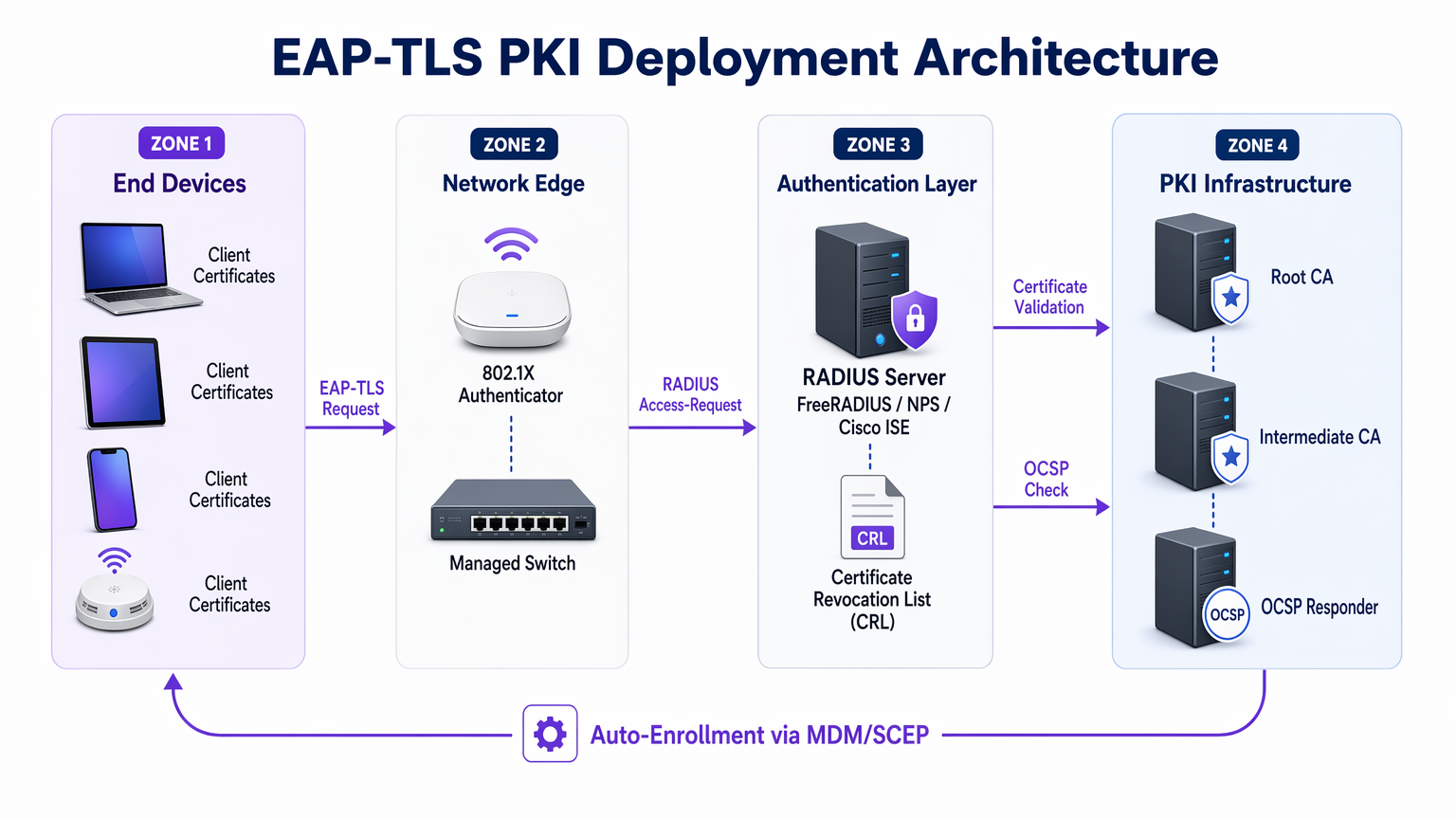
La sicurezza di EAP-TLS dipende interamente dall'integrità della PKI sottostante. Una tipica PKI aziendale per EAP-TLS è composta da tre livelli:
| Livello | Componente | Ruolo |
|---|---|---|
| CA radice | Autorità di certificazione radice offline | Firma i certificati CA intermedi; mantenuta isolata (air-gapped) |
| CA intermedia | CA di emissione online | Emette certificati server e client; gestisce la pubblicazione della CRL |
| Entità finali | Certificato server RADIUS + certificati client | Utilizzato nell'handshake di autenticazione in tempo reale |
La CA radice dovrebbe essere mantenuta offline e isolata (air-gapped). La sua chiave privata, se compromessa, invalida l'intera gerarchia di certificati. La CA intermedia gestisce l'emissione quotidiana e pubblica la CRL. I certificati client vengono emessi per singoli dispositivi (non utenti), tipicamente con un Subject Alternative Name (SAN) contenente l'indirizzo MAC del dispositivo o un identificatore del dispositivo dal tuo MDM.
EAP-TLS vs. Altri Metodi 802.1X
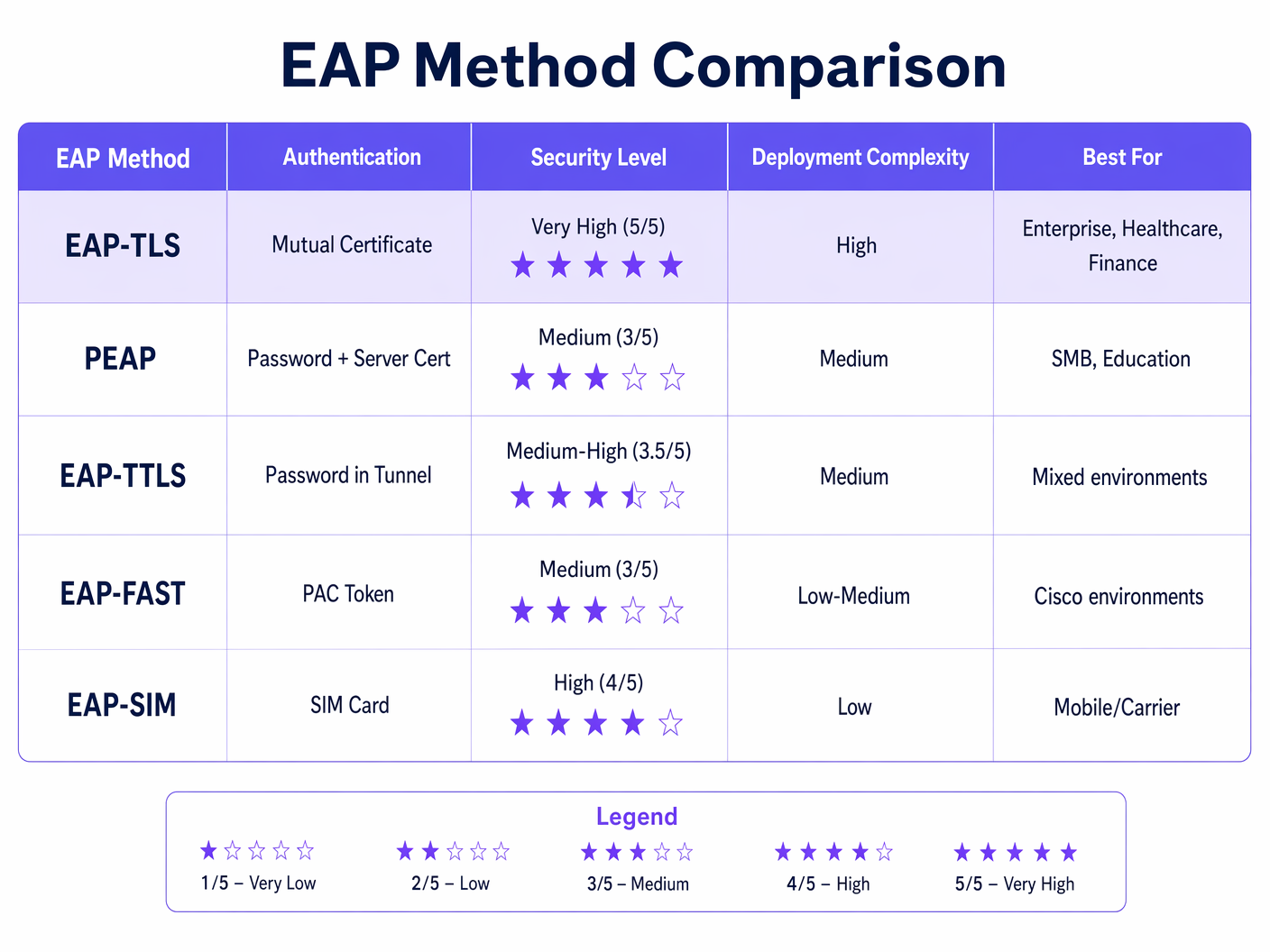
La tabella sopra illustra perché EAP-TLS è la scelta raccomandata per gli ambienti regolamentati. PEAP-MSCHAPv2, ancora il metodo 802.1X più ampiamente implementato, presenta vulnerabilità note: il certificato server non viene frequentemente convalidato dai client (una misconfigurazione che abilita attacchi AP non autorizzati), e MSCHAPv2 stesso è stato crittograficamente violato dal 2012. EAP-TLS elimina entrambe le superfici di attacco.
WPA2 Enterprise e WPA3 Enterprise
EAP-TLS opera in modo identico sia su WPA2 Enterprise (IEEE 802.11i) che su WPA3 Enterprise (IEEE 802.11ax). La distinzione risiede nella suite di cifratura negoziata per il livello di crittografia dei dati wireless. WPA3 Enterprise impone i Protected Management Frames (PMF) e offre una modalità di sicurezza opzionale a 192 bit (Suite B) che richiede EAP-TLS con specifiche suite di cifratura a curva ellittica (ECDHE + ECDSA o RSA-3072). Per la maggior parte delle implementazioni aziendali, WPA3 Enterprise con EAP-TLS e suite di cifratura standard AES-256 è lo stato target appropriato.
Guida all'Implementazione
Fase 1: Progettazione e Implementazione della PKI
Prima di configurare un singolo access point, la PKI deve essere operativa. Per le organizzazioni senza una CA interna esistente, Microsoft Active Directory Certificate Services (AD CS) è la scelta più comune negli ambienti Windows. Per implementazioni multipiattaforma o cloud-native, HashiCorp Vault PKI, EJBCA o un servizio PKI gestito come AWS Private CA sono alternative valide.
Decisioni chiave in questa fase:
- Periodo di validità del certificato: I certificati client di 1-2 anni bilanciano sicurezza e onere operativo. Periodi più brevi aumentano gli eventi di revoca; periodi più lunghi aumentano la finestra di esposizione per un certificato compromesso.
- Algoritmo chiave: RSA-2048 rimane ampiamente supportato. ECDSA P-256 offre una sicurezza equivalente con dimensioni del certificato inferiori e handshake più veloci — consigliato per nuove implementazioni.
- CRL vs. OCSP: La distribuzione CRL è più semplice da implementare ma introduce problemi di latenza e caching. OCSP fornisce lo stato di revoca in tempo reale. Per ambienti ad alta sicurezza, l'OCSP stapling sul server RADIUS è l'approccio preferito.
Fase 2: Configurazione del Server RADIUS
Il tuo server RADIUS deve essere configurato per:
- Presentare il proprio certificato server (emesso dalla tua CA interna) ai client che si connettono.
- Fidarsi solo delle tue CA radice e intermedie interne per la convalida dei certificati client — non fidarsi delle CA pubbliche per l'autenticazione client.
- Eseguire controlli CRL o OCSP su ogni certificato client presentato.
- Mappare gli attributi del certificato (Common Name, SAN o estensioni OID) alle regole della policy di rete — ad esempio, assegnando i dispositivi a VLAN specifiche in base agli attributi del certificato.
Per una guida dettagliata sull'architettura e la configurazione del server RADIUS, consulta Cos'è RADIUS? Come i server RADIUS proteggono le reti WiFi .
Fase 3: Distribuzione dei Certificati tramite MDM/SCEP
L'installazione manuale dei certificati non è scalabile. Per qualsiasi implementazione che superi pochi dispositivi, il provisioning dei certificati deve essere automatizzato. L'approccio standard è:
- Dispositivi aziendali gestiti: Integra la tua PKI con la tua piattaforma MDM (Microsoft Intune, Jamf, VMware Workspace ONE). Configura un profilo SCEP o EST che richieda e installi automaticamente un certificato client quando un dispositivo si registra. Il certificato è legato al TPM o Secure Enclave del dispositivo, ove supportato, impedendo l'esportazione del certificato.
- Dispositivi BYOD e di appaltatori: Implementa un portale di onboarding (come il portale Guest di Cisco ISE o una soluzione BYOD dedicata) che guidi l'utente attraverso un processo di installazione del certificato una tantum. Emetti certificati con periodi di validità più brevi e limita l'accesso alla rete tramite policy VLAN.
- Dispositivi IoT e headless: Utilizza SCEP con password di sfida pre-condivise o EST con credenziali di bootstrap. Il rinnovo del certificato dovrebbe essere automatizzato tramite lo stesso protocollo prima della scadenza.
Fase 4: Configurazione dell'Access Point e dell'SSID
Configura l'SSID aziendale con:
- Sicurezza: WPA2 Enterprise o WPA3 Enterprise (802.1X)
- Tipo EAP: EAP-TLS
- Server RADIUS: Punta al tuo server di autenticazione con segreto condiviso
- Assegnazione VLAN: Abilita l'assegnazione dinamica di VLAN tramite attributi RADIUS (Tunnel-Type, Tunnel-Medium-Type, Tunnel-Private-Group-ID)
- PMF: Obbligatorio per WPA3; fortemente raccomandato per WPA2
Fase 5: Configurazione del Supplicante Client
Per i dispositivi Windows gestiti tramite Group Policy o Intune, implementa una policy di rete cablata/wireless che specifichi EAP-TLS, la CA radice fidata e i criteri di selezione del certificato. Su macOS e iOS, implementa un profilo di configurazione. Su Android, usa il profilo WiFi gestito da MDM. Fondamentale, applica la convalida del certificato server — specifica la CA esatta e il nome del server. Lasciare questa opzione deselezionata è la singola misconfigurazione più comune nelle implementazioni 802.1X.
Best Practice
Applica la convalida del certificato server su tutti i supplicanti. La misconfigurazione più sfruttabile nelle implementazioni 802.1X è rappresentata dai client che accettano qualsiasi certificato server, consentendo attacchi da access point non autorizzati. Ogni profilo WiFi distribuito tramite MDM dovrebbe specificare la CA fidata e il nome del server previsto (CN o SAN).
Automatizza il rinnovo dei certificati prima della scadenza. Imposta il monitoraggio per avvisare quando i certificati sono entro 30 giorni dalla scadenza. Configura il rinnovo automatico SCEP o EST in modo che i dispositivi rinnovino i certificati senza intervento dell'utente. Un evento di scadenza massiva dei certificati è uno degli incidenti più dirompenti che un team di rete aziendale possa affrontare.
Implementa OCSP anziché CRL ove possibile. I file CRL possono diventare grandi e vengono memorizzati nella cache dai client, il che significa che un certificato recentemente revocato potrebbe essere ancora accettato fino alla scadenza della cache. OCSP fornisce lo stato in tempo reale ed è il meccanismo di revoca preferito per ambienti ad alta sicurezza.
Segmenta la tua PKI. Utilizza CA intermedie separate per diverse classi di certificati: una per i certificati del server RADIUS, una per i certificati dei dispositivi client, una per i certificati utente. Ciò limita il raggio d'azione di una compromissione della CA e semplifica la policy di revoca.
Registra e monitora gli eventi di autenticazione. Il tuo server RADIUS genera un log di autenticazione per ogni tentativo di connessione. Inserisci questi log nel tuo SIEM. Schemi come ripetuti fallimenti di autenticazione, errori di convalida del certificato o connessioni da indirizzi MAC inattesi sono indicatori precoci di misconfigurazione o attacco.
Allineati con PCI DSS 4.0. Il requisito 8.6 impone un'autenticazione forte per i componenti di sistema. Per le reti wireless rientranti nell'ambito PCI DSS, EAP-TLS con autenticazione basata su certificatotificazione soddisfa il requisito per l'autenticazione a più fattori a livello di rete, poiché il certificato (qualcosa che si possiede) combinato con la chiave privata legata al TPM del dispositivo (qualcosa che si è) costituisce due fattori.
Risoluzione dei problemi e mitigazione del rischio
Modalità di errore comuni
| Modalità di errore | Sintomo | Causa principale | Risoluzione |
|---|---|---|---|
| Errore di convalida della catena di certificati | EAP-Failure dopo lo scambio del certificato del server | Il client non si fida della CA del server RADIUS | Invia il certificato CA radice all'archivio attendibile del dispositivo tramite MDM |
| Certificato client non presentato | L'autenticazione si interrompe dopo il certificato del server | Nessun certificato client installato o certificato errato selezionato | Verificare il completamento dell'iscrizione SCEP; controllare il profilo MDM |
| OCSP/CRL irraggiungibile | Errori di autenticazione intermittenti | Il server RADIUS non può raggiungere l'endpoint di revoca | Assicurarsi che gli URL OCSP/CRL siano accessibili dal server RADIUS; implementare la memorizzazione nella cache CRL locale |
| Certificato scaduto | Tutti i dispositivi non riescono ad autenticarsi contemporaneamente | Automazione del rinnovo non configurata | Implementare avvisi di scadenza a 30 giorni; configurare il rinnovo automatico SCEP |
| Attacco AP non autorizzato | Gli utenti si connettono ad AP dannosi | Convalida del certificato del server disabilitata sul supplicante | Applicare la convalida del certificato del server in tutti i profili WiFi MDM |
| Errore di assegnazione VLAN | Il dispositivo si connette ma ottiene il segmento di rete sbagliato | Attributi RADIUS configurati in modo errato | Verificare Tunnel-Type (13=VLAN), Tunnel-Medium-Type (6=802), Tunnel-Private-Group-ID (VLAN ID) |
Mitigazione del rischio per implementazioni su larga scala
Per gli ambienti di ospitalità con centinaia di punti di accesso in più proprietà, e per le catene di vendita al dettaglio con siti distribuiti, il rischio operativo principale è un evento di scadenza sincronizzata dei certificati. Scaglionare le date di emissione dei certificati tra i gruppi di dispositivi in modo che i rinnovi siano distribuiti nel tempo anziché verificarsi contemporaneamente. Mantenere un inventario dei certificati nel proprio MDM ed eseguire report settimanali sui certificati in scadenza entro 60 giorni.
Per gli ambienti sanità , il rischio aggiuntivo è la latenza di autenticazione che influisce sui flussi di lavoro clinici. Ottimizzare il posizionamento del server RADIUS per ridurre al minimo il tempo di andata e ritorno. Considerare l'implementazione di server proxy RADIUS in ogni sito per ridurre la dipendenza dalla WAN per l'autenticazione.
ROI e impatto aziendale
Quantificare l'investimento in sicurezza
Il caso aziendale per EAP-TLS rispetto a 802.1X basato su password è semplice se inquadrato rispetto ai costi delle violazioni. Il costo medio di una violazione dei dati nel Regno Unito nel 2024 è stato di 3,58 milioni di sterline (Rapporto IBM Cost of a Data Breach). Una proporzione significativa delle violazioni aziendali ha origine da credenziali compromesse. EAP-TLS elimina completamente il vettore di furto delle credenziali per l'accesso alla rete.
Per le organizzazioni soggette a PCI DSS, una violazione della rete wireless che comporti l'esposizione dei dati dei titolari di carta comporta multe, costi di indagine forense e potenziali sanzioni del circuito delle carte che superano di gran lunga il costo di un'implementazione PKI. Il solo allineamento alla conformità giustifica l'investimento per qualsiasi organizzazione che elabora pagamenti con carta su infrastruttura wireless.
Guadagni di efficienza operativa
Controintuitivamente, un'implementazione EAP-TLS ben eseguita con provisioning di certificati integrato con MDM può ridurre il carico dell'helpdesk rispetto a 802.1X basato su password. Reset delle password, gestione delle credenziali condivise e ticket "perché non riesco a connettermi al WiFi" vengono eliminati. Lo sforzo di implementazione iniziale è concentrato all'inizio, ma le operazioni a regime richiedono meno interventi.
Per gli operatori di sedi che implementano WiFi Analytics insieme a reti sicure per il personale, la segmentazione abilitata da EAP-TLS e l'assegnazione dinamica di VLAN significano che il traffico degli ospiti, il traffico del personale e il traffico dei dispositivi IoT possono essere separati in modo pulito sulla stessa infrastruttura fisica — riducendo i costi hardware e migliorando la postura di sicurezza.
Il ruolo di Purple nel WiFi aziendale sicuro
La piattaforma di Purple opera all'intersezione tra Guest WiFi e l'intelligence di rete aziendale. Per le reti del personale e dei dispositivi aziendali, EAP-TLS fornisce il livello di autenticazione. La piattaforma WiFi Analytics di Purple si posiziona al di sopra di questo, fornendo visibilità sui modelli di utilizzo della rete, sui tempi di permanenza dei dispositivi e sull'affluenza nelle sedi — dati significativi solo quando la rete sottostante è correttamente segmentata e autenticata.
Per le organizzazioni che esplorano la connettività senza interruzioni basata su OpenRoaming e Passpoint tra le sedi, Purple agisce come fornitore di identità gratuito con la licenza Connect, sfruttando gli stessi framework di identità basati su 802.1X e certificati che sono alla base di EAP-TLS. Questo posiziona EAP-TLS non solo come controllo di sicurezza, ma come fondamento per servizi di connettività avanzati in hub di trasporto , proprietà commerciali e sedi di ospitalità.
Per gli architetti di rete che valutano come SD-WAN e la sicurezza WiFi aziendale si intersecano, I principali vantaggi di SD-WAN per le aziende moderne fornisce un contesto complementare su come l'autenticazione sicura si integra con le moderne architetture WAN.
Definizioni chiave
EAP-TLS (Extensible Authentication Protocol – Transport Layer Security)
An 802.1X authentication method defined in RFC 5216 that uses mutual X.509 certificate authentication between the client device and the RADIUS server. Neither side gains network access without presenting a valid, non-revoked certificate signed by a trusted Certificate Authority.
IT teams encounter EAP-TLS when evaluating 802.1X authentication methods for WPA2 Enterprise or WPA3 Enterprise deployments. It is the recommended method for regulated environments (PCI DSS, HIPAA, ISO 27001) and the required method for WPA3 Enterprise 192-bit (Suite B).
X.509 Certificate
A digital certificate standard (defined in ITU-T X.509 and RFC 5280) that binds a public key to an identity (device, server, or user). It contains the subject's identity, the public key, the issuing CA's digital signature, and validity dates. In EAP-TLS, both the RADIUS server and the client device present X.509 certificates during the authentication handshake.
IT teams encounter X.509 certificates when configuring RADIUS servers (server certificate), enrolling devices via MDM (client certificate), and managing PKI infrastructure. Certificate expiry and revocation are the primary operational concerns.
PKI (Public Key Infrastructure)
The combination of hardware, software, policies, and procedures required to create, manage, distribute, store, and revoke digital certificates. In an EAP-TLS deployment, the PKI consists of at minimum a root CA and an issuing CA, plus the CRL/OCSP infrastructure for revocation.
PKI is the foundational dependency for any EAP-TLS deployment. IT teams must design and operate a PKI before EAP-TLS can be deployed. Common PKI platforms include Microsoft AD CS, EJBCA, HashiCorp Vault PKI, and managed services such as AWS Private CA.
RADIUS (Remote Authentication Dial-In User Service)
A networking protocol (RFC 2865) providing centralised authentication, authorisation, and accounting (AAA) for network access. In 802.1X/EAP-TLS deployments, the RADIUS server validates client certificates, enforces network policy, and returns VLAN assignment attributes to the access point.
RADIUS is the authentication server component in every 802.1X deployment. Common implementations include Microsoft NPS, FreeRADIUS, Cisco ISE, and Aruba ClearPass. The RADIUS server must be configured to trust the internal CA and perform certificate revocation checks.
Mutual Authentication
An authentication process in which both communicating parties verify each other's identity before establishing a connection. In EAP-TLS, the client validates the RADIUS server's certificate (protecting against rogue APs) and the RADIUS server validates the client's certificate (protecting against unauthorised device access).
Mutual authentication is the key differentiator of EAP-TLS over PEAP and EAP-TTLS. IT teams should emphasise mutual authentication when justifying EAP-TLS to security auditors and compliance teams, as it directly addresses the rogue AP and credential theft threat vectors.
SCEP (Simple Certificate Enrollment Protocol)
A protocol (originally defined by Cisco, standardised in RFC 8894) that enables automated certificate requests and issuance between a client device and a Certificate Authority. In EAP-TLS deployments, SCEP is used by MDM platforms to automatically provision client certificates to managed devices without user intervention.
SCEP is the standard mechanism for zero-touch certificate provisioning in enterprise MDM environments. IT teams configure SCEP profiles in Intune, Jamf, or Workspace ONE to automate client certificate deployment and renewal.
CRL (Certificate Revocation List)
A periodically published list of certificate serial numbers that have been revoked by the issuing CA before their expiry date. RADIUS servers check the CRL to ensure a client certificate presented during EAP-TLS authentication has not been revoked (e.g., due to device theft or employee departure).
CRL management is a critical operational consideration in EAP-TLS deployments. IT teams must ensure the CRL distribution point is accessible from RADIUS servers, that CRLs are published frequently enough to reflect recent revocations, and that RADIUS servers are configured to reject authentication if the CRL cannot be retrieved.
OCSP (Online Certificate Status Protocol)
A real-time certificate revocation checking protocol (RFC 6960) that allows a RADIUS server to query the CA's OCSP responder for the current status of a specific certificate, rather than downloading and parsing a full CRL. OCSP provides lower latency and more current revocation information than CRL-based checking.
IT teams should prefer OCSP over CRL for high-security environments where real-time revocation is important (e.g., immediately revoking a certificate when a device is reported stolen). OCSP stapling, where the RADIUS server caches and presents the OCSP response, reduces latency and eliminates dependency on the OCSP responder being reachable during every authentication.
802.1X (Port-Based Network Access Control)
An IEEE standard that provides an authentication framework for devices attempting to connect to a LAN or WLAN. It defines three roles: supplicant (the connecting device), authenticator (the access point or switch), and authentication server (RADIUS). EAP-TLS is one of several EAP methods that can be used within the 802.1X framework.
802.1X is the overarching framework within which EAP-TLS operates. IT teams encounter 802.1X when configuring WPA2 Enterprise or WPA3 Enterprise SSIDs, and when configuring wired port authentication on managed switches. Understanding 802.1X is a prerequisite for deploying EAP-TLS.
Perfect Forward Secrecy (PFS)
A cryptographic property of key exchange protocols that ensures session keys cannot be derived from the long-term private key. In EAP-TLS with ECDHE cipher suites, each session generates a unique ephemeral key pair, meaning that compromise of the certificate's private key does not expose historical session traffic.
IT teams should specify ECDHE-based cipher suites when configuring EAP-TLS to ensure PFS. This is particularly important in environments where network traffic is recorded and could be subject to future decryption attempts (a 'harvest now, decrypt later' attack scenario).
Esempi pratici
A 450-room hotel group with 12 properties needs to migrate its staff WiFi from PEAP-MSCHAPv2 to EAP-TLS. The group runs Windows 10/11 laptops managed via Microsoft Intune, plus approximately 200 Android tablets used by housekeeping staff. The IT team has no existing internal PKI. What is the recommended deployment approach?
Step 1 — PKI Deployment (Weeks 1–3): Deploy Microsoft AD CS with a two-tier hierarchy. Stand up an offline root CA on a dedicated server that will be powered down after initial setup. Deploy an online issuing CA (intermediate CA) on a Windows Server VM. Configure the issuing CA to publish CRLs to an internal web server accessible from all RADIUS servers across the 12 properties. Enable the OCSP responder role on the issuing CA server.
Step 2 — RADIUS Infrastructure (Weeks 2–4): Deploy Microsoft NPS (Network Policy Server) at each property, or centralise with NPS proxy servers at each site pointing to a central NPS cluster. Issue a RADIUS server certificate from the internal CA to each NPS instance. Configure NPS network policy: authentication method = EAP-TLS, trusted root CA = internal root CA, certificate validation = enabled, VLAN assignment via RADIUS attributes.
Step 3 — Intune Certificate Profiles (Weeks 3–5): In Microsoft Intune, create a Trusted Certificate profile to push the root CA certificate to all managed devices. Create a SCEP Certificate profile targeting the issuing CA, with subject name format CN={{DeviceId}}, key usage = Digital Signature, extended key usage = Client Authentication. Create a WiFi profile specifying EAP-TLS, the SCEP certificate profile as the client certificate, and the root CA as the trusted server certificate authority.
Step 4 — Android Tablet Enrolment (Weeks 4–6): Enrol Android tablets into Intune via Android Enterprise (Dedicated Device mode). Deploy equivalent Trusted Certificate, SCEP Certificate, and WiFi configuration profiles. Verify certificate installation on a pilot group of 10 tablets before full rollout.
Step 5 — Pilot and Cutover (Weeks 6–8): Run EAP-TLS in parallel with PEAP on a separate SSID at one pilot property. Validate authentication success rates, VLAN assignment, and certificate renewal behaviour. Roll out property by property. Decommission PEAP SSID after 30-day parallel run at each site.
A national retail chain with 280 stores needs to secure its point-of-sale WiFi network to meet PCI DSS 4.0 requirements. Each store has 8–15 Windows-based POS terminals, a mix of managed and unmanaged devices, and a single IT administrator who manages all stores remotely. The chain currently uses a shared WPA2-PSK password across all stores. What is the migration path to EAP-TLS?
Assessment and Scoping: First, define the PCI DSS cardholder data environment (CDE) scope. POS terminals processing card data are in scope; staff break-room devices are not. Segment the network so that only POS terminals are on the EAP-TLS secured SSID. This limits the certificate deployment scope to a known, managed device population.
Centralised PKI and RADIUS: Deploy a cloud-hosted RADIUS service (e.g., Cisco ISE in the cloud, or JumpCloud RADIUS) to eliminate the need for on-premise RADIUS hardware at each store. This is critical for a distributed retail estate where local server management is not feasible. The cloud RADIUS service connects to the internal PKI via a secure tunnel.
MDM-Driven Certificate Deployment: All POS terminals must be enrolled in an MDM (Microsoft Intune or equivalent). Deploy the root CA trust anchor and SCEP certificate profile via MDM policy. The certificate subject should include the store number and terminal ID (e.g., CN=POS-STORE042-TERM003) to enable granular RADIUS policy and audit logging.
SSID Configuration: Configure a dedicated POS SSID at each store access point with WPA2 Enterprise / EAP-TLS. Use dynamic VLAN assignment to place authenticated POS terminals on the CDE VLAN. Implement a separate guest SSID on a completely isolated VLAN for customer WiFi.
Monitoring and Compliance Evidence: Configure RADIUS authentication logs to be forwarded to a central SIEM. Generate monthly reports showing authentication success rates, certificate validity status, and any revocation events. This log data constitutes audit evidence for PCI DSS Requirement 10 (logging and monitoring) and Requirement 8.6 (authentication management).
Domande di esercitazione
Q1. Your organisation runs a 600-bed hospital with 1,200 managed Windows laptops and 400 shared Android tablets used by nursing staff. The current WiFi uses PEAP-MSCHAPv2 with Active Directory credentials. A recent penetration test identified that none of the client devices validate the RADIUS server certificate, and the tester successfully performed a rogue AP attack capturing AD credentials. You have been asked to remediate this within 90 days. What is your prioritised remediation plan?
Suggerimento: Consider what can be fixed immediately (configuration change) versus what requires infrastructure work (PKI deployment). Not all remediation steps require EAP-TLS — some can be applied to the existing PEAP deployment while the longer-term migration is planned.
Visualizza risposta modello
Immediate (Week 1–2): Fix server certificate validation on existing PEAP deployment. Push a GPO/Intune WiFi profile update to all managed Windows devices that specifies the trusted root CA and the RADIUS server's expected CN/SAN. This immediately closes the rogue AP vulnerability without requiring PKI changes. For Android tablets, push an updated MDM WiFi profile. This addresses the critical finding within days.
Short-term (Weeks 2–8): Deploy internal PKI. Stand up a two-tier AD CS PKI (offline root CA + online issuing CA). Issue a new RADIUS server certificate from the internal CA. Update the NPS configuration. Push the new root CA trust anchor to all devices via MDM.
Medium-term (Weeks 6–12): Migrate to EAP-TLS for managed devices. Configure SCEP profiles in Intune for Windows laptops. Deploy client certificate profiles. Create a new EAP-TLS SSID in parallel with the existing PEAP SSID. Pilot with 50 laptops, validate, then roll out in waves. Shared Android tablets are more complex — evaluate whether Android Enterprise Dedicated Device enrolment is feasible, or whether a certificate-based onboarding portal is more appropriate for shared-use devices.
Key consideration: HIPAA requires appropriate safeguards for wireless networks carrying ePHI. The rogue AP vulnerability is a reportable risk. Document the remediation timeline and interim controls for your compliance officer.
Q2. A conference centre is deploying a new WiFi infrastructure to support both a secure staff network (EAP-TLS) and a guest WiFi network. The venue hosts events for up to 5,000 attendees. The IT manager wants to use the same physical access point infrastructure for both networks. How should the network be architected to achieve this, and what are the key configuration decisions?
Suggerimento: Consider SSID segmentation, VLAN design, and the different authentication requirements for staff (certificate-based) versus guests (captive portal or social login). Think about how Purple's guest WiFi platform integrates with this architecture.
Visualizza risposta modello
SSID and VLAN Design: Deploy two SSIDs on the same physical access point infrastructure. SSID 1 (Staff): WPA3 Enterprise / EAP-TLS, broadcasting on 5GHz and 6GHz bands, mapped to Staff VLAN (e.g., VLAN 10). SSID 2 (Guest): WPA3 Personal or Open with OWE (Opportunistic Wireless Encryption), mapped to Guest VLAN (e.g., VLAN 20). The Guest VLAN should have no access to the Staff VLAN or internal infrastructure — only internet access.
Staff Network: Configure RADIUS server with EAP-TLS policy. Issue client certificates to all staff devices via MDM. Use dynamic VLAN assignment to place authenticated staff devices on VLAN 10. Consider deploying a separate SSID for AV/event management equipment on VLAN 30 with EAP-TLS and a separate certificate policy.
Guest Network: Integrate with Purple's Guest WiFi platform for captive portal authentication, social login, or email capture. The guest network operates entirely independently of the EAP-TLS infrastructure. Purple's WiFi Analytics platform provides dwell time, footfall, and engagement data from the guest network.
Capacity Planning: For 5,000 concurrent guests, ensure the guest VLAN's DHCP scope, internet uplink, and access point density are sized appropriately. EAP-TLS authentication adds negligible overhead per-connection but RADIUS server capacity should be validated for peak event load.
Q3. A retail CTO is evaluating whether to deploy EAP-TLS for 350 stores or to continue with WPA2-PSK with a rotated shared key. The IT team is small (3 people) and has no PKI experience. The CTO's primary concern is PCI DSS compliance for the POS network. What is your recommendation, and how do you frame the business case?
Suggerimento: Consider the PCI DSS requirements, the operational capacity of a small IT team, and whether there are managed service options that reduce the PKI burden. The answer is not necessarily 'deploy full EAP-TLS immediately' — a phased or managed approach may be more appropriate.
Visualizza risposta modello
Recommendation: EAP-TLS via a managed RADIUS and PKI service, phased over 6 months.
WPA2-PSK is not acceptable for a PCI DSS cardholder data environment. PCI DSS Requirement 8 mandates individual authentication for system components, and a shared PSK does not satisfy this. A breach of the PSK exposes all 350 stores simultaneously. The risk is not theoretical — POS network breaches via compromised WiFi credentials are a documented attack vector in retail.
Managed Service Approach: Rather than building internal PKI expertise, engage a managed RADIUS and PKI provider (e.g., Foxpass, JumpCloud, or SecureW2). These services provide a hosted RADIUS server, a managed CA, and MDM integration out of the box. The IT team configures MDM certificate profiles and access point RADIUS settings — no PKI expertise required. Cost is typically $3–8 per device per month, which is trivial against the cost of a PCI DSS breach.
Business Case: Frame the investment against three cost categories: (1) PCI DSS non-compliance fines and forensic investigation costs following a breach — typically £50k–£500k for a mid-size retailer; (2) card scheme penalties for a cardholder data breach — potentially millions; (3) reputational damage and customer churn. The managed service cost for 350 stores with 15 POS terminals each (5,250 devices) at $5/device/month is approximately $26,250/month — less than the daily cost of a breach investigation.
Continua a leggere questa serie
Cos'è l'autenticazione tramite indirizzo MAC? Quando usarla e quando evitarla
Questa guida tecnica di riferimento autorevole copre l'autenticazione tramite indirizzo MAC negli ambienti WiFi aziendali — come funziona l'autenticazione MAC basata su RADIUS al Livello 2, le sue vulnerabilità di sicurezza intrinseche (inclusi lo spoofing MAC e l'impatto della randomizzazione MAC a livello di OS), e i precisi contesti operativi in cui rimane uno strumento valido per la gestione di dispositivi IoT e headless. Fornisce indicazioni pratiche per l'implementazione a responsabili IT e architetti di rete in strutture ricettive, retail, sanitarie e del settore pubblico, con esempi pratici, framework decisionali e contesto di integrazione per la piattaforma di guest WiFi e analisi di Purple.
Come configurare il WiFi aziendale su iOS e macOS con 802.1X
Questa guida autorevole fornisce ai leader IT senior passaggi pratici per l'implementazione del WiFi aziendale 802.1X su dispositivi iOS e macOS. Copre l'autenticazione basata su certificati (EAP-TLS), i profili di configurazione MDM e l'integrazione dell'architettura per proteggere le reti aziendali supportando al contempo le iniziative BYOD.
Come configurare il WiFi aziendale sui dispositivi Android con EAP-TLS
Questa guida di riferimento tecnico fornisce ai leader IT senior un progetto completo per la distribuzione dell'autenticazione 802.1X EAP-TLS sui dispositivi Android. Copre i meccanismi architetturali, le strategie di implementazione manuale e basate su MDM e le metodologie di risoluzione dei problemi necessarie per proteggere le reti wireless aziendali.