
Cos'è una pagina splash WiFi?
Questa guida di riferimento tecnico fornisce a IT manager e architetti di rete una spiegazione definitiva delle pagine splash WiFi, del loro rapporto architetturale con i captive portal e delle strategie di implementazione attuabili. Copre le migliori pratiche di implementazione, i requisiti di conformità e come misurare l'impatto aziendale della tua infrastruttura WiFi per ospiti.
Ascolta questa guida
Visualizza trascrizione del podcast
Riepilogo Esecutivo
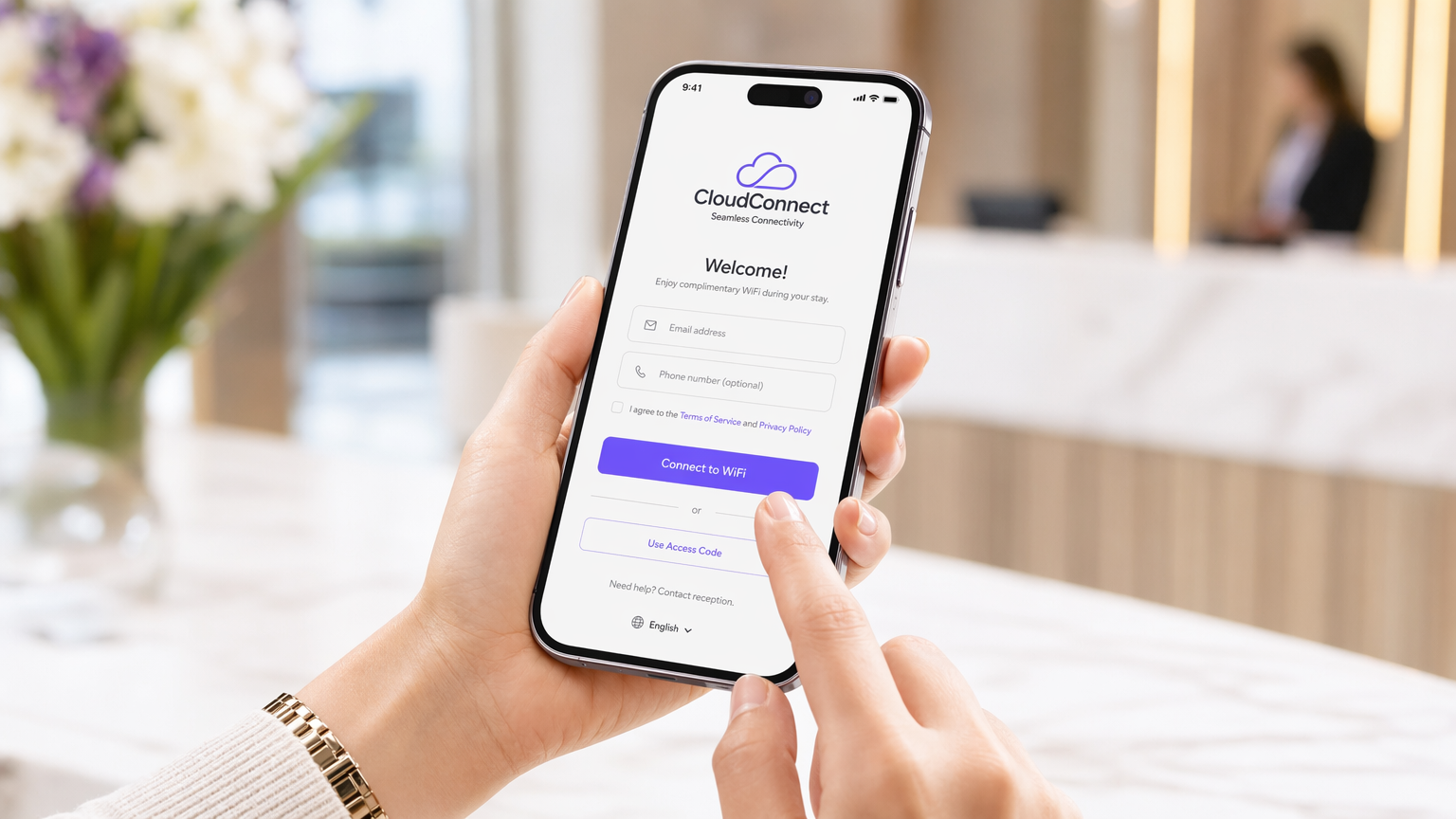
Per gli IT manager e gli architetti di rete che operano su larga scala, la distinzione tra controllo dell'accesso alla rete e presentazione all'utente è fondamentale. Una pagina splash WiFi è il livello di presentazione—l'interfaccia web interattiva e brandizzata presentata agli utenti che si connettono a una rete wireless per ospiti. Sebbene spesso confusa con un captive portal (il meccanismo di rete sottostante che intercetta il traffico), la pagina splash funge da porta d'ingresso all'esperienza utente, gestendo l'autenticazione, l'acquisizione dei dati e il consenso alla conformità.
L'implementazione di una pagina splash efficace richiede un equilibrio tra attrito minimo per l'utente e massima fedeltà dei dati e sicurezza per l'azienda. Questa guida analizza l'architettura tecnica delle pagine splash, descrive in dettaglio le strategie di implementazione in ambienti complessi come l'ospitalità e il commercio al dettaglio, e fornisce un framework per trasformare una necessità operativa in una risorsa misurabile utilizzando soluzioni come Guest WiFi .
Approfondimento Tecnico: Architettura e Standard
Per comprendere una pagina splash, è necessario prima comprendere l'architettura del captive portal che la serve. Il captive portal opera ai livelli OSI 2 e 3. Quando un dispositivo si associa a un SSID ospite, viene tipicamente inserito in una VLAN di pre-autenticazione. In questo stato, il controller di accesso intercetta le query DNS e le richieste HTTP, eseguendo un reindirizzamento 302 all'URL della pagina splash.
La pagina splash stessa opera al Livello 7. È l'interfaccia HTML, CSS e JavaScript che acquisisce le credenziali o il consenso dell'utente. I sistemi operativi moderni (iOS, Android, Windows) utilizzano meccanismi integrati di Captive Portal Network Assistant (CNA)—come le query di Apple a captivenetwork.apple.com—per rilevare questo reindirizzamento e visualizzare automaticamente la pagina splash in un pseudo-browser.
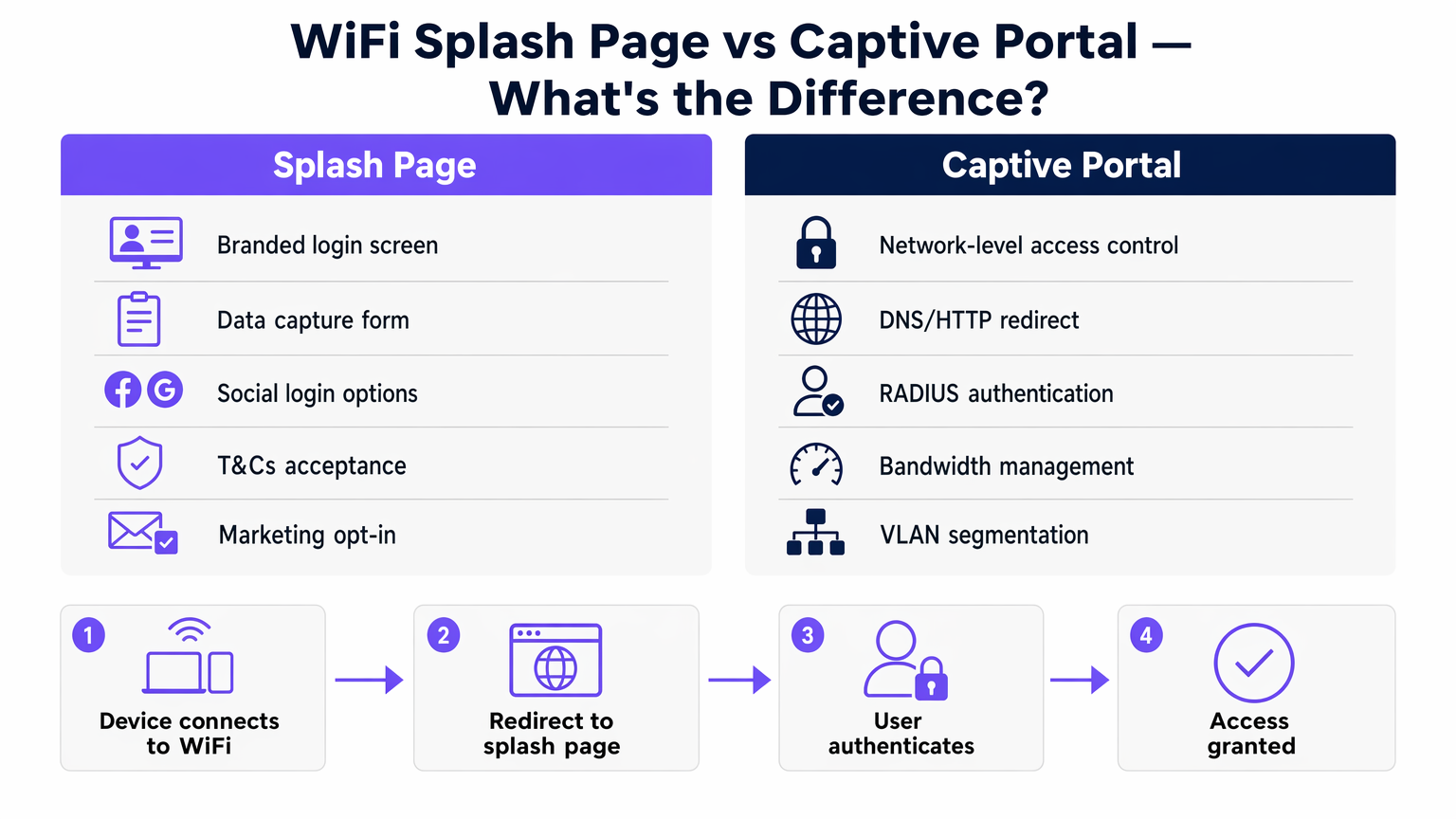
Una volta che l'utente completa il flusso di autenticazione sulla pagina splash, il controller del captive portal riceve un messaggio di autorizzazione API o RADIUS (Remote Authentication Dial-In User Service). Il controller aggiorna quindi le sue tabelle di stato, spostando l'indirizzo MAC del dispositivo a uno stato autorizzato, spesso spostando il client a una VLAN post-autenticazione con routing internet completo e applicando politiche di larghezza di banda o di timeout di sessione.
Meccanismi di Autenticazione e 802.1X
Mentre le pagine splash semplici si basano su reti aperte con autenticazione basata su MAC post-registrazione, gli ambienti aziendali si orientano sempre più verso un onboarding sicuro. Passpoint (Hotspot 2.0) e l'autenticazione basata su profili sfruttano 802.1X/EAP (Extensible Authentication Protocol) per fornire connessioni crittografate. In questi scenari, la pagina splash può fungere da portale di onboarding iniziale dove un utente si registra e scarica un profilo sicuro, allontanandosi dagli SSID aperti legacy. Purple opera come fornitore di identità gratuito per servizi come OpenRoaming, colmando il divario tra la registrazione della pagina splash e le connessioni successive fluide e sicure.
Guida all'Implementazione
L'implementazione di una pagina splash in un'azienda distribuita richiede la standardizzazione. Che tu stia equipaggiando una catena di Retail o una struttura di Hospitality , l'approccio all'implementazione determina il sovraccarico operativo.
- Selezione dell'Architettura: Scegli tra controller on-premise e soluzioni gestite in cloud. Le architetture basate su cloud—dettagliate nella nostra guida su Captive Portal Basato su Cloud vs. On-Premise: Qual è quello giusto per la tua attività? —offrono una gestione centralizzata delle pagine splash su più fornitori di AP, riducendo la deriva della configurazione.
- Configurazione del Walled Garden: Assicurati che gli indirizzi IP e i domini necessari per caricare la pagina splash (inclusi CDN, API di social login e server di autenticazione) siano esplicitamente consentiti nelle ACL (Access Control Lists) di pre-autenticazione. La mancata configurazione corretta del walled garden comporta il mancato caricamento della pagina splash.
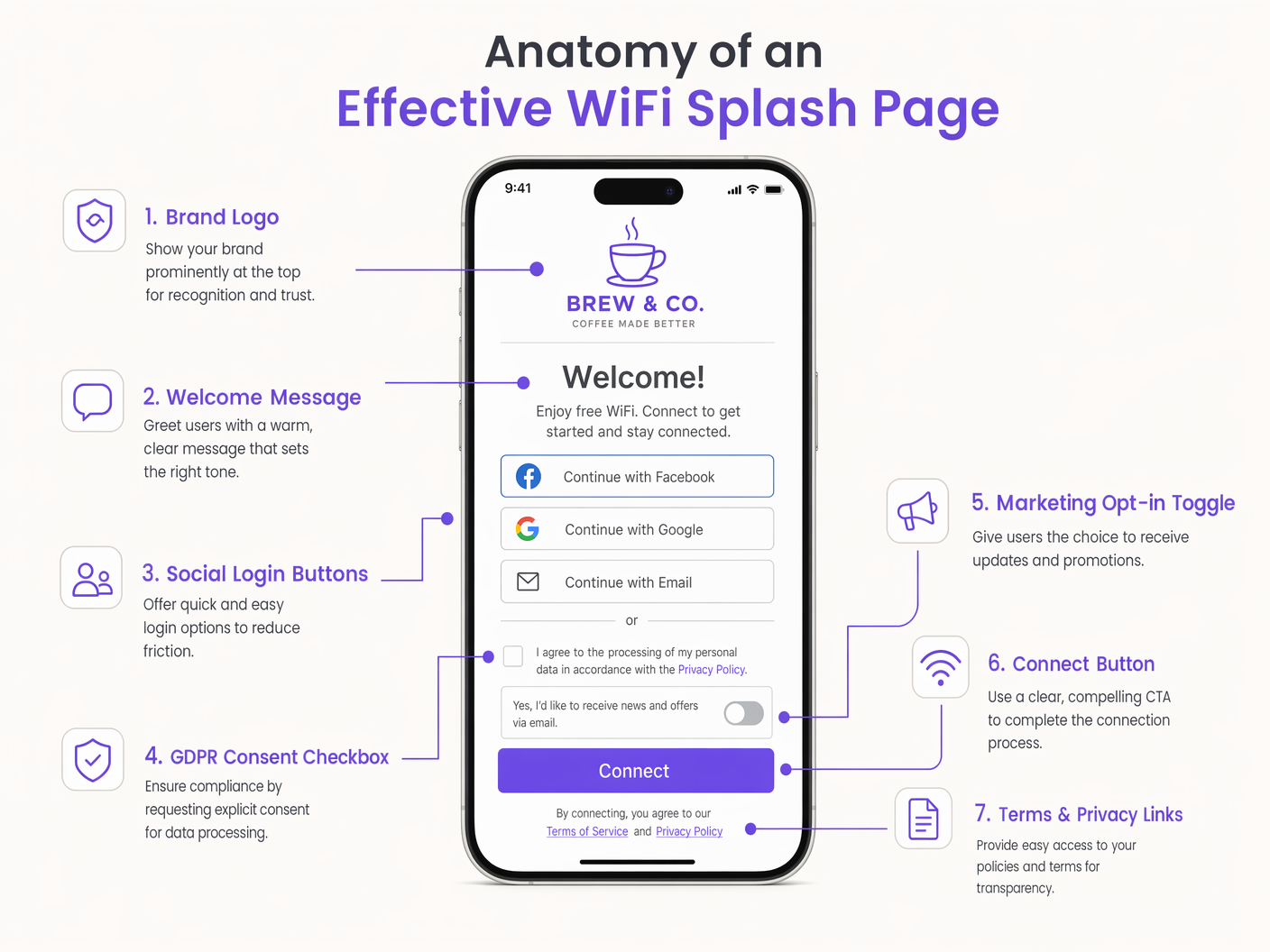
- Strategia di Autenticazione: Seleziona metodi di autenticazione che si allineino agli obiettivi aziendali. Il social login (OAuth) e la registrazione basata su moduli producono dati di alta qualità per WiFi Analytics , mentre un semplice click-through offre un'elevata produttività ma nessuna acquisizione di dati.
- Design Responsivo: Oltre l'80% delle connessioni WiFi per ospiti proviene da dispositivi mobili. La pagina splash deve essere altamente responsiva, utilizzando payload minimi per garantire un rendering rapido anche in ambienti RF ad alta densità e alta interferenza.
Migliori Pratiche e Conformità
Una pagina splash è un punto di controllo primario per la conformità. Operare in giurisdizioni regolate dal GDPR o dal CCPA richiede una stretta aderenza agli standard di privacy dei dati.
- Consenso Esplicito: Le opzioni di marketing devono utilizzare caselle di controllo non selezionate. Le caselle preselezionate violano l'Articolo 7 del GDPR.
- Minimizzazione dei Dati: Richiedi solo i dati necessari per il servizio o per il marketing concordato.
- Ambito PCI DSS: Assicurati che la rete WiFi per ospiti sia logicamente separata (tramite VLAN e regole firewall) dalla rete aziendale e dai sistemi di punto vendita (POS) per prevenire l'estensione dell'ambito negli audit di conformità PCI.
- Accessibilità: Assicurati che la pagina splash sia conforme agli standard WCAG (Web Content Accessibility Guidelines), utilizzando rapporti di contrasto appropriati e semantiche HTML adatte ai lettori di schermo.
Ascolta il nostro briefing tecnico senior sull'architettura delle pagine splash e le strategie di implementazione:
Risoluzione dei problemi e mitigazione del rischio
Anche le implementazioni ben progettate possono incontrare problemi. Le modalità di errore comuni includono:
- Errori di intercettazione HTTPS: Poiché il web si sta spostando interamente su HTTPS, i captive portal legacy che tentano di intercettare il traffico HTTPS senza un certificato attendibile attiveranno gravi avvisi di sicurezza del browser (errori HSTS). La mitigazione consiste nell'affidarsi ai meccanismi CNA a livello di sistema operativo che utilizzano HTTP per il rilevamento, o nell'implementare un onboarding sicuro tramite Passpoint.
- Latenza della risoluzione DNS: Se il server DNS assegnato nello stato di pre-autenticazione è lento o non risponde, il reindirizzamento iniziale fallirà. Assicurarsi che vengano utilizzati risolutori DNS locali e ad alta disponibilità per la rete ospite.
- MAC Randomization: I moderni sistemi operativi mobili utilizzano indirizzi MAC randomizzati per la privacy. Sebbene ciò complichi il tracciamento a lungo termine degli utenti non autenticati, le pagine di benvenuto che collegano le sessioni a profili utente autenticati (ad esempio, e-mail o ID CRM) mitigano l'impatto sull'analisi e sulla gestione delle sessioni.
ROI e impatto aziendale
L'impatto aziendale di un'implementazione di una pagina di benvenuto trasforma l'IT da centro di costo a motore di ricavo. Acquisendo dati di prima parte, la pagina di benvenuto alimenta direttamente i sistemi di marketing e operativi.
Ad esempio, negli hub Transport , l'analisi delle pagine di benvenuto fornisce metriche in tempo reale sul traffico pedonale e sul tempo di permanenza. Il ritorno sull'investimento si misura non solo nella riduzione dei ticket di supporto grazie a un'esperienza di connessione fluida, ma anche nei dati utilizzabili generati. La strategia dell'effetto rete — offrire connettività gratuita per favorire l'acquisizione di utenti — si basa interamente sulla pagina di benvenuto come meccanismo di conversione. Una pagina di benvenuto ben ottimizzata riduce l'abbandono, consente la monetizzazione dei media retail e supporta le integrazioni di fidelizzazione, fornendo un valore aziendale misurabile molto tempo dopo la connessione iniziale.
Definizioni chiave
Splash Page
The web-based presentation layer presented to a user attempting to connect to a guest network, used for authentication, consent, and branding.
The primary user interface for guest WiFi, managed jointly by IT and marketing.
Captive Portal
The network-layer infrastructure that intercepts traffic and redirects unauthenticated users to the splash page.
The gatekeeper mechanism configured on access controllers or cloud platforms.
Walled Garden
A whitelist of IP addresses or domains that a user can access before completing authentication on the splash page.
Critical for allowing social logins and CDNs to function during the login process.
Captive Network Assistant (CNA)
The OS-level pseudo-browser that automatically detects a captive portal and pops up the splash page.
Reduces user friction by eliminating the need to manually open a browser to trigger the redirect.
RADIUS
Remote Authentication Dial-In User Service; a networking protocol that provides centralized Authentication, Authorization, and Accounting (AAA).
Used by the captive portal to validate credentials and apply network policies post-login.
MAC Randomization
A privacy feature in modern operating systems that generates a temporary MAC address for each wireless network.
Impacts the ability to track returning devices without requiring them to re-authenticate via the splash page.
VLAN Segmentation
The practice of logically dividing a physical network into multiple broadcast domains.
Essential for isolating guest WiFi traffic from corporate infrastructure for security and PCI compliance.
Passpoint (Hotspot 2.0)
A standard for seamless, secure authentication to public WiFi networks using 802.1X, bypassing the traditional open SSID splash page.
The evolution of guest WiFi, where the splash page serves as the initial provisioning portal rather than a daily login screen.
Esempi pratici
A 200-room hotel needs to deploy a guest WiFi solution that integrates with their property management system (PMS) to restrict bandwidth for non-guests while offering premium tiers for loyalty members.
- Deploy a cloud-managed captive portal integrated with the existing AP infrastructure via RADIUS.
- Configure the splash page to request Room Number and Guest Last Name.
- The captive portal queries the PMS API via a webhook to validate the credentials.
- Upon successful validation, the RADIUS server returns a vendor-specific attribute (VSA) applying a premium bandwidth policy profile to the user's session.
A large retail chain experiences a 40% drop-off rate on their guest WiFi splash page. They currently require a 6-field registration form including postal address.
- Redesign the splash page to utilize Social Login (Google, Apple) and a simplified 2-field email registration form.
- Implement progressive profiling: capture minimal data on the first visit, and prompt for additional details (like birth month for loyalty rewards) upon subsequent reconnections.
- Ensure the walled garden includes the necessary OAuth domains for social providers.
Domande di esercitazione
Q1. A venue reports that users connecting via Android devices are seeing the splash page, but users on iOS devices are getting a blank white screen. What is the most likely architectural configuration error?
Suggerimento: Consider the specific domains that different operating systems use to detect captive portals.
Visualizza risposta modello
The walled garden (pre-authentication ACL) is likely misconfigured. It is allowing the Android connectivity check domains but blocking Apple's CNA domains (e.g., captivenetwork.apple.com). The access controller must be updated to allow traffic to the specific domains Apple uses for captive portal detection.
Q2. The marketing team wants to add a Facebook login option to the existing splash page. From a network engineering perspective, what configuration change is required before this can function?
Suggerimento: How does the device reach Facebook's servers before the user is fully authenticated?
Visualizza risposta modello
The network engineer must update the walled garden to include Facebook's OAuth domains and CDNs. Without this, the device cannot reach Facebook to complete the authentication handshake while still in the restricted pre-authentication state.
Q3. During a compliance audit, it is discovered that the splash page includes a pre-ticked box stating 'I agree to receive marketing emails'. What is the immediate risk, and what is the remediation?
Suggerimento: Consider GDPR Article 7 regarding consent.
Visualizza risposta modello
The immediate risk is non-compliance with GDPR, which mandates that consent must be freely given and unambiguous. Pre-ticked boxes are legally invalid. The remediation is to immediately update the splash page HTML to ensure the marketing opt-in checkbox is unchecked by default, requiring an affirmative action from the user.
Continua a leggere questa serie
Captive Portal vs Splash Page
Questa guida autorevole analizza la distinzione fondamentale tra Captive Portal e splash page nelle reti WiFi per gli ospiti. Chiarisce come il meccanismo di intercettazione di rete sottostante funzioni in sinergia con l'interfaccia visiva per gli ospiti, aiutando i responsabili IT e i gestori delle strutture a prendere decisioni architetturali e di acquisto informate.
Login al Captive Portal: Risoluzione dei problemi e guida esplicativa
Questa guida fornisce un riferimento tecnico completo per comprendere, implementare e risolvere i problemi dei sistemi di login al captive portal in ambienti WiFi aziendali per ospiti. Spiega gli esatti meccanismi di reindirizzamento HTTP e di dirottamento DNS utilizzati dai moderni captive portal, descrive in dettaglio come l'HSTS e i browser HTTPS sicuri possano bloccare i reindirizzamenti locali e fornisce una checklist di risoluzione dei problemi chiara e pratica che copre sia le soluzioni lato client (disattivazione delle VPN, disattivazione della randomizzazione MAC, utilizzo di NeverSSL) sia le risoluzioni lato operatore (configurazione del walled garden, ottimizzazione del tempo di lease DHCP, verifica dell'intercettazione DNS). I gestori delle sedi, i responsabili IT e gli architetti di rete troveranno questa guida essenziale per ridurre al minimo i ticket di supporto degli ospiti e massimizzare il ROI della loro infrastruttura wireless.
Come configurare un hotspot WiFi per la tua attività
Questa guida autorevole fornisce a leader IT, architetti di rete e direttori delle operazioni di sede un modello pratico e indipendente dal fornitore per l'implementazione di hotspot WiFi per ospiti sicuri, conformi e che migliorano il business. Copre decisioni architetturali critiche — dalla segmentazione VLAN e configurazione del Captive Portal alla conformità GDPR e alla modellazione del traffico — e dimostra come trasformare l'infrastruttura di rete da un centro di costo a una piattaforma di analisi che genera entrate utilizzando le capacità di Guest WiFi e analisi di Purple.