
I Migliori Strumenti di Analisi WiFi per la Risoluzione dei Problemi di Sovrapposizione dei Canali
Questa guida completa fornisce a manager IT e architetti di rete strategie attuabili per identificare e risolvere la sovrapposizione dei canali WiFi in ambienti ad alta densità. Valuta i migliori strumenti di analisi WiFi e delinea una metodologia comprovata per ottimizzare le prestazioni RF al fine di garantire un'esperienza ospite senza interruzioni e massimizzare il ROI dell'infrastruttura.
Ascolta questa guida
Visualizza trascrizione del podcast
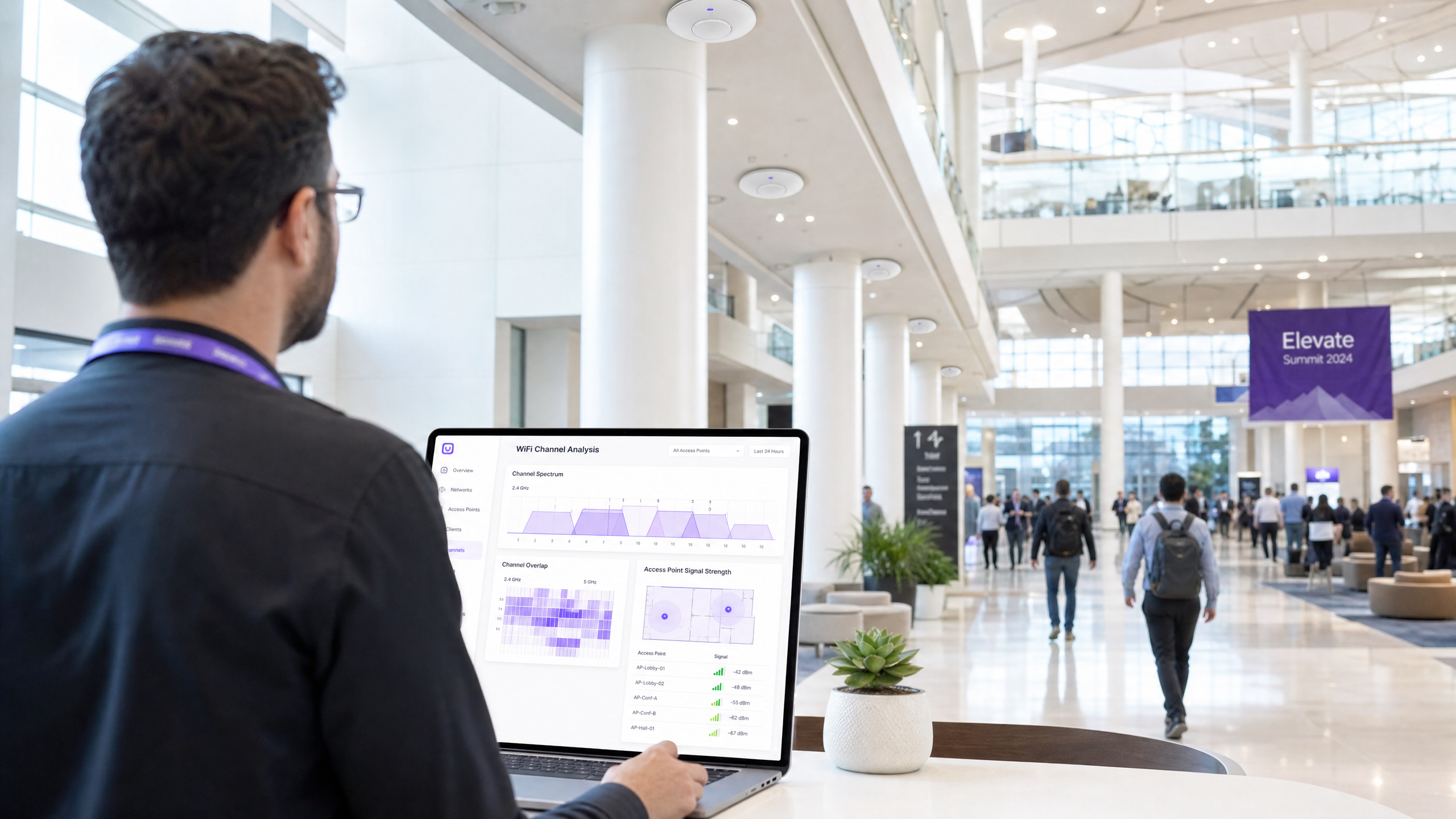
Sintesi Esecutiva
Per i manager IT e gli architetti di rete che gestiscono ambienti ad alta densità, la sovrapposizione dei canali rimane una delle cause più persistenti di degrado delle prestazioni WiFi. Quando i punti di accesso competono per lo stesso spettro, l'interferenza co-canale e adiacente al canale influisce direttamente sulla velocità di trasmissione, aumenta i tassi di ritrasmissione e compromette l'esperienza dell'ospite. Questa guida fornisce un riferimento tecnico definitivo per identificare, diagnosticare e risolvere la sovrapposizione dei canali utilizzando i migliori strumenti di analisi WiFi del settore.
Comprendendo la meccanica RF sottostante e implementando il software diagnostico corretto, i team tecnici possono ottimizzare le assegnazioni dei canali, mitigare le interferenze e massimizzare il ritorno sull'investimento per le implementazioni wireless aziendali. Sia che tu stia gestendo un hotel di 200 camere, una catena Retail multi-sito o una vasta sede del settore pubblico, le metodologie qui dettagliate ti forniranno gli strumenti per mantenere una rete wireless robusta e ad alte prestazioni. Inoltre, l'integrazione di queste pratiche con piattaforme avanzate di WiFi Analytics come Purple garantisce visibilità continua e gestione proattiva dell'ambiente RF.
Approfondimento Tecnico
La Fisica della Sovrapposizione dei Canali
Al livello fisico, le reti WiFi operano all'interno di bande di frequenza definite, principalmente 2.4GHz, 5GHz e, sempre più spesso, 6GHz. La sfida fondamentale nell'implementazione WiFi è la gestione dello spettro limitato disponibile all'interno di queste bande per servire più punti di accesso (AP) e dispositivi client senza causare interferenze distruttive.
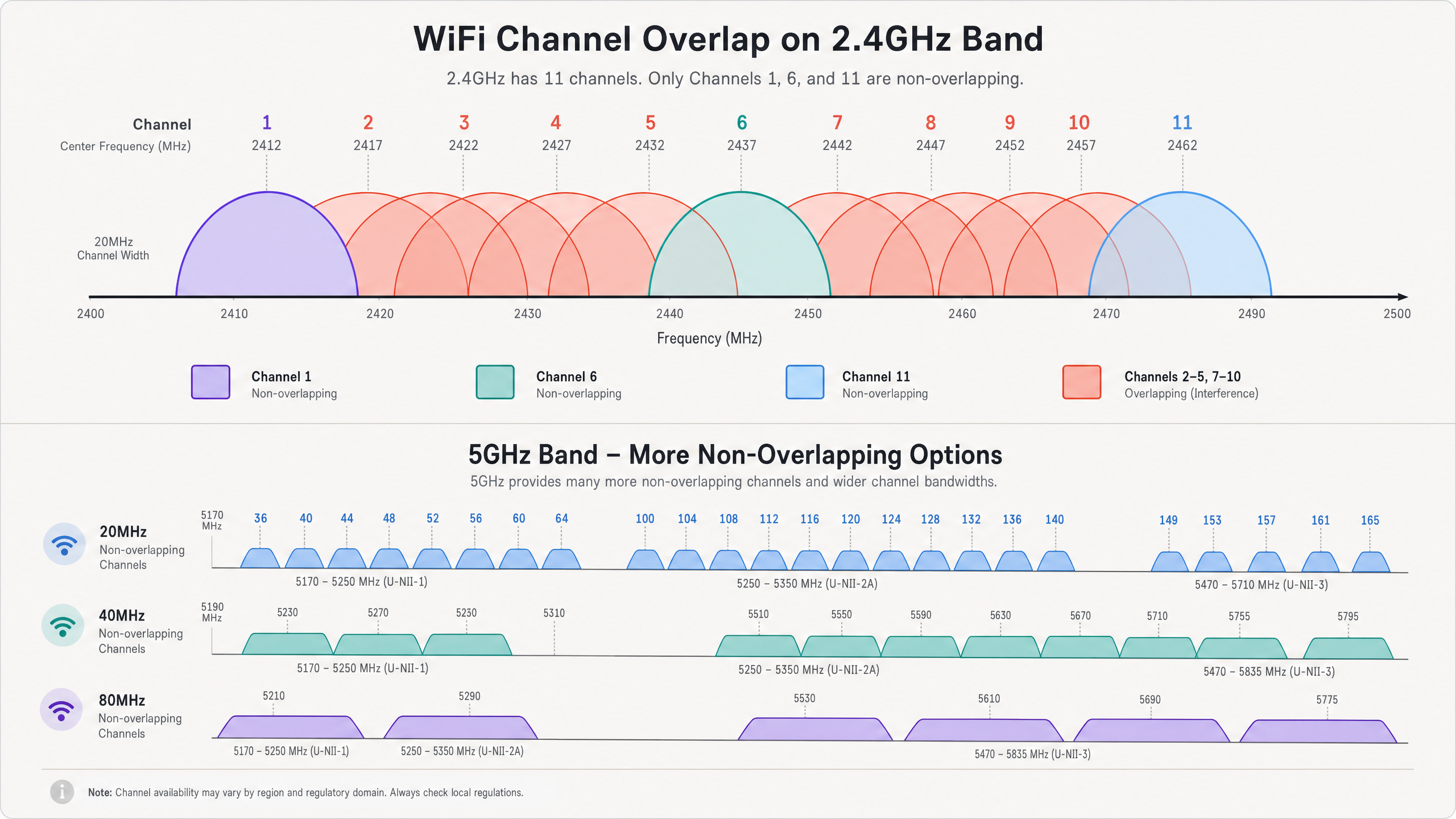
Nella banda 2.4GHz, ci sono 11 canali disponibili in Nord America e fino a 13 in Europa. Tuttavia, ogni canale occupa 20MHz di spettro, mentre i canali stessi sono distanziati di soli 5MHz. Questa realtà fisica impone che solo i canali 1, 6 e 11 siano completamente non sovrapposti. Quando un AP trasmette sul canale 2, il suo segnale si diffonde nei canali 1, 3 e 4. Questo è noto come interferenza di canale adiacente (ACI). L'ACI è particolarmente dannosa perché il protocollo 802.11 CSMA/CA (Carrier Sense Multiple Access with Collision Avoidance) non può gestire efficacemente le collisioni tra trasmissioni parzialmente sovrapposte, portando a frame corrotti e alti tassi di ritrasmissione.
L'interferenza co-canale (CCI), d'altra parte, si verifica quando più AP operano esattamente sullo stesso canale. Mentre il protocollo CSMA/CA può gestire la CCI costringendo i dispositivi a trasmettere a turno, ciò riduce efficacemente il tempo di trasmissione disponibile e la velocità di trasmissione per tutti i dispositivi che condividono il canale. In ambienti ad alta densità, una CCI eccessiva può rendere una rete inutilizzabile. Per una comprensione più approfondita delle caratteristiche delle bande, fare riferimento alla nostra guida su Perché 5GHz è più veloce ma 2.4GHz è più affidabile .
Il Vantaggio di 5GHz e 6GHz
La banda 5GHz offre un significativo sollievo dalla congestione di 2.4GHz. Fornisce fino a 25 canali da 20MHz non sovrapposti. Questa abbondanza di spettro consente agli architetti di rete di utilizzare canali più ampi (40MHz o 80MHz) per aumentare la velocità di trasmissione senza causare immediatamente CCI o ACI. Tuttavia, è ancora necessaria un'attenta pianificazione dei canali, specialmente quando si utilizzano canali più ampi, poiché l'unione di due canali da 20MHz dimezza il numero di canali non sovrapposti disponibili.
L'introduzione di WiFi 6E e della banda 6GHz fornisce ancora più spettro—fino a 59 canali da 20MHz non sovrapposti o 14 canali da 80MHz non sovrapposti. Questo massiccio aumento di capacità consente prestazioni wireless gigabit reali in ambienti densi, a condizione che i dispositivi client supportino il nuovo standard.
Funzionalità Chiave dell'Analizzatore
Per diagnosticare efficacemente la sovrapposizione dei canali, i team IT richiedono strumenti in grado di visualizzare l'ambiente RF. Le funzionalità chiave includono:
- Analisi dello Spettro: La capacità di visualizzare l'energia RF grezza attraverso lo spettro. Questo è cruciale per identificare le fonti di interferenza non-WiFi, come forni a microonde, dispositivi Bluetooth o telecamere di sicurezza wireless, che operano nella banda 2.4GHz ma non trasmettono frame 802.11.
- Misurazione dell'Utilizzo del Canale: La capacità di quantificare quanta capacità di un canale è attivamente utilizzata dal traffico WiFi rispetto a quanta è disponibile. Un utilizzo elevato indica congestione e la necessità di riallocazione del canale.
- Mappatura del Rapporto Segnale/Rumore (SNR): L'SNR è la differenza tra la potenza del segnale (RSSI) e il rumore di fondo. Un SNR elevato è richiesto per schemi di modulazione complessi (come 256-QAM o 1024-QAM) che offrono elevate velocità di trasmissione dati.
- Tracciamento BSSID: La capacità di tracciare i singoli Basic Service Set Identifiers (BSSID)—gli indirizzi MAC delle singole radio AP—per identificare AP non autorizzati o infrastrutture mal configurate.
Guida all'Implementazione
L'implementazione efficace di uno strumento di analisi WiFi richiede una metodologia strutturata. I seguenti passaggi delineano un approccio basato sulle migliori pratiche per la risoluzione dei problemi e l'ottimizzazione di una rete wireless.
Passaggio 1: Valutazione della Baseline
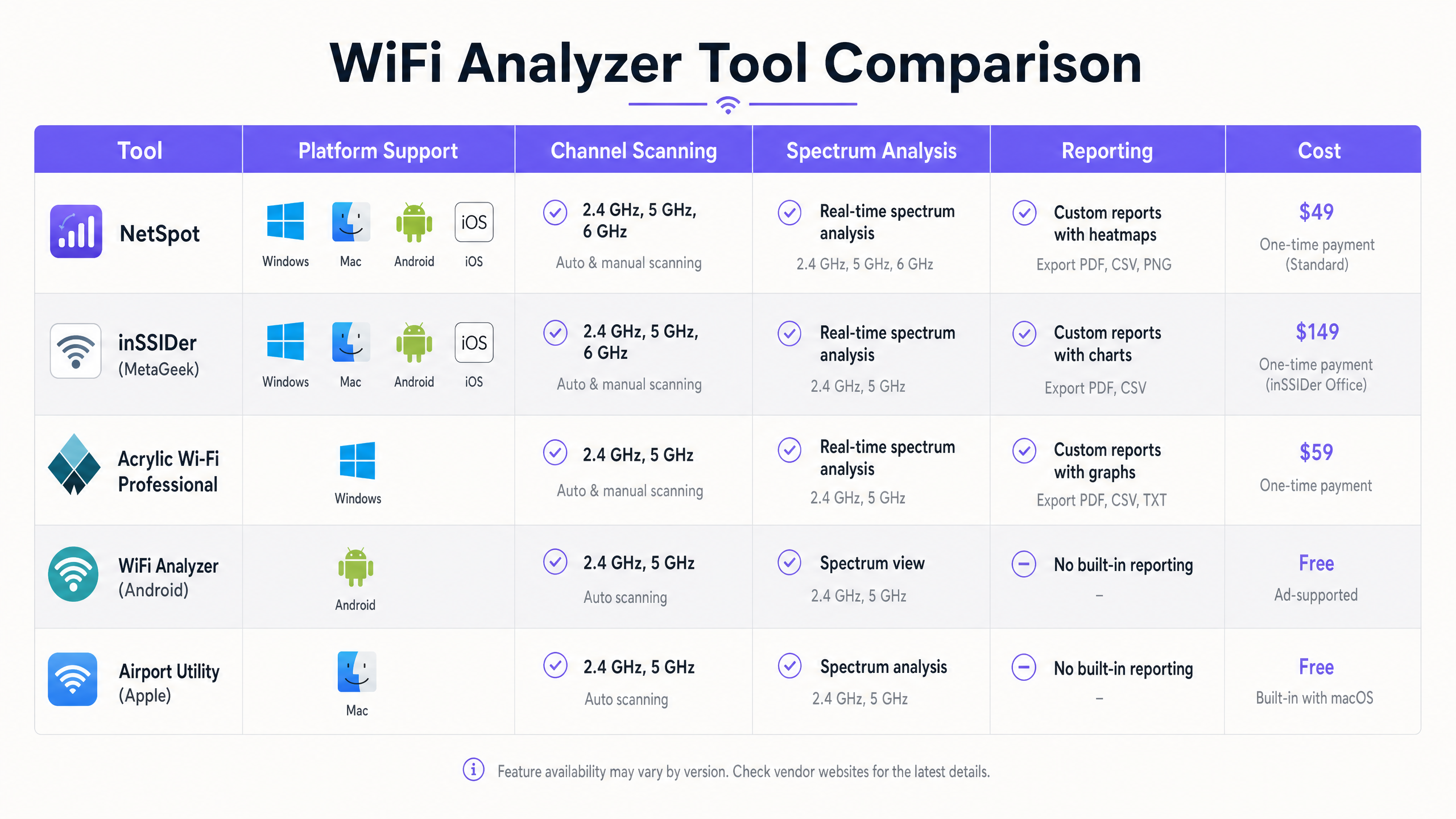
Prima di apportare qualsiasi modifica alla configurazione, stabilire una baseline dell'ambiente RF attuale. Utilizzare uno strumento come Ekahau o NetSpot per condurre un'indagine passiva del sito. Percorrere l'area di copertura e acquisire dati sulla potenza del segnale, le assegnazioni dei canali e il rumore di fondo. Questa baseline servirà comeun punto di riferimento dopo gli interventi di bonifica.
Fase 2: Identificare le Zone di Interferenza
Analizzare i dati del sondaggio per identificare le aree con elevata CCI o ACI. Cercare le posizioni in cui tre o più AP che operano sugli stessi canali o su canali sovrapposti vengono ricevuti con una potenza del segnale superiore a -70 dBm. Queste sono le zone di interferenza primarie. In un ambiente Hospitality , queste sono spesso intersezioni di corridoi; nel Retail , potrebbero essere vicino ai terminali punto vendita.
Fase 3: Scansioni dello Spettro
Condurre scansioni dello spettro utilizzando uno strumento con vere capacità di analisi dello spettro (ad es. Ekahau Sidekick o un analizzatore di spettro dedicato). Cercare firme energetiche non-WiFi continue o a raffica che elevano il rumore di fondo. Se viene identificata un'interferenza non-WiFi, la fonte deve essere localizzata e rimossa o mitigata prima che la pianificazione dei canali possa essere efficace.
Fase 4: Riassegnazione dei Canali
Basandosi sui dati del sondaggio e dello spettro, riprogettare il piano dei canali.
- 2.4GHz: Attenersi rigorosamente alla regola 1-6-11. Se la densità degli AP è elevata, considerare di disabilitare le radio a 2.4GHz su AP alternati per ridurre la CCI.
- 5GHz: Utilizzare i canali DFS (dynamic frequency selection) se le normative locali lo consentono e l'interferenza radar non è presente. Selezionare attentamente le larghezze dei canali; mentre i canali a 80MHz offrono un throughput di picco più elevato, i canali a 40MHz o anche a 20MHz sono spesso più appropriati in implementazioni dense per massimizzare il numero di canali non sovrapposti.
Fase 5: Regolazione del Livello di Potenza
La sovrapposizione dei canali è spesso esacerbata da una potenza di trasmissione eccessiva. Se il segnale di un AP si propaga troppo lontano, causa CCI non necessaria per gli AP vicini. Ridurre la potenza di trasmissione al livello minimo richiesto per fornire una copertura adeguata e mantenere un SNR target al bordo della cella. Ciò riduce la cella di copertura e diminuisce l'interferenza.
Fase 6: Validazione Post-Risanamento
Dopo aver applicato il nuovo piano dei canali e le impostazioni di potenza, condurre un sondaggio di follow-up sul sito. Confrontare i nuovi dati con la baseline per verificare che CCI e ACI siano stati ridotti e che i requisiti di copertura siano ancora soddisfatti.
Best Practice
Per mantenere un ambiente RF ottimizzato, attenersi alle seguenti best practice del settore:
- Standardizzare sugli Strumenti Enterprise: Mentre le app gratuite per smartphone sono utili per controlli rapidi, la risoluzione dei problemi e la pianificazione complete richiedono strumenti di livello enterprise come Ekahau, OmniPeek o AirMagnet.
- Integrare con gli Analytics: Combinare l'analisi RF con una piattaforma completa di Guest WiFi e analytics. Purple offre visibilità continua sulla qualità dell'associazione dei client, sulla durata della sessione e sulla salute generale della rete, consentendo ai team IT di rilevare il degrado prima che gli utenti segnalino problemi.
- Audit Regolari: L'ambiente RF è dinamico. Nuove reti vicine, modifiche al layout dell'edificio o l'introduzione di nuove apparecchiature possono alterare il panorama RF. Programmare sondaggi regolari sul sito (ad es. trimestrali) per garantire che la rete rimanga ottimizzata.
- Utilizzare l'Auto-RF con Cautela: La maggior parte dei moderni controller WLAN enterprise dispone di gestione automatizzata delle risorse radio (RRM). Sebbene questi algoritmi siano sofisticati, a volte possono causare "channel thrashing" (instabilità dei canali) in ambienti altamente dinamici. Monitorare attentamente il comportamento dell'RRM ed essere pronti a bloccare manualmente le assegnazioni dei canali se necessario.
- Rimanere Aggiornati con gli Standard: Assicurarsi che l'infrastruttura e le metodologie di risoluzione dei problemi siano allineate con gli ultimi standard IEEE (ad es. 802.11ax/WiFi 6) e protocolli di sicurezza (ad es. WPA3).
Risoluzione dei Problemi e Mitigazione del Rischio
Anche con una pianificazione meticolosa, le reti WiFi possono riscontrare problemi di prestazioni. Comprendere le modalità di guasto comuni e le strategie di mitigazione è essenziale.
Modalità di Guasto Comuni
- Il Problema del "Client Appiccicoso": I client spesso mantengono una connessione debole con un AP distante anche quando è disponibile un AP più vicino e più forte. Ciò degrada le prestazioni per il client appiccicoso e consuma un tempo di trasmissione eccessivo, influenzando tutti gli altri client su quel canale. Mitigazione: Implementare velocità di base minime e soglie RSSI per forzare i client a spostarsi verso AP migliori.
- Eventi Radar DFS: Nella banda a 5GHz, gli AP che operano su canali DFS devono ascoltare le firme radar e liberare immediatamente il canale se viene rilevato un radar. Ciò può causare interruzioni improvvise della rete. Mitigazione: Monitorare i log del controller per gli eventi DFS. Se si verificano frequenti rilevamenti radar, evitare di utilizzare i canali DFS in quella specifica posizione.
- Problema del Nodo Nascosto: Si verifica quando due client possono comunicare con lo stesso AP ma non possono sentirsi a vicenda. Possono trasmettere simultaneamente, causando collisioni all'AP. Mitigazione: Abilitare i meccanismi RTS/CTS (Request to Send/Clear to Send), sebbene ciò aggiunga overhead e riduca il throughput complessivo.
Strategie di Mitigazione del Rischio
- Implementare un'Autenticazione Robusta: Proteggere la rete utilizzando 802.1X/EAP per i dispositivi aziendali e captive portals sicuri per l'accesso degli ospiti. Per un accesso moderno e sicuro, considerare soluzioni come How a wi fi assistant Enables Passwordless Access in 2026 .
- Segmentazione della Rete: Isolare diversi tipi di traffico (ad es. guest, aziendale, IoT, PoS) su VLAN e SSID separati per migliorare la sicurezza e gestire i domini di broadcast.
- Monitoraggio Continuo: Utilizzare piattaforme come Purple per monitorare continuamente le metriche delle prestazioni della rete e il comportamento degli utenti. Ad esempio, comprendere come gli utenti navigano in uno spazio può informare il posizionamento degli AP, un concetto ulteriormente esplorato in Purple Launches Offline Maps Mode for Seamless, Secure Navigation to WiFi Hotspots .
ROI e Impatto sul Business
L'ottimizzazione della rete WiFi attraverso una rigorosa pianificazione e analisi dei canali offre risultati misurabil valore aziendale attraverso diverse dimensioni:
- Esperienza Utente Migliorata: La riduzione della sovrapposizione dei canali aumenta direttamente il throughput e diminuisce la latenza. In un hub di Trasporto , ciò significa che i passeggeri possono accedere in modo affidabile a carte d'imbarco e intrattenimento; in un hotel, si traduce in punteggi di soddisfazione degli ospiti più elevati e meno reclami alla reception.
- Maggiore Efficienza Operativa: Una rete stabile e ad alte prestazioni riduce il carico sui servizi di assistenza IT. Meno ticket di connettività significano che il personale IT può concentrarsi su iniziative strategiche piuttosto che sulla risoluzione reattiva dei problemi.
- Raccolta Dati Migliorata: Una rete affidabile è la base per analisi di localizzazione accurate e per il coinvolgimento degli utenti. Quando la rete funziona bene, piattaforme come Purple possono raccogliere dati di qualità superiore, consentendo campagne di marketing più efficaci e approfondimenti operativi. Come evidenziato da recenti mosse strategiche, come Purple nomina Iain Fox VP Growth – Settore Pubblico per promuovere l'inclusione digitale e l'innovazione delle Smart City , un'infrastruttura robusta è fondamentale per iniziative digitali avanzate.
- Durata Estesa dell'Hardware: Ottimizzando l'ambiente RF, l'infrastruttura esistente può spesso supportare densità di client più elevate senza richiedere aggiornamenti hardware immediati, massimizzando il ritorno sull'investimento di capitale.
Definizioni chiave
Co-Channel Interference (CCI)
Interference that occurs when two or more access points operate on the exact same frequency channel.
Forces devices to share airtime, reducing overall throughput. Often caused by overly dense AP deployments or excessive transmit power.
Adjacent-Channel Interference (ACI)
Interference that occurs when transmissions on one channel bleed into and disrupt communications on a neighboring, overlapping channel.
More destructive than CCI because the CSMA/CA protocol cannot effectively manage the collisions. Common when channels other than 1, 6, or 11 are used in the 2.4GHz band.
Signal-to-Noise Ratio (SNR)
The difference (in decibels) between the received signal strength (RSSI) and the background noise floor.
A critical metric for performance. High SNR is required for high data rates. A strong signal is useless if the noise floor is equally high.
Received Signal Strength Indicator (RSSI)
A measurement of the power level being received by the antenna.
Used to determine basic coverage boundaries. Typically, enterprise deployments aim for an RSSI of -65 dBm to -70 dBm at the cell edge.
Dynamic Frequency Selection (DFS)
A mechanism that allows unlicensed devices to share the 5GHz spectrum with legacy radar systems.
APs must monitor DFS channels for radar signatures and immediately switch channels if detected, which can cause temporary client disconnects.
Radio Resource Management (RRM)
Automated algorithms used by WLAN controllers to dynamically adjust AP transmit power and channel assignments.
Useful for initial setup, but can cause instability ('channel thrashing') in highly dynamic environments if not monitored.
Basic Service Set Identifier (BSSID)
The MAC address of the wireless access point radio.
Essential for tracking specific hardware during a site survey and identifying rogue APs.
Spectrum Analysis
The process of measuring and visualizing all RF energy within a specific frequency band, not just 802.11 traffic.
Necessary for identifying non-WiFi interference sources like microwaves or Bluetooth devices that standard WiFi scanners cannot see.
Esempi pratici
A 300-room hotel is experiencing widespread guest complaints regarding slow WiFi speeds and dropped connections during peak evening hours, particularly in the central atrium where multiple access points are deployed.
- Deploy a tool like Ekahau Site Survey to conduct a passive RF sweep of the atrium during peak hours.
- Analyze the resulting heatmaps to identify areas where more than two APs operating on the 2.4GHz band are visible on the same channel (e.g., channel 6) with RSSI > -70 dBm.
- Implement a strict 1-6-11 channel plan for the 2.4GHz radios, ensuring adjacent APs use non-overlapping channels.
- Reduce the transmit power on the 2.4GHz radios in the atrium to minimize cell overlap.
- Conduct a post-remediation survey to verify CCI reduction and monitor Purple Analytics for improved session stability.
A large retail store recently upgraded its PoS terminals to wireless tablets, but transactions are frequently timing out. The IT team suspects interference but standard WiFi scans show only the store's own SSIDs.
- Utilize a spectrum analyzer (like Ekahau Sidekick or a dedicated tool) rather than a standard WiFi scanner.
- Perform a spectrum sweep in the 2.4GHz and 5GHz bands around the PoS areas.
- Identify non-802.11 energy signatures (e.g., from a nearby microwave oven, wireless security cameras, or Bluetooth beacons) that are elevating the noise floor and causing a low SNR.
- If possible, remove the source of interference. If not, migrate the PoS tablets to the 5GHz band, selecting channels far removed from the identified interference frequencies.
Domande di esercitazione
Q1. You are auditing a new retail deployment. The 2.4GHz APs are currently set to channels 1, 4, 8, and 11 to 'spread out' the signals. What is the immediate risk, and what is the recommended action?
Suggerimento: Consider the 20MHz width of a 2.4GHz channel and the 5MHz spacing between channel numbers.
Visualizza risposta modello
The immediate risk is severe adjacent-channel interference (ACI). Channel 4 overlaps with 1 and 8; channel 8 overlaps with 4 and 11. ACI is highly destructive to throughput. The recommended action is to immediately reconfigure all 2.4GHz radios to use only channels 1, 6, and 11.
Q2. During a site survey in a conference center, you notice the noise floor on channel 6 is elevated to -75 dBm, but your WiFi scanner shows no BSSIDs broadcasting on that channel. What is the likely cause?
Suggerimento: Think about what a standard WiFi scanner can and cannot detect.
Visualizza risposta modello
The likely cause is a non-802.11 interference source, such as a microwave oven, wireless AV equipment, or Bluetooth devices operating in the 2.4GHz band. A standard WiFi scanner only sees 802.11 management frames. A dedicated spectrum analyzer is required to visualize this raw RF energy.
Q3. A hotel IT manager wants to maximize throughput by configuring all 5GHz APs to use 80MHz channel widths. The hotel has a dense deployment with APs in every other room. Why might this approach degrade performance rather than improve it?
Suggerimento: Consider the total number of available non-overlapping channels in the 5GHz band when using wider channels.
Visualizza risposta modello
Using 80MHz channels significantly reduces the number of available non-overlapping channels (typically to 5 or 6, depending on regulatory domain and DFS usage). In a dense deployment, this will inevitably lead to co-channel interference (CCI) as neighboring APs are forced to reuse the same wide channels, ultimately reducing aggregate capacity and stability.