
Integrazione di Alta Labs con Purple WiFi: installazione e configurazione del Captive Portal
Questa guida di riferimento tecnico copre l'integrazione end-to-end degli access point Alta Labs AP6 e AP6 Pro con il captive portal ospitato in cloud di Purple. Dettaglia la configurazione del reindirizzamento esterno, l'autenticazione RADIUS, i requisiti di walled garden e la segmentazione multi-tenant tramite AltaPass Private Pre-Shared Keys. I gestori delle sedi e i team IT disporranno di un playbook di implementazione replicabile per ambienti hospitality, retail e smart office.
Ascolta questa guida
Visualizza trascrizione del podcast
Sintesi operativa
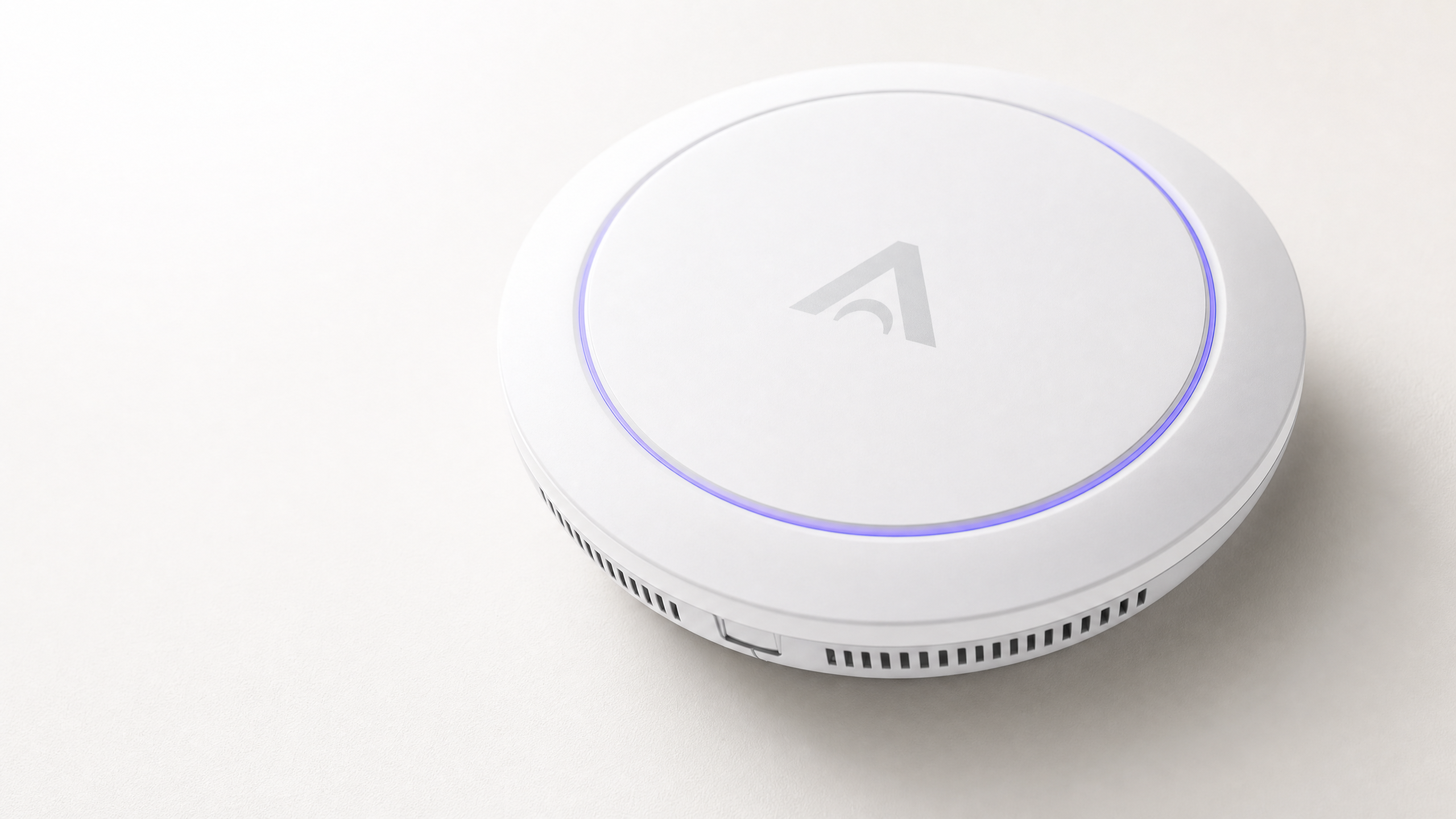
Gli access point Alta Labs AP6 e AP6 Pro si integrano con il captive portal in cloud di Purple utilizzando l'autenticazione RADIUS standard e il reindirizzamento HTTP. L'AP intercetta il traffico guest non autenticato, lo reindirizza alla tua splash page di Purple e concede l'accesso una volta che il server RADIUS di Purple restituisce un messaggio di Access-Accept. Per gli ambienti multi-tenant, la tecnologia AltaPass di Alta Labs assegna ogni dispositivo di connessione a una VLAN e a una policy di larghezza di banda univoche in base alla password utilizzata, senza richiedere SSID aggiuntivi. Questa guida fornisce i passaggi di configurazione esatti, gli elenchi dei domini walled garden e i parametri RADIUS per implementare l'integrazione da zero. Purple opera in oltre 80.000 sedi attive e ha elaborato 440 milioni di accessi nel 2024 (dati interni Purple). L'hardware di Alta Labs è ideale per MSP e installatori di smart office che necessitano di una segmentazione di livello enterprise a un prezzo competitivo.
Architettura tecnica
L'integrazione si sviluppa su tre livelli: la piattaforma di gestione cloud di Alta Labs, l'hardware AP6 o AP6 Pro all'edge e l'infrastruttura cloud di Purple che gestisce l'autenticazione e l'analisi.
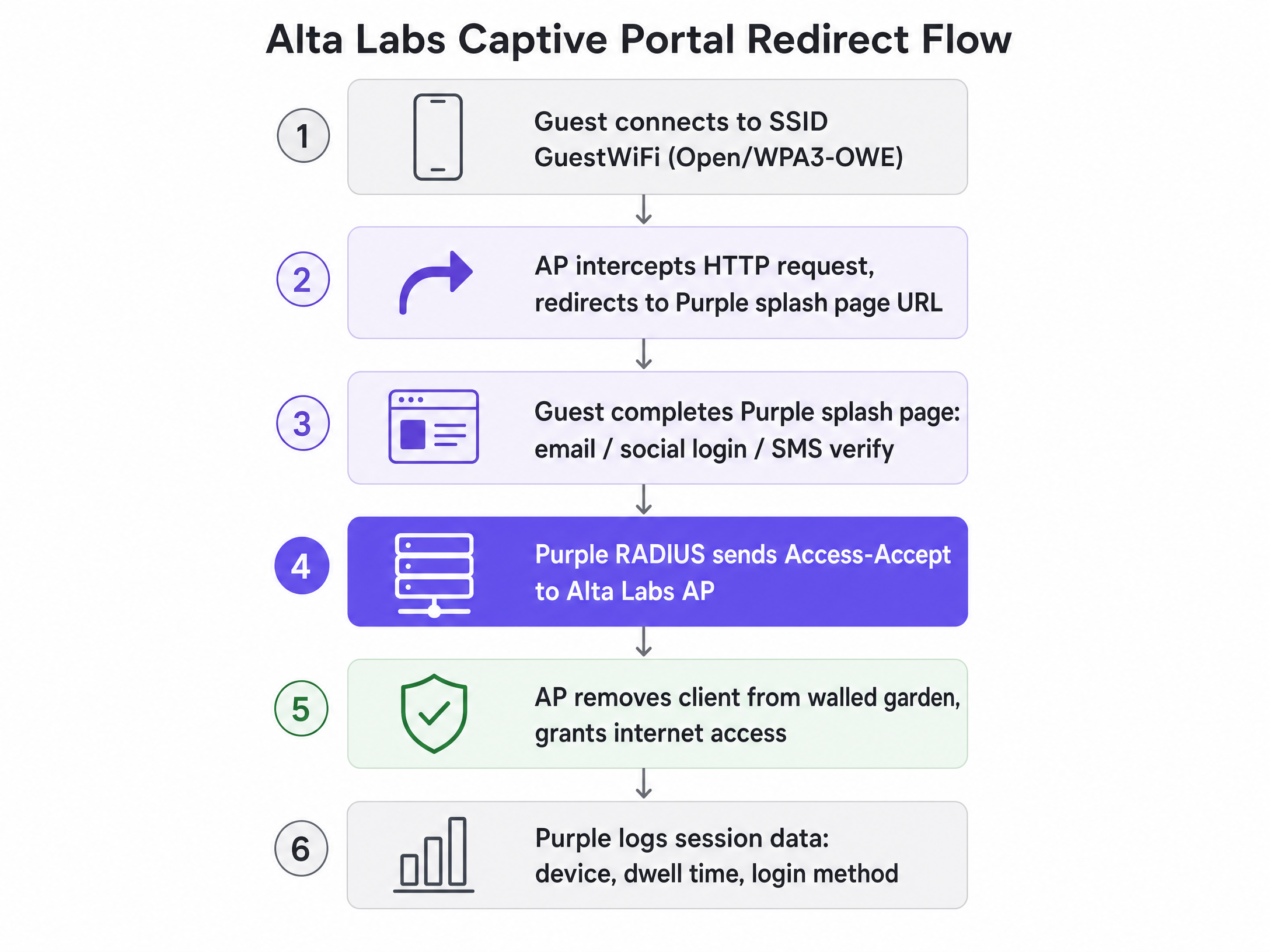
Quando un ospite si connette all'SSID aperto o WPA3-OWE, l'AP inserisce il dispositivo in uno stato di pre-autenticazione limitato. Tutto il traffico HTTP in uscita viene intercettato e reindirizzato all'URL della splash page di Purple. Il dispositivo può raggiungere solo i domini esplicitamente elencati nel walled garden fino al completamento dell'autenticazione. Una volta che l'ospite invia le proprie credenziali sulla splash page di Purple, il server RADIUS di Purple invia un Access-Accept all'AP, che rimuove la restrizione e concede l'accesso completo a Internet. Purple registra i dati della sessione (tipo di dispositivo, tempo di permanenza, metodo di accesso) e li rende disponibili nella dashboard WiFi Analytics .
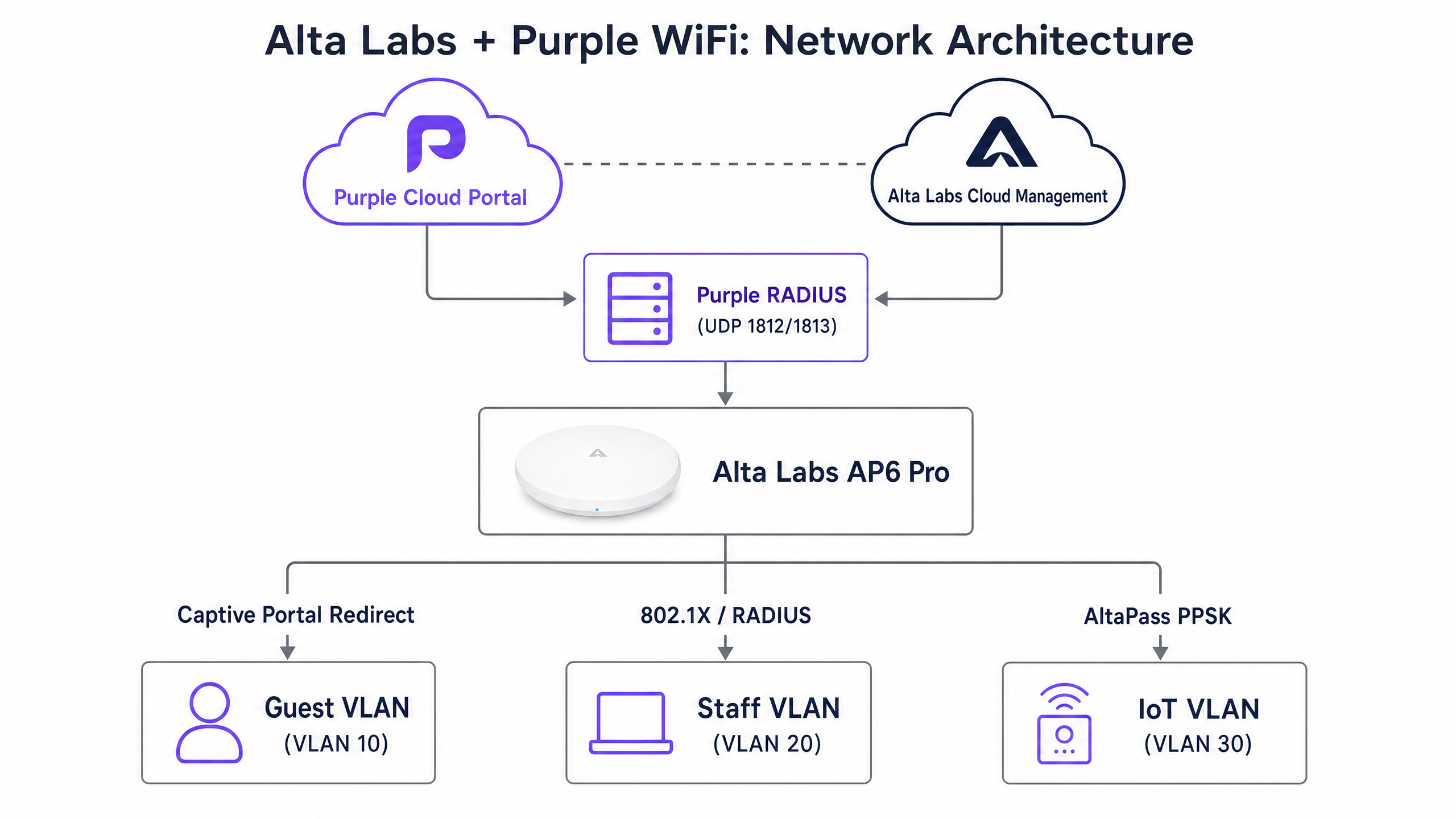
Per le reti del personale e del back-of-house, lo stesso hardware AP gestisce l'autenticazione WPA2/WPA3-Enterprise (IEEE 802.1X). L'AP funge da client RADIUS, inoltrando le richieste di autenticazione all'infrastruttura SecurePass di Purple, che a sua volta convalida le credenziali rispetto a Microsoft Entra ID, Okta o Google Workspace. La risposta RADIUS Access-Accept contiene l'attributo Tunnel-Private-Group-Id, che l'AP utilizza per posizionare dinamicamente il dispositivo sulla VLAN corretta.
Guida all'implementazione
Passaggio 1: Aggiungere la sede e l'hardware in Purple
Prima di intervenire sul controller Alta Labs, registra l'implementazione in Purple.
- Accedi al portale di gestione di Purple e naviga su Management > Locations.
- Seleziona Venues and Groups > Add venue e completa la procedura guidata per la sede.
- Dalla tua sede, seleziona Hardware > Add hardware > Add new hardware.
- Imposta il tipo di hardware su WiFi AP e seleziona il tipo di AP appropriato.
- Inserisci l'indirizzo MAC di ciascuna unità Alta Labs AP6 o AP6 Pro.
- Fai clic su View Manual Online per recuperare gli indirizzi IP del server RADIUS, le porte e la chiave segreta condivisa (shared secret) per questa sede. Registra questi valori: ti serviranno nel Passaggio 3.
Passaggio 2: Configurare l'SSID guest in Alta Labs
Accedi alla piattaforma Alta Labs Cloud Management all'indirizzo manage.alta.inc.
- Naviga su Settings > WiFi e seleziona l'SSID destinato all'accesso guest.
- In Advanced Settings, imposta il tipo di rete su Guest. Questo applica automaticamente l'isolamento dei client.
- Scorri fino alla sezione Hotspot e seleziona External.
- Nel campo Redirect URL, incolla l'URL della splash page di Purple fornito nelle impostazioni hardware della tua sede (ad es.
https://region1.purpleportal.net/access/). - Inserisci l'Authorisation Secret (chiave segreta condivisa RADIUS) dalle impostazioni della tua sede Purple.
- Fai clic su Save.
Passaggio 3: Configurare l'autenticazione RADIUS
Con il reindirizzamento esterno attivo, configura le impostazioni RADIUS in modo che l'AP possa comunicare con l'infrastruttura di autenticazione di Purple.
| Parametro | Valore |
|---|---|
| IP del server di autenticazione primario | Fornito dalle impostazioni della sede Purple |
| Porta di autenticazione | UDP 1812 |
| IP del server di accounting primario | Fornito dalle impostazioni della sede Purple |
| Porta di accounting | UDP 1813 |
| Chiave segreta condivisa | Fornito dalle impostazioni della sede Purple |
Per le distribuzioni ad alta disponibilità, configura il server RADIUS secondario utilizzando l'indirizzo IP di backup fornito da Purple.
Passaggio 4: Definire il walled garden
Il walled garden consente l'accesso a domini specifici prima del completamento dell'autenticazione. Eventuali voci mancanti interromperanno il flusso del captive portal o impediranno il caricamento dei social login. Inserisci i seguenti domini nel campo Additional Authorised Hosts / IPs nella configurazione dell'Hotspot di Alta Labs.
Infrastruttura Purple (richiesto)
| Dominio | Scopo |
|---|---|
region1.purpleportal.net |
Hosting della splash page |
venuewifi.com |
Infrastruttura di reindirizzamento Purple |
cloudfront.net |
CDN per gli asset del portale |
Sonde del captive portal del sistema operativo (richiesto)
| Dominio | Sistema operativo |
|---|---|
captive.apple.com |
iOS / macOS |
connectivitycheck.gstatic.com |
Android |
msftconnecttest.com |
Windows |
Social login (aggiungere in base al provider abilitato)
| Provider | Domini |
|---|---|
accounts.google.com, oauth2.googleapis.com, apis.google.com, gstatic.com |
|
facebook.com, graph.facebook.com, connect.facebook.net, *.fbcdn.net |
|
| Apple | appleid.apple.com, idmsa.apple.com, *.apple.com |
AltaPass PPSK e segmentazione multi-tenant
AltaPass è l'implementazione in attesa di brevetto di Alta Labs delle Private Pre-Shared Keys (PPSK). Consente a un singolo SSID di supportare più password univoche, con ciascuna password associata a una VLAN distinta, un limite di larghezza di banda, una pianificazione e una regola di bypass dell'hotspot. Ciò elimina la necessità di trasmettere SSID separati per ciascun inquilino, gruppo di personale o categoria di dispositivi.
Configurazione di AltaPass nella dashboard di Alta Labs
- Seleziona il tuo SSID e naviga nella sezione di gestione delle password.
- Fai clic sul pulsante purple del tipo di rete a sinistra di ciascun inserimento di password.
- Assegna un ID VLAN alla password. I client che si connettono con questa password verranno inseriti nella subnet VLAN specificata.
- Imposta i limiti di larghezza di banda (upload e download) per password come richiesto.
- Abilita o disabilita il bypass del Captive Portal per password. I dispositivi IoT e i terminali POS in genere bypassano il Captive Portal.
- Applica restrizioni di pianificazione se richiesto (ad es. limita l'accesso a Internet per determinati dispositivi al di fuori dell'orario di lavoro).
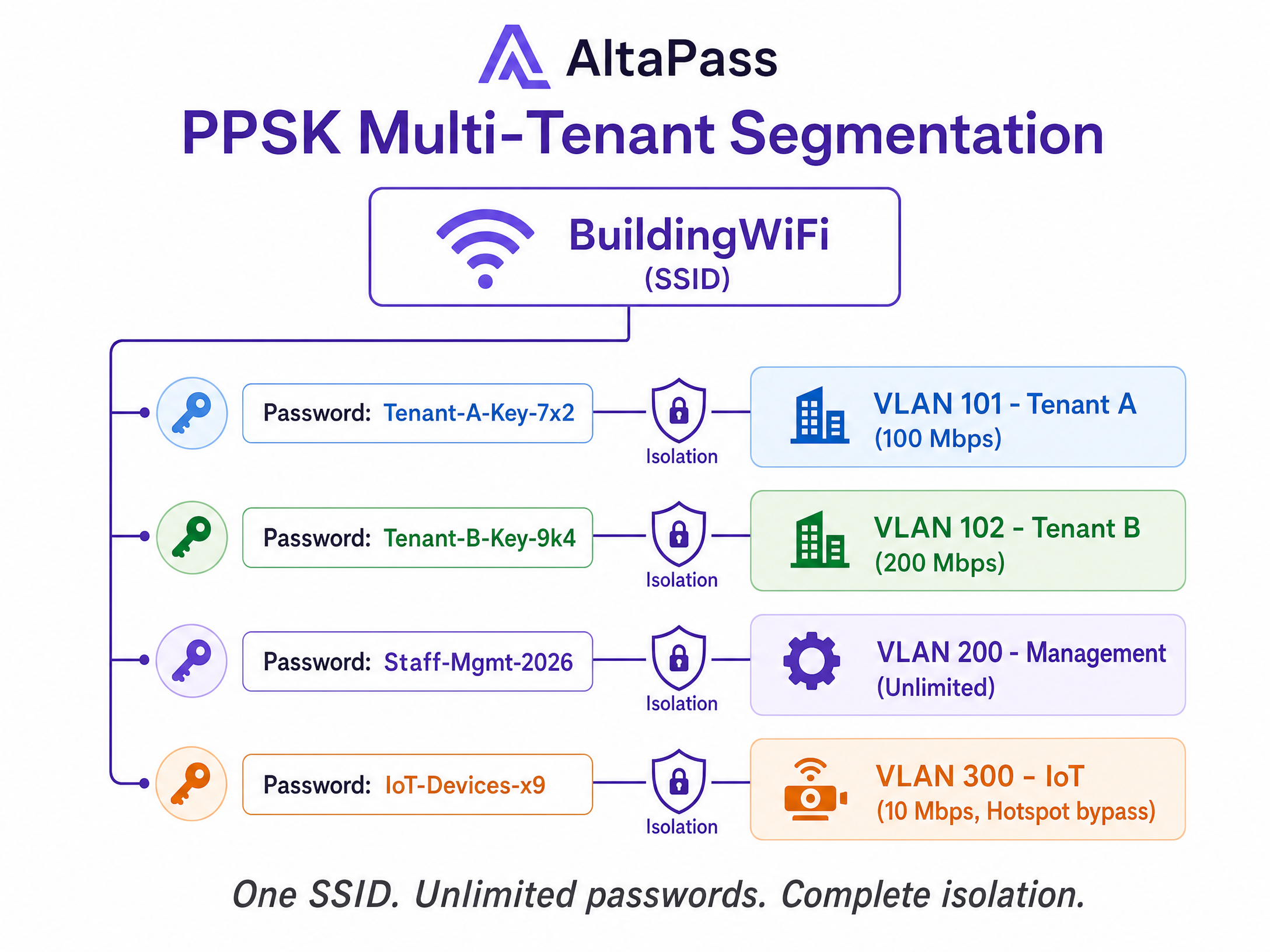
Per un edificio residenziale di 72 unità, questo significa un unico SSID e oltre 72 password univoche: una per unità, una per la gestione, una per il sistema di automazione dell'edificio. Ciascuna password è associata a una VLAN e a una subnet isolate. I residenti della fascia standard ricevono 100 Mbps. I residenti premium ricevono 300 Mbps. Il team di gestione dell'edificio non ha restrizioni. I dispositivi IoT sono isolati su una VLAN dedicata con deep packet inspection abilitata. Questo è il modello di implementazione che riduce il numero di SSID da 72 a uno.
Assegnazione dinamica della VLAN tramite RADIUS
Per le reti del personale 802.1X, l'assegnazione della VLAN funziona tramite gli attributi RADIUS anziché PPSK. La risposta RADIUS Access-Accept deve includere:
| Attributo | Valore |
|---|---|
Tunnel-Type |
13 (VLAN) |
Tunnel-Medium-Type |
6 (IEEE-802) |
Tunnel-Private-Group-Id |
ID VLAN di destinazione (ad es., "20") |
Importante: imposta la VLAN predefinita sull'SSID su VLAN 1 (or lasciala non taggata) quando utilizzi VLAN assegnate tramite RADIUS. Se la VLAN predefinita è impostata su un valore specifico, l'AP potrebbe ignorare l'assegnazione RADIUS con quella predefinita configurata. Questo è un comportamento noto nel firmware attuale di Alta Labs.
Best practice
Le seguenti raccomandazioni si applicano a qualsiasi implementazione Alta Labs con Purple, indipendentemente dal tipo di sede.
Utilizza la risoluzione DNS dinamica per le voci del walled garden. I provider OAuth e le CDN ruotano frequentemente gli indirizzi IP. Una whitelist di IP statici diventerà obsoleta nel tempo. Configura il controller Alta Labs per risolvere dinamicamente i domini del walled garden e imposta un TTL DNS non inferiore a 30 secondi per evitare un carico di query eccessivo.
Definisci l'ambito del walled garden con precisione. Inserisci in whitelist solo i domini richiesti per il flusso di autenticazione. Un'eccessiva inclusione in whitelist, in particolare l'aggiunta di voci wildcard per domini di grandi dimensioni, crea un vettore di bypass che vanifica lo scopo del Captive Portal.
Esegui test con dispositivi non autenticati prima della messa in servizio. Utilizza un dispositivo che non si è mai connesso alla rete. I dispositivi precedentemente autenticati potrebbero aver memorizzato nella cache le autorizzazioni MAC o le voci DNS, mascherando eventuali errori del walled garden. Verifica passo dopo passo ogni metodo di accesso che intendi offrire.
Verifica i domini del walled garden trimestralmente. Apple, Google e Meta aggiornano periodicamente le loro strutture di dominio OAuth. Inserisci una revisione trimestrale nel tuo calendario operativo per rilevare eventuali variazioni prima che interessino gli utenti.
Segmenta i dispositivi IoT fin dall'inizio. Utilizza AltaPass per assegnare i dispositivi IoT a una VLAN dedicata con il bypass dell'hotspot abilitato. Unire il traffico IoT con il traffico guest o del personale crea rischi non necessari e complica la risposta agli incidenti.
Per una panoramica più ampia dell'architettura di sicurezza WiFi aziendale, consulta la nostra guida su Sicurezza WiFi aziendale: una guida completa per il 2026 .
Risoluzione dei problemi e mitigazione dei rischi
La splash page non viene visualizzata su iOS. La causa più comune è la mancanza della voce captive.apple.com nel walled garden. iOS utilizza questo dominio per rilevare i Captive Portal. Se il probe è bloccato, il Captive Network Assistant non si avvia mai e l'utente visualizza un errore di connettività generico.
Il social login restituisce una schermata vuota o un errore CORS. Controlla il walled garden per verificare la presenza di sottodomini CDN o API mancanti. *.fbcdn.net di Facebook e gstatic.com di Google sono le voci omesse più di frequente. Utilizza gli strumenti di sviluppo del browser in una sessione non autenticata per identificare quali richieste di dominio stanno fallendo.
L'assegnazione della VLAN non riesce con AltaPass. Verifica che la porta dello switch a monte che si connette all'AP sia configurata come porta trunk e consenta le VLAN taggate. Una porta dello switch in modalità di accesso eliminerà i frame taggati in modo invisibile, lasciando il client senza un indirizzo IP.
L'autenticazione RADIUS va in timeout. Verifica che le porte UDP 1812 e 1813 siano aperte in uscita sul firewall perimetrale. Controlla che la chiave segreta condivisa nella configurazione di Alta Labs corrisponda esattamente al valore nelle impostazioni della sede di Purple: una mancata corrispondenza anche di un solo carattere causerà il fallimento di tutte le richieste di autenticazione.
L'assegnazione dinamica della VLAN inserisce gli utenti nella VLAN errata. Imposta la VLAN predefinita sull'SSID 802.1X su VLAN 1. Se la VLAN predefinita è impostata su un valore specifico, l'AP potrebbe ignorare la VLAN assegnata da RADIUS. Questo è un comportamento a livello di firmware confermato nel forum della community di Alta Labs.
ROI e impatto aziendale
L'implementazione dell'hardware Alta Labs con Purple Guest WiFi offre ritorni misurabili su tre dimensioni: efficienza operativa, acquisizione dati e postura di sicurezza.
Dal punto di vista operativo, il consolidamento di più SSID in un'unica rete gestita da AltaPass riduce i costi di gestione e migliora le prestazioni wireless. Meno SSID significano meno sovraccarico dei beacon frame, il che si traduce direttamente in un throughput più elevato per tutti i dispositivi connessi.
Dal punto di vista dei dati, il Captive Portal di Purple acquisisce dati di prima parte verificati a ogni accesso. Le sedi che utilizzano i piani Capture ed Engage di Purple registrano un aumento del 40% delle iscrizioni al database di marketing rispetto al WiFi guest non gestito (dati interni di Purple). Quei dati fconfluisce direttamente in WiFi Analytics , offrendo ai team di marketing visibilità sui modelli di affluenza, sui tempi di permanenza e sui tassi di visite ripetute.
Sul fronte della sicurezza, l'assegnazione dinamica delle VLAN isola il traffico di ospiti, personale e IoT all'edge. Combinata con l'infrastruttura certificata ISO 27001 di Purple e la gestione dei dati conforme al GDPR, questa architettura soddisfa i requisiti di segmentazione della rete PCI DSS per le strutture che gestiscono pagamenti con carta.
Specificamente per le implementazioni nel settore hospitality , la combinazione di splash page personalizzate, integrazioni con i programmi di fidelizzazione e controlli della larghezza di banda per singolo dispositivo crea un'esperienza ospite differenziata senza aggiungere complessità al team di gestione della rete.
Per gli ambienti retail , la possibilità di segmentare i terminali POS dal WiFi ospiti sulla stessa infrastruttura fisica - utilizzando le regole di bypass AltaPass - elimina la necessità di cablaggi o hardware separati, riducendo sia le spese in conto capitale che quelle operative.
Guide correlate: Arista Cognitive Wi-Fi Integration with Purple WiFi | Configurazione del Walled Garden per il WiFi ospiti
Definizioni chiave
Captive portal
A web page that intercepts unauthenticated network traffic and requires the user to interact - log in, accept terms, or pay - before granting internet access. Purple hosts the splash page in the cloud; the Alta Labs AP handles the redirect.
The primary mechanism for guest data capture in hospitality, retail, and public-sector WiFi deployments.
Walled garden
A defined list of domains and IP addresses that a client device can access before completing captive portal authentication. Everything outside the list is blocked until the user logs in.
Critical for allowing social login APIs, OS detection probes, and portal CDN assets to function before authentication completes.
PPSK (Private Pre-Shared Key)
A security method where multiple unique passwords can be used on a single SSID, with each password assigning the connecting device to a specific VLAN, bandwidth policy, and access schedule.
Alta Labs implements this as AltaPass. Used in MDUs, smart offices, and stadiums to provide isolated access without SSID proliferation.
RADIUS
Remote Authentication Dial-In User Service. A networking protocol that provides centralised authentication, authorisation, and accounting (AAA) management. Purple acts as the RADIUS server; the Alta Labs AP acts as the RADIUS client.
The mechanism that tells the AP a guest has successfully authenticated and should be granted internet access.
Identity-Based Networking
A network architecture where access rights, VLANs, and bandwidth limits are applied based on the authenticated identity of the user or device, rather than the physical port or SSID they connect to.
Purple's term for the combination of RADIUS, PPSK, and VLAN assignment that enables consistent policies across a distributed estate.
Dynamic VLAN assignment
The process of placing a client device onto a specific Virtual Local Area Network based on authentication credentials returned by a RADIUS server, rather than a static SSID-to-VLAN mapping.
Essential for isolating staff, guest, and IoT traffic on shared wireless infrastructure. Requires correct RADIUS attributes: Tunnel-Type, Tunnel-Medium-Type, and Tunnel-Private-Group-Id.
Captive Network Assistant (CNA)
The built-in OS mechanism on iOS, Android, and Windows that detects a captive portal by probing a known URL. If the probe is redirected, the OS launches a pseudo-browser for the user to log in.
If the CNA probe domains are blocked in the walled garden, the user never sees the splash page. This is the most common captive portal failure mode.
WPA3-OWE
Wi-Fi Protected Access 3 - Opportunistic Wireless Encryption. A standard that encrypts data in transit on open networks without requiring a password, protecting guest privacy while still allowing captive portal redirection.
The recommended security mode for guest SSIDs in 2026. Provides encryption without the friction of a pre-shared key.
AltaPass
Alta Labs' patent-pending implementation of multi-password SSID technology. Allows a single SSID to carry unlimited unique passwords, each with its own VLAN, bandwidth limit, schedule, and hotspot bypass setting.
The primary tool for multi-tenant segmentation on Alta Labs hardware. Replaces the need for multiple SSIDs in residential, hospitality, and smart office deployments.
Esempi pratici
A 200-room hotel needs to provide tiered WiFi access: a free basic tier (10 Mbps) for standard guests, a premium paid tier (50 Mbps) for loyalty members, and a secure network for housekeeping staff. They want to avoid broadcasting multiple SSIDs to maintain RF performance across 40 Alta Labs AP6 Pro units.
Deploy a single SSID named 'Hotel Guest WiFi' with AltaPass enabled. Create three password profiles in the Alta Labs dashboard: (1) a standard guest password assigned to VLAN 10 with a 10 Mbps download limit and external hotspot redirect to the Purple splash page; (2) a loyalty member password assigned to VLAN 20 with a 50 Mbps limit - Purple can distribute this password post-authentication via its marketing automation; (3) a housekeeping staff password assigned to VLAN 30 with no bandwidth limit, hotspot bypass enabled, and client isolation disabled so staff devices can communicate with back-of-house systems. Configure the switch uplinks as trunks allowing VLANs 10, 20, and 30. The guest and loyalty VLANs route to the internet via NAT. The staff VLAN routes to the property management system subnet.
A retail chain is deploying Purple Guest WiFi across 50 stores using Alta Labs hardware. During testing, the splash page loads correctly on Android devices, but Apple iOS devices show a generic 'No Internet Connection' error and do not display the login screen. The walled garden includes the Purple portal domain and Google OAuth entries.
Add captive.apple.com to the walled garden in the Alta Labs Hotspot configuration. iOS uses this domain as its Captive Network Assistant probe. When the device connects to a new network, iOS sends an HTTP request to captive.apple.com. If it receives the expected response, it assumes the network is open. If it receives a redirect, it launches the pseudo-browser. If the domain is blocked entirely, iOS cannot detect the captive portal and displays a connectivity error. Once the domain is whitelisted, iOS devices will detect the redirect and launch the login screen automatically.
Domande di esercitazione
Q1. You are deploying Alta Labs AP6 Pro access points in a conference centre. The client requires a captive portal for attendees, but also needs point-of-sale terminals to connect securely to the same access points without seeing the splash page. Both device types should use the same SSID to simplify signage. How do you configure this?
Suggerimento: AltaPass allows per-password hotspot bypass settings on the same SSID.
Visualizza risposta modello
Enable AltaPass on the single SSID. Create one password for POS terminals that assigns them to a secure VLAN (e.g., VLAN 50) with hotspot bypass enabled - these devices connect directly to the network without seeing the captive portal. Create a separate password (or use an open connection) for attendees that triggers the external redirect to the Purple splash page on VLAN 10. Both device types connect to the same SSID but receive different network policies based on their password.
Q2. After configuring the Purple captive portal on an Alta Labs network, Android devices successfully display the splash page, but Apple iOS devices show a generic 'No Internet Connection' error and do not open the login screen. The walled garden includes the Purple portal domain and Google OAuth entries. What is the most likely cause and fix?
Suggerimento: iOS uses a specific domain to detect captive portals. If it cannot reach that domain, it assumes the network has no internet access.
Visualizza risposta modello
The walled garden is missing captive.apple.com. iOS sends an HTTP probe to this domain when connecting to a new network. If the probe is blocked, iOS cannot detect the captive portal and displays a connectivity error instead of launching the Captive Network Assistant. Add captive.apple.com to the walled garden in the Alta Labs Hotspot configuration. Also add connectivitycheck.gstatic.com for Android and msftconnecttest.com for Windows to ensure cross-platform compatibility.
Q3. A stadium IT director has configured RADIUS-assigned VLANs on an Alta Labs 802.1X staff network. The RADIUS server is sending the correct Tunnel-Private-Group-Id attribute (VLAN 20), but all staff devices are landing on VLAN 5, which is the default VLAN configured on the SSID. What is causing this and how do you resolve it?
Suggerimento: There is a known behaviour in Alta Labs firmware related to the interaction between the SSID default VLAN and RADIUS-assigned VLANs.
Visualizza risposta modello
The Alta Labs AP is overriding the RADIUS-assigned VLAN with the SSID default VLAN value. This is a known firmware behaviour: when the default VLAN on the SSID is set to a specific value (VLAN 5 in this case), the AP uses that value instead of the RADIUS-returned VLAN. The fix is to set the default VLAN on the 802.1X SSID to VLAN 1 (or leave it untagged). With the default set to VLAN 1, the AP correctly defers to the RADIUS-assigned VLAN for each authenticated user.
Continua a leggere questa serie
Guida all'integrazione di MikroTik RouterOS Captive Portal e Purple WiFi
Questa guida tecnica fornisce istruzioni dettagliate per l'integrazione di MikroTik RouterOS con la piattaforma Purple WiFi. Copre la configurazione del Captive Portal per il WiFi ospiti, l'autenticazione 802.1X per il WiFi dipendenti e il WiFi multi-tenant utilizzando PSK privati per la segmentazione dinamica delle VLAN.
Integrazione di Zyxel Nebula Cloud e USG con Purple WiFi
Questa guida di riferimento tecnico copre l'integrazione end-to-end di Zyxel Nebula Cloud e dei firewall USG Flex con la piattaforma Purple WiFi. Fornisce istruzioni di configurazione passo-passo per il reindirizzamento del Captive Portal per gli ospiti, l'autenticazione RADIUS, la configurazione del Walled Garden, il WiFi protetto per il personale tramite 802.1X e la segmentazione della rete multi-tenant utilizzando le chiavi pre-condivise private (PPSK) di Zyxel con assegnazione dinamica della VLAN. I responsabili IT, gli MSP e gli architetti di rete che distribuiscono il WiFi in ambienti ricettivi, retail e multi-tenant troveranno indicazioni pratiche basate sugli standard di settore, inclusi PCI DSS, IEEE 802.1X e GDPR.
Aruba ClearPass e Purple WiFi: Guida all'integrazione e alla distribuzione
Questa guida fornisce un riferimento tecnico completo per l'integrazione di HPE Aruba ClearPass Policy Manager con la piattaforma Purple WiFi, coprendo l'architettura proxy RADIUS, la configurazione del Captive Portal e la mappatura dinamica dei ruoli VLAN. È progettata per i responsabili IT e gli architetti di rete in ambienti fortemente basati su Aruba che necessitano di mantenere ClearPass per il NAC pur implementando Purple per l'autenticazione degli ospiti e l'analisi. L'implementazione di questa integrazione colma una lacuna critica tra i fornitori, consentendo sicurezza e conformità di livello aziendale insieme alle capacità di intelligence sui visitatori leader di mercato di Purple.