
Migliorare le velocità WiFi bloccando le reti pubblicitarie al perimetro
Questa guida fornisce a IT managers, network architects e CTOs una strategia pratica a livello di architettura per implementare l'edge-level ad blocking sulle reti WiFi delle sedi. Spiega la relazione tecnica tra programmatic advertising, DNS query volume e perceived network latency, e descrive in dettaglio come l'intercettazione delle ad-related DNS requests all'edge gateway possa recuperare una significativa bandwidth e migliorare la guest experience. Dalle hotel deployments agli stadium events e ai distributed retail estates, la guida copre i passaggi di implementazione, la mitigazione dei rischi, le considerazioni sulla conformità e il ROI misurabile.
Ascolta questa guida
Visualizza trascrizione del podcast
Riepilogo Esecutivo
Per gli IT managers e i CTOs che supervisionano reti ad alta densità, la gestione del bandwidth consumption e la riduzione della latency sono sfide operative costanti. Mentre le tradizionali Quality of Service (QoS) policies e il bandwidth capping affrontano alcuni sintomi, non riescono a risolvere un significativo problema nascosto: il programmatic advertising. Le moderne web pages e applications eseguono decine di background DNS requests verso ad exchanges, trackers e telemetry services prima di renderizzare il primary content. In una sede con migliaia di concurrent users, questo crea un latency multiplier effect che degrada la perceived WiFi performance anche quando la raw bandwidth è disponibile.
Questa guida descrive in dettaglio come l'implementazione dell'edge-level DNS filtering possa migliorare la WiFi speed, ridurre i DNS resolution times fino all'86% e recuperare il 15-30% del bandwidth consumato nelle enterprise deployments. L'approccio non richiede alcun client-side software, è trasparente per gli end users e offre benefici secondari di security bloccando i malicious domains noti. È particolarmente efficace negli ambienti Hospitality , Retail , Transport e del settore pubblico dove la guest density è elevata e la connection duration varia.
Approfondimento Tecnico
L'Effetto Moltiplicatore della Latenza
La relazione tecnica tra programmatic advertising e network latency è radicata nel processo di Domain Name System (DNS) resolution. Quando un guest device si connette al Guest WiFi di una sede e accede a un moderno news site o application, la HTTP request iniziale innesca una cascata di secondary requests. Queste secondary requests mirano a ad exchanges, demand-side platforms (DSPs), data management platforms (DMPs), viewability trackers e conversion pixels — tutto prima che venga consegnato un singolo byte di primary content.
Ogni ad unit in questa programmatic chain richiede:
- Un DNS lookup per l'ad server domain
- L'instaurazione di una TCP connection (SYN, SYN-ACK, ACK)
- Una TLS handshake negotiation (tipicamente 2-3 round trips)
- La HTTP GET request e la payload delivery
In un ambiente denso come uno stadium o un conference centre, migliaia di devices che eseguono simultaneamente questo processo generano un enorme DNS query volume. Ancora più criticamente, ogni TCP connection occupa una voce nella connection state table dell'edge router — una struttura di memoria finita. Quando questa table raggiunge la capacity, il router inizia a dropping connections indiscriminatamente. Questa è la primary cause della perceived WiFi degradation nelle high-density venues, anche quando il WAN link opera ben al di sotto della capacity.
| Metrica | Senza blocco al perimetro | Con blocco al perimetro |
|---|---|---|
| Query DNS medie per utente/min | 180–240 | 65–90 |
| Tempo di risoluzione DNS (media) | 280–340 ms | 40–55 ms |
| Tempo medio di caricamento pagina | 4.0–4.5 s | 1.6–2.0 s |
| Larghezza di banda consumata da annunci/tracker | 18–32% del totale | <5% del totale |
| Utilizzo tabella di stato del router (picco) | 85–95% | 35–50% |
Architettura di Edge DNS Filtering
L'implementazione dell'ad blocking at the edge comporta il reindirizzamento delle client DNS queries a un local or cloud-based DNS resolver configurato con estese blocklists. Quando un client richiede la resolution per un noto ad-serving domain, l'edge resolver restituisce un null IP address (0.0.0.0) o una NXDOMAIN response. Questo impedisce tutti i successivi TCP e TLS connection attempts, risparmiando sia bandwidth che router state table entries.
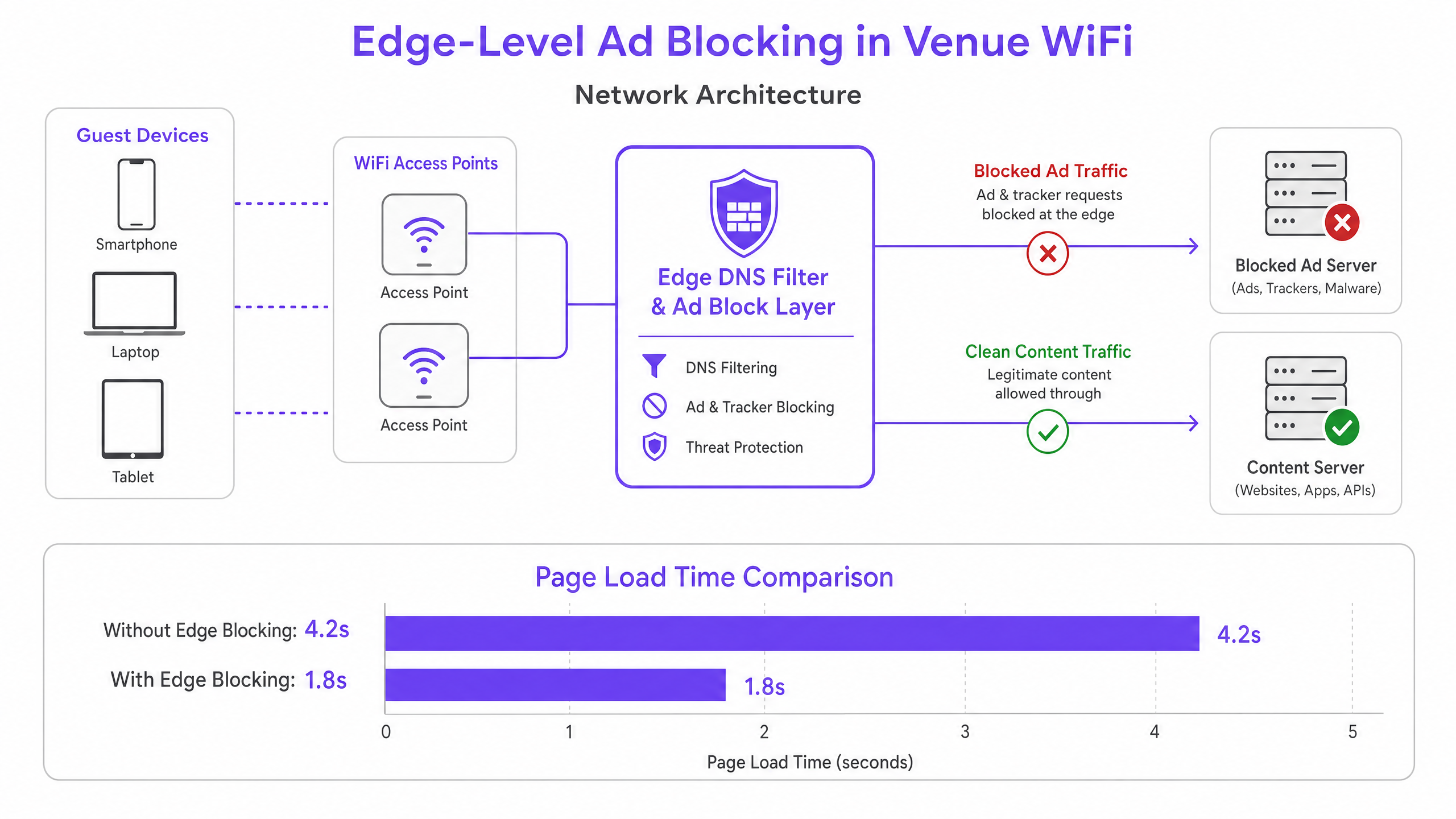
Questa architettura è interamente trasparente per gli end users e non richiede alcuna software installation sui guest devices. Inoltre, completa le piattaforme WiFi Analytics esistenti, garantendo che il traffico legittimo del captive portal e le engagement metrics rimangano inalterati. Il DNS layer si trova logicamente tra la guest VLAN e l'upstream resolver, intercettando tutte le DNS queries prima che lascino il network perimeter.
DNS over HTTPS (DoH) e il Problema del Bypass
I Modern browsers — Chrome, Firefox ed Edge — sempre più spesso utilizzano di default il DNS over HTTPS (DoH), che encrypts DNS queries e le routes over port 443. Poiché il DoH traffic è indistinguibile dal standard HTTPS, le port-based interception rules sono inefficaci. La current industry best practice consiste nel mantenere e applicare una blocklist di noti DoH provider IP address ranges al firewall layer, costringendo i browsers a fall back al standard unencrypted DNS, che può quindi essere filtrato. Questo approccio è coerente con gli enterprise network management standards e non viola gli user privacy obligations, poiché il filtering si applica a advertising e malicious domains, non a personal browsing content.
Guida all'Implementazione
Il deployment dell'edge ad blocking richiede un'attenta pianificazione per evitare di interrompere i legitimate services o di compromettere i captive portal authentication workflows.
Fase 1 — Audit del Volume Attuale delle Query DNS. Prima del deployment, stabilire una baseline. La maggior parte degli enterprise firewalls e dei DNS servers può esportare i query logs. Identificare i top queried domains e confrontarli con le liste note di ad network. Questo quantifica l'opportunità e fornisce una metric di confronto pre/post.
Fase 2 — Selezione dell'Architettura di Risoluzione. Determinare se un local on-premises resolver o un cloud-based service sia appropriato. Gli On-premises resolvers (ad es., Pi-hole, AdGuard Home, Infoblox) offrono la lowest latency ma richiedono hardware resources e maintenance. I Cloud resolvers (ad es., Cisco Umbrella, Cloudflare Gateway) semplificano il management tra distributed sites e sono fortemente raccomandati per multi-venue retail o hospitality chains senza local IT staff.
Fase 3 — Configurare l'intercettazione DHCP e DNS. Aggiornare gli ambiti DHCP per distribuire l'indirizzo IP del resolver edge ai client. Fondamentale è implementare regole Destination NAT (DNAT) sul firewall per intercettare tutto il traffico UDP/TCP in uscita sulla porta 53 dalla VLAN guest e reindirizzarlo al resolver edge. Senza questo passaggio, i dispositivi con impostazioni DNS hardcoded aggireranno completamente il filtro.
Passo 4 — Gestire il fallback DoH. Compilare e mantenere una blocklist di intervalli di indirizzi IP noti dei provider DoH. Applicare una regola di negazione del firewall per questi intervalli dalla VLAN guest. Ciò costringe i browser abilitati a DoH a ricorrere al DNS standard, che il resolver può filtrare.
Passo 5 — Curare Blocklist e Allowlisting. Iniziare con blocklist conservative e ben mantenute. Inserire immediatamente in allowlist tutti i domini richiesti per il vostro captive portal, i provider di social login, i gateway di pagamento e qualsiasi applicazione specifica della sede. Stabilire un processo di risposta rapida per l'allowlisting dei falsi positivi — un SLA inferiore a due ore durante l'orario lavorativo è un obiettivo ragionevole.
Passo 6 — Monitorare, Registrare e Iterare. Utilizzare i log delle query del resolver per monitorare i tassi di blocco e identificare le anomalie. Un improvviso picco di query bloccate da un singolo dispositivo potrebbe indicare un malware che tenta di contattare l'infrastruttura di comando e controllo — un beneficio di sicurezza secondario del filtraggio DNS. Integrare questi log con il vostro SIEM o piattaforma di monitoraggio della rete, ove possibile.
Migliori Pratiche
Design Fail-Open per Reti Guest. In un contesto WiFi guest, la connettività è l'obbligo primario. Configurare un resolver upstream secondario, non filtrato, come fallback. Se il resolver edge primario fallisce, le query DNS dovrebbero essere instradate al fallback per mantenere la connettività, accettando la perdita temporanea del filtraggio degli annunci piuttosto che causare un'interruzione completa.
Test di Compatibilità del Captive Portal. Prima di andare in produzione, testare ogni metodo di autenticazione supportato dal vostro captive portal — social login (Facebook, Google, Apple), email, SMS e qualsiasi integrazione di pagamento. Inserire esplicitamente in allowlist tutti i domini richiesti. Fare riferimento alla documentazione del vostro provider di captive portal per un elenco completo dei domini richiesti.
Conformità e Governance dei Dati. I log delle query DNS possono rivelare il comportamento di navigazione degli utenti e sono quindi soggetti alle normative sulla protezione dei dati, incluso il GDPR. Assicurarsi che i log siano archiviati in modo sicuro, conservati solo per il periodo minimo richiesto per scopi operativi e non utilizzati per la profilazione o il marketing. Per una guida dettagliata sui requisiti dell'audit trail, consultare Spiegare cos'è l'audit trail per la sicurezza IT nel 2026 .
Politiche Separate per le Reti del Personale. Applicare politiche di filtraggio diverse, potenzialmente più permissive, alle VLAN del personale. Il personale potrebbe richiedere l'accesso a piattaforme pubblicitarie, strumenti di analisi o social media per legittime finalità aziendali. Per una guida più ampia sulla sicurezza delle reti del personale, consultare Politiche BYOD Sicure per le Reti WiFi del Personale .
Provenienza e Manutenzione delle Blocklist. Utilizzare blocklist ben mantenute e verificate dalla comunità (ad esempio, la lista host di Steven Black, EasyList, OISD) e pianificare aggiornamenti automatici almeno settimanalmente. Le blocklist obsolete non rilevano nuovi domini pubblicitari e potrebbero mantenere voci categorizzate in modo errato.
Risoluzione dei Problemi e Mitigazione del Rischio
Falsi Positivi — Siti Web o Applicazioni Non Funzionanti. La modalità di fallimento più comune è il blocco di un dominio che serve contenuti legittimi insieme agli annunci. Un dominio CDN potrebbe ospitare sia script pubblicitari che i fogli di stile CSS per un importante sito di notizie. Mitigazione: Iniziare con blocklist conservative, stabilire un chiaro SLA per l'allowlisting e fornire al personale un semplice meccanismo di segnalazione per i siti non funzionanti.
Errori di Autenticazione del Captive Portal. Se i flussi di social login o di pagamento si interrompono dopo la distribuzione, il resolver sta bloccando un dominio richiesto. Mitigazione: Utilizzare gli strumenti per sviluppatori del browser per identificare la richiesta fallita e aggiungere il dominio all'allowlist. Testare sempre in un ambiente di staging prima del rollout in produzione.
Bypass DoH Persistente. Se il volume delle query DNS post-distribuzione rimane elevato, alcuni dispositivi potrebbero ancora utilizzare DoH. Mitigazione: Verificare la completezza della vostra blocklist IP dei provider DoH. Considerare l'implementazione di una regola di deep packet inspection (DPI) per rilevare e bloccare i modelli di traffico DoH sulla porta 443, se il vostro firewall lo supporta.
Prestazioni del Resolver Sotto Carico. In implementazioni ad altissima densità (oltre 5.000 utenti concorrenti), una singola istanza di resolver potrebbe diventare un collo di bottiglia. Mitigazione: Distribuire istanze di resolver in una coppia ad alta disponibilità con bilanciamento del carico, o utilizzare un servizio anycast basato su cloud che si scala automaticamente.
ROI e Impatto Commerciale
L'implementazione del blocco degli annunci edge offre risultati aziendali misurabili e quantificabili su più dimensioni.
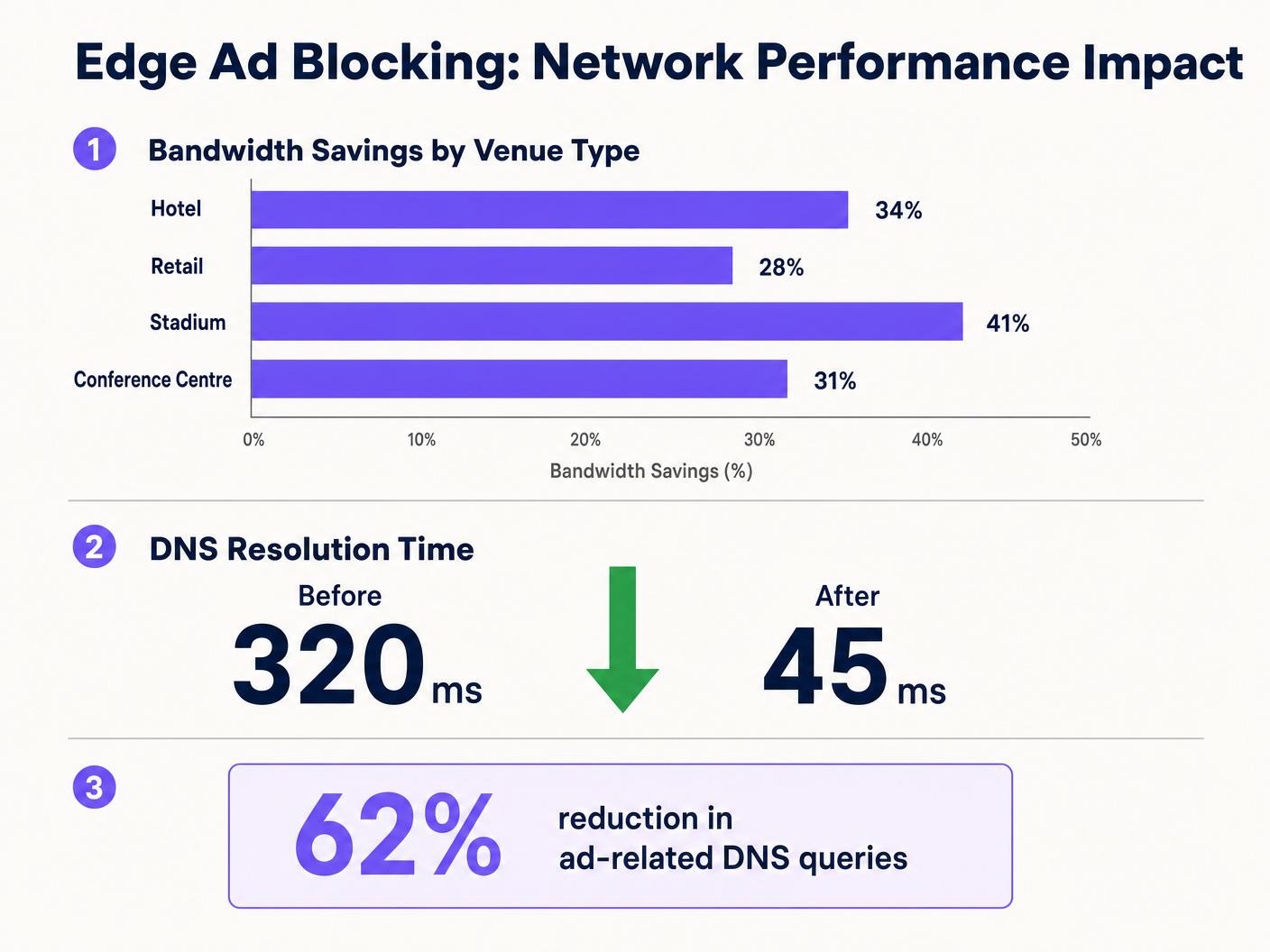
Recupero della Larghezza di Banda. Le sedi riportano costantemente riduzioni del 15-30% nel consumo complessivo di larghezza di banda dopo l'implementazione. Per una sede che spende £3.000 al mese per un circuito WAN da 1Gbps, una riduzione del 20% nell'utilizzo effettivo può posticipare un aggiornamento del circuito di 12-18 mesi, rappresentando un risparmio di £36.000–£54.000 in quel periodo.
Miglioramento della Soddisfazione degli Ospiti. I tempi di caricamento delle pagine diminuiscono notevolmente — da una media di oltre 4 secondi a meno di 2 secondi nelle implementazioni tipiche. Questo si correla direttamente con punteggi di soddisfazione degli ospiti più elevati e meno reclami relativi al WiFi alla reception o all'helpdesk. Negli ambienti di ospitalità, la qualità del WiFi è costantemente citata come un fattore principale nelle recensioni degli ospiti.
Miglioramento della Postura di Sicurezza. Le blocklist DNS coprono intrinsecamente i domini noti di distribuzione malware, i siti di phishing e l'infrastruttura di comando e controllo. Ciò riduce il rischio che i dispositivi degli ospiti vengano compromessi mentre si trovano sulla rete della sede, limitando l'esposizione dell'operatore a rischi reputazionali e di potenziale responsabilità.
Efficienza Operativa. La riduzione del volume di chiamate all'helpdesk relative alle prestazioni del WiFi si traduce direttamente in un risparmio di tempo per il personale IT. In un gruppo alberghiero con più proprietà, ciò può rappresentare diverse ore-uomo (FTE) a settimana in tutte le strutture.
Integrando il blocco perimetrale con iniziative più ampie di infrastruttura digitale — come quelle discusse in Purple Appoints Iain Fox as VP Growth – Public Sector to Drive Digital Inclusion and Smart City Innovation e Purple Launches Offline Maps Mode for Seamless, Secure Navigation to WiFi Hotspots — le organizzazioni possono offrire un'esperienza di connettività veramente premium che supporta sia l'efficienza operativa che gli obiettivi di coinvolgimento degli ospiti.
Definizioni chiave
Edge DNS Resolver
A DNS server deployed at or near the network perimeter that handles domain name resolution for local clients, applying custom filtering policies before forwarding queries upstream.
Deploying this at the venue level reduces reliance on ISP DNS, enables custom filtering, and minimises the round-trip time for DNS resolution.
Connection State Table
A memory structure maintained by routers and firewalls that records the details of every active TCP/UDP connection passing through the device.
High-density venues frequently exhaust this table due to the volume of micro-connections initiated by ad networks, causing indiscriminate packet drops and perceived WiFi degradation.
Destination NAT (DNAT)
A firewall technique that rewrites the destination IP address of a packet as it traverses the router, redirecting it to a different host than originally intended.
Used to force DNS requests destined for public resolvers (e.g., 8.8.8.8) to route through the venue's filtered DNS server, preventing bypass of the ad-blocking policy.
DNS over HTTPS (DoH)
A protocol that performs DNS resolution over an encrypted HTTPS connection on port 443, preventing interception by traditional port 53 filtering rules.
Increasingly the default in modern browsers, DoH requires network administrators to block known DoH provider IP ranges to enforce local DNS filtering policies.
NXDOMAIN
A DNS response code indicating that the queried domain name does not exist in the DNS namespace.
Edge resolvers return this response for blocked ad domains, causing the client to immediately abandon the connection attempt without consuming router state table resources.
Programmatic Advertising
The automated, real-time buying and selling of digital advertising inventory, typically involving multiple intermediary platforms (ad exchanges, DSPs, DMPs) each requiring separate network connections.
The multi-platform nature of programmatic advertising is the root cause of the DNS query multiplication effect that degrades guest network performance.
Captive Portal
A web-based authentication mechanism that intercepts a new network user's HTTP traffic and redirects them to a login or terms-acceptance page before granting full network access.
Ad blocking policies must be carefully configured to avoid blocking domains required for captive portal functionality, including social login providers and payment gateways.
Allowlisting
The explicit configuration of a DNS resolver or firewall to permit access to specific domains or IP addresses, overriding any broader blocking policies that would otherwise apply.
Essential for resolving false positives and ensuring that business-critical services — including the captive portal, loyalty apps, and payment processors — remain accessible.
Anycast Routing
A network addressing method where the same IP address is assigned to multiple servers in different locations, with traffic automatically routed to the nearest instance.
Cloud-based DNS filtering services use anycast to ensure low-latency DNS resolution regardless of the venue's geographic location.
Esempi pratici
A 400-room hotel is experiencing severe WiFi latency during peak evening hours (7 PM–10 PM) despite having a 1 Gbps fibre connection. The IT manager suspects high DNS query volume from streaming and browsing is exhausting the edge router's state table. The hotel uses a social login captive portal and has no dedicated server infrastructure.
The IT team deploys a lightweight DNS resolver as a virtual machine on an existing hypervisor (1 vCPU, 512 MB RAM is sufficient for this scale). They configure the DHCP helper on the core switch to distribute the resolver's IP to the guest VLAN only, leaving the management and staff VLANs on the existing ISP DNS. They apply a standard combined blocklist (EasyList + OISD) covering approximately 200,000 known ad and tracker domains. Before going live, they test the captive portal and explicitly allowlist all Facebook, Google, and Apple authentication domains. They add a DNAT firewall rule redirecting all outbound port 53 traffic from the guest VLAN to the local resolver. They also add firewall deny rules for the IP ranges of Cloudflare (1.1.1.1), Google (8.8.8.8), and other major DoH providers. Post-deployment, DNS query volume drops by 62%, average page load time falls from 4.2 seconds to 1.8 seconds, and peak router state table utilisation drops from 91% to 44%.
A retail chain with 50 stores wants to improve the performance of their in-store guest WiFi app for customers. The app is the primary vehicle for loyalty programme sign-ups and promotional offers. The chain has no on-site IT staff and uses a managed SD-WAN service from a third-party provider.
The architecture team selects a cloud-based DNS filtering service with a management portal. They work with the SD-WAN provider to configure all branch routers to forward DNS queries from the guest VLAN to the cloud provider's anycast resolver IP addresses. They apply a centralised policy blocking ad networks and known malicious domains. Critically, they create an explicit allowlist covering all domains associated with their loyalty app, payment processor, and the captive portal provider. They configure the cloud portal to generate weekly reports on blocked query volume and top blocked domains per site. The rollout is completed remotely across all 50 sites within three days. Average bandwidth consumption across the estate drops by 28%, and the loyalty app's average load time improves from 3.1 seconds to 1.4 seconds.
Domande di esercitazione
Q1. A stadium IT team has deployed edge ad blocking via a local DNS resolver and configured DHCP to distribute the resolver's IP. However, post-deployment monitoring shows that approximately 30% of devices are still generating high volumes of external DNS traffic to 1.1.1.1 and 8.8.8.8. What is the most likely cause, and what is the correct remediation?
Suggerimento: Consider both hardcoded DNS settings and modern browser privacy features that bypass traditional port 53 filtering.
Visualizza risposta modello
There are two likely causes. First, devices with hardcoded DNS settings are ignoring the DHCP-assigned resolver. The remediation is to implement a DNAT firewall rule that intercepts all outbound UDP/TCP port 53 traffic from the guest VLAN and redirects it to the local resolver, regardless of the destination IP. Second, some devices may be using DNS over HTTPS (DoH), which bypasses port 53 filtering entirely. The remediation is to add firewall deny rules for the IP addresses of known DoH providers (Cloudflare 1.1.1.1, Google 8.8.8.8, etc.), forcing browsers to fall back to standard DNS.
Q2. Following the deployment of an edge DNS filter at a hotel, guests are reporting that they cannot complete the WiFi login process using their Facebook accounts. The captive portal social login button returns an error. The IT team confirms the resolver is operational. What is the most likely cause and how should it be resolved?
Suggerimento: Review the interaction between the blocklist categories and the domains required for OAuth-based social authentication.
Visualizza risposta modello
The blocklist has categorised one or more domains required by Facebook's OAuth authentication flow as advertising or tracking domains and is returning NXDOMAIN for them. The IT team should use browser developer tools (Network tab) to identify the specific domain(s) failing to resolve during the login attempt. These domains — typically in the facebook.com, fbcdn.net, or connect.facebook.net namespaces — should be added to the resolver's allowlist. Going forward, all social login provider domains should be pre-allowlisted as part of the standard deployment checklist before any blocklist is activated.
Q3. A CTO at a multi-site conference centre group is evaluating two options: deploying an on-premises Pi-hole resolver at each of their 12 venues versus adopting a cloud-based DNS filtering service. Each venue has limited local IT support. The primary driver is reducing bandwidth costs and improving attendee WiFi experience during large events. Which approach is recommended and why?
Suggerimento: Weigh management overhead, failure risk, scalability during peak event load, and the cost of local IT resource allocation against the slight latency difference between approaches.
Visualizza risposta modello
The cloud-based DNS filtering service is the recommended approach for this scenario. While an on-premises Pi-hole would offer marginally lower DNS resolution latency, the operational risks outweigh this benefit. With limited local IT support, a failed on-premises resolver could cause a complete DNS outage at a venue during a major event — a high-visibility, high-impact failure. A cloud-based service with anycast routing provides geographic redundancy, automatic failover, and centralised policy management across all 12 venues from a single portal. The slight increase in DNS latency (typically 5–15ms to the nearest anycast node) is negligible compared to the latency savings from blocking ad traffic. The cloud service also scales automatically to handle peak event query volumes without manual intervention.