
Verbesserung der WiFi-Geschwindigkeit durch Blockieren von Werbenetzwerken am Edge
Dieser Leitfaden bietet IT-Managern, Netzwerkarchitekten und CTOs eine praktische Strategie auf Architekturebene für die Implementierung von Edge-basiertem Ad-Blocking in Venue-WiFi-Netzwerken. Er erläutert den technischen Zusammenhang zwischen programmatischer Werbung, dem Volumen von DNS-Abfragen und der wahrgenommenen Netzwerklatenz und beschreibt, wie das Abfangen von werbebezogenen DNS-Anfragen am Edge-Gateway erhebliche Bandbreite zurückgewinnen und das Gästeerlebnis verbessern kann. Von Hotelimplementierungen über Stadionveranstaltungen bis hin zu verteilten Einzelhandelsimmobilien deckt der Leitfaden Implementierungsschritte, Risikominderung, Compliance-Überlegungen und messbaren ROI ab.
Diesen Leitfaden anhören
Podcast-Transkript ansehen
Zusammenfassung für Führungskräfte
Für IT-Manager und CTOs, die Netzwerke mit hoher Dichte in Veranstaltungsorten überwachen, sind die Verwaltung des Bandbreitenverbrauchs und die Reduzierung der Latenz ständige betriebliche Herausforderungen. Während traditionelle Quality of Service (QoS)-Richtlinien und Bandbreitenbegrenzungen einige Symptome angehen, versäumen sie es, einen erheblichen versteckten Engpass zu beseitigen: programmatische Werbung. Moderne Webseiten und Anwendungen führen Dutzende von Hintergrund-DNS-Anfragen an Werbebörsen, Tracker und Telemetriedienste aus, bevor der primäre Inhalt gerendert wird. In einem Veranstaltungsort mit Tausenden von gleichzeitigen Benutzern erzeugt dies einen Latenz-Multiplikator-Effekt, der die wahrgenommene WiFi-Leistung beeinträchtigt, selbst wenn Rohbandbreite verfügbar ist.
Dieser Leitfaden beschreibt, wie die Implementierung von Edge-basiertem DNS-Filtering die WiFi-Geschwindigkeit verbessern, die DNS-Auflösungszeiten um bis zu 86 % reduzieren und 15–30 % der verbrauchten Bandbreite in Unternehmensbereitstellungen zurückgewinnen kann. Der Ansatz erfordert keine clientseitige Software, ist für Endbenutzer transparent und bietet sekundäre Sicherheitsvorteile durch das Blockieren bekannter bösartiger Domains. Er ist besonders effektiv in den Bereichen Gastgewerbe , Einzelhandel , Transport und in Umgebungen des öffentlichen Sektors, wo die Gästedichte hoch ist und die Verbindungsdauer variiert.
Technischer Deep-Dive
Der Latenz-Multiplikator-Effekt
Die technische Beziehung zwischen programmatischer Werbung und Netzwerklatenz wurzelt im DNS-Auflösungsprozess (Domain Name System). Wenn ein Gastgerät sich mit dem Gast-WiFi eines Veranstaltungsortes verbindet und eine moderne Nachrichtenseite oder Anwendung aufruft, löst die anfängliche HTTP-Anfrage eine Kaskade von sekundären Anfragen aus. Diese sekundären Anfragen richten sich an Werbebörsen, Demand-Side-Plattformen (DSPs), Datenmanagement-Plattformen (DMPs), Sichtbarkeits-Tracker und Konversionspixel – alles bevor ein einziges Byte des primären Inhalts geliefert wird.
Jede Werbeeinheit in dieser programmatischen Kette erfordert:
- Einen DNS-Lookup für die Ad-Server-Domain
- Eine TCP-Verbindungsherstellung (SYN, SYN-ACK, ACK)
- Eine TLS-Handshake-Verhandlung (typischerweise 2–3 Roundtrips)
- Die HTTP-GET-Anfrage und die Nutzlastlieferung
In einer dichten Umgebung wie einem Stadion oder Konferenzzentrum erzeugen Tausende von Geräten, die diesen Prozess gleichzeitig ausführen, ein enormes DNS-Abfragevolumen. Noch kritischer ist, dass jede TCP-Verbindung einen Eintrag in der Verbindungszustandstabelle des Edge-Routers belegt – einer endlichen Speicherstruktur. Wenn diese Tabelle ihre Kapazität erreicht, beginnt der Router, Verbindungen wahllos zu trennen. Dies ist die Hauptursache für die wahrgenommene WiFi-Verschlechterung in Veranstaltungsorten mit hoher Dichte, selbst wenn die WAN-Verbindung weit unter ihrer Kapazität arbeitet.
| Metrik | Ohne Edge-Blocking | Mit Edge-Blocking |
|---|---|---|
| Durchschnittliche DNS-Abfragen pro Benutzer/Min | 180–240 | 65–90 |
| DNS-Auflösungszeit (Durchschnitt) | 280–340 ms | 40–55 ms |
| Durchschnittliche Seitenladezeit | 4,0–4,5 s | 1,6–2,0 s |
| Durch Werbung/Tracker verbrauchte Bandbreite | 18–32 % der Gesamtmenge | <5 % der Gesamtmenge |
| Auslastung der Router-Zustandstabelle (Spitze) | 85–95 % | 35–50 % |
Edge-DNS-Filterarchitektur
Die Implementierung von Ad-Blocking am Edge beinhaltet die Umleitung von Client-DNS-Abfragen an einen lokalen oder Cloud-basierten DNS-Resolver, der mit umfangreichen Blocklisten konfiguriert ist. Wenn ein Client eine Auflösung für eine bekannte Ad-Serving-Domain anfordert, gibt der Edge-Resolver eine Null-IP-Adresse (0.0.0.0) oder eine NXDOMAIN-Antwort zurück. Dies verhindert alle nachfolgenden TCP- und TLS-Verbindungsversuche und spart sowohl Bandbreite als auch Einträge in der Router-Zustandstabelle.
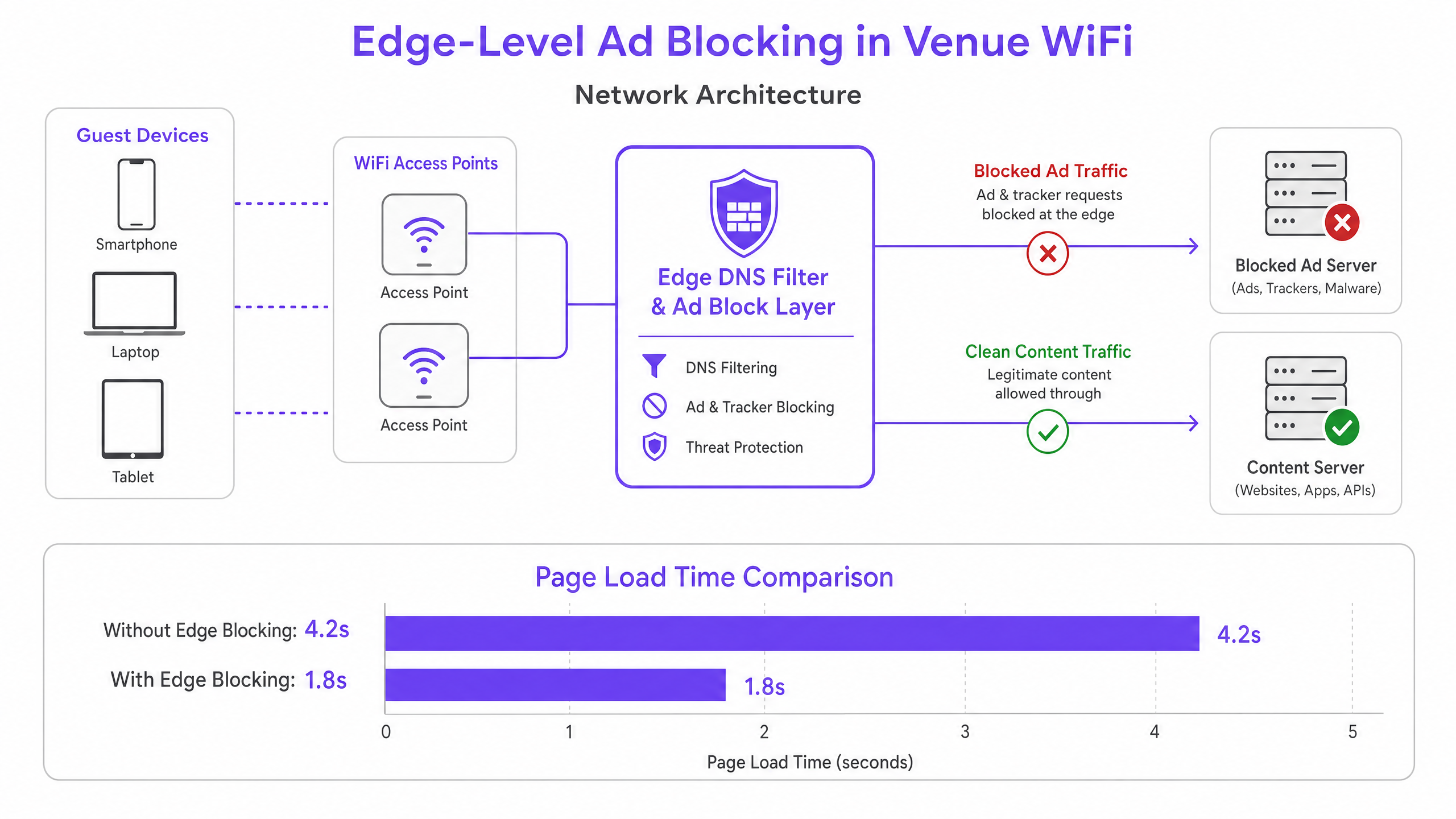
Diese Architektur ist für Endbenutzer vollständig transparent und erfordert keine Softwareinstallation auf Gastgeräten. Sie ergänzt auch bestehende WiFi Analytics -Plattformen, indem sie sicherstellt, dass legitimer Captive Portal-Traffic und Engagement-Metriken ungehindert bleiben. Die DNS-Schicht sitzt logisch zwischen dem Gast-VLAN und dem Upstream-Resolver und fängt alle DNS-Abfragen ab, bevor sie den Netzwerkperimeter verlassen.
DNS über HTTPS (DoH) und das Umgehungsproblem
Moderne Browser – Chrome, Firefox und Edge – verwenden zunehmend standardmäßig DNS über HTTPS (DoH), das DNS-Abfragen verschlüsselt und über Port 443 leitet. Da DoH-Traffic von Standard-HTTPS nicht zu unterscheiden ist, sind portbasierte Abfangregeln unwirksam. Die aktuelle Best Practice der Branche besteht darin, eine Blockliste bekannter DoH-Anbieter-IP-Adressbereiche auf der Firewall-Ebene zu pflegen und durchzusetzen, um Browser zu zwingen, auf standardmäßiges unverschlüsseltes DNS zurückzugreifen, das dann gefiltert werden kann. Dieser Ansatz steht im Einklang mit den Netzwerkmanagementstandards von Unternehmen und verletzt keine Datenschutzpflichten der Benutzer, da die Filterung auf Werbe- und bösartige Domains angewendet wird, nicht auf persönliche Browsing-Inhalte.
Implementierungsleitfaden
Die Bereitstellung von Edge-Ad-Blocking erfordert eine sorgfältige Planung, um die Störung legitimer Dienste oder das Unterbrechen von Captive Portal-Authentifizierungs-Workflows zu vermeiden.
Schritt 1 — Überprüfung des aktuellen DNS-Abfragevolumens. Vor der Bereitstellung eine Basislinie festlegen. Die meisten Enterprise-Firewalls und DNS-Server können Abfrageprotokolle exportieren. Identifizieren Sie die am häufigsten abgefragten Domains und gleichen Sie diese mit bekannten Werbenetzwerklisten ab. Dies quantifiziert die Gelegenheit und liefert eine Vor-/Nach-Vergleichsmetrik.
Schritt 2 — Auswahl der Auflösungsarchitektur. Bestimmen Sie, ob ein lokaler On-Premises-Resolver oder ein Cloud-basierter Dienst geeignet ist. On-Premises-Resolver (z. B. Pi-hole, AdGuard Home, Infoblox) bieten die geringste Latenz, erfordern jedoch Hardwareressourcen und Wartung. Cloud-Resolver (z. B. Cisco Umbrella, Cloudflare Gateway) vereinfachen die Verwaltung über verteilte Standorte hinweg und werden für Einzelhandels- oder Hotelketten mit mehreren Veranstaltungsorten ohne lokales IT-Personal dringend empfohlen.
Schritt 3 — DHCP- und DNS-Abfangen konfigurieren. Aktualisieren Sie die DHCP-Bereiche, um die IP-Adresse des Edge-Resolvers an Clients zu verteilen. Implementieren Sie entscheidend Destination NAT (DNAT)-Regeln auf der Firewall, um den gesamten ausgehenden UDP/TCP-Port-53-Verkehr vom Gast-VLAN abzufangen und an den Edge-Resolver umzuleiten. Ohne diesen Schritt umgehen Geräte mit fest codierten DNS-Einstellungen den Filter vollständig.
Schritt 4 — DoH-Fallback handhaben. Erstellen und pflegen Sie eine Blockliste bekannter IP-Adressbereiche von DoH-Anbietern. Wenden Sie eine Firewall-Verweigerungsregel für diese Bereiche vom Gast-VLAN an. Dies zwingt DoH-fähige Browser, auf Standard-DNS zurückzugreifen, das der Resolver filtern kann.
Schritt 5 — Blocklisten und Allowlisting kuratieren. Beginnen Sie mit konservativen, gut gepflegten Blocklisten. Erlauben Sie sofort alle Domains, die für Ihr Captive Portal, Social-Login-Anbieter, Zahlungsgateways und alle standortspezifischen Anwendungen erforderlich sind. Etablieren Sie einen schnellen Reaktionsprozess für das Allowlisting von Fehlalarmen – eine SLA von unter zwei Stunden während der Geschäftszeiten ist ein vernünftiges Ziel.
Schritt 6 — Überwachen, Protokollieren und Iterieren. Verwenden Sie Resolver-Abfrageprotokolle, um Blockierungsraten zu überwachen und Anomalien zu identifizieren. Ein plötzlicher Anstieg blockierter Abfragen von einem einzelnen Gerät kann auf Malware hinweisen, die versucht, eine Command-and-Control-Infrastruktur zu kontaktieren – ein sekundärer Sicherheitsvorteil der DNS-Filterung. Integrieren Sie diese Protokolle nach Möglichkeit in Ihr SIEM oder Ihre Netzwerküberwachungsplattform.
Best Practices
Fail-Open-Design für Gastnetzwerke. Im Kontext eines Gast-WiFi ist Konnektivität die primäre Verpflichtung. Konfigurieren Sie einen sekundären, ungefilterten Upstream-Resolver als Fallback. Fällt der primäre Edge-Resolver aus, sollten DNS-Abfragen an den Fallback weitergeleitet werden, um die Konnektivität aufrechtzuerhalten, wobei der vorübergehende Verlust der Werbefilterung in Kauf genommen wird, anstatt einen vollständigen Ausfall zu verursachen.
Captive Portal Kompatibilitätstests. Testen Sie vor der Inbetriebnahme jede Authentifizierungsmethode, die Ihr Captive Portal unterstützt – Social Login (Facebook, Google, Apple), E-Mail, SMS und alle Zahlungsintegrationen. Erlauben Sie explizit alle erforderlichen Domains. Eine vollständige Liste der erforderlichen Domains finden Sie in der Dokumentation Ihres Captive Portal-Anbieters.
Compliance und Data Governance. DNS-Abfrageprotokolle können das Surfverhalten von Benutzern offenbaren und unterliegen daher Datenschutzbestimmungen, einschließlich der GDPR. Stellen Sie sicher, dass Protokolle sicher gespeichert, nur für den minimal erforderlichen Zeitraum für operative Zwecke aufbewahrt und nicht für Profiling oder Marketing verwendet werden. Detaillierte Hinweise zu Audit-Trail-Anforderungen finden Sie unter Was ist ein Audit-Trail für IT-Sicherheit im Jahr 2026 erklären .
Separate Richtlinien für Mitarbeiternetzwerke. Wenden Sie unterschiedliche, potenziell permissivere Filterrichtlinien auf Mitarbeiter-VLANs an. Mitarbeiter benötigen möglicherweise Zugriff auf Werbeplattformen, Analysetools oder soziale Medien für legitime Geschäftszwecke. Umfassendere Sicherheitshinweise für Mitarbeiternetzwerke finden Sie unter Sichere BYOD-Richtlinien für Mitarbeiter-WiFi-Netzwerke .
Herkunft und Pflege von Blocklisten. Verwenden Sie gut gepflegte, von der Community geprüfte Blocklisten (z. B. Steven Blacks Hosts-Liste, EasyList, OISD) und planen Sie automatische Updates mindestens wöchentlich. Veraltete Blocklisten übersehen neue Werbedomains und können falsch kategorisierte Einträge enthalten.
Fehlerbehebung & Risikominderung
Fehlalarme — Kaputte Websites oder Anwendungen. Der häufigste Fehlerfall ist das Blockieren einer Domain, die neben Werbung auch legitime Inhalte bereitstellt. Eine CDN-Domain könnte sowohl Werbeskripte als auch CSS-Stylesheets für eine große Nachrichtenseite hosten. Minderung: Beginnen Sie mit konservativen Blocklisten, etablieren Sie eine klare Allowlisting-SLA und stellen Sie den Mitarbeitern einen einfachen Melde-Mechanismus für kaputte Websites zur Verfügung.
Captive Portal Authentifizierungsfehler. Wenn Social Login- oder Zahlungsabläufe nach der Bereitstellung fehlschlagen, blockiert der Resolver eine erforderliche Domain. Minderung: Verwenden Sie Browser-Entwicklertools, um die fehlerhafte Anfrage zu identifizieren und die Domain zur Allowlist hinzuzufügen. Testen Sie immer in einer Staging-Umgebung vor dem Produktions-Rollout.
Verbleibender DoH-Bypass. Wenn das DNS-Abfragevolumen nach der Bereitstellung hoch bleibt, verwenden einige Geräte möglicherweise immer noch DoH. Minderung: Überprüfen Sie Ihre DoH-Anbieter-IP-Blockliste auf Vollständigkeit. Erwägen Sie die Bereitstellung einer Deep Packet Inspection (DPI)-Regel, um DoH-Verkehrsmuster auf Port 443 zu erkennen und zu blockieren, falls Ihre Firewall dies unterstützt.
Resolver-Leistung unter Last. Bei sehr dichten Bereitstellungen (5.000+ gleichzeitige Benutzer) kann eine einzelne Resolver-Instanz zu einem Engpass werden. Minderung: Stellen Sie Resolver-Instanzen in einem Hochverfügbarkeitspaar mit Lastausgleich bereit oder verwenden Sie einen Cloud-basierten Anycast-Dienst, der automatisch skaliert.
ROI & Geschäftsauswirkungen
Die Implementierung von Edge-Ad-Blocking liefert messbare, quantifizierbare Geschäftsergebnisse in mehreren Dimensionen.
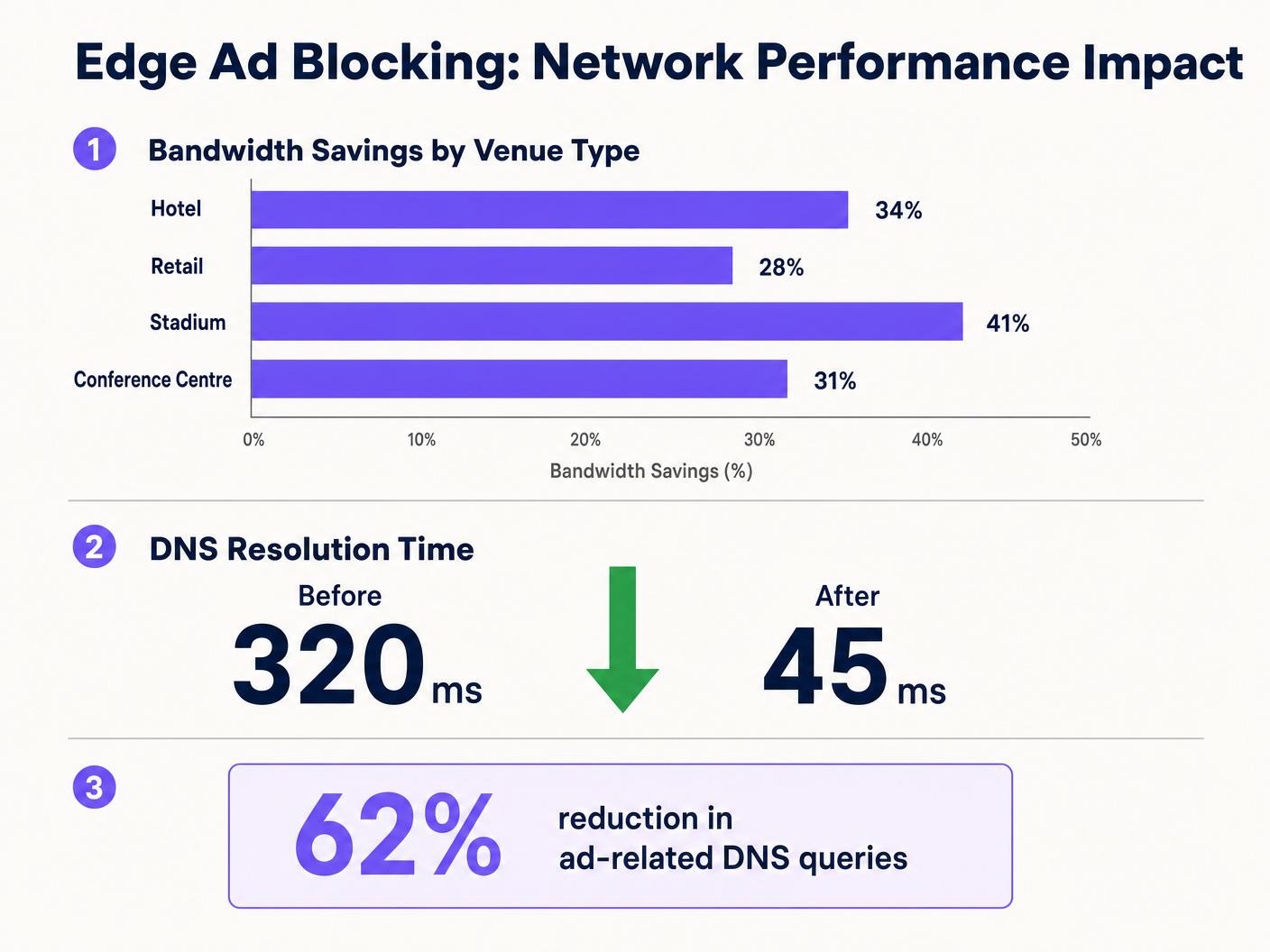
Bandbreitenrückgewinnung. Veranstaltungsorte melden nach der Bereitstellung durchweg eine Reduzierung des gesamten Bandbreitenverbrauchs um 15–30 %. Für einen Veranstaltungsort, der monatlich 3.000 £ für eine 1-Gbit/s-WAN-Leitung ausgibt, kann eine 20%ige Reduzierung der effektiven Auslastung ein Leitungs-Upgrade um 12–18 Monate verzögern, was über diesen Zeitraum eine Einsparung von 36.000–54.000 £ bedeutet.
Verbesserte Gästezufriedenheit. Die Ladezeiten von Seiten nehmen merklich ab – von durchschnittlich über 4 Sekunden auf unter 2 Sekunden bei typischen Bereitstellungen. Dies korreliert direkt mit höheren Gästezufriedenheitswerten und weniger WiFi-bezogenen Beschwerden an der Rezeption oder dem Helpdesk. In Gastgewerbeumgebungen wird die WiFi-Qualität durchweg als Top-Faktor in Gästebewertungen genannt.
Verbesserte Sicherheitslage. DNS-Blocklisten decken von Natur aus bekannte Malware-Verteilungsdomänen, Phishing-Sites und Command-and-Control-Infrastrukturen ab. Dies reduziert das Risiko, dass Gastgeräte im Veranstaltungsnetzwerk kompromittiert werden, und begrenzt das Risiko des Betreibers in Bezug auf Reputations- und potenzielle Haftungsrisiken.
Operative Effizienz. Ein reduziertes Anrufaufkommen beim Helpdesk im Zusammenhang mit der WiFi-Leistung führt direkt zu Zeiteinsparungen für das IT-Personal. In einer Hotelgruppe mit mehreren Objekten kann dies mehrere FTE-Stunden pro Woche über den gesamten Bestand hinweg bedeuten.
Durch die Integration von Edge-Blocking in umfassendere Initiativen zur digitalen Infrastruktur — wie sie in Purple Appoints Iain Fox as VP Growth – Public Sector to Drive Digital Inclusion and Smart City Innovation und Purple Launches Offline Maps Mode for Seamless, Secure Navigation to WiFi Hotspots erörtert werden — können Unternehmen ein wirklich erstklassiges Konnektivitätserlebnis bieten, das sowohl die operative Effizienz als auch die Ziele der Gästebindung unterstützt.
Schlüsseldefinitionen
Edge DNS Resolver
A DNS server deployed at or near the network perimeter that handles domain name resolution for local clients, applying custom filtering policies before forwarding queries upstream.
Deploying this at the venue level reduces reliance on ISP DNS, enables custom filtering, and minimises the round-trip time for DNS resolution.
Connection State Table
A memory structure maintained by routers and firewalls that records the details of every active TCP/UDP connection passing through the device.
High-density venues frequently exhaust this table due to the volume of micro-connections initiated by ad networks, causing indiscriminate packet drops and perceived WiFi degradation.
Destination NAT (DNAT)
A firewall technique that rewrites the destination IP address of a packet as it traverses the router, redirecting it to a different host than originally intended.
Used to force DNS requests destined for public resolvers (e.g., 8.8.8.8) to route through the venue's filtered DNS server, preventing bypass of the ad-blocking policy.
DNS over HTTPS (DoH)
A protocol that performs DNS resolution over an encrypted HTTPS connection on port 443, preventing interception by traditional port 53 filtering rules.
Increasingly the default in modern browsers, DoH requires network administrators to block known DoH provider IP ranges to enforce local DNS filtering policies.
NXDOMAIN
A DNS response code indicating that the queried domain name does not exist in the DNS namespace.
Edge resolvers return this response for blocked ad domains, causing the client to immediately abandon the connection attempt without consuming router state table resources.
Programmatic Advertising
The automated, real-time buying and selling of digital advertising inventory, typically involving multiple intermediary platforms (ad exchanges, DSPs, DMPs) each requiring separate network connections.
The multi-platform nature of programmatic advertising is the root cause of the DNS query multiplication effect that degrades guest network performance.
Captive Portal
A web-based authentication mechanism that intercepts a new network user's HTTP traffic and redirects them to a login or terms-acceptance page before granting full network access.
Ad blocking policies must be carefully configured to avoid blocking domains required for captive portal functionality, including social login providers and payment gateways.
Allowlisting
The explicit configuration of a DNS resolver or firewall to permit access to specific domains or IP addresses, overriding any broader blocking policies that would otherwise apply.
Essential for resolving false positives and ensuring that business-critical services — including the captive portal, loyalty apps, and payment processors — remain accessible.
Anycast Routing
A network addressing method where the same IP address is assigned to multiple servers in different locations, with traffic automatically routed to the nearest instance.
Cloud-based DNS filtering services use anycast to ensure low-latency DNS resolution regardless of the venue's geographic location.
Ausgearbeitete Beispiele
A 400-room hotel is experiencing severe WiFi latency during peak evening hours (7 PM–10 PM) despite having a 1 Gbps fibre connection. The IT manager suspects high DNS query volume from streaming and browsing is exhausting the edge router's state table. The hotel uses a social login captive portal and has no dedicated server infrastructure.
The IT team deploys a lightweight DNS resolver as a virtual machine on an existing hypervisor (1 vCPU, 512 MB RAM is sufficient for this scale). They configure the DHCP helper on the core switch to distribute the resolver's IP to the guest VLAN only, leaving the management and staff VLANs on the existing ISP DNS. They apply a standard combined blocklist (EasyList + OISD) covering approximately 200,000 known ad and tracker domains. Before going live, they test the captive portal and explicitly allowlist all Facebook, Google, and Apple authentication domains. They add a DNAT firewall rule redirecting all outbound port 53 traffic from the guest VLAN to the local resolver. They also add firewall deny rules for the IP ranges of Cloudflare (1.1.1.1), Google (8.8.8.8), and other major DoH providers. Post-deployment, DNS query volume drops by 62%, average page load time falls from 4.2 seconds to 1.8 seconds, and peak router state table utilisation drops from 91% to 44%.
A retail chain with 50 stores wants to improve the performance of their in-store guest WiFi app for customers. The app is the primary vehicle for loyalty programme sign-ups and promotional offers. The chain has no on-site IT staff and uses a managed SD-WAN service from a third-party provider.
The architecture team selects a cloud-based DNS filtering service with a management portal. They work with the SD-WAN provider to configure all branch routers to forward DNS queries from the guest VLAN to the cloud provider's anycast resolver IP addresses. They apply a centralised policy blocking ad networks and known malicious domains. Critically, they create an explicit allowlist covering all domains associated with their loyalty app, payment processor, and the captive portal provider. They configure the cloud portal to generate weekly reports on blocked query volume and top blocked domains per site. The rollout is completed remotely across all 50 sites within three days. Average bandwidth consumption across the estate drops by 28%, and the loyalty app's average load time improves from 3.1 seconds to 1.4 seconds.
Übungsfragen
Q1. A stadium IT team has deployed edge ad blocking via a local DNS resolver and configured DHCP to distribute the resolver's IP. However, post-deployment monitoring shows that approximately 30% of devices are still generating high volumes of external DNS traffic to 1.1.1.1 and 8.8.8.8. What is the most likely cause, and what is the correct remediation?
Hinweis: Consider both hardcoded DNS settings and modern browser privacy features that bypass traditional port 53 filtering.
Musterlösung anzeigen
There are two likely causes. First, devices with hardcoded DNS settings are ignoring the DHCP-assigned resolver. The remediation is to implement a DNAT firewall rule that intercepts all outbound UDP/TCP port 53 traffic from the guest VLAN and redirects it to the local resolver, regardless of the destination IP. Second, some devices may be using DNS over HTTPS (DoH), which bypasses port 53 filtering entirely. The remediation is to add firewall deny rules for the IP addresses of known DoH providers (Cloudflare 1.1.1.1, Google 8.8.8.8, etc.), forcing browsers to fall back to standard DNS.
Q2. Following the deployment of an edge DNS filter at a hotel, guests are reporting that they cannot complete the WiFi login process using their Facebook accounts. The captive portal social login button returns an error. The IT team confirms the resolver is operational. What is the most likely cause and how should it be resolved?
Hinweis: Review the interaction between the blocklist categories and the domains required for OAuth-based social authentication.
Musterlösung anzeigen
The blocklist has categorised one or more domains required by Facebook's OAuth authentication flow as advertising or tracking domains and is returning NXDOMAIN for them. The IT team should use browser developer tools (Network tab) to identify the specific domain(s) failing to resolve during the login attempt. These domains — typically in the facebook.com, fbcdn.net, or connect.facebook.net namespaces — should be added to the resolver's allowlist. Going forward, all social login provider domains should be pre-allowlisted as part of the standard deployment checklist before any blocklist is activated.
Q3. A CTO at a multi-site conference centre group is evaluating two options: deploying an on-premises Pi-hole resolver at each of their 12 venues versus adopting a cloud-based DNS filtering service. Each venue has limited local IT support. The primary driver is reducing bandwidth costs and improving attendee WiFi experience during large events. Which approach is recommended and why?
Hinweis: Weigh management overhead, failure risk, scalability during peak event load, and the cost of local IT resource allocation against the slight latency difference between approaches.
Musterlösung anzeigen
The cloud-based DNS filtering service is the recommended approach for this scenario. While an on-premises Pi-hole would offer marginally lower DNS resolution latency, the operational risks outweigh this benefit. With limited local IT support, a failed on-premises resolver could cause a complete DNS outage at a venue during a major event — a high-visibility, high-impact failure. A cloud-based service with anycast routing provides geographic redundancy, automatic failover, and centralised policy management across all 12 venues from a single portal. The slight increase in DNS latency (typically 5–15ms to the nearest anycast node) is negligible compared to the latency savings from blocking ad traffic. The cloud service also scales automatically to handle peak event query volumes without manual intervention.